
Deep dive into AKS ingress, load balancing algorithms and Azure Network Security Groups
This article is contributed. See the original author and article here.
I have already written a few articles on AKS, so feel free to have a look at them as I will not repeat what I’ve already written there. For the record, here are the links:
As a side note, this post is about how to harden ingress using Network Security Groups on top of internal network policies. Probably, 99% of the clusters worldwide are hardened using network policies only. If your organization is part of the last percent, and want to harden clusters further, this post is for you.
In AKS, ingress is used to let external components/callers interact with resources that are inside the cluster. Ingress is handled by an ingress controller. There are many of them: Nginx, Istio, Traefik, AGIC, etc. but whatever technology you choose, you will rely on a load balancer (LB) service to serve the traffic. When you instruct K8s to provision a service of type LB, it tells the Cloud provider (Microsoft in this case) to provision a LB service. This LB might be public facing or internal. The recommended approach is to provision an internal LB that is proxied by a Web Application Firewall (WAF) (Front Door+PLS or Application Gateway, or even any third party WAF). API traffic is also often proxied by a more specific API gateway.
The default behavior of a LB service in K8s, is to load balance the traffic twice:
- Firstly, at the level of the Azure LB, which will forward traffic to any healthy AKS node
- Secondly, at the level of K8s itself.
Because the Azure Load Balancer has no clue about the actual workload of the AKS cluster, it will blindly forward traffic to any “healthy” node, no matter what the pod density is. To prevent an imbalanced load balancing, K8s adds its own bits, to achieve a truly evenly distributed load balancing that considers the overall cluster capacity. While this sounds like the perfect thing on earth, it comes with two major caveats:
- K8s might add an extra hop between the Azure Load Balancer and the actual target, thus impacting latency.
- No matter whether there is an extra hop or not, K8s will source network address translation (SNAT) the source traffic, thus hiding the actual client IP. The ingress controller will therefore not be able to apply traffic restriction rules.
When you provision a LB service, for example, following the steps documented here, you will end up with a service, whose externalTrafficPolicy is set to Cluster. The Cluster mode takes care of the imbalanced load balancing. It performs the extra K8s bits to optimize load balancing and comes with the caveats described earlier.
This problem is known and documented so, why am I blogging about this? Well, this is because the load balancing algorithm that you choose at the level of the LB service, also has an impact on how you can restrict (or not) traffic that comes in, at the level of the Network Security Groups, and that is not something I could find guidance on.
If you do not want to restrict ingress traffic in any way, you can stop reading here, else, keep on reading.
Lab environment
Let us deep dive into the internals of AKS ingress with a concrete example.
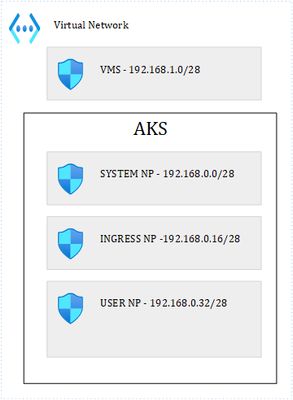
For this, let us use the following lab:
Where we have 1 VNET and 4 subnets. 3 subnets are used by the AKS cluster: 1 for the system node pool, 1 for ingress and the last one for user pods. I have labelled the Ingress and User node pools so that I can schedule pods accordingly. It is important to precise that our cluster is based on Kubenet, which adds a layer of complexity in terms of how networking works with K8s. The VM subnet holds our client VM, used to perform client calls to an API that is exposed through the ingress controller. Ultimately, we end up with this:
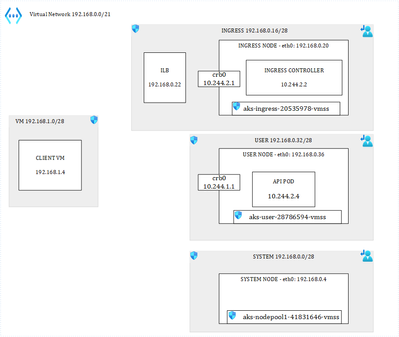
Load balancer with default behavior
I have provisioned the following LB service in AKS:
apiVersion: v1
kind: Service
metadata:
annotations:
meta.helm.sh/release-name: ingress-nginx
meta.helm.sh/release-namespace: ingress
service.beta.kubernetes.io/azure-load-balancer-health-probe-request-path: /healthz
service.beta.kubernetes.io/azure-load-balancer-internal: “true”
service.beta.kubernetes.io/azure-load-balancer-internal-subnet: ingress
labels:
app.kubernetes.io/component: controller
app.kubernetes.io/instance: ingress-nginx
app.kubernetes.io/managed-by: Helm
app.kubernetes.io/name: ingress-nginx
app.kubernetes.io/part-of: ingress-nginx
app.kubernetes.io/version: 1.5.1
helm.sh/chart: ingress-nginx-4.4.0
name: ingress-nginx-controller
namespace: ingress
spec:
allocateLoadBalancerNodePorts: true
externalTrafficPolicy: Cluster
internalTrafficPolicy: Cluster
ipFamilies:
– IPv4
ipFamilyPolicy: SingleStack
loadBalancerIP: 192.168.0.22
ports:
– appProtocol: http
name: http
nodePort: 31880
port: 80
protocol: TCP
targetPort: http
selector:
app.kubernetes.io/component: controller
app.kubernetes.io/instance: ingress-nginx
app.kubernetes.io/name: ingress-nginx
sessionAffinity: None
type: LoadBalancer
Notice the Azure-specific annotations at the top, telling Azure to provision an internal load balancer in a specific subnet, and with the /healthz endpoint for the health probe.
I’m only using HTTP but same logic applies to HTTPS. I have three nodes in the cluster:

I also have deployed one API and a few privileged containers, for later use:

Each privileged container runs on its corresponding node (one on the system node, one on the ingress node, and another one on the user node). The API runs on the user node. My ingress controller runs a single pod (for now) on the Ingress node:

Lastly, I deployed the following ingress rule:
apiVersion: networking.k8s.io/v1
kind: Ingress
metadata:
name: weather
spec:
ingressClassName: nginx
rules:
– host: demoapi.eyskens.corp
http:
paths:
– path: /weatherforecast
pathType: Prefix
backend:
service:
name: simpleapi
port:
number: 8080
Upon the deployment of the K8s LB service, Azure creates its own LB service, which after a few minutes, shows the status of the health probe checks:
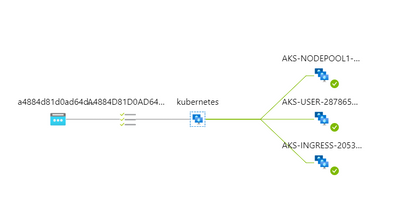
Each AKS node is being probed by the load balancer. So far so good, we can run our first API call from the client VM:
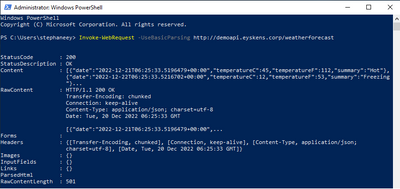
Our ingress controller sees the call and logs it:
192.168.0.4 – – [20/Dec/2022:06:25:33 +0000] “GET /weatherforecast HTTP/1.1” 200 513 “-“
“Mozilla/5.0 (Windows NT; Windows NT 10.0; en-US) WindowsPowerShell/5.1.17763.3770” 180
0.146 [default-simpleapi-8080] [] 10.244.1.5:8080 513 0.146 200
76e041740b70be9b36dd4fda52f97410
Everything works well until the security architect asks you how you control who can call this service…So, let us pretend that our client VM is the only one that can call the service. We could simply specify a rule at the level of the ingress controller itself. We know the IP of our VM so let’s give it a try:
apiVersion: networking.k8s.io/v1
kind: Ingress
metadata:
name: weather
annotations:
nginx.ingress.kubernetes.io/whitelist-source-range: 192.168.1.4
spec:
ingressClassName: nginx
rules:
– host: demoapi.eyskens.corp
http:
paths:
– path: /weatherforecast
pathType: Prefix
backend:
service:
name: simpleapi
port:
number: 8080
By adding a whitelist-source-range annotation. Surprise, we now we get a Forbidden response from our Client VM:

Looking at the NGINX logs reveals the problem:
…*24932 access forbidden by rule, client: 10.244.2.1, …
The client is 10.244.2.1 (crb0 of the ingress node) instead of our VM (192.168.1.4). Why is that? That is because of caveat number 2 described earlier. The Client IP is always hidden by the SNAT operation because the service is in Cluster mode. Well, is the client always 10.244.2.1? No, just run a few hundred queries from the same client VM, and you will notice things like this:
2022/12/20 07:03:45 [error] 98#98: *39317 access forbidden by rule, client: 10.244.2.1,
server: demoapi.eyskens.corp, request: “GET /weatherforecast HTTP/1.1”, host:
“demoapi.eyskens.corp”
2022/12/20 07:03:45 [error] 98#98: *39317 access forbidden by rule, client: 10.244.2.1,
server: demoapi.eyskens.corp, request: “GET /weatherforecast HTTP/1.1”, host:
“demoapi.eyskens.corp”
2022/12/20 07:03:48 [error] 98#98: *39361 access forbidden by rule, client: 192.168.0.36,
server: demoapi.eyskens.corp, request: “GET /weatherforecast HTTP/1.1”, host:
“demoapi.eyskens.corp”
We can see our CBR0 back, but also 192.168.0.36, which is the IP of our user node. Because you want to understand how things work internally, you decide to analyze traffic from the ingress node itself. You basically exec into the privileged container that is running on that node:
kubectl exec ingresspriv-5cfc6468c8-f8bjf -it — /bin/sh
Then, you go onto the node itself, and run a tcpdump:
chroot /host
tcpdump -i cbr0|grep weatherforecast
Where you can indeed see that traffic is coming from everywhere:
07:15:29.484576 IP aks-user-28786594-vmss000001.internal.cloudapp.net.35448 >
10.244.2.2.http: Flags [P.], seq 14689:14845, ack 26227, win 16411, length 156: HTTP:
GET /weatherforecast HTTP/1.1
07:15:29.499647 IP aks-user-28786594-vmss000001.internal.cloudapp.net.35448 >
10.244.2.2.http: Flags [P.], seq 14845:15001, ack 26506, win 16416, length 156: HTTP:
GET /weatherforecast HTTP/1.1
07:15:29.538515 IP aks-user-28786594-vmss000001.internal.cloudapp.net.35448 >
10.244.2.2.http: Flags [P.], seq 15001:15157, ack 26785, win 16414, length 156: HTTP:
GET /weatherforecast HTTP/1.1
07:15:29.552183 IP aks-user-28786594-vmss000001.internal.cloudapp.net.35448 >
10.244.2.2.http: Flags [P.], seq 15157:15313, ack 27064, win 16413, length 156: HTTP:
GET /weatherforecast HTTP/1.1
07:15:29.552630 IP aks-nodepool1-41831646-vmss000001.internal.cloudapp.net.24631 >
10.244.2.2.http: Flags [P.], seq 1:181, ack 1, win 16416, length 180: HTTP: GET
/weatherforecast HTTP/1.1
07:15:29.604062 IP aks-user-28786594-vmss000001.internal.cloudapp.net.35448 >
10.244.2.2.http: Flags [P.], seq 15313:15469, ack 27343, win 16412, length 156: HTTP:
GET /weatherforecast HTTP/1.1
07:15:29.620439 IP aks-user-28786594-vmss000001.internal.cloudapp.net.35448 >
10.244.2.2.http: Flags [P.], seq 15469:15625, ack 27622, win 16411, length 156: HTTP:
GET /weatherforecast HTTP/1.1
07:15:29.637675 IP aks-nodepool1-41831646-vmss000001.internal.cloudapp.net.24631 >
10.244.2.2.http: Flags [P.], seq 181:337, ack 280, win 16414, length 156: HTTP: GET
/weatherforecast HTTP/1.1
07:15:29.666067 IP aks-nodepool1-41831646-vmss000001.internal.cloudapp.net.24631
This is plain normal: every single node of the cluster could be a potential client. So, no way to filter out traffic from the perspective of the ingress controller, with the Cluster mode.
Never mind, let us use the NSG instead of the ingress controller to restrict traffic to our VM only. That’s even better, let’s stop the illegal traffic sooner and not even hit our ingress controller. Naturally, you tell the security architect that you have a plan and come with the following NSG rules for the ingress NSG:

You basically allow the client VM to talk to the LB, and some system ports, but you deny everything else. You tell the security guy to relax about the “Any” destination since none of the internal cluster IPs is routable or visible to the outside world anyway (Kubenet), so only what is exposed through an ingress rule will be “visible”. For the two other subnets, you decide to be even more restrictive. You basically use the same rules as shown above, except for rule 100. You’re pretty sure it should be ok, and that no one else on earth but your client VM will ever be able to consume that API. Because you are a thoughtful person, you still decided to enable the NSG flow logs to make sure you capture traffic…in case you need to troubleshooting things later on.
So, you retry and you realize that a few queries go through while others are blocked, until every call from the client VM is going through again….What could be the culprit? First reaction is to look at the Azure Load Balancer itself and you’ll notice that it is not in a great shape anymore:
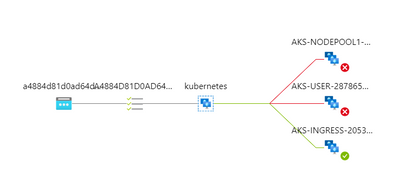
Why is that? It is because of the NSG that you defined at the level of the Ingress subnet, which broke it entirely, although you had authorized the AzureLoadBalancer tag. So, you decide to remove the NSG, wait a few minutes, and inspect again what comes into the CBR0 of the Ingress node, to figure it out from the inside:
tcpdump -i cbr0
This is what comes out of the dump:
08:36:46.835356 IP aks-user-28786594-vmss000001.internal.cloudapp.net.54259 >
10.244.2.2.http: Flags [P.], seq 199:395, ack 125, win 1024, length 196: HTTP: GET
/healthz HTTP/1.1
08:36:48.382720 IP aks-nodepool1-41831646-vmss000001.internal.cloudapp.net.8461 >
10.244.2.2.http: Flags [P.], seq 197:391, ack 125, win 16384, length 194: HTTP: GET
/healthz HTTP/1.1
You see that all nodes are directly probing the HEALTH endpoint on the ingress node…so the NSG rules described earlier are too restrictive. You start realizing that ruling AKS traffic with NSGs is a risky business…So, the non-ingress nodes are considered unhealthy by the Azure LB because they are unable to probe the ingress node. The ingress node is still considered healthy because it can probe itself and AzureLoadBalancer tag is allowed. That’s what explains the fact that ultimately, everything is going through because only the ingress node itself receives traffic, right from the LB and is already allowing the client VM. If you leave the cluster as is, you basically broke the built-in LB algorithm of K8s itself that protects against imbalanced traffic, plus you’ll keep getting calls from the other nodes trying to probe the ingress one. But because you want to optimize LB and avoid further issues, you add this rule to your ingress NSG:

Where you basically allow every node to probe on port 80 (remember we only focus on HTTP). You can safely put Any as destination since the destination is the IP of the Ingress Pod, which you can’t guess in advance. After a few minutes, the Azure LB seems to be in a better shape:
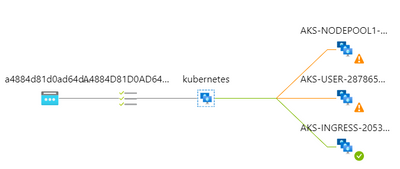
And yet a few minutes later, it’s all green again.
Now that you have restored the ingress, you’re back to square 1: some requests go through but not all. First, you checked the NSG flow logs of the User node pool and realized that you have such flow tuples that are blocked by the NSG:
[“1671521722,192.168.1.4,192.168.0.22,50326,80,T,I,D,B,,,,”]
Where you see that our client VM is trying to hit port 80 of our Azure Load Balancer…Wait, we said that the Cluster mode hides the original client IP, isn’t?? Yes that’s right but only from the inside, not from the outside. The NSGs still see the original IP….Ok, but why do I find these logs in the NSG of the user node?? Well, because each node of the cluster can potentially forward traffic to the destination…. So, it boils down to the following conclusion when using the Cluster mode:
- All nodes must be granted inbound access to the ingress node(s) for the health probes.
- Because each node is potentially forwarding the traffic itself, you must allow the callers (our VM in this case, an Application Gateway, an APIM in reality) in each subnet.
- You must accept de-facto cluster-wide node-level lateral movements to these endpoints/ports.
But what if the security architect cannot live with that? Let us explore the second option.
LB with externalTrafficPolicy set to Local.
The only thing needed to do is to switch the service’s externalTrafficPolicy to Local:
Type: LoadBalancer
IP Family Policy: SingleStack
IP Families: IPv4
IP: 10.0.58.7
IPs: 10.0.58.7
IP: 192.168.0.22
LoadBalancer Ingress: 192.168.0.22
Port: http 80/TCP
TargetPort: http/TCP
NodePort: http 31880/TCP
Endpoints: 10.244.2.2:80
Session Affinity: None
External Traffic Policy: Local
After a minute, you’ll notice this at the level of the Azure Load Balancer:
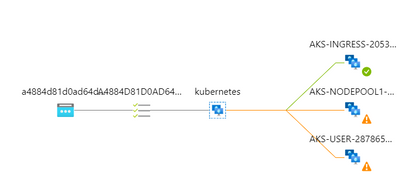
Don’t worry, this is the expected behavior. When you switch the K8s service to Local, K8s stops adding its own bits to the load balancing algorithm. The only way to prevent the Azure Load Balancer from sending traffic to a non-ingress-enabled node, is to mark these nodes as unhealthy. Any probe to the healthz endpoint will return a 503 answer from non-ingress-enabled nodes (example with the user node):
kubectl exec userpriv-5d879699c8-b2cww -it — /bin/sh
chroot /host
root@aks-user-28786594-vmss000001:/# curl -v http://localhost:31049/healthz
* Trying 127.0.0.1…
* TCP_NODELAY set
* Connected to localhost (127.0.0.1) port 31049 (#0)
> GET /healthz HTTP/1.1
> Host: localhost:31049
> User-Agent: curl/7.58.0
> Accept: */*
>
< HTTP/1.1 503 Service Unavailable
< Content-Type: application/json
< X-Content-Type-Options: nosniff
< Date: Tue, 20 Dec 2022 11:57:34 GMT
< Content-Length: 105
<
{
“service”: {
“namespace”: “ingress”,
“name”: “ingress-nginx-controller”
},
“localEndpoints”: 0
* Connection #0 to host localhost left intact
}root@aks-user-28786594-vmss000001:/#
While it will return a 200 on every ingress-enabled node. But what is it exactly an ingress-enabled node? It’s simply a node that is hosting an ingress controller pod. So, with this, you can control much better the ingress entry point, plus you can also directly use a whitelist-source-range annotation, and this time, the ingress controller will see the real client IP since there is no more SNAT happening.
You still must pay attention to where your ingress controller pods are running. Remember that I have dedicated one node pool in its own subnet for ingress and I have forced the pod scheduling on that node pool through a nodeSelector. Should I omit this, and scale my replicas to 3, I could end up with the following situation where AKS would schedule pods across nodes of different node pools:

This would lead to a situation where nodes hosting an instance of the ingress controller would show up as healthy again at the level of the Azure Load Balancer. Therefore, you’d be hitting NSGs of subnets hosting those nodes…So, if you want to concentrate the ingress traffic to a single entry point, you need to:
- Dedicate a node pool with 1 or more nodes (more for HA) and enable Availability Zones for your ingress pods to run on.
- Make sure to force the pod scheduling of the ingress controller onto that node pool.
- Make sure you white list your clients (APIM, Application Gateway, etc.) at the level of the NSG of the ingress subnet. You do not need to white list other nodes because in Local mode, nodes do not probe the ingress node anymore. If you run a tcdump -i cbr0 on the ingress node, you’ll see only traffic from the node’s pod cidr itself.
Conclusion
Whether you are using Kubenet or CNI, ruling AKS ingress with Network Security Groups is not something you can improvise. Using the native load balancing algorithm (Cluster), you should end up with an optimized load balancing, but you must accept the fact that you have to live with lateral movements across the entire cluster. You can of course try to compensate with additional network policies but OS-level traffic would still be allowed (mind the container escape risk). Using the Local mode, you can control much better the incoming traffic, at the level of the NSGs as well as at the level of the ingress controller itself. You can run any number of ingress controller pods, as long as you scheduled them on identified nodes. The downside is that you might end up with an imbalanced traffic. This is a trade-off!






 ) or https:// means you’ve safely connected to the .gov website. Share sensitive information only on official, secure websites.
Recent Comments