by Contributed | Dec 23, 2022 | Technology
This article is contributed. See the original author and article here.
Today, I worked on a service request that our customer got the following error message using Python code: pyodbc.OperationalError: (‘HYT00’, ‘[HYT00] [Microsoft][ODBC Driver 17 for SQL Server]Login timeout expired (0) (SQLDriverConnect)’). I would like to share with you what was my lessons learned here.
The first thing is to isolate the problem running the suggested Python code using pymssql and pyodbc to see the results:
import os

import pymssql
import pyodbc

conn = pyodbc.connect("DRIVER={ODBC Driver 17 for SQL Server};server=servername.database.windows.net,1433;UID=username;PWD=Password;database=dbName");
conn2 = pymssql.connect(server='servername.database.windows.net', user='username', password='password', database='dbname',port=1433);

cursor = conn.cursor()
cursor.execute('select 1 as a, 2 as b')
row = cursor.fetchone()
print(f"row={row}")

cursor = conn.cursor();
cursor.execute("SELECT 1");
row = cursor.fetchall()

conn.close()

for i in row:
    print(i)

cursor2 = conn2.cursor();
cursor2.execute("SELECT 1");
row2 = cursor2.fetchall()

conn2.close()

for i in row2:
    print(i)
After this, we saw that a better error message description using pymsql:
File “”, line 1, in
File “src/pymssql/_pymssql.pyx”, line 653, in pymssql._pymssql.connect
pymssql._pymssql.OperationalError: (20009, b’DB-Lib error message 20009, severity 9:nUnable to connect: Adaptive Server is unavailable or does not exist (nodename.trname.northeurope1-a.worker.database.windows.net,11021)nNet-Lib error during Connection refused (111)nDB-Lib error message 20009, severity 9:nUnable to connect: Adaptive Server is unavailable or does not exist (nodename.trname.northeurope1-a.worker.database.windows.net,11021)nNet-Lib error during Connection refused (111)n’)
All points to that our customer has as a connection policy Redirect and trying to connect to the port 11021 and the new node (nodename.trname.northeurope1-a.worker.database.windows.net,11021) where the database is running, the connection is refused by any firewall/NSG. Even, as this application worked previously, we need to know that the redirect port and node might be changed.
In this case we have two options:
- Review the firewall policy and outbound range from 11000-12000.
- Change the connection policy to proxy using the port 1433 avoiding the redirection.
Our customer chosen to change the connection policy and they were able to connect. Finally, they are going to review the firewall policy and change the Redirect connection.
For reference: Azure SQL Database connectivity architecture – Azure SQL Database and Azure Synapse Analytics | Microsoft Learn
Enjoy!
by Contributed | Dec 23, 2022 | Technology
This article is contributed. See the original author and article here.
Since the last update of v1.4.0, this Azure Functions OpenAPI extension has a lot of improvements. Here in this post, let’s discuss what improvements have been made.
Update – v1.5.0
.NET 7 support for the isolated worker extension
According to the Azure Functions roadmap, Azure Functions isolated worker model has started supporting .NET 7. Therefore, this OpenAPI extension also starts supporting .NET 7 with the isolated worker model. The migration step is as easy as changing the target framework. Update your .csproj file and find the netcoreapp3.1 (.NET Core 3.1), net5.0 (.NET 5) or net6.0 (.NET 6), to net7.0 (.NET 7).
    net7.0
    v4
    Exe
    ...

  ...

    ...


  ...
OpenAPI settings instance support out-of-the-box
There are many environment variables related to the OpenAPI extension. All of them are prefixed with OpenApi__ as the environment variables. These environment variables can now be read through the OpenApiSettings instance, injected directly from the extension package. So, all you need to do is to inject the instance.
Here’s the sample code for the in-proc worker model:
// in-proc worker function
public class Function1
{
    private readonly OpenApiSettings _openapi;
    private readonly ILogger _logger;

    // Inject OpenApiSettings instance through the constructor.
    public Function1(OpenApiSettings openapi, ILogger logger)
    {
        _openapi = openapi;
        _logger = logger;
    }
    ...
}
And here’s the sample code for the isolated worker model:
// out-of-proc worker function
public class Function1
{
    private readonly OpenApiSettings _openapi;
    private readonly ILogger _logger;

    // Inject OpenApiSettings instance through the constructor.
    public Function1(OpenApiSettings openapi, ILoggerFactory loggerFactory)
    {
        _openapi = openapi;
        _logger = loggerFactory.CreateLogger();
    }
    ...
}
GitHub Actions workflow support
You can now generate the OpenAPI document on-the-fly within the GitHub Actions workflow. You can find more details on this document. Here’s the sample usage:
steps:
- name: Checkout the repository
  uses: actions/checkout@v2

- name: Setup .NET SDK 7 LTS
  uses: actions/setup-dotnet@v1
  with:
    dotnet-version: '7.x'

- name: Restore NuGet packages
  shell: pwsh
  run: |
    dotnet restore .

- name: Build solution
  shell: pwsh
  run: |
    dotnet build . -c Debug -v minimal

- name: Generate OpenAPI document
  id: oai
  uses: Azure/azure-functions-openapi-extension/actions/build-openapi@v1
  with:
    functionAppPath: 'bin/Debug/net7.0'
    requestUri: 'http://localhost:7071/api/openapi/v3.json'
    documentPath: 'generated'
    documentName: 'openapi.json'
    delay: '30'
    isRemote: 'false'

- name: Check generated OpenAPI document
    shell: pwsh
    run: |
      echo "Generated Document: ${{ steps.oai.outputs.generated }}"

      $json = Get-Content -Path ${{ steps.oai.outputs.generated }} | ConvertFrom-Json
      $result = $json.openapi -eq "3.0.1"
      echo "Check result: $result"
Generic CI/CD pipeline support
In addition to supporting GitHub Actions workflow, both PowerShell script and bash shell script are provided to support generic CI/CD pipelines, including Azure DevOps.
Here’s the PowerShell script:
& $([Scriptblock]::Create($(Invoke-RestMethod https://aka.ms/azfunc-openapi/generate-openapi.ps1))) `
    -FunctionAppPath     `
    -BaseUri             `
    -Endpoint            `
    -OutputPath          `
    -OutputFilename      `
    -Delay               `
    -UseWindows
And here’s the bash shell script:
curl -fsSL https://aka.ms/azfunc-openapi/generate-openapi.sh
    | bash -s --
        -p|--functionapp-path
        -u|--base-uri
        -e|--endpoint
        -o|--output-path
        -f|--output-filename
        -d|--delay
Update – v2.0.0-preview1
Breaking changes
- The
OpenApiHttpTriggerAuthorization class has now become a property of the OpenApiConfigurationOptions class.
- The property,
IncludeRequestingHost of OpenApiConfigurationOptions has now become ExcludeRequestingHost, and its default value is false.
Azure Functions Easy Auth support
If your Azure Function app implements the Easy Auth feature for better AuthN scenarios, the authN’d claims can be directly used for Swagger UI and OpenAPI document generation through the OpenApiHttpTriggerAuthorization class.
Here’s the sample code for the in-proc worker model:
// in-proc worker function
public class Startup : FunctionsStartup
{
    public override void Configure(IFunctionsHostBuilder builder)
    {
        builder.Services.AddSingleton(_ =>
                        {
                            var options = new OpenApiConfigurationOptions()
                            {
                                ...
                                Security = new OpenApiHttpTriggerAuthorization(async req =>
                                {
                                    var result = default(OpenApiAuthorizationResult);

                                    // Add your custom authorisation logic like below
                                    var identities = req.Identities;

                                    return await Task.FromResult(result).ConfigureAwait(false);
                                }),
                            };

                            return options;
                        });
    }
}
And here’s the sample code for the isolated worker model:
public class Program
{
    public static void Main()
    {
        var host = new HostBuilder()
            .ConfigureServices(services =>
            {
                services.AddSingleton(_ =>
                        {
                            var options = new OpenApiConfigurationOptions()
                            {
                                ...
                                Security = new OpenApiHttpTriggerAuthorization(async req =>
                                {
                                    var result = default(OpenApiAuthorizationResult);

                                    // Add your custom authorisation logic like below
                                    var identities = req.Identities;

                                    return await Task.FromResult(result).ConfigureAwait(false);
                                }),
                            };

                            return options;
                        });
            })
            .Build();

        host.Run();
    }
}
Tell us what you think
There are a bunch of improvements released in this new version. Also, We’ve started gradually upgrading the extension version to v2.0.0. So if you have any questions, issues, suggestions or something else, please let us know!
by Contributed | Dec 22, 2022 | Technology
This article is contributed. See the original author and article here.
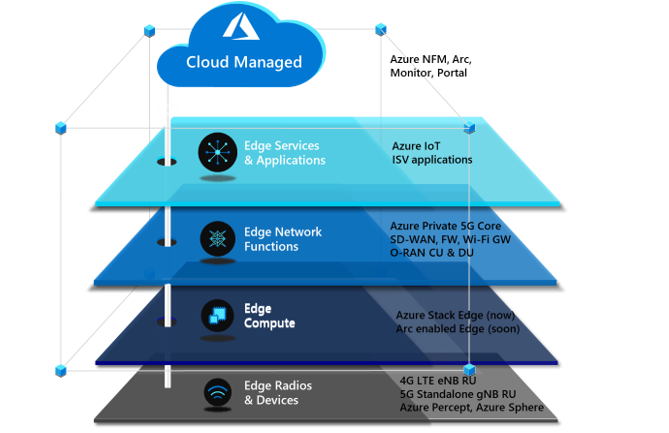
There are four critical components to a private 5G network: the local radio and networking functions, the edge compute platform, the application ecosystem, and the cloud. Private 5G network solutions are often built as a collection of loosely integrated components. This loose-integration approach might make sense in terms of physical and organizational demarcation points, but it has drawbacks. The following problems are inherent in this approach:
- Difficult to deploy
- Difficult to manage
- Expensive to scale
- Not secure
Microsoft offers a different approach to help operators take advantage of the opportunity to provide private 5G to enterprises. This cloud-managed private 5G network solution features cloud-native mobile core technology, advanced edge computing, and a flexible choice of radio and application partners. The solution is designed to be delivered and managed by operators. It’s appropriate for various industry verticals. The Microsoft approach for private 5G networks provides advantages to both operators and enterprises, and a choice of platforms and applications.
Azure private multiaccess edge compute is a solution for integrating edge compute, networking, and applications on a range of edge platforms. It’s designed to help operators and partners deliver high-performance MEC solutions to enterprises.
Private multiaccess edge compute can be deployed across multiple platforms powered by Azure Stack solutions. Azure Stack solutions extend Azure services and capabilities to various environments, from the datacenter to edge locations and remote offices. Enterprises can use Azure Stack to build, deploy, and run hybrid and edge computing apps consistently across IT ecosystems.
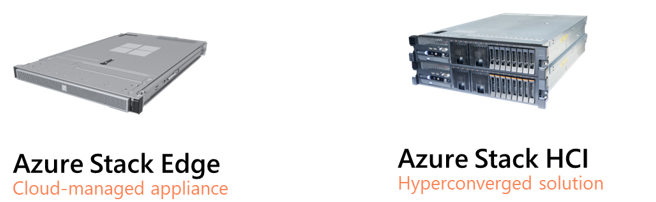
Azure Stack Edge is an Azure-managed edge appliance that brings the compute, storage, and intelligence of Azure into the enterprise environment. As part of the private multiaccess edge compute solution, Azure Stack Edge provides a single point for processing mobile network data at the edge. It enables local, intelligent breakout of data processing for faster processing and lower bandwidth consumption.
Azure Stack HCI is a hyperconverged infrastructure (HCI) operating system delivered as an Azure service. It provides the latest security, performance, and hybrid capabilities, which include Azure Arc enablement and management via the Azure portal.
Azure Private 5G Core
The final component of the Microsoft architecture for private 5G networks is the 4G/5G mobile core, which is deployed as a standalone 5G core with an optional 4G interworking function to enable support for 4G LTE RAN. Private 5G Core is a fully virtualized, cloud-native solution that includes standard 5G core network functions.
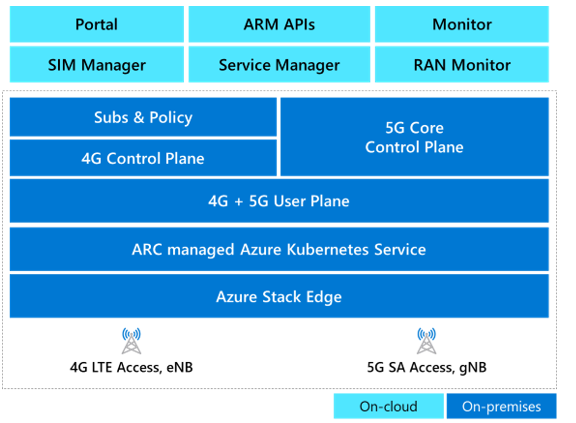
Azure automates the deployment and configuration of Private 5G Core on Azure Stack Edge. To deploy and update network configuration, the network operator can use any or all of these tools:
- The Azure portal web GUI
- The Azure Resource Manager REST API
- Deployment templates (ARM templates and/or Terraform)
Operators can use declarative syntax, in standard JSON or Bicep data format, to configure the core. This enables integration with CI/CD pipelines like Azure DevOps or GitHub Actions for repeatable deployments and updates across multiple network sites.
Operators don’t have to deploy 5G to benefit from a cloud-enabled private 5G network. Enterprise customers and operators can deploy a private 5G network in a 4G-only, 5G-only, or hybrid-4G/5G environment. Private 5G Core supports the transition from 4G to a 5G standalone network, so enterprises can start with a 4G implementation and later migrate to 5G or deploy a hybrid 4G/5G private solution.
Azure orchestration for edge workloads
Azure provides several tools for onboarding edge applications and network functions. The Microsoft private 5G solution uses Azure Arc and Azure Network Function Manager.
Azure Arc can simplify complex infrastructures that are distributed across on-premises, edge, and multicloud environments and extend Azure management to these environments.
For network function workloads, Network Function Manager is a cloud-native orchestration service that customers can use to deploy and provision network functions on Azure Stack platforms. Supported platforms include Azure Stack Edge Pro, which has a built-in GPU, and Azure Stack HCI. When used with Azure Stack Edge, Network Function Manager provides deployment, provisioning, and cloud-based management of network functions or apps running at the private edge, directly from the Azure portal. It’s a managed service, so an Azure-managed service provider handles updates, lifecycle management, and support for network functions and applications on the edge device. The platform supports virtual machines and containerized workloads, and one or two GPUs for acceleration.
Azure solution characteristics
This solution significantly reduces the total cost of ownership of operating a private cellular network. The following attributes contribute to reducing costs:
Telco private 5G network-as-a-service
Azure enables operators to deploy a complete CBRS/4G/5G mobile core as a service. The private 5G network-as-a-service approach changes how private 5G networks are deployed and managed. It gives operators more flexibility and enables them to provide the mobile core functionality as a hosted and managed service.
The solution can be integrated with a variety of radio access network (RAN) and subscriber identity management (SIM) systems via the Microsoft partner ecosystem. In addition to integration with other applications on Azure, like Azure Machine Learning and Azure IoT Hub, the solution has built-in features that enterprises need for service integrations. These features typically incur separate cost and compute, and require complex operations, but these functions are included as part of this solution. No additional hardware is required. The solution also provides integrated local policy to enable differentiated traffic treatment based on SIM policies configured in the Azure cloud and synced to Azure Private 5G Core.
Cloud-native solution
Because it uses both the Azure cloud and Azure Stack Edge, this solution architecture brings the benefits of cloud economics and a pay-as-you-go consumption model. Customers can size and deploy the solution for their current workloads and avoid the risk of underestimating or overestimating resource requirements. The Azure cloud also provides built-in enhanced security and privacy compliance. Customers can confidently deploy the solution in verticals that require stringent data privacy, like healthcare, government, public safety, and defense. Deploying an edge-based solution that uses Azure Stack Edge provides connectivity services and the ability to deploy edge applications. This combination helps customers deploy edge applications that require low-latency and edge-compute processing.
Cloud management, automation, and observability
The solution is managed remotely via Azure cloud. It’s a multi-tenant solution that gives role-based access control to network admins, enabling them to view, manage, and control private 5G networks and SIMs. Cloud management provides cost savings for several reasons:
- The solution can be serviced without the need to send technicians or agents to a site.
- Cloud management eliminates the need for an additional on-premises operations support system (OSS).
- Exposed northbound APIs can be easily integrated with existing SIM and OSS/BSS (business support system) solutions.
Automation provides a better user experience and simplifies deployment. Automation can reduce solution deployment from weeks to hours, whether the deployment is managed by the operator, a managed services provider (MSP), or a partner. Without automation, the scale needed to deploy a solution to thousands of enterprises and consumers is unattainable. Azure Automation provides cloud-based automation, operating system updates, and a configuration service that supports consistent management across Azure and non-Azure environments. It includes process automation, configuration management, update management, shared capabilities, and heterogeneous features.
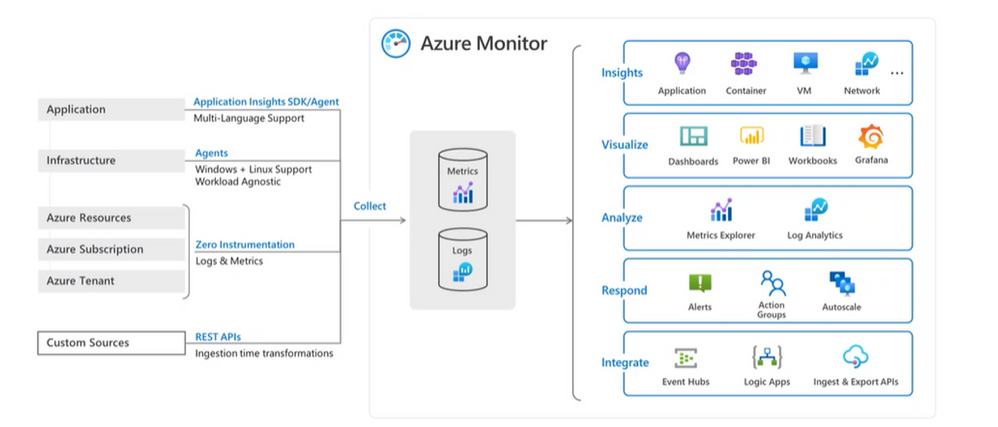
The single-pane-of-glass approach doesn’t just enable operators to deploy the service. It also quickly instantiates the private 5G network service at scale for its enterprises. The portal can then be used for full-service assurance and automation, including configuration, fault, and performance management.
Azure Private 5G Core and Azure Stack Edge report metrics and alarms to Azure Monitor to provide network insights. Operators can use these insights for closed-loop automation and to provide service assurance to customers. Beyond network insights, this data can provide useful business intelligence and network monetization to enterprise customers.
Integration with Azure services
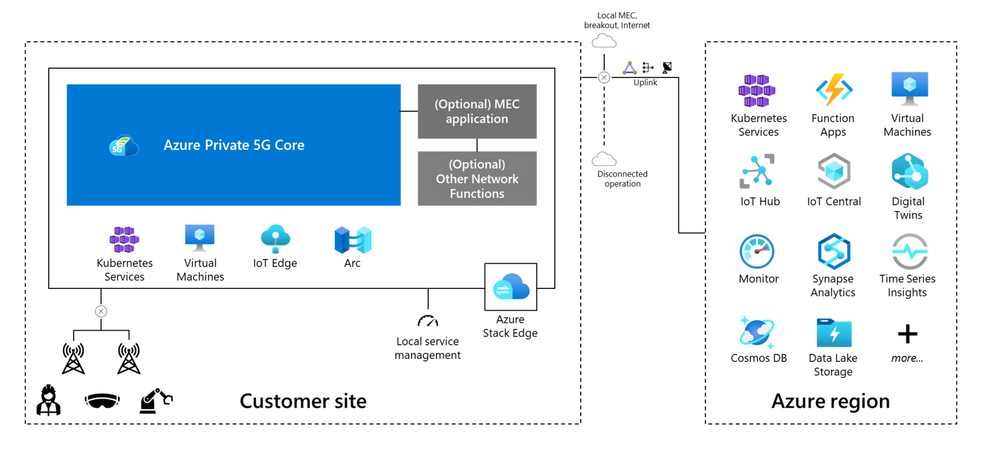
This solution enables an ecosystem of applications for operators and enterprise customers. These applications include business intelligence and analytics applications and AI and machine learning applications from Microsoft and others. Azure private multiaccess edge compute combines Private 5G Core and the Azure-managed edge compute environment in a single architecture. This colocation enables enterprises to move data in and out of their mobile networks for processing and choose which data should be processed on-site and which should be sent to the cloud.
MEC for networking and applications
An operator needs to provide both the local radio infrastructure and the managed compute for a private 5G network service. A cloud edge computing component is also required for processing cloud services and applications. One solution is a shared edge where both the mobile network functions and local edge applications run side-by-side. They run in a common zero-trust security framework provided by Azure Stack Edge or Azure Stack HCI. This approach provides seamless integration between the 5G network, edge computing, and the cloud, and significantly reduces CapEx and OpEx.
Alternative solutions involve splitting the compute functions into two sets: one managed by the operator and the other by the enterprise or another managed service provider. In this approach, solution architecture splits up the management, but enterprises benefit from using Azure as the common management layer for both networking and applications.
For example, consider a scenario in which the enterprise customer is a national retail chain with hundreds of stores. The enterprise can choose to integrate a select set of modern connected applications with the private 5G network on a single compute platform that’s managed by the operator. Or the enterprise can use two distinct compute platforms at every location: one for the mobile network functions (managed by the operator) and another to run distributed cloud and enterprise-developed applications. The architecture will provide flexibility for the enterprise and the operator.
The telco experience
This solution meets the high-performance, high-availability, low-latency requirements of telecommunications cloud services. It’s optimized to help operators and MSPs manage and control private 5G network services for their enterprise customers. By addressing the infrastructure requirements of private 5G networks in a seamless and highly scalable platform, the solution allows operators to focus on their strengths and bring the value of the cloud to their customers.
Questions from enterprise customers
As enterprises become better-educated consumers of private 5G network services, they’ll look for specific features that align with their unique requirements and use cases. Here are some of the questions that mobile operators can expect to hear from prospective enterprise customers:
Azure private multiaccess edge compute combines Private 5G Core and the edge compute environment in a single architecture. Seamless integration between the core and the edge provides reassurance that the private network solution will work as expected. Multi-vendor solutions can lead to lengthy integrations and challenges when technical problems arise. Because private 5G networks might handle mission-critical applications, disruptions aren’t acceptable.
Does the solution offer end-to-end management?
End-to-end management needs to incorporate Azure and partner services in a common management framework. Azure currently provides consistency for the edge platform, Kubernetes, and Private 5G Core. We also recommend that operators develop or integrate their order and service management via Azure APIs to provide automation to simplify the consumption of private 5G networks.
Is the solution reliable?
Azure private multiaccess edge compute supports multiple layers of reliability. Enterprises expect high-availability connectivity for mission-critical workloads. Azure provides multi-node edge deployment with Azure Kubernetes Service (AKS) on-premises clusters to run the Private 5G Core containers. For information about the Private 5G Core SLA, see the Azure SLA page after the product reaches general availability.
Is the solution simple, but flexible enough to scale dynamically?
As enterprises realize the benefits of running applications and operations on a private 5G network, the network footprint will expand into other business areas and other sites. Operators will need to scale these solutions quickly and cost-effectively. Having a cloud-based mobile core provides a significant advantage in this scenario.
How secure is the network?
The effective deployment of the Azure Zero Trust security model within a common architecture helps to ensure the consistent application of security policy across both operator and enterprise functions. The security model is enabled across all Azure service components.
Will the private 5G network integrate with my existing business applications and support my devices?
The Azure approach is to provide open and standardized APIs, SIM provisioning, and profile management for integration with business applications and devices. Azure partnerships with most network application and device vendors can help provide smooth integration. Because Microsoft owns both the cloud and the mobile core components, integration with OSS/BSS systems is streamlined.
How can I see what’s happening in my network?
With a unified Azure solution, enterprises and operators can view, manage, and monitor everything from telemetry data to network traffic by using a single management tool. Common lifecycle management, security policy, and orchestration provide end-to-end visibility and control for managing the service.
Containers and microservices are the building blocks for business applications. The ability to automate and orchestrate new mobile services is essential for operators and enterprises as they build new applications and services on their 5G networks. Enterprises also need to be able to host these applications either on-premises or in the cloud. The Azure solution provides automation and orchestration across all domains and network functions: physical, virtual, and cloud.
How do I analyze mobile network data?
Connected devices generate data that can be useful to enterprises. With this solution, enterprises can bring data into the Azure environment with enhanced security. They can use this data for AI, machine learning, and analytics, including analysis via business intelligence tools from Microsoft and others.
Contributors
This article is maintained by Microsoft. It was originally written by the following contributors.
Principal author:
Other contributor:


Recent Comments