by Contributed | Sep 26, 2022 | Technology
This article is contributed. See the original author and article here.
We’re not shy about using our own products and services internally here at Microsoft, and as such, we’re already taking advantage of recently moving our internal video platform—Microsoft Stream—under the Microsoft 365 umbrella.
The transformation of our corporate video platform has made it easier for our employees to create, upload, edit, and publish enterprise videos, says Marc Mroz, a product manager for Microsoft’s Office Media group, who explained that the new, modern Microsoft Stream experience is benefitting from now being located within SharePoint specifically.
“Many people were already familiar with what they can do in SharePoint,” says Mroz, who has been showing teams at Microsoft what they can now do with internal video. “We just helped connect the dots and showed them how to make a video destination, how to organize by folder, keyword, or metadata.”
The Microsoft Digital Employee Experience team has been working with Mroz and the product group team on deploying the modern Microsoft Stream experience across the company, with the team that publishes the company’s internal employee portal among those taking the lead on trying it first.
Using video to connect with employees in more meaningful ways has become more important as companies like Microsoft adjust to a new hybrid workstyle where employees aren’t working in the office as much as they used to, says Farnaz Hafezi, a program manager with Microsoft Digital Employee Experience.
“The last few years have really shown the importance of video for hybrid work,” Hafezi says. “It helps us collaborate, communicate, and educate. We’ve seen a significant increase in video within our tenant.”
Folding Microsoft Stream directly into Microsoft 365 and SharePoint using OneDrive for storage has made it more useable and accessible within Microsoft, Mroz says, adding that it also ensures that the product stays more current.
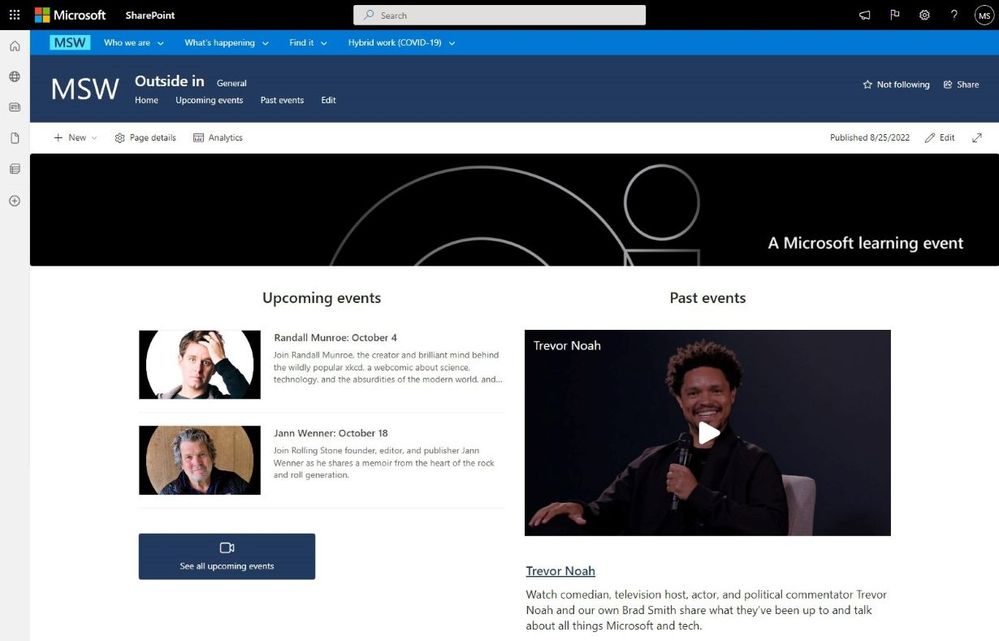
An image providing a screen capture of Microsoft’s internal site, MSW, with an embedded video from Microsoft Stream.
Microsoft’s Customer Zero
The Microsoft Digital Employee Experience team plays a significant internal role here at Microsoft as Customer Zero. What does this mean? It’s about trying out the company’s new technology offerings first—in this case, that means deploying the new Microsoft Stream internally to early adopters before it is broadly deployed to customers, listening to feedback from our early users, and then feeding those insights back to the product group. This virtuous circle gives the product group important feedback that makes the product stronger before it gets to customers.
One of the early adopters was the team that runs MSW, the company’s internal employee portal.
“There are things we can do in modern Stream that were difficult to do in classic,” says David Potts, a site administrator for MSW. “Our team is a mix of employees and vendors at any given time, but the whole team needs to be able to do authoring and manage videos. Anything you can do in SharePoint, including guest permissions, is now available to us.”
The feedback from Potts and other early users of the product has made the modern Microsoft Stream experience stronger, Mroz says.
“It’ll look better and be more purpose fit than classic could ever do,” he says. “Now we have an out-of-the-box video platform built into SharePoint, and when we show it to customers, they get it.”
To learn more and to find out how you can deploy the modern Microsoft Stream experience at your company, read the full story here: Corporate video at Microsoft gets a big upgrade thanks to the modern Microsoft Stream experience. You can also check out this helpful guide for using Microsoft Stream at your company.
If you’re thinking about upgrading to the new Microsoft Stream experience, here a few things for you to consider:
- When moving from classic to the modern Microsoft Stream experience, take stock of your current inventory, especially if you have a large archive of Microsoft Teams recordings. Not every video is going to be worth the effort of bringing along.
- Thanks to the way SharePoint sites populate content, you can elegantly use parent and child sites to share content to targeted audiences without having to duplicate efforts
- Keep your SharePoint organized; this was true before Microsoft Stream came to Windows 365 and it’s still true after
- Video is a great way to onboard new employees or offer just-in-time training. Microsoft Stream’s compatibility with Microsoft Search makes it easy for connections to be made
Visit Microsoft Inside Track to learn more about how Microsoft uses its own technology and services as well as the company’s Customer Zero journey.
Continue the conversation by joining us in the Microsoft 365 community! Want to share best practices or join community events? Become a member by “Joining” the Microsoft 365 community. For tips & tricks or to stay up to date on the latest news and announcements directly from the product teams, make sure to “Follow” or subscribe to the Microsoft 365 Blog space!
by Contributed | Sep 23, 2022 | Technology
This article is contributed. See the original author and article here.
Improvements to the console
When performing a search on any node in the console, the hint text in the search bar will now indicate the scope of the search.
- By default, all subfolders are searched when you perform a search in any node that contains subfolders. You can narrow down the search by selecting the “Current Node” option from the search toolbar.
- If you want to expand the search to include all nodes, then select the “All Objects” button in the ribbon.
For more information, see Console changes and tips.
Improvements to the dark theme
Pop-ups in the Health attestation dashboard will now adhere to the dark theme.
Enable this pre-release feature to experience the dark theme. For more information, see Dark theme for the console.
Other updates
The software center logo dimension details are now added as a hint in the software center customization wizard.
- The image file can’t be larger than 2 MB size. The maximum dimension of the image should be 400 Pixels wide and 100 pixels tall.
For more information, see Software Center settings.
For more details and to view the full list of new features in this update, check out our Features in Configuration Manager technical preview version 2209 documentation.
Update 2209 for Technical Preview Branch is available in the Microsoft Endpoint Configuration Manager Technical Preview console. For new installations, the 2206 baseline version of Microsoft Endpoint Configuration Manager Technical Preview Branch is available on the link: MECM2206TP-Baseline or from Eval center
Technical Preview Branch releases give you an opportunity to try out new Configuration Manager features in a test environment before they are made generally available.
We would love to hear your thoughts about the latest Technical Preview! Send us feedback directly from the console.
Thanks,
The Configuration Manager team
Configuration Manager Resources:
Documentation for Configuration Manager Technical Previews
Try the Configuration Manager Technical Preview Branch
Documentation for Configuration Manager
Configuration Manager Forums
Configuration Manager Support

by Contributed | Sep 23, 2022 | Technology
This article is contributed. See the original author and article here.
Hello and Happy Friday, MTC’ers!
Yesterday was the start of the Autumnal Equinox, which means the seasons are a-changin’. In the spirit of the season, let’s fall into this week’s community recap!
MTC Moments of the Week
First, we want to give a shoutout to this week’s MTC Member of the Week, @osxhone! They just joined the MTC this week and have already been given a Best Answer for their help in the OneDrive forum. Welcome, osxphone!
This week, we had our monthly Windows Office Hours, which takes place every third Thursday of each month here in the MTC. These office hours are a great opportunity to interact with and ask questions to a broad group of product experts, servicing experts, and engineers representing Windows, Microsoft Endpoint Manager (Microsoft Intune, Configuration Manager), security, public sector, FastTrack, and more. So, make sure you RSVP for the next session on October 20th!
Over on the blogs, @assafyatziv posted an article in the Security, Compliance, and Identity community showcasing the top threat protection use cases in Microsoft Defender for Cloud Apps. Check it out and let us know in the comments if you’d like to see more examples of how Microsoft Defender for Cloud Apps & Microsoft 365 Defender work together!
Unanswered Questions – Can you help them out?
Every week, users come to the MTC seeking guidance or technical support for their Microsoft solutions, and we want to help highlight a few of these each week in the hopes of getting these questions answered by our amazing community!
In the Excel forum, new contributor @willc8 is looking for possible solutions to a spreadsheet that keeps crashing.
Meanwhile, @Dinorah Flores is searching for a process to resolve a file path error in OneDrive for Business.
Next Week in Events – Mark Your Calendars!
—
Lastly, to wrap things up, since it now officially Fall/Autumn in the Northern hemisphere, I’ll hit you with a fun Fall fact…
The Fall season has its own disctinct scent that can only be smelled during certain times of the year due to the decay of leaves after they fall from the trees. All I know is that it’s one of my absolute favorite scents!
And with that, have a great weekend, everyone!
by Scott Muniz | Sep 23, 2022 | Security, Technology
This article is contributed. See the original author and article here.
CISA has added one new vulnerability to its Known Exploited Vulnerabilities Catalog, based on evidence of active exploitation. These types of vulnerabilities are a frequent attack vector for malicious cyber actors and pose significant risk to the federal enterprise. Note: To view the newly added vulnerabilities in the catalog, click on the arrow in the “Date Added to Catalog” column, which will sort by descending dates.
Binding Operational Directive (BOD) 22-01: Reducing the Significant Risk of Known Exploited Vulnerabilities established the Known Exploited Vulnerabilities Catalog as a living list of known CVEs that carry significant risk to the federal enterprise. BOD 22-01 requires FCEB agencies to remediate identified vulnerabilities by the due date to protect FCEB networks against active threats. See the BOD 22-01 Fact Sheet for more information.
Although BOD 22-01 only applies to FCEB agencies, CISA strongly urges all organizations to reduce their exposure to cyberattacks by prioritizing timely remediation of Catalog vulnerabilities as part of their vulnerability management practice. CISA will continue to add vulnerabilities to the Catalog that meet the specified criteria.


Recent Comments