Want to know who stole your identity? Getting your records can help
This article was originally posted by the FTC. See the original article here.
Brought to you by Dr. Ware, Microsoft Office 365 Silver Partner, Charleston SC.

This article was originally posted by the FTC. See the original article here.
Brought to you by Dr. Ware, Microsoft Office 365 Silver Partner, Charleston SC.
This article is contributed. See the original author and article here.
Windows Holographic, version 22H1 is now available! In this article we’ll go over some of the highlights of this release and some recent months. If you’re interested in full details check out our official release notes.
Features continually evolve in Windows Holographic based on your feedback. We packed this new update with features for both end-users and IT admins with the goal of making the day-to-day usage of your HoloLens 2 more intuitive and customizable.
To get the 22H1 build now, go to -> Settings -> Update & Security -> Windows Update Select Check for updates. IT Admins can use Windows Update for Business (WUfB) and MDM policy to update their fleet of HoloLens. Note that you must upgrade to Windows Holographic, version 21H1 Update before you can upgrade to Windows Holographic, version 22H1.
Feature Highlights:
We have made some great improvements for our last flagship feature, Moving Platform Mode. Moving out of the beta phase, there’s new improved methods for enabling Moving Platform Mode and new settings you can configure while using it such as setting the down direction to be a different direction than gravity. Here’s 3 new ways to enable Moving Platform Mode which is different depending on how or when you want it enabled.
Feature | Description | Target User |
Toggle Moving Platform Mode and more via Settings | End users | |
Moving Platform Mode MDM policies | Configures new MPM settings via MDM | IT Admins |
Configures MPM via Apps | Developers |
Start gestures settings – These are a new solution for those who want to keep the Start menu from appearing while doing tasks that involve looking downwards and actively using their hands. There are several options you can use or combine, such as requiring the user to look at their wrist or holding the icon for two seconds.
Power and Thermal SDK for apps – Try out this hot new feature for when it gets hotter in temperature. If you are in a warm environment or are pushing your app to the limits, and you’ve built your own app, then you can include this SDK to include notification events and have custom actions. These can help keep your app running longer.
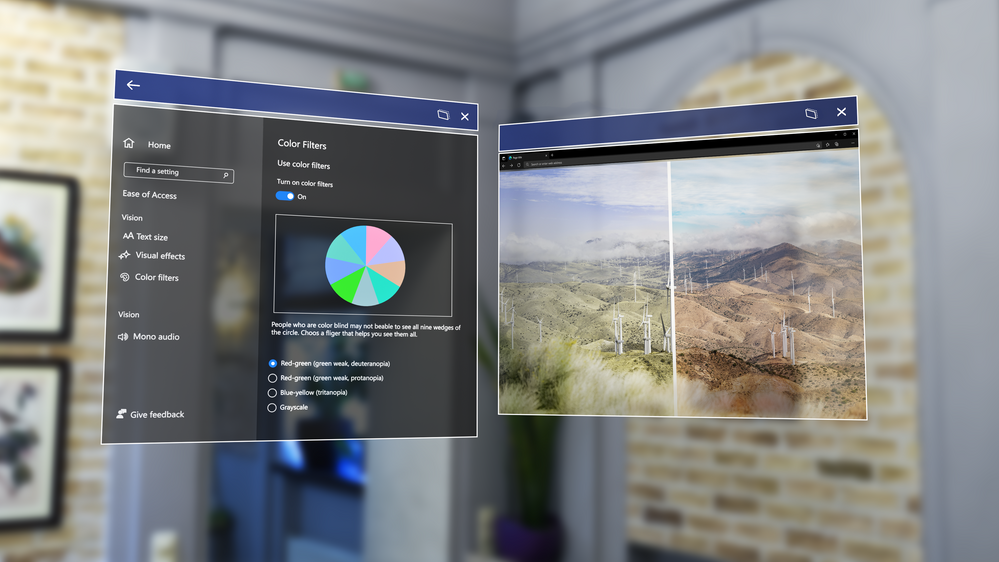
Color-blind mode – Color-blind mode is a feature that makes HoloLens more accessible using new color filters that can help make things easier to view. Try it, you might be surprised at the difference it makes.
Single app kiosk policy for launching other apps – A new Mixed Reality policy, that allows you to launch specific apps from a Single App Kiosk app. This is useful if you want to use a specific app, but might need access to Settings to change Wi-fi, or Edge to perform a sign in.
As always, you can follow our IT admin update checklist to prepare for when you update your fleet of HoloLens 2 devices to the latest update.

This article is contributed. See the original author and article here.
As work becomes more complexwith employees, customers, and partners spread across the globeorganizations must improve productivity and operations to stay competitive. Business leaders and project managers need tools that help them stay on top of their work, align teams around common objectives, and elevate project performance.
On April 20, 2022 at the Project Management for a Connected World digital conference, you’ll learn how Microsoft’s connected project experiencesMicrosoft Planner, Microsoft Project, and Microsoft Dynamics 365 Project Operationshelp you stay organized and deliver successful projects. With multiple breakout sessions to choose from, you can create a schedule that matches your goals. Plus, get your questions answered in a Q&A chat that runs throughout the event.
Planner, Project, and Project Operations enable people to effectively manage projects of all sizes and complexity. Planner works with Microsoft 365, and specifically Microsoft Teams, to help you create and share plans and information-rich tasks with collaborators. Project is the simple and powerful project management solution that helps you execute initiatives of varying sizesfrom quick projects to larger, more complex programs. Project Operations connects sales, resource management, project management, and accounting teams for greater visibility and collaboration.
Project Management for a Connected World is a great opportunity to dive deeper into each of these products to learn which one is most appropriate for your needs. Sessions like, “Choosing the right project management products for your organization” will help you connect the right tools with your upcoming and ongoing projects. You’ll also learn about the differences and benefits of Planner, Project, and Project Operations.
At this event, you’ll be able to connect with Microsoft product engineering to learn how the most recent product updates keep pace with the growth of your business and the evolving market. You’ll also get to delve into how the product roadmaps will meet the needs of a more complex hybrid workplace.
For example, the “Microsoft Project introduction and roadmap” session will show the releases over the last year that help drive more collaboration and visibility across your projects, and you’ll get a peek into the exciting innovations planned on the product roadmap.
In “Microsoft Planner: Introduction and roadmap” you’ll learn about the latest Planner updates and future releases.
You can also choose to attend sessions that dive deeper into Project Operations. Explore how the latest releases help boost efficiency in project planning and delivery. Learn more about investments in onboarding, estimating, and resourcing, and find out what Microsoft has planned for Project Operations in the coming months.
Running successful projects requires smart management of people, attention to budgets, and mitigation of project risks. The right tools give you good visibility across all these aspects of project management, and they allow you to dig into the details as needed.
Whether you’re interested in facilitating teamwork across a hybrid team, effectively resourcing your projects, or managing risk, there will be sessions that will help you understand how project management solutions from Microsoft support you.
Sessions like, “Collaborate better and turn connected project operations data into impact,” will show you how Project Operations helps you work smarter by breaking down the silos between customer relationship management (CRM), enterprise resource planning (ERP), and project management. “Accelerate projects while maintaining project management organization (PMO) governance” will give you a view into how other organizations manage programs, develop governance workflows, and mitigate issues and risk. These and other sessions will give you strategies for using Planner, Project, and Project Operations to run your projects more effectively.
Attend Project Management for a Connected World on April 20, 2022 to learn how Microsoft’s connected project experiences help you run projects more efficiently and deliver results.
Project Management for a Connected World
Collaborate, innovate, and deliver with Microsoft
Wednesday, April 20, 2022
9:00 AM to 11:00 AM Pacific Time (UTC-8)
The post Attend the Project Management for a Connected World digital event appeared first on Microsoft Dynamics 365 Blog.
Brought to you by Dr. Ware, Microsoft Office 365 Silver Partner, Charleston SC.
This article is contributed. See the original author and article here.
Organizations that run their Dynamics 365 Business Central or Dynamics NAV workloads on-premises often have large amounts of data built up from a high volume of transactions. Over time, it may become too expensive to host it on Business Central online.
In addition, many organizations want to glean insights from their ERP data by combining it with external data sources such as IoT, AI, or machine learning capabilities. In both cases, having direct access to information hosted inside the Business Central cloud can be useful.
You can access data in Business Central using REST APIs, of course. However, we’re piloting a way to host the information in an Azure Data Lake outside of Business Central. This capability will allow you to:
Our solution opens up some interesting possibilities for organizations using Business Central. If you’d like to try it out, we’re making it available as a proof of concept at aka.ms/bc2adls.
There are two parts to the solution:
Configure the extension with an Azure Storage account and access credentials, and then determine the tables and fields to export. Each time the export process runs, the Business Central extension places the inserts, updates, and deletions that were made since the last export in a container in the Azure data lake.
The Azure Synapse pipeline assimilates updates from multiple exports and creates a replica data warehouse in Common Data Model format. If an entity doesn’t yet exist in the data warehouse, the pipeline creates it.
The export process can run as a recurring background batch job or as a one-time operation, allowing you to maintain your data in the lake over time. Combine it with a recurring run of the Azure Synapse pipeline to have the final data updated at the lake. You can tune the frequency of recurrence in accordance with an acceptable delay between when changes are made in Business Central and when they’re updated in the lake.
Over time, older information in the Business Central database may need to be removed to make space for new operational data. Our solution duplicates the information from Business Central in Azure Storage, while giving you the option to skip exporting deletions. This feature is indispensable to auditing and historical tracking scenarios, because records can be maintained in the lake when they have been removed from Business Central.
To skip deletions for specific tables, uncomment or edit the relevant lines for the subscriber OnAfterOnDatabaseDelete procedure.
Using Business Central data that resides in Azure Data Storage as a source of analytics decouples it from the Business Central database. The database can then focus on running operational workloads.
Because the data is available in the Common Data Model format, it’s available to an increasing number of analytics services, such as Power BI and Azure data services. Query your Business Central data in the lake using familiar T-SQL syntax using Azure Synapse Serverless SQL pool endpoints, too.
Get more information, try out our solution, and read some instructions at aka.ms/bc2adls.
Information about the proof of concept is also linked from the BCTech repository. We encourage your contributions and suggestions.
The post Host your Dynamics 365 Business Central data in Azure Storage appeared first on Microsoft Dynamics 365 Blog.
Brought to you by Dr. Ware, Microsoft Office 365 Silver Partner, Charleston SC.
This article is contributed. See the original author and article here.
CISA has added eight new vulnerabilities to its Known Exploited Vulnerabilities Catalog, based on evidence of active exploitation. These types of vulnerabilities are a frequent attack vector for malicious cyber actors and pose significant risk to the federal enterprise. Note: to view the newly added vulnerabilities in the catalog, click on the arrow on the of the “Date Added to Catalog” column, which will sort by descending dates.
Binding Operational Directive (BOD) 22-01: Reducing the Significant Risk of Known Exploited Vulnerabilities established the Known Exploited Vulnerabilities Catalog as a living list of known CVEs that carry significant risk to the federal enterprise. BOD 22-01 requires FCEB agencies to remediate identified vulnerabilities by the due date to protect FCEB networks against active threats. See the BOD 22-01 Fact Sheet for more information.
Although BOD 22-01 only applies to FCEB agencies, CISA strongly urges all organizations to reduce their exposure to cyberattacks by prioritizing timely remediation of Catalog vulnerabilities as part of their vulnerability management practice. CISA will continue to add vulnerabilities to the Catalog that meet the meet the specified criteria.

Recent Comments