Microsoft Defender for Cloud Price Estimation Dashboard

Microsoft Defender for Cloud Price Estimation Dashboard

This article is contributed. See the original author and article here.

Microsoft Defender for Cloud provides advanced threat detection capabilities across your cloud workloads. This includes comprehensive coverage plans for compute, PaaS and data resources in your environment. Before enabling Defender for Cloud across subscriptions, customers are often interested in having a cost estimation to make sure the cost aligns with the team’s budget. We previously released the Microsoft Defender for Storage Price Estimation Workbook, which was widely and positively received by customers. Based on customer feedback, we have extended this offering by creating one comprehensive workbook that covers most Microsoft Defender for Cloud plans. This includes Defender for Key Vault, Containers, App Service, Servers, Storage and Databases. After reading this blog, you can deploy the workbook from our GitHub community and be sure to leave your feedback to be considered for future enhancements. Please remember these numbers are only estimated based on retail prices and do not provide actual billing data. For reference on how these prices are calculated, visit the Pricing—Microsoft Defender | Microsoft Azure.


pricedemocrop.gif


Overview


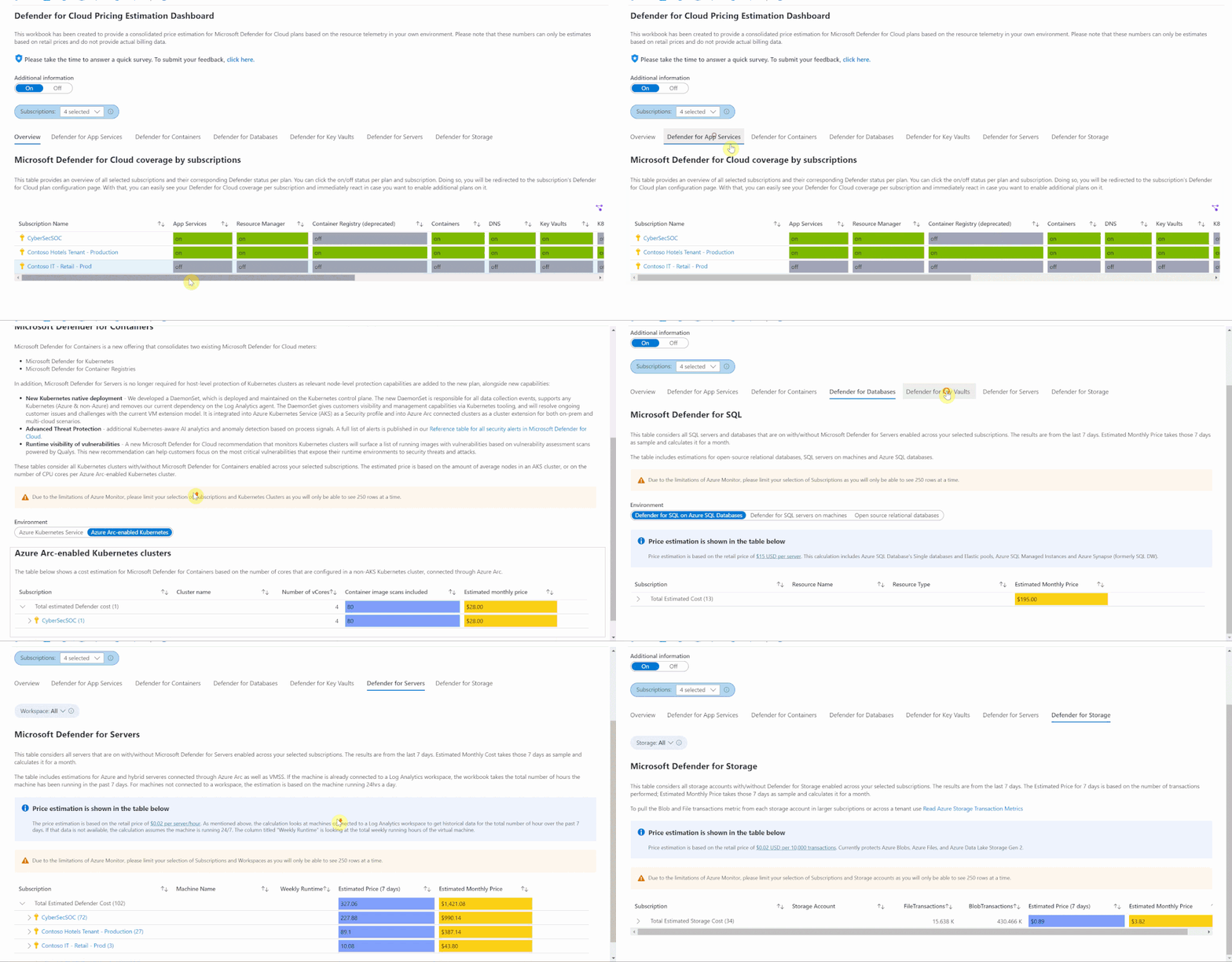
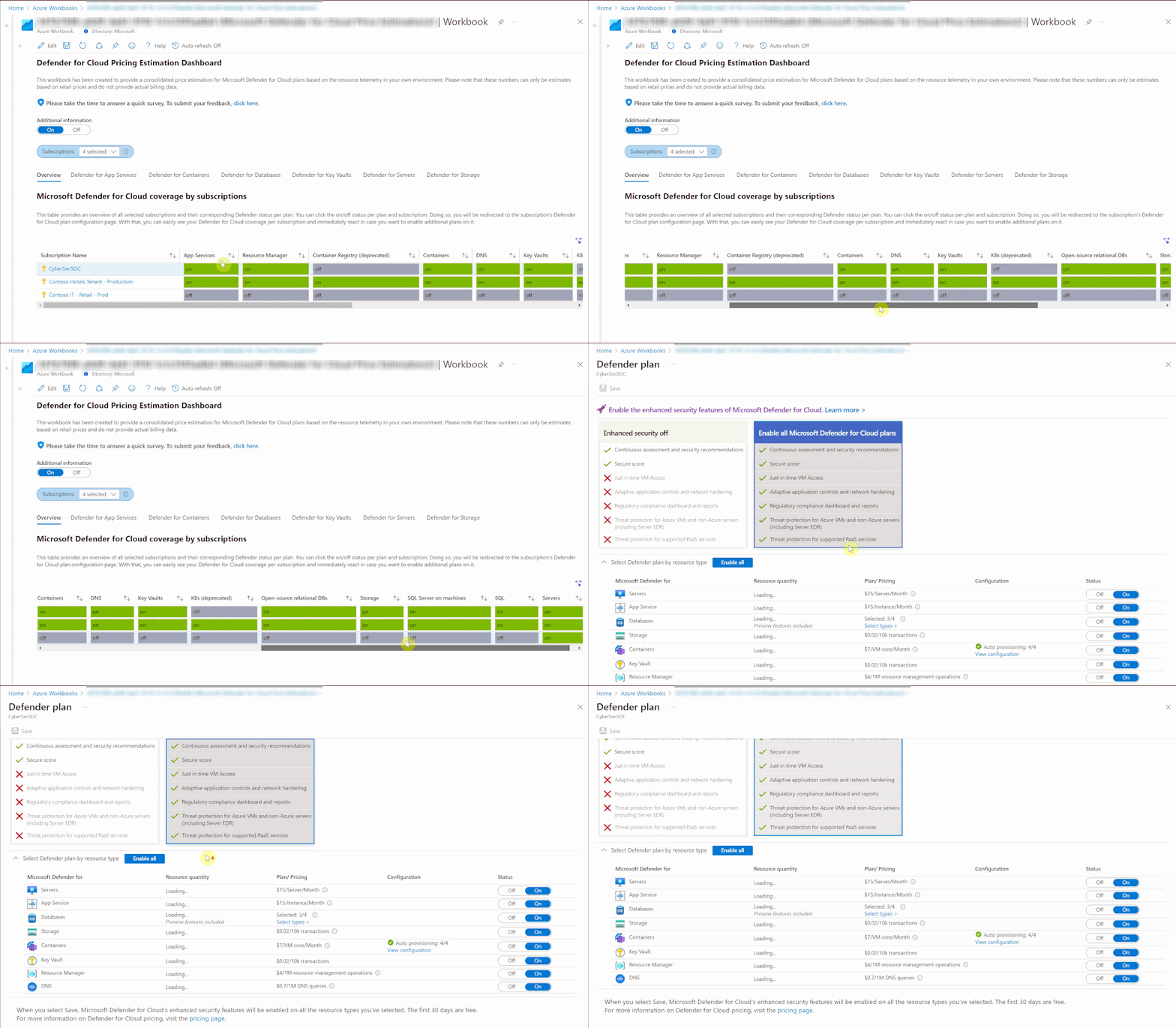
When first opening the workbook, an overview page is shown that displays your overall Microsoft Defender for Cloud coverage across all selected subscriptions. The coverage is represented through the green and gray “on/off” tabs. If the plan is enabled on that subscription, the tab shows green. If the plan is not enabled, the tab shows gray. When clicking on “on/off” in this table, you will be redirected to a subscription’s Defender for Cloud plans page from where you can directly enable additional plans.

costworkbookcrop.gif


Defender for App Service


appservice.png


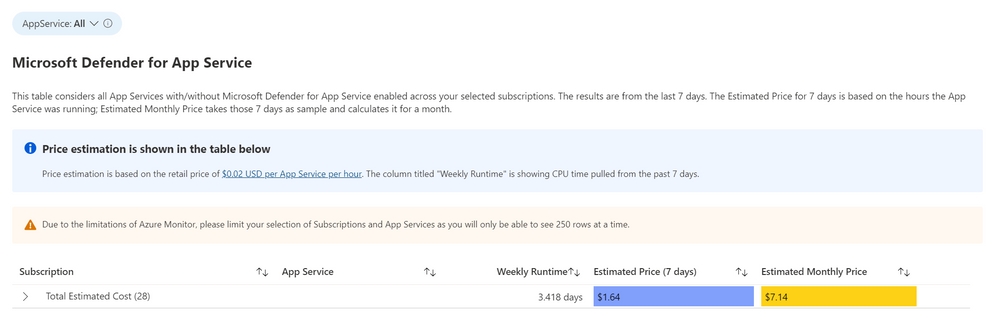
This workbook considers all App Services with and without Microsoft Defender for App Services enabled across your selected subscription. It is based on the retail price of $0.02 USD per App Service per hour. The column “Weekly Runtime” is showing CPU time pulled from the past 7 days. In the column “Estimated Price (7 days)”, the CPU time is multiplied by .02 to give an estimated weekly price. The “Estimated Monthly Price” uses the results of the “Estimated Price (7 days) to give the estimated price for one month.


Defender for Containers
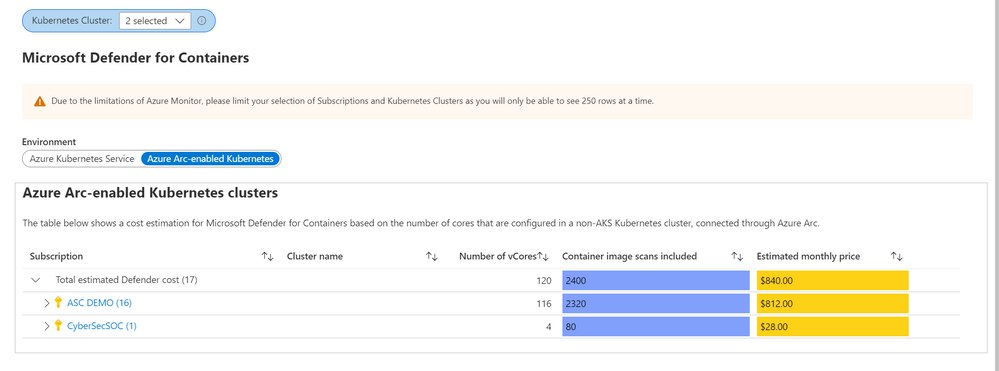

containersprice.pngThe Defender for Containers blade shows price estimations for two different environments: Azure Kubernetes Services (AKS) clusters, and Azure Arc-enabled Kubernetes clusters. For AKS, price estimation is calculated based on the average number of worker nodes in this cluster during the past 30 days. Defender for Containers pricing is based on the average number of vCores used in a cluster so based on the average number of nodes and the VM size, we can calculate a valid price estimation. In case the workbook cannot access telemetry for average node numbers, the table will show a price estimation based on the current number of vCores used in the AKS cluster.


For Azure Arc-enabled Kubernetes clusters, price estimation is based on the number of vCores that are configured in this cluster. Both tables will also show the number of container images that can be scanned at no additional cost based on the number of vCores used in both, AKS and Azure Arc-enabled Kubernetes clusters.


Defender for Databases

databaseprice.png


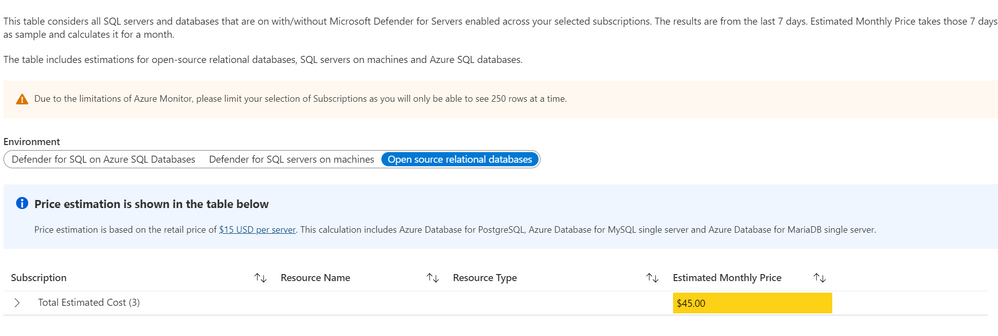
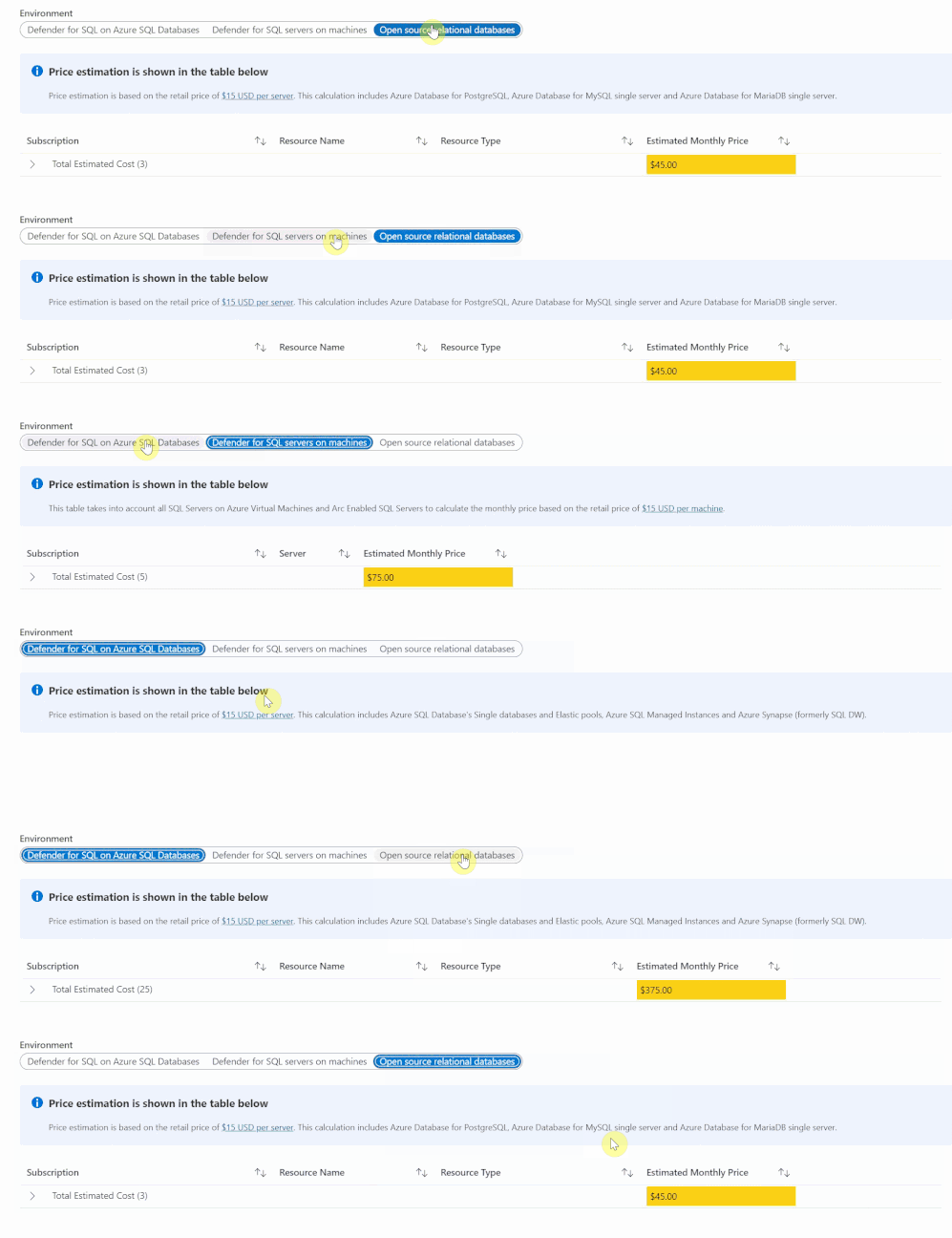
The Defender for Databases dashboard covers three key environments: Defender for SQL on Azure SQL Databases, Defender for SQL servers on machines and Open-source relational databases.

databasedemo.gif


All estimations are based on the retail price of $15 USD per resource per month. “Defender for SQL on Azure SQL databases” includes Azure SQL Database’s Single databases and Elastic pools, Azure SQL Managed Instances and Azure Synapse (formerly SQL DW). “Defender for SQL servers on machines” includes all SQL servers on Azure Virtual Machines and Arc Enabled SQL server. Lastly, “Open-source relational databases” looks at Azure Database for PostgreSQL, Azure Database for MySQL single server and Azure Database for MariaDB single server. The logic and calculation for all three environments are the same. On the backend, the workbook runs a query to find all SQL or database resources in the selected environment and multiplies each one by 15 to get the estimated monthly cost.


Defender for Key Vault

keyvaultprice.png


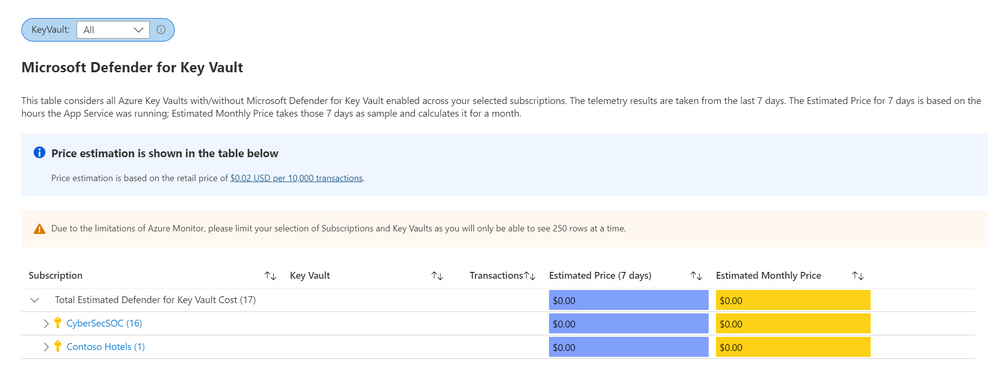
The Defender for Key Vault dashboard considers all Key Vaults with or without Defender for Key Vault enabled on the selected subscriptions. The calculations are based on the retail price of $0.02 USD per 10k transactions. The “Estimated Cost (7 days)” column takes the total Key Vault transactions of the last 7 days, divides them by 10K and multiples them by 0.02. In “Estimated Monthly Price”, the results of “Estimated Cost (7 days)” are multiplied by 4.35 to get the monthly estimate.


Defender for Servers

serversprice.png


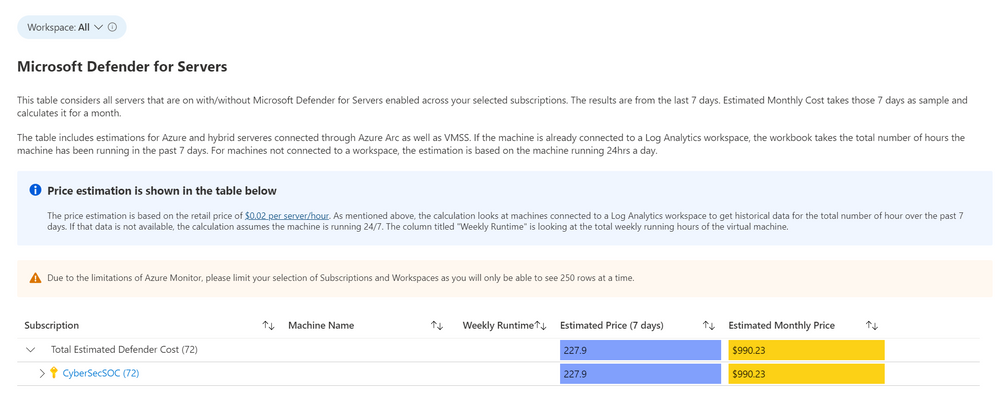
The Defender for Servers dashboard considers all servers on your subscriptions with or without Defender for Servers enabled. This dashboard includes estimations for Azure and hybrid servers connected through Azure Arc. The estimation is based on the retail price of $0.02 USD per server per hour. This dashboard includes the option to select a Log Analytics Workspaces. By selecting a workspace, the workbook can retrieve historical data for how many hours the machine has been running in the past seven days. If there is no historical data for the machine, the workbook assumes the machine has been running for 24hrs in the past 7 days. The column “Weekly Runtime” presents the total number of running hours from the past 7 days using the aforementioned strategies. The column “Estimated Cost (7 days)” takes the weekly hours and multiplies them by .02. Finally, in “Estimated Monthly Cost”, the result from “Estimated Cost (7 days)” is multiplied by * 4.35 to give the estimated monthly cost.


Defender for Storage
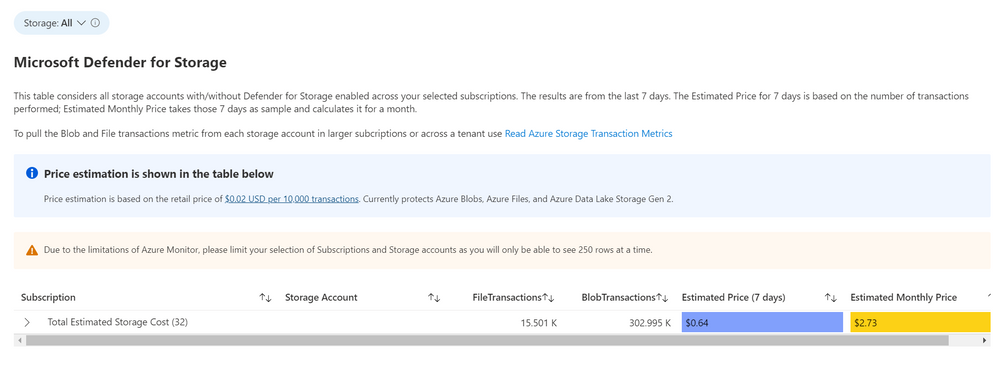

storageprice.png


 The Defender for Storage workbook looks at historical file and blob transaction data on supported storage types such as Blob Storage, Azure Files and Azure Data Lake Storage Gen 2. To learn more about the storage workbook, visit Microsoft Defender for Storage – Price Estimation Dashboard – Microsoft Tech Community.


Known Issues


Azure Monitor Metrics data backends have limits and the number of requests to fetch data might time out. To solve this, narrow your scope by reducing the selected subscriptions or resource types.


Acknowledgements


Special thanks to Fernanda VelaHelder PintoLili DavoudianSarah Kriwet and Tom Janetscheck for contributing their code to this consolidated workbook.


References:


Spilling the tea on the latest COVID-19 cure claim

Spilling the tea on the latest COVID-19 cure claim

This article was originally posted by the FTC. See the original article here.

Wouldn’t it be nice if all you had to do to get rid of COVID-19 was drink some tea? Well, selling people easy, feel good products — without competent scientific evidence — is something scammers are good at — and the FTC is working aggressively to stop them.

In the FTC’s latest case targeting fake COVID-19 cure claims, the agency took action against B4B Earth Tea, LLC. The company claims drinking their beverage (which sells for $60 per 16-ounce bottle) will cure the disease. But the complaint, filed by the Department of Justice on the FTC’s behalf, says the company doesn’t have scientific evidence to back up their treatment or prevention claims. 

There are no supplements proven to treat or prevent COVID-19.

When it comes to fighting COVID-19 and spotting unsupported treatment claims:

  • Always talk with your doctor or healthcare professional before you try any product claiming to treat, prevent, or cure COVID-19.
  • When there’s a medical breakthrough to treat, prevent, or cure a disease, you’re not going to hear about it for the first time through an ad or sales pitch on social media.
  • Visit CDC.gov and the FDA.gov for the most up-to-date information about COVID-19 and available vaccines.

Now, please share what you know, and ask others to do the same.

Brought to you by Dr. Ware, Microsoft Office 365 Silver Partner, Charleston SC.

NSA Releases Network Infrastructure Security Guidance

This article is contributed. See the original author and article here.

The National Security Agency (NSA) has released a new Cybersecurity Technical Report (CTR): Network Infrastructure Security Guidance. The report captures best practices based on the depth and breadth of experience in supporting customers and responding to threats. Recommendations include perimeter and internal network defenses to improve monitoring and access controls throughout the network.

CISA encourages network architects, defenders, and administrators to review NSA’s Network Infrastructure Security Guidance as well as CISA’s recently published Layering Network Security Through Segmentation infographic for assistance in hardening networks against cyber threats.

System Page Latch Concurrency Enhancements (Ep. 6) | Data Exposed

This article is contributed. See the original author and article here.

Over the past several SQL Server releases Microsoft has improved the concurrency and scalability of the tempdb database. Starting in SQL Server 2016 several improvements address best practices in the setup process, i.e. when there are multiple tempdb data files all files autogrow and grow by the same amount.


Additionally, starting in SQL Server 2019 we added the memory optimized metadata capability to tempdb and eliminated most PFS contention with concurrent PFS updates.


In SQL Server 2022 we are now addressing another common area of contention by introducing concurrent GAM and SGAM updates.


In previous releases, we may witness GAM contention different threads want to allocate or deallocate extents represented on the same GAM pages. Because of this contention, throughput is decreased and workloads that require many updates to the GAM page will take longer to complete. This is due to the workload volume and the use of repetitive create-and-drop operations, table variables, worktables that are associated with CURSORS, ORDER BYs, GROUP BYs, and work files that are associated with HASH PLANS.


The Concurrent GAM Updates feature in SQL Server 2022 adds the concurrent GAM and SGAM updates capability to avoid tempdb contention.


With GAM and SGAM contention being addressed, customer workloads will be much more scalable and will provide even better throughput.


SQL Server has improved tempdb in every single release and SQL Server 2022 is no exception.


Resources:


tempdb database


Recommendations to reduce allocation contention in SQL Server tempdb database


Learn more about SQL Server 2022​


Register to apply for the SQL Server 2022 Early Adoption Program and stay informed


Watch technical deep-dives on SQL Server 2022


SQL Server 2022 Playlist


CISA Adds 95 Known Exploited Vulnerabilities to Catalog

This article is contributed. See the original author and article here.

CISA has added 95 new vulnerabilities to its Known Exploited Vulnerabilities Catalog, based on evidence of active exploitation. These types of vulnerabilities are a frequent attack vector for malicious cyber actors and pose significant risk to the federal enterprise. Note: to view the newly added vulnerabilities in the catalog, click on the arrow on the of the “Date Added to Catalog” column, which will sort by descending dates.

Binding Operational Directive (BOD) 22-01: Reducing the Significant Risk of Known Exploited Vulnerabilities established the Known Exploited Vulnerabilities Catalog as a living list of known CVEs that carry significant risk to the federal enterprise. BOD 22-01 requires FCEB agencies to remediate identified vulnerabilities by the due date to protect FCEB networks against active threats. See the BOD 22-01 Fact Sheet for more information.

Although BOD 22-01 only applies to FCEB agencies, CISA strongly urges all organizations to reduce their exposure to cyberattacks by prioritizing timely remediation of Catalog vulnerabilities as part of their vulnerability management practice. CISA will continue to add vulnerabilities to the Catalog that meet the specified criteria

Note: prioritizing software updates that address known exploited vulnerabilities is one of the actions CISA encourages as part of the recent Shields Up recommendations to all stakeholders. CISA appreciates the contributions of Joint Cyber Defense Collaborative (JCDC) partners to this recent addition to the catalog.