Windows 10 IoT Enterprise LTSC 2021 has gone RTM for OEMs

This article is contributed. See the original author and article here.

Today marks the day that the latest release of Windows for IoT, Windows 10 IoT Enterprise LTSC 2021 has gone RTM for Original Equipment Manufacturers (OEMs). Windows 10 IoT Enterprise is the latest operating system offering for embedded and IoT devices. With every new release, we continue to deliver on our promise of bringing enterprise-class power, security, and manageability to the Internet of Things in addition to adding new features and capabilities, some of which are highlighted below.


This release will be available in two editions:


New Features and Capabilities in this release


There are several new features and capabilities included with Windows 10 IoT Enterprise, version 21H2. Unless otherwise noted, these features will be included in both the LTSC and SAC versions of the release.


Microsoft Edge Browser Support


Windows 10 IoT Enterprise, version 21H2, comes with in-box Microsoft Edge Browser support.


Customizable Windows Update UX


With this latest release, we are enabling you to manage your Windows update experience with genericized update message strings and screen accent colors.


Soft Real-Time


Windows 10 soft real-time is a new feature with Windows 10 IoT Enterprise, version 21H2 that allows device makers to introduce soft real-time capabilities on their devices.


Check out the following documentation to learn more:


Unified Write Filter (UWF) Updates


With Windows 10 IoT Enterprise, version 21H2, there have been many improvements to the Unified Write Filter.


  1. Allowing UWF Swapfile (DISK Overlay) to be created and used on any volume

  2. Read Only Media Mode

  3. Full Volume Commit in Read-Only Media mode


To learn more about how to implement these new features, review Enhanced Unified Write Filter Features


Windows Subsystem for Linux (WSL)


Starting with Windows IoT Enterprise LTSC 2021, Windows Subsystem for Linux (WSL) will be available in-box for both LTSC and SAC.


GPU Compute Support


With Windows 10 IoT Enterprise, version 21H2 there is additional GPU compute support in the Windows Subsystem for Linux (WSL) and Azure IoT Edge for Linux on Windows (EFLOW) deployments for machine learning and other compute intensive workflows.


Adding WPA3 H2E standards support


In this new release, there will be WPA3 H2E standards support for enhanced Wi-Fi security. To learn more, view  Faster and more secure Wi-Fi in Windows


Where to learn more?


Tax calculation enhancements are now available for Dynamics 365

Tax calculation enhancements are now available for Dynamics 365

This article is contributed. See the original author and article here.

Today, we are excited to announce the general availability of tax calculation for Microsoft Dynamics 365.

Over the past three decades, technology has made the world smaller. The steady drive of globalization and digitalization has pushed through significant headwindssuch as market protectionism, global recessions, and, most recently, a global pandemicto change the way we live and conduct business. Now, despite vast geographic distances, it is relatively simple to connect, communicate, and trade instantly with almost anyone. This has set the stage for businesses of all sizes and industries to expand globally in pursuit of new markets, suppliers, talent, and revenue streams.

As businesses pursue global expansion, they are challenged to keep pace with a myriad of ever-evolving country-specific laws and frequently changing legal requirements from local, state, and national tax authorities. For many years, the only option available for business leaders looking to ensure tax compliance globally was to hire enough full-time finance and tax professionals to monitor policy changes and align company processes accordingly. Indeed, this has been the standard solution for some time now.

Microsoft Dynamics 365 is changing this situation for companies with intelligent and timely globalization solutions, such as tax calculation. Tax calculation not only helps businesses unify their tax-relevant data, but it also leverages automation to make their tax calculation processes more efficient. At the same time, it assists in minimizing compliance risk by reducing opportunities to introduce errors into the process. In these ways, our new tax calculation service is simplifying and improving tax compliance for global businesses.

Learn more in our recent blog: Reduce complexity across global operations with Dynamics 365

Tax calculation service overview

Tax calculation is a low code, hyper-scalable, multitenant, microservice-based tax engine that enables organizations to automate and simplify the tax determination and calculation process. It is a standalone solution built on Microsoft Azure that enhances tax determination and calculation capabilities of Dynamics 365 applications through a flexible and fully configurable solution.

As tax calculation becomes generally available, it will integrate with Dynamics 365 Finance and Dynamics 365 Supply Chain Management, and we plan to integrate with more first and third-party applications in the near future. Additionally, it is fully backward compatible with the existing tax engine in Dynamics 365 Finance and Dynamics 365 Supply Chain Management and can be deployed as a new feature in the Feature Management workspace. Tax calculation service can also be enabled at more granular levels, including by legal entity or business process.

Tax determination

One challenge for organizations today is determining the appropriate tax for their business transactions. This challenge increases in difficulty as organizations add new regions where they trade and as the volume and types of transactions they process grows.

Tax calculation configures and determines tax codes, rates, and deductions in a low code and flexible way based on any combinations of the fields of a taxable document, such as shipping to or from location address, item category, or nature of counterparty, typically found on purchase orders or invoices.

Tax calculation

Another related challenge that companies face in addition to determination is calculating the tax due for their transactions. Again, this challenge becomes more difficult as business scale increases and as business is conducted in more distinct tax regions, each with its own authorities and requirements.

Our tax calculation service helps businesses meet this challenge as well by configuring with low code experience and executing the complex tax calculation formulas and conditions required by tax regulators, such as tax calculation based on margin or tax calculation on top of other tax codes.

Multiple tax registration numbers

Organizations also face challenges when they have multiple tax registration numbers that must be rolled up or reconciled to one central legal entity or party. When businesses add multiple tax registration numbers, the complexity of tax determination and calculation multiplies in step.

Tax calculation enables organizations to support multiple tax registration numbers under a single party, such as a legal entity, customer, or vendor. It also supports automatic determination of the correct tax registration number on taxable transactions like sales orders and purchase orders. And it works across various workflow scenarios, including transfer pricing, consignment warehouse, or low-risk distributor model.

In conjunction with new tax calculation, modified Tax Reporting provides new capabilities to execute country-specific, tax regulatory reports like VAT Declaration, EU Sales List, and Intrastat from a single legal entity. In multiple tax registration business scenarios, the reports select sets of data only relevant for transactions with specific country tax registration and provide results in the legally required form of an electronic file or a report layout required to file taxes in the country of tax registration.

Learn more about the feature enhancements of Tax Reporting and availability for specific countries and regions in our release notesand TechTalk.

Tax on transfer orders

A final challenge that businesses face when confronting the complexities and risk of tax compliance in foreign markets is determining and calculating the tax on transfer orders. This situation is quite common, such as when a business has a regional manufacturing facility or central warehouse that feeds storefronts scattered across multiple countries.

With tax calculation, businesses can allow for tax on transfer orders to support the EU regulation “Exempt intra-EU supply according to article 138 of the Directive 2006/112/EC” for Intra-EU Supply of goods.

Availability

Tax calculation is deployed in the following Azure geographies.

  • Asia Pacific
  • Australia
  • Canada
  • Europe
  • Japan
  • United Kingdom
  • United States

Learn more about the features of tax calculation service inour tax calculation overview, and check out our recent TechTalk on tax calculation.

Learn more what some of our partners are saying about the new tax calculation capabilities of Dynamics 365:

Next steps

If you are an existing Dynamics 365 user and would like to start today with tax calculation and Tax Reporting, check out our Get started with tax calculation documentation. Or, if you would like to see how Dynamics 365 Finance can benefit your company and enable smoother global expansion with microservice solutions such as tax calculation and Tax Reporting, we invite you to get started with a free trial today.

The post Tax calculation enhancements are now available for Dynamics 365 appeared first on Microsoft Dynamics 365 Blog.

Brought to you by Dr. Ware, Microsoft Office 365 Silver Partner, Charleston SC.

Communities thrive when we work together

Communities thrive when we work together

This article was originally posted by the FTC. See the original article here.

Every day dedicated community advocates work to improve the lives and protect the rights of people across the country. The FTC is proud of our work with the legal services community and we are excited to share the Community Advocate Center, a new resource to help you report to the FTC your clients’ experiences with fraud, scams, and bad business practices.

We know that communities thrive when we work together. We also know that scammers target specific populations including people of color, speakers of other languages, and lower-income communities. When advocates tell us people’s stories through ReportFraud.ftc.gov, the FTC can give tailored advice on next steps, including specific info about how to try to recover their money.

When you sign up for the Community Advocate Center, you’ll be joining colleagues from Legal Services Corporation, Inc. the National Legal Aid & Defender Association, the National Consumer Law Center, and the National Association of Consumer Advocates in supporting this initiative.

And please share this post and the video with your friends and colleagues and encourage them to use the Community Advocate Center on behalf of their clients.

The FTC cares about stopping scams you deal with, and preventing others from taking root. We use reports from your community to stop bad practices, get money back for your clients, and educate people about how to avoid the latest scams. Please sign up today: ReportFraud.ftc.gov/community

Brought to you by Dr. Ware, Microsoft Office 365 Silver Partner, Charleston SC.

NOBELIUM Attacks on Cloud Services and other Technologies

NOBELIUM Attacks on Cloud Services and other Technologies

This article is contributed. See the original author and article here.

Dot gov

Official websites use .gov
A .gov website belongs to an official government organization in the United States.

SSL

Secure .gov websites use HTTPS A lock (lock icon) or https:// means you’ve safely connected to the .gov website. Share sensitive information only on official, secure websites.

Reporting an email in Microsoft Defender for Office 365

Reporting an email in Microsoft Defender for Office 365

This article is contributed. See the original author and article here.

Attackers are constantly evolving their phishing technique with sophisticated campaigns to subvert email protection systems like Microsoft Defender for Office 365 and make your security perimeters vulnerable. For this reason, it’s critical that SecOps professionals empower employees to be hypervigilant to such threats and report them as soon as they land in their inboxes.


Microsoft Defender for Office 365 has a fully automated detection and remediation system for emails, URLs and attachments that are reported by your employees. User and admin submissions are critical positive reinforcement signals for our machine learning based detection systems to review, triage, rapid-learn and mitigate attacks. The submission pipeline is a tightly integrated solution with automated mail-flow filters that protect your employees from similar threats.


You can learn here on how to report an email to Microsoft and manage your submissions here.


Once you report an email through the submission process, our system follows a set of actions. If you have any organizational compliance restrictions that prevents a user from reporting sensitive emails outside of your infrastructure, we recommend using the custom mailbox reporting option detailed here. This will ensure that user reported emails will come to your custom mailbox. Admins who are granted privileges to review those emails can then report them back to Microsoft.


diannamarks_0-1634839071776.png


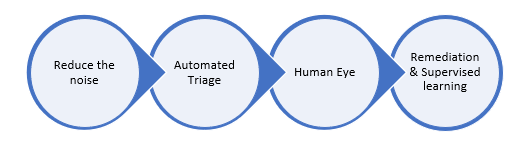
Figure 1: Behind the scenes post-submission process flow.


  1. Reduce the Noise: We wanted to reduce the noise from the submissions to ensure we send only clean signals for our automated triage system.

    1. Simulation: Your simulated messages from Attack Simulation Training or any of your 3rd party vendor will be filtered.

    2. Policy overrides: Wrongly classified messages due to your tenant’s ploicies or sometimes to end users’ policies are notified so that you can act at your end. From the override scenarios, we also honor your policies if they recommend detection improvements.

    3. Email Auth Check: We validate if the email authentication passed or failed during the email delivery.


You can learn about configuring 3rd party simulations here and learn about our secure by default strategy here.


  1. Automated Triage: We run our detection filters once again to identify if our systems have adapted between the time of delivery and your submission.

    1. All our machine learning based email filters will be run on your submissions to reclassify them in case of updated learning.

    2. In case of entities such as URLs and attachments in your submitted emails, we detonate them once again in our highly advanced sandbox environment to uncover the status of weaponization and assign the verdicts accordingly.

    3. We run a series of machine learning models exclusively on the reported submissions to identify, cluster the patterns and reclassify them in case of change in verdicts based on anomalies observed in similar submissions across our global customer base.

    4. We generate automated alerts on user reported phishing submissions by default and enable AIR (Automated Investigation and Response) so that these submissions will carry the verdicts from our automated triaging process. Please note that AIR is only available in MDO plan 2/E5/A5.


You can learn more about our AIR capabilities here.


  1. Human Eye: As the weaponization of phishing entities are dynamic, attackers constantly use multiple evasion techniques to bypass filters. That’s why a hybrid approach and human partnered machine learning based solution is the ideal method to stay on top of advanced threats and weaponization tricks.

    1. We prioritize submissions based on various factors such as phish severity, malware indicators, false positives, high volume anomalies, advanced pattern indicators, and whether reported by an admin or user.

    2. Expert graders/analysts are well trained on phish detection techniques and will be dissecting submissions through various Indicators of Compromise (IOC) and do deeper investigation on all email entities such as headers, URLs, attachments, and sender reputation to assign the right verdict on submissions.

    3. Graders generally deliver informed decisions as high-quality verdict signals that are being sent to the above discussed machine learning models 2(c) for continuous reinforcement learning.

    4. Human graded verdicts always take a higher priority and can override the verdict given by the automated triage process.


Human graders review anonymized email header and body metadata and hashed entities in a highly compliant environment that meets all the privacy guidelines from our Trust Center. You can learn more about Microsoft Trust Center here. You can also learn more about data storage here, and learn more about our data retention policies here.


  1. Remediation and supervised learning: The new verdict either from automated triage or human grader review will be sent for both rapid remediation and retrain our ML filters faster.

    1. We apply the graded labels from the automated triage system or human graders on the submitted and all related clusters belonging to this submitted pattern.

    2. We move all the messages from the current delivery location to the new location for all the impacted end users. For example, the system will move the messages from inbox to quarantine in case of ‘phish’ verdicts and move from Quarantine/Junk to inbox in case of ‘Good’ verdicts using our Zero-hour Auto Purge (ZAP) platform.

    3. We also identify IOCs by the submitted clusters and add them to our reputations to initiate instantaneous mitigation against phish and malware campaigns.

    4. Any new incoming mail from a similar pattern or IOC will be auto classified with the new verdict to reduce the triage load from your SecOps.


You can learn more about ZAP here.


The automated User Submission workflow is carefully designed with state-of-the-art technology to help the organizations to mitigate any False negative or False positive risks faster to reduce MTTR (Mean time to Response) for their SOC team. It also becomes important for organizations to enhance their security postures by training employees who actively participate in this phish detection submission feedback loop. Attack Simulation Training is included with Microsoft Defender for Office 365 P2 and E5 licenses and provides the necessary simulation and training capability that reduces phish vulnerabilities at the user-level. Learn more and get started using Attack Simulation Training here.


Do you have questions or feedback about Microsoft Defender for Office 365? Engage with the community and Microsoft experts in the Defender for Office 365 forum.