
by Contributed | May 5, 2021 | Technology
This article is contributed. See the original author and article here.
This series highlights Microsoft Learn Student Ambassadors who achieved the Gold milestone and have recently graduated from university. Each blog features a different student and highlights their accomplishments, their experience with the Student Ambassadors community, and what they’re up to now.
Today we’d like to introduce Sukhman Preet Singh Jawa who is from India and graduated this past winter from JECRC University in Jaipur, India.
Responses have been edited for clarity and length.
When you became a Student Ambassador in 2018, did you have specific goals you wanted to reach, and did you achieve them?
What I really wanted to do when I joined was to learn new things that are happening in technology. I was not connected to a community of people that would be actively participating in not just the development of the tech, but in adoption as well. This program gave me that platform and enabled me to connect with people around the world and discover technologies, like cloud, that back then were more like something that you would just read on a blog, and you would be like “Oh my God. What is that?”. These kinds of innovations were primarily my goal, and then after a year I was getting into it, then Microsoft Learn came and…whoa… I was just blown away. The amount of content, the amount of learning resources that were there, they were the best thing that I could hope for.
What was the one accomplishment that you’re the proudest of and why?
I wanted to build a community on my campus. I wanted people to build projects with me and participate in hackathons, so I launched a community called Microsoft Tribe. We initially invited students from our university, but the response was so overwhelming that opened it for the entire city. Last year we crossed 500 people–students and developers who are working on Microsoft technologies and trying to build the next generation of products. They are actively collaborating, teaching each other about the technologies that they know. It’s more like mutual learning, and even sharing opportunities for jobs to increase participation.
How has being a part of this community impacted you and helped to prepare you for the next chapter in your life? What are you doing now, what do you have planned?
I have been able to amass so much knowledge being in this program. Proper knowledge about not just technology. Knowledge about people, knowledge about how to pitch, how to be a part of a team, how to work together. These particular skills that I’ve acquired have enabled me to–alright, I’m going to brag here–I just founded my own startup, and I’m building products for developers to boost their productivity and enable them to have more granular control over how they’re building their products. I never thought I was going to talk about this. I was saving it for some special occasion, and I guess this is it. The scale of learnings from this program is amazing.
The Student Ambassadors program really sparked a new kind of motivation for me. Seeing all those amazing people doing all that great stuff, it inspires other Student Ambassadors to achieve more, to engage more with that community, to learn more. I won the top 100 Engineering Students Award in India, and I credit being in this program for this accomplishment. If I hadn’t been part of this program, I would have never thought of engaging with such an amazing dynamic of students and developers who are at the cutting edge or part of building the new world.
If you could go back in time, is there anything you would have done differently as a Student Ambassador?
I started as a sophomore, but had I got a time machine to go back, I would start the moment I joined college.
If you were to talk to a student who’s interested in joining the Microsoft Student Ambassadors community, let’s say you were trapped in an elevator with them for 30 seconds, what would you say to convince them to join?
I would hope the elevator stops for more than 30 seconds. This program enables you to achieve things that you would normally achieve later in your life. I would give this advice to people who generally don’t show up in tech. I would love to see more women joining this program because it embodies so much more about who you are. It is about growing yourself and community around you. You need to be a part of the program. You are going to miss out a lot of things if you don’t join. If you’re into tech, if you’re into learning, if you’re into being part of student communities, just join this program. Don’t think twice.
What advice would you give to new Student Ambassadors?
I would say start using Microsoft Learn early on. If I would have started using it when I became a Student Ambassador, I would have exponentially more knowledge than I have right now. And build connections with people you know, be a part of the community, stay immersed. Never stop dreaming about what you can build with technology. You’ve got access to such amazing people who are being part of that innovation that is happening round the corner, just reach out to them. If you have questions, just ask them.
Do you have a motto, a guiding principle that you live life by?
I have a motto–“empathy is greater than technology”. There’s a saying that we stand on the shoulders of giants, and we build upon them. As technologists, as innovators, as engineers, it becomes our responsibility to build solutions that empower people who are diverse. We must innovate and build for all of them. Be inclusive and understand the problem from the point of the person who is facing it, not from what we think that problem might be. Yeah, that’s “empathy greater than technology”.
Fellow Student Ambassadors and community members, you can always reach Sukhman on Twitter @spsxj.
Good luck to you, Sukhman, in your future endeavors! And if you’re interested in making a difference in tech, apply to join the Student Ambassadors community today.

by Contributed | May 5, 2021 | Technology
This article is contributed. See the original author and article here.
Welcome back to Reconnect, the biweekly series that catches up with former MVPs and their current activities.
This week we are thrilled to be joined by none other than eight-time titleholder Tony Champion! Hailing from Texas, Tony is a software architect with over 20 years of experience developing with Microsoft technologies.
As the owner and lead software architect of Champion DS, Tony remains active in the latest trends and technologies, creating custom solutions on Microsoft platforms. His client list includes multiple industries and includes companies such as Schlumberger, Microsoft, Boeing, MLB, and Chevron/Philips.
Tony describes his passion as creating new and engaging software that can span platforms, devices, and architectures. From XAML and C# to HTML and Javascript, Tony believes in using the right tools for the job and delivering a user experience and not just a piece of software.
Tony is an active participant in the community as a Microsoft MVP, international speaker, published author and blogger.
Tony simply describes himself as someone who has been coding for a long time and experienced both the highs and lows in this industry. Moreover, he loves to teach and jumps at the opportunity to share his knowledge.
When he’s not working or coding, Tony can normally be found with a guitar in hand.
For more information on Tony, check out his blog and Twitter @tonychampion.

by Contributed | May 5, 2021 | Technology
This article is contributed. See the original author and article here.
Dear IT Pros,
Ransomware acts with accessing to the files, folders and encrypting them, to respond against it, we need to enable the Windows Defender feature named “Controlled Folder Access” – WDCFA and monitor the Windows Defender Guard Events in Windows Event Viewer. The best way is possibly collecting the related activities by Advanced Hunting features of Microsoft 365 Security or Defender for Endpoint.
Could we search for Event ID by running the advanced hunting query or not?
We will discuss the above topic today.
To View or change the list of protected folders
You can use the Windows Security app to view the list of folders that are protected by controlled folder access.
- On your Windows 10 device, open the Windows Security app.
- Select Virus & threat protection.
- Under Ransomware protection, select Manage ransomware protection.
- If controlled folder access is turned off, you’ll need to turn it on. Select protected folders.
- Do one of the following steps:
- To add a folder, select + Add a protected folder.
- To remove a folder, select it, and then select Remove.
Note
Windows system folders are protected by default, and you cannot remove them from the list.
Review controlled folder access events in Windows Event Viewer
The following table shows events related to controlled folder access:
Event ID
|
Description
|
5007
|
Event when settings are changed
|
1124
|
Audited controlled folder access event
|
1123
|
Blocked controlled folder access event
|
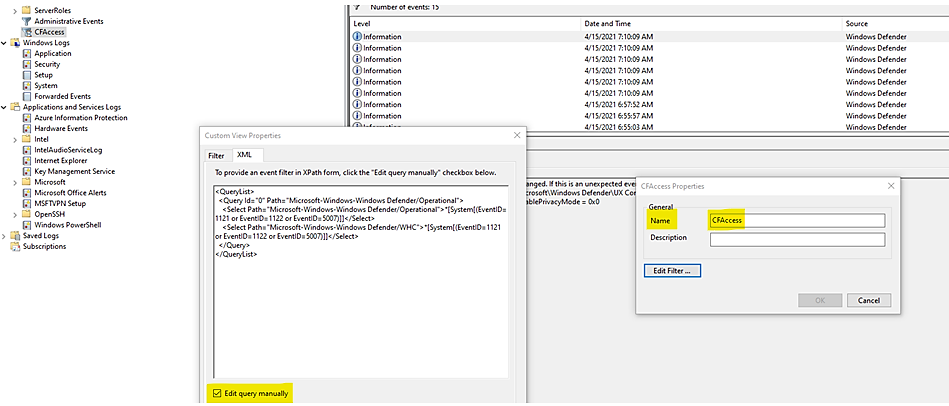
You can review the Windows event log and look for events which were created when controlled folder access of Windows Defender had blocked (or reported in audit mode) an app ‘s activity of accessing to the related folders, steps to follow:
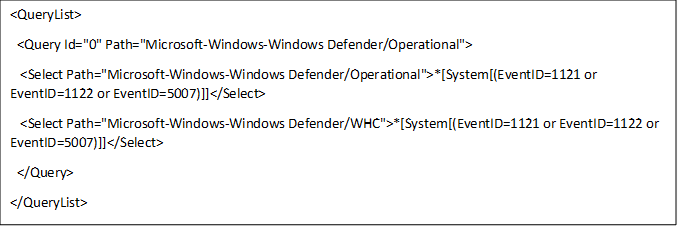
- Download the Evaluation Package and extract the file cfa-events.xml to an easily accessible location on the device.
Content of cfa-events.xml is shown in the following lines:
- Type Event viewer in the Start menu to open the Windows Event Viewer.
- On the left panel, under Actions, select Import custom view….
- Navigate to where you extracted cfa-events.xml and select it. Alternatively, copy the XML directly.
- Select OK.
Review controlled folder access events in the Microsoft 365 Security.
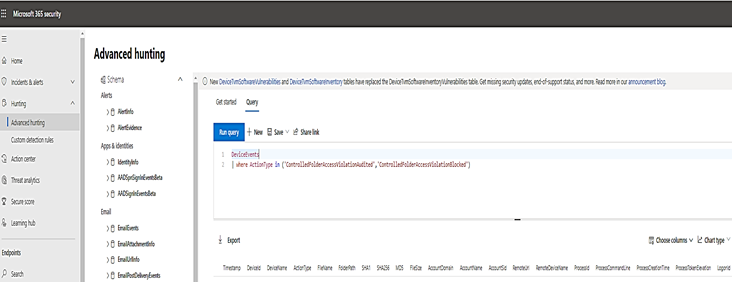
M365 Security portal, advanced hunting provides detailed information of Windows Defender events as part of its alert investigation scenarios.
You can query Microsoft 365 Security data by using Advanced hunting. For Controlled Folder Access, if you are enable it audit mode, you can use advanced hunting to see how controlled folder access settings would affect your environment if they were enabled.
To query Controlled Folder Access Events by Powershell, :
DeviceEvents
| where ActionType in ('ControlledFolderAccessViolationAudited','ControlledFolderAccessViolationBlocked')
Advanced Hunting for Controlled Folder Access Events:
Query Table
WDAC- Windows Defender Application Control
|
DeviceEvents
| where Timestamp > ago(7d) and ActionType startswith “AppControl”
| summarize Machines=dcount(DeviceName) by ActionType
| order by Machines desc
|
Monthly report on Vulnerability
|
DeviceTvmSoftwareInventoryVulnerabilities
| project DeviceName, SoftwareName, CveId, SoftwareVersion, VulnerabilitySeverityLevel
| join (DeviceTvmSoftwareVulnerabilitiesKB
| project AffectedSoftware, VulnerabilityDescription , CveId , CvssScore , IsExploitAvailable
)
on CveId
| project CveId , SoftwareName , SoftwareVersion , VulnerabilityDescription , VulnerabilitySeverityLevel, IsExploitAvailable , CvssScore
| distinct SoftwareName , SoftwareVersion, CveId, VulnerabilityDescription , VulnerabilitySeverityLevel, IsExploitAvailable
| sort by SoftwareName asc , SoftwareVersion
|
WD-ASR Event
|
DeviceEvents
| where ActionType == “AsrOfficeChildProcessAudited” and Timestamp > minTime
| project BlockedProcess=FileName, ParentProcess=InitiatingProcessFileName, DeviceName, Timestamp
|
WD-CFA Controlled Folder Access Event
|
DeviceEvents
| where ActionType in (‘ControlledFolderAccessViolationAudited’,’ControlledFolderAccessViolationBlocked’)
|
|
|
- We could not query by Event ID.
Until today, the built-in Defender for Endpoint sensor does not allow raw ETW access using Advanced Hunting nor forwards them.
- In Event Viewer, using XML to filter events related to Windows 10 Defender Guard,
the Event IDs are listed in the following Event Table:
Feature
|
Provider/source
|
Event ID
|
Description
|
Exploit protection
|
Security-Mitigations (Kernel Mode/User Mode)
|
1
|
ACG audit
|
Exploit protection
|
Security-Mitigations (Kernel Mode/User Mode)
|
2
|
ACG enforce
|
Exploit protection
|
Security-Mitigations (Kernel Mode/User Mode)
|
3
|
Do not allow child processes audit
|
Exploit protection
|
Security-Mitigations (Kernel Mode/User Mode)
|
4
|
Do not allow child processes block
|
Exploit protection
|
Security-Mitigations (Kernel Mode/User Mode)
|
5
|
Block low integrity images audit
|
Exploit protection
|
Security-Mitigations (Kernel Mode/User Mode)
|
6
|
Block low integrity images block
|
Exploit protection
|
Security-Mitigations (Kernel Mode/User Mode)
|
7
|
Block remote images audit
|
Exploit protection
|
Security-Mitigations (Kernel Mode/User Mode)
|
8
|
Block remote images block
|
Exploit protection
|
Security-Mitigations (Kernel Mode/User Mode)
|
9
|
Disable win32k system calls audit
|
Exploit protection
|
Security-Mitigations (Kernel Mode/User Mode)
|
10
|
Disable win32k system calls block
|
Exploit protection
|
Security-Mitigations (Kernel Mode/User Mode)
|
11
|
Code integrity guard audit
|
Exploit protection
|
Security-Mitigations (Kernel Mode/User Mode)
|
12
|
Code integrity guard block
|
Exploit protection
|
Security-Mitigations (Kernel Mode/User Mode)
|
13
|
EAF audit
|
Exploit protection
|
Security-Mitigations (Kernel Mode/User Mode)
|
14
|
EAF enforce
|
Exploit protection
|
Security-Mitigations (Kernel Mode/User Mode)
|
15
|
EAF+ audit
|
Exploit protection
|
Security-Mitigations (Kernel Mode/User Mode)
|
16
|
EAF+ enforce
|
Exploit protection
|
Security-Mitigations (Kernel Mode/User Mode)
|
17
|
IAF audit
|
Exploit protection
|
Security-Mitigations (Kernel Mode/User Mode)
|
18
|
IAF enforce
|
Exploit protection
|
Security-Mitigations (Kernel Mode/User Mode)
|
19
|
ROP StackPivot audit
|
Exploit protection
|
Security-Mitigations (Kernel Mode/User Mode)
|
20
|
ROP StackPivot enforce
|
Exploit protection
|
Security-Mitigations (Kernel Mode/User Mode)
|
21
|
ROP CallerCheck audit
|
Exploit protection
|
Security-Mitigations (Kernel Mode/User Mode)
|
22
|
ROP CallerCheck enforce
|
Exploit protection
|
Security-Mitigations (Kernel Mode/User Mode)
|
23
|
ROP SimExec audit
|
Exploit protection
|
Security-Mitigations (Kernel Mode/User Mode)
|
24
|
ROP SimExec enforce
|
Exploit protection
|
WER-Diagnostics
|
5
|
CFG Block
|
Exploit protection
|
Win32K (Operational)
|
260
|
Untrusted Font
|
Network protection
|
Windows Defender (Operational)
|
5007
|
Event when settings are changed
|
Network protection
|
Windows Defender (Operational)
|
1125
|
Event when Network protection fires in Audit-mode
|
Network protection
|
Windows Defender (Operational)
|
1126
|
Event when Network protection fires in Block-mode
|
Attack surface reduction
|
Windows Defender (Operational)
|
5007
|
Event when settings are changed
|
Attack surface reduction
|
Windows Defender (Operational)
|
1122
|
Event when rule fires in Audit-mode
|
Attack surface reduction
|
Windows Defender (Operational)
|
1121
|
Event when rule fires in Block-mode
|
- You could run the queries by using Microsoft 365 Security or Microsoft Defender for Endpoint.
I hope the information is useful, see you next time.
Reference:
by Contributed | May 5, 2021 | Technology
This article is contributed. See the original author and article here.
Sometimes we have a business requirement to get site collections with all the sub-webs so we can achieve the solution easily using PnP Powershell.
Let’s see step-by-step implementation:
Implementation
Open Windows Powershell ISE
Create a new file and write a script
Now we will see all the steps which we required to achieve the solution:
1. We will initialize the admin site URL, username, and password in the global variables.
2. Then we will create a Login function to connect the O365 SharePoint Admin site.
3. Create a function to get all site collections and all the sub-webs
So in the end, our script will be like this,
$SiteURL = "https://domain-admin.sharepoint.com/"
$UserName = "UserName@domain.onmicrosoft.com"
$Password = "********"
$SecureStringPwd = $Password | ConvertTo-SecureString -AsPlainText -Force
$Creds = New-Object System.Management.Automation.PSCredential -ArgumentList $UserName, $SecureStringPwd

Function Login {
    [cmdletbinding()]
    param([parameter(Mandatory = $true, ValueFromPipeline = $true)] $Creds)
    Write-Host "Connecting to Tenant Admin Site '$($SiteURL)'"
    Connect-PnPOnline -Url $SiteURL -Credentials $creds
    Write-Host "Connection Successfull"
}

Function AllSiteCollAndSubWebs() {
    Login($Creds)
    $TenantSites = (Get-PnPTenantSite) | Select Title, Url

    ForEach ( $TenantSite in $TenantSites) {
        Connect-PnPOnline -Url $TenantSite.Url -Credentials $Creds
        Write-Host $TenantSite.Title $TenantSite.Url
        $subwebs = Get-PnPSubWebs -Recurse | Select Title, Url
        foreach ($subweb in $subwebs) {
            Connect-PNPonline -Url $subweb.Url -Credentials $Creds
            Write-Host $subweb.Title $subweb.Url
        }
    }
}

AllSiteCollAndSubWebs
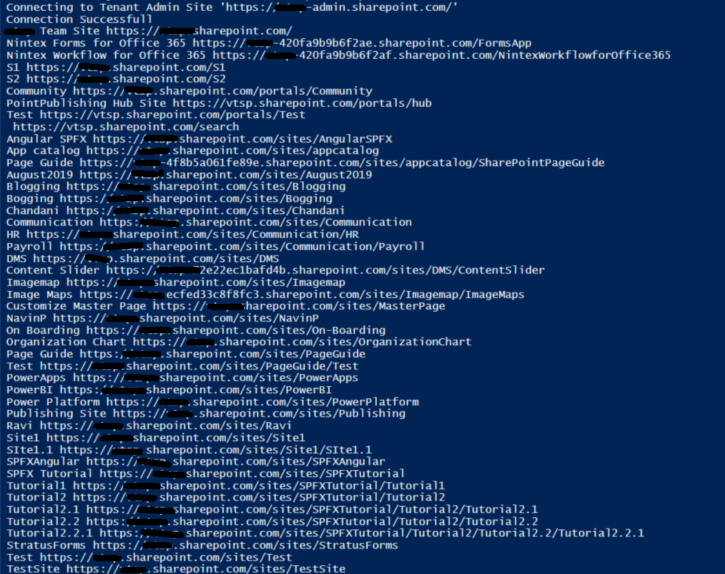
Output:
Summary:
In this article, we have seen how to get all the site collections and their subwebs using pnp Powershell.
Hope this helps! If it is helpful to you then share it with others.
Sharing is caring!



Recent Comments