by Scott Muniz | May 11, 2021 | Security, Technology
This article is contributed. See the original author and article here.
CISA and the Federal Bureau of Investigation (FBI) have released a Joint Cybersecurity Advisory (CSA) on a ransomware-as-a-service (RaaS) variant—referred to as DarkSide—recently used in a ransomware attack against a critical infrastructure (CI) company.
Cybercriminal groups use DarkSide to gain access to a victim’s network to encrypt and exfiltrate data. These groups then threaten to expose data if the victim does not pay the ransom. Groups leveraging DarkSide have recently been targeting organizations across various CI sectors including manufacturing, legal, insurance, healthcare, and energy.
Prevention is the most effective defense against ransomware. It is critical to follow best practices to protect against ransomware attacks, which can be devastating to an individual or organization and recovery may be a difficult process. In addition to the Joint CSA, CISA and FBI urge CI asset owners and operators to review the following resources for best practices on strengthening cybersecurity posture:
Victims of ransomware should report it immediately to CISA, a local FBI Field Office, or a Secret Service Field Office.
by Contributed | May 11, 2021 | Technology
This article is contributed. See the original author and article here.
In 2020, Artificial Intelligence (AI) Specialist was named the top emerging job, and according to Forbes, we are likely to witness an even more accelerated adoption of AI over the next year. Microsoft and Udacity have collaborated in the past to bring in-demand Azure skilling opportunities. Today, we are excited to announce the new AI Fundamentals free course on Udacity.
What to expect from AI Fundamentals
AI Fundamentals offers learners a basic foundational understanding of machine learning (ML) and AI concepts. This course also prepares learners to implement ML and AI workloads using Azure. There is no prerequisite for the course as AI Fundamentals is intended for learners with both technical and non-technical backgrounds.
Upon completing the AI Fundamentals free course, learners will have a foundational understanding of the following:
- AI workloads and considerations
- Fundamental principles of ML on Azure
- Computer vision workloads on Azure
- Natural Language Processing (NLP) workloads on Azure
While Udacity enables students to learn at their own pace, the AI Fundamentals course can be completed in as little as one month at 20 hours a week.
You completed the AI Fundamentals course, now what?
After completing this course with Udacity, learners will be prepared to take the AI-900 exam and become certified in Microsoft Azure AI Fundamentals. Whether a learner is looking for new roles or wanting to upskill in their current role, being adept in Microsoft Azure and having a certification to prove it is a competitive advantage. In fact, according to the Value of IT Certification Survey by Pearson Vue, almost thirty-five percent of technical professionals said getting certified led to salary or wage increases, and twenty-six percent reported job promotions.
While the AI Fundamentals course and the AI-900 certification exam will teach and test learners on their foundational understanding of AI on Azure, learners who are interested in furthering their learning can enroll in the Machine Learning Engineer for Microsoft Azure Nanodegree program with Udacity.
Enroll in the AI Fundamentals free course on Udacity today!
by Contributed | May 11, 2021 | Technology
This article is contributed. See the original author and article here.
Windows Holographic, version 21H1 is now available! In this article, we showcase some of the release highlights, but if you’re interested in more details on the full list of features, you can read our official release notes.
Features continually evolve in Windows 10 Holographic based on your feedback. We packed this new update with features for both end-users and IT admins with the goal of making the day-to-day usage of your HoloLens 2 more intuitive and customizable.
To get the 21H1 build now, go to Settings > Update & Security > Windows Update Select > Check for updates. IT Admins can use Windows Update for Business (WUfB) and MDM policy to update their fleet of HoloLens. Note that you must upgrade to Windows Holographic, version 20H2 February Update ( before you can upgrade to Windows Holographic, version 21H1. Another important note is that with the introduction of Windows Holographic version 21H1, we are discontinuing monthly servicing updates (for bug and security fixes) for Windows Holographic version 1903. We will now offer servicing updates for the following releases:
- Windows Holographic, version 21H1 (Build 20346.1002+)
- Windows Holographic, version 20H2 (Build 19041.1128+)
- Windows Holographic, version 2004 (Build 19041.1103+)
Release highlights
The new, Chromium-based Microsoft Edge is now available and will be the default browser for HoloLens users, offering better compatibility for customers and less fragmentation for web developers. The addition of WebXR and 360 Viewer make it possible to explore immersive web experiences. You can also use the new Edge to install web apps alongside Microsoft Store apps. For example, you can install the Microsoft Office web app from https://www.office.com to view and edit files hosted on SharePoint or OneDrive.

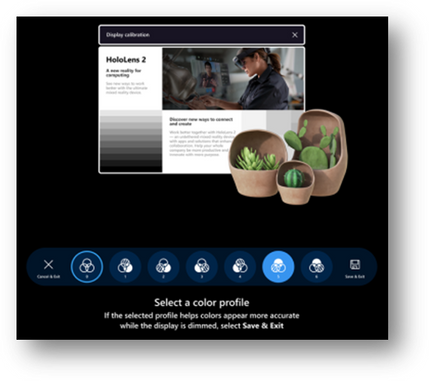
The Settings app has been updated to provide more granular control and customizability through additional settings. You can now search for specific settings and explore new options for Sound, Power & sleep, Network & Internet, Apps, Accounts, Ease of Access, and more. Some examples include selecting an alternative color profile for your HoloLens 2 display with the display color calibration tool, resetting default apps using the default app picker, and enabling Battery Saver Mode and Airplane Mode for your HoloLens 2.
We are also adding a new interaction for the holographic keyboard by introducing ‘Swipe to type’, similar to your mobile device. You can pass your fingertip through the plane of the keyboard, create the shape of the word, and then withdraw your finger from the plane.
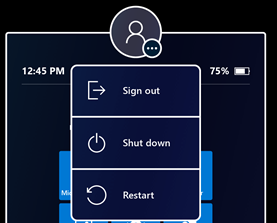
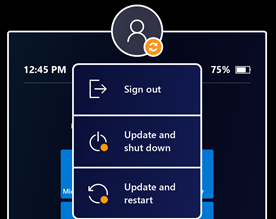
The new Power menu allows you to Sign out, Shut down and Restart your device from the Start menu by tapping the user profile icon. There will also be an indicator when there is a system update available.
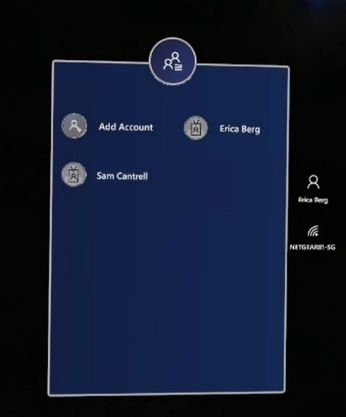
For our customers that share a HoloLens 2 across several users, multiple user accounts will now be visible on the sign-in screen, quashing the need to constantly retype usernames and passwords to change users. Before this build, you would just see one user or the generic ‘Other User’.
For IT admins, we continue to deliver features that enable seamless control and management of your devices. To highlight a few, Visitor Auto-logon for Kiosk mode will now be on by default for visitors but can be managed or turned off. Additionally, we improved error handling to help end-users get unblocked in case of a Kiosk mode failure. Instead of displaying an empty menu on startup if no Azure AD (Azure Active Directory) membership is found, a global kiosk configuration will be displayed (if available).
The Delivery Optimization Preview aims to reduce network bandwidth consumption for downloads from multiple HoloLens devices. Read Delivery Optimization for Windows 10 updates for more information on this feature.
Upgrade Today
As mentioned above, you can check out the full release notes on the HoloLens 2 release notes page. Update your HoloLens 2 devices so today to take advantage of the most recent features. If you are an IT administrator, we also created an IT Admin – Update Checklist to help you track and implement the features of this update.
Use the Feedback Hub app on your HoloLens to submit your feedback and report any issues. We love getting your feedback and take it all into consideration, so please keep it coming!
![Back in the Office with Microsoft Teams [M365 Meetup for Government]](https://www.drware.com/wp-content/uploads/2021/05/fb_image-90.jpeg)
by Contributed | May 11, 2021 | Technology
This article is contributed. See the original author and article here.
Back in the Office with Microsoft Teams – Professional woman is depicted in an office using teams.
As many organizations start to return to in-person office environments, how can we best leverage Microsoft Teams not only as a virtual work environment, but to enable and support more traditional office space scenarios? Discuss and explore real world adoption techniques and customer pain points – with solutions – to help keep your team on track. Live Q&A with expert deployment and workforce adoption experts.
Session Registration Link – Sign Up Here!
Presenter:
Doug Deitterick, Microsoft Federal
https://www.linkedin.com/in/dougdeitterick/
Live Q&A Panel with:
Jennifer Mason – Vice President Workforce Transformation and Learning, Planet Technologies
https://www.linkedin.com/in/jennifer-mason-5aa84b4/
Adam Ochs – Cloud Architect, Planet Technologies
https://www.linkedin.com/in/aochs/
Julie White – Evolve 365 Learning Strategist Manager, Planet Technologies
https://www.linkedin.com/in/julie-white-868a4a13/
by Contributed | May 11, 2021 | Technology
This article is contributed. See the original author and article here.
Microsoft has released security updates for vulnerabilities found in:
- Exchange Server 2013
- Exchange Server 2016
- Exchange Server 2019
These updates are available for the following specific builds of Exchange Server:
- Exchange Server 2013 CU23
- Exchange Server 2016 CU19 and CU20
- Exchange Server 2019 CU8 and CU9
The May 2021 security updates for Exchange Server address vulnerabilities responsibly reported by security partners and found through Microsoft’s internal processes. Although we are not aware of any active exploits in the wild, our recommendation is to install these updates immediately to protect your environment.
These vulnerabilities affect on-premises Microsoft Exchange Server, including servers used by customers in Exchange Hybrid mode. Exchange Online customers are already protected and do not need to take any action.
More details about specific CVEs can be found in Security Update Guide (filter on Exchange Server under Product Family).
Known issues in May 2021 security updates
During the release of April 2021 SUs, we received some reports of issues after installation. The following issues reported for April 2021 SUs also apply to May SUs and have the following workarounds:
- Administrator/Service accounts ending in ‘$’ cannot use the Exchange Management Shell or access ECP. The only workaround at this time is to rename Admin accounts or use accounts with no ‘$’ at the end of the name.
- Some cross-forest Free/Busy relationships based on Availability address space can stop working (depending on how authentication was configured) with the error: “The remote server returned an error: (400) Bad Request.” Please see this KB article for how to work around this problem.
- After application of the Exchange Server April or May security updates, cmdlets executed against the Exchange Management Console using an invoked runspace might fail with the following error message: The syntax is not supported by this runspace. This can occur if the runspace is in no-language mode. Please see this KB article for more information.
New security functionality in May 2021 security updates
We are making one additional change in May SU to make it easier for Exchange administrators and cybersecurity teams to quickly inventory the update state of the Exchange Servers on their networks. Specifically, we have added a protocol reply header containing Exchange Server version information to http responses that can be used by defenders to validate security update status of servers on your networks.
Update installation
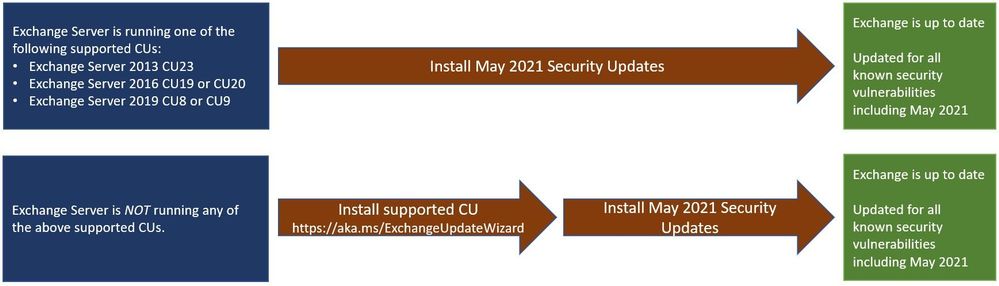
Two update paths are available:
Inventory your Exchange Servers
Use the Exchange Server Health Checker script (use the latest release), to inventory your servers. Running this script will tell you if any of your Exchange Servers are behind on updates (CUs and SUs).
Update to the latest Cumulative Update
Go to https://aka.ms/ExchangeUpdateWizard and choose your currently running CU and your target CU. Then click the “Tell me the steps” button, to get directions for your environment.
If you encounter errors during or after installation of Exchange Server updates
If you encounter errors during installation, see the SetupAssist script. If something does not work properly after updates, see Repair failed installations of Exchange Cumulative and Security updates.
FAQs
My organization is in Hybrid mode with Exchange Online. Do I need to do anything?
While Exchange Online customers are already protected, the May 2021 security updates do need to be applied to your on-premises Exchange Server, even if it is used only for management purposes. You do not need to re-run the Hybrid Configuration Wizard (HCW) after applying updates.
Do the May 2021 security updates contain the April 2021 security updates for Exchange Server?
Yes, our security updates are cumulative. Customers who installed the April 2021 security updates for supported CUs can install the May 2021 security updates and be protected against the vulnerabilities that were disclosed during those months.
Do I need to install the updates on ‘Exchange Management Tools only’ workstations?
Servers or workstations running only Microsoft Exchange Management Tools (no Exchange services) do not need to apply these updates.
NOTE: This post might receive future updates; they will be listed here (if available).
The Exchange Team


Recent Comments