by Contributed | May 12, 2021 | Technology
This article is contributed. See the original author and article here.
IT administrators can now use filters in Microsoft Endpoint Manager to target apps, policies and other workload types to specific devices. Available in public preview with the May release of Microsoft Intune, the filters feature gives IT admins more flexibility and helps them protect data within applications, simplify app deployments, and speed up software updates.
Microsoft built filters with a consistent and familiar rule authoring experience for admins who use Azure Active Directory dynamic device groups or are discovering the new filters capability in Conditional Access. With filters, administrators can achieve granular targeting of policies and applications to users on specific devices.
For example, this new capability makes it easier for administrators to comply with their organizational policies and compliance requirements by deploying:
- A Windows 10 device restriction policy to just the corporate devices of users in the Marketing department while excluding personal devices
- An iOS app to only the iPad devices for users in the Finance group
- An Android compliance policy for mobile phones to all users in the company but exclude Android-based meeting room devices that don’t support the settings in that mobile phone policy
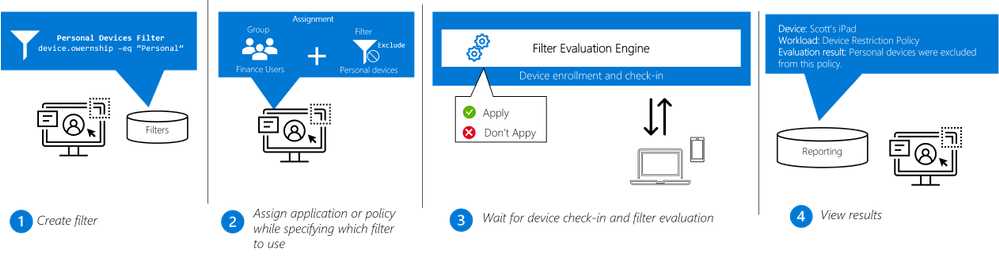
Filters work in conjunction with Azure AD group assignments or the “All users” or “All devices” groups to dynamically filter the assignment to only apply to a subset of devices during check-in. Dynamic filtering means that devices can be targeted with the right security policy and applications faster than ever before.
Filters are re-usable objects that can be applied to many workload types across the Endpoint Manager admin center. IT administrators can create a filter object using expressions across a set of supported device properties and then apply to that filter with an app or policy assignment. When devices check in to receive the policy, the filter evaluation engine determines applicability – either applying or not applying the policy based on the filter result. Results are reported back to the Endpoint Manager admin center so administrators can track policy and app deployment.
Workflow:
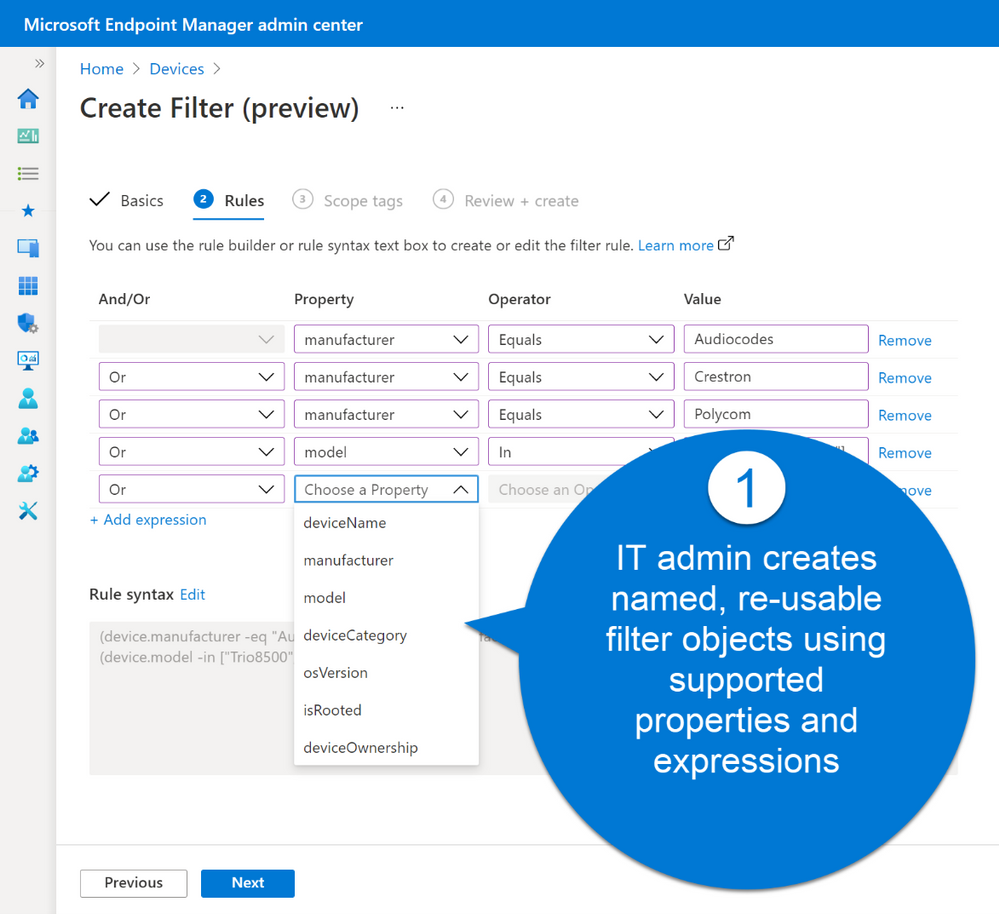
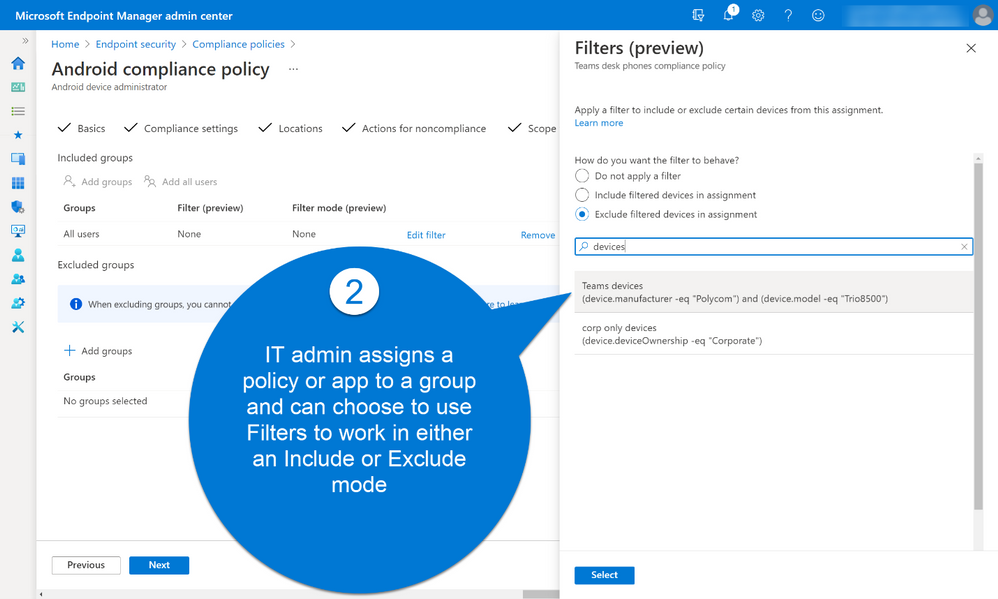
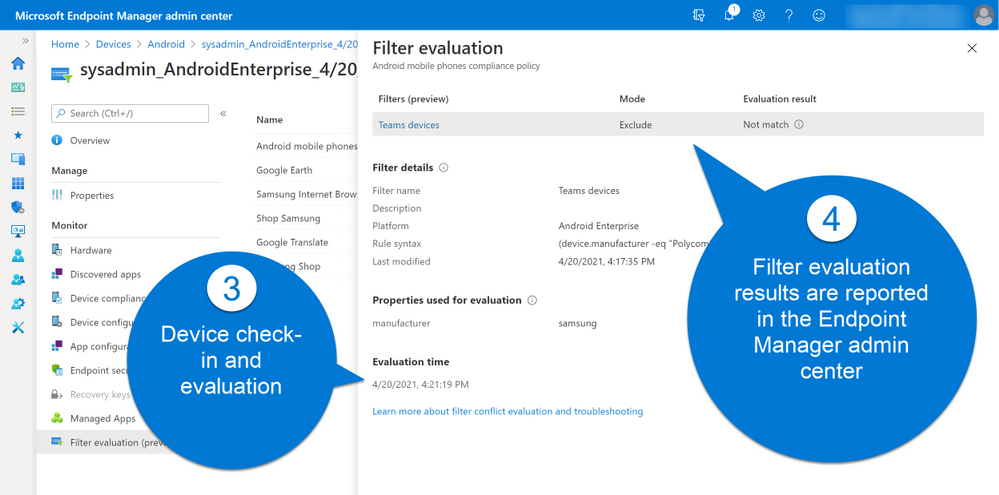
Filters is being rolled out with full support across platforms (Windows, Android, iOS and macOS) and an initial set of supported workloads and filter properties. Based on customer feedback, we will expand the capabilities across workloads in the coming months.
We value the input we received from customers in private preview. Here are a few highlights:
“We are starting to use filters a lot more. We are really looking forward to the previews coming up.”
“The Endpoint Manager filters feature has solved the challenges we faced with managing user-targeted settings and apps for users who have access to both a laptop and virtual desktop. For example, we can now apply a filter to prevent a user-assigned VPN profile from being applied when a user signs into their virtual desktop”
“Since we support a large number of different use cases, it’s always difficult to find a seamless way to target your workloads to ensure everyone in the field gets exactly what they need (configurations, apps, certificates, profiles). This is exactly where the Filters feature play a key role to accomplish difficult targeting scenarios. Filters helped us achieve complex assignment models eliminating the need of manual assignment work and helping IT stuff save important time to focus on further strategical and technical design key aspects for a truly modern workplace in our organization.”
“MEM Filters feature is allowing more granularity for assigning our policies as well as applications. Filters helped us adopt MEM even further in our very mixed environment, allowed us creating a better targeted approach. Filters also addressed a specific use case where we had to exclude virtual devices and critical systems from some of our assignments.”
“At Krones we support a large number of different use cases and it has always been difficult to find a way to target the specific workloads. Besides we have to ensure, that all employees get the tools they need for their work, like configurations, apps, certificates or profiles. This is exactly where the Filters feature plays a key role to accomplish difficult targeting scenarios. Filters helped us achieve complex assignment models eliminating the need of manual assignment work. As a result, our IT staff saved important time and is now able to focus on further strategic and technical design key aspects for a truly modern workplace within our organization.” –Roman Kleyn, Head of Workplace Design at Krones AG
As always, we appreciate your feedback. Please feel free to post your comment here or or tag me on LinkedIn.
To learn more about AAD, go here: https://aka.ms/RSACIdentity2021
by Contributed | May 12, 2021 | Technology
This article is contributed. See the original author and article here.
Howdy folks!
We’re excited to be joining you virtually at RSA Conference 2021 next week. Security has become top-of-mind for everyone, and Identity has become central to organizations’ Zero Trust approach. Customers increasingly rely on Azure Active Directory (AD) Conditional Access to protect their users and applications from threats.
Today, we’re announcing a powerful bundle of new Azure AD features in Conditional Access and Azure. Admins can gain even more control over access in their organizations and manage a growing number of Conditional Access policies and Azure AD authentication for virtual machines (VMs) deployed in Azure. These new capabilities enable a whole new set of scenarios, such as restricting access to resources from privileged access workstations or even specific countries or regions based on GPS location. And with the capability to search, sort, and filter your policies, as well as monitor recent changes to your policies you can work more efficiently. Lastly, you can now use Azure AD login for your Azure VMs and protect them from being compromised or used in unsanctioned ways.
Here’s a quick overview of the features we’re announcing today:
Public Preview
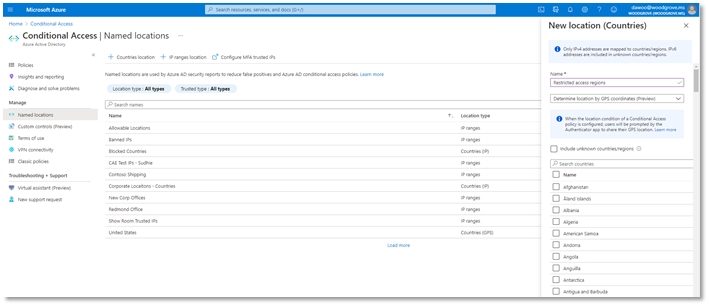
Named locations based on GPS: You can now restrict access to sensitive resources from specific countries or regions based on the user’s GPS location to meet strict data compliance requirements.
Filters for devices condition: Apply granular policies based on specific device attributes using powerful rule matching to require access from devices that meet your criteria.
Enhanced audit logs with policy changes: We’ve made it easier to understand changes to your Conditional Access policies including modified properties to the audit logs.
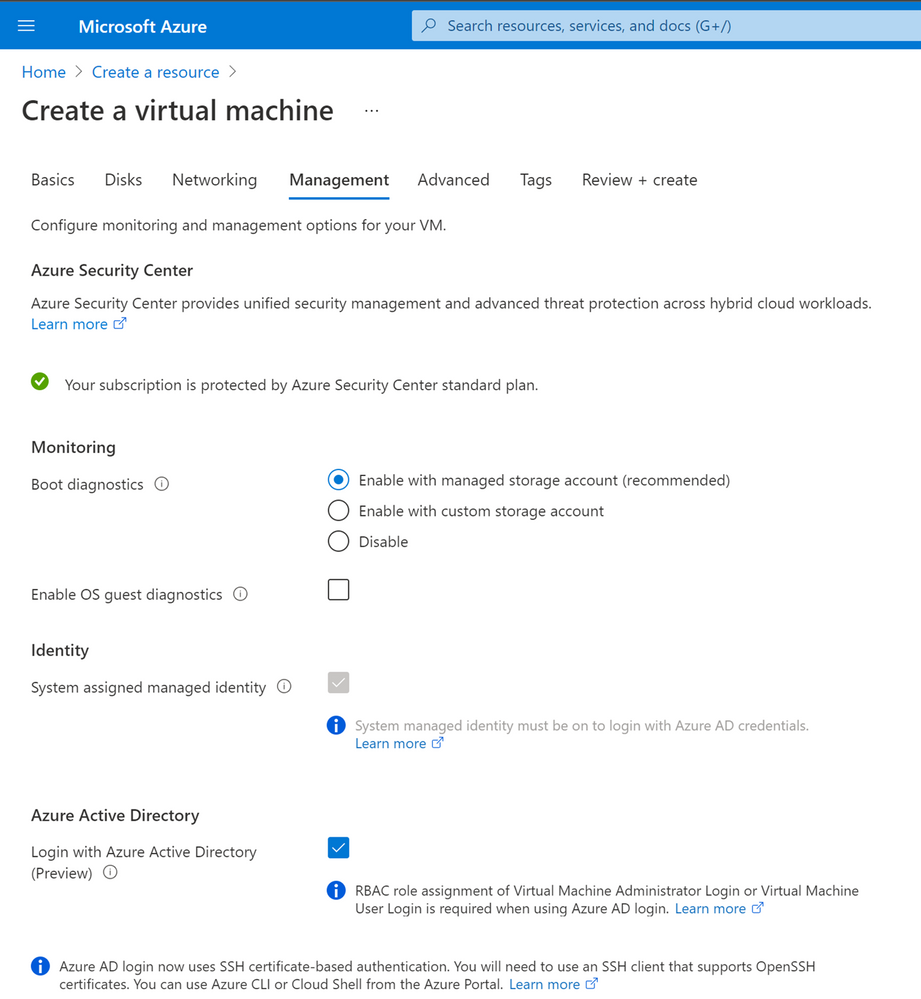
Azure AD login to Linux VMs in Azure: You can now use Azure AD login with SSH certificate-based authentication to SSH into your Linux VMs in Azure with additional protection using RBAC, Conditional Access, Privileged Identity Management and Azure Policy.
General Availability
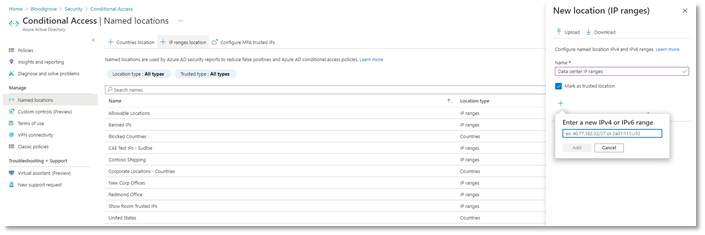
Named locations at scale: It’s now easier to create and manage IP-based named locations with support for IPv6 addresses, increased number of ranges allowed, and additional checks for mal-formed addresses.
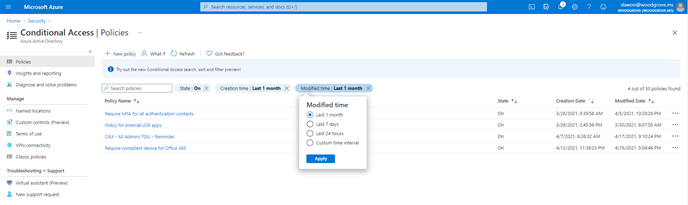
Search, sort, and filter policies: As the number of policies in your tenant grows, we’ve made it easier to find and manage individual policies. Search by policy name and sort and filter policies by creation/modified date and state.
Azure AD login for Windows VMs in Azure: You can now use Azure AD login to RDP to your Windows 10 and Windows Server 2019 VMs in Azure with additional protection using RBAC, Conditional Access, Privileged Identity Management and Azure Policy.
We hope that these enhancements empower your organization to achieve even more with Conditional Access and Azure AD authentication. And as always—we’re always listening to your feedback to make Conditional Access even better.
Named locations based on GPS location (Public Preview)
This capability empowers organizations to meet strict compliance regulations that limit where specific data can be accessed. Due to VPNs and other factors, determining a user’s location from their IP address is not always accurate or reliable. GPS signals enable admins to determine a user’s location with higher confidence. When the feature is enabled, users will be prompted to share their GPS location via the Microsoft Authenticator app during sign-in.
Conditional Access named locations is more versatile than ever with the addition of new GPS-based country locations. When selecting countries or regions to define a named location that will be used in your Conditional Access policies, you can now decide whether to determine the user’s location by their IP address or GPS location through the Authenticator App. This feature will be available in public preview later this month.
To configure a GPS-based named location for Conditional Access:
- Go to Azure AD -> Security -> Conditional Access -> Named locations
- Click + Countries location to define a new named location defined by country or region
- Select the dropdown option to Determine location by GPS coordinates (Preview)
- Select the countries you want to include in your named location and click Create.
Once you’ve created a GPS-based country named location, you can use Conditional Access to restrict access to selected applications for sign-ins within the named location. In the locations condition of the policy, select the named locations where you want your policy to apply.
When users sign-in, they’ll be asked to share their GPS location through the Authenticator app to access applications in scope of the policy.
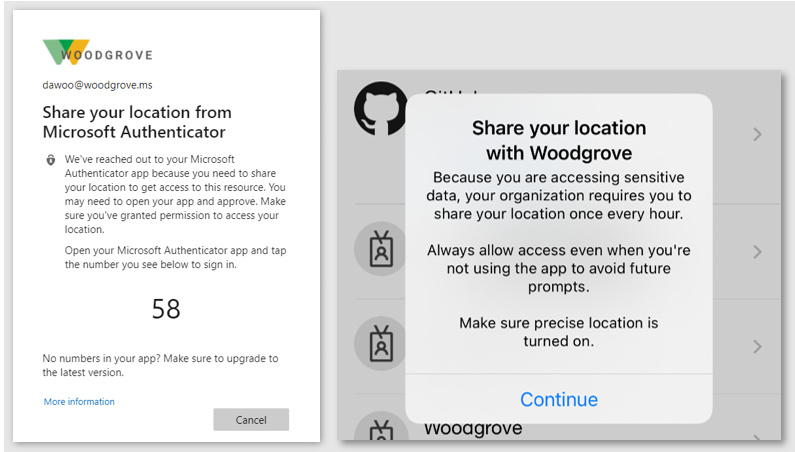
At left, users are asked in the browser to share their location. At right, users are prompted to share their location.
Filters for devices (Public Preview)
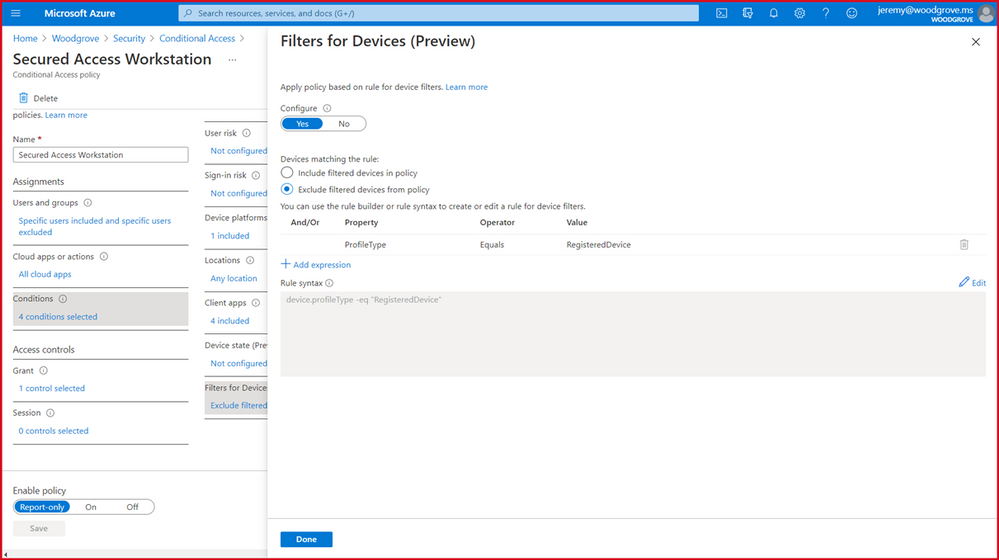
Next, we’re excited to release a powerful new Filters for devices condition. With filters for devices, security admins can enhance protection of their corporate resources to the next level by targeting Conditional Access policies to a set of devices based on device attributes. This capability unlocks a plethora of new scenarios we have envisioned and heard from customers, such as restricting access to privileged resources from privileged access workstations. Additionally, organizations can leverage the device filters condition to secure use of Surface Hubs, Teams phones, Teams meeting rooms, and all sorts of IoT devices. Filters were built with a consistent and familiar rule authoring experience for admins who use Azure AD dynamic device groups or are discovering the new filters capability in Microsoft Endpoint Manager.
In addition to the built-in device properties such as device ID, display name, model, MDM app ID, and more, we’ve provided support for up to 15 additional extension attributes. Using the rule builder, admins can easily build device matching rules using Boolean logic, or they can edit the rule syntax directly to unlock even more sophisticated matching rules. We’re excited to see what scenarios this new condition unlocks for your organization! This feature will be available before end of this month.
Enhanced Conditional Access audit logs with policy changes (Public Preview)
Another important aspect of managing Conditional Access is understanding changes to your policies over time. Policy changes may cause disruptions for your end users, so maintaining a log of changes and enabling admins to revert to previous policy versions is critical. Today, we’re announcing that in addition to showing who made a policy change and when, the audit logs will also contain a modified properties value so that admins have greater visibility into what assignments, conditions, or controls changed. Check it out today!
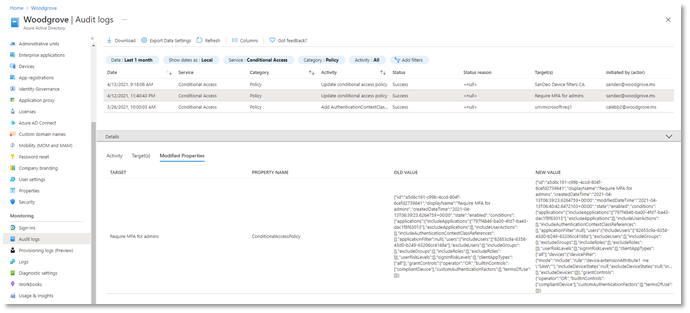
If you want to revert to a previous version of a policy, you can copy the JSON representation of the old version and use the Conditional Access APIs to quickly change the policy back to its previous state. This is just the first step towards giving admins greater back-up and restore capabilities in Conditional Access.
Named locations at scale (General Availability)
We’re also announcing the general availability for IPv6 address support in Conditional Access named locations. We’ve made a bunch of exciting improvements including:
- Added the capability to define IPv6 address ranges, in addition to IPv4
- Increased limit of named locations from 90 to 195
- Increased limit of IP ranges per named location from 1200 to 2000
- Added capabilities to search and sort named locations and filter by location type and trust type
Additionally, to prevent admins from defining problematic named locations, we’ve added additional checks to reduce the chance of misconfiguration:
- Private IP ranges can no longer be configured
- Overly large CIDR masks are prevented (prefix must be from /8 to /32)
As a result of these improvements, admins can define more accurate boundaries for their Conditional Access policies, increasing Conditional Access coverage and reducing misconfigurations and support cases.
Search, sort, and filter policies (General Availability)
We know that as you deploy more Conditional Access policies, managing a growing list of policies can become more difficult. That’s why we’re excited to give admins the ability to search policies by name, and sort and filter policies by state and creation/modified date. Also, as part of General Availability we will be gradually rolling out the feature to Government clouds. Say goodbye to scrolling through a long list of policies!
Azure AD login for Azure VMs (General Availability – Windows, Preview Update – Linux)
Organizations deploying virtual machines (VMs) in the cloud face a common challenge of how to securely manage the accounts and credentials used to login to these VMs. To protect your VMs from being compromised or used in unsanctioned ways, we are excited to announce General Availability of Azure AD login for Azure Windows 10 and Windows Server 2019 VMs. Additionally, we are also announcing an update to preview of Azure AD login for Azure Linux VMs. These features are now available in Azure Global and will be available in Azure Government and China clouds before the end of this month.
With the preview update for Azure Linux VMs, you can use either user or service principal-based Azure AD login with SSH certificate-based authentication for all major Linux distributions. As a result, you don’t need to worry about credential lifecycle management since you no longer need to provision local accounts or SSH keys. And with Azure RBAC, you can authorize who should have access to your VMs and whether they get administrator or standard user permissions.
Using Conditional Access, you can require MFA or managed devices and prevent risky sign-ins to your VMs. Additionally, you can deploy Azure Policies to require Azure AD login if it wasn’t enabled during VM creation. You can also audit existing VMs where Azure AD login isn’t enabled, and track VMs when a non-approved local account is detected on the machine.
We hope that these new Azure AD capabilities in Conditional Access and Azure make it even easier to secure your organization and unlock a new wave of scenarios for your organization.
As always, join the conversation in the Microsoft Tech Community and share your feedback and suggestions with us. We build the best products when we listen to our customers!
Best regards,
Alex Simons (@Alex_A_Simons)
Corporate VP of Program Management
Microsoft Identity Division
Learn more about Microsoft identity:

by Contributed | May 12, 2021 | Technology
This article is contributed. See the original author and article here.
Our team at EDGE Next has been developing with Azure Digital Twins since the platform’s inception and have made the Azure service a core component of our PropTech platform. From energy optimization to employee wellbeing, we’ve continued to innovate on top of Azure Digital Twins to provide our customers with a seamless smart buildings platform that puts sustainability and employment wellbeing front-and-center. We’ve upgraded our platform to take advantage of the latest Azure Digital Twins capabilities – like more flexible modeling and data integration options – that have equipped us to advance our goals of a reduced environmental footprint and increased workforce satisfaction. We’ve distilled some key learnings from our enhancements and we’d like to share our ideas with any team developing with Azure Digital twins – regardless of industry vertical.
The EDGE Next platform
EDGE Next is a PropTech company that was spun-off from EDGE, a real estate developer that shares our goal of connecting smart buildings that are both good for the environment and for the people in them.
Each EDGE project aims to raise the bar even higher to be the leader in the real estate market from a sustainability and wellbeing perspective. The EDGE Next platform provides a seamless way of ingesting massive amounts of IoT data, analyzing the data and providing actionable insights to serve both EDGE branded and non-EDGE branded (brownfield) buildings. EDGE Next currently has 13 buildings deployed, including Scout24, a tenant in the recently completed EDGE Grand Central Berlin building. We also have several pilots running, including with the Dutch Ministry of Foreign Affairs, IKEA and Panasonic.
At the heart of the EDGE Next platform is Azure Digital Twins, the hyperscale cloud IoT service that provides the “modeling backbone” for our platform. We leverage the Digital Twins Definition Language to define all aspects of our environment, from sensors to digital displays. Azure Digital Twins’ live execution environment is where we turn these model definitions into real buildings’ digital twins, which is brought to life by device telemetry. Finally, the latest data from these buildings is pushed to onsite digital signage and accessible via our platform. Azure Digital Twins played a vital role in enabling key capabilities of the EDGE Next platform, like allowing our implementation teams to onboard customer buildings to the platform without support from the EDGE Next development team (Self-Service Onboarding) and to integrate and manage customer devices in a (Bring Your Own Device). These capabilities are crucial to our platform’s onboarding experience and have brought the time it takes to onboard a customer’s building onto the platform down from weeks to just a couple of minutes.
One of the first buildings to use the platform was EDGE Next’s headquarters, EDGE Olympic in Amsterdam, the very first in a new generation of healthy and intelligent buildings. This hyper-modern structure is used as a living lab to help facilitate real scenarios for the team to materialize incubational ideas into concrete offerings. We leverage a host of sensors throughout the building that measure air quality, light intensity, noise levels and occupancy to create transparency around people counting, footfall traffic and social distancing metrics for COVID-19 scenarios.
EDGE Olympic building (Amsterdam, NL)
Data pathways in the platform
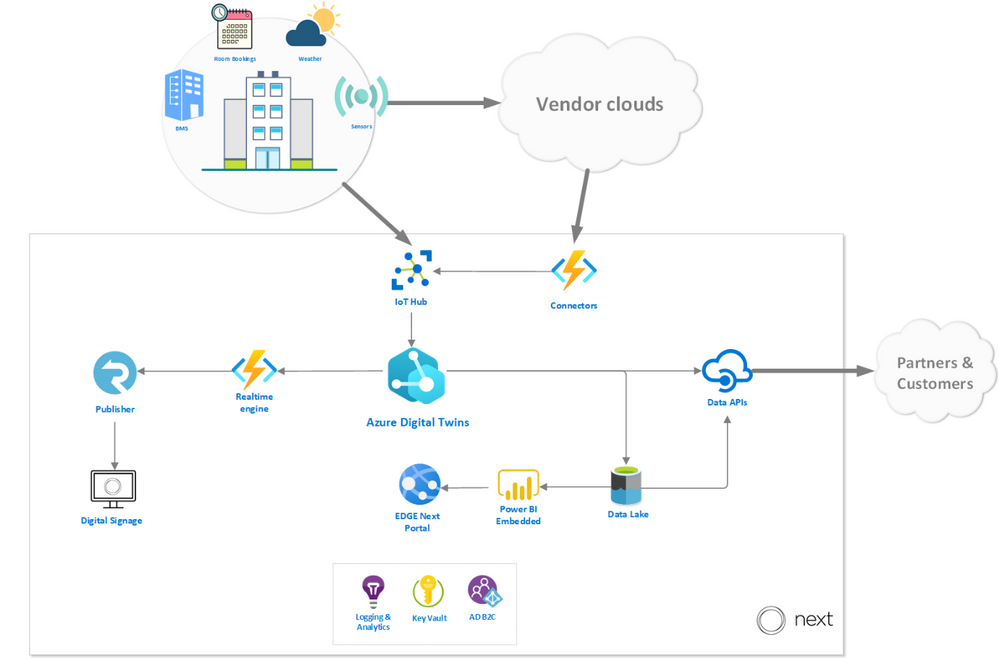
To give you an idea of how our platform works, we walk through the path of the data before and after it reaches Azure Digital Twins. In the diagram below, you can see how Azure Digital twins fits into our platform architecture, with emphasis on the data sources and destinations.
Data sources
The platform enables telemetry ingestion from a collection of IoT Hubs, but also allows messages to flow in from other clouds and APIs (like Azure Maps for outdoor conditions) in inter-cloud and intra-cloud integration scenarios. Given the wide range of different vendor specific APIs that the EDGE Next platform must cater to, our engineering team opted to implement a generic API connector – agnostic to the vendor implementation – and fully rely on a low-code, configuration-driven code base built on top of Azure Functions.
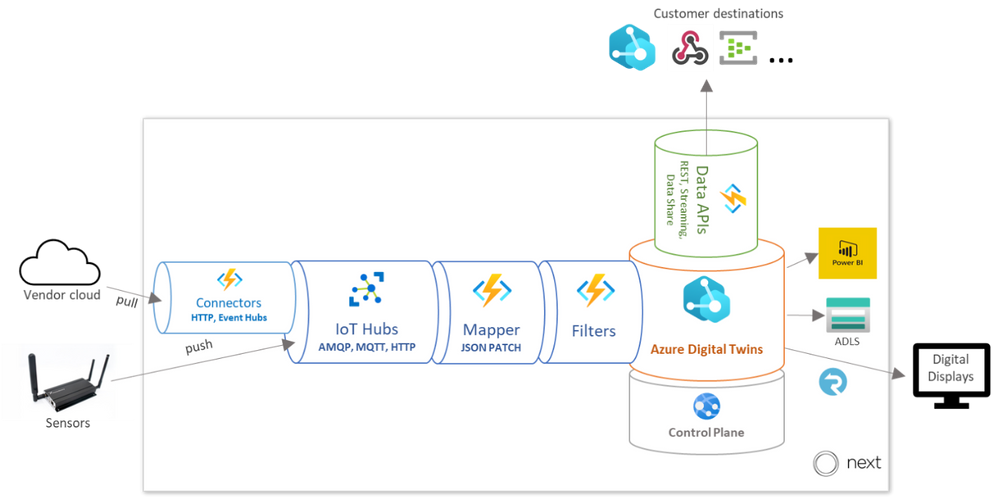
Once the data has been collected using the ingestion mechanisms, it passes through a mapping profile which transforms the raw telemetry messages to known typed messages based on the associated device twins inside the Azure Digital Twins instance. The process of mapping the incoming data is completely driven by low-code JSON Patch configurations, which enables Bring Your Own Device (BYOD) support without additional mapping code logic.
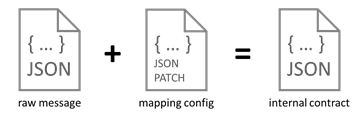
Each message that comes into the ingestion pipeline needs to contain specific fields or it will be rejected. The mapper consults a registry containing all data points in the system and their respective mapping profile configuration to be used for the transformation. The mapper not only transforms the values to the desired internal contract format, but also performs inline unit conversion functions (such as parts per billion to micrograms per cubic meter).
The messages are passed through our Filters stage (detailed below) and finally ingested into Azure Digital Twins.
Data destinations
Once Azure Digital Twins is updated with vendor data and sensor telemetry, the resulting events and twin graph state is accessible via a rich set of APIs that supports and enables multi-channel data delivery. The data is offered in three ways: A web-based portal for visualizations and actionable insights, a digital signage solution for narrowcasting onsite and a set of data APIs to allow our customers to pull their data to integrate with their custom solutions.
EDGE Next portal
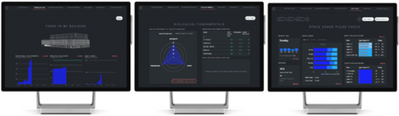
The EDGE Next Portal is where most of our customers go to get actionable insights based on retrospective aggregated data, for example highlighting abnormal spikes in energy usage over the weekends where occupancy is at a minimum or suggest more optimized set-points for the HVAC to optimize energy usage. The portal is built on ASP.NET Core 3.1 and driven by reports and dashboards rendered from Power BI embedded. From the Azure Digital Twins instance, measurements are eventually sent to the Azure Data Lake storage, where a batch process is responsible for populating an enriched data model inside Power BI.
On-site digital signage
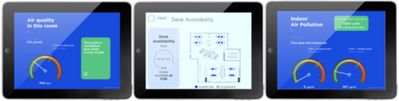
The digital signage solution provides a way to render data collected in rooms and areas in real-time on virtually any digital display. The solution is built with vanilla HTML and JavaScript and can run on any device that supports web pages. The mechanism that drives the delivery of the data, fed from the events generated from the Azure Digital Twins instance, and then uses Azure SignalR to push all the data in real-time to the displays. On our roadmap, we’re very excited to offer a Digital Signage SDK that will allow customers to build their own narrowcast experiences.
External Data APIs
The data APIs that we expose are the primary method for our customers to interact with their data on their terms. The Streaming API is responsible for pushing real-time telemetry to a wide variety of customer destinations (like Web Hook, Event Hub, Service Bus) and is often used to drive their custom solutions and dashboarding. The Data Extract API is used for ad-hoc data extract over a REST interface where customers can define entities in their environment and a timespan to receive a JSON payload with relevant data. Finally, the Data Share API allows customers to specify destination channels to receive bulk data transfers, powered by Azure Data Share.
Learnings from our journey
We’ve honed in on Azure Digital Twins to forward our goals of sustainability and employee well-being as the service offers our solution incredible flexibility. We’ve noted some key learnings in 3 major areas of the Azure Digital Twins development cycle which we hope the developer community can build off.
Optimizing our ontology for queries
To accomplish our goals of only utilizing necessary resources and building a cost-effective platform, we leveraged service metrics in the Azure Portal to monitor and understand our query and API operations usage. We learned that on average, a typical building running in production on the EDGE Next platform generated around two million telemetry messages per day, which resulted in almost sixty million daily API operations.
After assessing our topology at the time, we focused on reworking our digital twin to optimize for simplicity and reducing data usage. We reduced the amount of “hops” (or twin relationships to traverse) required in our most common queries first; JOINs add complexity to queries, so it’s most economical to keep related data fewer “hops” from each other. We also broke the larger twins into smaller, related twins to allow our queries to return only the data we need.
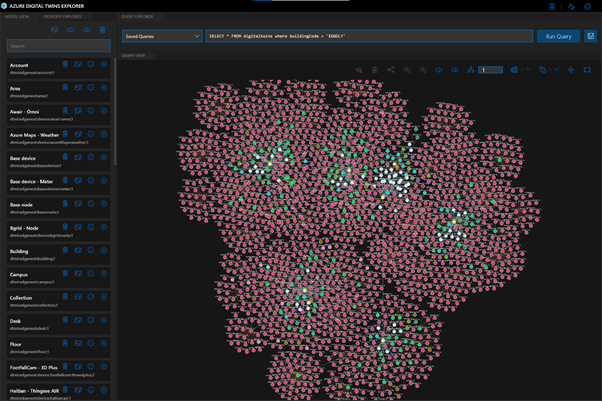
As you can imagine, the ontology design process is a big part of any digital twin solution, and it can be a time-consuming task to develop and maintain your own modeling foundation. To simplify this process, we referenced the open-source DTDL-based smart buildings ontology, based on the RealEstateCore standard, that Azure has released to help developers build on industry standards and best practices for their solutions. The great thing about using a standard framework is the flexibility to pick-and-choose only the components and concepts that are truly required for your solution. For example, we chose to utilize the room, asset and capability models in our ontology, but we haven’t yet implemented valves or fixtures. As our platform grows and requirements evolve, we’ll continue to cherry-pick critical concepts from the RealEstateCore ontology.
Streamlining our compute
At EDGE Next, we take sustainability very seriously. Solutions in the cloud need to be developed with mindfulness for the environment, and our engineers take great pride in the lightweight event-driven architecture that only lights up when needed and seamlessly scales as demand grows. With that said, it is important to pare down the massive amounts of data the buildings on our platform generate to limit unnecessary compute. Below, the diagram depicts how raw telemetry traffic is deliberately reduced through several different stages of the ingestion pipeline before it reaches the Azure Digital Twins instance. These steps are depicted in the “Data sources” diagram above as the Filters stage.
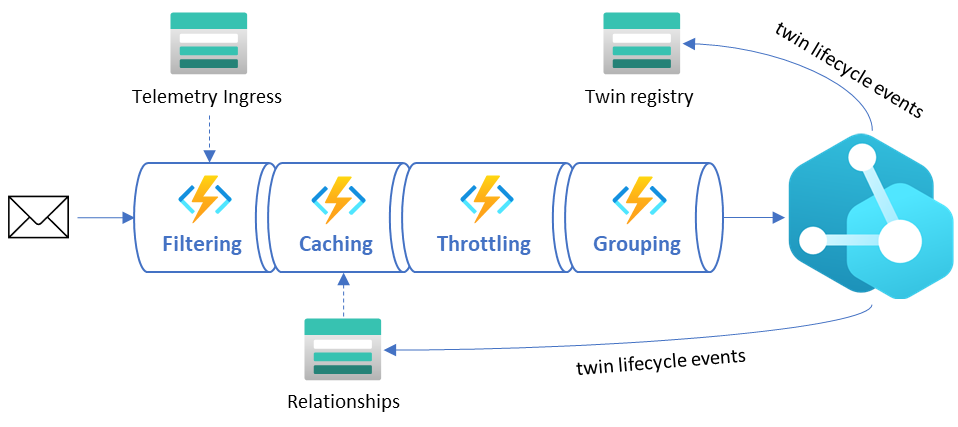
- Filtering – This stage ensures all duplicate messages are rejected and telemetry values within certain deviations are ignored. Due to the nature of the sources transmitting the messages, we do not have control on the throughput or what ends up on the IoT Hub, so we must rely on hashes and timestamps for detecting duplicate values as early in the pipeline as possible. AI-driven deviation filters validate incoming telemetry values against an expected range and drop those that don’t provide impact to current values.
- Caching – This stage includes smart caching mechanisms that reduce unnecessary GET calls to the Azure Digital Twins API by storing common existing relationships. This relationship cache is kept up to date by lifecycle events emitted by the Azure Digital Twins instance.
- Throttling – The throttling mechanism delays ingress logic to avoid spiky workloads by spreading the load out evenly over time. In scenarios where data ingress is delayed, we can see a backlog of unprocessed events that can cause huge activity spikes throughout the system. The throttling mechanism will kick in as a circuit breaker to ease the load and prevent overutilization of resources.
- Grouping – This stage recognizes messages that are targeting the same twin and combining them into minimal resulting API requests to reduce unnecessary updates and load.
Concentrating our query results
The Azure Digital Twins Query Language is used to express an SQL-like query to get live information about the twin graph. When building queries for sustainability and cost-effectiveness, it’s key to minimize the query complexity (quantified by Query Units in the service), which translates to reducing JOINs (query “hops”) and the amount of data the query must sift through. It’s also important to be intentional about how many API operations your request is consuming, meaning you should limit your query responses to only what’s critical for your solution.
A good example of the balance between Query Unit consumption and API Operation response sizes is the retrieval of information across multiple relationships in your twins graph. A scenario that we encountered multiple times during development was the retrieval of a parent with its children. You can write this into a “basic” query that would look like:
SELECT Parent, Child FROM digitaltwins Parent JOIN Child RELATED Parent.hasChild WHERE Parent.$dtId = ‘parent-id’
The “basic” query consumes 26 Query Units and 81 API Operations.
When using the response data, we discovered that retrieving all properties on the parent was unnecessary, which introduced excessive API consumption. In many scenarios it was better to execute two separate queries that projected only the properties that were required. This resulted in substantially fewer API Operations consumed, with a slight increase in Query Unit consumption. Our “optimized” query looks like:
SELECT valueA, valueB, valueC FROM digitaltins WHERE $dtId = ‘parent-id’ AND IS_PRIMITIVE(valueA) AND IS_PRIMITIVE(valueB) AND IS_PRIMITIVE(valueC)
The “optimized” query resulted in 4 Query Units and 1 API Operation.Implementing this operation resulted in an approximately 83% decrease in Query Units and 98% decrease in API Operations. In one of our processes, this change introduced an overall consumption reduction of 45%.
Moreover, you may be able to remove some queries altogether – Azure Digital Twins allows you to listen to lifecycle events and propagate resulting changes throughout your twins graph. If you capture the relevant lifecycle events, which carry information like updated properties and relationships in the payload, you can gather and react to the latest twin data without any queries at all. Our architecture that supports this optimization relies heavily on Azure Digital Twins’ eventing mechanism. Lookup caches in different forms and structures (like parent/child relationships, contextual metadata, etc.) are kept up to date by these events, allowing us to reduce API Operation consumption in the service.
EDGE Next + Azure Digital Twins
Azure Digital Twins gives us a head start in value proposition and time to market than our competitors. We’re able to deliver our customers with a seamless platform that offers quicker building onboarding times. Moreover, it offers us immense value by enabling development accelerators like our low-code ingestion pipeline, and endless integration possibilities with the API surface.
We are expecting to see a huge influx of building onboardings in the near future as our platform is already starting to gain massive commercial traction within the real estate and PropTech industries. Our platform is also constantly evolving with new features, and we look forward to leveraging cutting-edge Azure offerings like Azure Maps, Time Series Insights, IoT Hub and Azure Data Explorer to amplify the value proposition of our IoT Platform.
Learn more
Read about EDGE’s vital role in digital real estate
by Contributed | May 12, 2021 | Technology
This article is contributed. See the original author and article here.
Microsoft partners like contexxt.ai, Qunifi, and CoreStack deliver transact-capable offers, which allow you to purchase directly from Azure Marketplace. Learn about these offers below:
|
C.AI Adoption Bot: Cai, a chatbot from contexxt.ai, answers employees’ questions and helps them more effectively utilize the features of Microsoft Teams. Cai’s algorithm will predict important tips to share and deliver only relevant content based on individual skills and learning preferences. With Cai, businesses can drive Teams usage and reduce training costs. This app is available in German.
|
 |
Call2Teams for PBX: Qunifi’s Call2Teams global gateway provides a simple link between your existing PBX and Microsoft Teams. Teams users can make and receive calls just as they would on their desk phone. No hardware or software is required, and the cloud service can be set up in minutes. Bring all users under one platform by using Teams for collaboration, messaging, and voice.
Fuze Direct Routing: Use enterprise-grade calling services in Microsoft Teams with this offer from Qunifi. Customers can combine the native dial pad and calling features of Teams with Fuze global voice architecture, enabling Teams calling across all devices, including Teams clients on mobile devices. This integration does not require hardware or software deployment on any device.
|
 |
CoreStack Cloud Compliance and Governance: CoreStack, an AI-powered solution, governs operations, security, cost, access, and resources across multiple cloud platforms, empowering enterprises to rapidly achieve continuous and autonomous cloud governance at scale. Run lean and efficient cloud operations while achieving high availability and optimal performance.
|
|
by Scott Muniz | May 12, 2021 | Security
This article was originally posted by the FTC. See the original article here.
 Unwanted calls are annoying. They can feel like a constant interruption — and many are from scammers. Unfortunately, technology makes it easy for scammers to make millions of calls a day. So this week, as part of Older Americans Month, we’re talking about how to block unwanted calls — for yourself, and for your friends and family. To get started, check out this video:

Some of the most common unwanted calls the FTC sees currently include pretend Social Security Administration, Medicare, and IRS calls, fake Amazon or Apple Computer support calls, and fake auto warranty and credit card calls.
But no matter what type of unwanted calls you get (and everyone is getting them) your best defense is a good offense. Here are three universal truths to live by:
Visit FTC.gov/calls to learn to block calls on your cell phone and home phone.
The FTC continues to go after the companies and scammers behind these calls, so please report unwanted calls at donotcall.gov. If you’ve lost money to a scam call, tell us at ReportFraud.ftc.gov. Your reports help us take action against scammers and illegal robocallers — just like we did in Operation Call It Quits. In this law enforcement sweep, the FTC and its state and federal partners brought 94 actions against illegal robocallers. But there’s more: we also take the phone numbers you report and release them publicly each business day. That helps phone carriers and other partners that are working on call-blocking and call-labeling solutions.
So share these videos and this call blocking news with your friends and family. Sharing will help protect someone you care about from a scam — and it’ll help them get fewer unwanted calls, too!
Brought to you by Dr. Ware, Microsoft Office 365 Silver Partner, Charleston SC.


Recent Comments