Applications
|
 |
Advanced Shelf Intelligence for Retail Inventory: Pensa’s retail shelf intelligence data service delivers real-time data and reports that show an entire product category by brand, SKU, day, and store so you can effectively manage your store shelves by reducing stockouts and optimizing assortments.
|
 |
AIMMO Enterprise Data Annotation Platform: The AIMMO Enterprise Data Annotation Platform is a cloud-based solution for managing self-service data labeling projects for your AI models. Available in English and Korean, the platform includes other useful tools like workflow management and customizable data extraction.
|
 |
AlmaLinux 8 Latest: Cognosys offers this preconfigured image of AlmaLinux OS 8 on Microsoft Azure. AlmaLinux OS is a stable Linux distribution providing an enterprise-grade server operating system you can rely on for running critical workloads.
|
 |
AlmaLinux 8 Minimal: Cognosys offers this preconfigured image of a minimal installation of AlmaLinux OS 8 on Microsoft Azure. AlmaLinux OS is a stable Linux distribution providing an enterprise-grade server operating system you can rely on for running critical workloads.
|
 |
AlmaLinux 8.3: Cognosys offers this preconfigured image of AlmaLinux OS 8.3 on Microsoft Azure. AlmaLinux OS is a stable Linux distribution providing an enterprise-grade server operating system you can rely on for running critical workloads.
|
 |
Circulus: Circulus provide small and midsize businesses with the tools to harness the power and convenience of automated accounts payable workflows. Streamline processes, enhance data quality, tighten accounts payable controls, and consolidate bill management into a single interface with Circulus.
|
 |
edcom Vacation Manager: Vacation Manager is an intuitive web application that provides automated leave and absence management for organizations using Microsoft 365. Available in English and German, Vacation Manager features an integrated calendar that displays an overview of all vacations, absences, and substitutions.
|
 |
Effizency Sales: Accelerate your B2B energy services sales with Effizency’s platform on Microsoft Azure. Rapidly generate accurate energy solution proposals, provide flexible investment options to clients, close deals remotely, and reach more clients interested in reducing energy costs.
|
 |
G-Image Digital Asset Management (DAM): G-Image is a digital asset management (DAM) solution designed for companies that manage large streams of images and need to archive, categorize, and retrieve them in a simple, fast, and customizable manner.
|
 |
Glance for Financial Services: Glance for Financial Services allows bankers to see a customer’s screen and guide them through simple or complex digital transactions. Glance is an embedded service that can be added to an existing website or app and is engineered for enterprise security and privacy compliance.
|
 |
GUI on Ubuntu 20.04: This preconfigured image from Lotus Beta Analytics provides the XFCE desktop environment (GUI) on Ubuntu 20.04. The XFCE desktop environment enhances users’ Linux experience with an intuitive way to operate various Linux functions and applications.
|
 |
HR Communications Plugin for Microsoft 365: Velaku’s HR communications plugin for Microsoft 365 makes engaging employees fast, easy, and efficient across all Microsoft 365 communication channels. The full-service enterprise solution features cost-efficient volume-based pricing that’s perfect for companies of all sizes.
|
 |
iBinder foundation: Designed for all stakeholders in the construction industry, iBinder is a scalable, flexible, and secure information management platform hosted on Microsoft Azure. Drive collaboration across teams and manage all data with one end-to-end solution.
|
 |
Icertis Risk Management App: Mitigate business risk through proactive assessment, discovery, and continuous monitoring with the ICI Risk Management application from Icertis. The Risk Management application conforms to any risk model to reduce the impact of operational, financial, and reputational risk.
|
 |
Immuta Automated Data Governance: Immuta is a modern data access and control solution for Microsoft Azure data ecosystems. Empower your data engineering and DataOps teams to improve productivity, increase security, and unlock more data by automating cloud data access and privacy controls.
|
 |
Intelligent Data Analytics Platform: ADDO AI’s highly scalable, AI-enabled big data platform delivers a centralized data management infrastructure. Enable efficient decision-making for business users, data accessibility for downstream digital applications, and support for data science and machine learning workloads.
|
 |
Interoperable Backbone: Clinical Data Repository: Extend your facility’s hospital information system and optimize the flow of information between requesting systems and dispensing systems with 4WARD’s interoperable medical device platform on Microsoft Azure. This application is available only in Italian.
|
 |
LoopUp Cloud Telephony – Direct Routing: LoopUp Cloud Telephony connects Microsoft Phone System to the public switched telephone network (PSTN) using Direct Routing over a premium voice network. This allows users to make and receive external calls. LoopUp is available as a native app for Microsoft Teams or as a standalone solution.
|
 |
Maxis i.StartupBi SaaS: Maxis i.StartupBi is a hybrid cloud dashboard that provides a single pane of glass to view the operations of your organization via Microsoft Power BI. This customizable offer is available as a monthly or annual subscription.
|
 |
Medical Speech to Text (STT): Sayint Speech to Text for the healthcare industry automatically converts audio into text, providing automated transcriptions of doctor-narrated prescriptions, discharge summaries, and other conversations related to the medical domain.
|
 |
Multi-cloud Data Services for Dell EMC PowerScale: Faction’s Multi-cloud Data Services for Dell EMC PowerScale enable you to connect your PowerScale file scale-out storage directly to public clouds, including Microsoft Azure. Gain an on-demand, highly available cloud consumption model for compute workloads and storage.
|
 |
nDivision Azure Migrate project template: The project template from nDivision uses Microsoft Azure Migrate to walk users through creating an Azure Migrate project in a customer’s Azure subscription. Azure Migrate is a set of tools and services for discovery and migration of servers from on-premises to Azure or from Azure to Azure.
|
 |
Pilbara Insights for Higher Education: Pilbara provides an outsourced service including designing, building, and maintaining an activity-based costing (ABC) model for your higher education institution. ABC uncovers the mix of human, physical, and financial resources used by your institution to maximize mission attainment.
|
 |
Redis Sentinel Exporter Container Image: Bitnami provides this preconfigured container image of Redis Sentinel Exporter, which gathers Redis Sentinel statistics and exports them via HTTP for Prometheus consumption.
|
 |
Rubrik Cloud Data Management: Rubrik takes advantage of the flexibility and cost-effectiveness of Microsoft Azure by consolidating disparate hardware and software components into a single software platform for complete enterprise data management. It helps recover up to 80 percent of admin time with modernized data protection.
|
 |
SAS 9.4 SaaS: SAS 9 includes tools that enable users to access nearly any data source, analyze the data, and transform it into meaningful and valuable visualizations that help decision-makers gain a quick understanding of critical issues.
|
 |
Semantix API Management: Semantix API Management is an integration platform with a powerful framework that allows you to create API gateways simply and quickly. This application is available only in Portuguese.
|
 |
Semantix Integration Platform: Available only in Portuguese, Semantix Integration Platform empowers users to develop integrations with little or no coding. Create your own components or use over 200 ready-made components from CRM systems, e-commerce platforms, ERP systems, and more.
|
 |
Semantix Intelligent Chat: Semantix Intelligent Chat is a comprehensive customer engagement solution that uses artificial intelligence to automate service. This application is available only in Portuguese.
|
 |
Semantix Live Shopping: Semantix allows sellers to interact with customers via live video streaming and answer any product questions in real time. Customers can then purchase a product directly through Semantix’s built-in payment system without leaving the site. This application is available only in Portuguese.
|
 |
SNL Banker: SNL Banker is an intuitive reporting solution offering community banks and credit unions streamlined tools that provide data insights to inform daily decision-making. Get the essential intelligence you need to assess daily performance metrics, identify risk, analyze opportunities, and more.
|
 |
Symfony Container Image: Bitnami provides this preconfigured container image of Symfony, an open-source PHP framework for web applications.
|
 |
TIM InstantML for Alteryx – Starter Pack: TIM InstantML for Alteryx Starter Pack delivers a unique combination of two technologies to enable those who work with time series data to benefit from machine learning for predictive and prescriptive scenarios.
|
 |
TIM InstantML for Excel – Starter Pack: The TIM Forecasting add-in for Microsoft Excel supports TIM’s RTInstantML technology, enabling users to get direct forecasts based on the data in their Excel files.
|
 |
TIM InstantML for Qlik – Starter Pack: This TIM server-side extension enables Qlik Sense users to benefit from TIM’s capabilities without leaving the familiar Qlik Sense environment. The Qlik Sense TIM Starter Pack is your gateway to augmented machine learning for deeper insights into your data.
|
 |
Wavefront Adapter for Istio Container Image: Bitnami offers this preconfigured container image of Wavefront Adapter for Istio. Wavefront Adapter for Istio is a lightweight tool written in Go that exposes Istio metrics to Wavefront and supports Istio v1.4+ and Kubernetes v1.15+.
|
 |
Windows Server 2019 with IIS: Belinda offers this preconfigured image of Windows Server 2019 with Internet Information Services (IIS). This version of Windows Server 2019 offers improved performance and is ideal for customers looking to deploy a pre-installed IIS for low or heavy-traffic websites and web applications.
|
 |
YOSI: Yoshi is a Microsoft Azure-based solution that provides a virtual assistant who delivers a complete customer service experience for both internal and external users in your organization.
|
Consulting services
|
 |
AI and ML – 6-Week Proof of Concept: In this six-week engagement, Abersoft will assess your organization’s data requirements and identify how machine learning and artificial intelligence can help improve your data pipeline. This proof of concept includes a working prototype using Microsoft Azure Machine Learning and Azure Cognitive Services.
|
 |
App Modernization Quick Start: 2-Week Assessment: Cloocus’s two-week assessment is designed to help customers understand their existing architecture and the cost associated with running their IT environment. It will also provide a detailed plan on how to make the most cost-effective transition to Azure.
|
 |
Azure Backup Plus Services: 1-Month Implementation: Azure Backup Plus Services is AccTech Systems’ cloud-based service that uses Microsoft Azure to back up, protect, and restore your data. This one-month implementation will make it easy to define backup policies and protect a wide range of enterprise workloads.
|
 |
Azure Backup Services: 1-Month Implementation: In this one-month implementation AccTech Systems will replace existing onsite or off-site backups with a cloud-based solution that is reliable, secure, and cost-effective.
|
 |
Azure Synapse Migration – 2 Hour Workshop: Hexaware’s two-hour workshop offers cost-effective ways to re-platform your entire data warehouse landscape to Microsoft Azure Synapse Analytics in a secure and timely manner. Ensure your data is encrypted at rest as well as in transit.
|
 |
Azure Transformation Program: 5-Week Implementation: This six-week implementation from Heroes B.V. will help you define the right cloud-based strategy for every application in your portfolio —no matter what your industry is — and guide you through the execution in five steps.
|
 |
Building a Data Analytics Foundation: 10-Week Implementation: Available only in Japanese, Albert’s implementation will help your organization build a data analysis infrastructure on Microsoft Azure. Deliverables include identifying issues related to data analysis, a data analysis platform design document, and a manual for utilizing the platform.
|
 |
Cloocus – DB Modernization: 3-Week Assessment: Cloocus’s three-week assessment is designed to help customers make the most cost-effective migration of their SQL database environment to Microsoft Azure with almost no downtime while maximizing performance and security.
|
 |
Cloud Discovery and Strategy – 1-Week Briefing: In this free one-week briefing Kainos will provide an actionable cloud adoption readiness assessment aligned with your business needs. This process will include a high-level strategy for migrating to Microsoft Azure.
|
 |
Cloud Insight as a Service – 2-Hour Proof of Concept: Telindus’ proof of concept provides an overview of the current state and the potential improvement areas of your Microsoft Azure infrastructure. The subscription-based model allows you to purchase the full Cloud Insight Service, which implements the improvements outlined in the proof of concept.
|
 |
Cloud Managed Service: Metanet TPlatform offers managed services that safely and reliably monitor the health of your Microsoft Azure environment. Available only in Korean, Metanet TPlatform’s services are tailored to your organization’s needs.
|
 |
Cloud Native Modernization – 1-Week Briefing: Kainos’ architecture, development, and operations technologists will help you embrace cloud-native and Microsoft Azure PaaS services to modernize existing legacy applications. Deliver enhanced scalability, reliability, cost effectiveness, performance, and security with Kainos and Azure.
|
 |
Cloud Security: 1-Month Assessment: This Microsoft Azure Cloud Security Assessment from eacs delivers the analysis and visibility you need to detect, respond to, and prevent security and compliance gaps in your Azure environment. Deliverables include clear, actionable recommendations to improve your cloud security posture.
|
 |
Data Architecture Modernization: 6-Week Assessment: DataArt’s modernization approach for Microsoft Azure includes Azure Data Lake Storage, Azure Synapse Analytics, Azure Data Factory, Azure SQL Server, and more. Evolve an insight-driven organization through data management and agile business intelligence systems and practices.
|
 |
Datacenter Migration to Azure Cloud: IF-Tech provides analysis and consulting services for migrating your datacenter infrastructure to Microsoft Azure. Benefit from state-of-the-art Azure services and facilitate your organization’s cloud journey. This offer is available only in German.
|
 |
Datacenter Migration – 4 to 8 Week Implementation: Officeline’s Datacenter Migration implementation helps your organization execute its cloud journey by assessing your environment and requirements, migrating workloads to Microsoft Azure, optimizing your infrastructure, and securing and managing your Azure environment.
|
 |
Desktop as a Service – 2-Week Proof of Concept: In this proof of concept, Metsys will deploy an operational Windows Virtual Desktop environment for Windows 10 according to your organization’s governance, security, and compliance requirements. This service is available only in French.
|
 |
Digital Clinical Care: 10-Week Implementation: Persistent Systems offers this 10-week engagement enabling you to implement a digital clinical care (DCC) experience built on Microsoft Azure Cloud for Healthcare. Leverage software-driven recommendations for patient care and improve healthcare outcomes across your organization.
|
 |
Dynamics Integration using Azure: 2-Day Workshop: Mazars’ two-day workshop shows you how Microsoft Azure services deliver enterprise-grade integration solutions that link your Microsoft Dynamics 365 back-office instance and your critical line of business systems.
|
 |
Facial Recognition System: 6-Week Implementation: Synnex will implement a facial recognition system combining IoT and AI services and built on Microsoft Azure. Enable your company to better manage staff attendance using sensors, cameras, monitors, and other devices with results displayed in Microsoft Power BI for further analysis.
|
 |
HR Chat Bot: 8-Week Implementation: Ulteam will develop and implement an HR chatbot tailored to your business needs and based on Microsoft Azure Bot Services and Azure Cognitive Services. This service is available only in Russian.
|
 |
Infra Migration on Azure: 4-Week Implementation: Megazone Cloud will work with your stakeholders to develop and implement a systematic plan for migrating your current IT infrastructure to Microsoft Azure. This service is available only in Korean.
|
 |
Insight Accelerator: 30-Day Implementation: Unify Consulting’s Insight Accelerator is an artificial intelligence solution that reduces the barriers to entry for document research and analysis. Implement Insight Accelerator and enable your organization to handle the three Vs of data management: volume, velocity, and variety.
|
 |
Kainos – Evolve EMR on Azure – 1-Week Briefing: Provided as a fully managed service on Microsoft Azure, Evolve will deliver a unified digital care record to enable seamless clinical workflows for your healthcare organization. Leverage secure, audited storage and management of patient documentation with digital workflows and electronic forms.
|
 |
Kubernetes: 5-Day Proof of Concept: Container technologies such as Kubernetes have become essential in application modernization journeys. In this five-day proof of concept, Inetum-Realdolmen will set up and configure Azure Kubernetes Service (AKS), deploy a sample application, and demonstrate the automated scaling of AKS.
|
 |
Managed Security Operations Centre (SOC) Briefing: In this three-hour briefing call Risual’s managed Security Operation Center team will cover how they can deliver a 24×7 service that detects and responds to cybersecurity threats in your cloud or onsite environment.
|
 |
Modern Data Warehouse – Pilot Implementation: BI Applications offers the benefits of scaling your Microsoft Power BI solutions with a modern and analytical data warehouse pilot implementation. This service is available only in Spanish.
|
 |
Smart Buildings: 4-Week Implementation: Persistent Systems’ four-week implementation provides your organization with a roadmap to convert its existing structures into “smart spaces” with the use of Microsoft Azure IoT.
|
 |
Smart Data Platform: 10-Day Implementation: Improve relevancy, adoption, and user satisfaction of your data solutions in this 10-day implementation from Macaw. Deliverables include real-time machine learning, reliable predictions, and actionable insights based on a pay-per-use model.
|
 |
Windows Virtual Desktop Consulting Service: 4-Week Implementation: Customize your Windows Virtual Desktop experience with Daoudata’s four-week implementation service. This offering includes planning, cost optimization, and proof of concept aligned with your requirements. This service is available only in Korean.
|
 |
Windows Virtual Desktop: 1-Day Workshop: Data Market Bilgi Hizmetleri offers a one-day Windows Virtual Desktop workshop that guides you through different desktop virtualization scenarios and helps you pick the one that is best for your organization.
|
 |
Windows Virtual Desktop: 2-Week Proof of Concept: Learn how you can eliminate hardware constraints and increase agility with Compunet’s Windows Virtual Desktop two-week proof of concept. This scalable, turnkey solution meets the current and future needs of today’s virtual business environment.
|

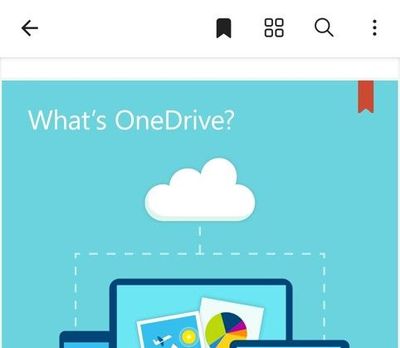
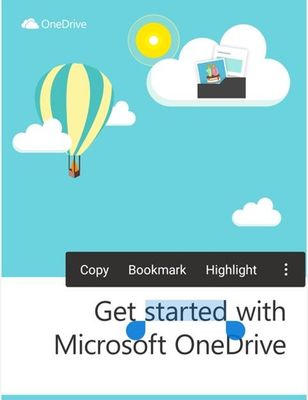 Press anywhere on the PDF for bookmark option
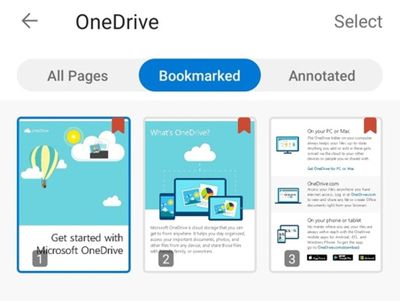 Access bookmarked pages in the thumbnail view
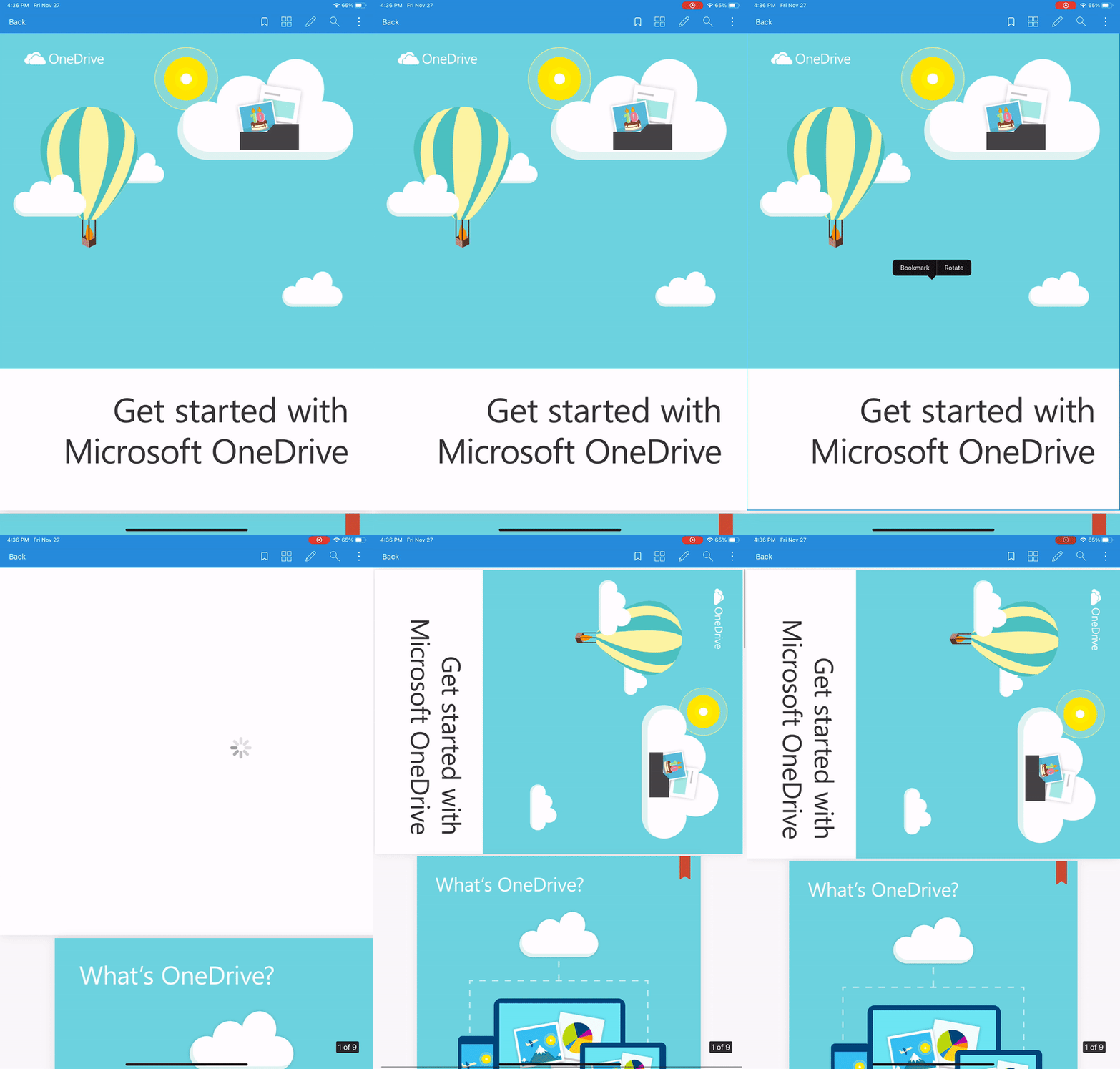 Rotate PDFs on iOS and Android






Recent Comments