by Contributed | May 19, 2021 | Technology
This article is contributed. See the original author and article here.
When a race that Chris Dinnel had been training for was canceled in 2020, he used the time for a different kind of training and earned the first of three Microsoft Certifications. Not long after, the effort paid off in a new job more closely aligned to his career goals.
We recently spoke with Dinnel, now Dynamics 365 Administrator/IT Technician at SBS CyberSecurity, to find out more about how preparing for and earning certifications helped his career and how he worked with the exam prep content on Microsoft Learn.
“Let’s see what happens!”
As a system administrator with a cybersecurity background, Dinnel was looking for something new. “My interest was shifting more to cloud infrastructure,” he explains. Dynamics 365 caught his eye when he researched it for a possible project at the company where he previously worked. Even though the project didn’t pan out, his interest remained.
Around this time, his summer vacation plans fell through—like so many plans in 2020. Instead of competing in a challenging physical endurance race, he used the time off to challenge himself mentally and began studying for the Microsoft Certified: Azure Administrator Associate certification, which required that he pass Exam AZ-104.
He studied the course content on Microsoft Learn. “There’s a ton of valuable materials there, and it’s free. I told myself, ‘Let’s see what happens!’”
To stay on track, he used the lure of certification. He spent a few months studying the Azure Administrator coursework before taking—and passing—the exam. When he saw that this material was a prerequisite for Microsoft Certified DevOps Engineer Expert certification (Exam AZ-400), he decided to study that next and see if he could earn another certification.
“I just studied hard and kept asking myself, ‘Is this something I want to get into?’” The exam prep became a way of exploring career paths and assessing his next steps as he looked for a new job. “Along the way, I realized that I didn’t want to go back to the type of programming I used to do,” he notes.
“If there’s an opportunity, I’m open!”
When Microsoft sponsored a free Virtual Training Day event for Microsoft Certified: Dynamics 365 Fundamentals certification (Exam MB-901), Dinnel signed up. These types of events give participants the opportunity to expand their skill sets and to connect with Microsoft experts, which he did.
“Once I got into Dynamics 365 fundamentals, I was really impressed with the quality of the training and how engaging the content was,” he explains. “It sparked this new interest in the whole concept of the ‘dataverse.’”
Dinnel was so impressed with the Virtual Training Day event for Dynamics 365 that he posted about it on LinkedIn, praising the instructor, Microsoft Technical Trainer Chelsea Lee.
Lee noticed the post and replied, as did an old programming friend of his. The friend wondered how interested Dinnel was in Dynamics 365, because it just so happened that his company wanted to add an in-house Dynamics 365 administrator to its workforce.
“I said, ‘That sounds like a great pivot,’” Dinnel remembers. “I said, ‘If there’s an opportunity, I’m open!’” After a round of interviews, he landed the job—just a few months after starting his self-directed learning odyssey.
“A very good way of presenting the content in a concise, down-to-earth way”
Microsoft started Virtual Training Days in 2020 to provide a free resource to people who wanted to know more about Microsoft products, like Dynamics 365. The fundamentals event is two half-days of training that prepare the participants for certification exams.
Dinnel mentioned the convenience of the half-day programs. “The scheduling made it easy to get time off, rather than a whole day where you’re completely unavailable.”
He points out that not only did the format work well, but also the quality of the training was impressive. “Chelsea was very engaging, and she had a very good way of presenting the content in a concise, down-to-earth way that also was easily understandable in real-world terms. That’s what mattered to me.”
Next year, Microsoft plans to roll out more Virtual Training Days to include additional Dynamics 365 technologies.
Virtual Training Days are free to all participants. Microsoft creates the content, and experienced technical trainers like Lee teach the classes.
In addition to the two-day fundamentals trainings, five-day instructor-led programs are available, based on organizational roles, such as administrator, system architect, and developer. These role-based certifications guide participants along a learning path specific to the role they have or aspire to.
In addition, Microsoft Learning Partners can help individuals and organizations meet their training and development goals. Learning Partners are expert consultants that can customize a program uniquely suited to individual and group needs. Many offer hands-on labs, a mix of self-paced and classroom training, custom content, role-based learning paths, exam and certification prep, and more.
“One of the most valuable things I’ve learned so far”
The Dynamics 365 fundamentals training gave Dinnel more insight into relational database structures—something he hadn’t studied in the past. “I’m not a database administrator, but technically, that’s been one of the most valuable things I’ve learned so far,” he explains. “Just drawing the lines between tables, getting exposure to different aspects of data structures—I’m really enjoying that.”
“A great way to get exposed to technology and learn new things”
Dinnel may have missed that race last summer, but he came out ahead anyway with three Microsoft Certifications that led to a better paying position as a Dynamics 365 system administrator. He spent about two months studying before he earned his first certification. Within six months, he had a new job that he loves.
“When I started interviewing, I had a gap in my résumé in hands-on experience with different technologies,” he explains. “Ultimately the certifications were the foundation on which I could build practical experience.”
When asked to offer advice to others looking to move in a new direction, Dinnel notes that there’s no substitute for hands-on experience. “But certification is a great way to show people that you can take initiative and communicate that kind of abstract concept, like self-motivation, that is otherwise hard to show on a résumé.”
Want to pursue your own learning journey in Dynamics? Check out other Dynamics 365 certifications. As Dinnel points out, “The majority of employers know that the skills will have to be taught on the job, regardless of the amount of training. But the certifications are a great way to get exposed to technology and learn new things.”
by Contributed | May 19, 2021 | Technology
This article is contributed. See the original author and article here.
Azure Arc and the Azure control plane enables Security Engineers to take care of Cloud Governance and make sure that their hybrid and multi cloud environment are configured in a secure and compliant state.
In this blog post, we are going to have a look at Azure Arc for Security Engineers. Azure Arc allows you to extend Azure management and Azure services to anywhere. Meaning that you can manage and govern resources running across hybrid and multi cloud environments, and bring services such as Azure SQL Database and Azure PostgreSQL Hyperscale to your on-premise datacenter, edge location, or other cloud providers. Since Azure Arc can help in many different scenarios. I wanted to summarize how Security Engineers, IT Administrators, IT Operators can take advantage of Azure Arc.
Azure Arc
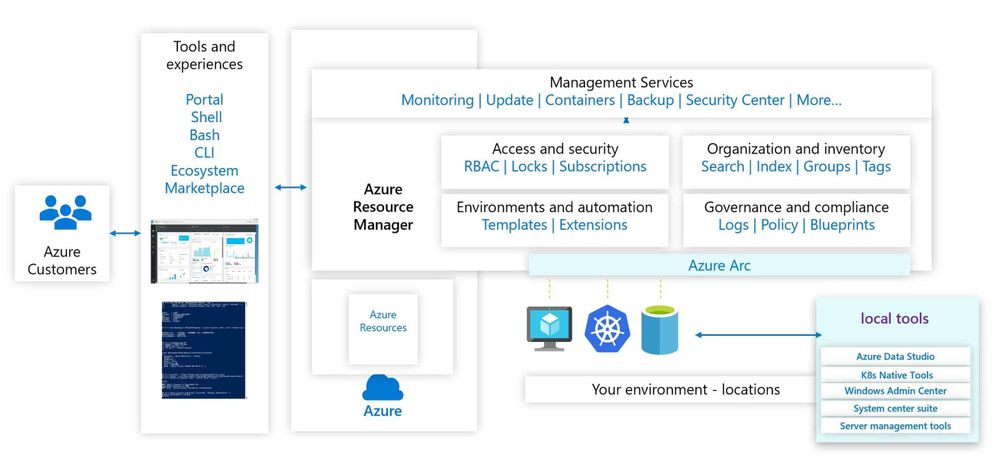
Azure Arc simplifies governance and management by delivering a consistent multi-cloud and on-premises management platform. Azure Arc enables you to manage your entire environment, with a single pane of glass, by projecting your existing resources into Azure Resource Manager. You can now manage virtual machines, Kubernetes clusters, and databases as if they are running in Azure. Regardless of where they live, you can use familiar Azure services and management capabilities. Azure Arc enables you to continue using traditional ITOps, while introducing DevOps practices to support new cloud-native patterns in your environment.
Azure Arc Management Overview
This provides you with a single control plane for your hybrid and multicloud environment.
Azure Arc for Security Engineers
Let’s have a look at some key Azure Arc scenarios for Security Engineers.
Use the Azure Portal to gain central visibility
In hybrid and multicloud environments, it can be difficult for Security Engineers to get a central view of all the resources they need to manage. Some of these resources are running in Azure, some on-premises, at branch offices, or even at other cloud providers. By connecting resources to the Azure Resource Manager using Azure Arc, Security Engineers can get central visibility of a wide range of resources including Windows and Linux servers, SQL server, Kubernetes clusters, and Azure services running in Azure and outside of Azure.
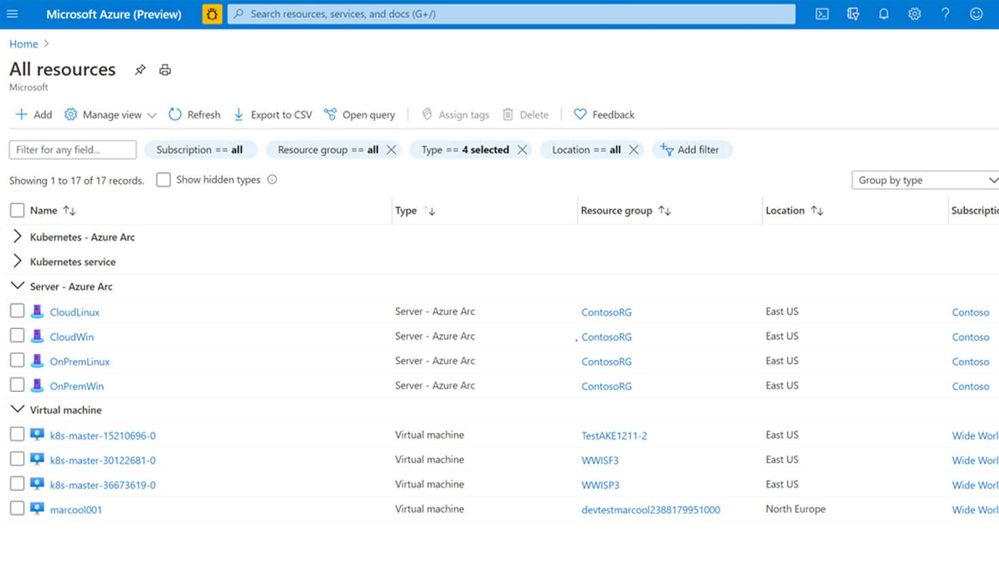 Azure Arc and Azure resources in the Azure Portal
Organization and Inventory
The single control plane using Azure Resource Manager lets you organize and inventory assets through a variety of Azure scopes, such as management groups, subscriptions, resource groups, and tags.
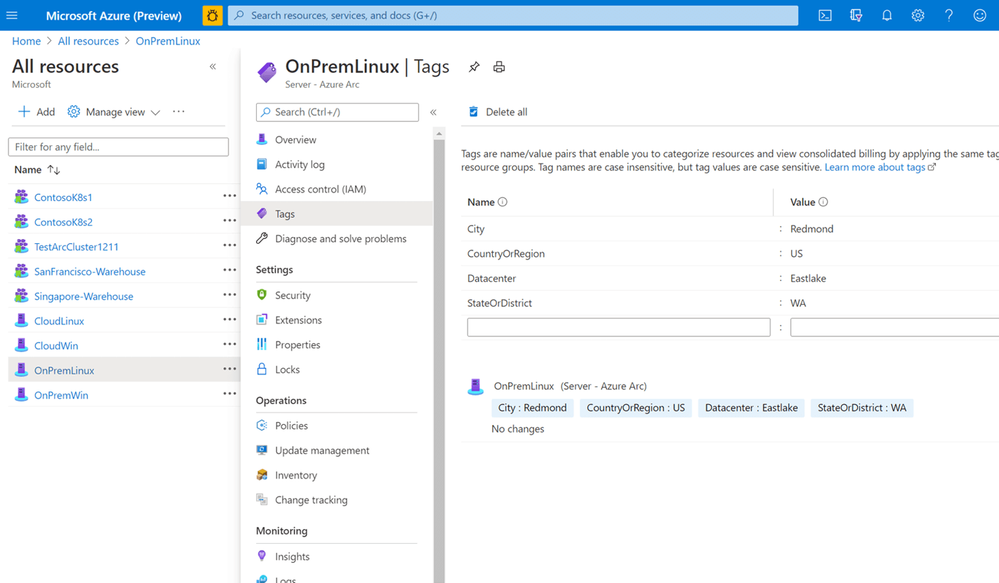 Azure Arc Tagging
Azure Resource Graph
Establish central visibility in the Azure portal and enable multi-environment search with Azure Resource Graph. This allows you to run queries against the Azure resource graph and provide you with a centralized view of all your resources running in Azure and outside of Azure.
Manage Access
As a Security Engineer, you want to make sure that only people who need to have access can access to these systems. You can delegate access and manage security policies for resources using role-based access control (RBAC) in Azure. With Azure Arc enabled servers, we are seeing customers removing the local access for administrators and only provide them access to the system in the Azure portal using Azure Arc and Azure Management services. If you run in multiple environments and tenants, Azure Arc also integrated perfectly in Azure Lighthouse. Azure Lighthouse is especially interesting for managed services providers.
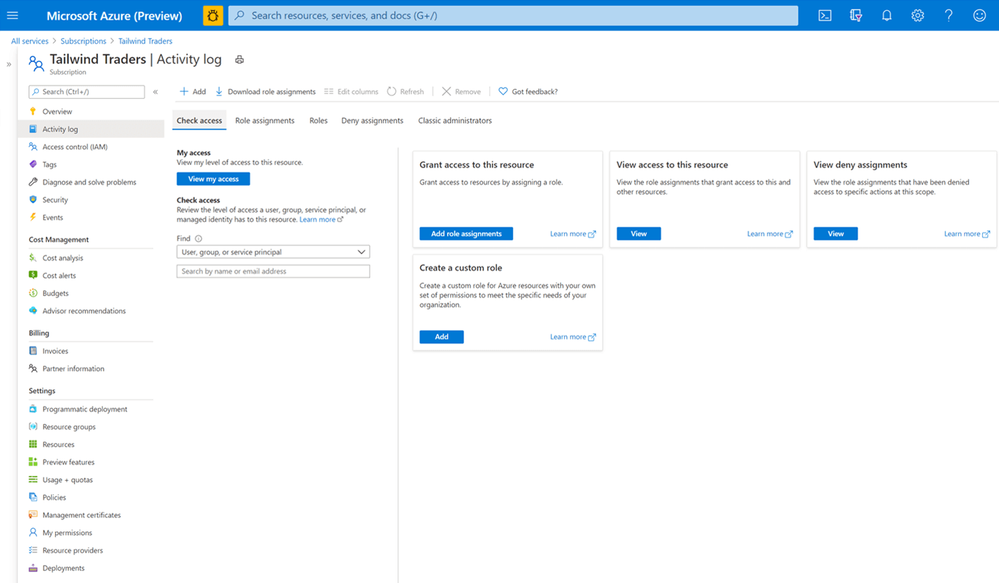 Role-based Access Control
Update Management
As a Security Engineer, one of your jobs is to make sure that all the systems have the latest updates and patches installed to protect against vulnerabilities. Often customers spend hours orchestrating or deploying patched or building automation for their patch management. With Update Management you can manage operating system updates for your Windows and Linux servers. It allows you to schedule and automate patching for your servers.
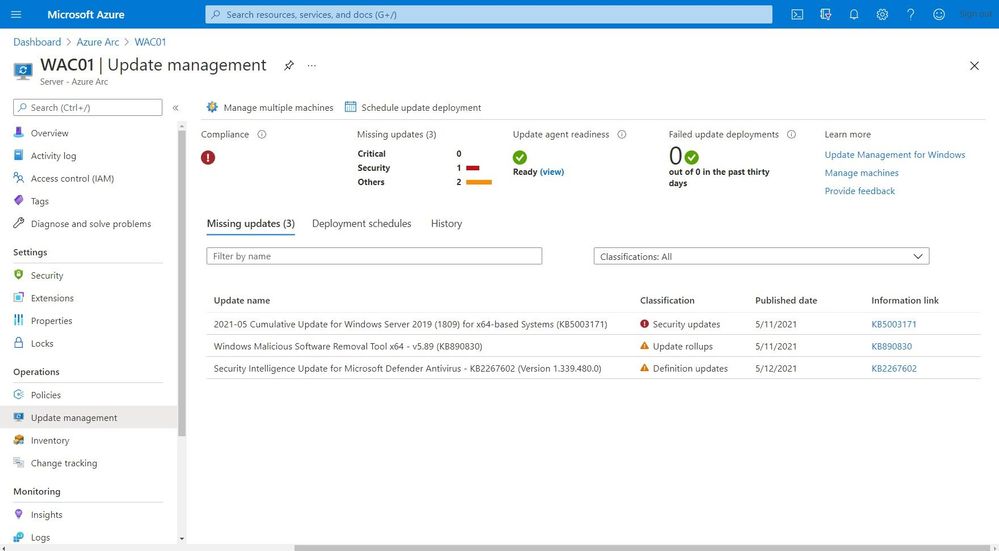 Update Management
Monitoring
You do not just want to manage your systems; you also want to monitor them and make sure that you get alerted in case anything is happening which you disrupted your environment and applications. You can monitor your Kubernetes clusters and containers, Linux, and Windows Servers. Azure Monitor provides you with monitoring guest operating system performance and discover application components to monitor their processes and dependencies with other resources the application communicates using VM insights.
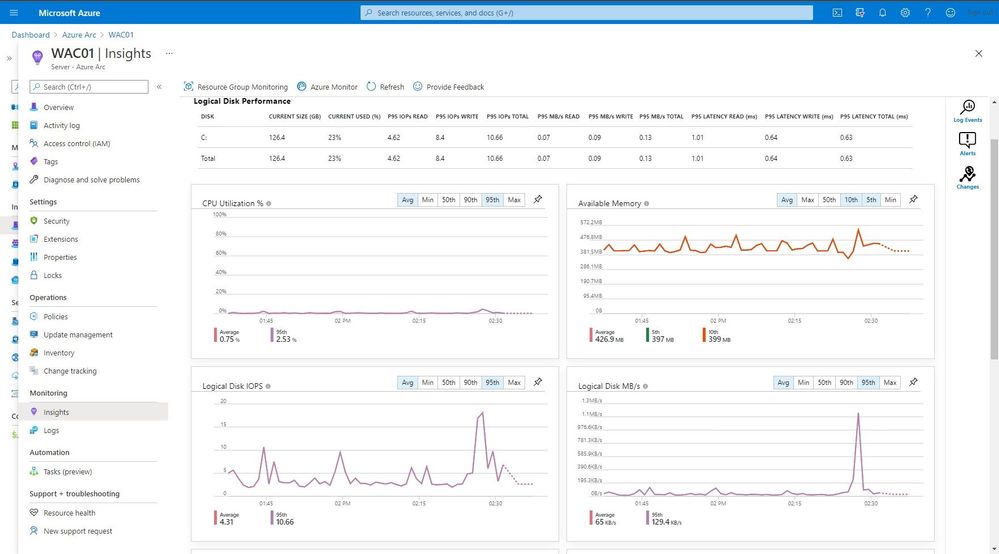 Monitoring
One of the great features in Azure Monitor which can help Security Engineers is the Microsoft Dependency agent. This provides you with information about the incoming and outgoing connections to a specific server.
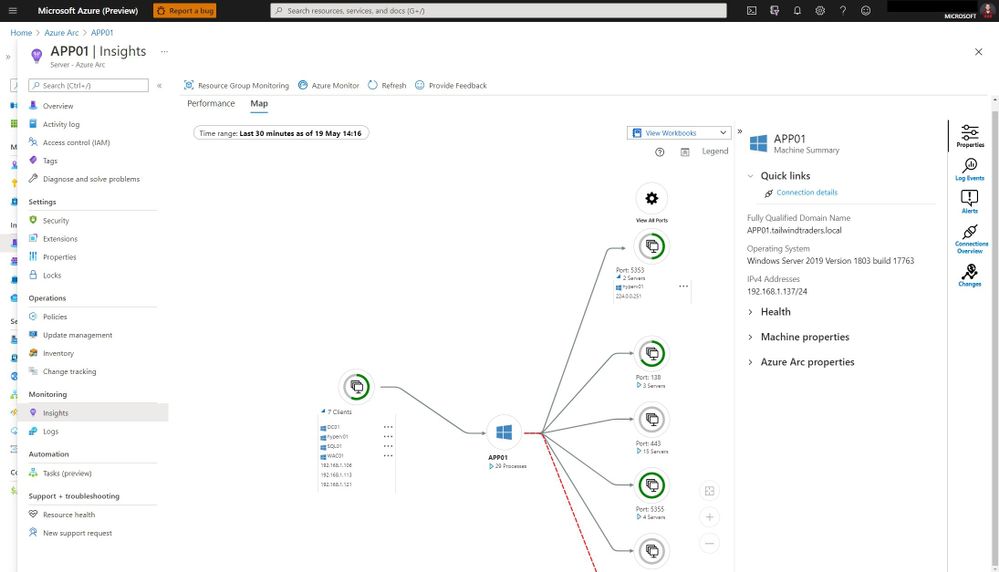 Azure Monitor Map
Log collection and analytics
Log collection and analytics can be very helpful to a Security Engineer in many ways. With Azure Log Analytics you can collect, sort, filter, and analyze your logs centrally. It allows Security Engineers to get a central view of all the security logs of the systems they manage. These logs can also be used for thread hunting using Azure Sentinel.
Microsoft Azure Sentinel is a scalable, cloud-native, security information event management (SIEM) and security orchestration automated response (SOAR) solution. Azure Sentinel delivers intelligent security analytics and threat intelligence across the enterprise, providing a single solution for alert detection, threat visibility, proactive hunting, and threat response.
Change Tracking and Inventory
With change tracking and inventory, you can get an overview of the changes happening in your environment and get an inventory of software installed on your Windows and Linux servers.
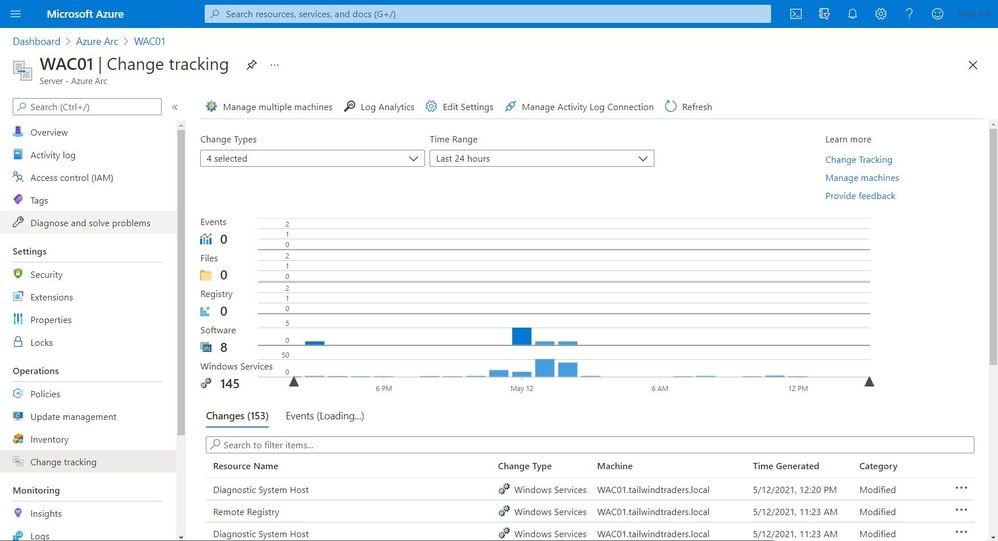 Change Tracking and Inventory
Certificate Management
You might have managed certificates on your servers using Active Directory and Group Policies for your local environment. In hybrid cloud or mutlicloud environments, servers are often not even domain joined. That can make managing certificates a challenge. With a combination of the Azure AD Managed Identity assigned by the Azure Arc agent and Azure Key Vault you can easily and securely deploy and manage certificates to your Windows and Linux servers.
Security Center
Making sure that your servers and Kubernetes clusters are secured is often a challenging task, especially in a hybrid or multicloud environment. With Azure Security Center you get threat detection and proactively monitor for potential security threats for your Azure Arc resources. It allows you to deploy Azure Defender for servers and Azure Defender for Kubernetes to your hybrid and multicloud resources.
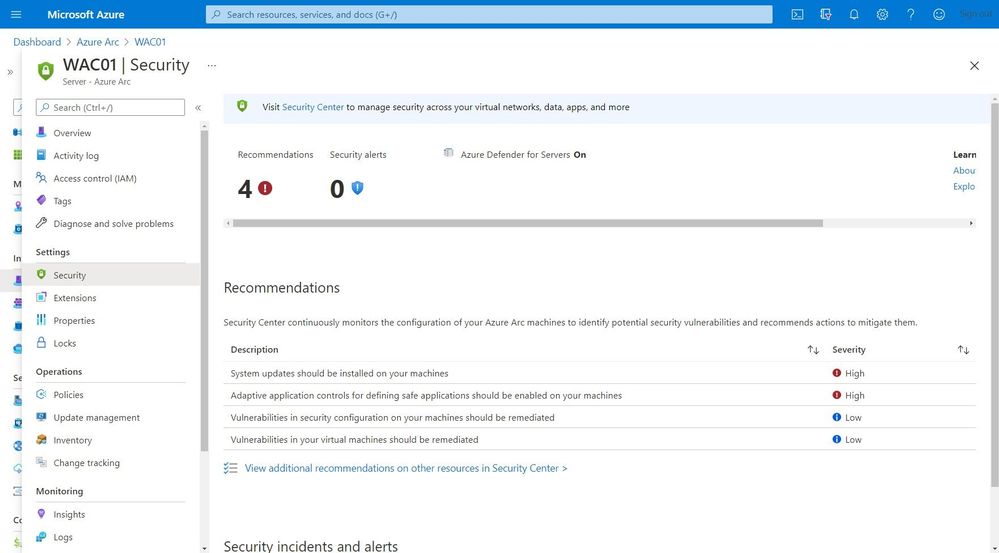 Security Center
Get compliance state
As an IT Pro you want to know if your servers or Kubernetes clusters are compliant with the company policies. Or you are even in charge to make sure that all your systems are configured correctly and secure. This is where Azure Policy Guest Configuration on your Azure Arc enabled servers can help you to make sure that everything is compliant.
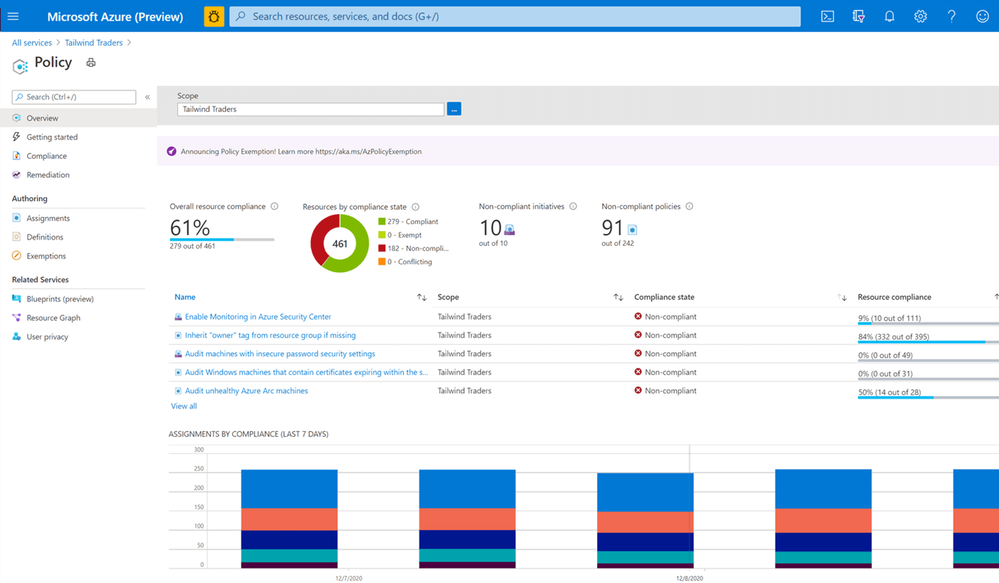 Azure Policy
Next steps
Learn more about Arc enabled servers, see the following overview
Learn more about Arc enabled Kubernetes, see the following overview
Learn more about Arc enabled data services, see the following overview
Experience Arc enabled services from the Jumpstart proof of concept
Also, check out my video on how to manage your hybrid cloud using Azure Arc on Microsoft Channel 9.
https://channel9.msdn.com/Shows/IT-Ops-Talk/Manage-your-hybrid-cloud-environment-using-Azure-Arc/player?WT.mc_id=modinfra-23498-thmaure
Conclusion
Azure Arc enables Security Engineers and others with the right tooling to manage and operate hybrid and multicloud resources such as Windows and Linux servers, Kubernetes clusters, and other resources. If you have any questions, feel free to leave a comment below.
by Contributed | May 19, 2021 | Technology
This article is contributed. See the original author and article here.
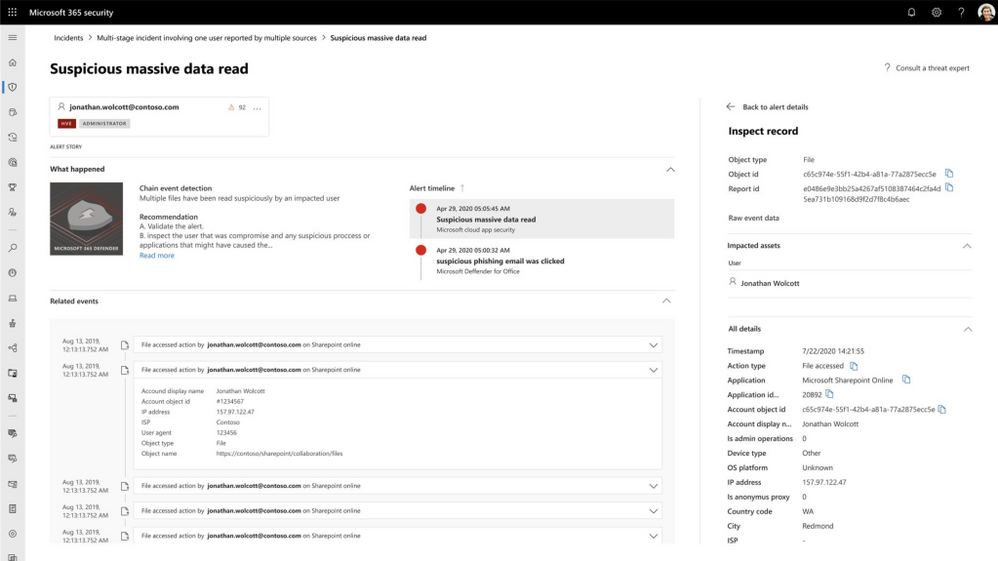
Microsoft 365 Defender automatically expands incidents to tell the full story of an attack.
It does this by leveraging the unique position which enables it to look across workloads and automatically expand the incident story, after all malicious activities are not generated in a void – there is something out there, logged by another workload, which can add insights. And this is exactly what we are doing in Microsoft 365 Defender; generating incidents based on other alerts that are triggered from the different detection sources, like, MDE, MDO, MDI and MCAS.
We are excited to introduce a new alert page for these detections. The new page provides additional, enriched information providing greater context into an attack. Security professionals can now see which other triggered alert caused the current alert and all the affected entities and activities involved in the attack, including files, users and mailboxes.
For example; an alert from Microsoft Defender for Office 365 might imply that a user’s credentials have been stolen. Once the alert is triggered, Microsoft 365 Defender will automatically search for other activities within the organization that are related to this user. This could include a mass data read event within several minutes of the credentials being breached.
Opening or viewing a large number of files may not be an indicator of a breach on its own but with the context of the credential theft alert it becomes a major concern. Microsoft 365 Defender recognizes the related context of these activities and the risk that an attacker is accessing large amounts of user data.
Using these alerts, the security analyst can see which files have been accessed, and in which applications and directories. They can also see the alerts and the relevant context. All of this information is correlated into a single incident that would also include other relevant alerts showing lateral movement, persistence, or further infiltration related to the same attack. With this breadth and depth of visibility the SOC can respond quickly and holistically across the entire attack from a single dashboard.
Microsoft 365 Defender leverages AI to automatically expand an investigation, just like an experienced analyst would. This allows your SOC team to focus on what matters: keeping your organization safe.
To learn more about incident in Microsoft Threat Protection go to the following links:
by Contributed | May 19, 2021 | Technology
This article is contributed. See the original author and article here.
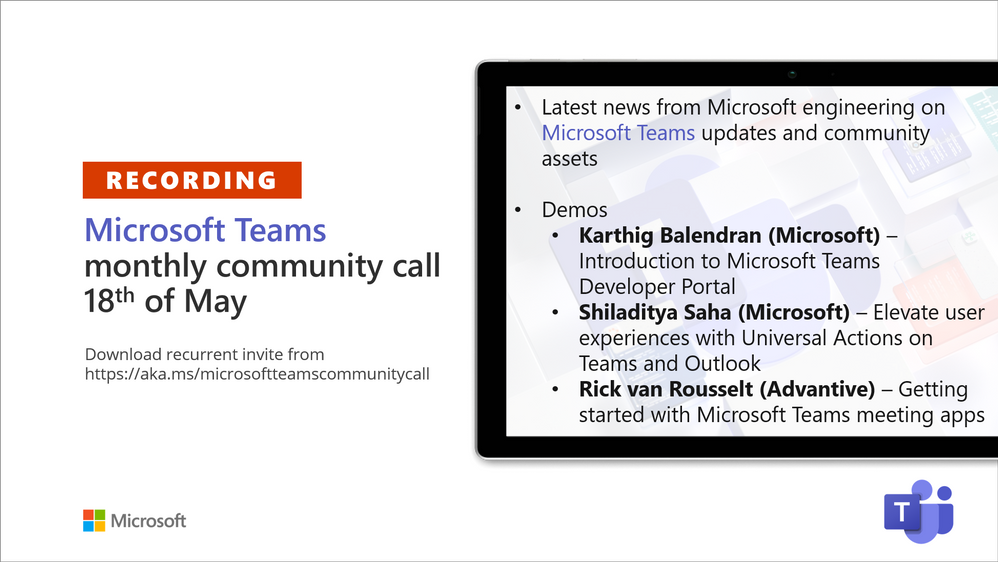
Recording of the Microsoft Teams monthly community call from May 18, 2021.
Call Summary
Latest news from Microsoft engineering on Microsoft Teams updates and community assets.
Register for Microsoft Build. Sign up for May trainings on Sharing-is-caring. Visit the Microsoft Teams samples gallery to get started with Microsoft Teams development. See the new Microsoft 365 Extensibility look book gallery co-developed by Microsoft Teams and Sharepoint engineering. Get the Microsoft Teams Toolkit (Controls) – “Designing your Microsoft Teams app” with layout guidance and reusable assets. Three great demos delivered during this session. The host of this call was Vesa Juvonen (Microsoft) | @vesajuvonen. Q&A takes place in chat throughout the call.
Actions:
- Register for Microsoft Build, May 25 – 27, 2021 – https://build.microsoft.com
- Register for Sharing is Caring Events:
- First Time Contributor Session – May 24th (EMEA, APAC & US friendly times available)
- Community Docs Session – May
- PnP – SPFx Developer Workstation Setup – June
- PnP SPFx Samples – Solving SPFx version differences using Node Version Manager – May 20th
- AMA (Ask Me Anything) – Microsoft Graph & MGT – June 8
- AMA (Ask Me Anything) – Teams Dev – June
- First Time Presenter – May 25th
- More than Code with VSCode – May 27th
- PnP Office Hours – 1:1 session – Register
- Download the recurrent invite for this call – https://aka.ms/microsoftteamscommunitycall
- Call attention to your great work by using the #PnPWeekly on Twitter.
Microsoft Teams Development Samples: (https://aka.ms/teams-samples)

Always a highlight to see you here. Enjoy Microsoft Build. Looking forward to seeing you in person at an event one day.
Demos delivered in this session
Introduction to Microsoft Teams Developer Portal – Meet the new and improved app management console for developers. Access the tools portal from a browser and from within Microsoft Teams client. This is the place to add – register and configure your Teams apps. New safeguards to prevent apps from having same app IDs. Key areas differentiating portal from App Studio called out. Access App Source from portal.
Elevate user experiences with Universal Actions on Teams and Outlook – deck, demo and documentation about consistent message (action) handling across apps (Teams, Outlook and more) using Adaptive Cards with the new Action.Execute action type. User takes action on either Teams or Outlook and action is reflected on the other platform. Vacation approval scenario shows contextual views and sequential workflows on Teams. Excellent documentation, quick start guide and code samples.
Getting started on building Microsoft Teams meeting apps – step through meeting extensions – pre-meeting (tab – a poll), in-meeting (side panel tab, pop-up, extension, and bot) and post-meeting (tab). Understand needed manifest updates. Microsoft Forms is a great meeting extension. Demo – create a meeting, add the Forms app to it and observe how Forms does configuration. Meeting extensions are built on top of tabs, bots and messaging extensions.
Thank you for your work. Samples are often showcased in Demos.
Topics covered in this call
- News and updates – Vesa Juvonen (Microsoft) | @vesajuvonen – 3:35
Demo: Introduction to Microsoft Teams Developer Portal – Karthig Balendran (Microsoft) | @KarthigBalendr1 – 10:20
Demo: Elevate user experiences with Universal Actions on Teams and Outlook – Shiladitya Saha (Microsoft) – 23:30
Demo: Getting started on building Microsoft Teams meeting apps – Rick van Rousselt (Advantive) | @RickVanRousselt – 36:54
Resources:
Additional resources around the covered topics and links from the slides.
General resources:
Upcoming Calls | Recurrent Invites:
Microsoft Teams monthly community calls are targeted at anyone who’s interested in Microsoft Teams development topics. This includes Microsoft Teams, Bots, App templates, Samples, and more. Details on the Microsoft 365 community from http://aka.ms/m365pnp. We also welcome community demos, if you are interested in doing a live demo in these calls!
You can download recurrent invite from https://aka.ms/microsoftteamscommunitycall. Welcome and join in the discussion. If you have any questions, comments, or feedback, feel free to provide your input as comments to this post as well. More details on the Microsoft 365 community and options to get involved are available from http://aka.ms/m365pnp.
“Sharing is caring”
Microsoft 365 PnP team, Microsoft – 19th of May 2021
by Contributed | May 19, 2021 | Technology
This article is contributed. See the original author and article here.
A nice customer success story from Hong Kong.
“Azure Lab Services provides more flexibility in classes and allows the faculty to engage better with students. We spoke to students and found they enjoyed their freedom to access hands-on practical experiences more frequently, and they value the time they save by not needing to visit the campus to test or finish their homework. Overall, our students and faculty members are happy with this seamless transition between the physical and virtual learning environments provided by Azure Lab Services.”
https://news.microsoft.com/en-hk/2021/04/13/polyu-cpce-and-microsoft-hong-kong-launch-virtual-labs-for-limitless-learning/


Recent Comments