by Contributed | May 3, 2021 | Technology
This article is contributed. See the original author and article here.
Below is the latest information on Project for the web. If you use on-premises Project and want to learn about Project 2021, please see below or go to the article.
New Features:
- Email assignment notifications ~ Your teammates will receive an email whenever they are assigned a task in Project for the web. Edit your notification settings by clicking on the gear icon in the top Office ribbon and clicking on the “Notification settings” under the Project heading.
- Actions on Project Home ~ Copy, rename, export, or delete your project directly from Project Home, without needing to open it in the browser.
- Open task from Project Power Bi Report ~ You can now directly open task details in Project Board from the Project Power Bi ‘Task Overview’ page. You can download the updated content pack available here.
Upcoming Features
- Import from Project desktop ~ Import your .mpp files from Project desktop to Project for the web.
- Filtering on Board & Timeline views ~ Find your tasks quickly on the Board and Timeline views by filtering by keyword or assignee.
Announcing Microsoft Office 2021
The entire Microsoft Office team is excited to announce the commercial preview of Microsoft Office Long Term Servicing Channel (LTSC) for Windows and Office 2021 for Mac. You can learn more about this preview by reading the Tech Community blog post here.
Microsoft Project Trivia
Last Month:
Thanks to everyone who put their guesses in the comments last month!
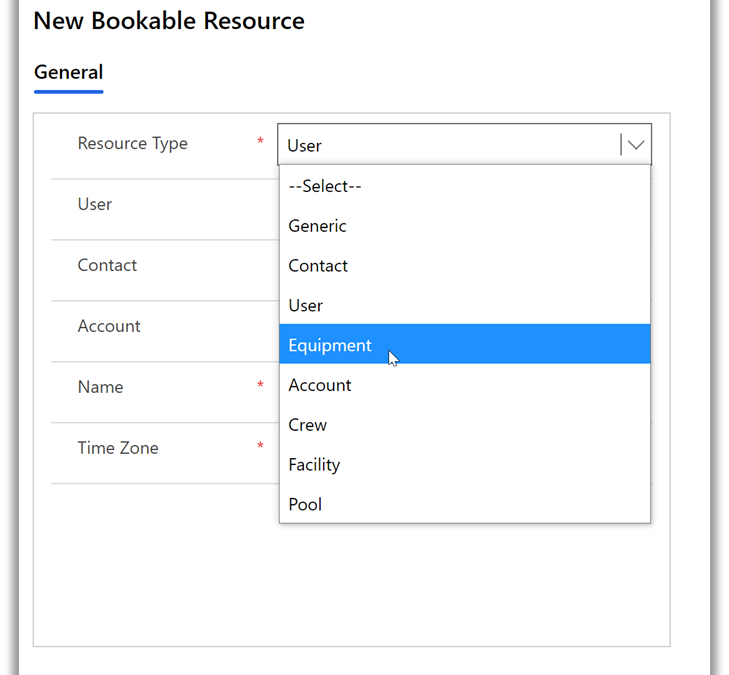
Question: Which type of resource is NOT supported by Project for the web?
A:
- Equipment
- Placeholder
- Crew
- Generic
The correct answer was Placeholder. You can create non-user resources in Project for the web through Power Apps:
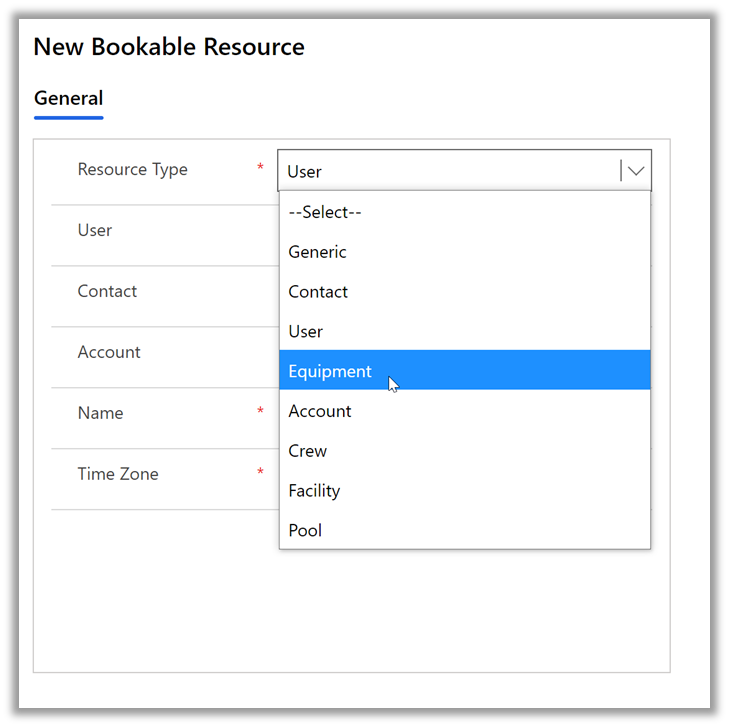
Learn more about how to create non-user resources in Project for the web here.
This Month:
QUESTION: Users with Project Plan 3 or 5 can create roadmaps including all their project information. What year did Roadmap in Microsoft Project first become available to users?
Feedback
Microsoft Project loves feedback! Feel free to leave feedback in the comments of this blog or give us feedback through our in-app feedback button. For the latter option, be sure to leave your email address so we can reach out with any questions or updates we may have.
by Contributed | May 3, 2021 | Technology
This article is contributed. See the original author and article here.
Call summary
April’s call, hosted by David Chesnut, featured the following presenters and topics:
• Richard Taylor discussed different support options available on Microsoft 365, and how to submit a new support ticket.
• Sudhi Ramamurthy shared news about updates to APIs, Recorder, and Admin-control for Office Scripts.
• Leslie Black (Analysis Cloud Limited) demonstrated a TICTACUFO application he created with Office Scripts.
• David Chesnut demonstrated a new PnP sample that shows how to handle event-based activation and set the signature in Outlook.
To watch the call, tap the following link.
Office Add-ins community call – April 2021 – YouTube
Q&A (Question & Answers)
We welcome you to submit questions and topic suggestions prior to each call by using our short survey form.
Support options
When we try to open tickets in the admin center regarding SharePoint Development they are getting immediately closed with the comment “we don’t provide support for developer issues”. Is that different for Office Add-ins?
The comment you see applies if you don’t have a Premier account, or Enterprise SKU. If you do have a Premier account and are seeing this comment, please reach out to us on the next community call web chat so we can follow up with you.
What level of support can I get for my tenant from the Microsoft 365 Developer Program?
The Microsoft 365 Developer Program provides standard Office 365 support, and does not include developer support. You can get help with developer questions at Microsoft Q&A for Office Add-ins, or at Stack Overflow [office-js].
Office Scripts
ServiceHub is not enabled for my Enterprise ID. Is it possible for an admin to configure without admin access to rest of the Office 365 tenant?
If you have a Premier account, we can reach out to your ADC/TAM and ensure you have access. If you just have an Enterprise subscription, use the O365 admin instead. Either should work.
Are Office Scripts for Excel on the web available to Microsoft 365 family accounts or just Enterprise?
Currently, Office Scripts are only available on Enterprise, though we’re exploring expanding availability to other licenses.
Miscellaneous questions
When will the current Outlook preview requirement set, including event-based activation, be available in production?
We don’t have a specific date yet, but we hope to make it available soon.
The Outlook REST API is going to be decommissioned. Is it safe to continue using EWS (Exchange Web Services) with Outlook add-ins going forward or is it also at risk of being decommissioned?
At present, there is no plan to decommission EWS.
Is it possible to port Office.addin.showAsTaskpane common API function to Outlook JS?
This is a great suggestion! Can you please provide more details on this idea, and scenario at Microsoft 365 Developer Platform – Microsoft Tech Community?
One of our custom functions must access data (a table) not specified in the arguments. We’ve noticed that calling Excel.run to request that data through the Excel request context on every formula invocation leads to concurrency issues (RichApi.Error: Wait until the previous call completes.) Is there a flexible way to get this to work?
There is a code approach used in GitHub issue 483 in office-js that may help you. If that doesn’t work for your scenario, please post a question with more information at Microsoft Q&A: Office JavaScript API.
In Excel custom functions, is there a way to pause the calculations and resume later (other than setting calculation mode to manual)? End users want to pass an additional flag to the custom function that indicates if it should run or not run.
We suggest switching to manual recalc mode, instead of using an argument to the function. Our goal is for Excel custom functions to run using the same paradigm as built-in functions. We don’t have a design pattern where we pause recalc based on an argument to a function. It’s clearer for users if you ask them to change to manual recalc, that you could implement in the task pane UI. Then when completed, you can switch back to automatic recalculation and the custom functions will run.
In Excel custom functions, you can get the address of the calling cell from the invocation object. Is there a way to get the current value from the cell along with the address?
We suggest that you use the onCalculated event which is called when custom functions are calculated. Here’s an example:
async function onCalculated(event) {
 await Excel.run(async (context) => {
        console.log(event.address);
        if (event.address == "A13") // “A13” here is an example of the cell that has the custom function. It can be replaced by a real cell address.
        {
           context.load (event.address, “values”);
           await context.sync();
          console.log(`The range value was "${cellC1.values}".`);
        }
      });
    }
Can the Microsoft Graph API be used by an add-in without a dedicated server to proxy requests to the Graph API? We’re trying to replace the usage of the Outlook REST API in an add-in that makes API calls from the client-side. We are struggling to find tutorials covering that case.
If you’re Outlook add-in is basically a single-page app (SPA) this tutorial will help you call the Microsoft Graph API from the add-in: Tutorial: Create a JavaScript single-page app that uses auth code flow – Microsoft identity platform | Microsoft Docs. There are also additional Microsoft Graph samples at https://github.com/Azure-Samples/active-directory-aspnetcore-webapp-openidconnect-v2/tree/master/2-WebApp-graph-user
When will Outlook sideload and debug from VS Code (as demoed in November community call) be available?
This feature is available, but there is an issue that prevents it from working in all scenarios. We’re working to get a fix out soon.
Resources
Microsoft 365 support
Office Scripts demo by Leslie Black
PnP: Outlook set signature
Office Add-ins community call
Office Add-ins feedback
The next Office Add-ins community call is on Wednesday, May 12, 2021 at 8:00AM PDT. You can download the calendar invite at https://aka.ms/officeaddinscommunitycall.
by Contributed | May 3, 2021 | Technology
This article is contributed. See the original author and article here.
Please join Microsoft, Ardalyst, and featured defense experts Tuesday May 3rd 2:00 – 3:00 PM EDT | 11:00 -12:00 PDT where we will discuss the critical components of a mature cyber defense program from the cradle to the grave of DoD systems. As most DoD warfighting capabilities are born and die in the DIB, we will explore the current art and science of IT and OT cyber defense and its implications from a full lifecycle perspective through a combined government and industry panel.
Defending commercial industry and Defense Industrial Base (DIB) from an Information and Operational Technologies (IT and OT) perspectives underpins the challenges we have in a Joint fight. As the Cybersecurity Maturity Model Certification (CMMC) comes online, it parallels the need for the DoD to mature internal cyber defense requirements and the resilient supply chain necessary to support it.
During the webinar, we will help you better understand:
· Why can’t we fix the vulnerabilities in technologies, specifically OT?
· What is the best way to effectively sensor a system?
· How do we leverage threat intelligence to understand and adapt against adversaries?
· How can OT sensors deter adversaries?
· What is the right workforce to deter, detect, and engage adversaries?
Speakers

Joe DiPietro
Principal Technical Specialist,
Azure IoT Security
Microsoft

Chris Cleary
Principal Cyber Advisor (PCA)
Department of the Navy

Josh O’Sullivan
Chief Technology Officer
Ardalyst
Register here today.
by Contributed | May 3, 2021 | Technology
This article is contributed. See the original author and article here.
Overview
In 2021, each month there will be a monthly blog covering the webinar of the month for the Low-code application development (LCAD) on Azure solution.
LCAD on Azure is a solution to demonstrate the robust development capabilities of integrating low-code Microsoft Power Apps and the Azure products you may be familiar with.
This month’s webinar is ‘Unlock the Future of Azure IoT through Power Platform’.
In this blog I will briefly recap Low-code application development on Azure, provide an overview of IoT on Azure and Azure Functions, how to pull an Azure Function into Power Automate, and how to integrate your Power Automate flow into Power Apps.
What is Low-code application development on Azure?
Low-code application development (LCAD) on Azure was created to help developers build business applications faster with less code.
Leveraging the Power Platform, and more specifically Power Apps, yet helping them scale and extend their Power Apps with Azure services.
For example, a pro developer who works for a manufacturing company would need to build a line-of-business (LOB) application to help warehouse employees’ track incoming inventory.
That application would take months to build, test, and deploy. Using Power Apps, it can take hours to build, saving time and resources.
However, say the warehouse employees want the application to place procurement orders for additional inventory automatically when current inventory hits a determined low.
In the past that would require another heavy lift by the development team to rework their previous application iteration.
Due to the integration of Power Apps and Azure a professional developer can build an API in Visual Studio (VS) Code, publish it to their Azure portal, and export the API to Power Apps integrating it into their application as a custom connector.
Afterwards, that same API is re-usable indefinitely in the Power Apps’ studio, for future use with other applications, saving the company and developers more time and resources.
IoT on Azure and Azure Functions
The goal of this webinar is to understand how to use IoT hub and Power Apps to control an IoT device.
To start, one would write the code in Azure IoT Hub, to send commands directly to your IoT device. In this webinar Samuel wrote in Node for IoT Hub, and wrote two basic commands, toggle fan on, and off.
The commands are sent via the code in Azure IoT Hub, which at first run locally. Once tested and confirmed to be running properly the next question is how can one rapidly call the API from anywhere across the globe?
The answer is to create a flow in Power Automate, and connect that flow to a Power App, which will be a complete dashboard that controls the IoT device from anywhere in the world.
To accomplish this task, you have to first create an Azure Function, which will then be pulled into Power Automate using a “Get” function creating the flow.
Once you’ve built the Azure Function, run and test it locally first, test the on and off states via the Function URL.
To build a trigger for the Azure Function, in this case a Power Automate flow, you need to create an Azure resources group to check the Azure Function and test its local capabilities.
If the test fails it could potentially be that you did not create or have an access token for the IoT device. To connect a device, IoT or otherwise to the cloud, you need to have an access token.
In the webinar Samuel added two application settings to his function for the on and off commands.
After adding these access tokens and adjusting the settings of the IoT device, Samuel was able to successfully run his Azure Function.
Azure Function automated with Power Automate
After building the Azure Function, you now can build your Power Automate flow to start building your globally accessible dashboard to operate your IoT device.
Samuel starts by building a basic Power Automate framework, then flow, and demonstrates how to test the flow once complete.
He starts with a HTTP request, and implements a “Get” command. From there it is a straightforward process, to test and get the IoT Device to run.
Power Automate flow into Power Apps
After building your Power Automate flow, you develop a simple UI to toggle the fan on and off. Do this by building a canvas Power App and importing the Power Automate flow into the app.
To start, create a blank canvas app, and name it. In the Power Apps ribbon, you select “button”, and pick the button’s source, selecting “Power Automate” and “add a flow”.
Select the flow that is connected to the Azure IoT device, its name should be reflected in the selection menu.
If everything is running properly your IoT device will turn on.
FYI in the webinar Samuel is running out of time, so he creates a new Power Automate flow, which he imports into the canvas app.
Summary
Make sure to watch the webinar to learn more about Azure IoT and how to import Azure Functions into your Power Apps.
Additionally, there will be a Low-code application development on Azure ‘Learn Live’ session during Build, covering the new .NET x Power Apps learning path, covering integrations with Azure Functions, Visual Studio, and API Management.
Lastly, tune in to the Power Apps x Azure featured session at Build on May 25th, to learn more about the next Visual Studio extensions, Power Apps source code, and the ALM accelerator package. Start registering for Microsoft Build at Microsoft Build 2021.


Recent Comments