
March Ahead with Azure Purview: Unify ALL your data using Apache Atlas open API support
This article is contributed. See the original author and article here.
Last week at Ignite, we made a number of announcements – since the launch of Azure Purview, we have discovered over 14.5 billion data assets in 2000+ Purview accounts. Thank you!
We are debuting a blog series today – “March Ahead with Azure Purview”. This blog series is focused on helping you get the most out of your current Purview implementation. Over the month of March, we will have blogs on best practices, tips and tricks and troubleshooting guidance on topics including Scans, Access, Roles, and Proof-of-Concept planning.
Tell us what other topics you want us to blog about in the comments! The first blog below is intended to help you understand the relationship between Azure Purview and the Apache Atlas Open API ecosystem. Are you planning to use Azure Purview to manage data in Azure Databricks? Read on!
Apache Atlas is a scalable and extensible set of core foundational governance services – enabling enterprises to meet their compliance requirements effectively and efficiently within Hadoop and allows integration with the whole enterprise data ecosystem. The high-level features that Atlas provides are metadata types & instances, classification, lineage, and discovery. Purview provides these capabilities and in most cases, more advanced than what native Atlas provides, while maintaining inter-compatibility with the Atlas API ecosystem. We have added a few APIs like the advanced search capability that enhances functionality over what is available in native Atlas. Let’s dive into this:
The Apache Atlas construct contains 3 fundamental concepts – a type, an entity, and an attribute. A Type in Atlas is a definition of how particular types of metadata objects are stored and accessed. A type represents a collection of attributes that define the properties for that metadata object. An entity in Atlas is a specific value or instance of an Entity Type, and thus represents a specific metadata object in the real world. An attribute represents the properties on an entity. Learn more about the Atlas Type system here.
Setup, Authentication, and using Purview Atlas Endpoints
For an in-depth look at how to set up your development environment for working with Azure Purview’s Atlas REST APIs, review the REST API Tutorial. In short, you will need the following:
- A Service Principal with Data Curator role on your Purview service. Learn about roles here.
- Collect the Purview service’s name.
- Be able to collect an access token from an OAuth2.0 request.
The samples below assume you have completed this setup and have the following environment variables setup.
- AUTH_TOKEN: The access token retrieved from successfully authenticating the service principal against the Azure Purview service.
- ENDPOINT: The API endpoint URL which follows this pattern: https://{PURVIEW_SERVICE_NAME}.catalog.purview.azure.com/api/atlas/v2
Get a system Entity’s Metadata with Purview Atlas APIs
A common starting point for using the REST APIs is to get an entity that has already been scanned. By getting an entity through the REST API, you have quick access to the schema, classifications, attributes, and other relationships to the entity.
Start by navigating to the entity you want to get with the API and obtain the GUID from the URL.

You then call the /entity/bulk?guid= endpoint and provide the guid you collected. You could also pass a comma delimited set of guids to retrieve multiple objects.
curl -H “Accept: application/json”
-H “Authorization: Bearer $AUTH_TOKEN”
$ENDPOINT/entity/bulk?guid=e5d12ea7-53a8-4b48-b8a4-61f6f6f60000 | jq .
The response provided contains several key sections including:
- Referred entities: Provides detail about every entity that is referenced. That includes columns in your schema or process entities used in lineage.
- Entities: This provides an array of the entities you asked for in the guid parameter. Each object in this array will have the core properties, attributes, and relationship attributes.
- For a detailed discussion on Relation Attributes, see the REST API Deep Dive presentation on YouTube.
Understanding Type Definitions for system entities
Once you have started exploring the entities you have scanned, you might want to instantiate your own entity based on that type. For example, you scanned an azure sql table but want to be able to programmatically generate your own server, database, schema, tables, and columns. In order to instantiate your own entity for a given type, you must first understand what the required attributes are, and what the other required entities for creation of this entity are.
Part of the response from our GET /entity/bulk?guid call returned a typeName attribute. That type name can be used to retrieve its definition which includes all the attributes we can capture and all the relationship attributes (i.e. the way a database entity relates to a server entity and a column entity relates to a table entity) that are available to the type.
curl -H “Accept: application/json”
-H “Authorization: Bearer $AUTH_TOKEN”
$ENDPOINT/types/entitydef/name/azure_sql_table | jq .
Understanding the Type definition response
The abbreviated response from the azure_sql_table type definition below shows several key features.
- Options.schemaElementsAttribute – The relationship attribute that will be referenced in the schema tab in the Purview UI.
- An array of Attribute Definitions – This defines what attributes we want to collect, the type, whether it is one or many values, the min and max number of values, and whether it’s optional or required.
- superTypes – The type which you are inheriting from, most often it will be DataSet or Process type.
- An array of Relationship Attribute Definitions – These relationships describe how one entity connects to another. A few interesting relationshp attributes for an azure_sql_table include:
- “columns” allows an instance of azure_sql_table to contain reference to an array of azure_sql_columns.
- “dbSchema” points to a single azure_sql_schema. This is a required relationship attribute, you can’t create an azure_sql_table without a database schema.
- “meanings” is available on all entities and it provides the support for adding glossary terms to a given entity.
Here is an example of the response payload:
{
“category”: “ENTITY”,
“guid”: “5f94b8b9-0430-4210-ade2-7b6f7e2d2db4”,
“name”: “azure_sql_table”,
“description”: “azure_sql_table”,
“serviceType”: “Azure SQL Database”,
“options”: {
“schemaElementsAttribute”: “columns”
},
“attributeDefs”: [
{
“name”: “objectType”,
“typeName”: “string”,
“isOptional”: true,
“cardinality”: “SINGLE”,
“valuesMinCount”: 0,
“valuesMaxCount”: 1,
…
},
…
],
“superTypes”: [
“DataSet”
],
“subTypes”: [],
“relationshipAttributeDefs”: [
{
“name”: “dbSchema”,
“typeName”: “azure_sql_schema”,
“isOptional”: false,
“cardinality”: “SINGLE”,
“relationshipTypeName”: “azure_sql_schema_tables”,
…
},
{
“name”: “columns”,
“typeName”: “array<azure_sql_column>”,
“isOptional”: true,
“cardinality”: “SET”,
“relationshipTypeName”: “azure_sql_table_columns”,
…
},
{
“name”: “meanings”,
“typeName”: “array<AtlasGlossaryTerm>”,
“relationshipTypeName”: “AtlasGlossarySemanticAssignment”,
…
},
…
]
}
Creating Your first Custom Type with Purview Atlas APIs
Now that you have learnt about the existing system types in Purview, as a user you might want to create your own type definitions along with creating your own custom lineage. As an example, we are creating our very own Process type to help us represent Lineage between Azure Databricks and existing entities.
Let us start by creating a custom Process entity type for our Databricks notebooks. The JSON below defines a Databricks notebook that has a required “notebook name”, an optional Schedule, and an array of possible parameters for the notebook. Since we are using a super type of Process, we inherit attributes like qualified name and importantly the inputs and outputs attributes, and relationship attributes. Since we are inheriting those attributes, we do not need to specify these attributes in our Type definition.
Here is an example of the request payload:
{“entityDefs”:[{
“category”: “ENTITY”,
“name”: “custom_databricks_notebook_process”,
“superTypes”: [
“Process”
],
“attributeDefs”: [
{
“cardinality”: “SINGLE”,
“includeInNotification”: false,
“isIndexable”: false,
“isOptional”: false,
“isUnique”: false,
“name”: “JobName”,
“typeName”: “string”,
“valuesMaxCount”: 1,
“valuesMinCount”: 0
},
{
“cardinality”: “SINGLE”,
“includeInNotification”: false,
“isIndexable”: false,
“isOptional”: true,
“isUnique”: false,
“name”: “Schedule”,
“typeName”: “string”,
“valuesMaxCount”: 1,
“valuesMinCount”: 0
},
{
“cardinality”: “SET”,
“includeInNotification”: false,
“isIndexable”: false,
“isOptional”: true,
“isUnique”: false,
“name”: “Parameters”,
“typeName”: “array<string>”,
“valuesMaxCount”: 12,
“valuesMinCount”: 0
}
],
“relationshipAttributeDefs”: []
}]
}
Taking that JSON above, we can call the /types/typedefs endpoint and POST this content to our Purview service and create the type.
curl -H “Accept: application/json” -H “Content-type: application/json”
-H “Authorization: Bearer $AUTH_TOKEN”
-X POST –data @path.to.json.file
$ENDPOINT/types/typedefs | jq .
The response will return the completed entity definition.
Using a Custom Type for Custom Lineage and entities
With a custom type for our Databricks Notebook lineage, we need to instantiate our custom entity, and point our input and outputs to existing entities.
The JSON payload below does the following:
- References our custom type.
- We provide a negative number to act as a “dummy guid” that will be translated into a system-assigned guid upon successful upload.
- We provide the required attributes (name, qualifiedName, and our custom JobName).
- Finally, we provide inputs and outputs. In this case, we are demonstrating two ways of referencing existing entities in your Purview data catalog.
- You can pass in a JSON object with key “guid” and the value of the guid itself.
- You can pass in a JSON object with keys type name and unique attributes. Unique attributes is itself a JSON object with qualifiedName as the key.
{“entities”:[{
“typeName”: “custom_databricks_notebook_process”,
“guid”: -2,
“attributes”: {
“name”: “MyNotebook”,
“JobName”: “MyDatabricksJob”,
“qualifiedName”: “custom_dbr://workspace/path/to/notebook”,
“inputs”: [
{
“guid”: “abc-123-456”
}
],
“outputs”: [
{
“typeName”: “azure_sql_table”,
“uniqueAttributes”: {
“qualifiedName”: “mssql://server/database/schema/table”
}
}
]
},
“relationshipAttributes”: {}
}
]}
With that payload body saved, we can POST the JSON to the /entity/bulk endpoint as shown below.
curl -H “Accept: application/json” -H “Content-type: application/json”
-H “Authorization: Bearer $AUTH_TOKEN”
-X POST –data @path.to.json.file
$ENDPOINT/entity/bulk | jq .
The response will tell us if this was a create or an update. In addition, we will get to see the official guid that the entity is assigned to and we can map our “dummy guid” to the official guid using the guidAssignments section of the response.
Here is an example of the request payload:
{
“mutatedEntities”: {
“CREATE”: [
{
“typeName”: “custom_databricks_notebook_process”,
“attributes”: {
“qualifiedName”: “custom_dbr://workspace/path/to/notebook”
},
“lastModifiedTS”: “1”,
“guid”: “3daeee33-0e07-47e0-b877-30225367fc11”
}
]
},
“guidAssignments”: {
“-2”: “3daeee33-0e07-47e0-b877-30225367fc11”
}
}
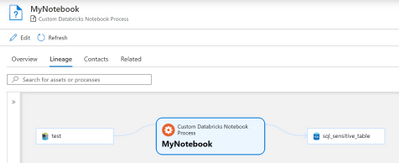
The results of our payload, assuming you had some entities created already, should look like the below Lineage graph when viewing the created custom process entity in the Purview UI.
This works great for existing entities, but if you are uploading new entities at the same time as creating custom entities, you would need to change your input/output “headers” to reference the “dummy guid”.
- Add your desired input / output entities as additional atlas entities to the “entities” array in the above JSON payload.
- Your input / output headers would now have three keys:
- guid: Containing the dummy guid that matches an entity being uploaded.
- typeName: Containing the type of the entity you’re uploading and using as an input/output.
- qualifiedName: Containing the qualified name of the entity you’re uploading and using as an input/output.
Community Driven SDKs
As Purview approaches General Availability, it will provide SDKs and Azure CLI integration. Until then, there are several community driven efforts to make working with the Purview / Atlas APIs easier. One such effort is the PyApacheAtlas project. Let us look at some of these examples above in PyApacheAtlas instead!
Authentication with PyApacheAtlas
Instead of doing the OAuth2.0 dance yourself, you can take advantage of the service principal authentication by passing in your service principal credentials and your purview service account name, and you have a client object that is ready to create types, entities, relationships, and custom lineage.
Here is the sample code to achieve this:
import os
from pyapacheatlas.auth import ServicePrincipalAuthentication
from pyapacheatlas.core.client import PurviewClient
oauth = ServicePrincipalAuthentication(
tenant_id=os.environ.get(“TENANT_ID”, “”),
client_id=os.environ.get(“CLIENT_ID”, “”),
client_secret=os.environ.get(“CLIENT_SECRET”, “”)
)
client = PurviewClient(
account_name=os.environ.get(“PURVIEW_NAME”, “”),
authentication=oauth
)
Getting Types and Entities with PyApacheAtlas
The first thing you will do is get an entity and its type in order to understand how to use that type. In PyApacheAtlas, it’s as simple as calling a couple of methods as shown below
import json
from pyapacheatlas.core.typedef import TypeCategory
# Get the one entity based on its guid
results = client.get_entity(guid=”abc-123-456″)
print(json.dumps(results[“entities”][0], indent=2))
# Get the one type definition
typedefs = client.get_typedef(TypeCategory.ENTITY, name=”azure_sql_table”)
print(json.dumps(typedefs, indent=2))
Creating Types and Entities with PyApacheAtlas
We can quickly create a type and their attributes in PyApacheAtlas. Once the object is created and all the attribute definitions are added, you will call the upload_typdefs method on the client object. Note that the force_update=True parameter will allow us to update the type if it exists already.
Here is the sample code to achieve this:
from pyapacheatlas.core.typedef import EntityTypeDef, AtlasAttributeDef
ed = EntityTypeDef(
name=”custom_databricks_notebook_process”,
superTypes=[“Process”]
)
ed.addAttributeDef(
AtlasAttributeDef(“JobName”, isOptional=False),
AtlasAttributeDef(“Schedule”),
AtlasAttributeDef(“Parameters”, cardinality=”SET”, typeName=”array<string>”, valuesMaxCount=12)
)
type_results = client.upload_typedefs(entityDefs=[ed], force_update=True)
# Now create the custom entity based on this type.
custom_entity = AtlasProcess(
name=”MyNotebook”,
typeName=”custom_databricks_notebook_process”,
qualified_name=”custom_dbr://workspace/path/to/notebook”,
attributs={“JobName”: “MyDatabricksJob”},
# Be sure to change your inputs and outputs before uploading
inputs=[{“guid”: “abc-123-456”}],
outputs=[{
“typeName”: “azure_sql_table”,
“uniqueAttributes”: {
“qualifiedName”: “mssql://server/database/schema/table”
}
}],
)
# Upload the “batch”
entity_results = client.upload_entities(batch=[custom_entity])
Deleting Entities with PyApacheAtlas
Lastly, you can delete entities using the REST API. Use the sample below to clean up your assets from this demonstration, and you have a clean catalog to re-populate!
delete_results = client.delete_entity(guid=”605fb1b1-0ee5-437e-9439-99aea4835127″)
print(json.dumps(delete_results, indent=2))
To learn more about Azure Purview, check out our full documentation today.





Recent Comments