Calling Synapse REST API to automate tasks using Powershell

Calling Synapse REST API to automate tasks using Powershell

This article is contributed. See the original author and article here.

Sometimes we need to do some automations on Synapse and if using Powershell by default use the Az Powershell Module to simplify this interaction


https://docs.microsoft.com/en-us/powershell/module/az.synapse/


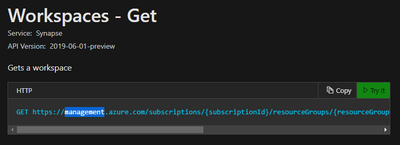
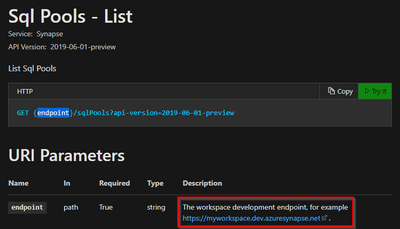
But sometimes we need call the REST APIs directly and this get the connectivity part a little more complicated depending on the BEARER TOKEN (This bearer token is a lightweight security token that grants the “bearer” access to a protected resource) and you need to request the token to the correct provider


$token = (Get-AzAccessToken -Resource “https://management.azure.com“).Token


$token = (Get-AzAccessToken -Resource “https://dev.azuresynapse.net“).Token


If you request the wrong token you will get error like below


Invoke-RestMethod: {“code”:”InvalidTokenAuthenticationAudience”,”message”:”Token Authentication failed with SecurityTokenInvalidAudienceException – IDX10214: Audience validation failed. Audiences: ‘[PII is hidden]’. Did not match: validationParameters.ValidAudience: ‘[PII is hidden]’ or validationParameters.ValidAudiences: ‘[PII is hidden]’.”}


You can check it in the API documentation

FonsecaSergio_0-1615481441962.png


FonsecaSergio_1-1615481518841.png


Find below two samples

 – Sample 1 – Get Synapse workspace (Azure Management Endpoint)

 – Sample 2 – Get Synapse SQL Pools (Synapse DEV Endpoint)


Sample 1 – Get Synapse workspace (Azure Management Endpoint)


$ResourceGroup = "ResGroup"
$workspaceName = "Synapse"
$SubscriptionId = "de41dc76-xxxxxxx"

# ------------------------------------------
# these Az modules required
# https://docs.microsoft.com/powershell/azure/install-az-ps
Import-Module Az.Accounts 

#CONNECT TO AZURE

$Context = Get-AzContext

if ($Context -eq $null) {
    Write-Information "Need to login"
    Connect-AzAccount -Subscription $SubscriptionId
}
else
{
    Write-Host "Context exists"
    Write-Host "Current credential is $($Context.Account.Id)"
    if ($Context.Subscription.Id -ne $SubscriptionId) {
        $result = Select-AzSubscription -Subscription $SubscriptionId
        Write-Host "Current subscription is $($result.Subscription.Name)"
    }
    else {
        Write-Host "Current subscription is $($Context.Subscription.Name)"    
    }
}


# ------------------------------------------
# get Bearer token for current user for Synapse Workspace API
$token = (Get-AzAccessToken -Resource "https://management.azure.com").Token
$headers = @{ Authorization = "Bearer $token" }
# ------------------------------------------

#https://docs.microsoft.com/en-us/rest/api/synapse/workspaces/get

$uri = "https://management.azure.com/subscriptions/$SubscriptionID/"
$uri += "resourceGroups/$ResourceGroup/providers/Microsoft.Synapse/"
$uri += "workspaces/$workspaceName/?api-version=2019-06-01-preview"

$result = Invoke-RestMethod -Method Get -ContentType "application/json" -Uri $uri -Headers $headers

Write-Host ($result | ConvertTo-Json)


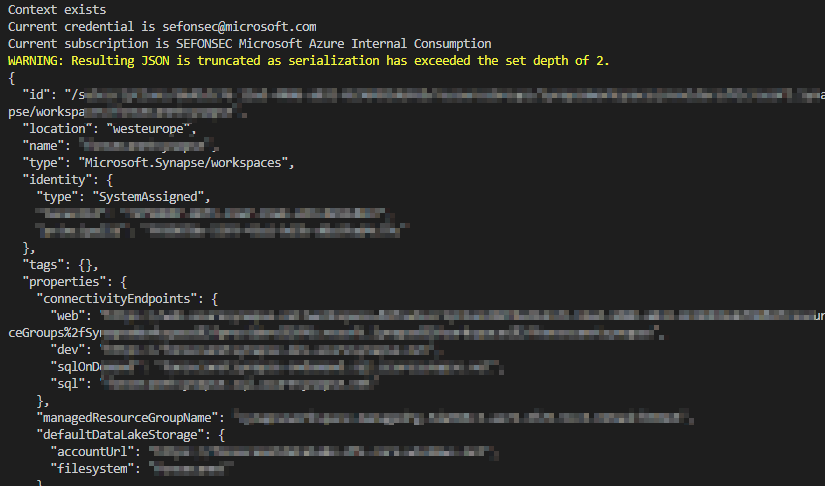
It will return JSON with data

FonsecaSergio_0-1615479391491.png


But you can explore it like a Powershell object


$result.properties.connectivityEndpoints.sql


$workspaceName = "Synapse"
$SubscriptionId = "de41dc76-xxxxxx"

# ------------------------------------------
# these Az modules required
# https://docs.microsoft.com/powershell/azure/install-az-ps
Import-Module Az.Accounts 


#CONNECT TO AZURE

$Context = Get-AzContext

if ($Context -eq $null) {
    Write-Information "Need to login"
    Connect-AzAccount -Subscription $SubscriptionId
}
else
{
    Write-Host "Context exists"
    Write-Host "Current credential is $($Context.Account.Id)"
    if ($Context.Subscription.Id -ne $SubscriptionId) {
        $result = Select-AzSubscription -Subscription $SubscriptionId
        Write-Host "Current subscription is $($result.Subscription.Name)"
    }
    else {
        Write-Host "Current subscription is $($Context.Subscription.Name)"    
    }
}


# ------------------------------------------
# get Bearer token for current user for Synapse Workspace API
$token = (Get-AzAccessToken -Resource "https://dev.azuresynapse.net").Token
$headers = @{ Authorization = "Bearer $token" }
# ------------------------------------------

# https://docs.microsoft.com/en-us/rest/api/synapse/data-plane/sqlpools/list
# GET {endpoint}/sqlPools?api-version=2019-06-01-preview

$uri = "https://$workspaceName.dev.azuresynapse.net/"
$uri += "sqlPools?api-version=2019-06-01-preview"

$result = Invoke-RestMethod -Method Get -ContentType "application/json" -Uri $uri -Headers $headers

Write-Host ($result | ConvertTo-Json)



{
  "value": [
    {
      "properties": "@{status=Online; maxSizeBytes=263882790666240; collation=SQL_Latin1_General_CP1_CI_AS; restorePointInTime=01/01/0001 00:00:00; creationDate=10/22/2020 11:20:08; provisioningState=Succeeded}",
      "sku": "@{name=DW100c; capacity=0}",
      "id": "/subscriptions/de41dc76-...",
      "name": "pool01",
      "type": "Microsoft.Synapse/workspaces/sqlPools",
      "location": "westeurope",
      "tags": "@{test=true}"
    },
    {
      "properties": "@{status=Paused; maxSizeBytes=263882790666240; collation=SQL_Latin1_General_CP1_CI_AS; restorePointInTime=01/01/0001 00:00:00; creationDate=03/04/2021 20:14:32; provisioningState=Failed}",
      "sku": "@{name=DW100c; capacity=0}",
      "id": "/subscriptions/de41dc76-....",
      "name": "lab01",
      "type": "Microsoft.Synapse/workspaces/sqlPools",
      "location": "westeurope",
      "tags": ""
    }
  ]
}


Azure Marketplace new offers – Volume 121

Azure Marketplace new offers – Volume 121

This article is contributed. See the original author and article here.


We continue to expand the Azure Marketplace ecosystem. For this volume, 99 new offers successfully met the onboarding criteria and went live. See details of the new offers below:


Applications


Acumex Trade Management.png

Acumex Trade Management System: The Acumex Trade Management System streamlines the pharmaceuticals trading process. Optional AI support includes recommendations for negotiations, allowing traders to unlock value from large, complex product portfolios and multiple suppliers or buyers.


AI Chatbot for Hotels.png

AI Chatbot for Hotels by Book Me Bob: Book Me Bob, a line of AI-powered chatbots from Myma Digital Limited, helps hotels boost sales conversion, optimize costs, and enhance the guest experience. These bots are trained by hoteliers through thousands of questions and answers.


Artificial Solutions.png

Artificial Solutions – Teneo Conversational AI: Teneo is an integrated development environment that creates conversational assistants and extends the capabilities of the Microsoft Language Understanding (LUIS) AI service. Teneo features a graphical interface, a runtime engine, an analytics platform, and more than 30 language packs.


Atlas Elite.png

Atlas Elite: Atlas Elite accelerates trade by connecting corporate staff and financiers in a place where operations are automated and transaction processing time is reduced, with documents digitally signed and committed.


Audit360 SaaS.png

Audit360 SaaS: Audit360 transforms auditing with its intelligent reports, robust scoring, configurable workflows, and real-time updates. Let it open the door to digitalization and increase your audit efficiency by up to 70 percent.


Barracuda CloudGen Access.png

Barracuda CloudGen Access: Barracuda CloudGen Access lets you securely manage your remote workforce with instant provisioning of company-owned or employee-owned devices and unmanaged contractor endpoints. Establish access control across users and devices without the performance pitfalls of a traditional VPN.


Bell Network Archiver.png

Bell Network Archiver: TeleMessage’s connector enables you to import and archive Short Message Service (SMS) and Multimedia Messaging Service (MMS) messages from the Bell Network to mailboxes in Microsoft 365. This can help your organization stay compliant with governmental and regulatory policies.


Berrycast.png

Berrycast – Screen video messages: Berrycast can help you improve and clarify your communications with co-workers and clients around the world. With Berrycast, you can record and share videos, giving your messages a human touch and allowing you to relay thoughts faster than you can type an email.


Blackbaud CRM.png

Blackbaud CRM: Blackbaud CRM combines extensive nonprofit expertise with fundraising and customer relationship management software tools, integrated analytics, multichannel marketing, and data-mining services to help large nonprofits build stronger and more productive relationships.


Blackbaud Raiser's Edge NXT.png

Blackbaud Raiser’s Edge NXT: Blackbaud Raiser’s Edge NXT is an all-in-one fundraising and relationship management solution that can help you attract new supporters, engage with them according to their preferences, and expand their impact.


CentOS 7.png

CentOS 7: This preconfigured image from Cloud Whiz Solutions provides CentOS 7, a free Linux distribution that’s functionally compatible with its upstream source, Red Hat Enterprise Linux.


Charge Up.png

ChargeUp: Made for anyone who offers drivers access to electric vehicle charging points, the ChargeUp cloud-based software manages charging networks. ChargeUp offers 24-hour customer support for most of the standard types of charging points.


clinicgram.png

clinicgram (CE Type I Digital Health Platform): clinicgram uses digital imaging and AI algorithms to assist healthcare professionals in their assessments. It enables the efficient capture of non-radiological images (mobile clinical pictures) and associated metadata (clinical scales) through standard mobile devices.


CloudUCX.png

CloudUCX: CloudUCX from Exactive provides cost savings with direct routing, helping your organization get the most out of Microsoft Teams. Exactive will guide you through migration and into a fully managed support service.


Comtrade eSession.png

Comtrade eSession: Comtrade’s eSession, an electronic meeting management solution, caters to the needs of large corporations and state administrations. It enables electronic delivery of documents, simplifying procedures and helping board meetings go paperless.


CYBERhythm Cloud Detection.png

CYBERhythm Cloud Detection & Response Service: CYBERhythm, a multi-cloud cybersecurity detection and response solution, features automated onboarding, integrated threat intelligence, easily navigable dashboards, and a risk index.


EAM 4FACTORY.png

EAM 4FACTORY: EAM 4FACTORY’s preventive and predictive actions reduce the duration of production downtime resulting from the unplanned unavailability of machines. EAM 4FACTORY allows manufacturing companies to achieve full traceability of repairs and preventive inspections.


Egnyte.png

Egnyte Connect: Egnyte Connect serves as a central data hub and command console for IT administrators. It features enterprise file synchronization and sharing, VPN-less access, and integration with several Microsoft Azure services.


EPAM Decentralized.png

EPAM Decentralized Clinical Trial Platform: EPAM’s Decentralized Clinical Trial platform enables life science companies to move beyond traditional clinical trial models, with technical accelerators in the areas of e-consent, telehealth, IoT integration, and ePRO and eCOA mobile configuration.


Evocom.png

Evocom: Evocom lets business users digitize task management and microprocesses. IT specialists use the connector for automation with Microsoft Power Automate or the development of specific process apps. This app is available in German and English. Additional languages may be available on request.


EXAScaler Cloud.png

EXAScaler Cloud: EXAScaler Cloud is a highly scalable parallel file system for data-intensive deployments. Based on the Lustre parallel distributed file system, EXAScaler Cloud is built for AI, high-performance computing, and other big data workloads.


Expense Management for Office 365.png

Expense Management for Office 365: DynamicPoint’s EASYEXP365 is an employee expense management app that supports the Essentials and Premium editions of Microsoft Dynamics 365 Business Central. It automates the entry, review, and approval of expense reports.


Fusion KTP.png

Fusion KTP: Fusion KTP provides corporate treasurers with an integrated modular platform for managing cash, risk, reporting, compliance, and accounting. More than 200 organizations use Fusion KTP to manage their global treasury operations.


hi-chart.png

hi-chart: Use hi-chart to create easy-to-read reports, presentations, and dashboards. The design and distribution of multi-page reports and dashboards with Microsoft Excel data is achieved via the hi-chart web platform or directly in Excel. This app is available only in German.


HIPAA-Compliant Geocoder.png

HIPAA-Compliant Geocoder: The HIPAA-Compliant Geocoder from Spatialitics transforms readable addresses to geographic coordinates, allowing healthcare providers to perform spatial analytics on the data and develop a better understanding of any number of clinical, strategic, or operational activities.


Indyco.png

Indyco Enterprise Edition: Indyco is a suite for modeling, designing, and governing an enterprise data warehouse. By using a graphical formalism that can easily be understood, Indyco provides up-to-date documentation and breaks down the barriers of communication between IT and business teams.


IoT Service Hub.png

IoT Service Hub: IoT Service Hub from Hitachi Solutions Ltd. notifies workers of abnormalities in information gathered by IoT devices and stored in Microsoft Azure. This app is available only in Japanese.


IOTA Hornet Node.png

IOTA Hornet Node: This node is designed for use in the IOTA Tangle. IOTA is a distributed ledger technology with an architecture called Tangle. IOTA is designed to support frictionless data and value transfer with high scalability and no fees.


itracks Realtime.png

itracks Realtime: itracks Realtime from Interactive Tracking Systems is a platform built for focus groups and interviews. The virtual backroom allows stakeholders to observe the session and interact via video or text without biasing the research results.


Juno Intranet.png

Juno Intranet SharePoint Solution: Juno is a ready-to-go intranet based on Microsoft SharePoint and Office 365. Offer your employees a pleasant digital work environment with more than 35 features and a continuously developing module structure.


Kanvas for Design.png

Kanvas for Design: Kleen Tex Japan’s Kanvas for Design is a design simulator that can be customized for your company’s products, services, and branding strategy. This app is available only in Japanese.


MagnifEye.png

MagnifEye: MagnifEye is intended for public health organizations and manufacturers of lateral flow tests. MagnifEye is an AI-powered software product that improves test speed and accuracy by detecting difficult-to-read lines, including those not visible to the human eye.


NonProfit Power Up.png

NonProfit Power Up – Power Platform Accelerator: cloudThing’s NonProfit Power Up accelerator can help your charity lower the cost and effort to build a Microsoft Power Platform solution. This solution can quickly unlock new functionality, such as gift aid management and constituent discovery.


OpenText.png

OpenText EnCase Endpoint Security: OpenText EnCase Endpoint Security provides security teams with 360-degree visibility to validate, analyze, scope, and respond to incidents that originate in Microsoft Azure or involve endpoints in Azure.


Patient Data Hub.png

Patient Data Hub: Physicians and care teams can use the dashboards of CitiusTech’s Patient Data Hub to provide virtual care or remotely monitor patients for chronic conditions. Patient Data Hub offers payment options through integration of patient-generated health data.


PHP 7.3 on CentOS 8.0.png

PHP 7.3 on CentOS 8.0: This preconfigured image from Cloud Maven Solutions provides PHP 7.3.25 on CentOS 8.0. PHP is a fast and flexible scripting language commonly used for web development.


PHP 7.4 on CentOS 8.0.png

PHP 7.4 on CentOS 8.0: This preconfigured image from Cloud Maven Solutions provides PHP 7.4.13 on CentOS 8.0. PHP is a fast and flexible scripting language commonly used for web development.


Policies and Insights.png

Policies & Insights (PI) for Microsoft 365: AvePoint’s Policies & Insights makes it easy to run tenant-wide security reports across Microsoft cloud services. Gain security insights and apply automated policies to Teams, Groups, SharePoint, and OneDrive.


PostgreSQL With CentOS 8.0.png

PostgreSQL With CentOS 8.0: This preconfigured image from Cloud Maven Solutions provides PostgreSQL on CentOS 8.0. PostgreSQL is an open-source relational SQL database management system.


Project Management Information System.png

Project Management Information System (PMIS): Cambay’s Project Management Information System (PMIS), developed using the modern frameworks of Microsoft SharePoint, Microsoft Power Automate, and Microsoft Azure Functions, enables organizations to execute projects seamlessly through an intuitive and engaging interface.


QuickBooks Computer.png

QuickBooks Computer Multi-User with Office 365 Applications: This offer from Automate.io provides a preconfigured Windows 10 virtual machine with QuickBooks Enterprise and Office 365 software installed. A QuickBooks Enterprise license must be purchased separately.


Retail 7.png

retail7: The retail7 point-of-sale system is suited for cafés, delivery services, food trucks, and other small businesses. It works on mobile phones, tablets, and PCs, and its interface is customizable. retail7 is available in German and adheres to the General Data Protection Regulation.


SCMProFIT.png

SCMProFIT: SCMProFit is a supply chain logistics system that simplifies complexity and provides manufacturers with end-to-end visibility. It integrates with leading enterprise resource planning solutions and has served numerous organizations across industry sectors.


Senseye PdM.png

Senseye PdM – Predictive Maintenance on Azure: Through predictive maintenance, Senseye PdM maximizes machine effectiveness while minimizing operational costs, slashing unplanned downtime. Deployment is rapid, and actionable results are delivered within 14 days.


Social and Digital Data Screening.png

Social & Digital Data Screening: Farosian’s Social & Digital Data Screening analyzes social media to flag high-risk job candidates or employees. Nurture an inclusive work environment with insights derived from Farosian’s AI and machine learning.


Stackbit.png

Stackbit: Stackbit is an open platform for JAMstack, a web development architecture based on JavaScript, reusable APIs, and pre-built Markup. Users can easily build and edit JAMstack sites through an intuitive interface and deploy sites directly to Microsoft Azure.


StoreVue Inspection.png

StoreVue Inspection: Through IoT, cloud storage, video analysis, and mobile Internet technology, StoreVue Inspection helps retail store managers oversee branch locations, centrally manage store data, conduct inspections, and ensure food safety. 


SurePact Project.png

SurePact Project & Contract Risk Management SaaS: SurePact, a risk identification and mitigation solution for government and corporate contracts delivery, guards against cost and scope increases. SurePact’s configurable workflows and pre-built analytics help track governance and compliance.


Time and Material app.png

Time and Material app for construction: The Time and Material app from CEM Business Solutions tracks project hours and equipment used for construction and other product development. It’s especially useful for jobs with requirements that are expected to change.


TOPdesk.png

TOPdesk: What if your customers could easily get answers to all their IT, facility, or HR questions in one place? TOPdesk’s enterprise service management software streamlines customer support so your teams can join forces and offer more value to your customers.


Turing AI Aerial Object Detection.png

Turing AI Aerial Object Detection: Turing Challenge’s models use aerial images and satellite images to detect and classify objects. Monitor infrastructure, detect anomalies, and predict maintenance.


Valimail Enforce.png

Valimail Enforce: Modern phishing attacks bypass traditional filtering mechanisms but can be stopped by email authentication. Valimail Enforce utilizes cloud-native technologies to authenticate sender identity, preventing phishing attacks and protecting brands.


Verloop.png

Verloop.io: Verloop.io’s platform allows businesses to automate customer support across channels like WhatsApp, Facebook Messenger, and web browsers. At the heart of Verloop.io is a machine learning system that understands customer problems using natural language processing.


Virtual Desktop.png

Virtual Desktop: DJT Group’s Cameyo platform enables the secure delivery of Windows and internal web apps from a browser to any device, without the need for a virtual private network. This makes it easier for organizations to support remote-work arrangements.


WebIZ.png

WebIZ: Envision’s WebIZ is a comprehensive immunization information system for state and local government public health agencies. Access to the application can be direct, via a browser-based interface, or indirect, via HL7 messages.


ZChatBot.png

ZChatBot – chatbot for Microsoft Teams: ZChatBot helps IT and human resources departments streamline workflows and more quickly handle routine tasks, such as ordering a visitor pass, getting information about working hours and holidays, and referring to orders.


Consulting services


3-8 month implementation.png

3-8 Month Implementation: Decision Analytics: Make intelligent decisions, accelerate innovation, analyze trends, and forecast outcomes – all through data analytics and intuitive dashboards with CloudMoyo Decision Analytics. In this service, CloudMoyo will implement its platform to bring your data to life through visualizations.


Agilisys Data Platform Discovery.png

Agilisys Data Platform Discovery: 5-Week Assessment: Agilisys will help securely migrate your data to the cloud, enabling actionable business intelligence and insights. As part of this discovery and design assessment, Agilisys will work with you to provide a thorough and comprehensive review of your data estate.


AMOS for.png

AMOS for Azure Red Hat OpenShift (ARO): 1-Hour Briefing: Learn about the Atos end-to-end managed service for ARO, a Microsoft Azure service that integrates Red Hat OpenShift into Azure infrastructure and is jointly support by Microsoft and Red Hat. On top of ARO, Atos provides Atos Managed OpenShift (AMOS), a fully managed service.


App Innovation Migration.png

App Innovation Migration: 8-Week Implementation: Neudesic will deliver an in-depth identification and analysis of specific applications for migration to Microsoft Azure, complete with architecture design, migration plan, and subsequent migration. The deliverables include Azure service and architecture recommendations.


Application Modernization- 2-Day.png

Application Modernization: 2-Day Assessment: This application solution assessment from Spikes NV will determine the cloud readiness of your application infrastructure. The scope of the assessment will be determined during an intake call. The final report will include a high-level summary of the project background.


Azure App Modernisation Assessment.png

Azure App Modernization Assessment: 6 Weeks: Content + Cloud will review your application to determine how it can be rebuilt and rearchitected using a cloud-first approach with Microsoft Azure. C+C will also discuss security and compliance requirements and the current end-user experience.


Azure Cloud Migration Assessment.png

Azure Cloud Migration Assessment: 6 Weeks: Content + Cloud’s tools-based assessment provides a clear explanation of the options available to support your migration to Microsoft Azure along with expert recommendations and a high-level design. Get a migration plan with projected costs for your Azure subscriptions.


Azure Database Migration Review.png

Azure Database Migration Review: 2-Day Assessment: This assessment from Trivadis will check your environment and Microsoft Azure readiness with the Microsoft Assessment and Planning (MAP) Toolkit. The result is a complete overview of your SQL environment and prerequisites for your migration to Azure.


Azure Data Platform 8 week.png

Azure Data Platform: 8-Week Implementation: Implement your Microsoft Azure data platform and governance solution with Azure API Management, Azure Data Lake, Azure Databricks, and more. Get an operational data platform and the first data products available within the compliancy requirements of your company.


Azure ML (4) (Cognitive Machines).png

Azure ML: 4-Week Proof of Concept: Cognitive Machines will hold a detailed discussion with your team to identify your data-centric business transformation goals. Cognitive Machines will then develop a proof-of-concept AI product on the Microsoft Azure platform, with rich application interfaces using cognitive technologies. 


Azure ML (4) (Cognitive Machines).png

Azure ML: 5-Day Workshop: Cognitive Machines will educate your team about AI and analytics tools that can drive an improved business outcome. Get advanced analytics demos and examples for use cases similar to your business, advice on reference architecture, and best practices for implementing a data-centric transformation.


Azure ML (4) (Cognitive Machines).png

Azure ML: 8-Hour Briefing: Cognitive Machines will define an AI implementation plan detailing the data collection process, data cleanup procedure, algorithm selection, and hardware requirements. Cognitive Machines will document the assessment and provide a blueprint that can be used as a template for further development.


Azure ML (4) (Cognitive Machines).png

Azure ML: 10-Week Implementation: Cognitive Machines aims to enable small and medium-sized businesses to harness the power of AI. In this engagement, Cognitive Machines will define an AI implementation plan detailing the data collection process, price estimates, and more.


Azure Monitoring Workshop.png

Azure Monitoring Workshop – 2 Days: The purpose of this offering from Newwave is to provide clients with a professional workshop that teaches them about the different services Microsoft Azure makes available for monitoring cloud workloads. Clients will learn how to increase efficiency and keep costs as low as possible.


Azure Sentinel Onboarding.png

Azure Sentinel Onboarding: 3-Day Workshop: Persol will explain the Microsoft Azure Sentinel service, install it, analyze and collect logs, and report the results in a hands-on workshop. This service is available only in Japanese.


BizTalk Migration.png

BizTalk Migration Service: 2-Week Assessment: This service from Communicate will assess and evaluate Microsoft BizTalk Server and consider a migration of the customer’s integration platform to Microsoft Azure. Communicate will identify and document the business integration needs, desired business outcome, pain points, and more.


Capgemini.png

Capgemini eAPM Assessment – 1 Week: Capgemini will provide an in-depth view into your organization’s IT portfolio. The assessment will deliver a business case that will summarize current-state costs, future-state costs, estimated savings, application waves/project timelines, implementation costs, and more.


Cloud4C Azure Lighthouse.png

Cloud4C Azure Lighthouse – Internal: Cloud4C offers the following managed services on Microsoft Azure: migrations; Azure IaaS, PaaS, and SaaS; SAP on Azure; and Azure Site Recovery. Expand your expertise with Cloud4C’s Microsoft-certified engineers and 24-hour support.


Cloud Competence Center.png

Cloud Competence Center: 4-Week Assessment: Streamline the value flow from ideas to production in your Microsoft Azure environment. This quick start from KPMG will give you an overview and understanding of how your cloud strategy aligns to the specific needs of your team.


Cloud Migrate.png

Cloud Migrate: 2-Day Implementation: Tec Networks will perform a detailed cloud assessment and deliver a plan for the migration of your environment to Microsoft Azure. This implementation includes an analysis of virtual machines, a review of a lift-and-shift migration, and more.


Cloud Readiness Assessment.png

Cloud Readiness Assessment: 2-Week Assessment: NNIT will establish as-is and desired-to-be pictures through data gathering, interviews, and workshops. The service delivers short-term and long-term roadmaps. Build a secure, scalable platform that utilizes Microsoft Azure services to handle operational efficiency and more.


Computer Vision.png

Computer Vision in Action: 2-Week Proof of Concept: Solve your business problems by applying computer vision techniques on Microsoft Azure. Computer vision is the area of AI focused on automatically processing and analyzing images to understand what they contain. This service from Ilitia Technologies is available in Spanish and English.


Desktop360 VMware Horizon.png

Desktop360 VMware Horizon on Azure: 5-Day Proof of Concept: This proof of concept from Entisys360 shows how you can enable your workforce to work from anywhere. Deploying Windows Virtual Desktop on Microsoft Azure with VMware Horizon simplifies deployment and improves end-user experience for virtual desktops.


DevOps Assessment.png

DevOps Assessment & Migration Opportunities – 1 Week: Get an assessment by Invati of your DevOps environment, complete with an effort estimate for migration to Microsoft Azure DevOps or GitHub. Get comprehensive guidance on automation benefits and opportunities, unlock innovation, and more.


Digital Service Platform.png

Digital Service Platform: 3-Week Assessment: A Digital Platform from Communicate can release the potential that resides within your legacy systems as it collects, secures, and shares locked-in data. This platform design assessment will address Microsoft Azure API Management and more.


Enterprise System.png

Enterprise System: 4-Hour Assessment: ACW Solutions will help identify weak spots in your system with this assessment. ACW Solutions will evaluate your operation processes and compare them to industry best practices to expose risks and improve efficiency.


ePlus-Lighthouse PAL.png

ePlus-Lighthouse PAL: This offer will onboard customers to an ePlus-managed Microsoft Azure Lighthouse environment to enable Partner Admin Link (PAL). PAL enables Microsoft to identify and recognize partners who are helping customers achieve business objectives and realize value in the cloud.


Liquid Infrastructure Assessment.png

Liquid Infrastructure Assessment: 3-Week Assessment: Liquid Telecom’s Cloud Managed and Cyber Security Services team will partner with you to understand your organization’s strategic goals. Liquid Telecom will analyze your IT environment and outline the best way forward for your business in the cloud.


Managed Detection and Response.png

Managed Detection and Response – CSP: Wortell offers a fully managed service for your business-critical Microsoft Azure environment. This package provides seamless Azure management access control via Azure Lighthouse for managed detection and response (MDR) cloud solution provider (CSP) customers.


Managed Ubuntu server.png

Managed Ubuntu Server – Linnovate Open Source SLA: Linnovate 24-hour support plans provide managers and enterprises the coverage they need to have a productive day at work. Enterprises, startups, academies, and government agencies can get professional support for Ubuntu Server virtual images on Azure, including security updates.


Migesa Remote Worker.png

Migesa Remote Worker Platform (free): 1-Week Proof of Concept: This service will enable a test environment of Windows Virtual Desktop infrastructure on Microsoft Azure. Migesa will also be able to provide supervision, administration, and technical support. This service is available only in Spanish.


Mortgage Compliance.png

Mortgage Compliance in Azure: 2-Day Workshop: Invati provides leading solutions for the mortgage-lending and loan-serving sectors. Get a hands-on workshop for your team on how to be compliant in the cloud. Learn about the basic steps of data governance, demand management, and data classification, customized for your organization.


MSBI FastTrack.png

MSBI FastTrack – 2-Hour Briefing: Automate the creation of SSIS packages to expedite project delivery, increase productivity, apply industry best practices, and reduce total cost of ownership. Learn how Elait has created the MSBI Fast Track application to drive the generation of single or multiple SSIS packages.


On-Premise to Online Consultancy.png

On-Premises to Online Consultancy: 1-Week Briefing: Tisski’s on-premises-to-online service can provide you and your organization with the support you need in making the move to Microsoft Azure. Reduce the cost of operations in comparison to on-premises hosting and keep your data safe online.


Piksel Group.png

Piksel Group Windows Virtual Desktop Assessment Workshop (2 Days): This workshop from Piksel will show how Windows Virtual Desktop can form a key part of your IT modernization strategy. Upon completion of the workshop, you will have a strong understanding of how your organization could benefit from Windows Virtual Desktop. 


Quadra Nubis 2 day.png

Quadra Nubis: 2-Day Azure Windows Virtual Desktop assessment: This assessment from Quadra will help you take advantage of Windows Virtual Desktop on Microsoft Azure. Benefit from enhanced user experience, lower costs, and greatly increased manageability while addressing security and compliance regulations.


Quorum Cyber.png Quorum Cyber – Professional Services: Quorum Cyber’s professional security services help your organization manage exposure to cyber-risk, increase resilience to business disruption, and achieve measurable returns on investment.
Solution Assessment App Innovation.png

Solution Assessment App Innovation: 1-Hour Assessment: ITCO will analyze your current architecture and, depending on the scenario, will recommend modernizing your architecture using Microsoft Azure services. ITCO will also accompany you during the design of applications.


Start with Azure Datalake.png

Start with Azure Data Lake: 4-Week Implementation: Connect and implement six different data sources from two different technologies on a Microsoft Azure Data Lake. Conclusion will enable automatic refresh of your data, automatic filtering using basic logging of data pipeline status, and implementation of Azure Databricks.


Stress test.png

Stress test: ITG Solutions will test your web application at the maximum load supported to check its robustness and reliability. This offering is available in Spanish and English.


The IT Optimization.png

The IT Optimization: Half-Day Workshop: This workshop from Neudesic is designed to help IT organizations drive quick wins and long-term strategies that reduce cost and increase customer value. Neudesic’s IT Optimization frameworks focus on unlocking savings and efficiencies from different areas of the IT organization.


Windows Virtual Desktop (Persol) 2 weeks.png

Windows Virtual Desktop: 2 weeks of verification support: For customers considering Windows Virtual Desktop, Persol will build a verification environment and provide verification support. Persol aims to build an environment and configuration that suits the customer’s business. This service is available only in Japanese.


Windows Virtual Desktop Deployment.png

Windows Virtual Desktop Deployment: 1-Week Implementation: Fortevento offers a quick assessment of customer needs, current infrastructure, and cost estimates. Based on Fortevento’s findings, a custom Windows Virtual Desktop deployment plan will be offered. Scope may vary depending on customer size and needs.


2021 Imagine Cup category feature: Lifestyle

2021 Imagine Cup category feature: Lifestyle

This article is contributed. See the original author and article here.

Get to know the Lifestyle category teams innovating for impact with deep convolutional neural networks, Artificial Intelligence, Microsoft Edge Extensions, and more.


The 2021 Imagine Cup is all about innovating to help solve pressing global issues, and this year’s competition is focused on solutions in four social good categories: Earth, Education, Healthcare, and Lifestyle. All tech ideas submitted to the competition were developed under one category that best aligned with a team’s passion and motivation to make a difference. In this feature, we’ll look at innovations in our Lifestyle competition category. 


Lifestyle overview 


The Lifestyle category focuses on projects that shape how we game, play, and live. Tech that creates opportunities for recreation, building community, and shaping our passions, hobbies, and work is important for all of us as a digital world becomes interwoven into our daily livesStudents have created solutions within this category encompassing a virtual game to combat social isolation, an app to increase the spatial awareness of cyclists, and a sign-language caption generator. 


Why it matters 


The tools, games, and resources that bring positivity, fun, social connection, and creative interactions with others around the world is more important than ever. At the forefront of Lifestyle innovation is creating technology that holds purpose and meaning in our lives giving us information, creative outlets, connection, and relaxationStudents in this category aim to have that impact through their Imagine Cup ideas 


Meet our Lifestyle category World Finalists: 


Team Assurance, United States


Project: Assurance – Re(Imagine) Safety


Team Assurance created a proactive and affordable system to prevent mass shootings. It works by scanning the aggregate input from security camera feeds for firearms and alerts all parties it needs to alert as soon as a firearm is detected. The system is fully extensible and is able to run on low-cost hardware.


Assurance Team.PNG

Team DataMasker, China


Project: WellMask


WellMask is an Artificial Intelligence social mask based on semantic extraction & symbol communication. The team hopes to solve the problems of inefficient communication and high social threshold caused by masks, so that masks are no longer synonymous with isolation.


DataMasker.png

Team Detectd, India


Project: Detectd- A sophisticated Artificial Intelligence based online Deepfake Detection platform


Detectd is a sophisticated Artificial Intelligence online Deepfake detection platform. It aims to fight misinformation warfare, the biggest cyber threat of 21st century. The aim is to counter the bad actors from weaponizing AI & misinformation.


DetectD.jpg

Team En#Plane, Korea


Project: HSG : Hate Speech Guard for Children


HSG is a Microsoft Edge extension program for children that filters hate speech in text and videos on websites. The goal is to positively aid child development and reduce parental concerns.


EnPlane Logo.PNG

Team Funtime, France


Project: Funtime


Funtime is a social game, with the goal to help people socializing virtually. The game is a video call with pose challenges that players try to mimic. AI is used to analyze the human poses and return a player score.


Funtime.png

Team INTELLIVOLT, Kenya


Project: Power Monitoring System 


Intellivolt monitors over voltage, under voltage and power outages. Alerts from Azure applications in the form of SMS and emails are sent to relevant authorities in real time. 


Intellivolt.PNG

Team Mimibot, Singapore


Project: Mimibot


Mimibot is a chatbot that interacts with children aged 7-12. Its database is connected to a web portal that allows parents and teachers to gain insight to their children’s emotions and words or topics using data visualization.


Mimibot Logo.PNG

Team Roball Go, China


Project: Intelligent Visual Inspection Spherical Robot with Active Drive and Recovery


Roball Go is an intelligent vision spherical inspection robot with active attitude drive and recovery. It can travel in a variety of harsh environments so as to be used in consumer-grade entertainment projects, security inspections, environmental inspections, and national defense and military applications.


placeholder.jpg

SafeTandem, Singapore


Project: SafeTandem


The team created an Android application with an optional hardware add-on to increase the spatial awareness of cyclists and the people around then. The solution aims to benefit everyone, including the deaf and hard-of-hearing community.


Ian_Ng_Cheong_Sian___Celia_Claresta_Chandra.jpg

Team Threeotech, Thailand


Project: JustSigns


JustSigns is a web application for content creators to create sign language captions to improve media accessibility for hard-of-hearing viewers. 


Threeotech.PNG

Team Virtuoso Music, United States


Project: Virtuoso-Hyper-realistic AI Musician Using a Novel Multi-resolution Approach with deep convolutional neural networks


Virtuoso is a program capable of playing a midi (sheet music) as if it was played by a real musician, achieved by utilizing a novel multi-resolution approach using deep convolutional neural networks.


Virtuoso Music.png

Team Zephyr Air, United States


Project: Zephyr Air


Zephyr Air is a low-cost smart air purifier that automatically turns on when the particulate matter sensor inside detects highly concentrated levels of P.M. 2.5 and P.M.10.


Zephyr Air Logo.png


We’re so inspired by these students’ passion to make a difference and are excited to see them pitch their projects at the World Finals this month. Four winning teams will be selected from each of the competition categories, taking home USD10,000 and Azure credits. These teams will also move forward to the World Championship for the chance to win USD75,000 and mentorship with Microsoft CEO, Satya Nadella. Two runner-up teams in each category will take home USD2,500 plus Azure credits.


Follow the action 


Follow these teams’ journey on Instagram and Twitter as they head to the World Finals to compete.  


How do I find all my Planner plans?

How do I find all my Planner plans?

This article is contributed. See the original author and article here.

One question we often get in support is, “How do I find all my Planner plans?” The answer to this is not too tricky—the tricky bit is ‘all plans; rather than ‘all my plans’—as, due to security and privacy controls, you can only ever see plans that are in a group where you are a member (and being an owner does not automatically mean you are a plan member as far as Planner is concerned). But with that constraint how can I get a list of all my plans other than looking at the Planner hub? PowerShell and the Microsoft Graph API are one way.


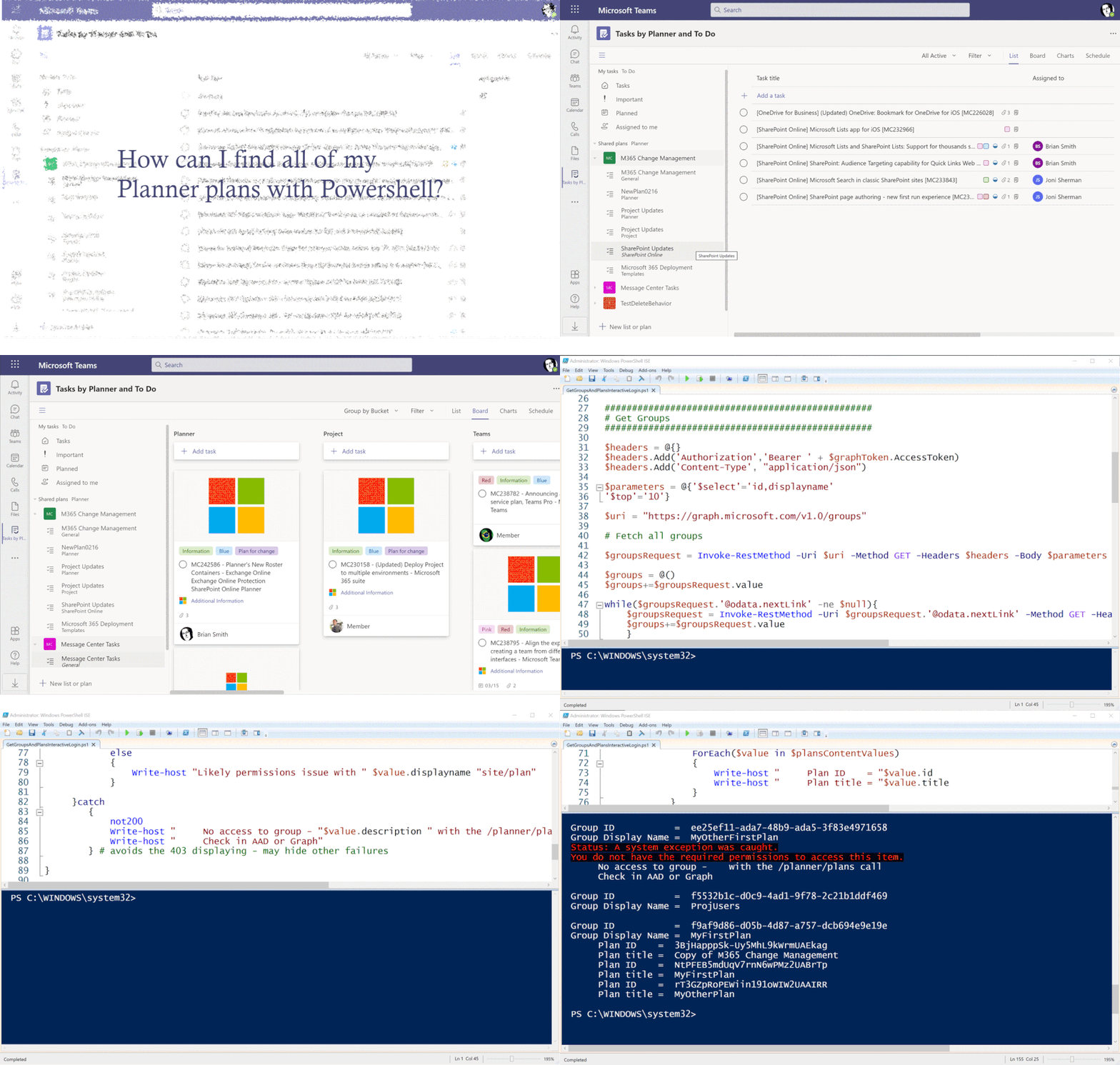
An animation showing some plans, the PowerShell code and then the output list of groups and plansAn animation showing some plans, the PowerShell code and then the output list of groups and plans


I’ve posted previously about using the Graph with Planner, and to avoid repeating some of the basics I won’t cover the creation of App Registrations in Azure Active Directory in depth. You can find those details in this blog from Lee Ford. His blog is not about Planner specifically, but has very good steps on the App Registration using a more recent UI than I did in my earlier posts. I’ll note in the PowerShell code walkthrough below the specific permissions needed. 


I also use the latest MSAL authentication, using the MSAL.PS module to make things easier. You’ll need to have the most up-to-date version of PowerShell and preferably PowerShellGet to make it easier to install modules. I usually work in the ISE, too. On to the code!


First, I have a function that helps to handle failed web callsunless you get a 200 http response, it will be handled as an exceptionso you need to use Try/Catch rather than just read the status of the response. I found this useful function on Chris Wahl’s blog.


# Script to iterate Groups and get all Plans

function not200 {
$global:result = $_.Exception.Response.GetResponseStream()
$global:reader = New-Object System.IO.StreamReader($global:result)
$global:responseBody = $global:reader.ReadToEnd();
$message = $global:responseBody | ConvertFrom-Json
Write-Host -BackgroundColor:Black -ForegroundColor:Red "Status: A system exception was caught."
Write-Host -BackgroundColor:Black -ForegroundColor:Red $message.error.message
} 


This will be called in the catch to give the specific error (usually it will be a “403″ for Groups that you read, but since you’re not a member you can’t see the groups). You could use this information to either find a member or add yourself to check for plans.


Next is the authentication using MSAL. First, you need to install the module either manually or using the Install-Module if you have PowerShellGet.


# MSAL.PS added to the function to support the MSAL libraries
# Available from https://github.com/AzureAD/MSAL.PS or https://www.powershellgallery.com/packages/MSAL.PS
# Or Install-Module MSAL.PS -AcceptLicense
Import-Module MSAL.PS

# Interactive login
# Client ID is created in Azure AD under App Registration - requires Group.Read.All and the default User.Read
# Redirect Url is Mobile and Desktop applications - https://login.microsoftonline.com/common/oauth2/nativeclient
# Change TenantId to your own tenant 


For the call, you need to have your TenantId as well as a ClientId that you have configured via Azure AD as per the reference I shared above. This assumes you are making an interactive loginso it will prompt youbut if necessary you could configure with any of the supported MSAL authentication flows. Just a reminder, Planner always requires an app + user authentication.


$graphToken = Get-MsalToken -ClientId "<replace with your client id>" -TenantId "<replace with your tenant id>" `
-Interactive -Scope 'https://graph.microsoft.com/Group.Read.All', 'https://graph.microsoft.com/User.Read' `
-LoginHint <use your fully qualified domain name as login hint> 


Once you have the token, the next section is where the work happens, as it makes a call to get all groups and then iterates over the groups to get the plans in each groupassuming you have access.  As you can potentially have a lot of groups, the response can be paged, so the while loop handles this seamlessly to get all groups in one PowerShell object. There are very useful Graph examples in this blog from Rezwanur Rahman. I used the top 10 filter to give me a nextlinkeven though I don’t have that many groupsand to check the while functionality. This also shows how the parameters are passed in, which are not really the body of the call but work as url query strings. I also use the parameter to pull just two fields.


#
# Get Groups
#

$headers = @{}
$headers.Add('Authorization','Bearer ' + $graphToken.AccessToken)
$headers.Add('Content-Type', "application/json")

$parameters = @{'$select'='id,displayname'
'$top'='10'} 

$uri = "https://graph.microsoft.com/v1.0/groups"

# Fetch all groups

$groupsRequest = Invoke-RestMethod -Uri $uri -Method GET -Headers $headers -Body $parameters

$groups = @()
$groups+=$groupsRequest.value

while($groupsRequest.'@odata.nextLink' -ne $null){
    $groupsRequest = Invoke-RestMethod -Uri $groupsRequest.'@odata.nextLink' -Method GET -Headers $headers
    $groups+=$groupsRequest.value
    }  


Now that I have all my groups, I’ll next look at each for any plans.


# Iterate through the Groups and find the plans owned by each group

ForEach($value in $groups)
{
    Write-host " "
    Write-host "Group ID           = " $value.id
    Write-host "Group Display Name = " $value.displayname

    $parameters = @{'$select'='id,title'}
    
    $uri = "https://graph.microsoft.com/v1.0/groups/" + $value.id + "/planner/plans"
    try
    # This code will read all groups - but if you are not a member it may fail to read plans 
    {

        $plans = Invoke-WebRequest -Uri $uri -Method Get -Headers $headers -Body $parameters -UseBasicParsing
            if($plans.StatusCode -eq '200')
            {
                $plansContent = $plans.Content | ConvertFrom-Json
                $plansContentValues = $plansContent.value
                ForEach($value in $plansContentValues)
                {
                    Write-host "     Plan ID    = "$value.id
                    Write-host "     Plan title = "$value.title
                }
            }
            else
            {
                Write-host "Likely permissions issue with " $value.displayname "site/plan"
            }

     }catch
        {
            not200 
            Write-host "     No access to group - "$value.description " with the /planner/plans call"
            Write-host "     Check in AAD or Graph" 
        } # avoids the 403 displaying - may hide other failures
        
} 


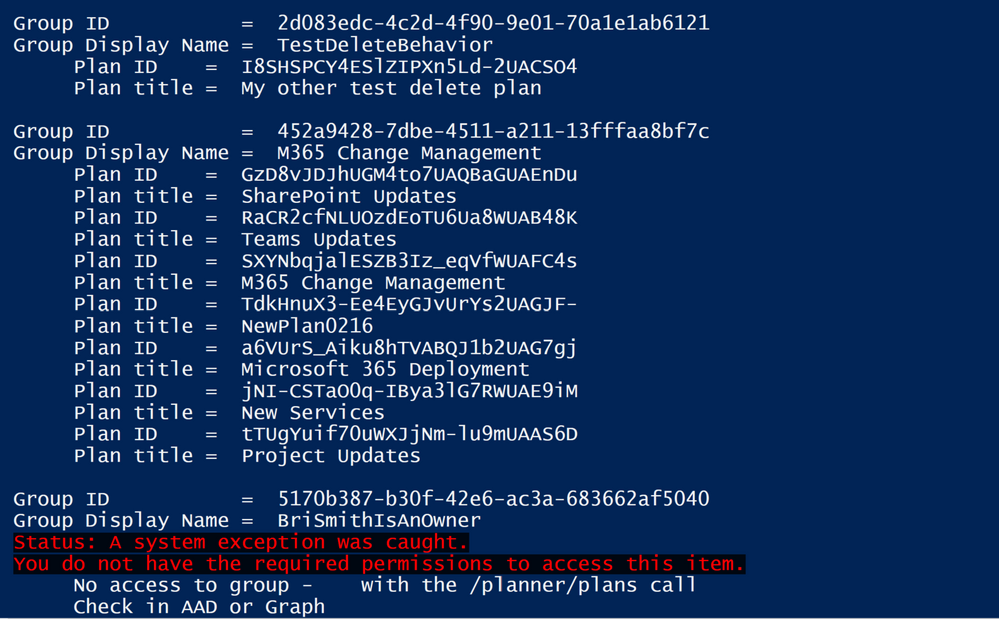
Again, I am using parameters to get the fields I want. I also found that on some machines I didn’t need the -UseBasicParsing flagthat depends on exact versions and is now the default. The output of this script will show the group ID and display name, and then indented underneath the plan ID and title for each plan.


Part of the output showing groups and plans and a failurePart of the output showing groups and plans and a failure


I hope you find this useful.

Azure REST API through Logic App

Azure REST API through Logic App

This article is contributed. See the original author and article here.


As you mature in your cloud journey you may start to be intrigued by the Azure REST API. I feel like sometimes our answer to almost anything is “we could do that through the REST API.” This is a true statement but when we are talking to Infrastructure Engineers a REST API solution might be intimidating. What I want to do in this blog is to use Logic App to make an Azure REST API call with the goal of taking away some of the stigma that you need to be a programmer to utilize API calls!   


Azure REST API 


Before we jump into Logic App look at our documentation on the Azure REST API: 


Azure REST API reference documentation | Microsoft Docs 


As you can see this library of APIs is extensive and powerful. That’s why you can do almost anything through the Azure REST API. For this blog I’m going to utilize the Virtual Network API for listing your Virtual Networks: 


Virtual Networks – List All (Azure Virtual Networks) | Microsoft Docs 


Most everyone has at least one Virtual Network in there subscription so this is a good one to start with. 


Virtual Network – List All 


We need to understand the API before we can call it. The first thing I always look at is the sample call: 


GET https://management.azure.com/subscriptions/{subscriptionId}/providers/Microsoft.Network/virtualNetworks?api-version=2020-07-01 


Couple thing to note from this: 


  • This is a “GET” operation 

  • The values we need to provide will be in the {} block. So for this particular API we need to just provide the Subcription ID we want to query 


The other section that I always look at too is the “Sample” section which will have a sample response. So for this one we should expect the response to look like this: 


{ 
  "value": [ 
    { 
      "id": "/subscriptions/subid/resourceGroups/rg1/providers/Microsoft.Network/virtualNetworks/vnet1", 
      "name": "vnet1", 
      "type": "Microsoft.Network/virtualNetworks", 
      "location": "westus", 
      "properties": { 
        "addressSpace": { 
          "addressPrefixes": [ 
            "10.0.0.0/8" 
          ] 
        }, 
        "dhcpOptions": { 
          "dnsServers": [] 
        }, 
        "subnets": [ 
          { 
            "id": "/subscriptions/subid/resourceGroups/rg1/providers/Microsoft.Network/virtualNetworks/vnet1/subnets/test-1", 
            "name": "test-1", 
            "properties": { 
              "addressPrefix": "10.0.0.0/24", 
              "provisioningState": "Succeeded" 
            } 
          } 
        ], 
        "virtualNetworkPeerings": [], 
        "provisioningState": "Succeeded" 
      } 
    }, 
    {VNET2}, 
    {VNET3}, 
    {…} 
  ] 
} 


Logic App 


So how do we take advantage of Logic App to call this API? Well let’s start with a blank logic app. Here is some info if you’ve never created one: 


Quickstart – Create your first Logic Apps workflow – Azure portal – Azure Logic Apps | Microsoft Docs 


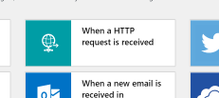
When you create a Logic App it always brings you to the designer page. You always need a trigger in your logic app and for testing I like to use the “When a HTTP Request is Received” (I can always change it later to something like a schedule). 


bwatts670_0-1615226064581.png


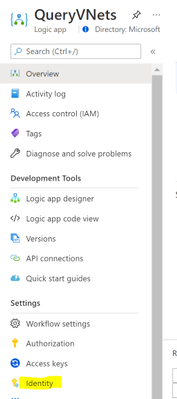
This will take you into the designer with the trigger already added. We are going to utilize the managed identity for the Logic App to do the REST API call. This is not enabled by default, so we need to enable it and give it some rights before we go further. Go ahead and save the Logic App in the designer. Then go to “Identity” under the “Settings” for your Logic App. 


bwatts670_1-1615226064623.png


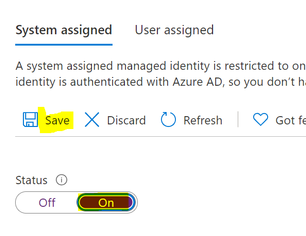
Turn the status to “On” and click on “Save” 


bwatts670_2-1615226064587.png


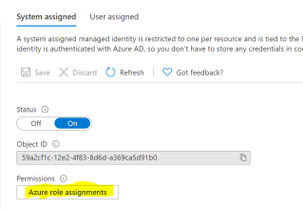
Once it finishes saving click on the “Azure role assignments”: 


bwatts670_3-1615226064591.png


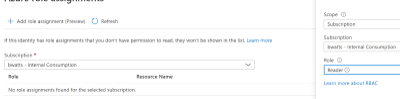
Click on “Add role assignment” and fill in the following: 


  • Scope: Subscription 

  • Subscription: Whatever subscription you plan to query 


  • Role: Reader 


bwatts670_4-1615226064627.png


Click on Save. At this point the Managed Identity has the permissions needed to query the REST API so we can move back to the Logic App Designer. 


In the designer, go ahead and click on the “New Step” below the trigger. 


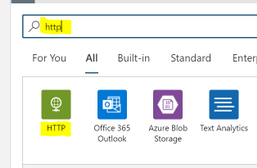
Search for “http” and select the “HTTP” action 


bwatts670_5-1615226064595.png


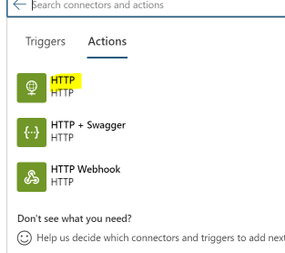
 Then we can choose the basic HTTP Action 


bwatts670_6-1615226064597.png


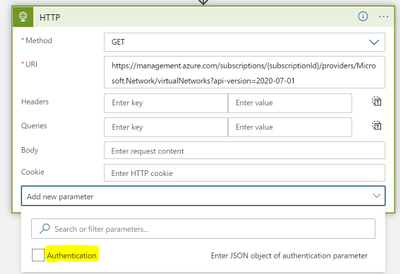
Let’s go ahead and add the authentication before we fill anything out. Click on “Add new parameter” and check the box next to “Authentication”. You’ll need to click somewhere outside of the drop down to add it in so click for instance the “URI” field.  


bwatts670_7-1615226064631.png


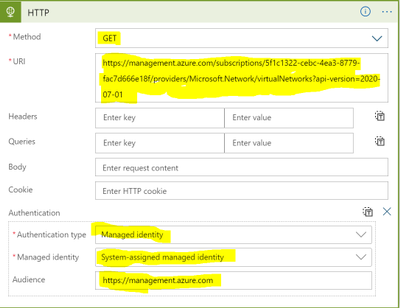
Now we can fill out the required fields to call the REST API 


***Replace {subscriptionId} with the subscription id you want to query*** 


  • Authentication type: Managed identity 


bwatts670_8-1615226064633.png


Go ahead and save your Logic App and then click on Run. 


bwatts670_9-1615226064601.png


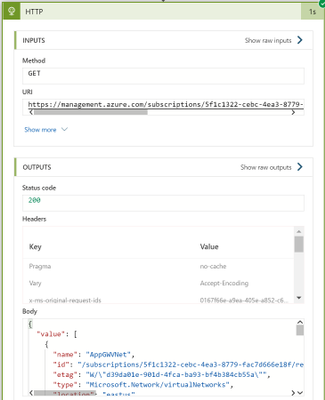
You should see the HTTP call succeed and in the “Body” section you should see your VNets. 


bwatts670_10-1615226064639.png


Congrats! You have authenticated to an Azure Rest API, made a request, and successfully gotten results. 


Using the Results 


I don’t want to leave you with just the results in the body of the HTTP action. Let’s actually do something with the results in Logic Apps. I would typically do some parsing of the JSON but to keep this simple being the focus here is the REST API and not Logic App we will keep the parsing of the JSON to a minimum. 


Go back into the Logic App Designer and click on “New Step” below the HTTP action.  


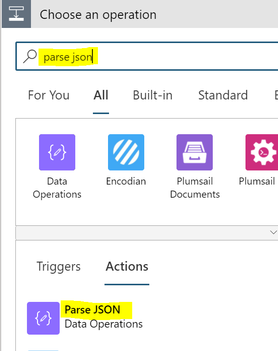
Search for “parse json” and then under the “Actions” section choose “Parse JSON 


bwatts670_11-1615226064604.png


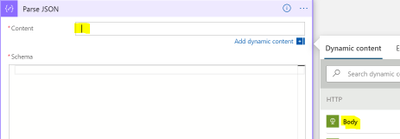
 Click in the “Content” section and then from the “Dynamic content” choose “Body” 


bwatts670_12-1615226064607.png


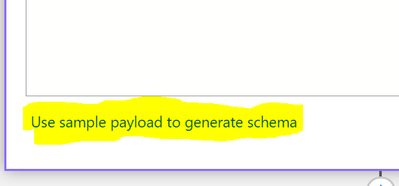
 Click on the option to “Use sample payload to generate schema” 


bwatts670_13-1615226064609.png


 In the box that pops up you can paste in the below: 


***TIP: You can get the sample payload from the previous run we did. You can just grab the body from the “Output”*** 


{
  "value": [ 
    { 
      "id": "/subscriptions/subid/resourceGroups/rg1/providers/Microsoft.Network/virtualNetworks/vnet1", 
      "name": "vnet1", 
      "type": "Microsoft.Network/virtualNetworks", 
      "location": "westus", 
      "properties": { 
        "addressSpace": { 
          "addressPrefixes": [ 
            "10.0.0.0/8" 
          ] 
        }, 
        "dhcpOptions": { 
          "dnsServers": [] 
        }, 
        "subnets": [ 
          { 
            "id": "/subscriptions/subid/resourceGroups/rg1/providers/Microsoft.Network/virtualNetworks/vnet1/subnets/test-1", 
            "name": "test-1", 
            "properties": { 
              "addressPrefix": "10.0.0.0/24", 
              "provisioningState": "Succeeded" 
            } 
          } 
        ], 
        "virtualNetworkPeerings": [], 
        "provisioningState": "Succeeded" 
      } 
    } 
  ] 
} 


Click “Done” and it’ll generate the schema for you. 


Click on “New Step” below the “Parse JSON” 


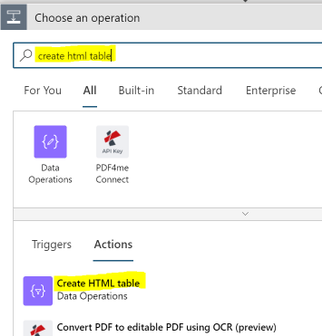
Search for “create html table” and then under the “Actions” section choose “Create HTML table 


bwatts670_14-1615226064611.png


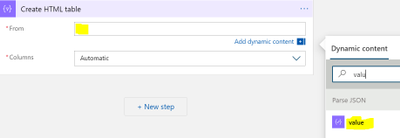
 Click in the “From” field and in “Dynamic content” search for “value”. Choose the “value” field from “Parse JSON” 


bwatts670_15-1615226064614.png


We now have an HTML table lets send an email with it attached. 


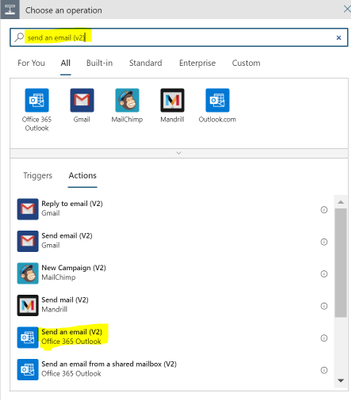
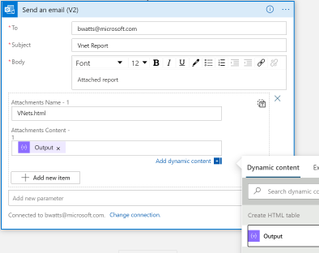
Click on “+ New Step” below this activity, search for “send an email (v2)”, and choose the Office 365 Outlook action named “Send an email (V2)”  


bwatts670_16-1615226064616.png


Rename the Action to “Email HTML Report” and fill out the following:  


  • Body: Whatever you wish for the Body of the email  

  • Subject: Whatever you wish for the Subject of the email  

  • To: Fill out the emails you wish to receive the report  


  • Click on “Add new parameter” and choose “Attachment” 

  • Attachment Content: from the “Dynamic content” choose “Output” under “Create HTML table”  

  • Attachment Name: Something like “VNets.html”  


bwatts670_17-1615226064642.png


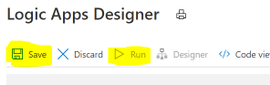
 That’s it for the Logic App. You should now click on “Save” and once the Logic App is saved click on “Run”. Look for an email with the HTML attachment. 


bwatts670_18-1615226064619.png


Summary 


In this blob we showed how to use Logic App to query the Azure Rest API, take the output and make a HTML report, then email that report as an attachment. The focus was on calling the REST API and not the report (there is more formatting that I’d do with that report but didn’t want to focus on that). So hopefully you see from this example that you don’t need to be a programmer to call Azure REST APIs. Logic App can take care of the authentication and we can focus on just formatting the request correctly! As an Azure Administrator this can open the doors for a lot of automation that you always wanted but never thought was possible.