
by Contributed | Mar 16, 2021 | Dynamics 365, Microsoft 365, Technology
This article is contributed. See the original author and article here.
As the supply chain evolves, logistics management has an even greater impact on the bottom line. Knowing the full price of an item once it arrives at your warehouse is crucial. Miscalculating landed cost through manual entry can result in lost profits for business owners. The Landed cost module in Supply Chain Management provides companies with an innovative way to track goods and determine the total charge in getting a shipment to its destination. With a single data entry, landed cost allows you to record end-to-end transportation fees quickly and accurately. Automating administrative tasks such as estimating landed costs and status tracking helps avoid financial missteps that can weaken product profitability. These enhanced features save time for staff and streamline production from the manufacturer to the warehouse. Landed cost often can account for up to 40 percent or more of the total cost of each imported freight item. First, there’s transport to the departure port, loading, sailing, customs clearance, and, finally, transport from the port of arrival. Then there are the delays, duties or other contingencies that will impact the landed price. Landed cost module functionality The Landed cost module in Supply Chain Management includes: Estimated landed cost visible at time of creation of voyage Receiving by container Status tracking at purchase order line level Landed cost apportioned to multiple purchase orders on one voyage Additional cost apportionment rules Preliminary posting of estimated costs that are reversed/adjusted as actual costs are received Automatic updates for FIFO, LIFO, weighted average, moving average, and standard costing Support of transfer orders Reduce guesswork Here are a few features that take the guesswork out of determining true costs of products and offer visibility for employees: Distribution of landed cost to items from voyage or containers. This is based on quantity, amount, percentage, weight, volume, volumetric calculation, or user-defined measure. Goods in transit accrual allows for full visibility of goods in transit for any tracked activity (for example: loading, customs, or clearance) and transport leg (for example: air, ocean, rail, or truck). Centralized shipping, which means voyages can contain products from multiple vendors, purchase orders, or legal entities in one or more containers/folios. Automated costs so that automated estimates of landed cost are used and then reversed out when actual landed cost invoices are processed. Import of business process compliance, which uses due dates to track invoices processed before or after receipt in the warehouse. Cost comparisons and reports to help you review costs by total voyage, container, purchase order, and line item by cost type code and category (such as FOB price, freight, accessed charges, duty, commissions, and brokerage fees). Voyage editor Every step of a voyage can be defined, including adding a purchase order to a container. Employees can also create a voyage with a purchase order from multiple entities. Template shipping and costing Landed cost also supports the creation of a series of customized templates covering standard freight journeys. These templates make it easier for your employees to keep journeys on course by allowing them to accurately record fees both actual and accrued for each step. It also helps to ensure that freight voyages are in legal and regulatory compliance. Voyage tracking Landed cost includes functionality to record and track voyage in transit. All data is integrated across the Supply Chain Management application. First, an activity start date or end date such as the loading date is entered. That entry then triggers an update to the shipping status and the purchase order receipt or confirmed date. This functionality allows you to: Record lead times between multiple ports based on rules Assign a voyage status to the purchase order line or goods in transit Process invoices before receipting of goods Share containers and voyages across entities Place goods from multiple vendors, countries, or regions in the same container Next steps To learn more, read the documentation for the Landed cost module. To see for yourself how Dynamics 365 Supply Chain Management can help your operations, get started today with a free trial
The post Here’s a way to increase the accuracy of landed cost calculations appeared first on Microsoft Dynamics 365 Blog.
Brought to you by Dr. Ware, Microsoft Office 365 Silver Partner, Charleston SC.
by Contributed | Mar 16, 2021 | Technology
This article is contributed. See the original author and article here.
Some of you have seen a blog on Azure AD only authentication (hereafter “AAD-only auth”) that was accidently published. With this blog we would like to correct the previous message and announce that this feature will be in a public preview in April and will support all Azure SQL SKUs such as Azure SQL Database, Azure Synapse Analytics and Managed Instance (MI).
Following the SQL on-premises feature that allows the disabling of SQL authentication and enables only Windows authentication, we developed a similar feature for Azure SQL that allows only Azure AD authentication and disables SQL authentication in the Azure SQL environment.
When “AAD-only auth” is active (enabled), it disables SQL authentication, including SQL server admin as well as SQL logins and users, and allows only Azure AD authentication for the Azure SQL server and MI. SQL authentication is disabled at the server level (including all databases) and prevents any authentication (connection to the Azure SQL server and MI) based on any SQL credentials.
Although SQL authentication is disabled, the creation of new SQL logins and users is not blocked. Neither the pre-existing nor newly created SQL accounts will not be allowed to `connect to the server. In addition, enabling the AAD-only auth does not remove existing SQL login and user accounts, but it disallows these accounts to connect to Azure SQL server and any database created for this server.
by Contributed | Mar 16, 2021 | Technology
This article is contributed. See the original author and article here.
The purpose of this about is to discuss Managed and External tables while querying from SQL On-demand or Serverless.
Thanks to my colleague Dibakar Dharchoudhury for the really nice discussion related to this subject.
By the docs: Shared metadata tables – Azure Synapse Analytics | Microsoft Docs
Spark provides many options for how to store data in managed tables, such as TEXT, CSV, JSON, JDBC, PARQUET, ORC, HIVE, DELTA, and LIBSVM. These files are normally stored in the warehouse directory where managed table data is stored.
Spark also provides ways to create external tables over existing data, either by providing the LOCATION option or using the Hive format. Such external tables can be over a variety of data formats, including Parquet.
Azure Synapse currently only shares managed and external Spark tables that store their data in Parquet format with the SQL engines
Note “The Spark created, managed, and external tables are also made available as external tables with the same name in the corresponding synchronized database in serverless SQL pool.”
Following an example of an External Table created on Spark-based in a parquet file:
1) Authentication:
blob_account_name = "StorageAccount"
blob_container_name = "ContainerName"
from pyspark.sql import SparkSession

sc = SparkSession.builder.getOrCreate()
token_library = sc._jvm.com.microsoft.azure.synapse.tokenlibrary.TokenLibrary
blob_sas_token = token_library.getConnectionString("LInkedServerName")

spark.conf.set(
    'fs.azure.sas.%s.%s.blob.core.windows.net' % (blob_container_name, blob_account_name),
    blob_sas_token)
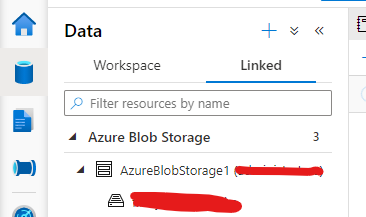
Note my linked Server Configuration:
2) External table:
Spark.sql('CREATE DATABASE IF NOT EXISTS SeverlessDB')

#THE BELOW EXTERNAL SPARK TABLE
filepath ='wasbs://Container@StorageAccount.blob.core.windows.net/parquets/file.snappy.parquet'
df = spark.read.load(filepath, format='parquet')
df.write.mode('overwrite').saveAsTable('SeverlessDB.Externaltable')
Here you can query from SQL Serverless

If you check the path where your external table was created you will be able to see under the Data lake as follows. For example, my workspace name is synapseworkspace12:

3) I can also create a managed table as parquet using the same dataset that I used for the external one as follows:
#Managed - table
df.write.format("Parquet").saveAsTable("SeverlessDB.ManagedTable")
This one will also be persisted on the storage account under the same path but on the managed table folder.
Following the documentation. This is another way to achieve the same result for managed table, however in this case the table will be empty:
CREATE TABLE SeverlessDB.myparquettable(id int, name string, birthdate date) USING Parquet
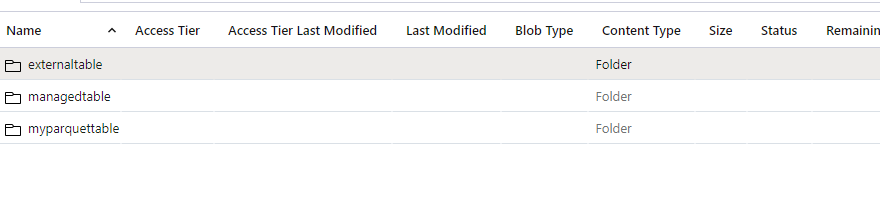
Those are the commands supported to create managed and external tables on Spark per doc. that would be possible to query on SQL Serverless.
If you want to clean up this lab – Spark SQL:
-- Drop the database and it's tables
DROP DATABASE SeverlessDB CASCADE
That is it!
Liliam
UK Engineer

by Contributed | Mar 16, 2021 | Technology
This article is contributed. See the original author and article here.
Introduction & Profiles
Hi there everyone! We are Team 21, first place prize winners of the Imperial College London Data Science Society’s (ICDSS) 2021 AI Hackathon for the ‘Kaiko Cryptocurrency Challenge’. We are Howard, a penultimate Mechanical Engineering student and Stephanie, a penultimate Molecular Bioengineering student from Imperial College London.
Check out the full report and code in this repo: https://github.com/howardwong97/AI-Hack-2021-Team-21-Submission .
Feel free to contact us if you have any questions!
Kaiko Cryptocurrency Challenge and Our Motivation
The Kaiko Cryptocurrency Challenge provided cryptocurrency market data to create a predictive model. We tackled this challenge by investigating the effectiveness of traditional time series models in predicting volatility in the cryptocurrency market and the effect of introducing social media sentiment.
If we look at the Bitcoin volatility index, the latest 30-day estimate for the BTC/USD pair is 4.30%. There are several factors contributing to the high volatility in cryptocurrency prices: low liquidity, minimal regulation, and the fact that it’s a very young market. It is incredibly difficult to apply fundamental analysis and so the values of cryptocurrencies are mostly driven by speculation. Social media, therefore, makes a huge impact. Take the tweet from Elon Musk about Dogecoin, for example, we observed a dramatic price drop and increased volatility. Although we can’t say with certainty that what happened was a direct result of the tweet, we cannot underestimate the effect of social media on the cryptocurrency market.
Exploratory Data Analysis
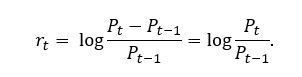
Instead of working directly with prices, we compute the returns, which normalizes the data to provide a comparable metric. Furthermore, we take the log of the returns, which has the desirable property of additivity. Denoted by , the log returns can be written as
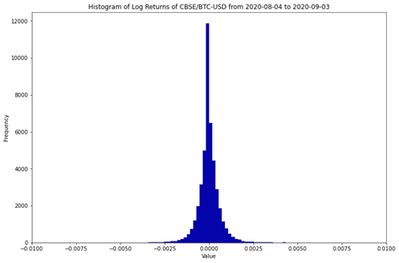
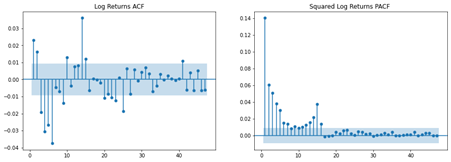
The histogram of log returns is plotted below. It is often assumed that log returns, especially in the equities market, are normally distributed. The unimodal distribution seems to agree with this assumption. However, the negative skew and excess kurtosis suggests that this is not the case!
Mean
|
Variance
|
Skew
|
Excess Kurtosis
|
-0.000002
|
4.68e-07
|
-4.26
|
179.5
|
We are interested in modelling the serial correlation observed in the log returns. The autocorrelation function (ACF) plot suggests that there is significant serial correlation. In addition, plotting the partial autocorrelation function (PACF) of the squared log returns allows shows autoregressive conditional heteroskedastic effects (more on this later). In other words, the volatility is not serially independent.
Lastly, we talk about the concept of stationarity. Roughly speaking, a time series is said to be weakly stationary if both the mean of  and the covariance of and
  are time invariant. This is the foundation of time series analysis; the mean is only informative if the expected value remains constant across time periods. Therefore, we performed the Augmented Dickey-Fuller unit-root test and confirmed that the log returns is indeed stationary.
Time Series Analysis
A mixed autoregressive moving average process, or ARMA, is written as

One of the assumptions of ARMA is that the error process, , is homoscedastic or constant over time. However, we have seen from the PACF plot of the squared log returns that this might not be the case. Volatility has some interesting characteristics. Firstly, asset returns tend to exhibit volatility clustering; volatility tends to remain high (or low) over long periods. Secondly, volatility evolves in a continuous manner; large jumps in volatility are rare. This is where volatility models come in. The idea of autoregressive conditional heteroscedasticity (ARCH) is that the variance of the current error term is dependent on previous shocks. An ARCH model assumes.
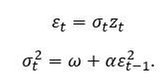
Generalised ARCH (GARCH) builds upon ARCH by allowing lagged conditional variances to enter the model as well:
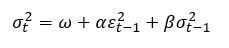
The constants  ,
,  and
and  are parameters to be estimated.
  can be interpreted as a measure of the reaction of the volatility to market shocks, while
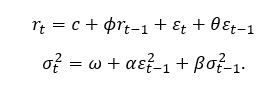
  measures its persistence. Therefore, ARMA specifies the structure of the conditional mean of log returns, while GARCH specifies the structure of the conditional variance. Put together, an ARMA-GARCH can be summarised as
Forecasting Volatility
Another interesting property of volatility is that it is not directly observable. For example, if we had daily log returns data for BTC, we cannot establish the daily volatility. However, data with finer granularity (e.g., one-minute data) is available, one can estimate this by taking the sample standard deviation over a single trading day. Therefore, we used the following forecasting scheme:
- Reduce the resolution of the log returns to five-minute intervals. Since log returns are additive, we can simply sum the log returns
 to
to  .
.
- Compute the realized volatility for each five-minute period.
- Use a rolling window of 120 samples to fit ARMA-GARCH using maximum likelihood.
- Use fitted parameter estimates to compute the forecasted volatility for the next five-minute interval.
Fitting the model on a rolling window and then forecasting the following period’s five-minute volatility ensure that we avoid look-ahead bias.
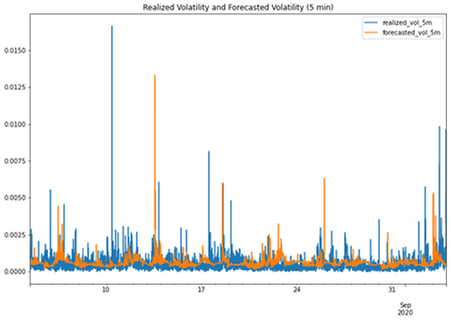
The results are plotted above. Clearly, the ARMA GARCH model did not perform very well! Indeed, we have fitted ARMA(1,1) and GARCH(1,1) for simplicity; other lag orders could be necessary. One could also argue that the models were also over a relatively short timeframe.
Sentiment Analysis
There are many flavours of GARCH (e.g. I-GARCH, E-GARCH). However, we are interested in exploring the possibility of introducing sentiment regressors to the GARCH model specification. It is straightforward to introduce additional terms, i.e.

where  is an additional explanatory variable, and is a new parameter to be estimated.
So how do we measure sentiment? For this, we turn to Reddit, which provides an API for searching for posts and comments. We performed a search for “Bitcoin” and “BTC” across several subreddits (yes, including WallStreetBets).
What remains is to engineer features for our model. There are two key features that we saw to be the most informative:
- Frequency – how many times Bitcoin has been mentioned on Reddit within a timeframe?
- Sentiment – what is the overall sentiment (positive or negative)?
Indeed, upvotes would have been a good feature to include too, as it is an indication of the reach of the post or comment. However, we did not include this in this project.
Natural Language Processing (NLP) techniques have been utilised in the past to detect sentiment as positive or negative. However, comments about the financial markets are unique in terms of terminology. Therefore, a domain-specific corpus must be built to train a sentiment model. Conveniently, Stocktwits is a site where users can label their own comments as either “bullish” or “bearish”, so this would be the perfect source for training data. In our past work, we scraped thousands of posts and trained a RoBERTa model.
What is RoBERTa? Many are familiar with BERT, the self-supervised method released by Google in 2018. Researchers at the University of Washington built upon this by removing BERT’s next-sentence pretraining objective, and training with much larger mini-batches and learning rates. We chose this due to its promise of better downstream task performance – this is especially important in a 24-hour Hackathon!
Feature Engineering
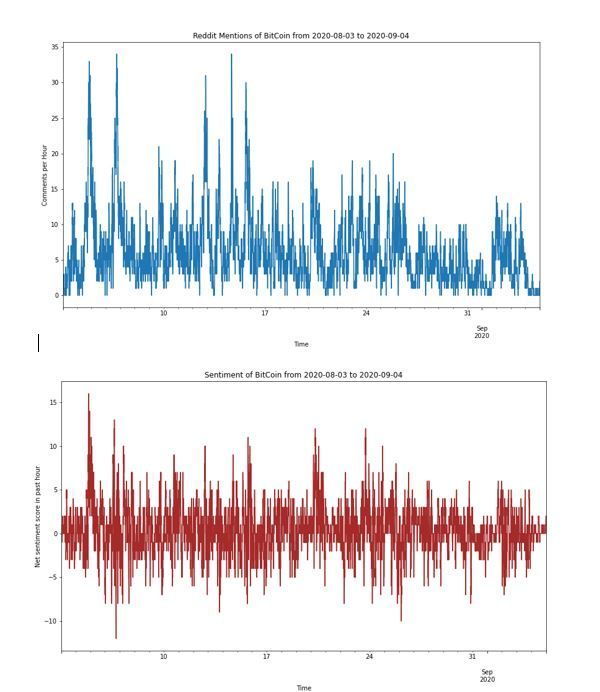
Having scraped all mentions of Bitcoin on Reddit over the period, we made sentiment predictions using our financial RoBERTa model, which labels each comment as “Bullish” (positive) or “Bearish” (negative). We created the following features:
- N, the number of comments made about BTC in the past hour.
- S, computed by defining
 and
and 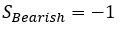 and summing these for each comment in the past hour.
The new GARCH specification is now

It is important to ensure that N and S are synchronous with the log returns (i.e. the post or comment was published at or before the time period of interest).
Results
So, how did our new sentiment-based model perform? Terribly! In fact, the mean square error (MSE) of this new model was about ten times worse than the original model. There are clearly many pitfalls in the work that we have presented here. Our sentiment model was clearly very simplistic as it only provided a ‘bullish’ or ‘bearish’ signal. The Reddit dataset that we created was also relatively small – there are other sources of news that we could have used. One could also argue that our sentiment model was incapable of identifying bots deployed to manipulate sentiment models such as this one.
Something also must be said about the efficacy of traditional time series models. GARCH models have historically been rather effective in forecasting daily volatility. However, our intuition tells us that social media sentiment clearly plays a big factor. Our future work will be focused on thinking of more appropriate ways of integrating this into our model.
Resources
Microsoft Learn BlockChain
Beginners Guide to BlockChain on Azure

by Contributed | Mar 16, 2021 | Technology
This article is contributed. See the original author and article here.
In this installment of the weekly discussion revolving around the latest news and topics on Microsoft 365, hosts – Vesa Juvonen (Microsoft) | @vesajuvonen, Waldek Mastykarz (Microsoft) | @waldekm are joined by are joined by Scotland-based Solution Architect, dual MVP Veronique Lengelle (CPS) | @veronicageek.
The discussion included insights to the role of technical architect for Microsoft 365 platform – both about designing solutions that solve customer problems and as important – educating customers on the value of the integrated platform. Microsoft Teams vs SharePoint – meet the customer where they are at and coach from there. “Don’t neglect to deliver SharePoint training and don’t focus solely on Microsoft Teams.” And finally, the growth in partner opportunities as many customers who quickly moved to M365 and the cloud in the last year are now looking for guidance on how to leverage many more of the platform’s capabilities that they own. Veronique is an active contributor to PnP PowerShell project, as a champion for Sys Admin users.
As with the previous week, Microsoft and the Community delivered 23 articles and videos this last week. Brilliant! This session was recorded on Monday, March 15, 2021.
This episode was recorded on Monday, March 15, 2021.
These videos and podcasts are published each week and are intended to be roughly 45 – 60 minutes in length. Please do give us feedback on this video and podcast series and also do let us know if you have done something cool/useful so that we can cover that in the next weekly summary! The easiest way to let us know is to share your work on Twitter and add the hashtag #PnPWeekly. We are always on the lookout for refreshingly new content. “Sharing is caring!”
Here are all the links and people mentioned in this recording. Thanks, everyone for your contributions to the community!
Microsoft articles:
Community articles:
Additional resources:
If you’d like to hear from a specific community member in an upcoming recording and/or have specific questions for Microsoft 365 engineering or visitors – please let us know. We will do our best to address your requests or questions.
“Sharing is caring!”




Recent Comments