by Contributed | Mar 17, 2021 | Technology
This article is contributed. See the original author and article here.
Is there anything more fraught than managing device certificates? Probably, but you generally don’t encounter subatomic physics in IoT*. In the case of certificates, it does not help that we treat them like the proverbial student treats math, aka we are intimidated by the subject and hide instead of explore, learn, and embrace. I always liked math, and I will be your guide explaining the words we use when we talk about X.509 certificates. There are many terms because they are all precise, not because they are really complicated. There will be a vocabulary quiz, and that quiz is called “sounding competent in front of your manager.” Join me today as I define some certificate terminology in a non-threatening way. Terms are presented by relation to one another.
*Feel free to leave links to subatomic physics IoT projects if you know of any!
X. 509 certificate or device client certificate
Type of certificate used in IoT with a strict hierarchy of signing certificates (unlike PGP which is more web-like). This type of certificate is commonly used to identify IoT devices due to its strength. This can also be called a device client certificate.
X.509 thumbprint
The thumbprint of a certificate is basically a shortened version of the full-chain certificate. It is created by hashing the certificate – basically doing math on a certain encoding of the certificate that returns a unique result.
Server certificate
The server certificate is how the device authenticates the service it is attempting to connect to. In order to do this, the device must have the public key for the service/server it is attempting to connect to so it can verify the server using public key cryptography.
Public key cryptography
This is a blog post for another time. For the sake of this document, it’s the fancy math by which clients and servers authenticate each other using asymmetric keys.
Asymmetric key
In public key cryptography, the fancy math involved uses two very large prime numbers that are the only two factors of an even bigger number. The two very large prime numbers are both keys, and generally one is shared (public) and one is kept hidden (private). Because the two very large prime numbers are different, they are called “asymmetric.” Unlike symmetric keys, the two parties involved in the information exchange have different keys that they use to encrypt and decrypt messages.
PKI
Public Key Infrastructure. The machinery that handles hosting CAs and signing certificates
Signing
This is fancy math that boils down to a trusted certificate saying it trusts whatever it is signing.
Certificate issuance
This is the term for the process by which a certificate is given out.
Self-signed certificate
The general term for a certificate whose source of trust comes from that certificate itself. A self-signed cert can either be a CA or a leaf certificate. Being self-signed does not necessarily mean the certificate is less trustworthy than a certificate signed by a CA, it just means that you trust the cert directly instead of trusting the signing entity.
Signed certificate or CA signed certificate
This is the general term for any certificate whose trust comes from being signed by a signing certificate. You trust this certificate because you trust the signer.
X.509 Certificate Authority or CA or signing CA
CA stands for Certificate Authority. Generic term for a certificate that is a source of trust. Signing certificates can either be root CAs or intermediate CAs. Think of a signing CA like the fancy holographic seal embedded in a driver’s license – you trust the driver’s license is real because you trust the Washington State Department of Licensing to only issue a license to a valid driver. (For folks outside the US, the analogy holds true for passports too).
Signing CA support
We hear this request from customers. This could mean either being able to authenticate a device using your CA, or it could mean being able to integrate your signing CA into Azure IoT to authenticate/rotate device certs. This is ambiguous, so please make sure you clarify when you talk with the product team.
Root CA
The ultimate source of truth for a certificate chain. Root certificates are self-signed, which means that they trust themselves, and they can also sign other certificates (aka place trust in that device, like saying “I’m Nicole and I approve this message”). Because they are the root of trust for other applications, there are often strict requirements around how they can be stored and rotated. Root CAs are a type of signing CA.
Intermediate CA or ICA
Intermediate CAs are a type of signing certificate that has trust placed in it by another signing CA (either root CA or another ICA) and are used to place trust in other certificates. A device can have any number of ICAs in its certificate chain, though typical IoT devices have between 2-4 levels.
Leaf certificate or device certificate or identity certificate
This is the identity cert for a device. “Leaf” means it is the terminus for the certificate chain; leaf certificates are not allowed to sign other certs (aka not allowed to place trust in other certs). The leaf certificate does not have to be signed by a signing certificate, although they often are. Leaf certificates can also be self-signed.
Certificate chain
The certificate chain is the chain of trust, from root CA to leaf certificates with some number of ICAs in the middle. The chain of trust is like when you get a job because your brother’s roommate’s cousin vouches for you when you apply for a job. In my made-up case, the chain of trust goes: cousin [trusts] roommate [trusts] brother [trusts] you. You are the leaf certificate asking to be trusted, and you are trusted because the chain of trust leads to the cousin who roots the trust in your ability.
Full chain certificate
Devices can either present their leaf certificate or their full chain certificate when they authenticate. The leaf certificate only has information about the CA that directly signed the leaf certificate, but it does not have information about the other CAs involved in the chain of trust for that device. The full chain certificate contains information about all of the links in the certificate chain, from root CA through to leaf certificate.
Public CA
Public CAs are CAs trusted by web browsers. They are called “public” because they are intended for the general public to trust them, and thus there is a set of requirements a PKI must go through in order to provide public CAs.
Private CA
“Private” means “not trusted by web browsers by default.” Private CAs are meant to be trusted in a limited context, such as within a given company or a different business case. Private CAs can be provided by a 3rd party provider or from a company’s own internal PKI.
Levels
Number of links in the cert chain. The number of levels can vary depending on how your certificate organization mirrors your company organization.
Certificate rotation
Certificates have an expiration date, just like passports and drivers licenses. Rotating a certificate means renewing the certificate with a longer expiration date, just like renewing your drivers license or passport. For devices, this means sending a certificate signing request (CSR) to a CA and updating the services to accept the new cert.
Primary certificate
Generally, this refers to a certificate used by the service to identify the device. The primary certificate is the main certificate used to identify a device. During certificate rotation, this certificate stops being trusted in favor of the secondary certificate.
Secondary certificate
Generally, this refers to a certificate used by the service to identify the device. The secondary certificate is the “backup” certificate that is next in line if something happens to the primary. During certificate rotation, the primary certificate stops being trusted, and the secondary certificate becomes the (new) trusted primary. Then a new secondary certificate is added.
Certificate signing request or CSR
A CSR is basically a formal request to a CA to place trust in a certificate. Think of it like the application for a new driver’s license – once approved, the DMV gives you a new license. Similarly, when a device sends a CSR, the signer sends back a signed certificate.
Manufacturing certificate
This is an Azure-specific term for the credential installed on the device during manufacturing. This is used for onboarding before being issued an operational certificate. Think of this as the device’s birth certificate – it tells where the device came from and does not get renewed, but it is not useful for knowing what the device is used for today. The manufacturing certificate can be used as the operational certificate, but we recommend they be separate.
Operational certificate
This is an Azure-specific term for the credential used by the device when it connects to a solution. Think of this as the device’s driver’s license – the device uses this on a day-to-day basis, but it needs renewing regularly.
ECC
Elliptic Curve Cryptography. This has to do with the math used to generate the certificate. ECC certificates tend to be smaller than RSA certificates and thus better for use on resource- or bandwidth-constrained devices. Unless you are a security person, I would not worry about this – just think about it like a flavor of ice cream, like vanilla or chocolate.
RSA
Rivest-Shamir-Adleman, named after the people who developed the algorithm. This has to do with the math used to generate the certificate. Unless you are a security person, I would not worry about this – just think about it like a flavor of ice cream, like vanilla or chocolate.
Public key or public portion certificate
This is the part of the certificate that is shared to all entities who might want to establish trust with the device, e.g. prove that a message sent by the device originated from the device itself and not an imposter. Think of the public key as the decoder ring for messages sent by the device: the decoder ring only works for the particular code used by the device. If the decoder ring can read a message, that means the correct secret code was used and thus the message is genuine. If this key gets leaked, it is not the end of the world.
Private key or private portion certificate
This is the part of the certificate that the device uses to prove its identity via fancy math done on the device itself. The public key is used to “undo” the fancy math, and if the result isn’t gibberish then the device has proved its identity. The private key should never leave the device and must be protected, ideally in specialized hardware storage called a secure element. When a device is compromised, generally that means that someone has stolen the private key and your device should no longer be trusted.
Let me know in the comments if there are other certificate terms that are not covered that you’d like to see defined.
To sum things up with a limerick:
Certificates can complicate
But don’t let your mind fill with hate
This list of vocab
Is sure to be fab
To keep terminology straight
by Contributed | Mar 17, 2021 | Technology
This article is contributed. See the original author and article here.
Do you have experience performing proactive and preventive work to increase the value of your customers’ investment? Are you able to identify opportunities to solve business problems? Do you promote organizational health in your engagements? If this describes you, why not start the path of earning the Microsoft Power Platform Solution Architect Expert certification?
To pursue this expert level certification, you must have experience leading successful implementations and an ability to focus on solutions that address the broader business and technical needs of an organization. You should have functional and technical knowledge of Microsoft Power Platform, Dynamics 365 customer engagement apps, related cloud solutions from Microsoft, and third-party technologies. In addition to having experience across Microsoft Power Platform, you should be able to facilitate design decisions across development, configuration, integration, infrastructure, security, availability, storage, and change management.
Are you ready for this beta exam? Can you:
- Initiate solution planning and identify Microsoft Power Platform components?
- Identify organization information and metrics?
- Evaluate an organization’s enterprise architecture?
- Capture requirements and perform gap analysis?
- Architect a solution?
- Lead the design process, and use Power Automate in your automation strategy?
- Design integrations?
- Identify opportunities to integrate and extend Microsoft Power Platform solutions by using Azure?
- Design the data and security models?
- Validate the solution design?
- Support and troubleshoot the solution as it goes live?
If you answered ‘yes’ to these questions (or most of them), you may be ready to earn the new Microsoft Certified: Microsoft Power Platform Solution Architect Expert certification. It has one exam that is currently in beta: PL-600: Power Platform Solution Architect.
To receive the 80% discount*, use code PL600Sunny when prompted for payment.
This is NOT a private access code. You can use this code to register for and take the exam on or before April 14, 2021.
*The first 300 people who register can take these exams for an 80% discount! (Why beta exams are no longer free.) The seats are offered on a first-come, first-served basis. You must register for the exam on or before April 14, 2021. Take the exam as soon as possible, so we can leverage your comments, feedback, and exam data in our evaluation of the quality of the questions.
Preparing for Beta Exams
Taking a beta exam is your chance to have a voice in the questions we include on the exam when it goes live. The rescore process starts on the day that exams go live, and final scores are released approximately 10 days later. For updates on when the rescore is complete, follow me on Twitter (@libertymunson). For questions about the timing of beta exam scoring and live exam release, see the blog posts The Path from Beta Exam to Live Exam and More Tips About Beta Exams.
Remember, the number of spots is limited, so when they’re gone, they’re gone. You should also be aware that there are some countries where the beta code will not work (including Turkey, Pakistan, India, and China). You will not be able to take the beta exam in those countries.
Also keep in mind that these exams are in beta, which means that you will not be scored immediately. You will receive your final score and passing status after your exam is live.
Related announcements
Skill up and stand out, with new role-based training and certification!
New role-based certification and training is here, and we’re just getting started!
Catching up: continuing our journey with new role-based certifications and training
MB-600 Exam retiring
by Scott Muniz | Mar 17, 2021 | Security, Technology
This article is contributed. See the original author and article here.
This Advisory uses the MITRE Adversarial Tactics, Techniques, and Common Knowledge (ATT&CK®) framework. See the ATT&CK for Enterprise for all referenced threat actor tactics and techniques.
The Cybersecurity and Infrastructure Security Agency (CISA) and Federal Bureau of Investigation (FBI) have observed continued targeting through spearphishing campaigns using TrickBot malware in North America. A sophisticated group of cybercrime actors is luring victims, via phishing emails, with a traffic infringement phishing scheme to download TrickBot.
TrickBot—first identified in 2016—is a Trojan developed and operated by a sophisticated group of cybercrime actors. Originally designed as a banking Trojan to steal financial data, TrickBot has evolved into highly modular, multi-stage malware that provides its operators a full suite of tools to conduct a myriad of illegal cyber activities.
To secure against TrickBot, CISA and FBI recommend implementing the mitigation measures described in this Joint Cybersecurity Advisory, which include blocking suspicious Internet Protocol addresses, using antivirus software, and providing social engineering and phishing training to employees.
Click here for a PDF version of this report.
TrickBot is an advanced Trojan that malicious actors spread primarily by spearphishing campaigns using tailored emails that contain malicious attachments or links, which—if enabled—execute malware (Phishing: Spearphishing Attachment [T1566.001], Phishing: Spearphishing Link [T1566.002]). CISA and FBI are aware of recent attacks that use phishing emails, claiming to contain proof of a traffic violation, to steal sensitive information. The phishing emails contain links that redirect to a website hosted on a compromised server that prompts the victim to click on photo proof of their traffic violation. In clicking the photo, the victim unknowingly downloads a malicious JavaScript file that, when opened, automatically communicates with the malicious actor’s command and control (C2) server to download TrickBot to the victim’s system.
Attackers can use TrickBot to:
- Drop other malware, such as Ryuk and Conti ransomware, or
- Serve as an Emotet downloader.[1]
TrickBot uses person-in-the-browser attacks to steal information, such as login credentials (Man in the Browser [T1185]). Additionally, some of TrickBot’s modules spread the malware laterally across a network by abusing the Server Message Block (SMB) Protocol. TrickBot operators have a toolset capable of spanning the entirety of the MITRE ATT&CK framework, from actively or passively gathering information that can be used to support targeting (Reconnaissance [TA0043]), to trying to manipulate, interrupt, or destroy systems and data (Impact [TA0040]).
TrickBot is capable of data exfiltration, cryptomining, and host enumeration (e.g., reconnaissance of Unified Extensible Firmware Interface or Basic Input/Output System [UEFI/BIOS] firmware).[2] For host enumeration, operators deliver TrickBot in modules containing a configuration file with specific tasks.
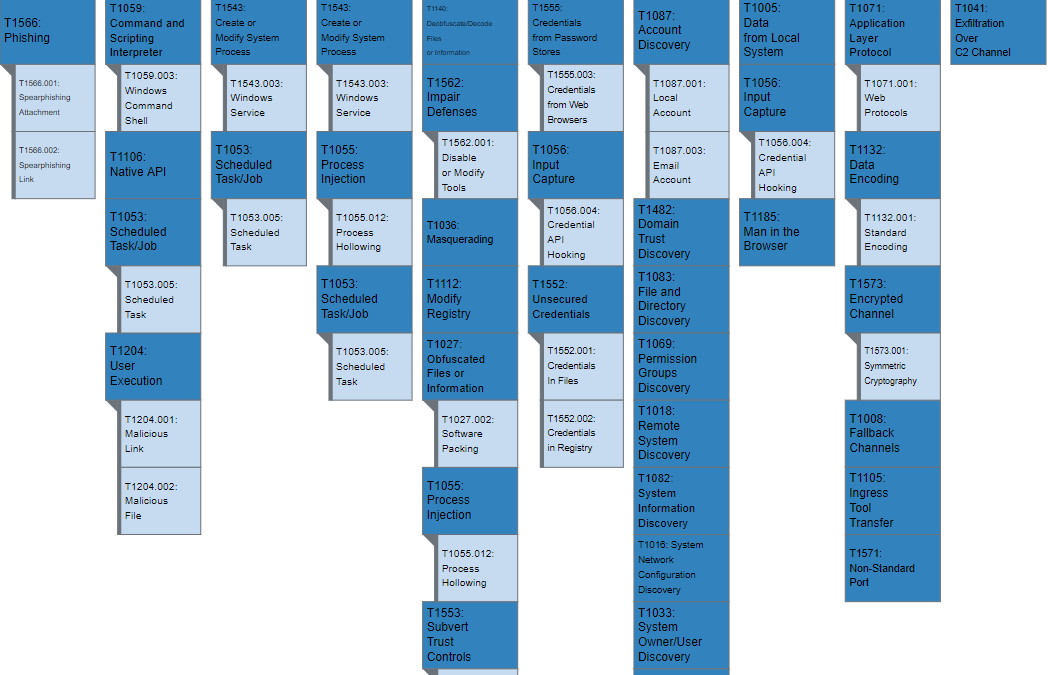
Figure 1 lays out TrickBot’s use of enterprise techniques.
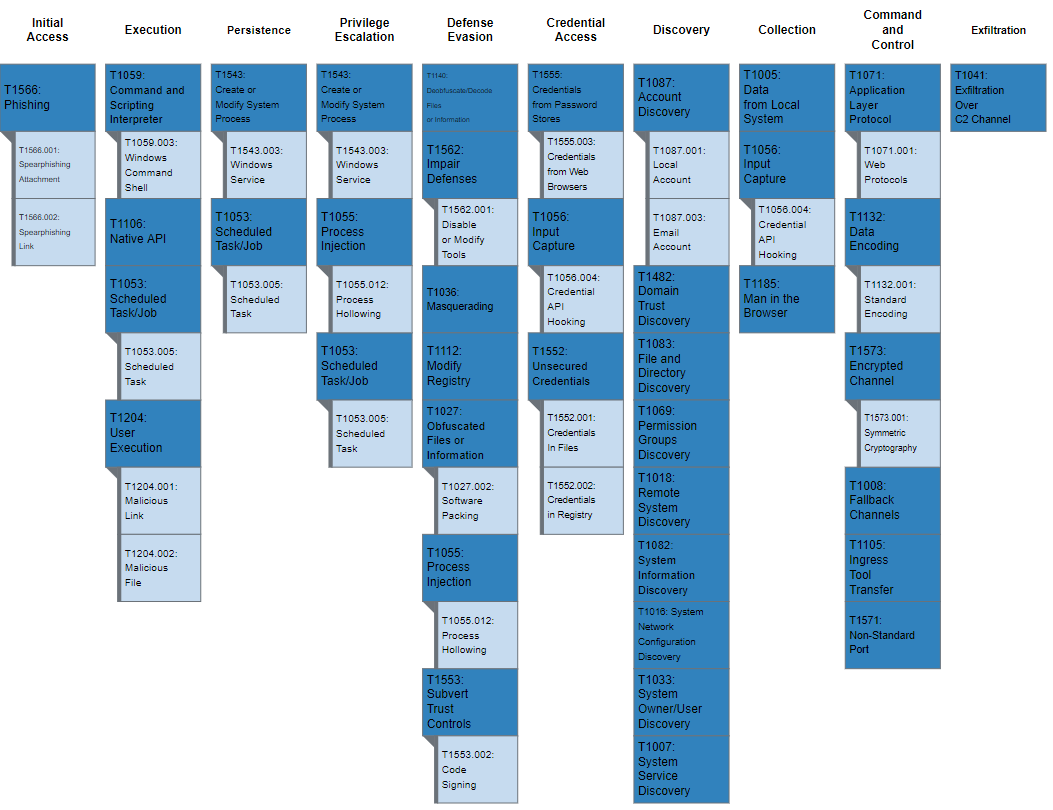
Figure 1: MITRE ATT&CK enterprise techniques used by TrickBot
MITRE ATT&CK Techniques
According to MITRE, TrickBot [S0266] uses the ATT&CK techniques listed in table 1.
Table 1: TrickBot ATT&CK techniques for enterprise
Initial Access [TA0001]
|
Technique Title
|
ID |
Use |
| Phishing: Spearphishing Attachment |
T1566.001 |
TrickBot has used an email with an Excel sheet containing a malicious macro to deploy the malware. |
| Phishing: Spearphishing Link |
T1566.002 |
TrickBot has been delivered via malicious links in phishing emails.
|
Execution [TA0002]
| Technique Title |
ID |
Use |
| Scheduled Task/Job: Scheduled Task |
T1053.005 |
TrickBot creates a scheduled task on the system that provides persistence. |
| Command and Scripting Interpreter: Windows Command Shell |
T1059.003 |
TrickBot has used macros in Excel documents to download and deploy the malware on the user’s machine. |
| Native API |
T1106 |
TrickBot uses the Windows Application Programming Interface (API) call, CreateProcessW(), to manage execution flow. |
| User Execution: Malicious Link |
T1204.001 |
TrickBot has sent spearphishing emails in an attempt to lure users to click on a malicious link. |
| User Execution: Malicious File |
T1204.002 |
TrickBot has attempted to get users to launch malicious documents to deliver its payload. |
Persistence [TA0003]
| Technique Title |
ID |
Use |
| Scheduled Task/Job: Scheduled Task |
T1053.005 |
TrickBot creates a scheduled task on the system that provides persistence. |
| Create or Modify System Process: Windows Service |
T1543.003 |
TrickBot establishes persistence by creating an autostart service that allows it to run whenever the machine boots. |
Privilege Escalation [TA0004]
| Technique Title |
ID |
Use |
| Scheduled Task/Job: Scheduled Task |
T1053.005 |
TrickBot creates a scheduled task on the system that provides persistence. |
| Process Injection: Process Hollowing |
T1055.012 |
TrickBot injects into the svchost.exe process. |
| Create or Modify System Process: Windows Service |
T1543.003 |
TrickBot establishes persistence by creating an autostart service that allows it to run whenever the machine boots. |
Defense Evasion [TA0005]
| Technique Title |
ID |
Use |
| Obfuscated Files or Information |
T1027 |
TrickBot uses non-descriptive names to hide functionality and uses an AES CBC (256 bits) encryption algorithm for its loader and configuration files. |
| Obfuscated Files or Information: Software Packing |
T1027.002 |
TrickBot leverages a custom packer to obfuscate its functionality. |
| Masquerading |
T1036 |
The TrickBot downloader has used an icon to appear as a Microsoft Word document. |
| Process Injection: Process Hollowing |
T1055.012 |
TrickBot injects into the svchost.exe process. |
| Modify Registry |
T1112 |
TrickBot can modify registry entries. |
| Deobfuscate/Decode Files or Information |
T1140 |
TrickBot decodes the configuration data and modules. |
| Subvert Trust Controls: Code Signing |
T1553.002 |
TrickBot has come with a signed downloader component. |
| Impair Defenses: Disable or Modify Tools |
T1562.001 |
TrickBot can disable Windows Defender. |
Credential Access [TA0006]
| Technique Title |
ID |
Use |
| Input Capture: Credential API Hooking |
T1056.004 |
TrickBot has the ability to capture Remote Desktop Protocol credentials by capturing the CredEnumerateA API. |
| Unsecured Credentials: Credentials in Files |
T1552.001 |
TrickBot can obtain passwords stored in files from several applications such as Outlook, Filezilla, OpenSSH, OpenVPN and WinSCP. Additionally, it searches for the .vnc.lnk affix to steal VNC credentials. |
| Unsecured Credentials: Credentials in Registry |
T1552.002 |
TrickBot has retrieved PuTTY credentials by querying the SoftwareSimonTathamPuttySessions registry key. |
| Credentials from Password Stores |
T1555 |
TrickBot can steal passwords from the KeePass open-source password manager. |
| Credentials from Password Stores: Credentials from Web Browsers |
T1555.003 |
TrickBot can obtain passwords stored in files from web browsers such as Chrome, Firefox, Internet Explorer, and Microsoft Edge, sometimes using esentutl. |
Discovery [TA0007]
| Technique Tactic |
ID |
Use |
| System Service Discovery |
T1007 |
TrickBot collects a list of install programs and services on the system’s machine. |
| System Network Configuration Discovery |
T1016 |
TrickBot obtains the IP address, location, and other relevant network information from the victim’s machine. |
| Remote System Discovery |
T1018 |
TrickBot can enumerate computers and network devices. |
| System Owner/User Discovery |
T1033 |
TrickBot can identify the user and groups the user belongs to on a compromised host. |
| Permission Groups Discovery |
T1069 |
TrickBot can identify the groups the user on a compromised host belongs to. |
| System Information Discovery |
T1082 |
TrickBot gathers the OS version, machine name, CPU type, amount of RAM available from the victim’s machine. |
| File and Directory Discovery |
T1083 |
TrickBot searches the system for all of the following file extensions: .avi, .mov, .mkv, .mpeg, .mpeg4, .mp4, .mp3, .wav, .ogg, .jpeg, .jpg, .png, .bmp, .gif, .tiff, .ico, .xlsx, and .zip. It can also obtain browsing history, cookies, and plug-in information. |
| Account Discovery: Local Account |
T1087.001 |
TrickBot collects the users of the system. |
| Account Discovery: Email Account |
T1087.003 |
TrickBot collects email addresses from Outlook. |
| Domain Trust Discovery |
T1482 |
TrickBot can gather information about domain trusts by utilizing Nltest. |
Collection [TA0009]
| Technique Tactic |
ID |
Use |
| Data from Local System |
T1005 |
TrickBot collects local files and information from the victim’s local machine. |
| Input Capture:Credential API Hooking |
T1056.004 |
TrickBot has the ability to capture Remote Desktop Protocol credentials by capturing the CredEnumerateA API. |
| Person in the Browser |
T1185 |
TrickBot uses web injects and browser redirection to trick the user into providing their login credentials on a fake or modified webpage. |
Command and Control [TA0011]
| Technique Tactic |
ID |
Use |
| Fallback Channels |
T1008 |
TrickBot can use secondary command and control (C2) servers for communication after establishing connectivity and relaying victim information to primary C2 servers. |
| Application Layer Protocol: Web Protocols |
T1071.001 |
TrickBot uses HTTPS to communicate with its C2 servers, to get malware updates, modules that perform most of the malware logic and various configuration files. |
| Ingress Tool Transfer |
T1105 |
TrickBot downloads several additional files and saves them to the victim’s machine. |
| Data Encoding: Standard Encoding |
T1132.001 |
TrickBot can Base64-encode C2 commands. |
| Non-Standard Port |
T1571 |
Some TrickBot samples have used HTTP over ports 447 and 8082 for C2. |
| Encrypted Channel: Symmetric Cryptography |
T1573.001 |
TrickBot uses a custom crypter leveraging Microsoft’s CryptoAPI to encrypt C2 traffic. |
Exfiltration [TA0010]
| Technique Tactic |
ID |
Use |
| Exfiltration Over C2 Channel |
T1041 |
TrickBot can send information about the compromised host to a hardcoded C2 server. |
Detection
Signatures
CISA developed the following snort signature for use in detecting network activity associated with TrickBot activity.
alert tcp any [443,447] -> any any (msg:”TRICKBOT:SSL/TLS Server X.509 Cert Field contains ‘example.com’ (Hex)”; sid:1; rev:1; flow:established,from_server; ssl_state:server_hello; content:”|0b|example.com”; fast_pattern:only; content:”Global Security”; content:”IT Department”; pcre:”/(?:x09x00xc0xb9x3bx93x72xa3xf6xd2|x00xe2x08xffxfbx7bx53x76x3d)/”; classtype:bad-unknown; metadata:service ssl,service and-ports;)
alert tcp any any -> any $HTTP_PORTS (msg:”TRICKBOT_ANCHOR:HTTP URI GET contains ‘/anchor'”; sid:1; rev:1; flow:established,to_server; content:”/anchor”; http_uri; fast_pattern:only; content:”GET”; nocase; http_method; pcre:”/^/anchor_?.{3}/[w_-]+.[A-F0-9]+/?$/U”; classtype:bad-unknown; priority:1; metadata:service http;)
alert tcp any $SSL_PORTS -> any any (msg:”TRICKBOT:SSL/TLS Server X.509 Cert Field contains ‘C=XX, L=Default City, O=Default Company Ltd'”; sid:1; rev:1; flow:established,from_server; ssl_state:server_hello; content:”|31 0b 30 09 06 03 55 04 06 13 02|XX”; nocase; content:”|31 15 30 13 06 03 55 04 07 13 0c|Default City”; nocase; content:”|31 1c 30 1a 06 03 55 04 0a 13 13|Default Company Ltd”; nocase; content:!”|31 0c 30 0a 06 03 55 04 03|”; classtype:bad-unknown; reference:url,www.virustotal.com/gui/file/e9600404ecc42cf86d38deedef94068db39b7a0fd06b3b8fb2d8a3c7002b650e/detection; metadata:service ssl;)
alert tcp any any -> any $HTTP_PORTS (msg:”TRICKBOT:HTTP Client Header contains ‘boundary=Arasfjasu7′”; sid:1; rev:1; flow:established,to_server; content:”boundary=Arasfjasu7|0d 0a|”; http_header; content:”name=|22|proclist|22|”; http_header; content:!”Referer”; content:!”Accept”; content:”POST”; http_method; classtype:bad-unknown; metadata:service http;)
alert tcp any any -> any $HTTP_PORTS (msg:”TRICKBOT:HTTP Client Header contains ‘User-Agent|3a 20|WinHTTP loader/1.'”; sid:1; rev:1; flow:established,to_server; content:”User-Agent|3a 20|WinHTTP loader/1.”; http_header; fast_pattern:only; content:”.png|20|HTTP/1.”; pcre:”/^Hostx3ax20(?:d{1,3}.){3}d{1,3}(?:x3ad{2,5})?$/mH”; content:!”Accept”; http_header; content:!”Referer|3a 20|”; http_header; classtype:bad-unknown; metadata:service http;)
alert tcp any $HTTP_PORTS -> any any (msg:”TRICKBOT:HTTP Server Header contains ‘Server|3a 20|Cowboy'”; sid:1; rev:1; flow:established,from_server; content:”200″; http_stat_code; content:”Server|3a 20|Cowboy|0d 0a|”; http_header; fast_pattern; content:”content-length|3a 20|3|0d 0a|”; http_header; file_data; content:”/1/”; depth:3; isdataat:!1,relative; classtype:bad-unknown; metadata:service http;)
alert tcp any any -> any $HTTP_PORTS (msg:”TRICKBOT:HTTP URI POST contains C2 Exfil”; sid:1; rev:1; flow:established,to_server; content:”Content-Type|3a 20|multipart/form-data|3b 20|boundary=——Boundary”; http_header; fast_pattern; content:”User-Agent|3a 20|”; http_header; distance:0; content:”Content-Length|3a 20|”; http_header; distance:0; content:”POST”; http_method; pcre:”/^/[a-z]{3}d{3}/.+?.[A-F0-9]{32}/d{1,3}//U”; pcre:”/^Hostx3ax20(?:d{1,3}.){3}d{1,3}$/mH”; content:!”Referer|3a|”; http_header; classtype:bad-unknown; metadata:service http;)
alert tcp any any -> any $HTTP_PORTS (msg:”HTTP URI GET/POST contains ‘/56evcxv’ (Trickbot)”; sid:1; rev:1; flow:established,to_server; content:”/56evcxv”; http_uri; fast_pattern:only; classtype:bad-unknown; metadata:service http;)
alert icmp any any -> any any (msg:”TRICKBOT_ICMP_ANCHOR:ICMP traffic conatins ‘hanc'”; sid:1; rev:1; itype:8; content:”hanc”; offset:4; fast_pattern; classtype:bad-unknown;)
alert tcp any any -> any $HTTP_PORTS (msg:”HTTP Client Header contains POST with ‘host|3a 20|*.onion.link’ and ‘data=’ (Trickbot/Princess Ransomeware)”; sid:1; rev:1; flow:established,to_server; content:”POST”; nocase; http_method; content:”host|3a 20|”; http_header; content:”.onion.link”; nocase; http_header; distance:0; within:47; fast_pattern; file_data; content:”data=”; distance:0; within:5; classtype:bad-unknown; metadata:service http;)
alert tcp any any -> any $HTTP_PORTS (msg:”HTTP Client Header contains ‘host|3a 20|tpsci.com’ (trickbot)”; sid:1; rev:1; flow:established,to_server; content:”host|3a 20|tpsci.com”; http_header; fast_pattern:only; classtype:bad-unknown; metadata:service http;)
CISA and FBI recommend that network defenders—in federal, state, local, tribal, territorial governments, and the private sector—consider applying the following best practices to strengthen the security posture of their organization’s systems. System owners and administrators should review any configuration changes prior to implementation to avoid negative impacts.
- Provide social engineering and phishing training to employees.
- Consider drafting or updating a policy addressing suspicious emails that specifies users must report all suspicious emails to the security and/or IT departments.
- Mark external emails with a banner denoting the email is from an external source to assist users in detecting spoofed emails.
- Implement Group Policy Object and firewall rules.
- Implement an antivirus program and a formalized patch management process.
- Implement filters at the email gateway and block suspicious IP addresses at the firewall.
- Adhere to the principle of least privilege.
- Implement a Domain-Based Message Authentication, Reporting & Conformance validation system.
- Segment and segregate networks and functions.
- Limit unnecessary lateral communications between network hoses, segments and devices.
- Consider using application allowlisting technology on all assets to ensure that only authorized software executes, and all unauthorized software is blocked from executing on assets. Ensure that such technology only allows authorized, digitally signed scripts to run on a system.
- Enforce multi-factor authentication.
- Enable a firewall on agency workstations configured to deny unsolicited connection requests.
- Disable unnecessary services on agency workstations and servers.
- Implement an Intrusion Detection System, if not already used, to detect C2 activity and other potentially malicious network activity
- Monitor web traffic. Restrict user access to suspicious or risky sites.
- Maintain situational awareness of the latest threats and implement appropriate access control lists.
- Disable the use of SMBv1 across the network and require at least SMBv2 to harden systems against network propagation modules used by TrickBot.
- Visit the MITRE ATT&CK Techniques pages (linked in table 1 above) for additional mitigation and detection strategies.
- See CISA’s Alert on Technical Approaches to Uncovering and Remediating Malicious Activity for more information on addressing potential incidents and applying best practice incident response procedures.
For additional information on malware incident prevention and handling, see the National Institute of Standards and Technology Special Publication 800-83, Guide to Malware Incident Prevention and Handling for Desktops and Laptops.
Resources



Recent Comments