by Contributed | Mar 17, 2021 | Technology
This article is contributed. See the original author and article here.
Azure Monitor SQL insights (Preview)
Comprehensive and reliable monitoring is a top priority for all SQL customers.
The Azure SQL and Azure Monitor teams are proud to announce the preview of Azure Monitor SQL insights: a new, Azure–native monitoring experience for almost any SQL deployment in Azure.
To learn more about SQL Insights, and how to onboard see the documentation at docs.microsoft.com.
What is SQL insights?
SQL insights is a remote, agent-based monitoring solution. It is developed jointly by the Azure SQL and Azure Monitor teams using an open-source agent called Telegraf. SQL insights delivers a new and more powerful monitoring experience for almost any SQL deployment in Azure.
How is SQL insights different from other offerings?
SQL insights puts the controls in the hands of our customers. It is a platform for collecting, streaming, storing, visualizing, and analyzing almost any SQL telemetry. The SQL insights platform is fully integrated with all the current Azure Monitor offerings, providing customers access to out-of-the–box visualizations, alerting, automation, and analysis.
Capabilities include:
- Configure data collection frequency
- Choose exactly which data to collect
- Control the retention policy for the data
- Visualize data using Azure Monitor Workbooks
- Create separate Data Collection Rules for every environment
- Integrate with open-source monitoring solutions (Telegraf)
- Surface over two hundred new metrics
- Monitor almost any SQL deployment in Azure: Azure SQL Database, Azure SQL Managed Instance and SQL Server on Azure VM
Supported Deployment Options
SQL insights supports the following versions of SQL Server:
- SQL Server 2012 and newer
SQL insights supports SQL Server running in the following environments:
- Azure SQL Database
- Azure SQL Managed Instance
- Azure SQL VMs
- Azure VMs
SQL insights does not support or has limited support for the following:
- Azure SQL Serverless Deployments: Serverless deployments are fully supported for SQL insights functionality. However, the remote agent will prevent any database deployed with the serverless compute tier from pausing. This could lead to increased compute costs for customers.
- SQL Server running on virtual machines or on non-Hypervised infrastructure outside of Azure is currently not supported.
- Azure SQL Database Elastic Pools: No support during the preview.
- Azure SQL Database in the following service tiers: Free, Basic, S0 and S1.
- Readable Secondaries: Currently only deployment types with a single readable secondary endpoint (Business Critical or Azure SQL Database Hyperscale) will be supported.
- Azure Active Directory: Currently, we only support SQL authentication. We plan to support Azure Active Directory authentication in an upcoming release. For SQL Server on Azure Virtual Machines, there is currently no support for authenticating via Active Directory on a bespoke domain controller.
Disclaimer
Please note that the products and options presented in this article are subject to change. This article reflects the Azure Monitor SQL insights options available in preview in March 2021.

by Contributed | Mar 17, 2021 | Technology
This article is contributed. See the original author and article here.
“Microsoft Managed Key (MMK), Bring Your Own Key (BYOK), Hold Your Own Key (HYOK), and Double Key Encryption (DKE)”
Blog Purpose
Enterprises often create, share, and store sensitive data on-premises, in the cloud, and across multiple clouds. Due to the nature of business and to meet regulatory requirements, sensitive data should always be securely stored and protected with solutions including strong data encryption. Enterprises are also heterogenous – one size does not fit all since they all have different business needs.
Microsoft Information Protection (MIP) is a built-in, intelligent, unified, and extensible solution to protect sensitive data across your enterprise – in Microsoft 365 cloud services, on-premises, third-party SaaS applications, and more. MIP provides a unified set of capabilities to know your data, protect your data, and help prevent data loss across Microsoft 365 apps (e.g., Word, PowerPoint, Excel, Outlook) and services (e.g., Teams, SharePoint, and Exchange).
Microsoft offers a variety of encryption keys that support various customer scenarios. While it could be a daunting task to understand various encryption key types and their applications in the context of the environment, we will describe the various Microsoft Information Protection (MIP) encryption key types through this blog. This blog expands on each key offering, highlights unique aspects, differences, benefits, challenges, typical use cases, and a high-level architectural overview of each key type. Our intent is to keep the right level of technical depth that will help readers get a good understanding of the various key options. Refer to NIST 800-57 for best practices of key management. The blog outlines key elements that enable encryption, discusses rights management services, various key types and concludes with a comparison tables that helps to choose the appropriate key types.
Underlying elements that enable Microsoft Encryption key types
Encryption Algorithms
- MIP uses both symmetric encryption and public-key encryption for different processes, leveraging the best of both types of algorithms each performing a different function.
- Symmetric AES (Advanced Encryption Standard) is used for the encryption of the plaintext in emails & files. keys are used depending on the type of content.
- Asymmetric RSA (Rivest Shamir Adleman) algorithm with a 2048 bit ‘key’ is used to encrypt the symmetric key and thus ensure secrecy of the content.
Tenant Keys
- A tenant key is the root encryption key tied to a tenant. In other words, content encrypted with MIP in a tenant, roots to the tenant key that was active at the time the content was protected.
- The tenant key is used to encrypt other keys that in turn are used to supply protection to emails and files & provides access to users.
- This tenant key is common to all emails and files protected by MIP and can be changed only by the MIP administrator for the tenant.
Content Keys
- Content keys are symmetric keys, they are used to encrypt the content itself (the plaintext).
- The content key is protected, together with the policy in the document that defines access to the content, with the tenant’s RSA key
The encrypted policy and content key are embedded into the document itself and persist through editions of the document. The document metadata is not encrypted nor protected. For more details, refer to Azure Information Protection (AIP) labeling, classification, and protection | Microsoft Docs
Microsoft Rights Management Services
The following section provides an overview of how a client initiates the environment for users to begin protecting and consuming sensitive data[i]. This is common across all encryption key types using MSIPC clients. (Ref: How Azure RMS works – Azure Information Protection | Microsoft Docs)
Initializing the Environment
STEP 1: Before a user can protect content or consume protected content on a Windows computer, the user environment must be prepared on the device. This is a one-time process and happens automatically without user intervention when a user tries to protect or consume protected content.
The RMS client (aka MIP Client) on the computer first connects to the Rights Management service (RMS) and authenticates the user by using their Azure Active Directory account.
STEP 2: After the user is authenticated, the connection is automatically redirected to the organization’s MIP tenant, which issues certificates that let the user authenticate to the RMS to consume protected content, and to protect content offline.
One of these certificates is the rights account certificate, often abbreviated to RAC. This certificate authenticates the user to Azure Active Directory and is valid for 31 days. The certificate is automatically renewed by the RMS client, provided the user account is still in Azure Active Directory and the account is enabled. This certificate is not configurable by an administrator.
A copy of this certificate is stored in Azure so that if the user moves to another device, the certificates are created by using the same keys.
Content Protection
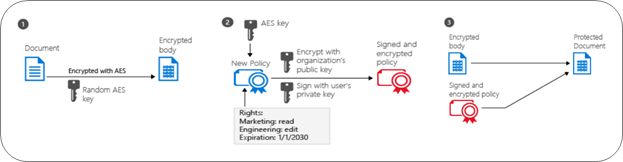
STEP 1: The RMS client creates a random key (the content key) and encrypts the document using this key with the AES symmetric encryption algorithm.
STEP 2: The RMS client then creates a certificate that includes a policy for the document that includes the usage rights for users or groups, and other restrictions, such as an expiration date. These settings can be defined in a template that an administrator previously configured or specified at the time the content is protected (sometimes referred to as an “ad hoc policy”).
The main Azure AD attribute used to identify the selected users and groups is the Azure AD Proxy addresses attribute, which stores all the email addresses for a user or group. However, if a user account does not have any values in the AD Proxy addresses attribute, the user’s User Principal Name value is used instead.
The RMS client then uses the organization’s key that was obtained when the user environment was initialized and uses this key to encrypt the policy and the symmetric content key. The RMS client also signs the policy with the user’s certificate that was obtained when the user environment was initialized.
STEP 3: The RMS client embeds the policy into a file with the body of the document encrypted previously, which together comprise a protected document. This document can be stored anywhere or shared by using any method, and the policy always stays with the encrypted document.
Content Consumption
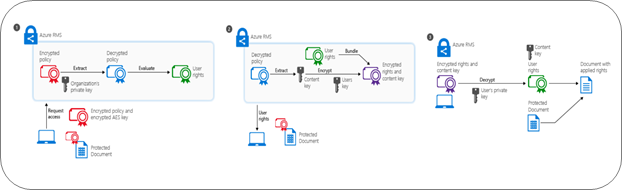
STEP 1: The authenticated user sends the document policy and the user’s certificates to the Azure Rights Management service. The service decrypts and evaluates the policy and builds a list of rights (if any) the user has for the document. To identify the user, the Azure AD Proxy addresses attribute is used for the user’s account and groups to which the user is a member. For performance reasons, group membership is cached. If the user account has no values for the Azure AD Proxy addresses attribute, the value in the Azure AD User Principal Name is used instead.
STEP 2: The service then extracts the AES content key from the decrypted policy. This key is then encrypted with the user’s public RSA key that was obtained with the request. The re-encrypted content key is then embedded into an encrypted use license with the list of user rights, which is then returned to the RMS client.
STEP 3: Finally, the RMS client takes the encrypted use license and decrypts it with its own user private key. This lets the RMS client decrypt the document’s body as it is needed and render it on the screen. The client also decrypts the rights list and passes them to the application, which enforces those rights in the application’s user interface.
How office applications and services support Rights Management
End-user Office applications and Office Services also uses the Rights Management service to protect data. These office applications are Word, Excel, PowerPoint, and Outlook. The Office services are Exchange[ii] and Microsoft SharePoint[iii],[iv]. The Office configuration that supports the Rights Management service often use the term information rights management (IRM).
Office 365 apps, Office 2019, Office 2016, and Office 2013 versions provide built-in support for the Azure Rights Management services. No client computer configuration is required to support the IRM features for applications such as Word, Excel, PowerPoint, Outlook, and Outlook on the web. All users must do for these apps on Windows, is sign-in to their office applications with their Microsoft 365 credentials. They can protect files and emails and use files and emails that have protected by others. Users who have Office for Mac must first verify their credentials before they can protect their content.[v]
To enable third party application to build native support for applying labels and protection to files refer to Microsoft Software Development Kit[vii]. Microsoft Information Protection SDK documentation | Microsoft Docs
Key Management Options
Now that we have a good understanding of encryption and how IRM client enables this functionality, let us dig deeper into the various encryption key options. Microsoft offers four encryption key management options as part of MIP offerings. Per Cloud’s shared responsibility model guidance, enterprise CISOs and Data Owners have the ultimate accountability to choose and implement the right key option that will allow their enterprise to securely create, use, share, store, archive and destroy data. Microsoft key management options are Microsoft Managed Key (MMK); Bring your own key (BYOK); Hold your own key (HYOK) and Double Key Encryption (DKE). Enterprises have the option to choose the right key solution that addresses their business scenarios to protect and secure ‘sensitive & highly sensitive’ data. All the key options are built on above key elements that are fundamentally common across the board except that the implementation varies for each key.
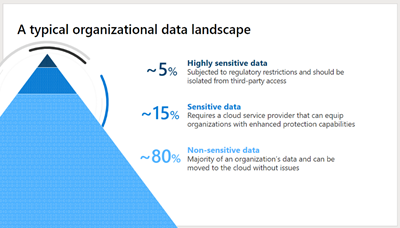
Typically, an enterprises data landscape has the following structure. Majority of the data ~80% are non-sensitive data not subject to compliance requirements and does not require encryption. Enterprises are most concerned about their sensitive data ~15% and highly sensitive data ~5% that they would want to protect. By using the MIP key options you can protect your data assets, additionally you can use different MIP keys to adequately protect different types of sensitive data in your digital estate.
1. Microsoft Information Protection – Microsoft Managed Keys
Microsoft fully owns and manages the key. Microsoft offers a full key management solution that customers can use for instantiating their MIP tenant. This is the default choice if it meets the business needs and most preferable for smaller enterprises. This is also the quickest and most effective way to get started with MIP with the least number of administrative efforts and without requiring special hardware. Supports various key operations such as Rekey, Revoke, Backup, Export and Respond[viii].
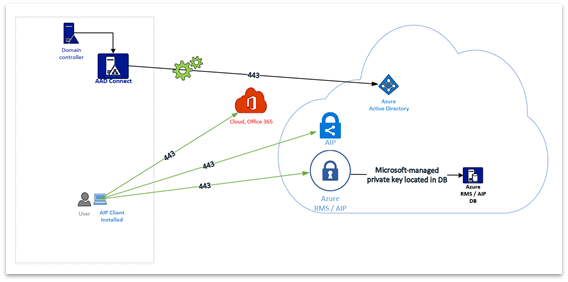
High-level Architecture of ‘Microsoft Managed Key’:
Uniqueness:
- Microsoft generates your tenant key and keeps the master copy.
- Customers can export their tenant keys through Microsoft Customer Support Services.
- RMS can use your tenant key to authorize users to open your documents.
- RMS provides logging information to show how your protected data is used.
Benefits:
- Key management is fully managed by Microsoft.
- It is quick and easy to deploy with the customer.
- Cost effective solution, no separate key management hardware/software required.
- Least administrator efforts compared to other key solutions.
- Customers have the choice to rekey the tenant key when a business scenario calls for it.
- The key is automatically revoked by Microsoft when a subscription is cancelled thereby making this key unusable to protect or view data after revocation.
- Data may be viewed after cancelling the subscription provided customer has exported the TPD.
Challenges:
- While customers can export their tenant key, they own accountability to safeguard the exported key.
- Rekeying may take a while to reflect across all existing clients and services used by the enterprise. This allows the client to choose a new key for protecting data. This does not re-protect existing protected content. Existing protected content can be opened if the previous key is stored in archive is available, user must unprotect with the previous keys and re-protect.
- Customers have the responsibility of initiating the process of exporting tenant keys from Microsoft.
Use MMK when:
- Enterprises do not have the need to manage their tenant keys.
- You do not have to comply with stringent compliance and regulatory requirements.
How it works:
- Upon the activation of Azure Information Protection Service Microsoft generates a tenant key
- Microsoft manages most aspects of tenant key life cycle.
- Azure Active Directory authenticates users.
- RMS uses the tenant key to authorize users to open your documents.
- RMS provides logging information to show how your protected data is used.
2. Microsoft Information Protection – Bring Your Own Key
Customers own and manage this key. When enterprises must comply with regulatory requirements, they have the option to bring their own keys, in other words they can generate their own keys from anywhere and bring them to Azure Key Vault.
High-level Architecture of ‘Bring Your Own Key’:
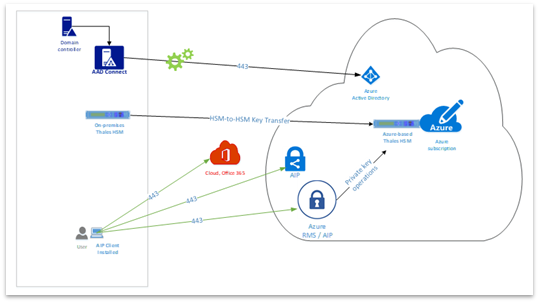
Uniqueness:
- Customers generate and protect the MIP tenant key.
- Microsoft cannot see or export customer MIP tenant key as this stay protected by HSMs.
- It can be software or hardware based with a protected key.
Benefits:
- Customers can use this solution if moving to cloud from On Premise (HYOK to BYOK)
- Customer manages the MIP tenant key.
- Customer has full control over the generated key (master copy, backup)
- Customers can use custom specifications for the key to comply with specific regulatory needs.
- Enables customers to meet the regulatory and compliance requirements. Customers can audit.
- Customers can securely transfer their keys to Microsoft Hardware Security Modules (HSMs).
- Microsoft can replicate tenant keys across a controlled set of HSMs for scale or disaster recovery.
- Microsoft can provide log information to show how your tenant key and protected data are used.
Challenges:
- Customers will have administrative overheads initially when setting up the solution.
Use BYOK when:
- Use BYOK when your organization has compliance regulations for key generations, including control over all life-cycle operations. For example, when your key must be protected by a hardware security module.
How it works:
- Customers generate their tenant key.
- Customer securely transfer their own tenant key to Microsoft HSMs.
- Your key stays protected by Thales or other vendor HSMs.
- RMS can use your tenant key to authorize users to open your documents.
- Microsoft can replicate your tenant key across a controlled set of HSMs for scale & disaster recovery but cannot export it.
- RMS provides logging information to show how your tenant key and protected data are used.
3.Microsoft Information Protection – Hold Your Own Key (Classic Only)
Note: ‘Hold Your Own Key was supported with the AIP ‘classic’ client. As we announced in 2020, the AIP classic client will no longer be supported as of March 31, 2021. HYOK is included here for reference purposes only’.
When enterprises want to maintain data opacity at all costs then Hold Your Own Key solution provided this functionality, however, this option will be deprecated soon in favor of Double Key Encryption that is more compatible with the overall MIP Unified Labeling story. This enables us to protect data in a way where the organization holds the key, the enterprise fully operates their own Active Directory, Rights Management Server, and Hardware Security Modules for key . HYOK-protection uses a key that is created and held by customers, in a location isolated from the clouds. Since HYOK-protection only enables access to data for on-premises applications and services, customers may also have a need for cloud-based key for managing cloud documents.
High-level Architecture of ‘Hold Your Own Key’:
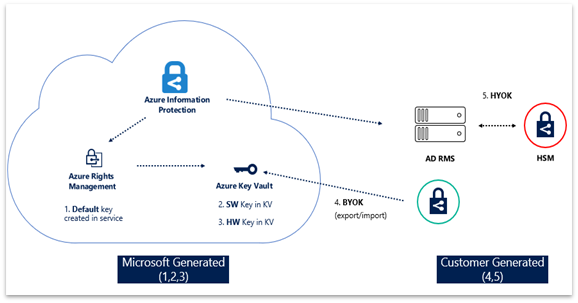
Uniqueness:
- Most suitable for cases where opaque data is required, and it comes with trade-offs.
- Customers deploy Azure Information Protection in their organization.
- MIP is cloud hosted, but they enable customers to operate in cloud-only, on-premises or hybrid.
- Customers define policies using RMS for “Sensitive” data.
- Customers define policies using Active Directory (AD) RMS for “Sensitive” data
- Ideal for highly sensitive data that will not be shared outside of the enterprise.
Benefits:
- Microsoft does not have access to on-premise self-hosted keys.
- AD RMS content cannot be consumed by users from different tenants.
- HYOK supports Documents and Email using AIP Classic Client.
- Good for air-gapped complete control of your encryption of toxic content.
Challenges:
- Customer owns Active Directory and AD RMS server.
- The AD RMS server should not be published on the internet.
- HYOK works solely with AD and AD RMS instance.
- HYOK should be used with fully managed PCs only.
- AD RMS content is not recognized by O365 (no search, pivoted views, eDiscovery, antispam and anti-malware).
- Email based on AD RMS is not compatible and supported with Office 365 Message Encryption (OME).
- Data cannot be accessed by mobile devices.
- AIP Unified labeling does not and will not support HYOK. Works only with AIP Classic Client.
- Extremely difficult to manage and deploy and may require specialized skills and admin overhead to use and breaks a lot of MIP functionality that the cloud has to offer.
Use HYOK when:
- Use when documents have the highest classification in your organization, such as “Top Secret.”
- It is restricted to just a few people.
- Not shared outside the organization.
- They are consumed only on internal networks.
How it works:
- Deploy Azure Information Protection in your organization, configure labels, policies.
- Deploy multiple RMS services within your AIP environment.
- Configure Azure RMS protection policies for “regular” sensitive data.
- Configure AD RMS protection policies for “sensitive” data.
- Keep your AD RMS out of demilitarized zone (DMZ).
- Configure RMS connector if you operate in a hybrid environment (on-premise and cloud)
- HYOK should be used with fully managed PCs to access “sensitive” data.
4. Microsoft Information Protection – Double Key Encryption (AIP UL Client )
Double key encryption is suitable for customers with mission critical data that are most sensitive data and requires higher protection and regulatory requirement. Double key encryption uses two keys together to access protected content. Microsoft stores one key in Microsoft Azure and the customer holds the other key. Customers maintain full control of one of your keys using the Double Key Encryption service. You can apply protection using the Azure Information Protection Unified Labeling client to your highly sensitive content.
High Level Architecture of Double Key Encryption:
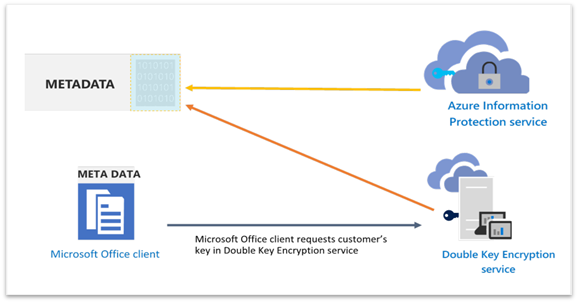
Uniqueness:
- Suitable for protecting highly sensitive data for WXP M365 Office Apps for Enterprise.
- DKE helps to meet several regulatory requirements.
- Customers have the choice to choose any location (on-premise or third-party cloud) to host their DKE service.
- Customers can share DKE encrypted across tenants if the users have access to Azure key and the required permission to access the in the DKE service.
- Data remains opaque to Microsoft under all circumstances. Only customers can decrypt the data.
Benefits:
- Customers maintain full control of their keys. Host your key and store your protected data in the location of your choice (on premises or in the clouds), it remains opaque to Microsoft.
- Manage user access to your key and content. Choose who has permission for the web service to access your key and decrypt content.
- Enjoy a consistent labeling experience. Double key encryption labels function like other sensitivity labels in the Microsoft Information Protection ecosystem, ensuring a consistent end user and admin experience.
- Simplify deployment. Reference code and instructions help deploy the Double Key Encryption service used to request your key. We support the reference implementation hosted on GitHub. Any modifications to the reference implementation are at customers own risk + responsibility.
Challenges:
- Customers need to deploy and manage their own DKE service.
- As of today, DKE is supported only by AIP UL Client (not Office built-in sensitivity labelling) and for documents only – but this may change in the future.
Use a DKE when:
- Double key encryption is intended for your most sensitive data that is subject to the strictest protection requirements.
- Customers want to ensure that only they can ever decrypt protected content, under all circumstances.
- Enterprise does not want Microsoft to have access to protected data on its own.
- It has regulatory requirements to hold keys within a geographical boundary. With DKE, customers can choose to host their DKE service and keys in the location of their choosing.
How it works:
- If you have not already set up the Azure Information Protection service using MMK or BYOK
- Deploy Double Key Encryption Service at your preferred location i.e., on-premise or cloud.
- Microsoft Office client + AIP Unified labeling client bootstraps to the AIP Service.
- AIP service sends the customer’s public key to the Office client which gets cached for 30 days.
- Microsoft Office + AIP Unified Label client requests customer-controlled public from DKE service
- The document metadata controlling access to the document is encrypted with the key from DKE.
- The encrypted part of the metadata is further encrypted with AIP, thus double encrypting the document.
Synopsis
*With AIP Classic client deprecation HYOK is not relevant anymore. Documented for reference purposes only.
The table below shows a high-level comparison between the various MIP key options. IT admins can assess the various aspects to select the most suitable option that meets their business scenario.
Table 1: Key options and key actions
Action
|
MMK
|
BYOK
|
HYOK*
|
DKE
|
Revoke a tenant key.
|

|

|

|

|
Re-key your tenant key.
|

|

|

|

|
Backup & recover your tenant key.
|

|

|

|

|
Customers can export tenant keys.
|

|

|

|

|
Microsoft can export tenant keys.
|

|

|

|

|
Table 2: Key options and administrative efforts:
Administrative Effort
|
MMK
|
BYOK
|
HYOK*
|
DKE
|
Low
|

|
–
|
–
|
–
|
Moderate
|
–
|

|
–
|
–
|
High
|
–
|
–
|

|

|
Table 3: Key options and licensing requirements:
License
|
MMK
|
BYOK
|
HYOK*
|
DKE
|
AIP P1
|

|

|

|

|
AIP P2
|

|

|

|

|
M365 E3
|

|

|

|

|
M365 E5
|

|

|

|

|
Table 4: Applications Supported:
Applications Supported
|
MMK
|
BYOK
|
HYOK*
|
DKE
|
One Drive
|

|

|

|

|
SharePoint Online
|

|

|

|

|
Exchange Online
|

|

|

|

|
Microsoft 365 (Office 365 Word, Excel, PowerPoint)
|

|

|

|

|
Microsoft 365 (Office 365 – Email)
|

|

|

|

|
On-Premise Exchange
|

|

|

|

|
On-Premise SharePoint
|

|

|

|

|
Teams
|

|

|

|

|
Table 5: Applications Supported:
Platform
|
MMK
|
BYOK
|
HYOK*
|
DKE
|
Windows
|

|

|

|

|
iOS
|

|

|

|

|
Android
|

|

|

|

|
Frequently asked questions
How to renew symmetric keys
https://docs.microsoft.com/en-us/azure/information-protection/develop/how-to-renew-symmetric-key
How to export tenant keys for MMKs:
https://docs.microsoft.com/en-us/azure/information-protection/operations-microsoft-managed-tenant-key#export-your-tenant-key
What are DKE License requirements?
https://docs.microsoft.com/en-us/office365/servicedescriptions/microsoft-365-service-descriptions/microsoft-365-tenantlevel-services-licensing-guidance/microsoft-365-security-compliance-licensing-guidance#double-key-encryption-for-microsoft-365
How to configure DKE
https://docs.microsoft.com/en-us/microsoft-365/compliance/double-key-encryption?view=o365-worldwide
References
[i] How Azure RMS works – Azure Information Protection | Microsoft Docs
[ii] How Office apps & services support Azure RMS from AIP | Microsoft Docs
[iii] How Office apps & services support Azure RMS from AIP | Microsoft Docs
[iv] Enable sensitivity labels for Office files in SharePoint and OneDrive – Microsoft 365 Compliance | Microsoft Docs
[v] Configuration for clients to use Office apps with Azure RMS from AIP | Microsoft Docs
[vi] Licenses and Certificates, and how AD RMS protects and consumes documents
[vii] Microsoft Information Protection SDK documentation | Microsoft Docs
[viii] Microsoft-managed – AIP tenant key life cycle operations | Microsoft Docs
[ix] Customer-managed – AIP tenant key life cycle operations | Microsoft Docs
[x] How to prepare an Azure Information Protection “Cloud Exit” plan
[xi] Bring Your Own Key (BYOK) details – Azure Information Protection | Microsoft Docs
[xii] How to generate & transfer HSM-protected keys – BYOK – Azure Key Vault | Microsoft Docs
[xiii] Bring Your Own Key (BYOK) details – Azure Information Protection | Microsoft Docs
[xiv] Operations for your Azure Information Protection tenant key




Recent Comments