by Contributed | Mar 18, 2021 | Technology
This article is contributed. See the original author and article here.
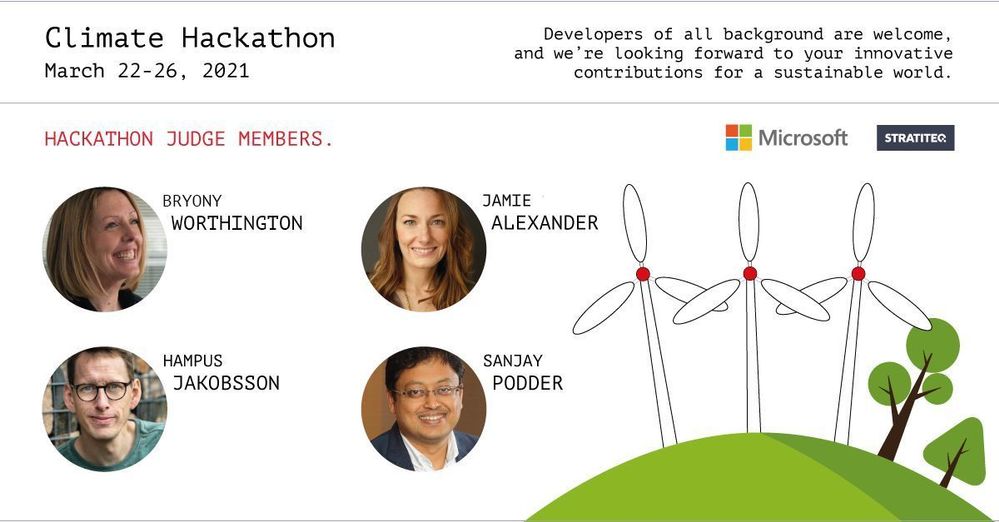
Meet the judges behind Hack the Climate for a sustainable world! The organizing team has pulled together an incredible lineup of experienced professionals to support the hackathon, March 22-26, 2021. Get to know them by reading their profiles and responses to two key questions we all may want to ask ourselves:
- In which ways do you see technology tackling climate challenges?
- What kind of solutions do you hope to see in the hackathon?
Jamie Alexander

Jamie Alexander is the founding director of Project Drawdown’s Drawdown Labs – a consortium of private sector partners working to go beyond ‘net zero’ to scale climate solutions in the world, within and outside their own operations. Jamie joined the Project Drawdown team from Ceres, where she led corporate engagement, working with companies to set ambitious emission reduction targets, and leveraging their influence in support of strong climate and clean energy policies.
Please see Jamie’s recent article on corporate climate leadership in Fast Company and a new video series on climate solutions that Project Drawdown launched just this week!
Jamie responded to our two questions about her motivations.
In which ways do you see technology tackling climate challenges?
Technology is essential in helping to improve and scale the climate solutions that we already have in hand. Technology can help address food waste by tracking excess food and redistributing surplus. It can help reduce building heating and cooling costs through automation. And mapping, satellites, and open source data can help monitor and address deforestation. And many, many more. We already have most of the technologies and practices we need to address climate change, but with improved technologies they can be scaled much faster and more effectively.
What kind of solutions do you hope to see in the hackathon?
I hope to see solutions in the food, agriculture, and land use sector since it’s the sector of solutions that can have the biggest impact on reducing heat-trapping gases in the atmosphere. But we need them all!
Hampus Jakobsson

Hampus Jakobsson is a climate venture capitalist. Prior to being an investor, he built and scaled software startups. He started out as a computer scientist and is an avid reader and blogger.
Hampus will bring his years of experience as a climate researcher to his role as a judge for Hack the Climate. He currently lends his expertise as General Partner at Pale Blue Dot, a European Climate Tech Venture Capitalist investing in pre-seed and seed stage startups focused on building scalable companies that help to reduce or reverse climate change and prepare for a new world.
We asked Hampus a few questions to better understand his motivations.
In which ways do you see technology tackling climate challenges?
- I think technology has previously been seen as a negative contributor or even the cause of the climate crisis, which I think is very incorrect. Extreme consumption (and therefore production) without factoring in costs and inefficient methods are the causes of the crisis. Technology is an amazing way of metering and gathering information to be able to understand the production, consumption, and even the crisis itself – and then on top of that technology can make processes a thousandfold more efficient. If we can move food production to use less land and reduce processing pollution, if we can produce, transport, and store energy without fossil fuel, and if we can plan and construct cities in a minimal impact way, we can remove most of the causes of the climate crisis.
What kind of solutions do you hope to see in the Hack the Climate hackathon?
- Data gathering of the causes – How can we understand the world’s flows of production and consumption? Replicating the Electricity Map technology for more climate impact sources.
- Overview of the research – Can we get a comprehensive view of all the climate research and events out there so science can work better together? Like a GitHub for climate research.
- Coordination of protests and movements – How can different climate movements coordinate, plan, and discuss issues? Such as from End Coal to Telegram, and local as well as global.
- Impact of savings – Is there a way to figure out how your mortgage, pension savings, and other financial products impact the planet?
Sanjay Podder

Sanjay is the Global lead for Technology Sustainability Innovation at Accenture and drives thought leadership and innovation in this area. He is also responsible for establishing and managing our ecosystem strategy for Sustainability, for developing our Technology Capabilities offerings and capabilities, and for embedding sustainability best practices in technology delivery.
As an innovator, Sanjay has been very passionate about bringing digital technologies to develop innovative solutions to achieve sustainable development goals, and decarbonizing digital technologies is his current area of innovation. He has over 25 patents in Software Engineering including AI. Sanjay believes big challenges such as Climate Change and building Trust in communities needs the collaboration of diverse stakeholders and he has worked extensively with non-profit organizations, academia, big business, start-ups and government to address issues such as biodiversity protection, financial inclusion, disability inclusion, gender equality, education, preventive healthcare and others. He also believes that now, more than ever, organizations need to prioritize sustainability to continue to be successful and profitable.
Sanjay was recognized as an Eisenhower Fellow in 2017 for his leadership in building a just and peaceful world using technology. He is also a passionate wildlife photographer and nature enthusiast with several of his pictures in Lonely Planet. Sanjay is a computer engineer and an MBA graduate and alumnus of Mumbai University and Wharton School of the University of Pennsylvania. Sanjay Podder | LinkedIn
Sanjay provided in-depth responses to our questions about his motivations for working in the tech sustainability space.
In which ways do you see technology tackling climate challenges?
Technology has a key role to play in achieving sustainability goals and addressing the climate challenges that we are facing today. One of the most widespread and impactful areas is migrating to cloud. Cloud is a fast-growing trend for businesses and is fundamental to digital transformation. A green approach to cloud migration can also be a key step for businesses in reducing their energy requirements and carbon emissions. So how can ‘Green Cloud’ help to reduce carbon emissions?
- Public cloud spending rose by 17% between 2019-2020.1 And by some analysts’ estimates, 11.4% of US IT spend is on cloud. China is at 2.7% but catching up rapidly.(1)
- This double-digit growth comes with a cost, however. Global data-center electricity consumption is huge. It’s the same as Spain’s total annual consumption. The carbon implications are clear.(2,3)
- With a green approach, however, our analysis suggests migrations to public cloud could reduce global carbon (CO2) emissions by 59 million tons a year. That’s a 5.9% reduction in total emissions from IT – the same as taking 22 million cars off the road.
- This level of reduction in CO2 emissions would go a long way toward meeting climate change commitments, particularly for data-intensive businesses.
Technology has a much wider role to play beyond cloud too. It can help to extract carbon from the atmosphere and underpin energy transition to renewable energy sources like solar, wind, hydrogen, and nuclear – a key focus area for reducing GHG emissions.
Another area where technology can play a key role is reducing emissions in heavy industrial companies.
- Accenture analysis reveals European industrial firms are investing in new areas. Chemical companies are spending heavily on 3D printing, biofuels, hydrogen, and battery technology; energy companies are more focused on platform ecosystems, cloud technologies, and renewable energy; and mining, metals, and building materials companies are concentrating larger investments in energy distribution and chemicals, such as hydrogen.
- Agriculture is another area that configured significantly to reduce GHG emissions such as methane. The use of AI, IoT, and other technologies can also significantly reduce the use of fertilizers and feeds leading to a further lowering of GHG emissions.
- A recent Accenture study shows Vehicular transmission could be reduced by 75% using circular economy concepts. Circular cars initiatives will use technology to:
- Achieve net-zero carbon emissions across the whole vehicle lifecycle (e.g., low-carbon materials and assembly, integration with energy grid.).
- Enable resource recovery and close material loops (e.g., end-of-life disassembly and reverse logistics, electric vehicle battery recycling).
- Increase the lifetime of the vehicle and its components (e.g., subscription-based ownership, re-use, and remanufacturing at scale).
- Ensure efficient vehicle use over time and occupancy (e.g., vehicle/mobility on demand).
What kind of solutions do you hope to see in the hackathon?
I am looking forward to Technology innovations in carbon capture. And carbon reduction in different industrial sectors from digital and data centers, heavy industries, agriculture, transportation, and others.
(1)Seeking Alpha, “China’s burgeoning cloud computing market is a tremendous opportunity”, May 12, 2020
(2)Eric Masanet, Arman Shehabi, Nuoa Lei, Sarah Smith, Jonathan Koomey, “Recalibrating global data center energy-use estimates”, Science Vol: 367, Issue 6481, February 28, 2020
(3)IEA, Data and Statistics, “CO2 emissions from electricity generation factors, Spain 2000-2017”, accessed July 2020
Bryony Worthington

Baroness Bryony Worthington is a Crossbench member of the House of Lords, having spent a career working on conservation, energy, and climate change issues. She is the founder of Ember, is a key architect of the UK’s Climate Change Act.
Prior to her appointment as a Peer in 2011, Baroness Worthington worked at Friends of the Earth on their ‘Big Ask’ campaign, which successfully lobbied for the introduction of new climate change laws. She also worked for Scottish and Southern Energy advising on sustainability. While there she was seconded to Government to work on climate communications and the design of the 2008 Climate Change Act. In 2008, she launched Sandbag, a data-focused NGO that morphed into Ember, which is an independent climate and energy think tank focused on accelerating the global electricity transition from coal to clean.
During the coalition years of 2011 and 2015, Baroness Worthington served as Shadow Spokesperson for Energy and Climate Change and led on two Energy Bills for the Shadow Ministerial Team.
From 2016 to 2019 she was the Executive Director of Environmental Defense Fund Europe. Her current roles include co-chairing the cross-party caucus Peers for the Planet and devising grant-making strategies for the Quadrature Climate Foundation where she works as Co-Director with Cressida Pollock.
We asked Baroness Worthington a few questions to better understand her motivations for being a judge for Hack the Climate.
In which ways do you see technology tackling climate challenges?
Information technology has a huge role to play in tackling climate change, which we view in three main ways:
- Use of big data, Machine Learning, and other technological approaches to optimize systems, such as country or city transport systems, grid operations or factory processes
- Observing and predicting what is happening to the planet and why
- The one that is often neglected – the new marketing and communication tools that are enabled through social media platforms and other digital communications tools that can help build movements and nudge people’s behaviors and beliefs.
Ultimately, to respond with the necessary urgency requires a combination of political interventions and real-world actions to replace the activities that pollute with clean alternatives. The effective use of Artificial Intelligence/Machine Learning and Information & Communications Technology can help speed that process.
What kind of solutions do you hope to see in the hackathon?
I’m interested in anything that can drive a real-world outcome. The challenge is to find sensitive intervention points where action can have an outsize effect. We need to focus on ideas that can scale. A good lever is needed, meaning a robust tool that applies force in a unique way. This could mean new ways of scanning, interpreting, and presenting the vast amount of information we now have at our fingertips to highlight problems and solutions or ways to aggregate concerns or ideas and direct them towards decision-makers at the right time to influence their decisions. Ideas that help people see that there are multiple benefits to tackling the fossil fuel and big agriculture economy that are causing the problem are also very interesting as they can drive change at a personal level and create political pressure if well executed. Ideas that help connect money to real-world projects are also good, but they must be able to scale, for example, a reinvented Kiva for climate.
Join us for Hack the Climate!
@Sherrylist @jawache
by Contributed | Mar 18, 2021 | Technology
This article is contributed. See the original author and article here.
Windows 10, version 21H1, is now available for commercial customers to begin feature exploration and validation prior to being released for general availability.
As previously announced, version 21H1 will be delivered to devices currently running Windows 10, version 2004 or version 20H2 using an enablement package. This is the same technology we used to update devices from Windows 10, version 2004 to version 20H2. Do you want to see how quickly devices update from version 2004 or 20H2 to version 21H1, and how little downtime is involved? Now you can!
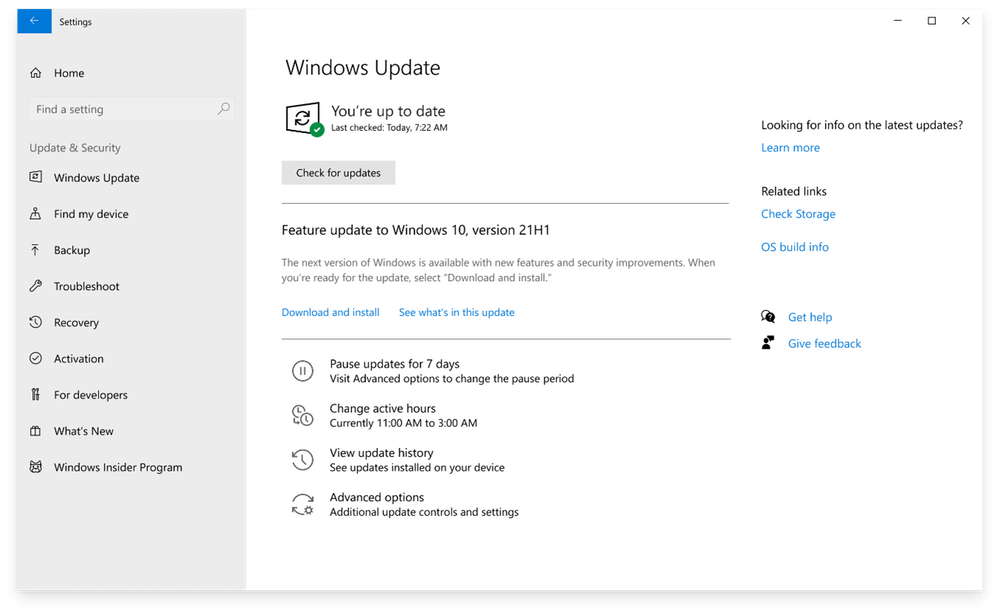
You can access Windows 10, version 21H1 through all standard channels, including Windows Update, Windows Server Update Services (WSUS), and Azure Marketplace, or you can download an ISO file. If you manage updates directly from Windows Update and have devices enrolled in the Release Preview Channel for validation purposes, you can go to the Windows Update Settings page of the device to download and install Windows 10, version 21H1 and experience the remarkably fast update that comes with updating via enablement package.
Note: We consider a device a commercial device if it is not running the Home edition of Windows 10, is being managed by an IT administrator (whether via Microsoft Endpoint Manager or a third-party MDM tool), or if the device has a volume license key, a CommercialID, or is joined to a domain.
|
As with Windows 10, versions 2004 and 20H2, version 21H1 also shares a common core operating system with an identical set of system files. New features are included in monthly quality updates for version 2004 in an inactive and dormant state. These new 21H1 features remain dormant until they are turned on through the “enablement package,” a small, quick-to-install “master switch” that activates the Windows 10, version 21H1 features.
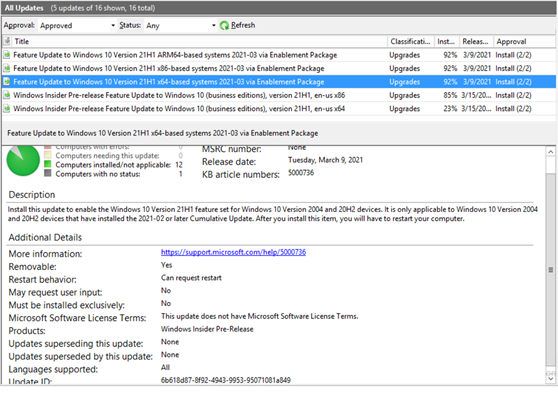
If you are managing updates with WSUS, you have the option of taking a full feature update to 21H1 or testing out the enablement package path if your devices are currently running 2004 or 20H2. As with any other validation done on pre-release updates published to WSUS, you will need to first ensure that you have synced the “Windows Insider Preview” category. Once you have synced this category, you should see the following updates show up in your console as shown below:
To test out this experience on a virtual machine, check out the Windows 10 Preview on Azure Marketplace or, if you would prefer, you can download the Windows 10, version 20H2 ISO.
We not only want to ensure that you have access to the upcoming Windows 10 feature update payload via any channel you may use today, we also want to enable you to validate with confidence. Therefore, customers in the Windows Insider Program for Business can once again receive Microsoft Support for the Windows 10, version 21H1 build available through WSUS, ISO download, Azure Marketplace, and directly from Windows Update in the Release Preview Channels.
If you run into a severe issue that prevents you or other users in your organization from using a device, or compromises security or personal data, use the online form to request assistance directly from Microsoft Support—at no cost to you.
For more information, check out these useful links for exploring and validating pre-release Windows feature updates:
by Contributed | Mar 18, 2021 | Technology
This article is contributed. See the original author and article here.
Windows 10, version 21H1, is now available for commercial customers to begin feature exploration and validation prior to being released for general availability.
As previously announced, version 21H1 will be delivered to devices currently running Windows 10, version 2004 or version 20H2 using an enablement package. This is the same technology we used to update devices from Windows 10, version 2004 to version 20H2. Do you want to see how quickly devices update from version 2004 or 20H2 to version 21H1, and how little downtime is involved? Now you can!
You can access Windows 10, version 21H1 through all standard channels, including Windows Update, Windows Server Update Services (WSUS), and Azure Marketplace, or you can download an ISO file. If you manage updates directly from Windows Update and have devices enrolled in the Release Preview Channel for validation purposes, you can go to the Windows Update Settings page of the device to download and install Windows 10, version 21H1 and experience the remarkably fast update that comes with updating via enablement package.
Note: We consider a device a commercial device if it is not running the Home edition of Windows 10, is being managed by an IT administrator (whether via Microsoft Endpoint Manager or a third-party MDM tool), or if the device has a volume license key, a CommercialID, or is joined to a domain.
|
As with Windows 10, versions 2004 and 20H2, version 21H1 also shares a common core operating system with an identical set of system files. New features are included in monthly quality updates for version 2004 in an inactive and dormant state. These new 21H1 features remain dormant until they are turned on through the “enablement package,” a small, quick-to-install “master switch” that activates the Windows 10, version 21H1 features.
If you are managing updates with WSUS, you have the option of taking a full feature update to 21H1 or testing out the enablement package path if your devices are currently running 2004 or 20H2. As with any other validation done on pre-release updates published to WSUS, you will need to first ensure that you have synced the “Windows Insider Preview” category. Once you have synced this category, you should see the following updates show up in your console as shown below:
To test out this experience on a virtual machine, check out the Windows 10 Preview on Azure Marketplace or, if you would prefer, you can download the Windows 10, version 20H2 ISO.
We not only want to ensure that you have access to the upcoming Windows 10 feature update payload via any channel you may use today, we also want to enable you to validate with confidence. Therefore, customers in the Windows Insider Program for Business can once again receive Microsoft Support for the Windows 10, version 21H1 build available through WSUS, ISO download, Azure Marketplace, and directly from Windows Update in the Release Preview Channels.
If you run into a severe issue that prevents you or other users in your organization from using a device, or compromises security or personal data, use the online form to request assistance directly from Microsoft Support—at no cost to you.
For more information, check out these useful links for exploring and validating pre-release Windows feature updates:

by Contributed | Mar 18, 2021 | Business, Microsoft 365, Technology
This article is contributed. See the original author and article here.
Legal departments are increasingly being called on to not only help navigate a broad range of issues but also to show organizational leadership and become strategic partners to the business.
The post Delivering legal technology to help you adapt to what’s next appeared first on Microsoft 365 Blog.
Brought to you by Dr. Ware, Microsoft Office 365 Silver Partner, Charleston SC.
by Contributed | Mar 18, 2021 | Technology
This article is contributed. See the original author and article here.
Information security understanding is becoming more and more crucial for Enterprises in the last 40-50 years, and it is inevitable for any industry to protect resources against cybercrime or attacks. These security demands are further challenging in the Pandemic era where people are working remotely. However, Microsoft® Teams – a trustworthy centralized collaboration system providing greater security within Microsoft 365 through security, compliance, and protection offerings – is making organizations safe and employees more productive. Although Teams has its own org-wide policies (Teams policies, meetings policies, messaging policies and much more to control users accesses and information from Microsoft Teams Admin center), it is essential to configure security within Microsoft 365 to protect teams that is strongly coupled with SharePoint, Exchange, OneDrive, and any other integrated services as per the org need.
In short, Microsoft Teams as one of the Microsoft 365 applications leverages security advantages from SharePoint, OneDrive, and Exchange by default. For example, as a site member, if a user is not allowed to access a file stored in Teams’ SharePoint site, the same experience will be inherited in the team for the user, even though they can access the teams. All these workloads further can be configured-investigated-secured for Microsoft Teams in Microsoft 365 using various security, protection and compliance Microsoft 365 policies described as follows:
Note: This article only covers Microsoft 365 policies that can be leveraged in Microsoft Teams Security; for more information on other security and compliance features apart from Microsoft 365 policies, go to the “Learn More” section of this article located at the bottom.
Security and Protection Policies for Teams
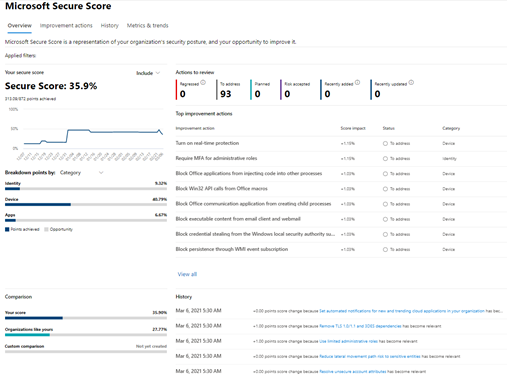
Microsoft Teams as a part of Microsoft 365 services allows to configure essential Microsoft 365 security and protection policies such as Safe attachment policy, safe link policy, conditional access policy, data encryption policy as described below to protect teams content as per the organization need. A good way to start is checking the Microsoft Secure store to know the organization security posture – the higher the number, the greater the security – available at Microsoft 365 Security center as indicated in the following screen.
Based on the security score, you can make an action plan from the “Improvement Actions” to further boosting security score; for example, “Require MFA for administrative roles,” which prevents attackers from accessing important information in case of admin password leakage or Restrict anonymous users from joining meetings which helps to align with company regulation such as external partner, must have a valid account to join the Teams meeting. Additionally, security score also helps to compare your security score with similar organizations as yours as explained here.
Safe Attachment policy
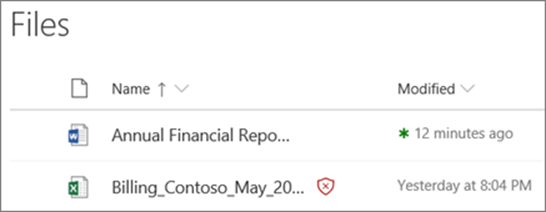
With safe attachment policy, you can protect users from opening or sharing the malicious files in SharePoint, OneDrive, and Teams. When a file is identified as suspicious as indicated in the following screen, users cannot access that file; however, they can delete it.
It is recommended to block the malicious files while configuring Safe Attachment policy from the Microsoft 365 Security center as indicated in the following screen.
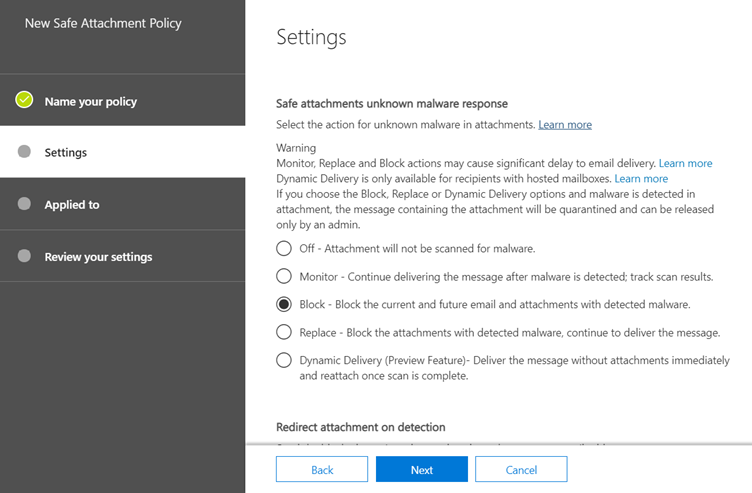
Please find more information here to turn on safe attachments policy in SharePoint, OneDrive and Microsoft Teams. Improve your action plans further when malicious links are found as explained here.
Safe Links policy
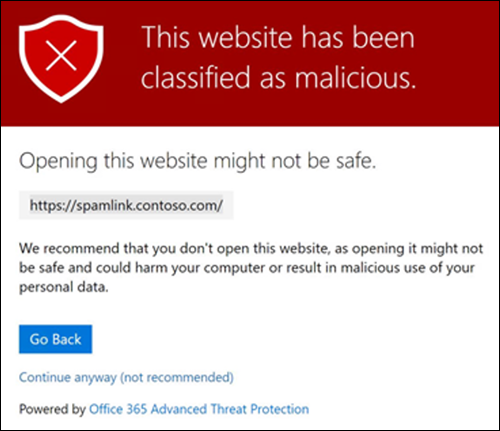
Safe links policy protects users from accessing the malicious links in emails, documents, and Teams conversations. This policy settings, allow to implement URL scanning and determine how user would interact with the link. For example, if user clicks in a link in teams chat, it shows warning page with malicious link information as indicated in the following screen.
It is a best practice to enable the “Do not allow users to click through to original URL” setting while configuring the Safe links policy as indicated in the following screen to protect users from clicking malicious URLs.
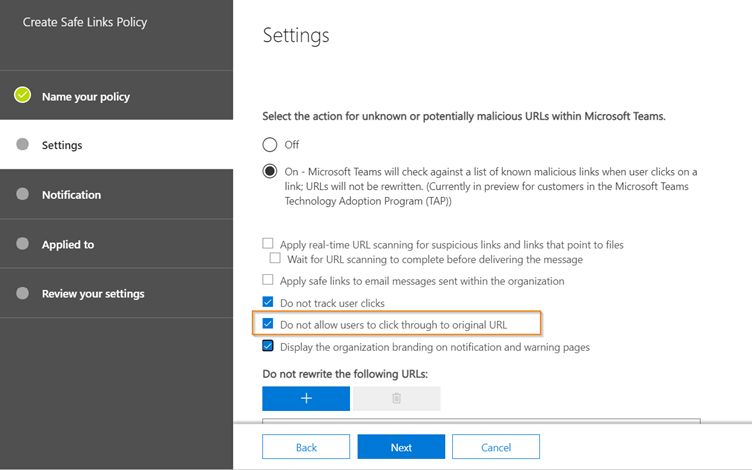
Please find more information on how Safe links policy can be configured and how it works here.
Conditional Access policy
Conditional access policy helps enforcing the desirable access controls such as allow/block access to user based on users, locations, devices, and applications to make organization secure by unexpected app access as indicated in the following screen:
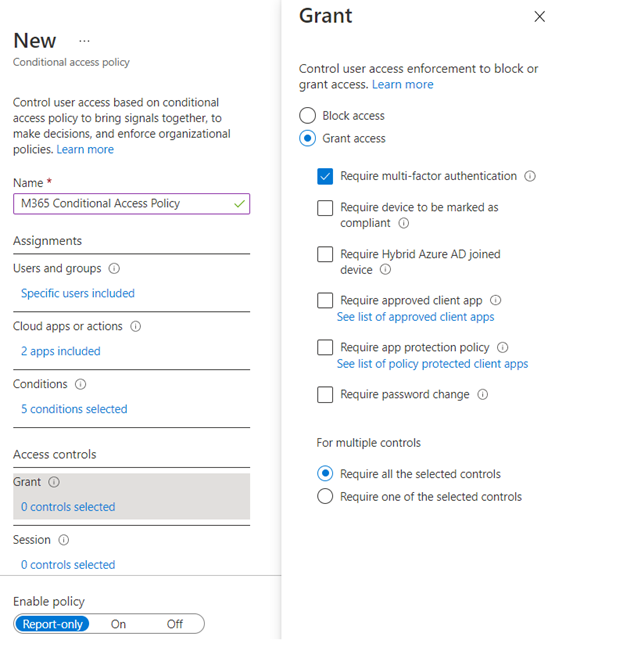
For example, if a conditional access policy includes “Microsoft Teams” as a cloud app, then it will be applicable to specified users based on other criteria such as device/location/client application from where app will be accessed. And, when the specified user in the conditional access policy sign into Microsoft Teams, it would display a message as follows:
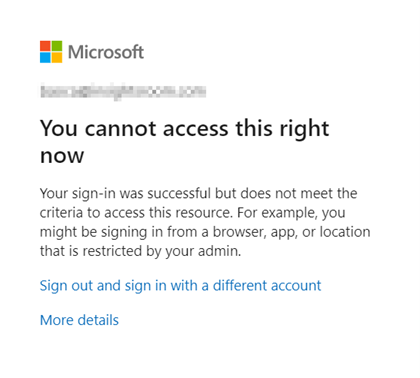
For more information about conditional access policy, please find the documentation here explaining overview, deployment and commonly used conditional policies in the organization.
Data Encryption Policy
Data encryption policy is a part of setting up Customer key for encrypting the content at application level that provides additional layer of security to align with organization compliance obligations, for example, leaving Microsoft 365 service. Now, you can have the customer key assigned for Microsoft teams to encrypt new Teams files stored in SharePoint online via single Data encryption policy at tenant level. As a customer you can revoke the access when you decide to leave the Microsoft 365 service, which deletes the cryptography of the data to meet security and compliance regulations.
To achieve encryption for Microsoft Teams using DEP and customer key, upload the keys in Azure Key vault and grant access to SharePoint online service. By doing so, the user’s file will be encrypted and accessible. However, the moment, keys are deleted when you decide to leave the service, users will not be able to access files from SharePoint Online as it will throw a message as follows as service has no information available to encrypt the data.
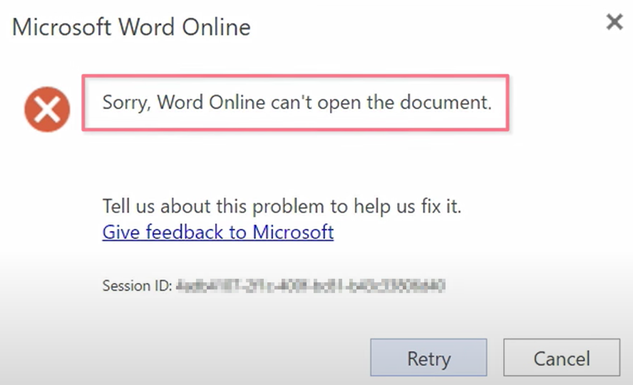
This layer of security does not allow anyone to access the data even from Microsoft, so as a customer you can be rest assured on the controls of your data. Please find more information about strengthening your data by setting up data encryption policy for Microsoft Teams using customer keys here.
Compliance policies for Teams
Microsoft 365 compliance policies help Microsoft Teams to match organization compliance guidelines through Information Barrier policy, Communication compliance policy, sensitivity label policy, data loss prevention policy and retention policy as described below. To know more compliance features apart from compliance policies, please review “Learn More” section located at bottom.
Information Barrier Policy
To regulate Teams communication between specific users for the compliance reason, an Information Barrier policy comes in handy that blocks/allow access between set of users to communicate by determining communication restrictions. For example, when team owner tries to add user in the teams affected by information barrier restriction, then it will show following message:
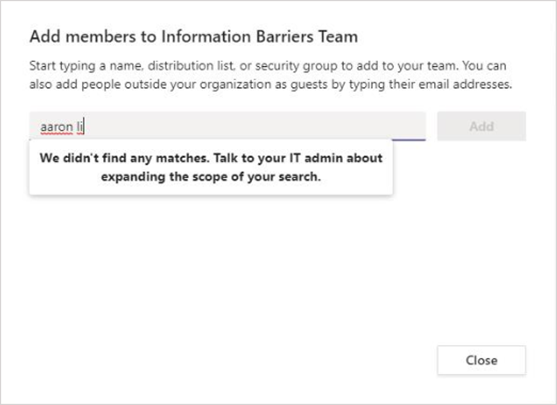
This policy can be triggered at 1:1 chat, group chat, meeting invitation, screen sharing, phone calls, adding user as guest. For more information, on IB policy, please click here.
Communication Compliance Policy
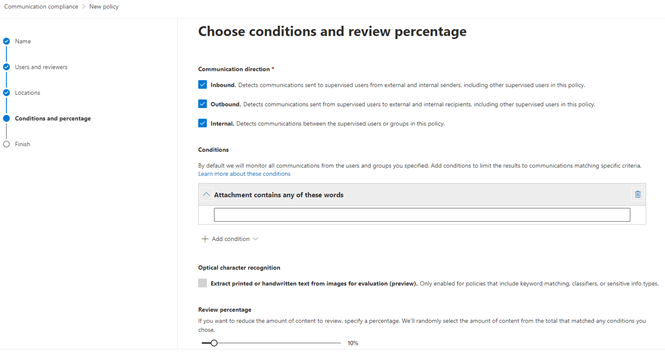
Communication Compliance policies in Microsoft 365, help detecting and acting up on unprofessional messages within the Microsoft Teams that may put your organization at risk. This helps regulating internal and external communications as per the organization standards. It also detects unexpected activities such as increasing Teams channel or volume of messaging data. Configuring Communication compliance policies support healthy culture between organization and employees. Behind the scenes, it uses machine learning over signals coming from various channel such as Exchange, Teams, Yammer, and Skype for Business. For example, as a Communication Admin, you can set up the policy for Teams that matches any offensive words defined in the condition as indicated in the following screen and as reviewer, you can get the trigger when that matches. Learn about planning and configuring communication compliance here.
Sensitivity Label Policy
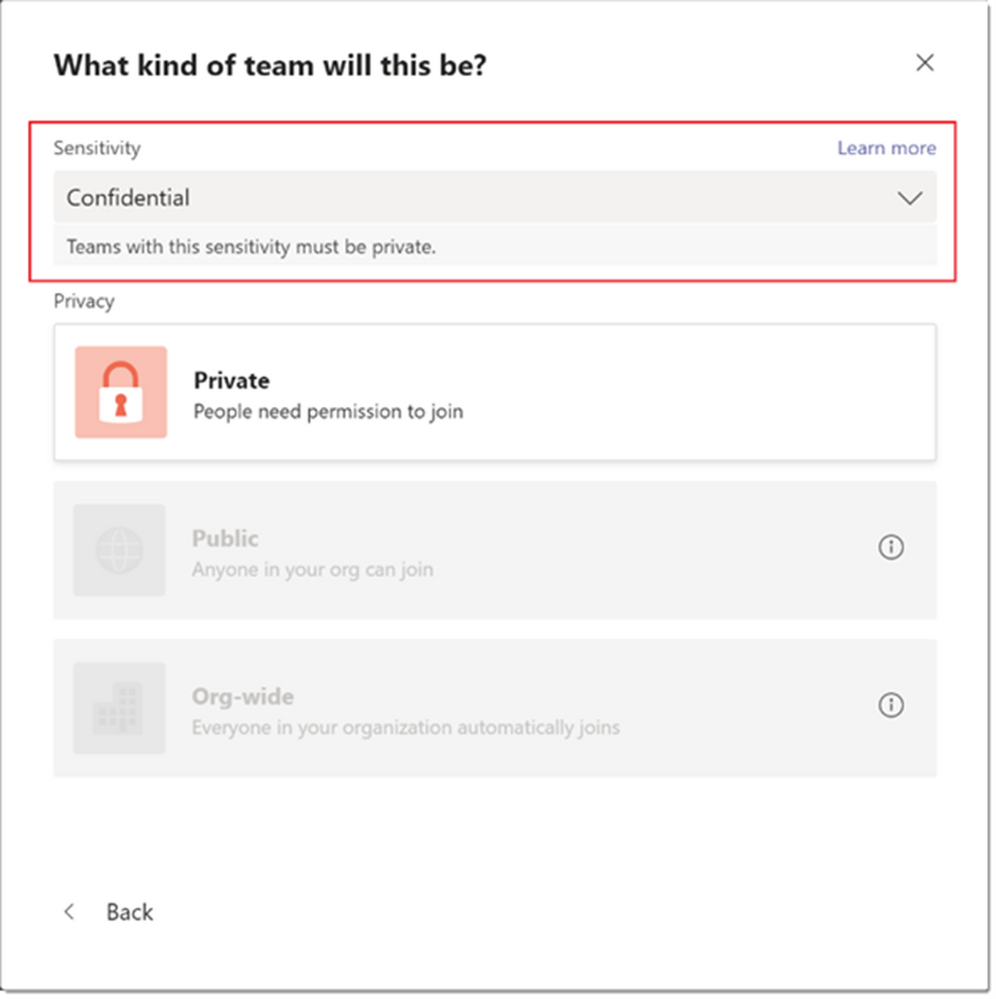
Sensitivity label policy help secure and protect content in Microsoft teams which are created during the collaboration for example, creating or editing team. For instance, as an administrator, you want to allow users to create only private channels. In that case, create and publish sensitivity label called “Confidential” with the “Private” privacy option. Next, when user create a team and apply “Confidential” label to the team, User will only see “Private” as a privacy option as indicated in the following screen. Please find more information on sensitivity labels for Microsoft Teams here.
Data loss prevention policy
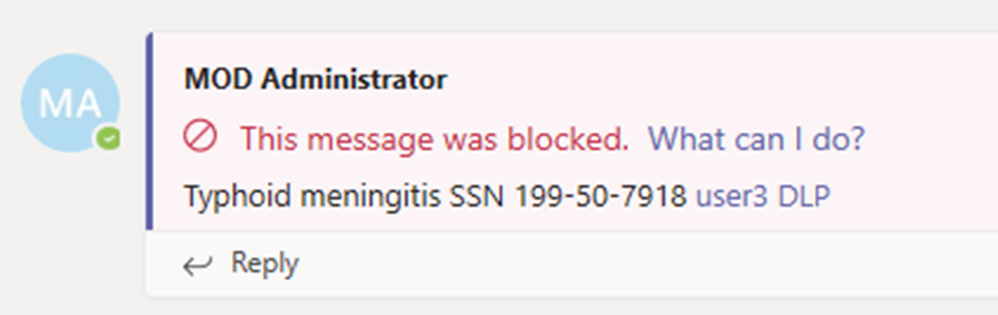
Prevent people from sharing sensitive information relevant to your business with internal or external users in Teams chat and channel messages by defining the data loss prevention policy. For example, if user sends a social security number in the Teams channel which is prevented by DLP policy created in Microsoft 365 compliance center, then the DLP policy automatically detects an action and block the message as indicated in the following screen.
You can also configure sending the incident reports to relevant users, when sensitive information is shared with specific instances at one time. Please find more information about DLP policies in the Microsoft Teams here.
Retention Policy
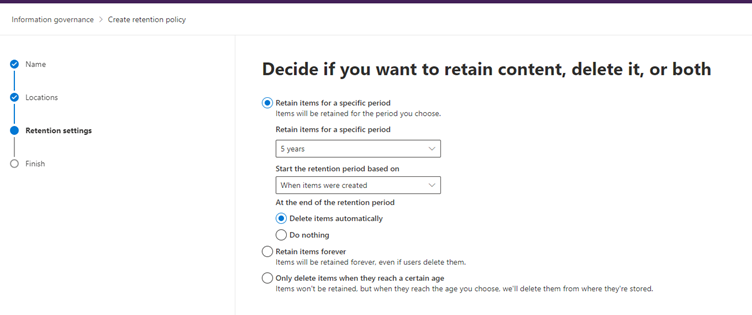
Retention policy helps to manage the Teams chats per the organization policies, legal requirements, or industry standards. For example, you can create a retention policy to delete the Teams chat after five years as indicated in the following screen. It also provides configuration settings such as retain chat data, delete it, or retain it for a specific period and then delete it. Please find more information about how retention policy works for Microsoft Teams here.
Learn More
Further information on security, privacy and compliance features, please have a look here. Know latest Teams announcement on security and compliance from here.
Dipti Chhatrapati is a passionate and ambitious Microsoft Professional with more than 12 years as a Developer, Consultant, Architect, and Manager for SharePoint (2007, 2010, 2013), Office 365, and Power Platform projects. Learn more at Insightrun with Dipti C.
To write your own blog on a topic of interest as a guest blogger in the Microsoft Teams Community, please submit your idea here: https://aka.ms/TeamsCommunityBlogger


Recent Comments