by Contributed | Mar 2, 2021 | Technology
This article is contributed. See the original author and article here.
Today the Power Platform introduces its open-source language for low-code, Microsoft Power Fx. This formula-based language originates from Microsoft Excel and is already the foundation of the Microsoft Power Apps canvas. You may wonder, why does the world need a low-code programming language? Point-and-click tools are great for quickly assembling experiences and workflows, but many apps need a layer of logic that goes beyond what is practical to drag and drop, for example:
Show a list of customers who signed up in the last 7 days within 15 miles of this location.
Highlight the newest entries in green.
When a user clicks for more details, if the record has outstanding action items associated with it, pop those to the top of the screen.
Custom logic traditionally needed to solve such problems is where low-code platforms have “hit a cliff” requiring traditional code, where the Low-code application development on Azure solution has stepped in. Power Fx enables many millions of people globally who build with Microsoft Excel syntax to build custom logic, reducing much of the “cliff”. However, this does not reduce the integration capabilities of Azure and Power Apps but enhances them.
Additionally, developers can use Power Fx with tools they are familiar with such as VS (Visual Studio) Code, GitHub, Azure DevOps, and it works with “pro-code” components created in JavaScript, C#, or other professional languages. Developers can cut development time and costs using Power Fx. The complexities of asynchronous coding are taken care of, Dataverse entities and data types are first class objects, and guardrails prevent run away code and other common pitfalls. Read the entire Power Fx announcement here.
by Contributed | Mar 2, 2021 | Technology
This article is contributed. See the original author and article here.
Today the Power Platform introduces its formula language for low-code, Microsoft Power Fx. This language originates from Microsoft Excel and is already the foundation of the Microsoft Power Apps canvas. You may wonder, why does a low-code platform need a programming language? The truth is, point-and-click tools are great for quickly assembling experiences and workflows, but many apps need a layer of logic that goes beyond what is practical to drag and drop, for example:
- Show a list of customers who signed up in the last 7 days within 15 miles of this location.
- Highlight the newest entries in green.
- When a user clicks for more details, if the record has outstanding action items associated with it, pop those to the top of the screen.
Custom logic traditionally needed to solve such problems is where low-code platforms have “hit a cliff” requiring traditional code, where the Low-code application development on Azure solution has stepped in. Power Fx enables 200+ million people globally who build with Microsoft Excel syntax to build custom logic, reducing much of the “cliff”. However, this does not reduce the integration capabilities of Azure and Power Apps but enhances them.
Developers will cut their development time and cost by using Power Fx where the complexities of async coding are taken care of, Dataverse, Power Apps’ underlying data platform, entities and data types are first class objects, and guard rails prevent run away code and other common pitfalls. Additionally, developers can use Power Fx with tools they are already familiar with such as VS (Visual Studio) Code, GitHub, Azure DevOps, and their own build scripts and tools. Power Fx works with “pro-code” components created in JavaScript, C#, or other professional languages. Read the entire Power Fx announcement here.
by Contributed | Mar 2, 2021 | Technology
This article is contributed. See the original author and article here.
Using the Modernization tooling, classic SharePoint pages can be converted to Modern pages residing in Microsoft 365 Team or Communication sites.
The overall benefit of using this tooling, is that you can scan the environment to get an inventory by using the Modernization scanner (SharePoint Online only); and then with the Page Transformation tools, you then have the option to move your classic content to the modern experience – this supports either an on-premises SharePoint system or sites in SharePoint Online. The tooling is focused on the pages in classic sites and will allow you to keep and convert that content in which you have invested in resources to produce.
There is currently a major multi-step project to move away from older versions of PnP Sites Core and PnP PowerShell to taking advantage of modern .NET 5 and refocus the SDK to Graph first. For details of this project check out this blog for more details about the long term plans for the project for General Availability of the new PnP Framework library for automating SharePoint Online operations
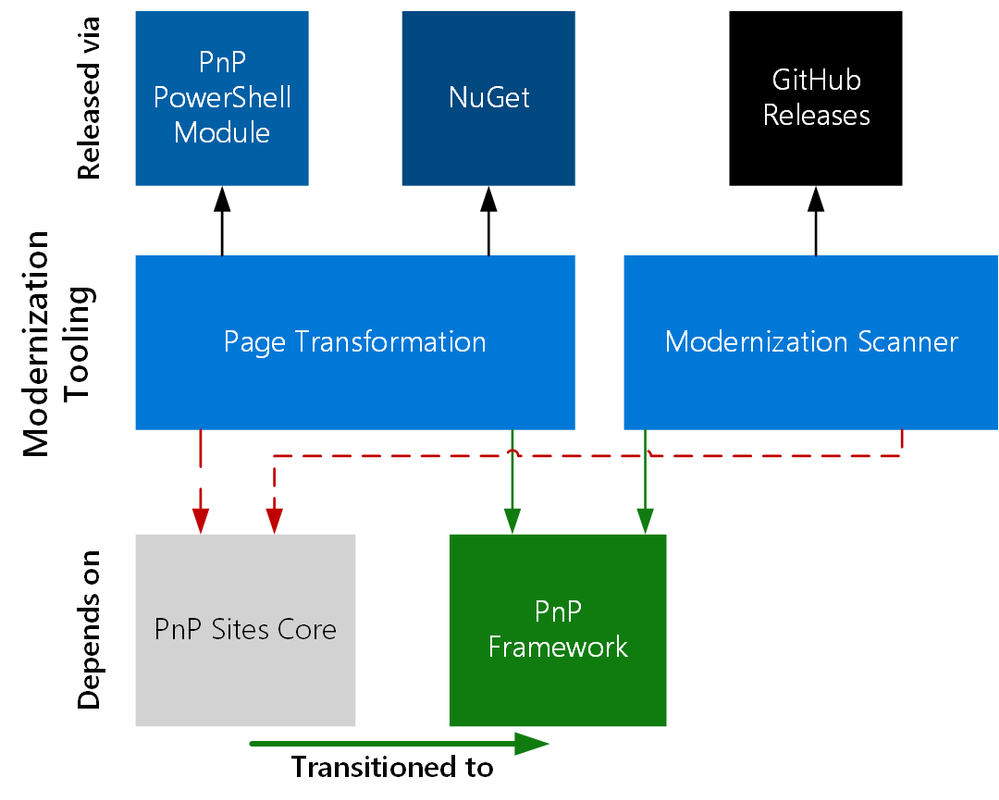 Diagram to show the transition of PnP Modernisation tooling in the underlying framework
The modernization tooling is dependent on the PnP Sites Core, we are pleased to announce this now has been ported and integrated into PnP Framework as part of the steppingstone of improvements – meaning you can continue to take advantage of this tooling, if you wish, via either new PnP.PowerShell library that contains the cmdlets required to perform page transformation or the PnP.Framework NuGet package to use in your .NET applications.
There is one caveat with the move to PnP Framework, that we have no longer support for SharePoint 2010, due to the widening gaps between Office 365 APIs and the older SharePoint 2010 APIs (which is also coming up for retirement in April 2021).
To resolve the issues, we would have to spend significant time engineering a fix and we feel that better value of time can be used to continue integrating into the newest frameworks. If you wish to use the tooling with SharePoint 2010 support then please download the older versions Alternatively, you can use a migration tool to copy the classic sites to SharePoint Online and then convert to modern.
As PnP Sites Core and older PnP PowerShell GitHub repositories are now archived, this will mean these are no longer updated and there will be no further releases of PnP PowerShell (classic) and PnP Sites Core.
Updates to the modernization tool, specifically the page transformation tool are no longer being released as this would require a new release of the underlying archived frameworks; updates will now be released via the PnP Framework repository and as these now have builds either nightly or monthly, you will be able to take advantage of updates the next day – to use these nightly versions, you can install the prerelease version of the PowerShell modules from the gallery or grab the latest NuGet packages.
The Modernization scanner is currently being maintained for the time being in the SP-Dev-Modernization repository, as this tool is , any issues found with this tool can continue to be posted to this repository.
For bugs, enhancements with the page transformation tooling, please post to the issues list on the PnP Framework page – these will then be investigated and any bug or enhancement that is written as a outcome of the issue will be included in the nightly builds of PnP Framework.
Currently, the PnP Core SDK that will eventually replace PnP Framework is currently in beta and is currently under active development. When this is complete, the next steps are to transition all the tooling, PnP Framework, PnP PowerShell, and Modernization tooling to utilize this library – details on timelines and what features are included will be announced on a later date.
by Contributed | Mar 2, 2021 | Technology
This article is contributed. See the original author and article here.
In Q1, 2021 (CY) we released a significant set of for Video Indexer related to our ongoing global expansion, customer growth and additional scenarios based on our customer demand and feedback. . The mapping of the feature list into use cases with more details and examples per each feature, is described in the 2nd part of the blog.
Feature List
- New regions availability –
- Create paid accounts on US government cloud in Virginia and Arizona regions
- Create a Video Indexer paid account in the Switzerland West and Switzerland North, Central India regions
New and Improved Analytics capabilities –
Audio event detection (e.g. explosions, gunshots, crowd reactions as public preview explosions, gunshots, crowd reactions) as public preview. Full list of acoustic events is described in the details section and in Feb release notes. By the next two months it will also be available on paid accounts.
Observed People detection* – detect standing people spotted in the video and trace their path with bounding boxes as public preview.
Video indexer supports detection, grouping, and recognition of characters in animated content. Improved version of on trial and paid accounts is available as a public preview. Read more here.
New low-cost basic audio SKU enabling of the audio related analytics of Video Indexer. The use case and the exact list of analytics are described in “Increased accessibility to video and audio content” section. This can be achieved by having a new upload preset to enable subset of models, both in Video Indexer portal website and in the upload API.
New source languages* for transcription and translation: Turkish, Swedish, Finnish, Danish, Norwegian, multiple Arabic Dialects, Thai and French-Canada.
Extend the Widget customization* capabilities to the solution developers. Read mote in “Embed widgets into your own solution” section below. The new extension will be shipped by end of March, 2021.
- Account management and supportability:
- New API portal* with support channels
- Ability to have multiple account owners for a single VI account.
- Improved User Experience in Video Indexer Website
- Enable dark theme for Video Indexer Website
- Enhance video player experience and the video player widget to support X2 playback speed for audio files
- Ongoing accessibility improvements
*Features will be delivered by end of March, 2021.
Details and Examples
Enabling new work safety and public safety use cases
For public safety use cases (but not only) we enabled Video Indexer running for the first time on Azure Gov cloud. Azure Government is a cloud platform built upon the foundational principles of security, privacy and control, compliance, and transparency. Public Sector entities receive a physically isolated instance of Azure. You can create paid accounts on US government cloud in Virginia and Arizona regions. Read more here.
Site operators and video investigators spend hours and event days to manually explore videos, to analyze accident in the road or at work, bank robbery or searching for court evidence post events. With the new preview features such as observed people tracing and audio event detection you can quickly analyze your video with no human intervention. Use cases such as efficient accident analysis can be achieved by automatically detect observed people and acoustic events within your video to truly understand what had happened post event. For example, site operator who would like to analyze an explosion that happened in a factory can now take the footage from the CCTV cameras, automatically get timeline when the explosion accrued, and then run backwards to track the employee’s activities around the explosion and before the event accrued. That could be extremely helpful for learning, prevent and improve processes within the industry or factory.
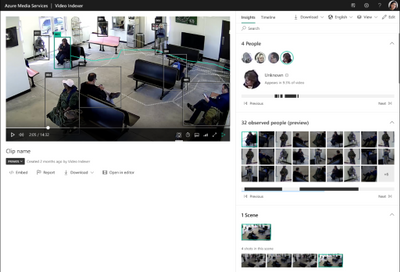
The observed people tracing model extracts the observed people, with bounding boxes who are displayed on the video while it plays. The user can mark a specific thumbnail (right side) and detect the corresponding bounding boxes in the video. We plan to enhance it in the future also with the person path. The first public preview is planned to be shipped by end of March, 2021.
Screenshot from Video Indexer website: observed people insights with bounding boxes marked as a layer in the player. The path marked for a selected person is a future enhancement.
Audio event detection detects and classify the following audio effects in the non-speech segments of the content. The full list of caustic events includes Gunshot, Glass shatter, Alarm, Siren, Explosion, Dog Bark, Screaming, Laughter, Crowd reactions (cheering, clapping and booing) and silence (This model is relevant also for accessibility type of use cases and described in the accessibility paragraph as well).
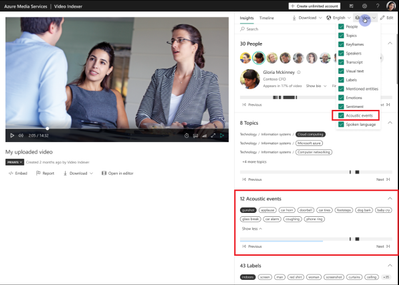
Screenshot from Video Indexer website: introduces acoustic events as a new insight. Represented by event name and where is accrues in the timeline.
Deep search experience across the video library and within videos
One of the leading use cases for VI is enable discoverability across media archives and skip to specific locations within the video quickly based on multiple business insights. With this release, media companies would mainly benefit from improved algorithm version of animated characters recognition models in the video.
Those which use VI website experience will now have it available in dark mode which is usually aligned with other media and video tools within the media market. To enable the dark theme, open your user settings menu and toggle on this feature.
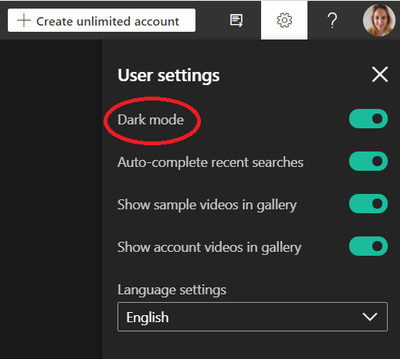
Screenshot from Video Indexer website: enable Dark mode from the user settings menu
Increased accessibility to video and audio content
Another key use case for Video Indexer is enabling accessibility to people with disabilities and across languages through transcription and translation, as well as compliance with accessibility regulations. You can now trigger basic audio insight and features by selecting “basic audio only” preset when uploading a video both in the upload screen and in the upload API. Choosing this option, trigger a selected following subset of audio only capabilities that would also reduce your pricing costs. This mode performs speech-to-text transcription and generation of a VTT subtitle/caption file as well as translation. The output of this mode includes an Insights JSON file including only the keywords, transcription, and timing information. Automatic language detection, content moderation and speaker diarization are not included in this . Note that the basic audio analysis is a low-cost offering comparing to the standard audio analysis. More information is available in our pricing page.
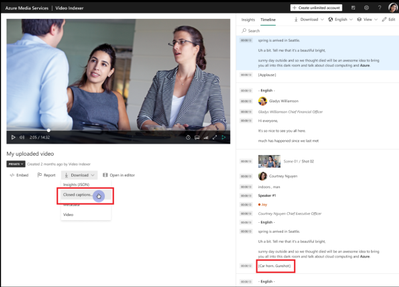
Screenshot from Video Indexer website: introduces acoustic events into the closed captions and ability to download the captions.
For both deep search and accessibility use cases, within the next couple of days we plan to enable additional languages based on our customer demand. When uploading a video/audio, the list of source languages in both API and the website includes also Turkish, Swedish, Finnish, Danish, Norwegian, multiple Arabic dialects, Thai, French-Canada. Those languages are relevant for transcription and translation.
Embed widgets into your own solution
If you are a solution developer, you can embed three types of widgets into your apps: Cognitive Insights, Player, and Editor. More information is available here. We enhanced the widget customization capabilities so that now you can also –
- Load a json from external location.
- Enable custom styling to meet your application look and feel.
- Set a custom configuration to by our custom AI (that isn’t generated by Video Indexer) side-by-side with Video Indexer AI and with that to enrich the insight widget with more insights.
- Enrich your insights by integrating data from other data sources (e.g., if it were a person related model, you could get additional data from Active Directory on the persons org structure)
We invite you to explore our code sample in Video Indexer Github Repository.
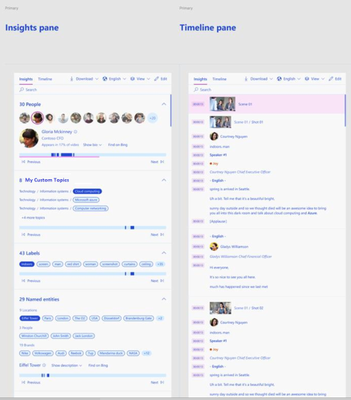
Example of the insight widget with customized styling. The web component includes Video Indexer insights side-by-side with “My custom topics” which The developers can now supplement the output from VI’s widgets with additional output from other sources.
Looking to get your Feedback Today!
In closing, we’d like to call you to provide feedback for all recent enhancements, especially those which were released as public preview. We collect your feedback and adjust the design where needed before releasing those as general available capabilities. For those of you who are new to our technology, we’d encourage you to get started today with these helpful resources:
Thanks for reading ;)
by Contributed | Mar 2, 2021 | Technology
This article is contributed. See the original author and article here.
Azure Data Factory (ADF) is a fully managed, easy-to-use, serverless data integration solution to ingest all your on-premises, hybrid, and multi-cloud data. Choose from over a rich set of connectors to ingest data, build code-free or code-centric ETL/ELT processes, and seamlessly deliver it to operational data stores and modern data warehouses like Azure Synapse.
We are constantly energized and inspired by how everyone has been using Azure Data Factory for all your enterprise data integration needs. Thank you to the ADF community for sharing product feedback on User Voice and community forums!
Over the years, Azure Data Factory has been made generally available in 30+ Azure regions. Today, we are excited to share that Azure Data Factory is now available in additional Azure regions: China North, South India, Switzerland North, Japan West, Canada East , Germany West Central , UK West. Learn more about Azure regions where Azure Data Factory is available.
In addition, Azure Data Factory is now HITRUST certified. Learn more about Azure Data Factory compliance as part of Azure Compliance offerings.
We are thrilled to share with you the latest updates to Azure Data Factory that will help you do more with Azure Data Factory.
- Azure Purview and Azure Data Factory Integration – With the integration of Azure Data Factory and Azure Purview, data engineers can quickly & easily find relevant data using a search experience in Data Factory portal, know the data and understand its business value, and easily use them in Data Factory as linked services or datasets. Learn more on how you can use this to deeply understand the lineage for data integration.
- Reserved Instance pricing for Data Flows – You can now purchase 1-year or 3-year reservations of Data Flows from the Azure Portal and receive up to 30% off the pay-as-you-go option for General Purpose and Memory Optimized compute options. Learn more about reserved Instance pricing for data flows in Azure Data Factory and Azure Synapse Analytics.
- CDM Format Support with Data Flow – With data flows, you can build powerful ETL processes using CDM formats and then also generate updated manifest files that point to your new, transformed data using CDM as a sink. ADF can use your CDM entity definitions to build ETL projections for transformation and mapping. Learn more about using the Common Data Model format using Azure Data Factory.
- Azure Policy Support for Azure Data Factory – Azure Data Factory now includes. built-in policies that you can assign to your data factory to ensure resource consistency, regulatory compliance, and security. Learn more on how you can use Azure Policy for Azure Data Factory.
- Automating Azure Data Factory Deployment – You can now use the validate all and export Azure Resource Manager (ARM) template functionality as part of a CI/CD pipeline. Learn more about Automated publish improvement in ADF’s CI/CD flow
- Dual standby Azure SSIS IR pair for high availability – For business continuity and disaster recovery (BCDR), you can now configure a dual standby Azure-SSIS IR pair that works in sync with Azure SQL Database/ Managed Instance failover group. – Learn more
- Azure Database for PostgreSQL in Data Flow – You can now build powerful ETL pipelines that connects to Azure Database for PostgreSQL You can read data directly from Azure Database for PostgreSQL and apply data transformations or join with other data, or post transformation you can perform inserts, updates, deletes, and upserts to publish the analytics result set into Azure Database for PostgreSQL. Learn more about Azure Database for PostgreSQL connector.
- REST Connector as Sink – Generic REST connector is one of the most commonly used connectors in ADF to integrate with various SaaS applications or your own applications. It helps you easily extend and reach a great number of data sources than the built-in ones. Now using copy activity, not only you can use REST connector to retrieve data, ADF newly enables REST connector as sink so you can also write data via REST APIs. Learn more about REST connector.
- Using Worksheet Index for Excel – When parsing Excel files using copy activity or data flow, you can specify the worksheet index. Learn more about Excel format
- Delta Lake Format support – Delta Lake is a Spark-based data lake format that makes working with data in your lake for analytics solution super-easy. With ADF data flows, you can read from Delta Lake folders, transform data, and even update, upsert, insert, delete, and generate new Delta Lake folders using the Delta Lake sink format. Learn more about using the Delta format using Azure Data Factory.
LEARN Azure Data Factory
Together with the Azure Learn team, we have been working on creating Azure Data Factory learning path that can help you jumpstart your Azure Data Factory learning journey. If you are new to ADF, or looking at continuously learning new ADF skills, check out the learning paths on Microsoft Learn for Azure.
We look forward to see what you can build with Azure Data Factory.
Read more about the latest Azure Data Factory innovation on the Azure Data Factory blog.


Recent Comments