by Contributed | Dec 1, 2020 | Technology
This article is contributed. See the original author and article here.
Today, we got a new service request that our customer implemented a private link and they want to use External tables.
Unfortunately, when they enabled the option “Deny public network access” they are not able to connect: Connection was denied since Deny Public Network Access is set to Yes
Our customer implemented the following steps:
- Create Master KEY
- Create Database Scoped Credential
- Create External Data Source with this parameters :
- LOCATION=’servername.database.windows.net’,
- DATABASE_NAME = ‘databasename’,
- CREDENTIAL = AppCredential
- Create External database from the data source
When we tried to perform a select from the first database they faced the following message:”Error retrieving data from servername.database.windows.net The underlying error message received was: ‘A network-related or instance-specific error occurred while establishing a connection to SQL Server. The server was not found or was not accessible. Verify that the instance name is correct and that SQL Server is configured to allow remote connections. (provider: Named Pipes Provider, error: 40 – Could not open a connection to SQL Server)”.
We need to explain that the connection will be made using the external IP of the node that the server is running and not the private IP. For this reason, you need to use the external connection or use Managed Instance that is possible to connect among databases that are running in the same instance.
Enjoy!
by Contributed | Dec 1, 2020 | Technology
This article is contributed. See the original author and article here.
While organizations of all sizes use Microsoft 365, very small businesses (VSBs)—those with 10 or fewer people—have very different needs from medium and enterprise customers. When it comes to using cloud services, VSBs tend to focus on the productivity essentials like using Office to share information, using calendars and email, and using Teams to communicate with their customers.
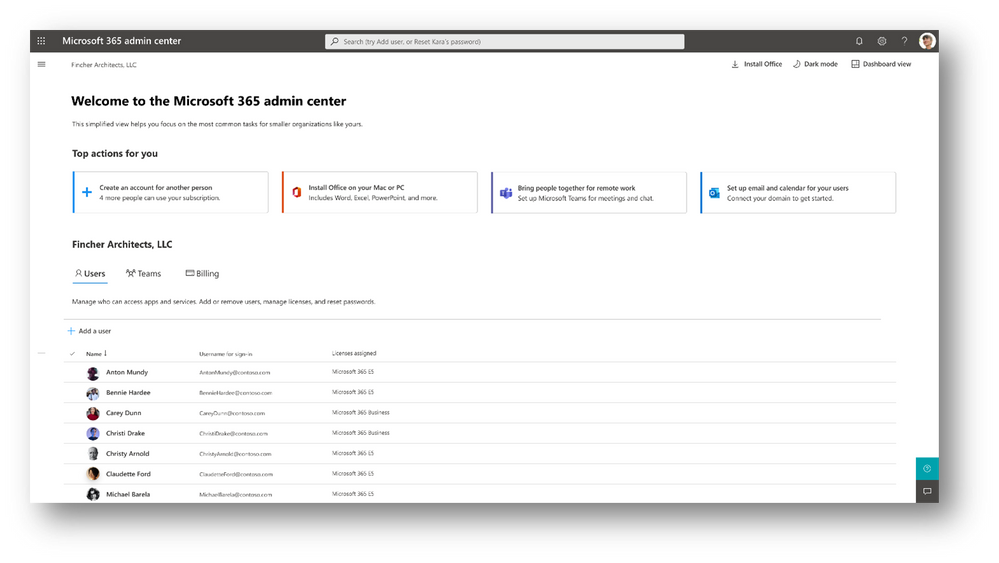
To help VSBs also focus on the administrative essentials, we are introducing a new experience in the Microsoft 365 admin center called the admin simplified view. This experience can be used by Global admins in any organization that has Microsoft 365, but it is designed primarily for VSBs.
The experience provides you with access to users, teams, and billing information in one view, and it guides you through simplified flows of top actions to take, such as adding users, installing Office, and enabling Teams, email, and calendaring. To revert to the complete admin center experience, you can click Dashboard view.
We are testing this simplified experience over the next few months. An early version is shipping first to targeted release customers starting early next month. We plan on adding more scenarios around onboarding and ongoing subscription management. As always, we are listening to your feedback, so please feel free to reach out using the feedback option in the Microsoft 365 admin center at any time!
by Contributed | Dec 1, 2020 | Technology
This article is contributed. See the original author and article here.
Today, I got a service request that our customer needs to know the total data size per table and data size per column.
I shared the following information with this customer.
- My first idea was to identify the size per table (in terms of rows and KB). We executed this query:
SELECT
    t.NAME AS TableName,
    s.Name AS SchemaName,
    p.rows AS RowCounts,
    SUM(a.total_pages) * 8 AS TotalSpaceKB,
    SUM(a.used_pages) * 8 AS UsedSpaceKB,
    (SUM(a.total_pages) - SUM(a.used_pages)) * 8 AS UnusedSpaceKB
FROM
    sys.tables t
INNER JOIN
    sys.indexes i ON t.OBJECT_ID = i.object_id
INNER JOIN
    sys.partitions p ON i.object_id = p.OBJECT_ID AND i.index_id = p.index_id
INNER JOIN
    sys.allocation_units a ON p.partition_id = a.container_id
LEFT OUTER JOIN
    sys.schemas s ON t.schema_id = s.schema_id
WHERE t.is_ms_shipped = 0
    AND i.OBJECT_ID > 255
GROUP BY
    t.Name, s.Name, p.Rows
ORDER BY
    t.Name
- We found that several tables are using too much data and have a lot of rows.
- We suggested to run the following script to the tables that they consider that are the main goal to review the size.
- Also, we mentioned that using DataLength per column our customer will have an impact in performance due to SQL SERVER needs to read all the rows of the tables and there is not needed to calculate for some data type like INT because it is fixed value that you could obtain the size basically multiple the max_lenght per number of rows.
- I think that this script is possible to improve a lot, for example, instead of running a TSQL command per execution, try to run every 50 or 60 columns, but, anyway, here is:
DECLARE @ObjectTable    sysname = 'Example'
DECLARE @Name           sysname
DECLARE @Type           INT
DECLARE @Total          BIGINT = 0
DECLARE @SQL            NVARCHAR(4000)
DECLARE @ParmDefinition nvarchar(100)= N'@Total BIGINT OUTPUT'

DECLARE vColumns CURSOR FOR
     SELECT C.name,T.USER_TYPE_ID from sys.columns c
     JOIN SYS.TYPES T
     ON C.USER_TYPE_ID=T.USER_TYPE_ID
       WHERE object_id=OBJECT_id(@ObjectTable)
        ORDER BY 1;

OPEN vColumns
FETCH NEXT FROM vColumns
INTO @Name, @Type

WHILE @@FETCH_STATUS = 0
BEGIN
       SET @Total=0
    SET @SQL = 'SELECT @Total = SUM(DATALENGTH(' + @Name + ')) FROM ' + @ObjectTable
    EXECUTE sp_executesql @SQL,@ParmDefinition, @Total = @Total OUTPUT;
       PRINT 'Size:' + CONVERT(CHAR(20),@Total) + '|Type ID:' + CONVERT(CHAR(5),@Type) + '|Column Name:'+ CONVERT(CHAR(128), @Name)  + '|SQL:' + @SQL
       FETCH NEXT FROM vColumns INTO @Name, @Type
END
CLOSE vColumns;
DEALLOCATE vColumns;
Enjoy!
by Contributed | Dec 1, 2020 | Technology
This article is contributed. See the original author and article here.
We are very proud to announce that Surface Go is positioned to play a key role in helping businesses and schools resume on-site operations when it becomes safe to do so.
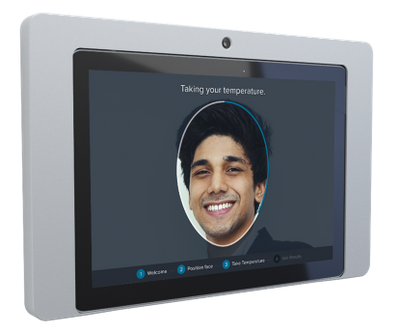
A new solution — Communify Greet – turns Surface Go into a self-service, contact-less gating kiosk deployable at building entrances, lobbies, and reception areas. Equipped with a custom Box IT enclosure and an embedded temperature-reading thermal sensor, Communify Greet provides first line gating and check-in for employees, students and visitors.
Communify Greet on Surface contact-less kiosk with fully enclosed thermal sensor
How it works
Built in collaboration with our Microsoft partners — Teknikos and BOX IT Design — Communify Greet works like this:
- The Surface Go camera is used to detect when someone is approaching and asks the individual to check in by scanning a QR code.
- The embedded thermal sensor initiates a scan to ensure the individual does not exceed temperature thresholds.
- When not in use, the Communify Greet kiosk displays digital signage to facilitate the implementation of company policies and promote workforce confidence.
Microsoft Power Platform integration
Starting with release 1.3 of Power Platform return to the workplace solution, organizations can integrate Communify Greet via a connector, extending the value of Power Platform return to the workplace workflows to Surface endpoints running Communify.
Mapping a real-time digital footprint
Communify Greet is part of the Communify return to the workplace suite, a SaaS (Software as a Service) workplace productivity solution exclusively available on Microsoft Surface devices. Together, Communify Greet, Communify Meet (calendar hall display outside of meeting rooms) and Communify Seat (flexible workspace management display for non-meeting room work areas) can provide a “digital footprint” for employees and students, using QR code behavioral data generated as an individual checks in and out of different buildings, meeting rooms and workspaces throughout their day.
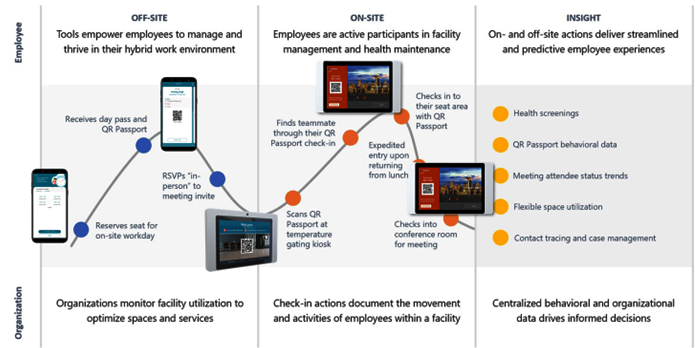
Employee journey: Return to modern work
Complete solution powered by Surface and Microsoft Cloud
Bringing together the Communify RTW Suite with Surface, Power Platform and Microsoft Cloud offers organizations a unique set of capabilities and unmatched value.
- The Surface Go 3:2 display aspect ratio is ideal for digital signage and easy interaction. The device specifications are best-in-class including brightness, field of view, and resolution.
- Microsoft Azure Active Directory (AAD) integration eliminates synchronization issues.
- Device deployment, management and security is all done via Microsoft 365, using current investments and IT processes.
- Windows Autopilot self-deploy mode eliminates the need for on-site IT resources, greatly reducing deployment total cost of ownership.
- The Surface device hardware ID and device TPM (trusted platform module) are used to create paired state resilience between the Surface device, the Azure tenant and the Communify service.
- A web-based administration portal provides easy access to distinct roles including IT, facilities, human resources and marketing.
- Microsoft Power Platform common data service is used to exchange data between the return to the workplace solution and the Communify RTW Suite.
How to get it
Communify Meet calendar hall display is available now from Microsoft Surface partners. Communify Greet gating kiosk is available from December 3rd (aligned with the 1.3 release of the Microsoft Power Platform return to the workplace solution). Communify Seat flexible workspace management is being launched in Q1 2021. For more information visit www.communifyapp.com.
by Scott Muniz | Dec 1, 2020 | Security, Technology
This article is contributed. See the original author and article here.
Original release date: December 1, 2020
This Advisory uses the MITRE Adversarial Tactics, Techniques, and Common Knowledge (ATT&CK®) framework. See the ATT&CK for Enterprise for all referenced threat actor tactics and techniques.
The Cybersecurity and Infrastructure Security Agency (CISA) and the Federal Bureau of Investigation (FBI) have observed persistent continued cyber intrusions by advanced persistent threat (APT) actors targeting U.S. think tanks. This malicious activity is often, but not exclusively, directed at individuals and organizations that focus on international affairs or national security policy.[1] The following guidance may assist U.S. think tanks in developing network defense procedures to prevent or rapidly detect these attacks.
APT actors have relied on multiple avenues for initial access. These have included low-effort capabilities such as spearphishing emails and third-party message services directed at both corporate and personal accounts, as well as exploiting vulnerable web-facing devices and remote connection capabilities. Increased telework during the COVID-19 pandemic has expanded workforce reliance on remote connectivity, affording malicious actors more opportunities to exploit those connections and to blend in with increased traffic. Attackers may leverage virtual private networks (VPNs) and other remote work tools to gain initial access or persistence on a victim’s network. When successful, these low-effort, high-reward approaches allow threat actors to steal sensitive information, acquire user credentials, and gain persistent access to victim networks.
Given the importance that think tanks can have in shaping U.S. policy, CISA and FBI urge individuals and organizations in the international affairs and national security sectors to immediately adopt a heightened state of awareness and implement the critical steps listed in the Mitigations section of this Advisory.
Click here for a PDF version of this report.
This product is provided subject to this Notification and this Privacy & Use policy.


Recent Comments