by Contributed | Dec 29, 2020 | Technology
This article is contributed. See the original author and article here.
Following this lab: Lab: Serverless Synapse – From Spark to SQL On Demand – Microsoft Tech Community
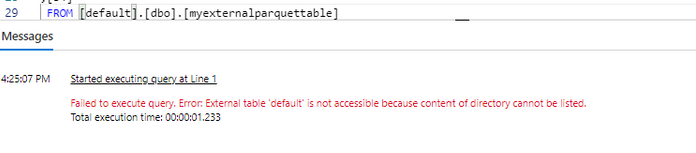
You may experience this message:
Failed to execute the query because content of directory cannot be listed)
This is due to an extra step required to enable the AAD to pass through the firewall on the storage.
Scenario:
Query SQL Serverless failed as following while querying Spark.
On Azure Portal, Storage Account -> Networking is configured as follows ( with Allow trusted Microsoft services to access this account enabled):
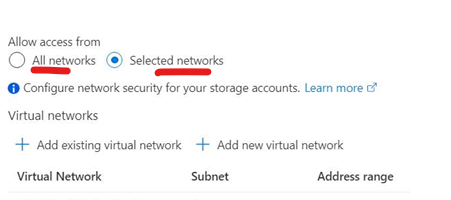
If you change to All Networks it does work successfully.
Mitigation: Enable the AAD to pass through the firewall on the storage.
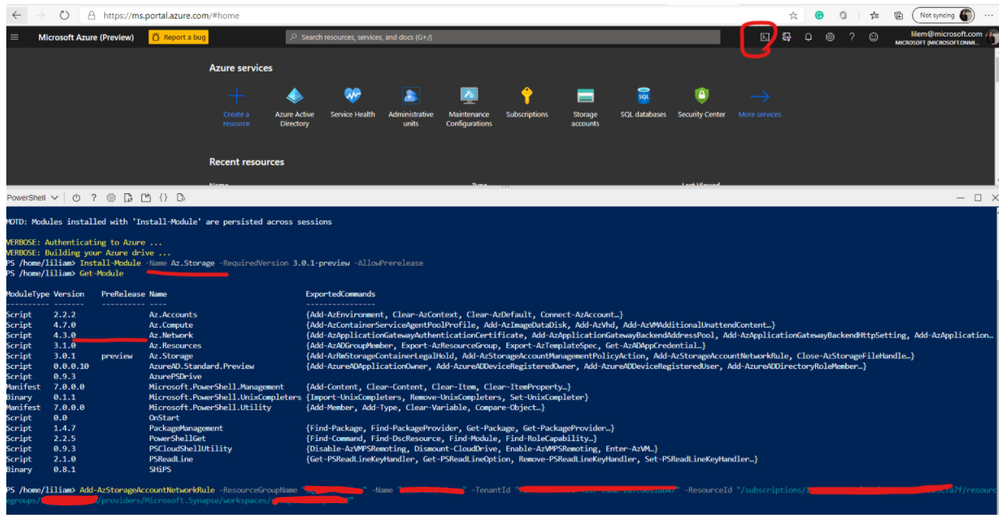
Run the following-> exactly like this example but replace the values as required:
Add-AzStorageAccountNetworkRule -ResourceGroupName $resourceGroupName -Name $accountName -TenantId $tenantId -ResourceId "/subscriptions/<subscriptionid>/resourcegroups/<rgname>/providers/Microsoft.Synapse/workspaces/<workspacename>"
For the Tenant ID you can get the value from the Azure Portal ->AAD
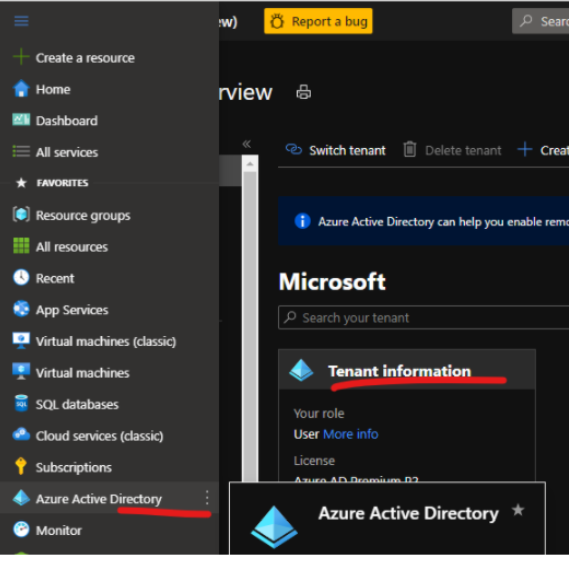
Microsoft Doc: Control storage account access for serverless SQL pool – Azure Synapse Analytics | Microsoft Docs
Note you may need to install Power Shell version 3 like my example:
(PowerShell Gallery | Az.Storage 3.0.1-preview)
Thanks to Stefan Azaric.
That is it!
Liliam
UK Engineer.
by Scott Muniz | Dec 29, 2020 | Security
This article was originally posted by the FTC. See the original article here.
We just heard from more companies that scammers are using their names to trick people into a car wrap scam. This time, scammers are saying they’re Marlboro or Purell (but they’re not really).
The gist of the scam is this: scammers send emails and post to social media and job boards with messages like “GET PAID TO DRIVE.” They offer to pay you up to $700 a week if you’ll drive around with your car (or truck or bike) wrapped to advertise a well-known product. But they’re not really affiliated with the brand. They just want your money.
If you message them back, they’ll send you a check to deposit into your bank account. Then they’ll say to use some of that money to pay their “decal agent” to put the ads on your car. They’ll tell you to pay by money order, Walmart money services, or by making a cash deposit directly into the decal agent’s bank account — all ways that are hard to cancel or get your money back.
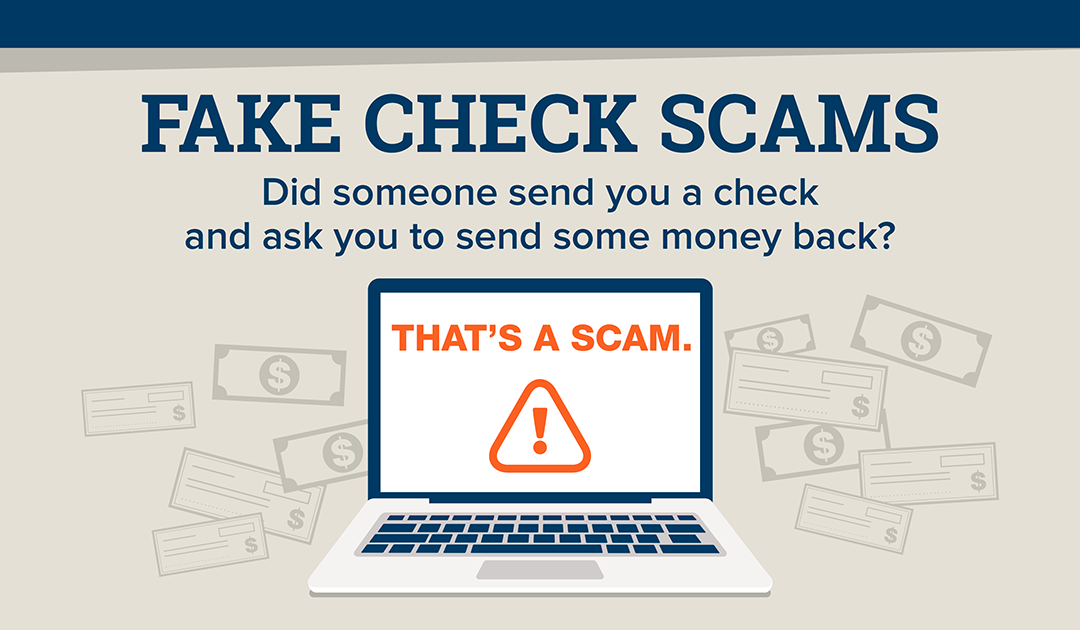
So what’s really going on? Well, the “decal agent” is really the scammer. And that check you just deposited? That was fake — which means the money you sent is coming out of your own pocket. So, if you deposited a $1,500 check and sent $500 to the “decal agent,” you’re out $500 of your own money. (And you don’t get to keep that $1,000, either.)
Another thing: an FTC analysis published earlier this year showed that fake check scams hit 20- and 30-year-olds hard in the wallet. People reported a median loss in 2019 of $1,988.
Spotted a scam like this? We want to hear about it. Let us know at ReportFraud.ftc.gov.
Brought to you by Dr. Ware, Microsoft Office 365 Silver Partner, Charleston SC.

by Scott Muniz | Dec 29, 2020 | Security
This article was originally posted by the FTC. See the original article here.
Several months ago, we told you that the U.S. Department of Education announced some flexibility to federal student loan borrowers. Understanding these options can help you make more informed decisions about paying your bills and prioritizing your debts. The benefits have been extended until January 31, 2021.
So, just to recap, what does this mean for you if you have a federal student loan?
- This program gives temporary payment relief to borrowers with qualifying federal student loans. But some federal student loans don’t qualify – for example, older Family Federal Education Loan (FFEL) program loans or Perkins Loans that are owned by the school you attended. Contact your federal loan serviceronline or by phone to find out if your loans are eligible.
- If your federal loans are covered, the U.S. Department of Education has automatically placed your loans into what’s called “administrative forbearance.” That means you can stop making payments on those loans right away, up through January 31, 2021. If your payments automatically come out of your bank account, check if any payments have been processed since March 13, 2020. If they have, you may be able to get a refundas part of administrative forbearance.
- If you want to keep making payments on your qualifying federal student loan through January 31st, the interest rate is now 0%. So any payments you make during the forbearance period may help you pay off your debt faster. If you’re on an income-based repayment program and/or a forgiveness program, you should check out Federal Student Aid’s Coronavirus pageto see which option makes sense for you.
- If your federal student loans are in default, the U.S. Department of Education has stopped making collection calls, and sending letters or billing statements through January 31, 2021. And if your federal loans were in default and your employer continues to garnish your wages, you’ll get a refund.
This program only applies to federal student loans. Not sure what kinds of student loans you have? Here are two things you can do to find out:
One more thing: you don’t need to hire a company to help you get this student loan payment relief. The program is already in place and there’s nothing you need to do to enroll.
Updated December 29, 2020 with new information about how payment flexibilities for federal student loan borrowers have been extended until January 31, 2020.
Brought to you by Dr. Ware, Microsoft Office 365 Silver Partner, Charleston SC.
by Contributed | Dec 29, 2020 | Technology
This article is contributed. See the original author and article here.
This release brings support for older SQL Server versions (2012, 2014, 2016) into the version agnostic MP. That is, going forward just like SQL Server MP, we will have version-agnostic Replication MP that can monitor all SQL Server versions in support. This is the last MP in SQL Server MP family to move to full version-agnostic mode.
Please download at:
Microsoft System Center Management Pack for SQL Server Replication
What’s New
- Updated MP to support SQL Server 2012 through 2019
- Updated “Replication Agents failed on the Distributor” unit monitor to extend it for Log Reader and Queue Reader agents detection
- Added new property ‘DiskFreeSpace’ for “Publication Snapshot Available Space” unit monitor
- Removed “One or more of the Replication Agents are retrying on the Distributor” monitor as non-useful
- Removed “Availability of the Distribution database from a Subscriber” monitor as deprecated
- Updated display strings
Issues Fixed
- Fixed discovery issue on SQL Server 2019
- Fixed issue with the incorrect definition of ‘MachineName’ property of DB Engine in some discoveries and replication agent-state unit monitors
- Fixed issue with wrong property-bag key initialization on case-sensitive DB Engine in some unit monitors and performance rules
- Fixed issue with the critical state of “Replication Log Reader Agent State for the Distributor” and “Replication Queue Reader Agent State for Distributor” unit monitors
- Fixed wrong space calculation in “Publication Snapshot Available Space”
- Fixed duplication of securable detection for monitor “Subscriber Securables Configuration Status”
- Fixed issue with the incorrect definition of ‘InstanceName’ property in “Replication Database Health” discovery
- Fixed issue with an incorrect alert message for monitor “Pending Commands on Distributor”
- Fixed issue with incorrect condition detection for monitor “Total daily execution time of the Replication Agent”


Recent Comments