by Contributed | Nov 5, 2020 | Technology
This article is contributed. See the original author and article here.
What is Android Work Profile?
Android Work Profile (AWP) is the Android Enterprise feature that keeps your phone’s personal information private and separate from work while offering secure access to your work resources—all on one device. With Google’s movement from legacy Device Admin deployment to Android Enterprise, admins will have restricted access to user’s devices.
How can I get AWP for my Android device?
If your organization supports Android Work Profile, they’ll have instructions on how to get it for your device. Learn more about AWP
How to get Microsoft To Do on AWP?
If Microsoft To Do is made available on AWP by your organization, you can download it from the AWP managed Play Store and sign in with your work account. Once you do, you’ll be able to switch between your personal and work accounts by tapping your avatar and selecting which version of To Do you’d like to view. If To Do is not available on your AWP, please contact your IT admin for more details.
How does AWP affect Microsoft To Do?
Your apps and data will be separated into personal and work profiles, which you can switch between with just a tap. On some devices, your personal and work profiles will be shown together, but your work apps will have a briefcase icon in the bottom-right corner.
Since the work profile keeps your personal and work information separately, you’ll no longer see a blended view of work and personal To Do notifications in your notification panel.
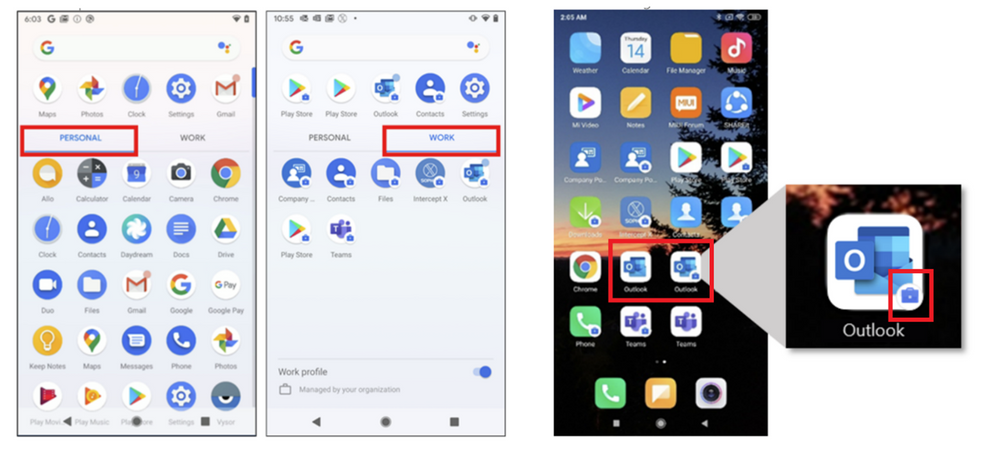 Apps in Android Work Profile with a briefcase icon
FAQs:
Will there be any functional changes in To Do app on AWP?
There won’t be any change in To Do functionalities.
Can I use To Do beta program in AWP?
Yes, users can join the beta program available on To Do Play Store page.
Will To Do provide multi-account support on AWP?
Users on the personal profile can log into the To Do app only via personal Microsoft accounts. On AWP, users can log into To Do app using both personal as well as work/school accounts.
Will AWP support the To Do widget?
Yes, the widget will be available for both personal and work profiles and will have multi-account support.
What will be the impact on To Do shared list and reminder notifications in AWP?
On the personal profile, users will not see a change in reminders and shared list notifications. On AWP, reminders and shared list notifications will appear with a briefcase icon.
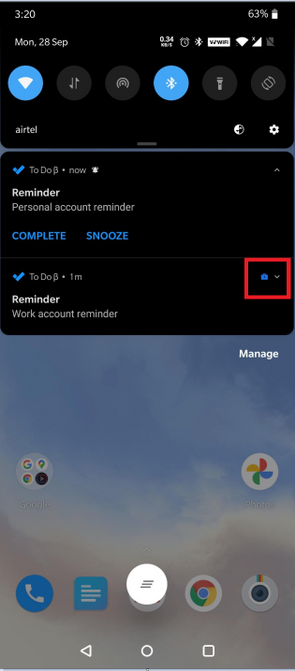 To Do reminders in Android Work Profile
Contact us for more details:
Email To Do Support at todohelp@microsoft.com
Get started with Microsoft To Do
Follow us on Twitter
Find us on Facebook
by Scott Muniz | Nov 5, 2020 | Security, Technology
This article is contributed. See the original author and article here.
Original release date: November 5, 2020
Cisco has released security updates to address vulnerabilities in multiple Cisco products. An attacker could exploit some of these vulnerabilities to take control of an affected system.
The Cybersecurity and Infrastructure Security Agency (CISA) encourages users and administrators to review the Cisco Security Advisories page and apply the necessary updates.
This product is provided subject to this Notification and this Privacy & Use policy.
by Contributed | Nov 5, 2020 | Technology
This article is contributed. See the original author and article here.
The possibilities of tomorrow’s factories are truly limitless as traditional manufacturing and industrial practices are shaken up by modern technology.
Driven by The Internet of Things, The Cloud, Blockchain, AI, and VR/AR — to name but a few — The Fourth Industrial Revolution is expected to produce machines which analyze and diagnose issues with ultimately no paperwork.
It is certainly an exciting development in manufacturing and one which The Microsoft User Group Lyon looks to be at the forefront of. The French group launched Smart Factory initiatives in 2016, an open-source project featuring Microsoft Lab Experiences.
Today, the collaborative platform acts as a mini-factory for enthusiasts to unleash their collective intelligence on new technologies which can be deployed at scale into production factories. The communal project looks to develop tomorrow’s smart factories with hands-on code which can be used and improved by anyone.
Microsoft Azure MVP and Microsoft User Group Lyon Lead Vincent Thavonekham says the platform has evolved into a repository of true industrial 4.0 devices which provide use cases and connect to real industrial equipment.
“Currently, we have more than 100 contributors with various talents. This gives us collective insight on broad topics like 3D Blender, marketing, coding, cartooning, photographs, philosophy, and more!”
Vincent, who is also one of the co-founders of Azure User Group France and a Microsoft Regional Director, says the project provides tangible feedback that goes beyond gadgets so that people can have an illustration of real-life examples on physical industrial equipment.
One successful project, for example, leverages Azure Custom Vision and its object detection capabilities to automatically flag anomalies on a Schneider Electric apparatus. Another project, meanwhile, uses drones to process 42 billion laser dots along 450 kilometres of railroad tracks from Paris to Lyon. Using French tech company VISEO’s custom data model and Azure IoT Edge, the data is now prepared for upload to the Cloud in days instead of weeks.
Further, this solution was used in a real-world scenario by Altametris, a subsidiary of SNCF Réseau. The project analyzed the Cloud data to track and maintain its railroad assets remotely to reduce expenses and increase safety. Special photographic processing on data collected from the drone, meanwhile, enabled teams to view the welds and bolts on bridges to achieve digital inspection rather than manual inspection. Finally, dynamic visualization enabled long-term predictions to be made, like how tall trees would grow under the railway in 20 years, and whether or not they would create safety hazards.
These are next-generation insights which are made possible, Vincent says, thanks to the flexibility of Microsoft’s AI technologies.
“I love the fact that Microsoft brought to the masses such sophisticated technologies, and these technologies also have the ability to allow AI experts to have the freedom to use their own techniques with open-source tools,” he says.
With Smart Factory only growing from strength to strength, Vincent says it is a very exciting time to develop Industry 4.0 solutions with other like-minded MVPs, RDs, teachers, directors, job seekers, trainees, enthusiasts, teenagers and more.
“I love that [as an MVP] I can count on the help of a friendly community that is always ready at any time and in any country,” Vincent says. “[Being an MVP] is like a badge which opens many doors that I wouldn’t have dared to open otherwise.”
For more on Smart Factory, check out the GitHub page.
by Scott Muniz | Nov 5, 2020 | Security
This article was originally posted by the FTC. See the original article here.
Scammers follow the headlines. They take advantage of what’s happening in the news to find new ways to get people to part with their money. During the COVID pandemic, cleaning supplies have been in high demand, but often in short supply. Scammers see that as opportunity knocking.
Brought to you by Dr. Ware, Microsoft Office 365 Silver Partner, Charleston SC.


Recent Comments