This article is contributed. See the original author and article here.
Note: This guest post includes an excerpt from Jared’s blog. The link after the excerpt will take you to the full article, which helps maintain custom formatting.
Multithreading can be hard to get right. But it’s also vitally important to getting simulations running smoothly on resource constrained mobile devices. In my career at Microsoft I’ve had the opportunity to spend more than 4 years helping partners write high performance apps for HoloLens. I also spent another 4 years helping partners write high performance apps for phones and tablets.
This is an article I’ve been meaning to write for a very long time. It’s basically an 8 year brain dump of everything I know about multithreading for AR/VR/MR simulations. While the article focuses mainly on Unity and C#, I hope the high-level concepts will still be valuable to simulation developers of all languages and runtimes.
This article is contributed. See the original author and article here.
We recently received a customer support case around compliance check behavior in iOS 14. The customer had a compliance policy set with a value for “Password expiration (days)”. Prior to iOS 14, devices would prompt the end user to change the device passcode, and provided they changed it, then the policy condition was met and there was no break in resource access. In iOS 14 and higher, the devices are not prompting the user for the passcode change but are properly reporting the expiration to Intune. The device, per the policy setting, then becomes non-compliant and ultimately users are blocked from resources protected by conditional access requiring a complaint device.
Apple has acknowledged this change in behavior and plans to address it in an upcoming release, and we’ll update this post when new information is available.
Currently, there are two mitigation approaches:
Advise users to manually change the device passcode via Settings in iOS:
Open Settings applications
Scroll down to “Touch ID & Passcode” or “Face ID & Passcode select”
Complete passcode prompt with the current passcode
Scroll down and select Change Passcode then complete prompt.
Once change, user can open Company Portal, select device, then Check Status to have the compliance state updated.
Use Remove passcode to trigger user to set a new passcode:
Select Devices > iOS/iPadOS > Search for and select impacted user device .
Select Remove passcode, read and agree to the remove passcode by selecting “Yes”.
The passcode will be removed from the device, and the user will be prompted to set a new passcode per the requirements of your defined compliance policy.
Once the passcode is set, the user can open Company Portal, select device, then Check Status to have the compliance state updated.
Let us know if you have any additional questions on this by replying to this post or by tagging@IntuneSuppTeamout on Twitter.
This article is contributed. See the original author and article here.
Yammer questions and answers insights are now included in the Microsoft Productivity Score, which helps organizations transform how work gets done with insights about how people use Microsoft 365 and the technology experiences that support them. The Productivity Score is now generally available to Global Admins and people with a report reader role.
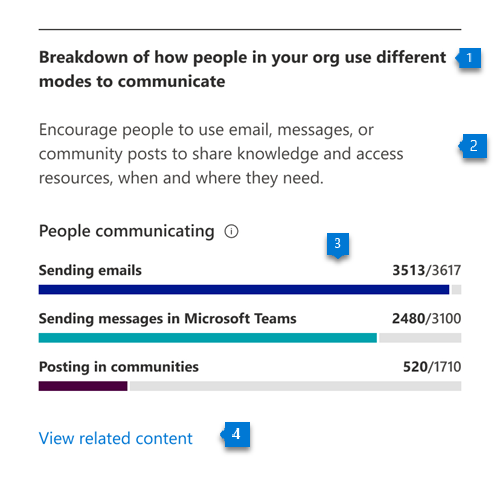
Yammer question and answer data is included in the Communication category, which shows how frequently people use email, chat, and community posts to help you understand how people in your organization find and share information.
The communication score measures whether people are consistently communicating using multiple modes among email, chat, and community posts over a 28-day window
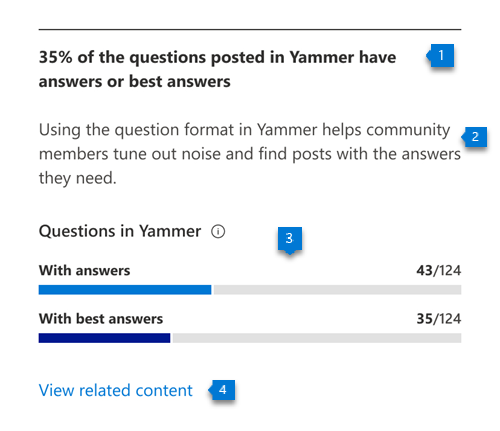
The Questions in Yammer score highlights the volume of high-quality knowledge creation using Yammer Q&A – see how many questions were asked, answered and have best answers.
See insights about Q&A engagement in Yammer in the Communication category
Learn more about how to get the most of the Microsoft Productivity Score in this video (Yammer Communication info starts at 3:38).
And check out our definitive guide to Microsoft Productivity Guide for a one-stop shop for all things Productivity Score – including documentation, demos, videos, announcements, and key resources.
This article was originally posted by the FTC. See the original article here.
Scams come in many forms: texts, emails, letters, and lots of calls. Scammers plot schemes from tech support scams to fake check scams to try to knock us off balance just long enough to take advantage. They want to get our money and personal information, like account numbers and our Social Security number. How can we fight back? By sharing your story and reporting what happened to the FTC.
Brought to you by Dr. Ware, Microsoft Office 365 Silver Partner, Charleston SC.


Recent Comments