by Scott Muniz | Aug 1, 2020 | Alerts, Microsoft, Technology, Uncategorized
This article is contributed. See the original author and article here.
Overview of Built-In RBAC roles in Azure API Management
Azure API Management relies on Azure Role-Based Access Control (RBAC) to enable fine-grained access management for API Management services and entities (for example, APIs and policies).
Reference Article: https://docs.microsoft.com/en-us/azure/api-management/api-management-role-based-access-control
As highlighted in the above article, Azure APIM provides a set of built-in RBAC roles for managing access to APIM services. These roles can be assigned at different scopes, which includes
- Subscription Level
- Resource Group Level
- Individual APIM service level
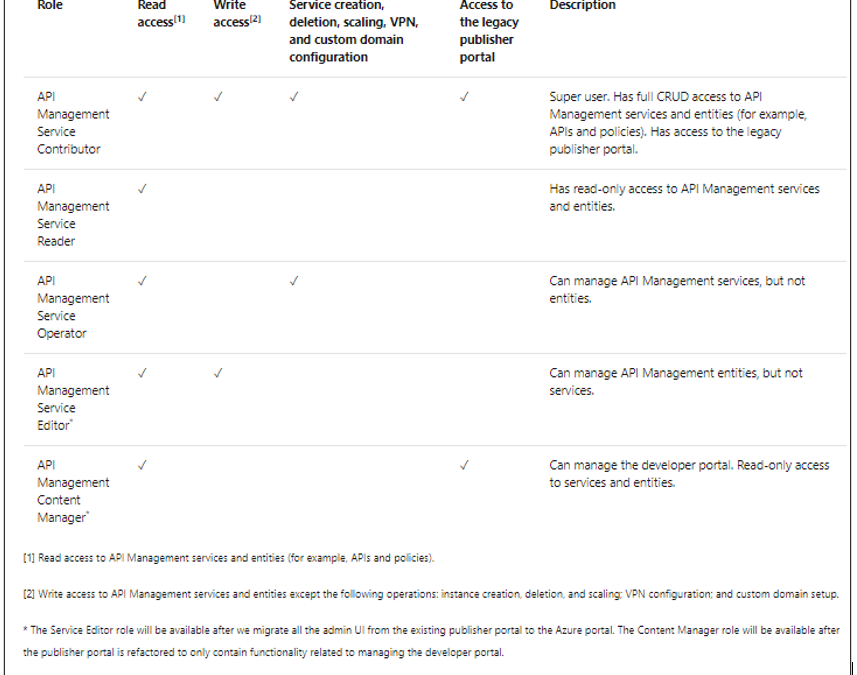
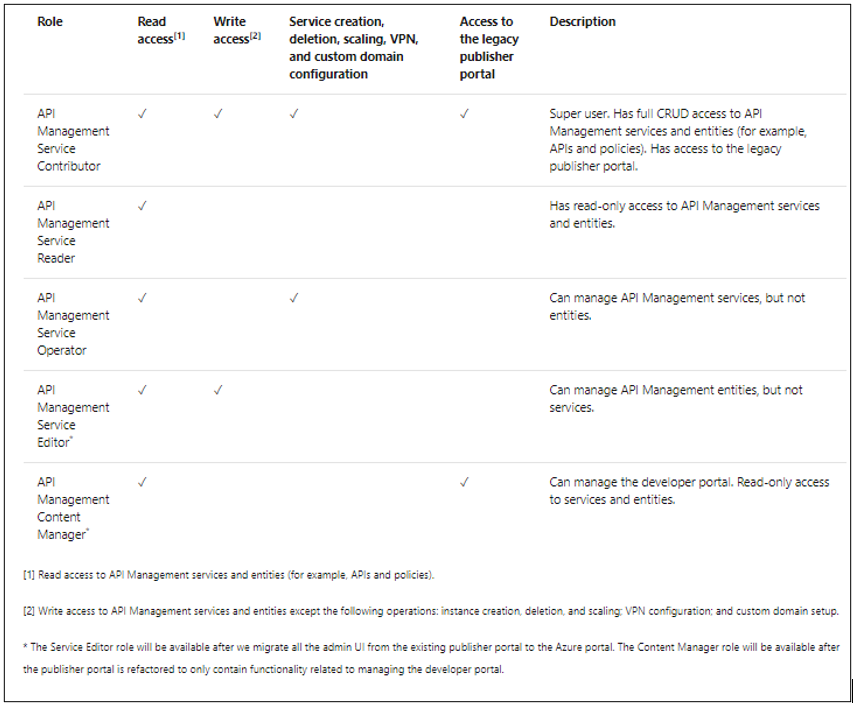
The following table provides a brief description of the built-in roles currently offered by Azure APIM. These roles can be assigned via Azure portal or other tools, including Azure PowerShell, Azure CLI, and REST API
Custom RBAC roles in Azure APIM
If the default built-in roles do not meet specific user requirements, you can create custom RBAC roles for providing a more granular access to either APIM services or any of their sub-components.
Custom Roles in Azure RBAC: https://docs.microsoft.com/en-us/azure/role-based-access-control/custom-roles
While creating a custom RBAC role, it is easier to follow the below approach in order to avoid complexities or discrepancies:
- Start with one of the built-in roles.
- Edit the attributes to add Actions, NotActions, or AssignableScopes.
- Save the changes as a new role.
- Assign the new role to the APIM services or APIM components (such as APIs, policies, et cetera).
The ARM (Azure Resource Manager) Resource Provider Operations article contains the list of permissions that can be granted on APIM level.
https://docs.microsoft.com/en-us/azure/role-based-access-control/resource-provider-operations#microsoftapimanagement
Let us consider a few scenarios where we envision the usage of custom RBAC roles to enable fine-tuned access to APIM services or their components.
Scenario 1: Deny users from deleting APIM services
RBAC roles that enable having complete write access to APIM services (such as API Management Service Contributor role) have provision for performing all management operations on an APIM service.
To avoid intentional/unintentional deletion of APIM services by any user having write access other than the APIM Administrator, you can create the below custom RBAC role for denying the operation Microsoft.ApiManagement/service/delete to users.
In this example, let us use the Azure Portal for modifying the built-in RBAC role Contributor and create a custom role for denying APIM service deletion action for all services under a particular Azure subscription. This custom role would allow users to perform all default owner operations except deleting APIM services in the subscription.
Step 1:
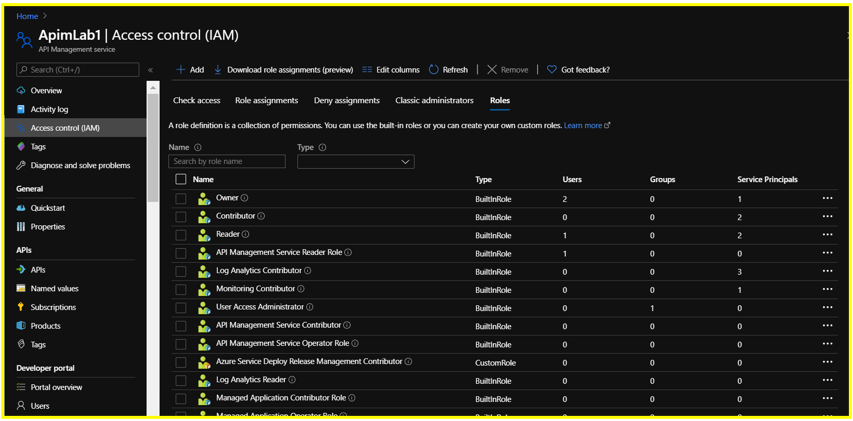
Maneuver to the Access Control (IAM) blade of a sample APIM service on the Azure Portal and click on the Roles tab. This would display the list of roles that are available for assignment.
Step 2:
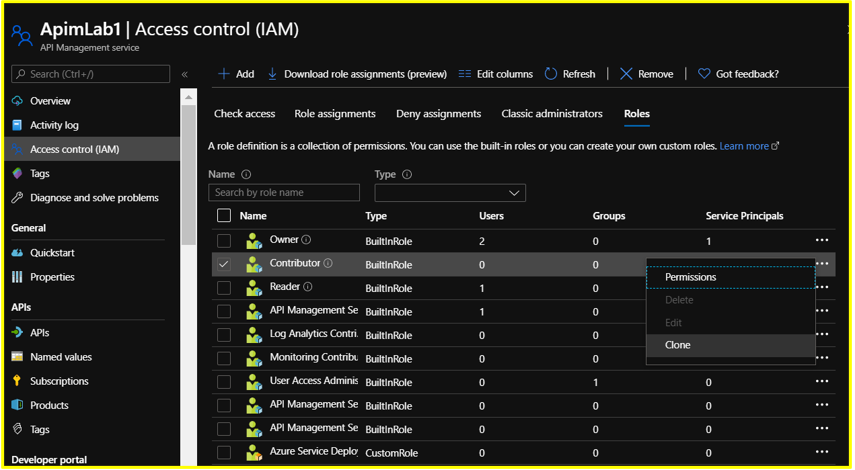
Search for the role you wish to clone (APIM Service Contributor in this case). At the end of the row, click the ellipsis (…) and then click Clone
Step 3: Configure the Basics section as follows
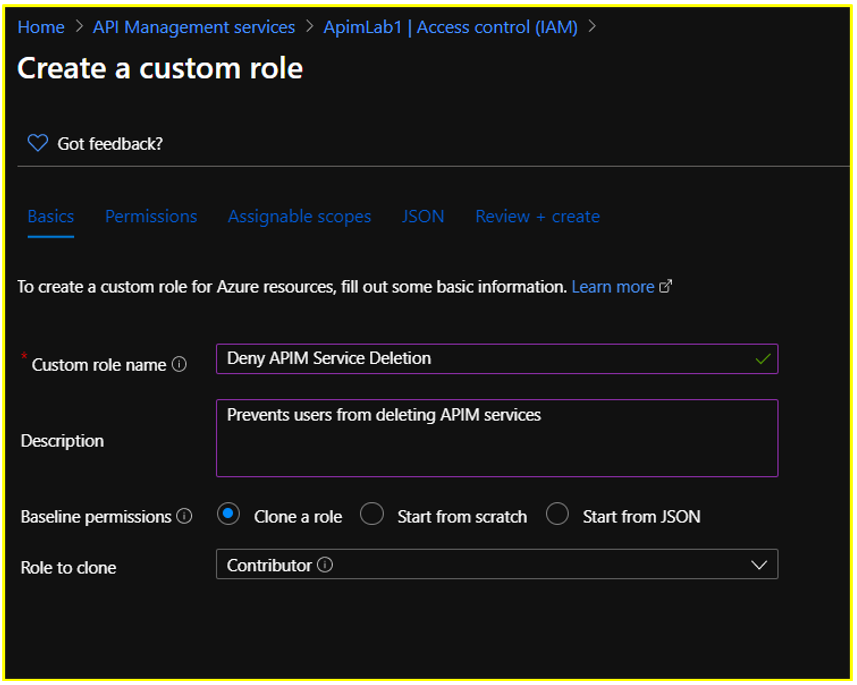
Step 4: Configure the Permissions section.
Retain the default permissions listed for this role.
Click on +Exclude Permissions and search for Microsoft API Management
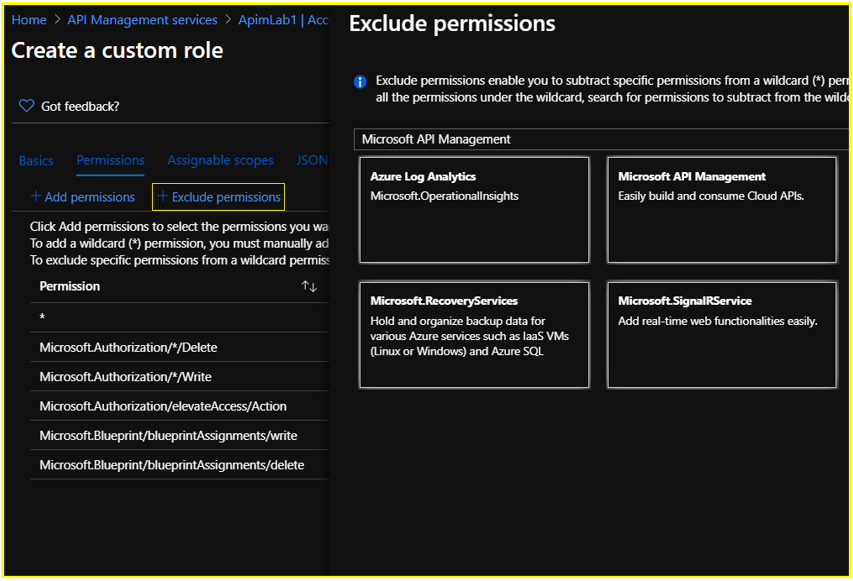
Under Not Actions, select the permission ‘Delete: Delete API Management Service instance’ under Microsoft.ApiManagement/service on the succeeding Permissions page and click the Add button.
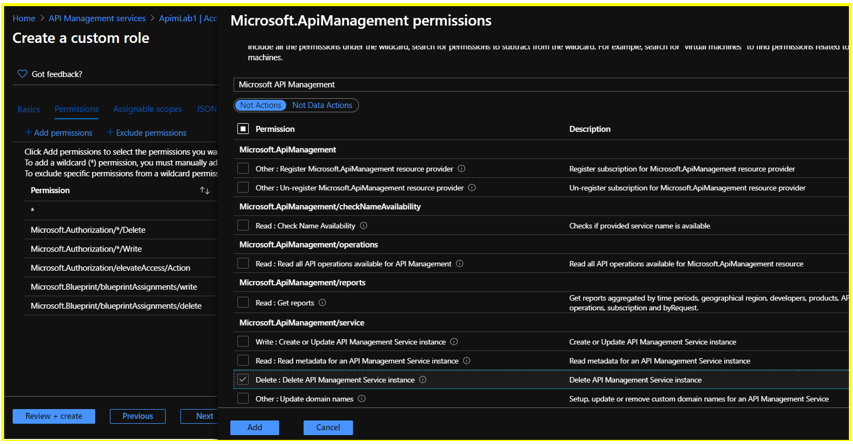
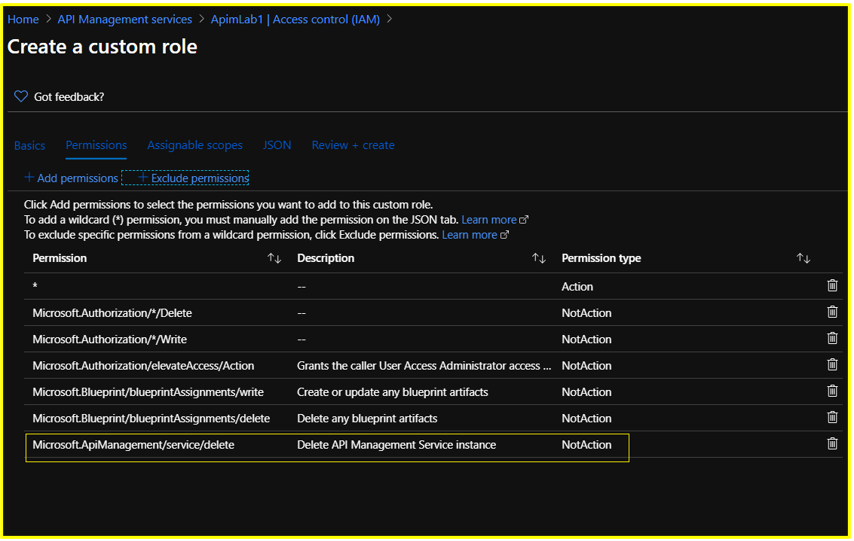
Step 5: Configure the Assignable Scopes section.
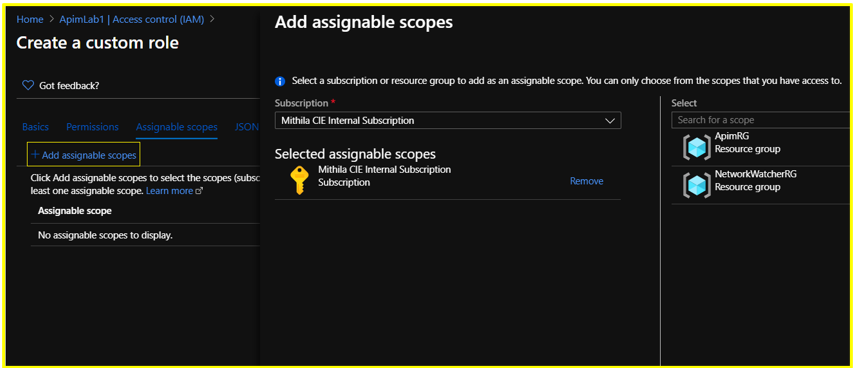
Delete the existing resource level scope. Click on +Add Assignable Scopes and set the scope to Subscription level. Click Add.
NOTE:
- Each Azure Active Directory can only have a maximum of 5000 custom roles.
Hence, for a custom role where the assignable scope is configured to be at resource level, you could consider replacing it with a subscription or resource group level scope to prevent exhausting your custom role limit.
Constraints associated with custom roles can be found documented in the below article:
https://docs.microsoft.com/en-us/azure/role-based-access-control/custom-roles#custom-role-limits
Step 6: In the JSON section, you could also Download your custom RBAC role in JSON format for future usage or reference.
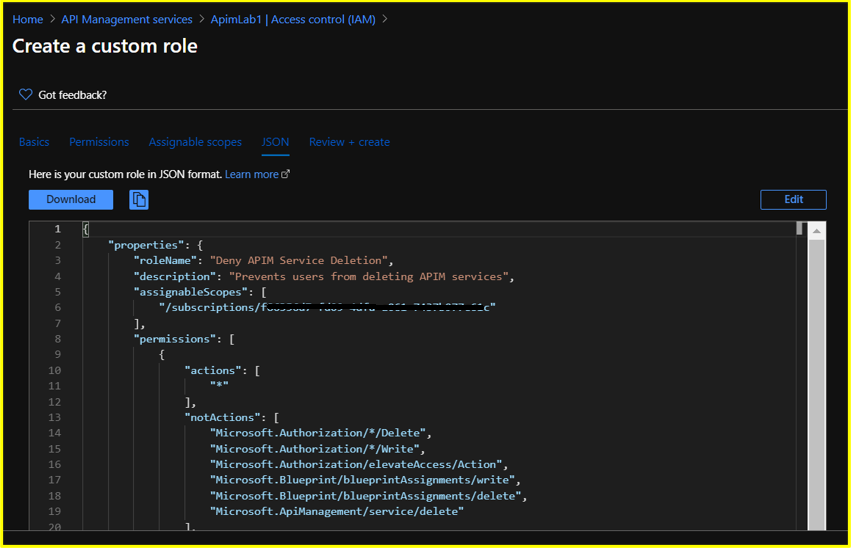
Step 7: Review the custom RBAC role details in the Review + Create section and click on Create.
It may take a few minutes for the custom role to be created and displayed under the list of available roles.
In this scenario, the newly created custom role would be available for assignment under the Roles section on the subscription’s Access Control (IAM) blade since the assignable scope was set at subscription level during creation.
NOTE:
- Post creation, custom roles appear on the Azure portal with an orange resource icon (Built-in roles appear with blue icons).
- Custom Roles would be available for assignment at the respective subscription, resource group or resource access control blade based on the assignable scope that has been configured during creation of the role.
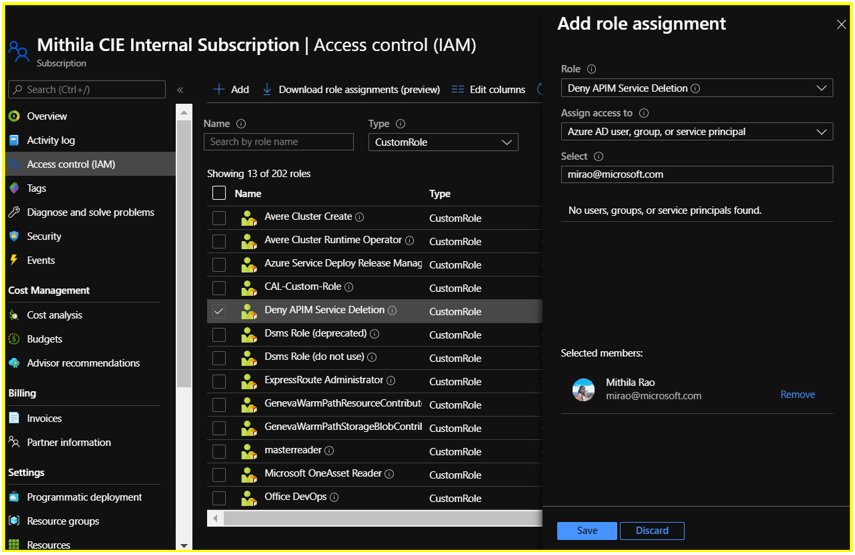
Step 8: Assign this custom role to a user. Any user having this role would be able to perform all the operations that are offered by default by the APIM Service Contributor role except deleting APIM services in the subscription.
Scenario 2: Deny users having Reader access from reading Product subscription keys
Let us consider the built-in APIM RBAC role ‘API Management Service Reader’ role for this scenario.
Users often have a misconception that only the APIM Administrators would be able to view the Product subscription keys on the Azure Portal. However, that is not the case.
The ability to read subscription keys from products (an action which is defined as Microsoft.ApiManagement/service/products/subscriptions/read) is allowed by default for users having the ‘API Management Service Reader Role’. Same is the case for navigating to the keys via APIs/subscriptions.
Hence, as a workaround, you can create a custom RBAC role in order to block the subscription keys – read action.
NOTE:
The action Microsoft.ApiManagement/service/users/keys/read does not correspond to reading subscription keys. The 2 actions are completely different.
Every user has two “secrets”, a primary and a secondary. These secrets are used to generate an encrypted SSO token that users can use to access the developer portal. These keys are not related to the subscription keys that users use to call the APIs. The /service/users/keys/read permission corresponds to the ability to read the user secrets, whereas the /service/products/subscriptions/read permission corresponds to reading subscription keys under products, which is allowed by default under the ‘API Management Service Reader’ role.
Additionally, the Microsoft.ApiManagement/service/users/subscriptions/read permission corresponds to the ability to read subscriptions associated with users via the “Users” blade on the Portal, which is also allowed by default under this role.
Here, we are creating and assigning a custom RBAC role using PowerShell for denying users having Read access over the APIM service from reading the subscription keys. Basically, this role denies users from performing the operation Microsoft.ApiManagement/service/products/subscriptions/read
The sample PowerShell script is as below:
$role = Get-AzRoleDefinition "API Management Service Reader Role"
$role.Id = $null
$role.Name = 'Deny reading subscription keys'
$role.Description = 'Denies users from reading product subscription keys'
$role.NotActions.Clear()
$role.NotActions.Add('Microsoft.ApiManagement/service/products/subscriptions/read')
$role.AssignableScopes.Clear()
$role.AssignableScopes.Add('/subscriptions/<subscription ID>/resourceGroups/<resource group name>/providers/Microsoft.ApiManagement/service/<service name>')
New-AzRoleDefinition -Role $role
New-AzRoleAssignment -ObjectId <object ID of the user account> -RoleDefinitionName 'Deny reading subscription keys' -Scope '/subscriptions/<subscription ID>/resourceGroups/<resource group name>/providers/Microsoft.ApiManagement/service/<service name>'
Known Limitations
- Current design does not allow RBAC permissions to be controlled at Product level for API creation/deletion.
For example, consider a scenario where users on the Azure Portal should have read and write access only over APIs that are associated with a particular Product. For this, you can configure an RBAC role where the assignable scope has been set at “Product” level and add the desired Actions and NotActions.
Now, even if you add the permission “Microsoft.ApiManagement/service/apis/*” at product scope, when the user who is assigned this role attempts creating a new API inside this Product, the operation would still fail.
If a user needs to create a new API in the service (irrespective of whether it is inside the same Product), they should be able to read all APIs in the service and have write permissions granted at the APIM service scope instead of Product scope.
This is because, when a user attempts to create a new API or add a new version/revision for an existing API, there is a validation check that happens in the background to verify if there is any other API in the service which is using the same path that the user is attempting to create. If the user performing this operation does not have permissions to read all APIs in the service, the operation would fail.
Hence, you would have to grant the user the permission to read all APIs in the service (granted at the service scope).
- Permissions to view APIM Diagnostics Logs cannot be configured at APIM scope.
For example, if user has configured streaming of APIM Diagnostic Logs to a Log Analytics Workspace and wishes to create a custom RBAC role only for viewing these diagnostic logs, it wouldn’t be possible to configure this role at the APIM scope. Since the log destination is Log Analytics, the permission has to be configured at the Log Analytics scope.
The APIM ARM operation “Microsoft.ApiManagement/service/apis/diagnostics/read” only controls access to the diagnostic configuration for the APIM service and not to the diagnostic telemetry that APIM streams to external resources such as Log Analytics/Application Insights, et cetera.
- Preventing users from accessing the Test Console for APIs on the Azure Portal cannot be achieved with a straight-forward approach.
This is because there are no APIM ARM operations that support actions corresponding to “Microsoft.ApiManagement/service/apis/operations/test”.
However, this limitation can be overcome if the API is protected by a subscription key. When the permission “Microsoft.ApiManagement/service/subscriptions/read” is denied to a user, the user cannot test an API protected by a subscription key since they wouldn’t be able to retrieve the subscription key required for testing the API operation.
A JSON sample for creating this custom role can be found attached below:
{
  "properties": {
    "roleName": "Deny Testing APIs",
    "description": "Deny Testing APIs",
    "assignableScopes": [
      "/subscriptions/<subscription ID>/resourceGroups/<resource group name>/providers/Microsoft.ApiManagement/service/<service name>"
    ],
    "permissions": [
      {
        "actions": [],
        "notActions": [
          "Microsoft.ApiManagement/service/subscriptions/read"
        ],
        "dataActions": [],
        "notDataActions": []
      }
    ]
  }
}
APPENDIX
- Tutorials for Creating Custom RBAC Roles:
a) Azure Portal Tutorial – https://docs.microsoft.com/en-us/azure/role-based-access-control/custom-roles-portal
b) PowerShell Tutorial – https://docs.microsoft.com/en-us/azure/role-based-access-control/tutorial-custom-role-powershell#create-a-custom-role
c) Azure CLI Tutorial – https://docs.microsoft.com/en-us/azure/role-based-access-control/tutorial-custom-role-cli
d) REST API Tutorial – https://docs.microsoft.com/en-us/azure/role-based-access-control/custom-roles-rest
e) ARM Template Tutorial and Sample – https://docs.microsoft.com/en-us/azure/role-based-access-control/custom-roles-template
by Scott Muniz | Aug 1, 2020 | Uncategorized
This article is contributed. See the original author and article here.
MICROSOFT DEFENDER
ADVANCED THREAT PROTECTION FOR LINUX OPERATING SYSTEM
Hi IT Pro,
I have gathered the information for MD ATP Linux in this document.
Thanks for viewing.
Enjoy your Linux ATP!
_____________
Microsoft Defender Advanced Threat Protection (MD ATP) support for Linux with kernel version 3.10.0-327 or later, including the following Linux flavours :
- Red Hat Enterprise Linux 7.2 or higher
- CentOS 7.2 or higher
- Ubuntu 16.04 LTS or higher LTS
- Debian 9 or higher
- SUSE Linux Enterprise Server 12 or higher
- Oracle Linux 7.2 or higher
MD ATP provide real-time protection for the following file system types:
|
btrfs
|
ecryptfs
|
ext2
|
|
ext3
|
ext4
|
fuse
|
|
fuseblk
|
jfs
|
nfs
|
|
overlay
|
ramfs
|
reiserfs
|
|
tmpfs
|
udf
|
vfat
|
|
xfs
|
|
|
Deployment MD ATP prerequisite:
Administrative privileges on the device (in case of manual deployment)
The fanotify kernel option must be enabled,
For RedHat Enterprise Linux 7.x and CentOS 7.x systems, the kernel module is enabled by default.
For Ubuntu, SUSE, and Oracle Enterprise Limited, Fanotify is enabled by default.
Disk space: 650 MB
No other fanotify-based security solutions running on same Linux Computer.
Network connections
Set firewall outbound connection rules to allow these URLs.
|
Service location
|
DNS record
|
|
Common URLs for all locations
|
x.cp.wd.microsoft.com
cdn.x.cp.wd.microsoft.com
eu-cdn.x.cp.wd.microsoft.com
wu-cdn.x.cp.wd.microsoft.com
officecdn-microsoft-com.akamaized.net
crl.microsoft.com
events.data.microsoft.com
|
|
European Union
|
europe.x.cp.wd.microsoft.com
eu-v20.events.data.microsoft.com
usseu1northprod.blob.core.windows.net
usseu1westprod.blob.core.windows.net
|
|
United Kingdom
|
unitedkingdom.x.cp.wd.microsoft.com
uk-v20.events.data.microsoft.com
ussuk1southprod.blob.core.windows.net
ussuk1westprod.blob.core.windows.net
|
|
United States
|
unitedstates.x.cp.wd.microsoft.com
us-v20.events.data.microsoft.com
ussus1eastprod.blob.core.windows.net
ussus1westprod.blob.core.windows.net
|
If a proxy or firewall is blocking anonymous traffic, make sure that anonymous traffic is permitted in the previously listed URLs.
For transparent proxies, no additional configuration is needed
For static proxy, follow the steps in Manual Static Proxy Configuration.
DEPLOYMENT OPTIONS
MD ATP deployment by 4 steps:
Configure the Linux software repository (Linux download channel)
Application installation
Download the onboarding package
Client configuration (Onboarding Linux Client)
MANUAL DEPLOYMENT Using YUM Utility
Install Yum Utility for package installing and uninstalling
If the Server is RHEL and newly build, you have to register it with Redhat first.
It may take more than 30 minutes for all the RHEL download and Linux update packages.
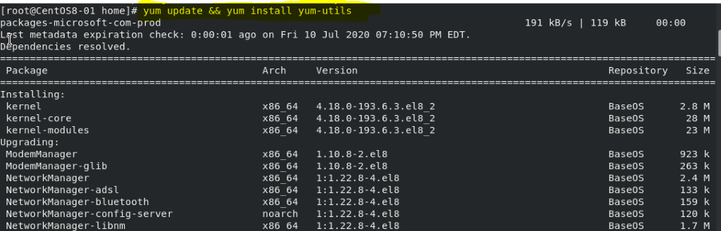
Yum update && yum install yum-utils
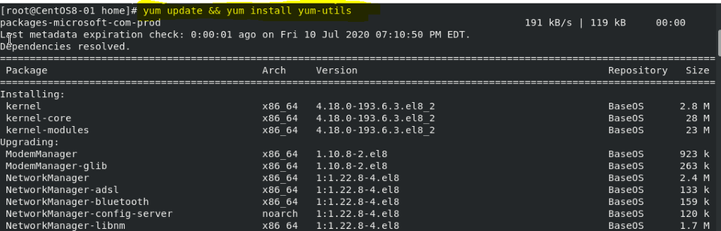
Microsoft Defender ATP for Linux can be deployed from one of the following channels (denoted below as [channel]:( insiders-fast, insiders-slow, or prod. Each of these channels corresponds to a Linux software repository
RHEL and variants (CentOS and Oracle Linux)
sudo yum-config-manager –add-repo=https://packages.microsoft.com/config/[distro]/[version]/[channel].repo

If you want to check current Linux distro and version, run the command:
cat/etc/os-release
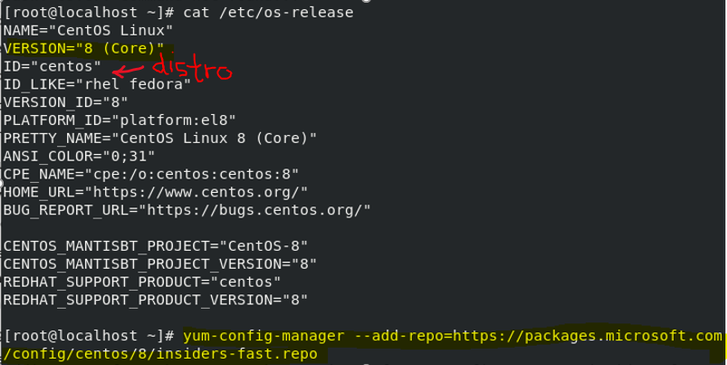
Install the Microsoft GPG public key:
sudo rpm –import http://packages.microsoft.com/keys/microsoft.asc
Download and make usable all the metadata for the currently enabled yum repositories:
yum makecache
RHEL and variants (CentOS and Oracle Linux):
sudo yum install mdatp
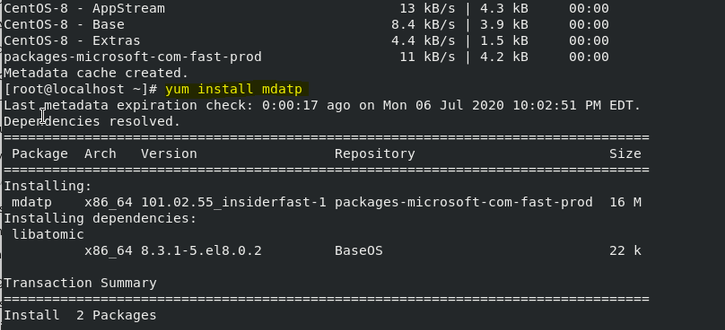
Downloading the ATP Onboarding package from ATP Portal
Download the onboarding package from Microsoft Defender Security Center:
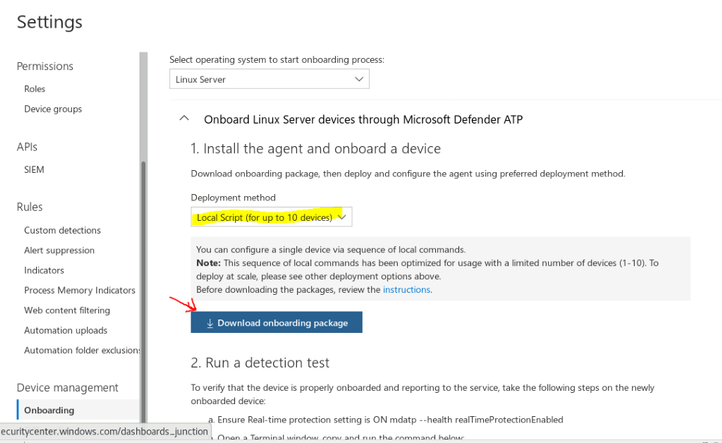
In Microsoft Defender Security Center, go to Settings > Device Management > Onboarding.
In the first drop-down menu, select Linux Server as the operating system. In the second drop-down menu, select Local Script (for up to 10 devices) as the deployment method.
Select Download onboarding package. Save the file as WindowsDefenderATPOnboardingPackage.zip.
Client Configuration (Onboarding Linux Client)
Make sure Python3 is in system ‘s path
sudo alternatives –set python /usr/bin/python3
Copy MicrosoftDefenderATPOnboardingLinuxServer.py to the target device
On the target device
python MicrosoftDefenderATPOnboardingLinuxServer.py

Verify that the device is now associated with your organization
mdatp health –field org_id

Checking MD ATP Service Status with mdatp health command
verify that the device is properly onboarded and reporting to the service

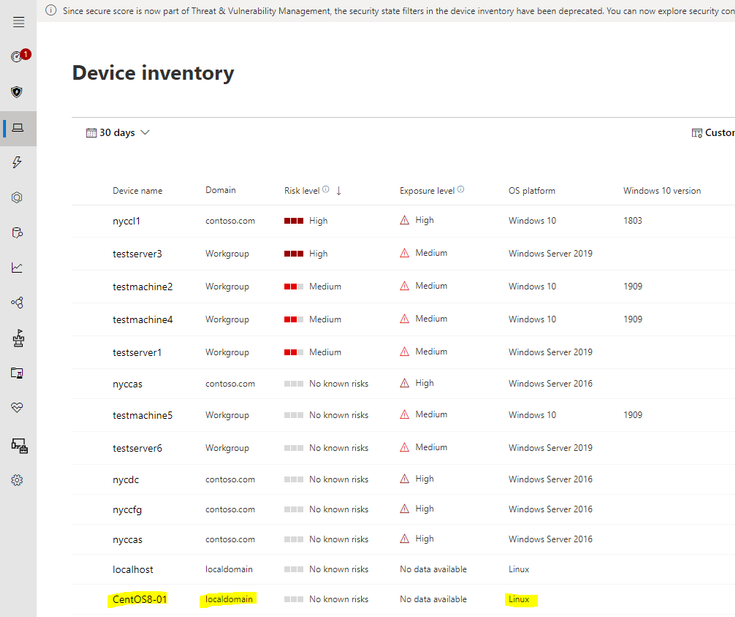
Monitoring new Linux Client on ATP Portal
Check if Linux Machine is display in ATP Portal Dashboard
How to configure Microsoft Defender ATP for Linux
Location of mdatp configuration file: /etc/opt/microsoft/mdatp/managed/mdatp_managed.json
In enterprise environments, Microsoft Defender ATP for Linux can be managed through a configuration profile
The configuration profile is a .json file that consists of entries identified by a key (which denotes the name of the preference), followed by a value.Values can be simple, such as a numerical value, or complex, such as a nested list of preferences.
Typically, you would use a configuration management tool to push a file with the name mdatp_managed.json at the location /etc/opt/microsoft/mdatp/managed/.
mdatp_managed.json preference key and value
|
|
KEY
|
VALUE
|
|
Enable / disable real-time protection
|
enableRealTimeProtection
|
true (default)/false
|
|
Enable / disable passive mode
(In passive mode:
Real-time protection is turned off.
On-demand scanning is turned on.
Automatic threat remediation is turned off.
Security intelligence updates are turned on.
Status menu icon is hidden.
|
passiveMode
|
true/false (default)
|
|
Scan exclusions
|
exclusions
|
$type
excludedPath
excludedFileExtension
excludedFileName
|
|
Path to excluded content
|
path
|
valid paths (string)
|
|
Enable/Disable Delivered Cloud Protection
|
enabled
|
true (default)/false
|
Recommended configuration profile
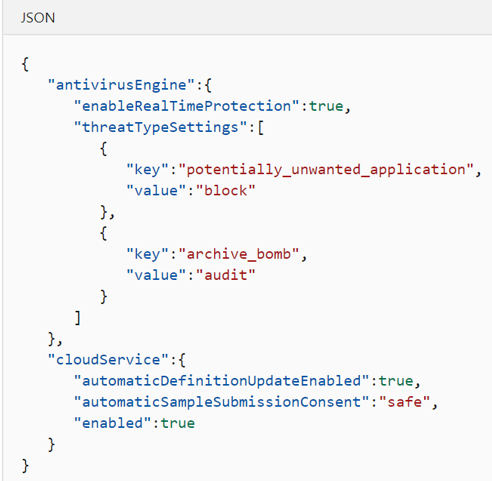
To get started, we recommend the following configuration profile for your enterprise to take advantage of all protection features that Microsoft Defender ATP provides.
The following configuration profile will:
Enable real-time protection (RTP)
Specify how the following threat types are handled:
Potentially unwanted applications (PUA) are blocked
Archive bombs (file with a high compression rate) are audited to the product logs
Enable automatic security intelligence updates
Enable cloud-delivered protection
Enable automatic sample submission at safe level
More ATP Preference Configuration
https://docs.microsoft.com/en-us/windows/security/threat-protection/microsoft-defender-atp/linux-preferences
Configuration profile deployment by Linux Management:
Once you’ve built the configuration profile for your enterprise, you can deploy it through the management tool that your enterprise is using. Microsoft Defender ATP for Linux reads the managed configuration from the /etc/opt/microsoft/mdatp/managed/mdatp_managed.json file.
Update Microsoft Defender ATP for Linux
Each version of Microsoft Defender ATP for Linux has an expiration date, after which it will no longer continue to protect your device.
To check the MD ATP expiration date, run the following bash command:
mdatp health –field product_expiration
To update Microsoft Defender ATP for Linux manually, execute one of the following commands:
RHEL and variants (CentOS and Oracle Linux)
sudo yum update mdatp
SLES and variants
sudo zypper update mdatp
Ubuntu and Debian systems
sudo apt-get install –only-upgrade mdatp
TROUBLESHOOTING
Troubleshoot installation issues
To verify if the installation succeeded, one can obtain installation.log and search the installation logs for “postinstall end” phrase, using command:
sudo journalctl | grep ‘microsoft-mdatp‘ > installation.log
grep ‘postinstall end’ installation.log

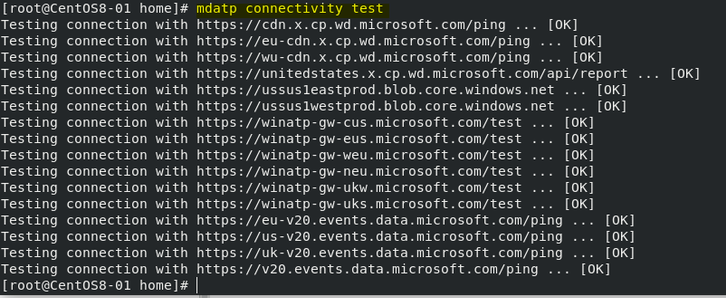
Troubleshooting Connectivity:
Run the connectivity test
mdatp connectivity test
Troubleshooting Performance
To find the applications that are triggering the most scans, you can use real-time statistics gathered by Microsoft Defender ATP for Linux.
mdatp diagnostic real_time_protection_statistics > stat.log
This feature is enabled by default on the Dogfood and InsisderFast channels. If you’re using a different update channel, this feature can be enabled from the command line:
mdatp config real-time-protection-statistics –value enabled
More Troubleshooting:
Installation
https://docs.microsoft.com/en-us/windows/security/threat-protection/microsoft-defender-atp/linux-support-install
Performance
https://docs.microsoft.com/en-us/windows/security/threat-protection/microsoft-defender-atp/linux-support-perf
Network Connectivity
https://docs.microsoft.com/en-us/windows/security/threat-protection/microsoft-defender-atp/linux-support-connectivity
I hope the information is useful to you. Please provide feedback.


Recent Comments