by Scott Muniz | Aug 4, 2020 | Uncategorized
This article is contributed. See the original author and article here.
When looking into performance issues on support cases there is one pattern called ALL-IN-ONE QUERY that we always sees that cause many issues. This pattern is very common and logically looks correct but will cause huge performance degradation.
The idea behind this pattern is that you want a query that filter by the parameter or ignore the filter if send null or zero. And as said logically it looks correct
- (CustomerID = @CustomerID OR @CustomerID = 0)
Or some other variations
- (CustomerID = @CustomerID OR @CustomerID IS NULL)
- CustomerID = CASE WHEN ISNULL(@CustomerID, 0) = 0 THEN CustomerID ELSE @CustomerID END
Find below a sample. For this test I want to filter by Customer ID or by Last Name.
- If I send @CustomerID = XXX I want to filter specific customer ID filter
- If I send @CustomerID = 0 I want the query to ignore the customer ID filter
- if I send @LastName I want to filter specific last name
- if send NULL to @LastName filter, want to ignore it
- I can also ignore both to list all users
DROP PROCEDURE IF EXISTS spTEST
GO
CREATE PROCEDURE spTEST
(
	 @CustomerID int = 0
	,@LastName varchar(50) = NULL
)
AS
	SELECT * FROM [SalesLT].[Customer]
	WHERE
			(CustomerID = @CustomerID OR @CustomerID = 0)
		AND (LastName   = @LastName   OR @LastName IS NULL)
GO

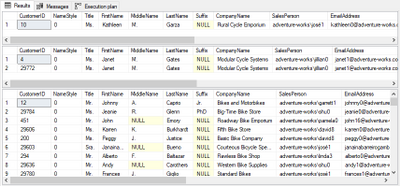
EXEC spTEST @CustomerID = 10, @LastName = NULL
EXEC spTEST @CustomerID = 0, @LastName = 'Gates'
EXEC spTEST @CustomerID = 0, @LastName = NULL
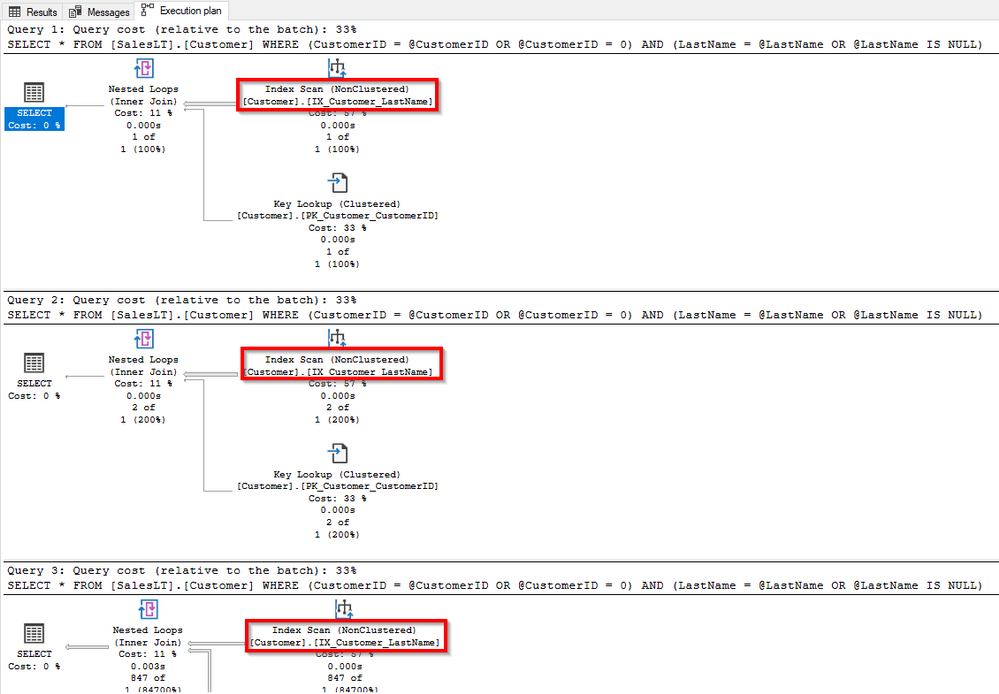
What will happen is that the query works, usually on dev databases with small datasets will run fine, but when you go to production with huge databases you going to notice a huge slowdown
Does not matter the parameter you sent it will always scan the index. Even that you have a covering index it will completely ignore it.
This is not a defect this is an expected behavior when SQL is building query plan.
Solution 1 – OPTION RECOMPILE
One workaround, if query is not executed very often, is to use OPTION (RECOMPILE) at end. This might not be a good option if running very frequently because it will increase the CPU usage and can cause compilation queue waits because for each new execution SQL will have to create a new plan.
DROP PROCEDURE IF EXISTS spTEST
GO
CREATE PROCEDURE spTEST
(
	 @CustomerID int = 0
	,@LastName varchar(50) = NULL
)
AS
	SELECT * FROM [SalesLT].[Customer]
	WHERE
			(CustomerID = @CustomerID OR @CustomerID = 0)
		AND (LastName   = @LastName   OR @LastName IS NULL)
	OPTION (RECOMPILE) --------- MAY INCREASE CPU / RESOURCE_SEMAPHORE_QUERY_COMPILE
GO

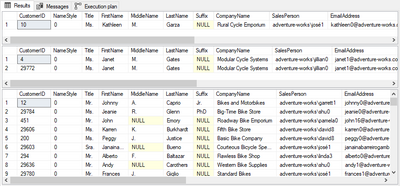
EXEC spTEST @CustomerID = 10, @LastName = NULL
EXEC spTEST @CustomerID = 0, @LastName = 'Gates'
EXEC spTEST @CustomerID = 0, @LastName = NULL
It will create the best plan for each set of filters used
Solution 2 – IF/ELSEs
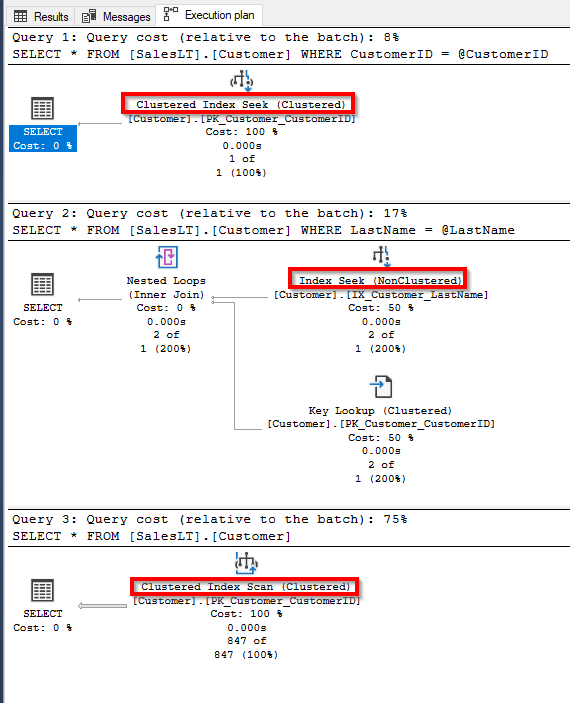
One workaround when you have a limited number of options is to create a series of IF and ELSEs. But this can be an issue as number of options increase.
DROP PROCEDURE IF EXISTS spTEST
GO
CREATE PROCEDURE spTEST
(
	 @CustomerID int = 0
	,@LastName varchar(50) = NULL
)
AS
	IF @CustomerID = 0 AND @LastName IS NULL
		SELECT * FROM [SalesLT].[Customer]

	ELSE IF @CustomerID = 0 AND @LastName IS NOT NULL
		SELECT * FROM [SalesLT].[Customer]
		WHERE LastName = @LastName

	ELSE IF @CustomerID != 0 AND @LastName IS NULL
		SELECT * FROM [SalesLT].[Customer]
		WHERE CustomerID = @CustomerID

	ELSE IF @CustomerID != 0 AND @LastName IS NOT NULL
		SELECT * FROM [SalesLT].[Customer]
		WHERE   (CustomerID = @CustomerID)
			AND (LastName   = @LastName)

GO

EXEC spTEST @CustomerID = 10, @LastName = NULL
EXEC spTEST @CustomerID = 0, @LastName = 'Gates'
EXEC spTEST @CustomerID = 0, @LastName = NULL
Solution 3 – Dynamic query
When you have multiple options the best option is to use Dynamic query + sp_executesql sending the parameters, this way you will have good plan depending on parameters sent to procedure and also will reuse plan.
!!! Use sp_executesql parameters. Do not concatenate parameters to the string. This can lead to SQL Injection issues
DROP PROCEDURE IF EXISTS spTEST
GO
CREATE PROCEDURE spTEST
(
	 @CustomerID int = 0
	,@LastName varchar(50) = NULL
)
AS
	DECLARE @SQL NVARCHAR(MAX) = ''

	SET @SQL += 'SELECT * FROM [SalesLT].[Customer] ' + CHAR(10)
	SET @SQL += 'WHERE 1=1' + CHAR(10)
	IF @CustomerID != 0
		SET @SQL += '	AND (CustomerID = @CustomerID)' + CHAR(10)
	IF @LastName IS NOT NULL
		SET @SQL += '	AND (LastName = @LastName)' + CHAR(10)

	EXEC sp_executesql @SQL
		,N'@CustomerID int, @LastName varchar(50)'
		,@CustomerID = @CustomerID
		,@LastName = @LastName
GO

EXEC spTEST @CustomerID = 10, @LastName = NULL
EXEC spTEST @CustomerID = 0, @LastName = 'Gates'
EXEC spTEST @CustomerID = 0, @LastName = NULL
I hope this help you build better queries
REF: https://deep.data.blog/2008/12/19/t-sql-anti-pattern-of-the-day-all-in-one-queries/
by Scott Muniz | Aug 4, 2020 | Uncategorized
This article is contributed. See the original author and article here.
Scenario: When executed more than 325 columns in a select query the error bellow was thrown:
[110813] Invalid operation. The connection is closed.
The same query with fewer columns than that worked. So it seems it was hitting some kind of limit.
Once we got the request after some troubleshooting we found the following error on the logs:
The service has encountered an error processing your request. Please try again. Error code 8632.
So it was not a matter of hard limit, but complexity and translation that may happen in any version of SQL Server.
I know this doc is SQL Server 2005, but the issue is the same. When the query is too complex it must be simplified. So SQL does not map de number of expressions directly. Using the doc words:
“This issue occurs because SQL Server limits the number of identifiers and constants that can be contained in a single expression of a query. This limit is 65,535. For example, the following query only has one expression:
select a, b + c, d + e
This expression retrieves all five columns, calculates the addition operators, and sends three projected results to the client.”
https://support.microsoft.com/en-us/help/913050/error-message-when-you-run-a-query-in-sql-server-2005-internal-error-a
The solution was simplified the query text. Some functions were added on Select statement, SQL query text was simplified and the query worked after that.
That is it!
Liliam
UK Engineer
by Scott Muniz | Aug 4, 2020 | Alerts, Microsoft, Technology, Uncategorized
This article is contributed. See the original author and article here.
Final Update: Tuesday, 04 August 2020 07:38 UTC
We’ve confirmed that all systems are back to normal with no customer impact as of 08/04, 02:42 UTC. Our logs show the incident started on 08/04, 00:35 UTC and that during the 2 hours and 7 minutes that it took to resolve the issue some of the customers might have experienced delayed alerts. Alerts would have eventually fired.
- Root Cause: The failure was due to an issue in one of our back-end services.
- Incident Timeline: 2 Hours & 7 minutes – 08/04, 00:35 UTC through 08/04, 02:42 UTC
We understand that customers rely on Azure Monitor as a critical service and apologize for any impact this incident caused.
-Saika

by Scott Muniz | Aug 4, 2020 | Alerts, Microsoft, Technology, Uncategorized
This article is contributed. See the original author and article here.
Hello Folks,
As we announced last month (Announcing the general availability of Azure shared disks and new Azure Disk Storage enhancements) Azure shared disks are now generally available.
Shared disks, is the only shared block storage in the cloud that supports both Windows and Linux-based clustered or high-availability applications. It now allows you to use a single disk to be attached to multiple VMs therefore enabling you to run applications, such as SQL Server Failover Cluster Instances (FCI), Scale-out File Servers (SoFS), Remote Desktop Servers (RDS), and SAP ASCS/SCS running on Windows Server. Thus, enabling you to migrate your applications, currently running on-premises on Storage Area Networks (SANs) to Azure more easily.
Shared disks are available on both Ultra Disks and Premium SSDs.
Ultra disks have their own separate list of limitations, unrelated to shared disks. For ultra disk limitations, refer to Using Azure ultra disks. When sharing ultra disks, they have the following additional limitations:
Shared ultra disks are available in all regions that support ultra disks by default.
Premium SSDs
- Currently only supported in the West Central US region.
- Currently limited to Azure Resource Manager or SDK support.
- Can only be enabled on data disks, not OS disks.
- ReadOnly host caching is not available for premium SSDs with maxShares>1.
- Disk bursting is not available for premium SSDs with maxShares>1.
- When using Availability sets and virtual machine scale sets with Azure shared disks, storage fault domain alignment with virtual machine fault domain is not enforced for the shared data disk.
- When using proximity placement groups (PPG), all virtual machines sharing a disk must be part of the same PPG.
- Only basic disks can be used with some versions of Windows Server Failover Cluster, for details see Failover clustering hardware requirements and storage options.
For this post we’ll deploy a 2-node Windows Server Failover Cluster (WSFC) using clustered shared volumes. That way both VMs will have simultaneous write-access to the disk, which results in the ReadWrite throttle being split across the two VMs and the ReadOnly throttle not being used. And we’ll do it using the new Windows Admin Center Failover clustering experience.
Azure shared disks usage is supported on all Windows Server 2008 and newer. And Azure shared disks are supported on the following Linux distros:
Currently only ultra disks and premium SSDs can enable shared disks. Each managed disk that have shared disks enabled are subject to the following limitations, organized by disk type:
Ultra disks
Ultra disks have their own separate list of limitations, unrelated to shared disks. For ultra disk limitations, refer to Using Azure ultra disks.
When sharing ultra disks, they have the following additional limitations:
Shared ultra disks are available in all regions that support ultra disks by default, and do not require you to sign up for access to use them.
Premium SSDs
- Currently only supported in the West Central US region.
- Currently limited to Azure Resource Manager or SDK support.
- Can only be enabled on data disks, not OS disks.
- ReadOnly host caching is not available for premium SSDs with maxShares>1.
- Disk bursting is not available for premium SSDs with maxShares>1.
- When using Availability sets and virtual machine scale sets with Azure shared disks, storage fault domain alignment with virtual machine fault domain is not enforced for the shared data disk.
- When using proximity placement groups (PPG), all virtual machines sharing a disk must be part of the same PPG.
Let’s get on with the creation of our cluster. In my test environment I have 2 Windows Server 2019 that will be used as our cluster Nodes. They are joined to a domain through a DC in the same virtual network on Azure. Windows Admin Center (WAC) is running on a separate VM and ALL these machine are accessed using an Azure Bastion server.
When creating the VMs you need to ensure that you enable Ultra Disk compatibility in the Disk section. If your shared Ultra Disk is already created, you can attach it as you create the VM. In my case I will attach it to existing VM in the next step.
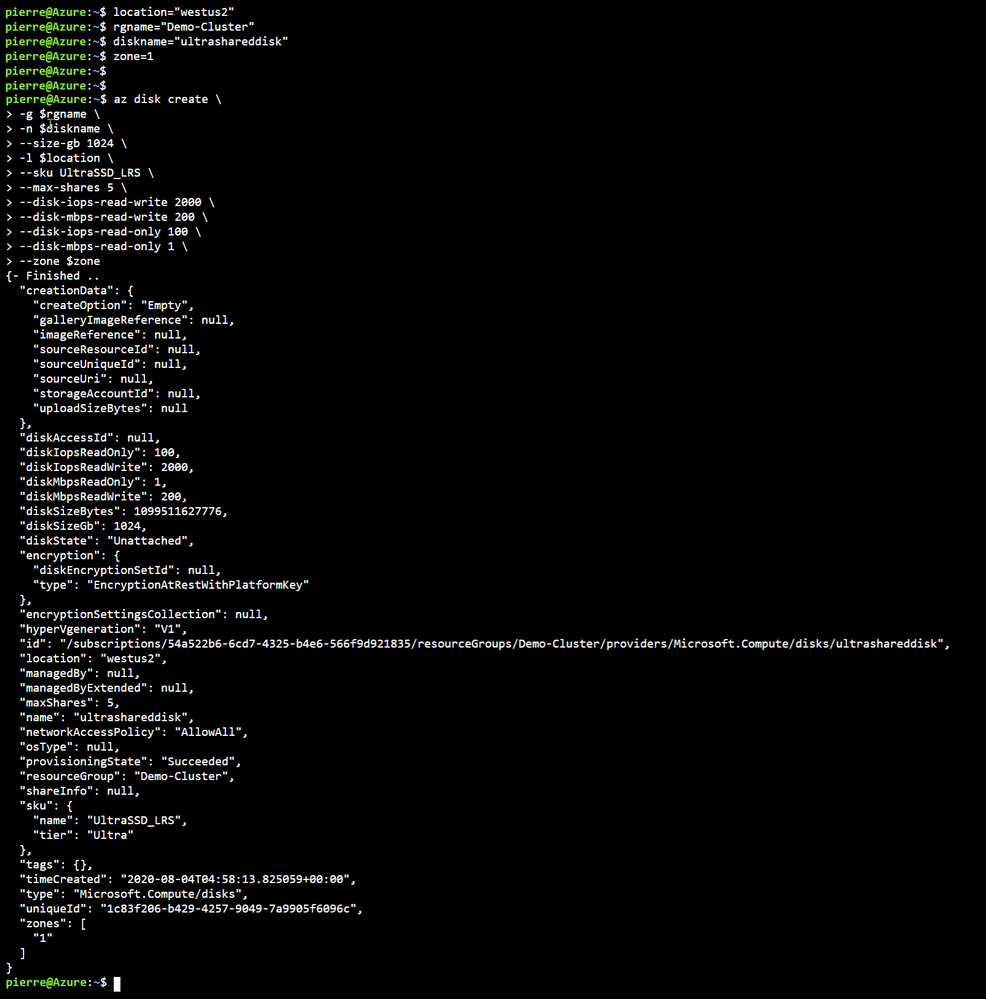
First, we need to Deploy an ultra disk as a shared disk. To deploy a managed disk with the shared disk feature enabled, you must ensure that the “maxShares” parameter is set to a value greater than 1. This makes the disk shareable across multiple VMs. I used the cloud shell through the portal and the following Azure CLI commands to perform that operation. Notice that we also need to set the zone parameter to the same zone where the VMs are located (Azure Shared Disk across availability zones is not yet supported)
location = "westus2"
rgname = "Demo-Cluster"
diskname = "ultrashareddisk"
zone = 1

az disk create
     -g $rgname
     -n $diskname
     --size-gb 1024
     -l $location
     --sku UltraSSD_LRS
     --max-shares 5
     --disk-iops-read-write 2000
     --disk-mbps-read-write 200
     --disk-iops-read-only 100
     --disk-mbps-read-only 1
     --zone $zone
We end up with the following result:
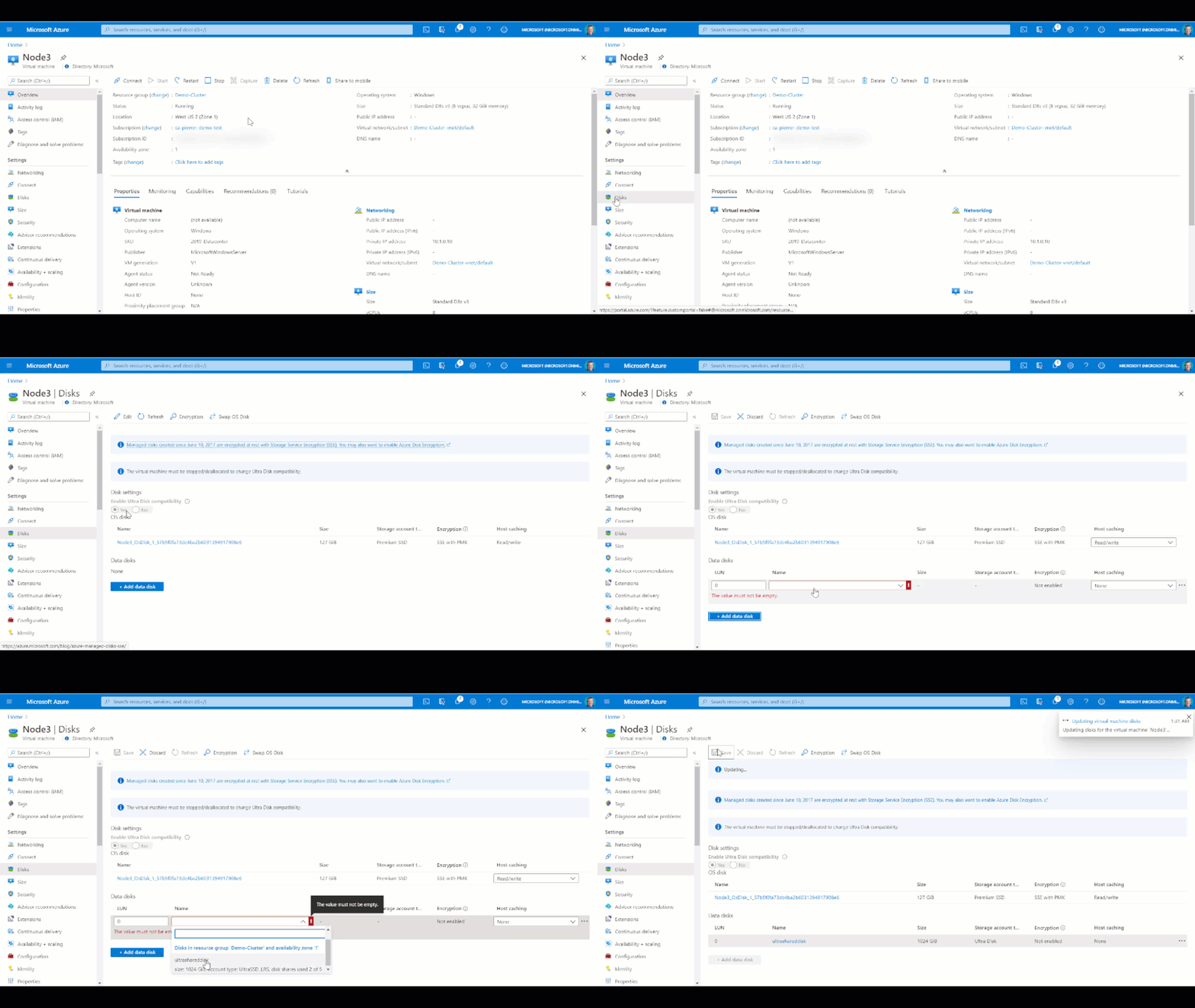
Once the Shared Disk is created, we can attach it to BOTH VMs that will be our clustered nodes. I’ve attached the disk to the VMs through the Azure portal by navigating to the VM, and in the Disk management pane, clicking on the “+ Add data disk” and selecting the disk I created above.
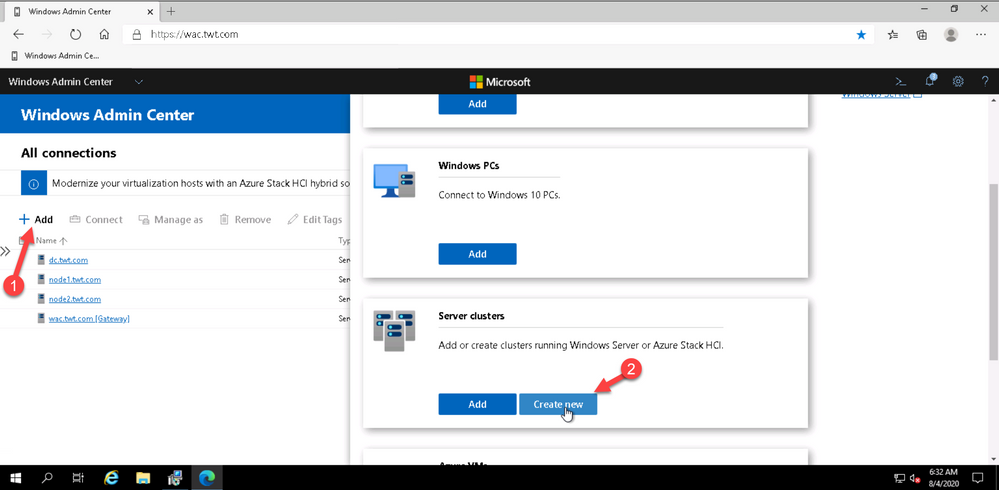
Now that the shard disk is attached to both VM, I use the WAC cluster deployment workflow to create the cluster.
To launch the workflow, from the All Connections page, click on “+Add” and select “Create new” on the server clusters tile.
You can create hyperconverged clusters running Azure Stack HCI, or classic failover clusters running Windows Server (in one site or across two sites). I’m my case I’m deploying a traditional cluster in one site.
The cluster deployment workflow is included in Windows Admin Center without needing to install an extension.
At this point just follow the prompts and walk through the workflow. Just remember that whenever, in the workflow, you are asked for an account name and password. the username MUST be in the DOMAINUSERNAME format.
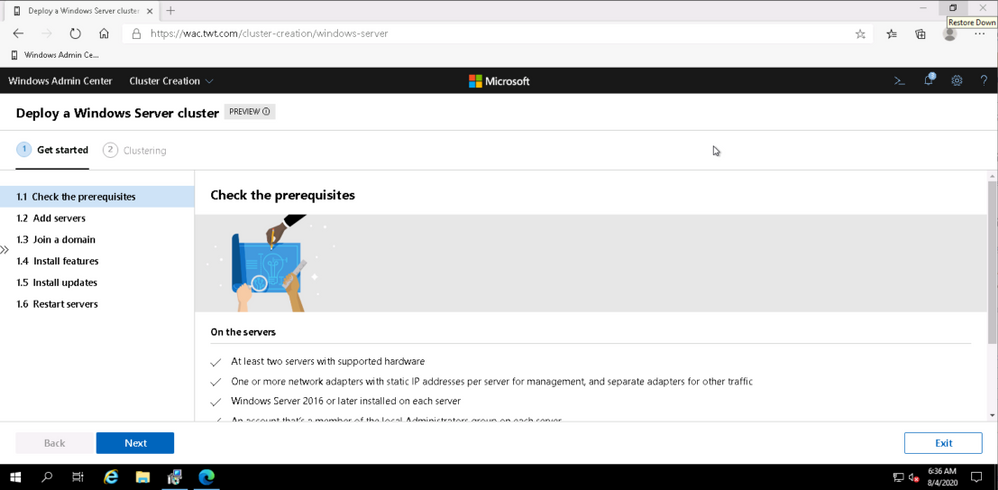
Once I walked through the workflow, I connected to Node 1 and added the disk to my clustered shard volume.
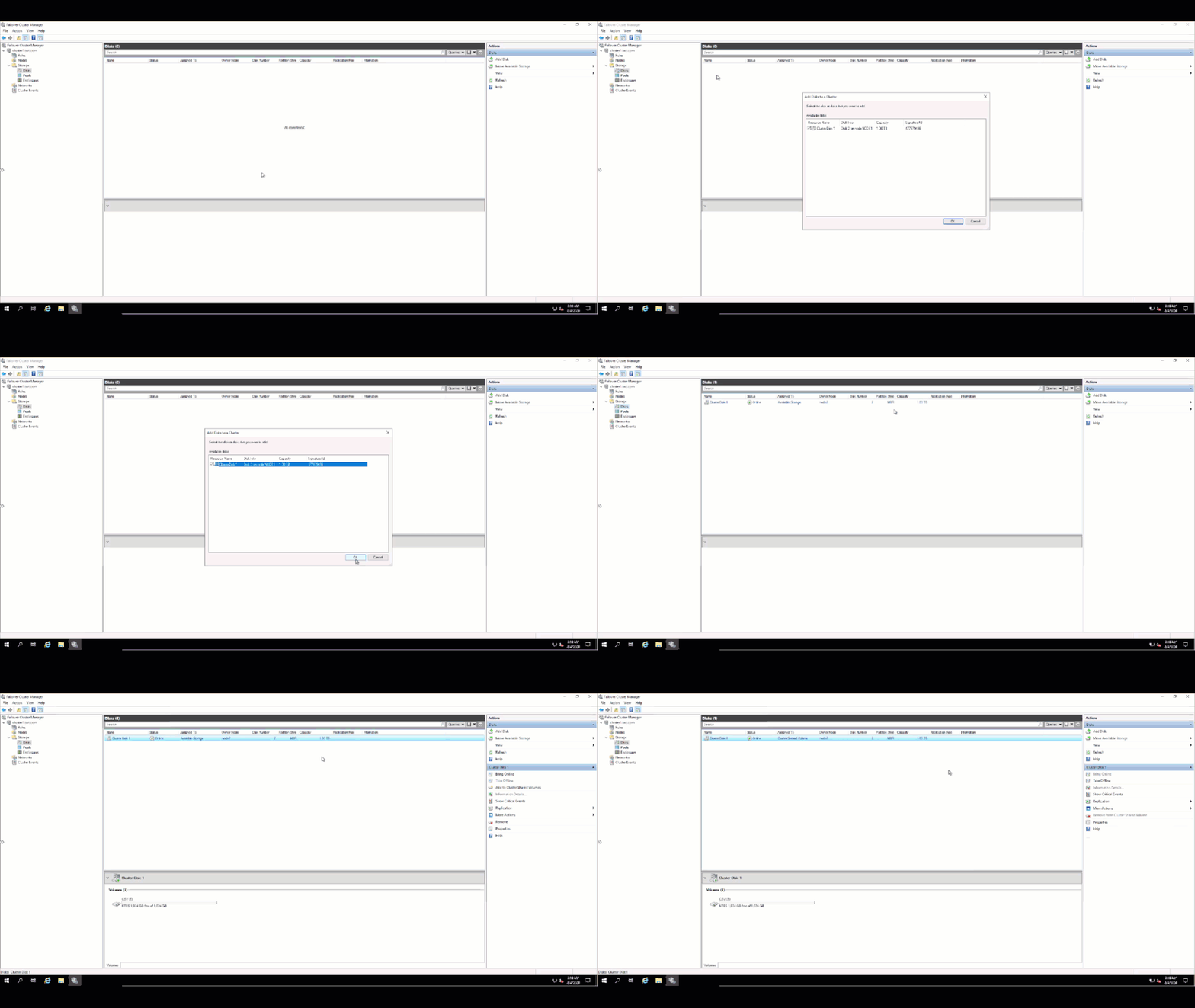
and verified on the other node that I could see the Clustered Shared Volume.
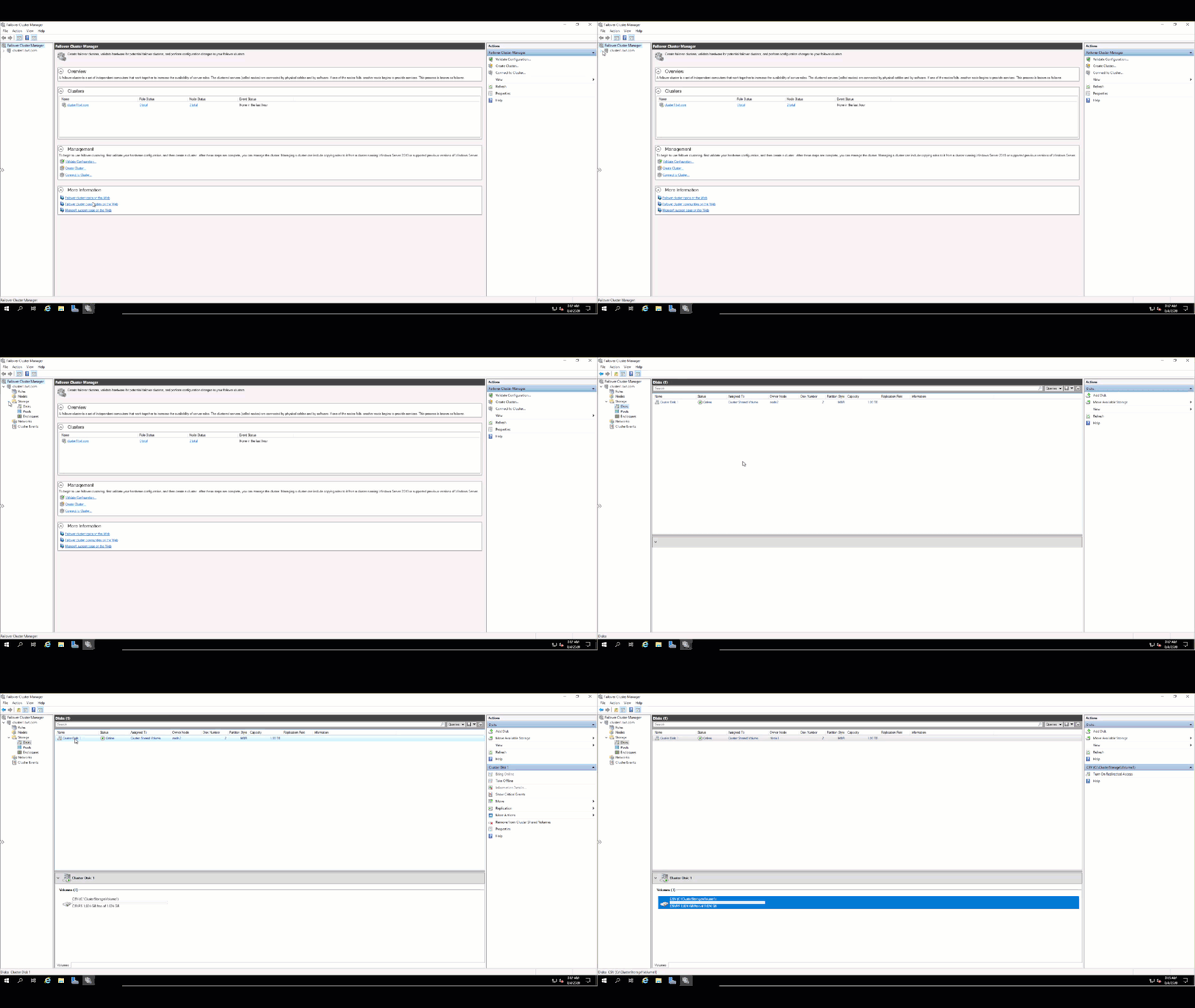
That’s it!! My traditional WSFC is up and running and ready to host whatever application I need to migrate to Azure.
I hope this helped. Let me know in the comments if there are any specific scenarios you would like us to review.
Cheers!
Pierre
by Scott Muniz | Aug 4, 2020 | Alerts, Microsoft, Technology, Uncategorized
This article is contributed. See the original author and article here.
Today I am happy to announce an expansion of our longstanding partnership with Bitnami (now part of VMware) to deliver a collection of production-ready templates on the Azure marketplace for our open source database services—namely, MySQL, MariaDB, and Postgres.
In this blog post you can learn about the Bitnami Certified Apps (what many of us call “templates”) for our Azure Database for PostgreSQL services are available on the Azure Marketplace and are production-ready. You can also find Bitnami templates using Azure Database for MySQL and MariaDB.
More importantly, these Bitnami templates make it easy for you to manage the complexity of modern software deployments.
And when we say the Bitnami templates make it easy, we mean easy: these templates for our Azure open source databases give you a one-click solution to deploy your applications for production workloads. Bitnami packages the templates following industry standards—and continuously monitors all components and libraries for vulnerabilities and application updates.
Invent with purpose on Azure with Bitnami templates !
Bitnami templates available with PostgreSQL on Azure Marketplace
The current collection of Bitnami production-ready templates on the Azure marketplace are for these applications.
- Airflow for PostgreSQL
- CKAN for Postgres—with Hyperscale (Citus)
The Bitnami Community Catalog on the Azure Marketplace give you certified applications that are always up-to-date, highly secure, and built to work right out of the box.
In these solution templates for the Azure open source database services, our Azure and Bitnami engineering teams have worked together to incorporate all the best practices for performance, scale, and security—to make the Bitnami templates ready for you to consume, with no additional integration work necessary.
Airflow with PostgreSQL on Azure
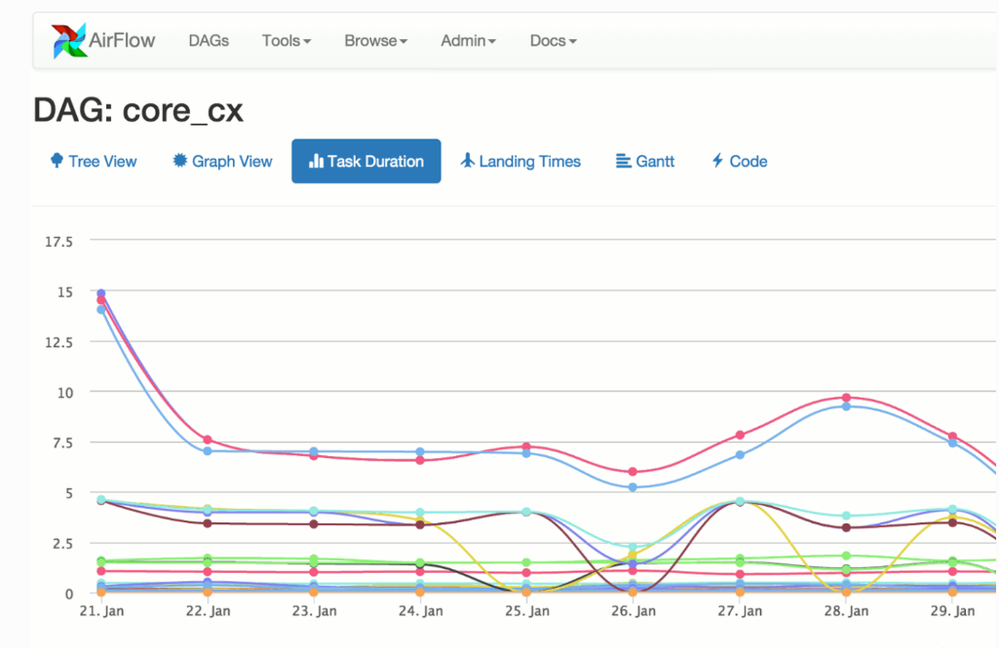
Caption: Airflow with Azure Database for PostgreSQL
You can build and manage your company’s workflows using Apache Airflow solution that gives you high availability, better performance, and scalability. This Bitnami template for Airflow uses two virtual machines for the application front-end and scheduler, plus a configurable number of worker virtual machines. It also uses Azure Database for PostgreSQL and Azure Cache for Redis to store application data and queue tasks.
Try Airflow with Azure Database for PostgreSQL
CKAN with PostgreSQL & Hyperscale (Citus)
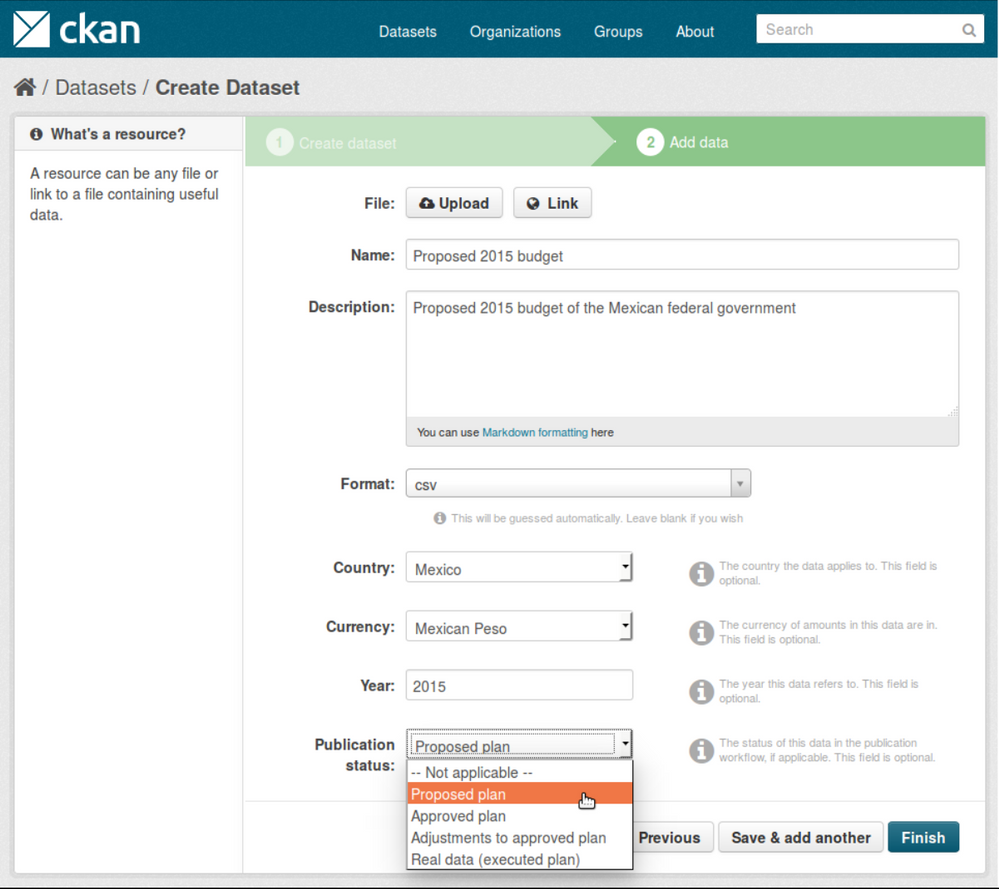
Caption: CKAN with Hyperscale PostgreSQL (Citus)
With this Bitnami template for CKAN, you can now build an open data management system on Azure that is based on CKAN. CKAN is used by various governments, organizations and communities around the world when they need store and process large amounts of data from census data to scientific data. This is a scalable solution that uses several virtual machines instances to host the applications which also include virtual machines for Solr , Memcahced and managed databases using Hyperscale (Citus) on Azure Database for PostgreSQL.
Try CKAN with Hyperscale Citus PostgreSQL
If you’re building an application on Azure using CKAN or Airflow with Azure Database for PostgreSQL or Hyperscale Citus, here are a few of the reasons I recommend you consider taking advantage of the Bitnami templates on the Azure Marketplace.
Bitnami templates lower your TCO
These Bitnami production-ready templates are available to you at no additional cost than the underlying Azure services being used to host the application. These services are already optimized to reduce the total cost of ownership using the elastic cloud infrastructure.
You also get Azure advisor recommendations for your managed database service, so you can scale up or down based on your usage telemetry.
Managed database services on Azure enable you to focus on your application—not your database
Azure managed database services provide high availability with 99.9% SLA and ease of scale up or down your servers based on what your application needs are. You can easily backup and perform point-in-time restore for business continuity and disaster recovery. Using Hyperscale (Citus) on Azure Database for PostgreSQL, you can scale out horizontally your multi-tenant app on Azure—or build a real-time operational analytics app that gives your customers sub-second performance even with billions of rows.
Security benefits that are built into Azure
With these Bitnami templates on Azure, you can use built-in security features like using SSL connectivity to the database server and using Azure Role-based access control (RBAC) to control who has access to the server.
You can also use our Advanced Threat Protection feature for the managed databases to detect anomalous activities indicating unusual and potentially harmful attempts to access or exploit databases.
You can also read this blog post from Bitnami (now part of VMWare). We are thrilled to work with Bitnami and focus on simplifying the experience for developers to build solutions using community based applications like CKAN and Airflow.
What our leaders are saying about the Bitnami & Azure collaboration
Sunil Kamath is Director of Product Management for OSS databases at Microsoft Azure Data—here is Sunil’s take on the importance of our partnership:
“Developers want simple, fast ways to deploy production-ready solutions on the cloud. We have been excited about our partnership with Bitnami—now part of VMware—to deliver what customers say they care about the most. Today, together with Bitnami, we are thrilled to launch new production-ready and enterprise-grade Bitnami templates for WordPress, Drupal, Magento, and more, making it easier than ever for developers to run these solutions on the Azure cloud. These solutions are built to fully utilize the best-in-class intelligence, enterprise security, and scalability offered by Azure database services for MySQL, MariaDB, and PostgreSQL.“
Daniel Lopez is the former CEO/Founder of Bitnami and is now Sr. Director R&D at VMware. When asked for his perspective on the partnership with Microsoft Azure, Daniel said:
“Bitnami has worked closely with Microsoft for many years to provide Azure customers with a wide array of ready to deploy open source software in a variety of formats including virtual machines, containers, Helm Charts, and ARM Templates; and across environments including Azure and Azure Stack. Our recent expansion of this partnership with the Azure Data team is a particularly exciting area of development as we’re bringing together the convenience and simplicity of Bitnami applications with the power and scalability of Azure Data services; creating a low-friction and high-value win for customers. We’re also proud of this collaboration in highlighting the type of innovation and benefits the cloud operating model allows us to unlock.”
Want to learn more about Azure open source databases & Bitnami?
Below are some resources if you want to dig in further and try out some of these Bitnami production-ready templates with our Azure open source databases.
Oh and if you have ideas for more Bitnami templates we should create that you think you and other developers would benefit from on the Azure Marketplace, please provide feedback on UserVoice. We would love your input.


Recent Comments