![[Guest Blog] My Journey from the Marine Corps to Cybersecurity](https://www.drware.com/wp-content/uploads/2020/08/large-168)
by Scott Muniz | Aug 4, 2020 | Uncategorized
This article is contributed. See the original author and article here.
This article was written by Microsoft employee Vishal Amin who shares about how he transitioned from a career as a Fighter Pilot and Special Operations Officer to Cybersecurity Specialist at Microsoft.
64KB of data storage and memory. On the eve of my military career retirement that was 20 years in the making, I looked at my common access card and realized that this 3.370 x 2.125 inch card I was holding was the single piece of authentication that validated my career to the outside world. Somehow, the Marine Corps managed to fit my life and my 20 years of service onto a card that was merely 0.030 inches thick with only 64kB of data storage and memory.
So you might ask, why Microsoft, why cybersecurity? Well, in my story that is precisely where Identity, Security and the “Human” intersect.

I remember that day vividly. On March 21st of 2015, the Islamic State Hacking Division released an order to target 100 individuals operating against them. In the same order, they also released the whereabouts, pictures and personal identities of each individual – I was one of those who was identified. The thrill of 36,000 pounds of thrust from the fighter jet cockpit of a McDonnell Douglas F/A-18 Hornet, the privilege of leading our men and women in service, and my own personal aspirations of continued servant leadership seemingly grounded to a complete halt. The ability to collaborate and engage my peers, to serve my country and most importantly, protect my family were stripped from my control by way of data ownership and identity compromise. I had navigated a purposeful and fulfilling career, layered behind the most physically secure and digitally sound barriers our nation had the ability to provide. Yet, in a push of a button, a simple human event compromised the single most important piece of me – my identity.
The years following the incident, I was constantly in a heightened state of awareness and alarm – imagine having to be always mindful of suspicious unmarked vehicles outside your home, the safety of your family, and the ability to live a normal life without fear of physical or digital harm. This was my new normal. For me, this single event critically defined how the human element is the core to security and protecting our identities.
Realizing that the most important decisions we make in life are not tied to our wallets, but rather how we truly impact those around us and under our influence, I decided to dedicate the remainder of my life and career to Cybersecurity. For many, Cybersecurity is a monetary investment and a layer of protection or insurance on our valuable digital estate.


For a select few, Cybersecurity is how we empower people and organizations to positively impact the world in their unique and innovative ways, without fear or repercussion. Microsoft’s mission to empower every person and every organization on the planet to achieve more is precisely the reason I chose Microsoft, and specifically, Cybersecurity within Microsoft. Ann Johnson, CVP of Cybersecurity Business Development – someone I admire and continue to learn from at Microsoft – shared a few impactful thoughts with me personally before I began my career at Microsoft. She also published them in an article from CYBERCRIME MAGAZINE:
“But if all the people in your security team think the same way, you’re missing out on the diversity of understanding and problem-solving that a wider group of approaches and experiences would bring. We need to avoid the risk of group think, and that’s best done by having teams that come from different backgrounds, with varied experiences that help them find new answers to problems. Not only do you need different viewpoints to get creative solutions: you may not even notice some of the areas you’re neglecting, because you can’t tackle what you don’t know about.” – Ann Johnson
My journey to Microsoft was certainly not traditional, and I can only assume that same sentiment holds true for many others in their journey here. Looking back at the 64KB common access card I was issued, I realize that the authentication and validation that card provided could only be weaponized by the humans with malicious intent behind it. It’s our job as humans pledging to use tech for good – and not evil – to defend against that.
What can you do?
Invest in the people, the human. Look for talents in the places you least expect to. They will reciprocate that investment in you and your organization. My career and choice to invest in Microsoft was not simply a “transition”, but a journey. For those on their own journeys and navigating their careers in an uncertain, changing and evolving world, I challenge you to invest in passions. For me, Cybersecurity is not merely a job, but an entire frame of mind and a way of life. The investment that I choose to make in my passion has allowed me to diversify the way I view security. That same investment has now allowed me to grow in my career at Microsoft.
Ask yourself: How are you investing in your future, your passions, and most importantly, yourself? When that answer comes to mind, go do that thing. You will not regret it.
#HumansofIT
#CareerJourneys
#MilitaryVeteransinTech
by Scott Muniz | Aug 4, 2020 | Uncategorized
This article is contributed. See the original author and article here.
We’re excited to continue our blog series to share the learning journeys of our customers, partners, employees, and future generations. Today, we present the second blog in the series with a global customer learning story we love: the learning transformation at EY.
When Veronica Gomez received an email in November of 2019 inviting her to build her technical skills with Microsoft Learn, it intrigued her right away. A veteran Windows Server Administrator for more than a decade, Veronica was eager to expand her technical skillset and she dove in right away. Little did she know that it would open a new world of learning for her.
“I immediately thought it was a very cool opportunity,” Veronica said. “I have always been very interested in learning new things and I quickly started pursuing the different learning paths for DevOps to become a cloud engineer. I also became interested in other career paths that had not interested me before, like Python and AI.”
EY, Veronica’s employer, is one of the largest professional services firms in the world and a global leader in assurance, tax, transaction, and advisory services. She is part of the Client Technology Platform team, which partners with EY service lines to combine client knowledge and innovative ideas to deliver industrialized solutions on a global scale. The Client Technology function challenges itself to “innovate at scale while delivering technology at the speed of technology,” and it is constantly building new tools and experimenting with digital technologies and cloud platforms such as Microsoft Azure.
“When we assembled this global team about two years ago, it was an experiment,” said Pablo Cebro, Design and Engineering Director for EY’s Client Technology Platform and team leader. “I was the first employee and now we have 500. When you grow this fast, the biggest challenge is to continue to deliver the quality of work that we expect to deliver for EY clients. To get there, it wasn’t enough to just review the work. We needed to improve what we call the ‘employee quality’.”
Microsoft Learn
To deliver that quality, the Client Technology Platform team turned to Microsoft Learn, which offers free online access to bite-size, self-paced, interactive, and hands-on training, to upskill their employees. The team had recently adopted Azure DevOps to help make app development faster and less costly, and is now also using Azure services such as Azure Pipelines and Azure Kubernetes Service (AKS) to unlock software development with the power of container-based architecture. So, one of the areas where the EY employees really needed upskilling was Azure DevOps practices. And to motivate the team to learn, leaders were looking for a program that would be fun, measurable and at the same time would help get their employees certified. Enter the Microsoft Cloud Skills Challenge, a “gamified” skilling program designed to kickstart the cloud learning journey through self-guided content from Microsoft Learn, where developers compete to earn points by completing modules and top learners win prizes at the end of the competition.
“We needed a program that was quick to get off the ground, but also enticed our employees to see it through,” said Mark Luquire, Global DevOps Practice Lead for Client Technology, who also started the learning program for the team. “We have a global, dispersed team, so spending a week in a classroom is not always possible, but the material on Microsoft Learn is really good and gives people flexibility with the option to self-pace their learning with 24/7 access.”
But that was only the beginning of EY’s Client Technology team’s “transformational learning journey” to invest in their people. As they embraced the Cloud Skills Challenge, Mark saw his team “up their game” to mature their overall skills to successfully establish a DevOps culture and practice and meet the high expectation of creating industry-leading, world-class solutions. They also added virtual and in-person classes and today, engineers in the program are heavy users of Microsoft Learn’s free online training to help prepare for Microsoft Certification.
“Microsoft Learn is an open book, available to all, and it allows me to study every night before I go to sleep,” said Veronica Gomez, who is now a Cloud engineer for EY. “I work and I have a family with two little kids, so I have no time during the day, but I use the night to work on my career.”
The team also takes full advantage of other training options outside Microsoft Learn such as Microsoft OpenHack and collaboration in the Technology Experience Center (TEC) in Seattle. “Microsoft has been a great strategic partner for us, and this has been a joint journey,” Mark explained. “We have a unique relationship through the Technology Experience Center (TEC), where we have dedicated Cloud Solution Architects (CSA) who work side-by-side with us in Seattle, day in, day out. And they don’t just give us access to product teams and other engineering groups, but also provide the right learning materials. That partnership has been instrumental to the success of this program.”
Continuous learning
Today, EY’s learning program has matured to the point that leadership now evaluates their program every quarter, adding new practices and adjusting the program’s targets and goals for the hundreds of engineers who participate. The next step in the journey will be an expansion to other engineering teams and other organizations, which will incrementally grow the number of participants at EY into the thousands.
Mark describes the result of the partnership with Microsoft as a “culture of continuous learning”. Team leadership established a learning foundation with clear organizational goals focused on the cloud, but do not limit them in terms of what skills they want to pursue. And they celebrate successes by posting employee pictures on a dedicated internal site when they achieve a certification. They also are encouraged to share their achievement on LinkedIn, where EY leadership will publicly congratulate them as well.
“Microsoft Learn is a really powerful tool that gave us the opportunity to get quality skilling at scale,” said team leader Pablo, when asked to evaluate the progress made to date. “We’re now able to certify people faster than ever while also making sure they’re on the right career path. We expect 80% of our organization to be certified in DevOps by June. After that we’re going to be looking to skill more Azure developers, architects, and security specialists.” This is music to the ears of employees like Veronica Gomez, who has literally incorporated learning into her daily schedule to finish up her Azure certifications. “I’ve found that learning has contributed a great deal to my career in IT and has made my professional profile a lot more robust and appealing,” she says. “Now that I have had experience working with on-premises and IaaS systems I realize it certainly was more than just studying to pass an exam. I truly developed my skills.”

by Scott Muniz | Aug 4, 2020 | Uncategorized
This article is contributed. See the original author and article here.

| References and Information Resources |
Microsoft 365 Public Roadmap
This link is filtered to show GCC, GCC High and DOD specific items. For more general information uncheck these boxes under “Cloud Instance”.
New to filtering the roadmap for GCC specific changes? Try this:
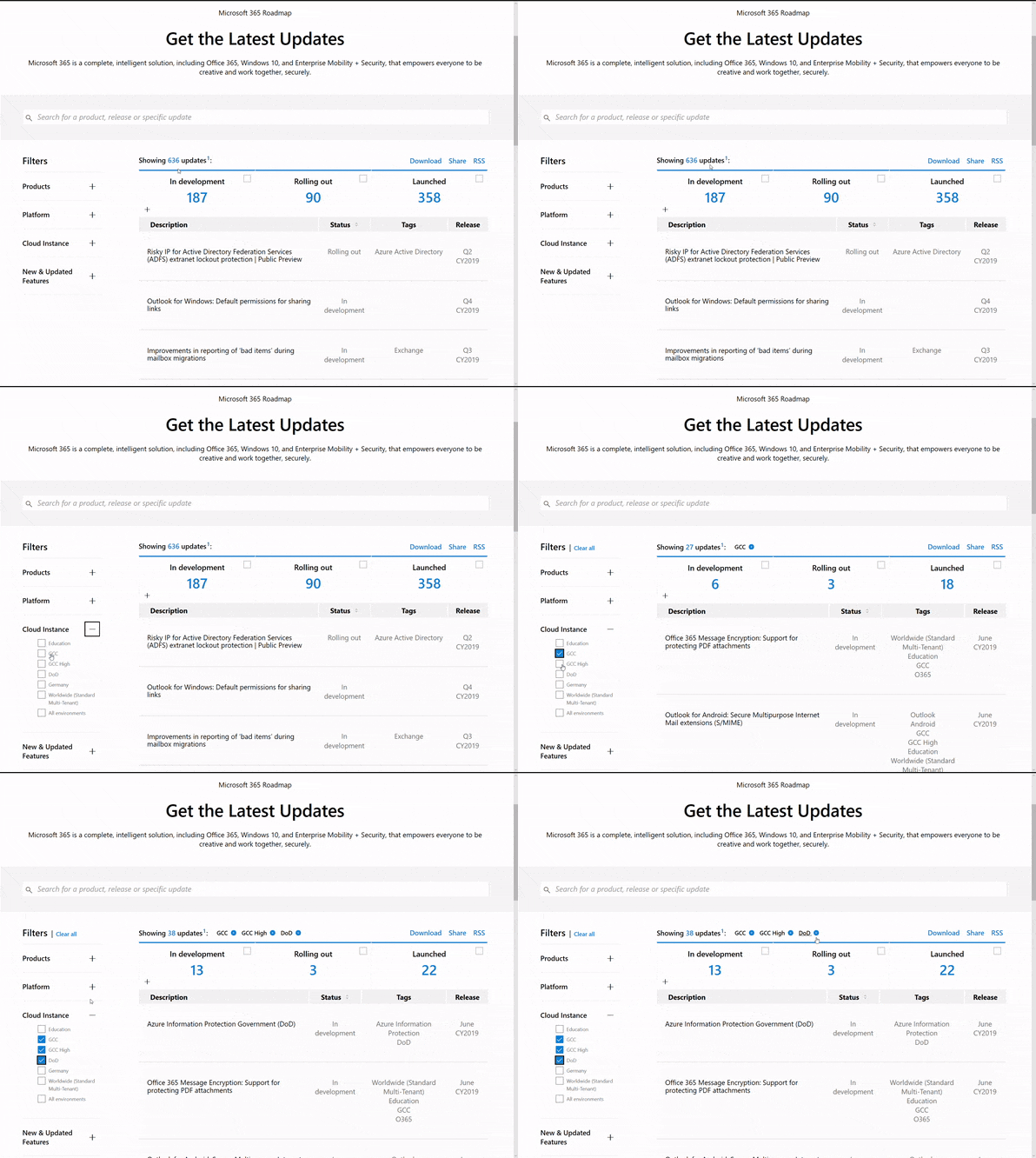
Stay on top of Office 365 changes
Here are a few ways that you can stay on top of the Office 365 updates in your organization.
Microsoft Tech Community for Public Sector
Your community for discussion surrounding the public sector, local and state governments.
Microsoft 365 for US Government Service Descriptions
- Office ProPlus (GCC, GCCH, DoD)
- PowerApps (GCC, GCCH, DoD)
- Flow (GCC, GCCH, DoD)
- Power BI (GCC, GCCH)
- Planner (GCC, GCCH, DoD)
- Outlook Mobile (GCC, GCCH, DoD)
- My Analytics (GCCH, DoD)
- Dynamics 365 US Government
Teams for Government Training Series
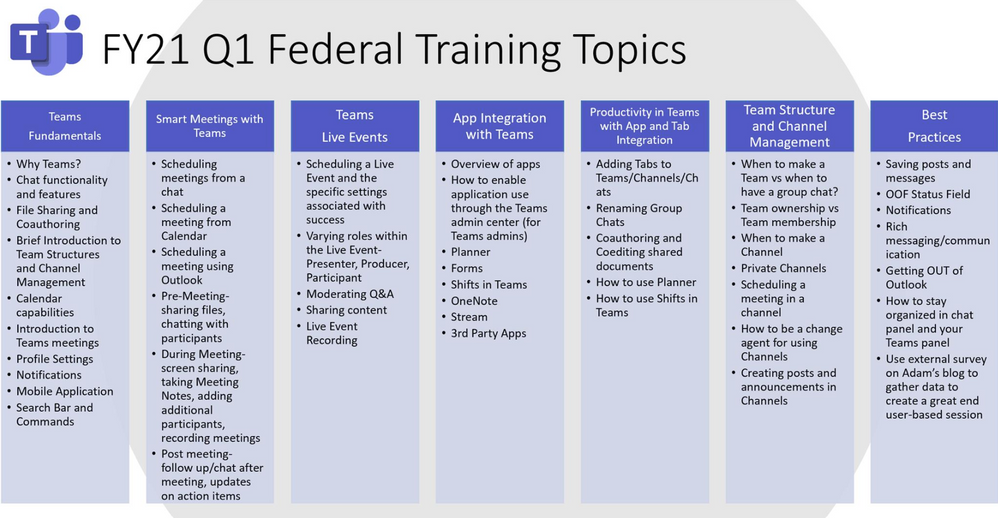
Live training accessible via Teams Live Event aka.ms/learnTeamsforGov
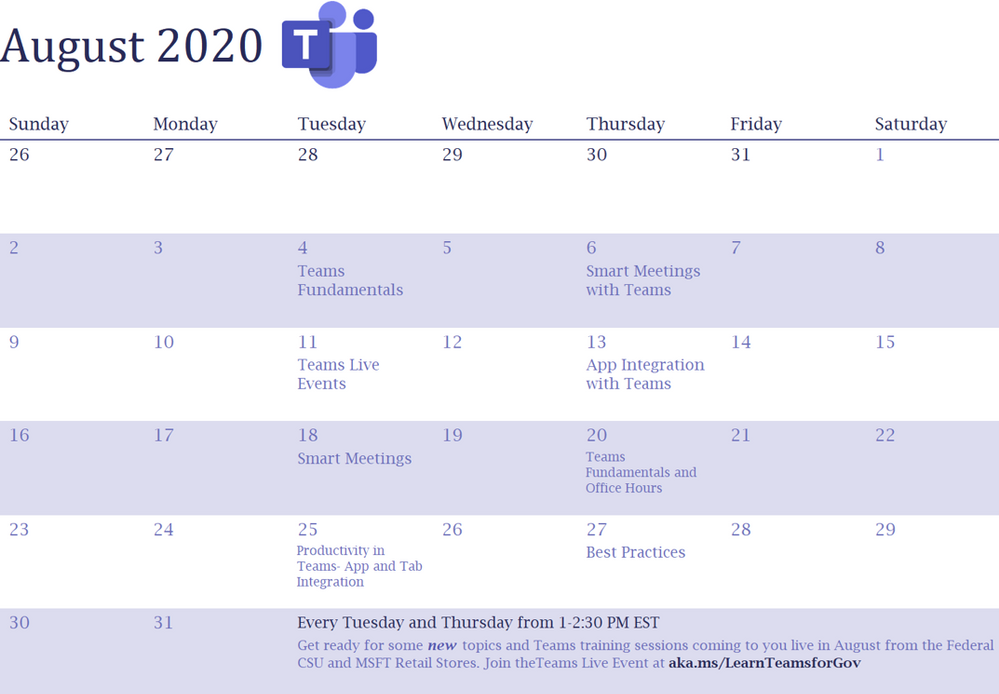
Also available: VOD options of past events
Introducing Microsoft Adoption
We want to ensure you get the most from our services to deliver your business outcomes. The Microsoft 365 adoption community and resources are here to support your journey.
PowerShell Basics: How to Delete Microsoft Teams Cache for All Users
Quickly clear Teams cache for testing and troubleshooting
Auditing and Logging: Designing SaaS service implementations to meet federal policy
Meeting federal mandates with SaaS services, a deep dive on auditing and logging.
How To Manage Federal Taxpayer Information In Microsoft Teams
Defining FTI and Consequences of Non-Compliance
Microsoft Bookings will be available on August 18th for Office 365 Government GCC
GCC customers are being notified that Microsoft Bookings will be available and released as on by default to all eligible Office 365 Government GCC customers on August 18th.
Reply-All Storm Protection releasing
This feature will temporarily block Reply-Alls under certain criteria, helping to eliminate these distractions that can disrupt business continuity.
SharePoint 2010 Workflow Retirement
SharePoint 2010 workflows will be retired starting August 2020. To mitigate the impact for customers using SharePoint 2010 workflows, we recommend migrating to Power Automate or other supported solutions.
Enable communication site experience on classic team sites
Allows SharePoint admins and site owners to enable the modern communication site experience on any classic team site that meets certain requirements including the root site.
MC210713 – SharePoint Designer features deprecation
An issue has been identified affecting SharePoint Designer functionality for creating custom Forms within SharePoint Online.
MC217890: Advanced eDiscovery Rollout Status
GCC rollout completed July 31
GCCH and DOD delayed, expected complete by mid-September
| Microsoft 365 IP & URL Endpoint Updates |
08 July 2020 – GCC
28 July 2020 – GCC High
28 July 2020 – DOD
| Roadmap Changes This Month |
by Scott Muniz | Aug 4, 2020 | Uncategorized
This article is contributed. See the original author and article here.
In general, the recommendation is to use Automatic OS upgrade feature of Virtual Machine scale set as patching solution for Service Fabric in production refer to (it needs durability of Silver and above for nodetype) :
https://docs.microsoft.com/en-us/azure/virtual-machine-scale-sets/virtual-machine-scale-sets-automatic-upgrade
https://docs.microsoft.com/en-us/azure/service-fabric/service-fabric-common-questions#do-service-fabric-nodes-automatically-receive-os-updates
However in this approach updates can happen anytime (but will be rolling upgrade) i.e. when new images are published. If you don’t want this and need more control like schedule patching during non-peak time you can consider Patch Orchestration Application refer https://docs.microsoft.com/en-us/azure/service-fabric/service-fabric-patch-orchestration-application. Otherwise if you need total control like want to test updates in lower environments and then only patch prod, then you have to manually upgrade images refer : https://docs.microsoft.com/en-us/azure/virtual-machine-scale-sets/virtual-machine-scale-sets-automatic-upgrade#manually-trigger-os-image-upgrades or simply disable nodes one by one with intent restart and then update Windows and then enable node again.
Important Notes:
- Ideally, when “enableAutomaticUpdates” is set to True, you are enabling windows updates i.e. patch upgrades, etc. (not the upgrade from 2012 to 2016). By default its True. These updates doesn’t happen in rolling fashion.
- For scale sets using Windows virtual machines using automatic OS upgrade feature i.e enableAutomaticOSUpgrade set to True, starting with Compute API version 2019-03-01, the property virtualMachineProfile.osProfile.windowsConfiguration.enableAutomaticUpdates property must set to false in the scale set model definition. The above property enables in-VM upgrades where “Windows Update” applies operating system patches without replacing the OS disk. With automatic OS image upgrades enabled on your scale set, an additional update through “Windows Update” is not required. So if your using any patching solution in prod, Automatic OS Upgrade feature / Patch Orchestration Application / Manual OS upgrades, ideally you should be set enableAutomaticUpdates to false.
If you are patching VMSS nodes you should also make sure the windows container which is running in VMSS nodes is patched and the windows version should be matched with VMSS node and the container.
In windows containers, its recommended that both should be patched to latest however host images using 1809 and above does not need to have matching revisions or if you are using Hyper-V isolation mode. Refer to examples. You can also refer to https://docs.microsoft.com/en-us/virtualization/windowscontainers/deploy-containers/update-containers#how-to-get-windows-server-container-updates for getting Container updates.
Windows Server containers currently don’t support scenarios where Windows Server 2016-based containers run in a system where the revision numbers of the container host and the container image are different. For example, if the container host is version 10.0.14393.1914 (Windows Server 2016 with KB4051033 applied) and the container image is version 10.0.14393.1944 (Windows Server 2016 with KB4053579 applied), then the image might not start.
However, for hosts or images using Windows Server version 1809 and later, this rule doesn’t apply, and the host and container image don’t need to have matching revisions.
We recommend you keep your systems (host and container) up-to-date with the latest patches and updates to stay secure.
Example 1: The container host is running Windows Server 2016 with KB4041691 applied. Any Windows Server container deployed to this host must be based on the version 10.0.14393.1770 container base images. If you apply KB4053579 to the host container, you must also update the images to make sure the host container supports them.
Example 2: The container host is running Windows Server version 1809 with KB4534273 applied. Any Windows Server container deployed to this host must be based on a Windows Server version 1809 (10.0.17763) container base image, but doesn’t need to match the host KB. If KB4534273 is applied to the host, the container images will still be supported, but we recommend you update them to address any potential security issues.
Container Patching
In simple term in your case you have to update your docker file, working with containers is not the same as working with real servers or VM’s you support for months or years. A container image is a static snapshot of the filesystem (and Windows registry and so on) at a given time.
Container images have layers
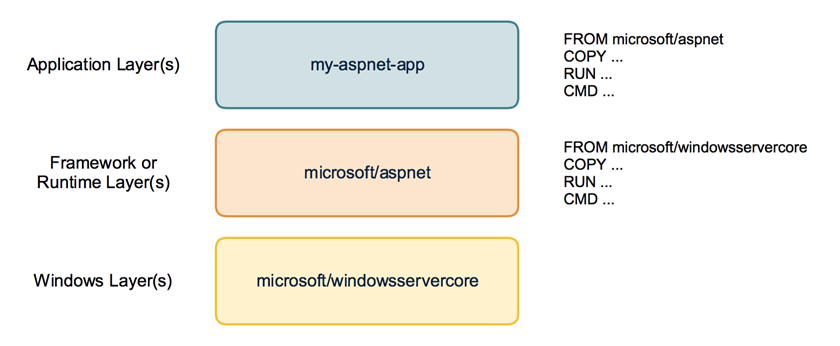
First have a look how a container image looks like. It is not just a snapshot. A container image consist of multiple layers. When you look at your Dockerfile you normally use a line like FROM microsoft/windowsservercore.
Your container image then uses the Windows base image that contains a layer with all the files needed to run Windows containers.
If you have some higher level application you may use other prebuilt container images like FROM microsoft/iis or FROM microsoft/aspnet. These images also re-use the FROM microsoft/windowsservercore as base image.
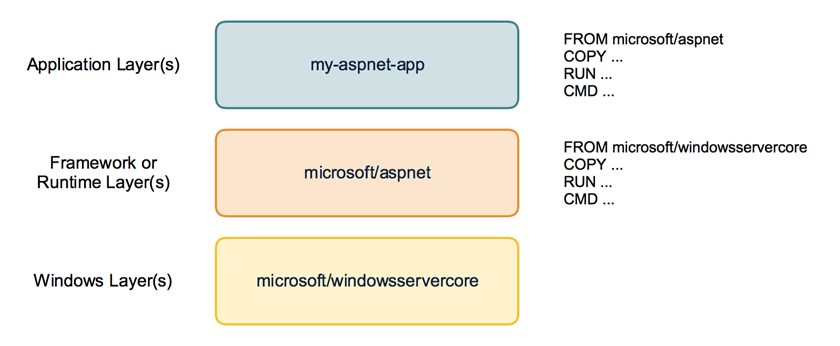
On top of that you build your own application image with your code and content needed to run the application in a self contained Windows container.
Behind the scenes your application image now uses several layers that will be downloaded from the Docker Hub or any other container registry. Same layers can be re-used for different other images. If you build multiple ASP.NET applications as Docker images they will re-use the same layers below.
But now back to our first question: How to apply Windows Updates in a container image?
The Windows base images
Let’s have a closer look at the Windows base images. Microsoft provides two base images: windowsservercore and nanoserver. Both base images are updated on a regular basis to roll out all security fixes and bug fixes. You might know that the base image for windowsservercore is about 4 to 5 GByte to download.
So do we have to download the whole base image each time for each update?
If we look closer how the base images are built we see that they contain two layers: One big base layer that will be used for a longer period of time. And there is a smaller update layer that contains only the patched and updated files for the new release.
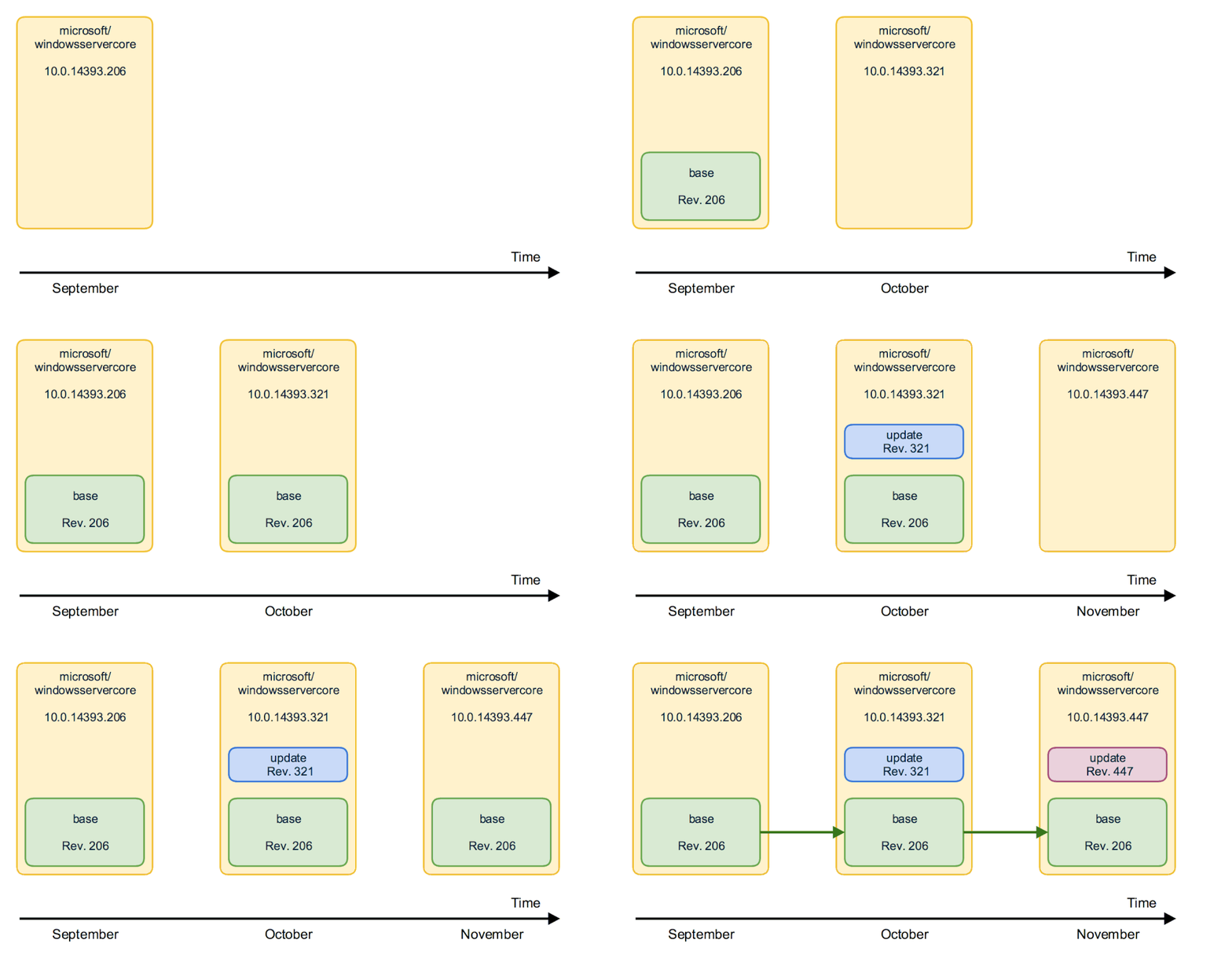
So updating to a newer Windows base image version isn’t painful as only the update layer must be pulled from the Docker Hub.
But in the long term it does not make sense to stick forever to the old base layer. Security scanners will mark them as vulnerable and also all the images that are built from them. And the update layer will increase in size for each new release. So from time to time there is a “breaking” change that replaces the base layer and a new base layer will be used for upcoming releases. We have seen that with the latest release in December.
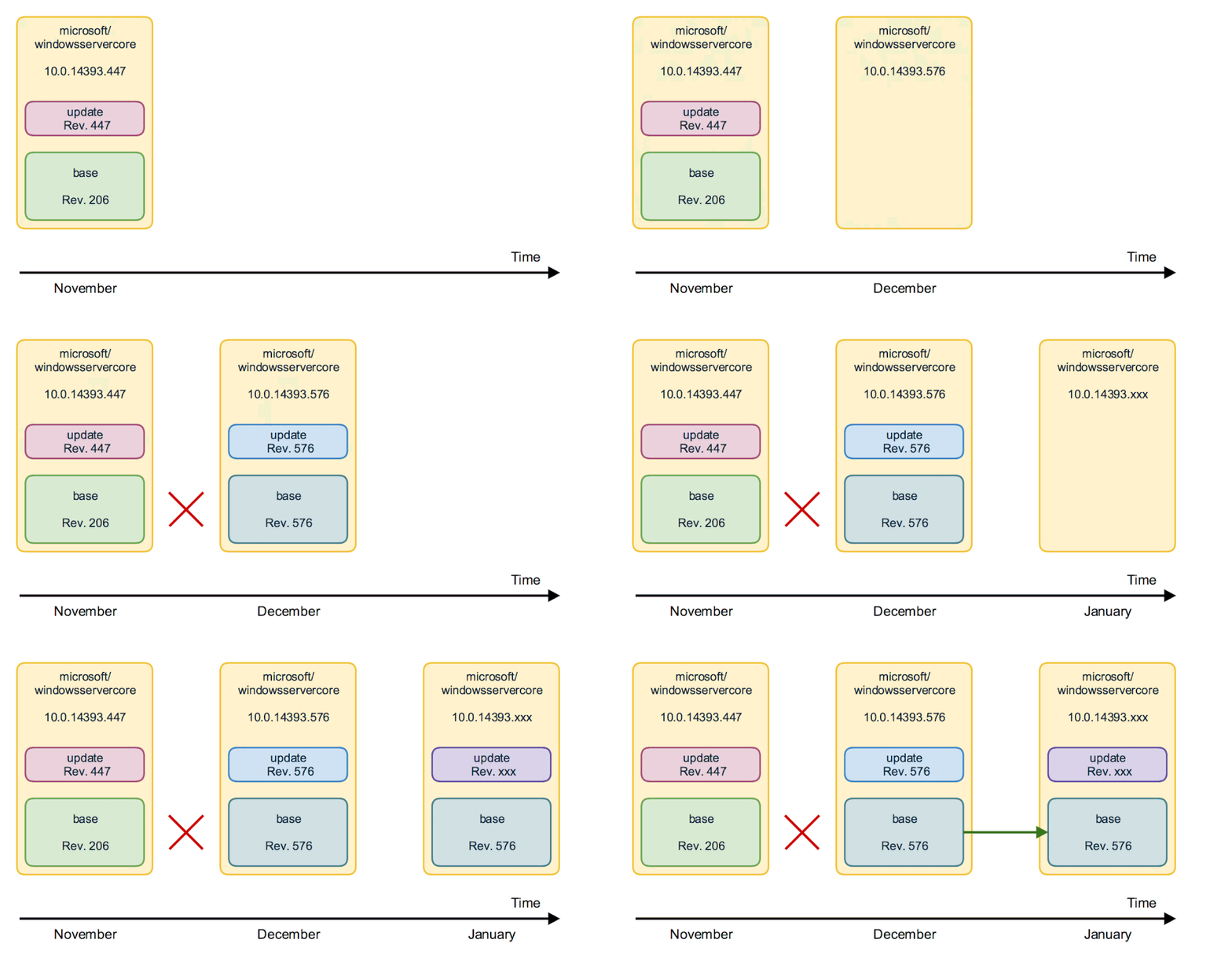
From time to time you will have to download the big new base layer which is about 4 GByte for windowsservercore (and only about 240 MByte for nanoserver, so try to use nanoserver whereever you can) when you want to use the latest Windows image release.
Keep or Update ? Should I avoid updating the Windows image to revision 576 to keep my downloads small? No!
Recommendation is to update all your Windows container images and rebuild them with the newest Windows image. You have to download that bigger base layer also only once and all your container images will re-use it.
Perhaps your application code also has some updates you want to ship. It’s a good time to ship it on top of the newest Windows base image. So is recommended to run
docker pull microsoft/windowsservercore
docker pull microsoft/nanoserver
before you build new Windows container images to have the latest OS base image with all security fixes and bug fixes in it.
If you want to keep track which version of the Windows image you use, you can use the tags provided for each release.
Instead of using only the latest version in your Dockerfile
FROM microsoft/windowsservercore
you can append the tag
FROM microsoft/windowsservercore:10.0.14393.576
But is still recommended to update the tag after a new Windows image has been published.
You can find the tags for windowsservercore and nanoserver on the Docker Hub.
What about the framework images?
Typically you build your application on top of some kind of framework like ASP.NET, IIS or a runtime language like Node.js, Python and so on. You should have a look at the update cycles of these framework images. The maintainers have to rebuild the framework images after a new release of the Windows base image came out.
If you see some of your framework images lag behind, encourage the maintainer to update the Windows base image and to rebuild the framework image. With such updated framework images – they hopefully come with a new version tag – you can rebuild your application.

by Scott Muniz | Aug 4, 2020 | Uncategorized
This article is contributed. See the original author and article here.
From privacy to manageability, these are the five areas you have to rigorously examine when evaluating the browser you want your organization to use for accessing corporate apps and data.
The post Why I think it’s time to revisit the idea of a “Modern Browser” appeared first on Microsoft 365 Blog.
Brought to you by Dr. Ware, Microsoft Office 365 Silver Partner, Charleston SC.



Recent Comments