by Scott Muniz | Jul 8, 2020 | Uncategorized
This article is contributed. See the original author and article here.
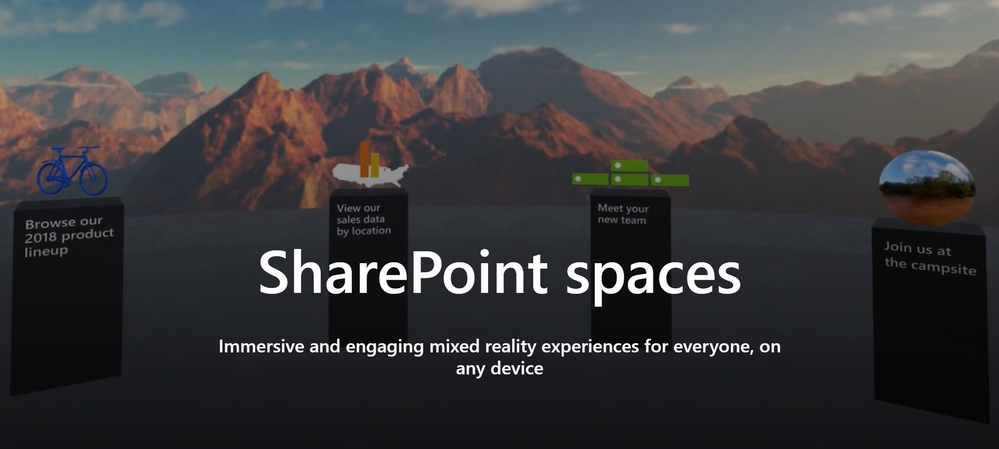
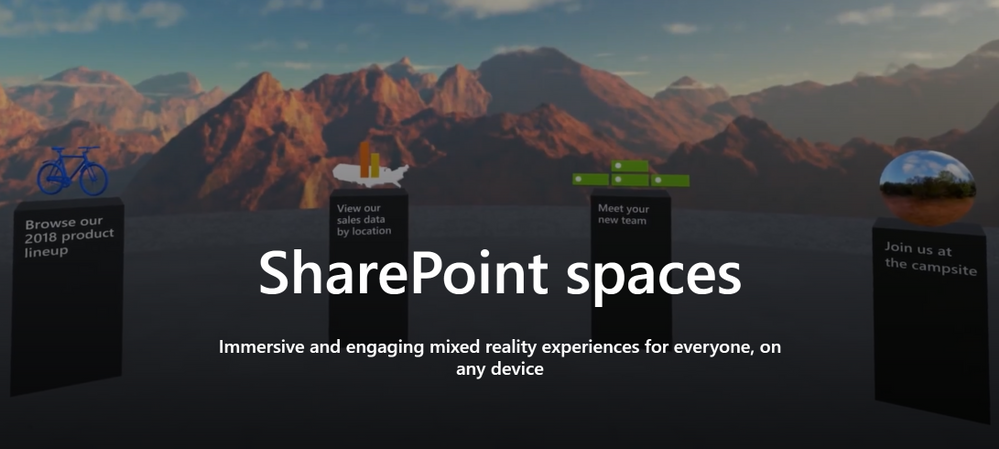
Have you been looking for ways to create virtual events, conferences, employee on-boarding, facility tours, and even trainings? Check out Microsoft’s innovative SharePoint Spaces solution, an immersive and engaging mixed reality experience for everyone on any device. On Wednesday, July 8th, at 12 noon EST, my colleague Mike Gannotti and I introduced SharePoint Spaces, showed a live demonstration of a Virtual Conference, and gave you the resources to get started on your own! Check out the recording and resources below:
Related Resources:
Presenters and Moderators:

- Sam Brown, Microsoft Teams Technical Specialist

Thanks for joining and we look forward to the next CollabCast!
by Scott Muniz | Jul 8, 2020 | Uncategorized
This article is contributed. See the original author and article here.
The Workplace Analytics team is excited to announce our feature updates for July 2020. (You can see past blog articles here). This month’s update covers our latest features:
- Updated Business continuity report
- New organizational network analysis person-to-person query and metrics
- Increased number of non-global partitions
Updated Business continuity report
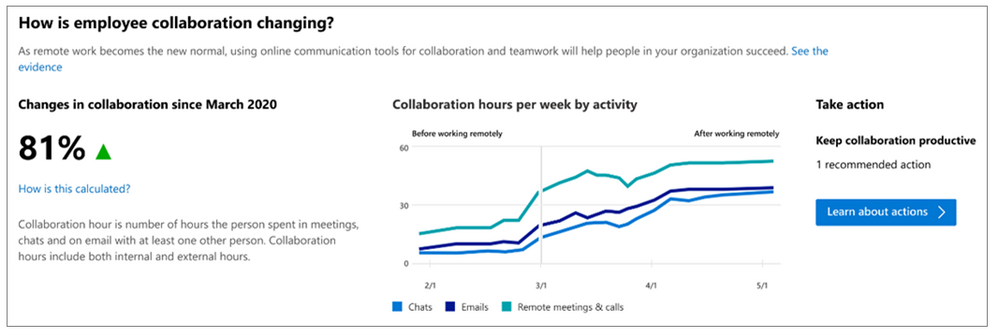
The Workplace Analytics team has updated and relocated the Business continuity report that we released in May of this year. This report now appears in the Microsoft Productivity Score area of the M365 admin center. It is available to any M365 customer tenant that has at least 100 active M365 users. Microsoft admins can access the report and they can share it with their business leaders.
The Business continuity report can help leaders answer questions such as:
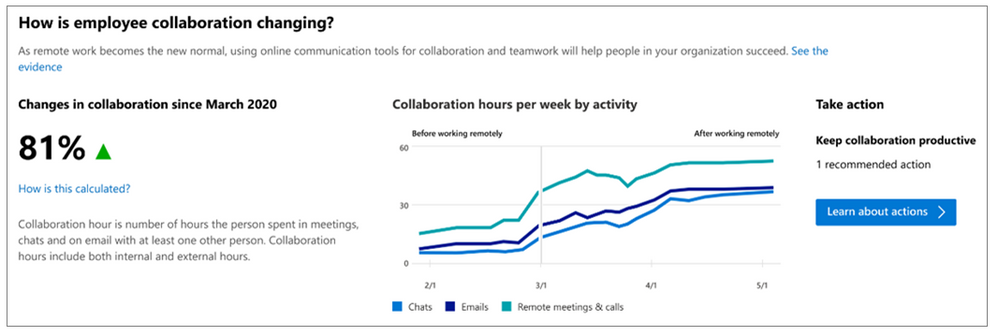
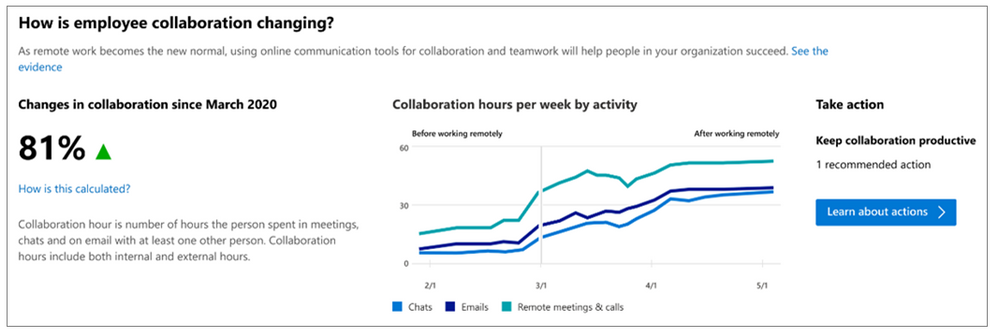
- How the shift to remote work has changed their employees’ collaboration habits:
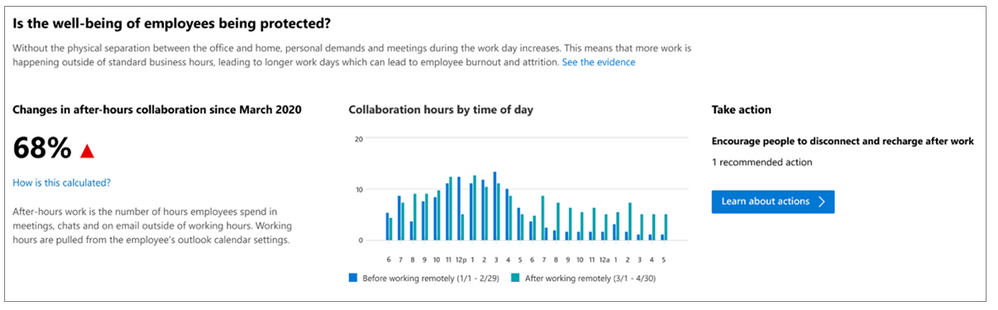
- How employees are adapting to the shift in work-life balance:
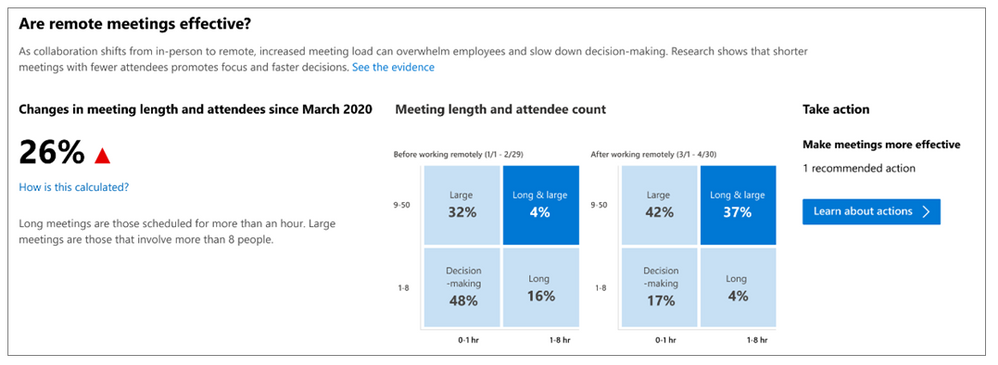
- Whether remote meetings are structured for effective decision-making:
- How ideation and knowledge-sharing are affected by remote work:
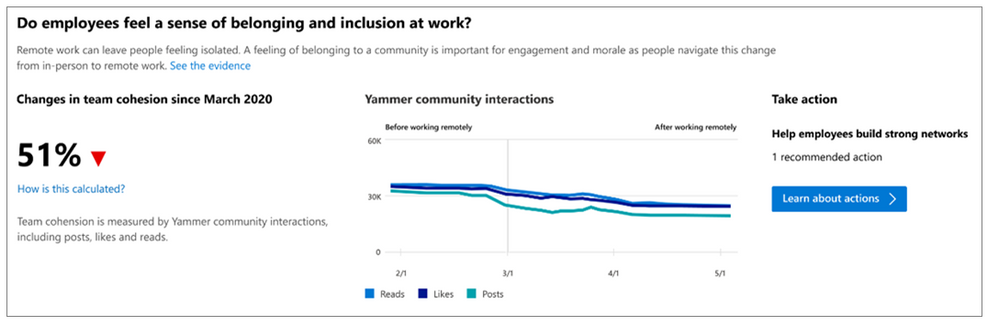
- Whether employees, though physically separated, maintain a sense of community at work:
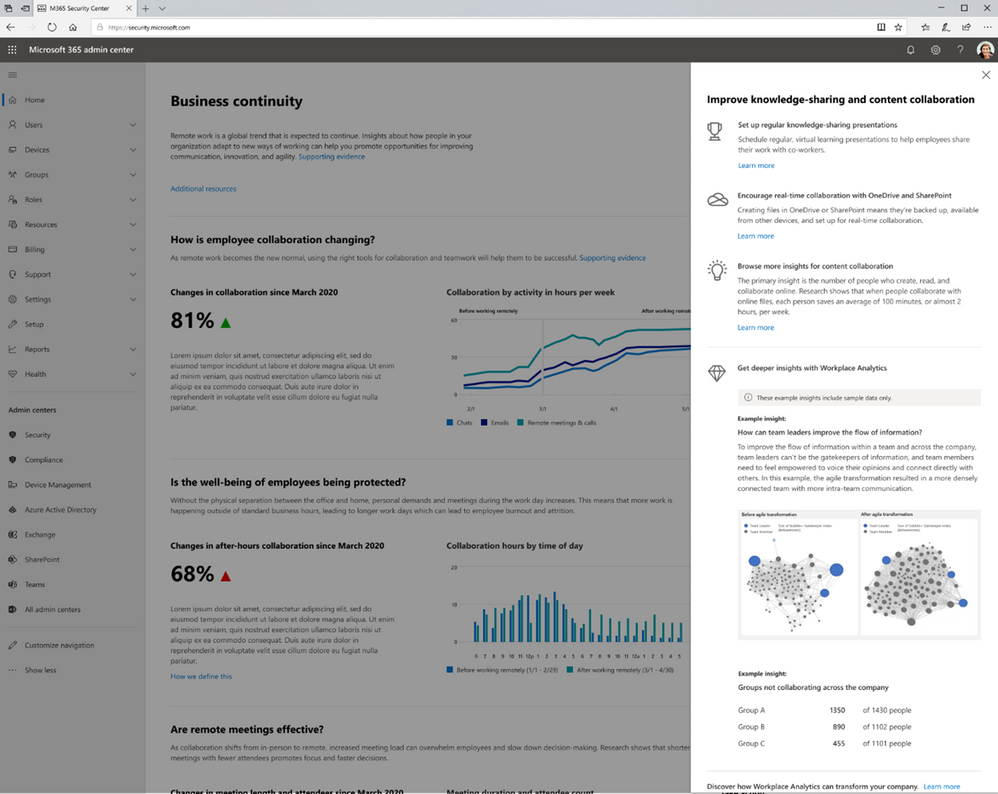
In addition, if you’re an admin or a senior leader, the Business continuity report helps you understand how Workplace Analytics can help you learn and do more. Selecting Take action on any of these reports opens a pane that describes both general best practices and the benefits of diving deeper into information that Workplace Analytics can provide. For example, the pane shown in the following screenshot gives more information about the question “Are employees able to create and share effectively while working remotely?”:
New ONA person-to-person query and metrics
Workplace Analytics now offers a new organizational network analysis (ONA) query and two new accompanying metrics. Our first ONA query, a person query, lets analysts measure Influence, a score of how well connected you are in the company.
This new query, the ONA person-to-person query, lets you measure the strength of connections through the following new metrics:
- The Strong ties metric measures how many strong and tight engagements a person has had. For example, a “strong tie” between a manager and a direct report reflects the amount of direct collaboration they have over time. Typically, a person has only a few strong ties because such ties take more effort to maintain.
- The Diverse ties metric measures how varied and how broad the person’s connections are. A person need not have much direct collaboration with their diverse ties, so it’s easy to have more diverse ties than strong ties. Diverse ties present good sources of fresh and varied information from across the company.
Measuring the quality, or strength, of an employee’s connections can help improve organizational functioning in various ways. For example, a manager’s effectiveness can improve if the manager has high network strength. Such managers have tight connections with their direct reports, they tend to have strong peer connections, and they have the right kind of connections outside the team. Well-connected managers know how to point inquisitive employees to the right people in their network. This makes it more likely that these employees become star performers, which of course reflects positively on the manager.
As for non-managers, the most effective employees also excel in part because of strong and rich networks. When high performers have broader internal networks, it indicates that they have relationships across a more diverse set of people, which promotes system-level thinking and problem solving.
Determine Strong ties and Diverse ties
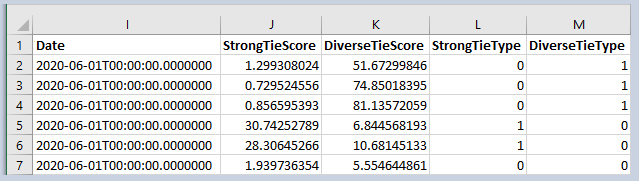
After you run the ONA person-to-person query, results appear in a .csv file, which you can open in Excel. They show the quality of the relationship between two specific (but de-identified) people. Each row shows the information for a pair of people between whom a tie exists, or existed, over the time period of the query.
In the query results, the first columns describe the initiator of the tie, the next columns describe the other participant in the tie, and the last columns give the results, in the form of the Strong ties and Diverse ties metrics. For example:
These metrics are presented as scores:
- StrongTieScore. Sort on this column to find employees with the highest scores. These high scores represent strong ties between the two individuals.
- DiverseTieScore. Sort on this column to find employees with the highest scores. These high scores represent diverse ties between the two individuals.
- StrongTieType. This column is present to help analysts quickly find the strongest ties. It contains values of 0, 1, or 2. The value 1 indicates that this row clearly indicates a strong tie — roughly, the top 10% of ties, by strength. “2” indicates a tie that is significant but less strong. “0” indicates a tie that’s not that strong.
- DiverseTieType. This column is present to help analysts quickly find the most diverse ties. IT contains values of 0, 1, or 2. The value 1 indicates that this row clearly indicates a diverse tie — roughly, the top 10% of ties, by diversity. “2” indicates a tie that is significant but less diverse. “0” indicates a tie that’s not that diverse.
For complete information about running this query and interpreting its results, see ONA person-to-person queries.
Increased number of non-global partitions
Based on feedback from multiple customers, we are now increasing to ten the number of non-global partitions, each of which can contain 10,000 licensed users. This feature is available to customers who have a current engagement with Workplace Analytics Customer Solutions.
You might want to take advantage of this new feature if any of the following apply to your organization:
- You need to create additional partitions based on business units, subsidiaries, or geographies.
- You need more than five partitions so that you can hide sensitive columns that should not be exposed to specific teams or because you have different personas who analyse your data.
Note the following about this change:
- Partitions remain an on-request feature for organizations that have a Customer Solutions engagement.
- Although non-global partitions are acquiring the new limit of 10,000 licensed users, there remains no maximum number of licensed users for the Global partition.
- This change has no impact on older partitions, even those that have more than 10,000 licensed users.

by Scott Muniz | Jul 8, 2020 | Uncategorized
This article is contributed. See the original author and article here.
Today we’re announcing a set of new features in Microsoft Teams that make virtual interactions more natural, more engaging, and ultimately, more human.
The post Reimagining virtual collaboration for the future of work and learning appeared first on Microsoft 365 Blog.
Brought to you by Dr. Ware, Microsoft Office 365 Silver Partner, Charleston SC.
by Scott Muniz | Jul 8, 2020 | Uncategorized
This article is contributed. See the original author and article here.
How a sudden and global shift to remote work may have a lasting impact on work.
The post The future of work—the good, challenging & the unknown appeared first on Microsoft 365 Blog.
Brought to you by Dr. Ware, Microsoft Office 365 Silver Partner, Charleston SC.
by Scott Muniz | Jul 8, 2020 | Uncategorized
This article is contributed. See the original author and article here.
We’re getting ready for our upcoming announcements for partners and customers at Microsoft Inspire this month. Until then, here’s our latest set of updates. See what’s next in our Office Hours series, see how organizations are using Intelligent Capture, tell us more about how you’ll use content connectors, learn how organizations use Microsoft 365 Content Services, and join us for more virtual events.
More Office Hours meetings on their way…
We’re excited to extend the Project Cortex Office Hours series through the summer!
Tune in on July 22 (download invite) to hear Microsoft 365 and Project Cortex updates and news from Microsoft Inspire. And on August 12 (download invite) to learn more about the business case for Project Cortex.
Miss the last meeting? Visit the Office Hours series page for meeting recaps (like those below) and upcoming meeting invites.
Project Cortex spotlight
Watch the Microsoft Services roundtable on Project Cortex to see what Project Cortex is and how you can build solutions around it to solve real business challenges.
This roundtable discussion provides an overview and walk-through of core functionality and the architecture that drive these knowledge services. It also features a demo on how Project Cortex can be combined with other Microsoft 365 services, like Microsoft Search and the Power Platform, to build a purchase order dashboard.
Microsoft/AIIM Industry Watch 2020 on Intelligent Capture
Read the latest Microsoft/AIIM Industry Watch on four strategies to conquer information chaos with Intelligent Capture, assisted by AI. The report focuses on how organizations use AI to help automatically process and categorize incoming information in all forms as it enters the organization, and automatically extract the data and information that is necessary to initiate or drive core business processes. The report also includes 12 tips to set the right foundation for automated capture.
Want the stats to power your next conversation? View the related infographic: 10 things you need to know about Intelligent Capture.
Tell us more about content connectors
Are you using or planning to use content connectors to expand the types of content sources that appear in Microsoft Search results. If so, fill in this brief 10-question survey to tell us more about your interest in connectors – including building your own connectors.
Upcoming events
Hear more from Microsoft about Knowledge and Project Cortex at an upcoming virtual event.
Microsoft Inspire | July 21-22, 2020
Registration now open for Microsoft’s annual partner event!
Catch up on recent events
SIKM Boston: Overview of Knowledge in Microsoft 365 with Project Cortex (replay)
Microsoft 365 Virtual Marathon (replay)
Galactic Collaboration Summit (replay)
GlobalCon2 (replay)
Learn about our customers and partners
Read our blog posts on how Microsoft Content Services partners help customers drive digital transformation and catch up on several customer stories from our partners:
Compliance and records management
Colligo Email Manager and Microsoft 365 enabled a global equipment supplier to inform responsive sales outreach
Information Leadership implemented Microsoft 365 at Central Hawke’s Bay District Council for widespread Public Records Act compliance grade EDRMS
Repstor helped National Grid use Office 365 to enable greater consistency and efficiency in legal matter management
Workflow and extensions
MondayCoffee helped R&M introduce a digital workplace based on Microsoft 365
Information Leadership helped Gisborne District Council develop a new Microsoft 365-based intranet
Adobe Sign and Microsoft solutions helped Iowa State University Foundation maximize investments
Mint Group is helping CIDB embrace digital transformation with Microsoft 365, Dynamics 365, and Azure
For more related stories, see our Case Studies library on the Microsoft Tech Community Resource Center.
Visit the Project Cortex resource center to learn more. Thanks.


Recent Comments