by Scott Muniz | Jul 13, 2020 | Uncategorized
This article is contributed. See the original author and article here.
Have you ever misplaced something? Maybe it was your car keys, your favorite jewelry, or something else… The typical process you go through is probably something like this – you ask yourself the question, “where did I put my keys” and then walk backward from where you last went, which rooms you were last in…
That process is synonymous with a traditional search experience, a query and continuous refining of the query until you find what you were looking for – while this process may work for you on one occasion, it’s not consistent enough to be valuable in the future, and what if the keys you’re looking for, aren’t the ones you misplaced, but those of a roommate, partner, or someone else?
This is why search needs to evolve, to become more personal, more context aware, and more available so wherever you are, whatever it is, you can find it the first time, with minimal effort, and precision.
Microsoft Search is the evolution of search, smarter search to help you stay in touch with what’s important and trending around you in Microsoft 365 and your connected systems.
New Search Locations
Contextual Search in Microsoft Teams
Find information faster with contextual search in Microsoft Teams. Users will now have the ability to search for content in a specific channel or chat by pressing CTRL + F. Search results will only contain messages and files found in the selected chat or channel.
Learn more on searching for messages and more in Microsoft Teams at https://support.microsoft.com/en-us/office/search-for-messages-and-more-in-teams-4a351520-33f4-42ab-a5ee-5fc0ab88b263.
New Search Answers
Acronym search in SharePoint and Office.com
Did you know that 2-3% of search queries entered by employees are related to acronyms? The new Acronyms feature in Microsoft Search helps users navigate their company’s often-confusing alphabet soup.
Then, when users come across an acronym they may not recognize, a simple search in SharePoint, Office.com, or Bing will reveal common definitions from your organization’s unique definitions in addition to AI mined suggestions from files and conversations.
Learn more about creating and curating acronym answers at https://docs.microsoft.com/en-us/microsoftsearch/manage-acronyms.
Customization & Extensibility
Enrich Profile Cards in Office 365
The hundreds of millions of users of Microsoft 365 cloud services form part of the core of Microsoft Graph. The users’ data is carefully managed, protected, and with proper authorization, made available by Microsoft Graph services to drive productivity and creativity in businesses.
People are the heart and soul of intelligent insights in the Microsoft Graph, but more importantly of your company – but finding the right people at the right time isn’t always easy. Sometimes you’re looking for more than just a name and face, maybe it’s a skill, location, or something else.
Now via the Microsoft Graph you can add any of the existing or 15 custom attributes to an individual’s profile card.
Learn more about enriching Office 365 profile cards at https://techcommunity.microsoft.com/t5/microsoft-search-blog/add-additional-properties-to-the-profile-card-using-the-profile/ba-p/1496467.
PnP Modern Search
We’ve updated PnP Modern Search at https://github.com/microsoft-search/pnp-modern-search. Check out the latest release for more news about this update.
Connectors
Microsoft Search increases productivity and saves time finding information, whether at work, at home, or on the go. In the workplace, Microsoft Search reaches across all enterprise content and across all entry points with a consistent and familiar user experience.; however, search is most powerful when it brings together information and insights across data sources…
Last month we expanded availability Microsoft Graph connectors for Microsoft Search to Targeted Release – as we continue to enable organizations to connect their disparate systems to Microsoft Search through Microsoft and partner connectors, we’re looking for feedback on where we can improve and what connectors we should consider moving forward.
Salesforce Connector Preview Program
As we continue to develop native connectors for Microsoft Search, we’d like to invite you or your customers to participate in a private preview program for our upcoming Salesforce connector.
We’re excited to work with you to learn how you would use this connector and listen to your feedback. We’d love to have a range of customers and partners of different sizes and industries with a wide variety of business scenarios. Since we are still in very early stages, please use the form below to nominate your customer or organization for private preview inclusion and we will contact you if your organization is accepted.
Nominate your organization at https://techcommunity.microsoft.com/t5/microsoft-search-blog/nominate-your-organization-for-our-salesforce-connector-preview/ba-p/1513043.
Connect Feedback Survey
Are you using or planning to use content connectors to expand the types of content sources that appear in Microsoft Search results. If so, fill in this brief 10-question survey to tell us more about your interest in connectors – including building your own connectors.
Other Updates and Announcements
Recently, Microsoft commissioned Forrester Research to help quantify the benefits companies saw when they actively used and promoted using Microsoft Search through Bing. To do so, Forrester spoke with IT Pros at seven different organizations about how they functioned before and after using Bing as an entry point to the Microsoft Search experience.
Learn more about the TEI study and view the results at https://techcommunity.microsoft.com/t5/microsoft-search-blog/how-it-pros-saved-time-money-and-reduced-helpdesk-headaches-with/ba-p/1443490.
Keep up to date with the latest on Microsoft Search by following us on Twitter @MicrosoftSearch or at the Microsoft Search Resource Center on the TechCommunity.

by Scott Muniz | Jul 13, 2020 | Uncategorized
This article is contributed. See the original author and article here.
Do you want to become a ninja for Microsoft Defender ATP? We can help you get there! We collected content for two roles: “Security Operations (SecOps)” and “Security Administrator (SecAdmin)”. The content is structured into three different knowledge levels, with multiple modules: Fundamentals, Intermediate, and Expert. Some topics can be relevant for SecOps as well as for SecAdmins and are listed for both roles. We will keep updating this training on a regular basis and highlight new resources.
Table of Contents
Security Operations Fundamentals
Module 1. Technical overview
Module 2. Getting started
Module 3. Threat and vulnerability management
Module 4. Attack surface reduction
Module 5. Next generation protection
Module 6. Investigation – Incident
Module 7. Alert handling
Module 8. Automated investigation and remediation
Module 9. Microsoft Threat Experts
Module 10. Reporting
Module 11. Evaluation Lab
Security Operations Intermediate
Module 1. Architecture
Module 2. Threat and vulnerability management
Module 3. Next generation protection.
Module 4. Advanced hunting
Module 5. Automated investigation and remediation
Module 6. Threat analytics
Module 7. Unified indicators of compromise (IOCs)
Module 8. Evaluation lab
Module 9. Community (blogs, webinars, GitHub)
Security Operations Expert
Module 1. Responding to threats
Module 2. Alert handling
Module 3. Deep file analysis
Module 4. Advanced hunting
Module 5. Unified indicators of compromise IOCs
Module 6. Custom reporting
Module 7. Community (blogs, webinars, GitHub)
Security Administrator Fundamentals
Module 1. Architecture
Module 2. Onboarding
Module 3. Grant and control access
Module 4. Security configuration
Module 5. Reporting
Module 6. SIEM Integration
Security Administrator Intermediate
Module 1. Threat and vulnerability management (TVM)
Module 2. Attack surface reduction
Module 3. Next generation protection
Module 4. Advanced hunting
Module 5. Conditional access
Module 6. Microsoft Cloud App Security (MCAS)
Module 7. Community (blogs, webinars, GitHub)
Security Administrator Expert
Module 1. Custom reporting (PowerBI)
Module 2. Advanced hunting
Module 3. Custom Integrations, APIs
Learn about our partner integrations
Legend:
|
Product videos
|
 Webcast recordings Webcast recordings
|
 Tech Community Tech Community
|
|
 Docs on Microsoft Docs on Microsoft
|
 Blogs on Microsoft Blogs on Microsoft
|
 GitHub GitHub
|
|
⤴ External
|
 Interactive guides Interactive guides
|
|
Security Operations Fundamentals
Module 1. Technical overview
Module 2. Getting started
Module 3. Threat and vulnerability management
Module 4. Attack surface reduction
Module 5. Next generation protection
Module 6. Investigation – Incident
Module 7. Alert handling
Module 8. Automated investigation and remediation
Module 9. Microsoft Threat Experts
Module 10. Reporting
Module 11. Evaluation Lab
Security Operations Intermediate
Module 1.Architecture
Module 2. Threat and vulnerability management
Module 3. Next generation protection
Module 4. Advanced hunting
Module 5. Automated investigation and remediation
Module 6. Threat analytics
Module 7. Unified indicators of compromise (IOCs)
Module 8. Evaluation lab
Module 9. Community (blogs, webinars, GitHub)
Security Operations Expert
Module 1. Responding to threats
Module 2. Alert handling
Module 3. Deep file analysis
Module 4. Advanced hunting
Module 5. Unified indicators of compromise IOCs
Module 6. Custom reporting
Module 7. Community (blogs, webinars, GitHub)
Security Administrator Fundamentals
Module 1. Architecture
Module 2. Onboarding
Module 3. Grant and control access
Module 4. Security configuration
Module 5. Reporting
Module 6. SIEM Integration
Security Administrator Intermediate
Module 1. Threat and vulnerability management (TVM)
Module 2. Attack surface reduction
Module 3. Next generation protection
Module 4. Advanced hunting
Module 5. Conditional access
Module 6. Microsoft Cloud App Security (MCAS)
Module 7. Community (blogs, webinars, GitHub)
Security Administrator Expert
Module 1. Custom reporting (PowerBI)
Module 2. Advanced hunting
Module 3. Custom Integrations, APIs
Learn about our partner integrations
by Scott Muniz | Jul 13, 2020 | Uncategorized
This article is contributed. See the original author and article here.
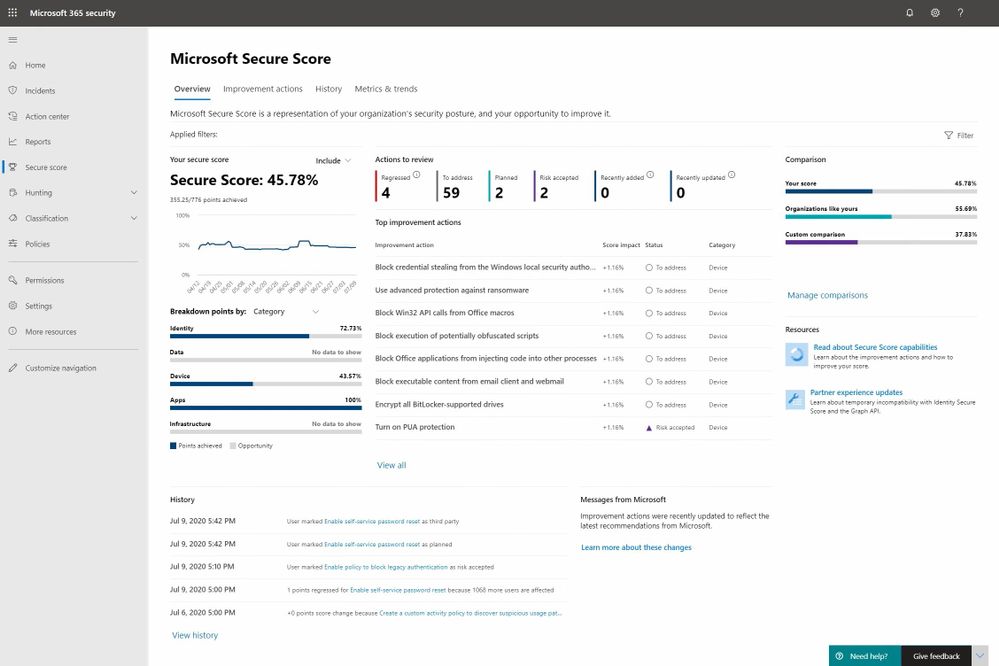
Earlier this year we blogged about the latest public preview of Microsoft Secure Score and today we’re pleased to announce that we‘ve completed our global roll out making it generally available to all of our customers.
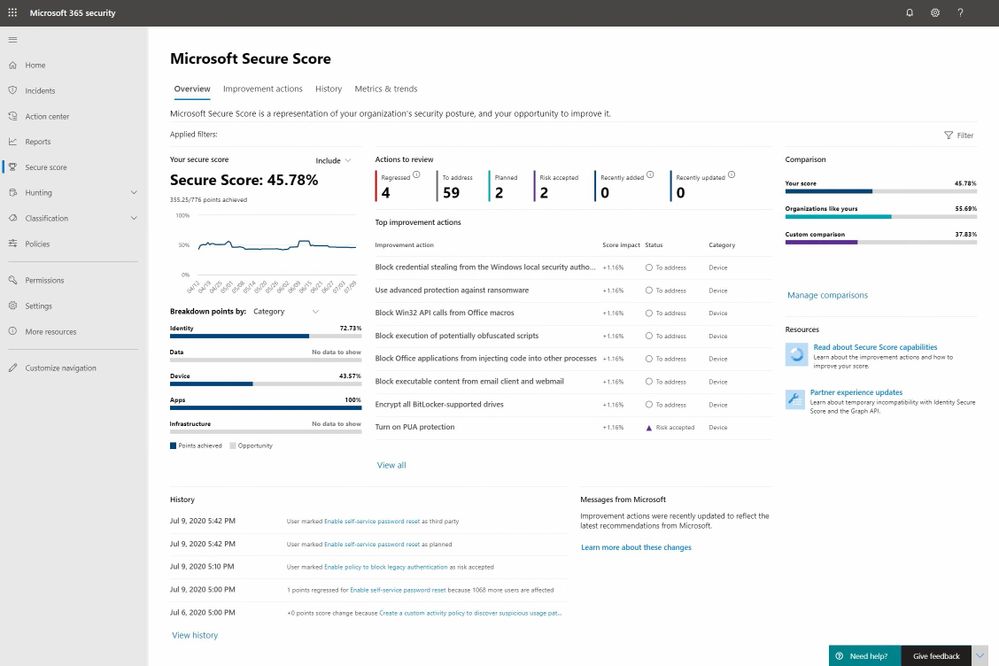
As mentioned in the last blog this a major release for us and it marks Microsoft Secure Score’s transition from simply being a gamified list of security recommendations to one that we think is on its way to becoming the go-to posture management app for security administrators. There’s lots of work left to do to achieve that aspiration, but we feel we’re well on our way.
With this release, we focused on the following areas:
- Improving the assessment and scoring models
- Adding planning, workflow and posture monitoring improvements
- Adding metrics and trend reports to drive meaningful planning and status discussions with leadership
Our previous blog provides all of the details on these investments and our brand new Mechanics video helps bring them to life so today’s blog is going to focus on some key changes and feedback that came out of the public preview program.
During the public preview we’ve seen strong usage growth and there has been no shortage of feedback along the way. Much of it helped us further refine the user experience and your ideas jammed the long-term roadmap with a lot of great ideas. With that said there are two areas of change that we think are important to mention as everyone transitions to the new release.
Improvement Action Changes
The area that we received the most feedback on was related to Improvement Actions. As a product team and a community we’ve had to work together to learn what constitutes an Improvement Action worth adding to the product and to be honest we (Microsoft) didn’t get it perfect in our previous releases. Here are some new principles you helped us define that will enable us to help ensure that only the right types of Improvement Action make it into the system:
- Status of Improvement Actions must be measurable through automation
- Improvement actions when implemented must render a measurable level of risk reduction
Without these principles Microsoft Secure Score only provides a directional view of your posture status rather than the precise measurement we had in mind.
The new principles correct this problem but there is a trade-off that had to be made which will impact a subset of the existing Improvement Actions. The trade-off is that Improvement Actions that violate these rules must now be removed from the product at least temporarily. There are two classes of Improvement Actions that are impacted by these new principles including:
Not Scored
Not scored improvement actions we’re those that lacked automation to determine control status. Improvement actions of this type have been removed until automation can be added at which point, they can return to the product.
Review
Review improvement actions were recommendations that suggest a security administrator review a report or something similar and then take the appropriate actions. Unfortunately, these actions couldn’t be monitored or measured. Like Not Scored Improvement Actions these will be removed until automation can be added.
In addition to these changes customers have informed us that some Improvement Actions where yielding inaccurate numbers in certain scenarios. To address this problem the engineering team expanded their testing coverage and a number of multi-factor authentication and other Improvement Actions have been fixed in response.
A complete list of the Improvement Actions that have been temporarily removed because of accuracy issues can be found at the following pages: Previous Version and Public Preview.
Security related scores in other Microsoft 365 and Azure Security products
Another point of recurring feedback is related to security scores showing up in various user experiences across Microsoft 365 and Azure. The thrust of the questions tends to be about whether they are aligned, are different, etc. Here is how to think about it.
The vision for Microsoft Secure Score is that it will be the centralized user experience for all security related points and Improvement Actions across Microsoft 365 and Azure workloads. Individual products can include a secure score experience scoped to their workload however they must align to the Microsoft Secure Score design patterns and branding. They must also forward their score and improvement action data to Microsoft Secure Score so that it can provide the end to end super set view for an organization’s security posture.
At the moment the Azure workloads are yet to start sending their data however as you’ll notice in the new Microsoft Secure Score experience everything is plumbed in for the day when that data starts to flow into the system. We are still in the process of determining a date for this and will keep you posted when it becomes more clear.
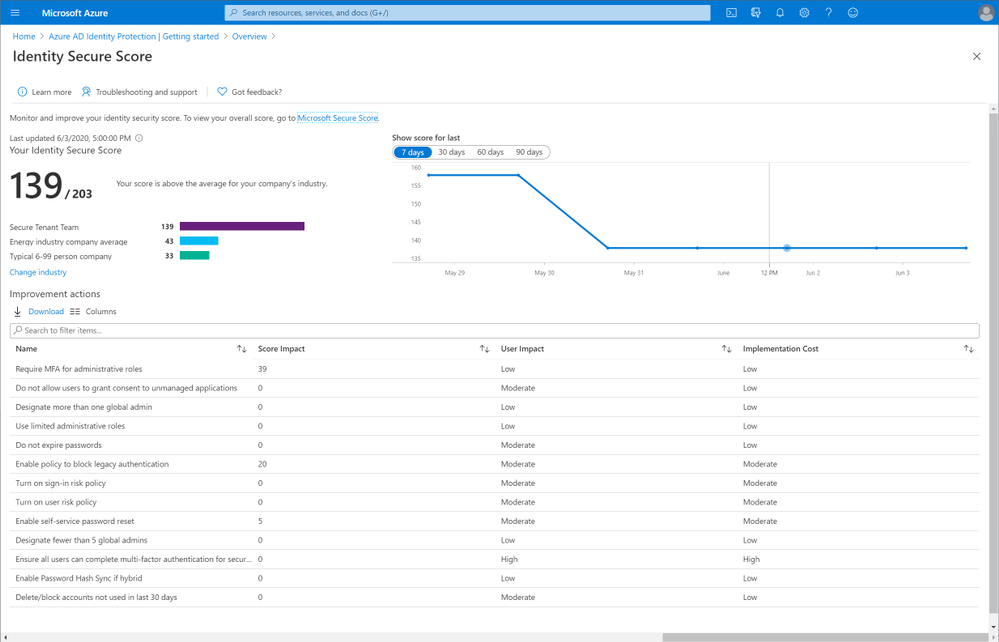
As mentioned a moment ago we have defined a common set of design patterns and branding for all products to align on however the transition to this new state across all of Microsoft 365 and Azure is a work in progress. For this reason, you may see secure score experiences like the following which are not yet aligned. The changes for this particular example are straight forward and you can anticipate Identity Secure Score will soon be rebranded to Microsoft Secure Score for Identity. At this time the score will be change from the # Points Achieved to the % Complete model that Microsoft Secure Score has just transitioned to.
That covers it for today. Thanks for your interest in Microsoft Secure Score and we hope you enjoy the new release. Please logon and take and look and if you have any questions or feedback feel free to leave them in the comments section below.
by Scott Muniz | Jul 13, 2020 | Azure, Microsoft, Technology, Uncategorized
This article is contributed. See the original author and article here.
This post was inspired by Azure/Azure-Api-Management-DevOps-Resource-Kit and targets the How-To process vs the semantics of the problem and the proposed solution, which are very well defined in the Resource Kit GitHub page as well as providing release builds and source code for the tools used throughout this guide.
In this scenario our Azure API Management service (APIM for short) has been deployed and in production for some time already, the API publishers and API developers all use the Azure Portal to operate the service and launch new APIs. Publishers and Developers have agreed that it is time to adopt a DevOps process to streamline the development, management, and environment promotion of their APIs.
This is a transformation journey, thus it is important to keep in mind that the current Prod APIM will still be Prod. Our journey will:
- Provision Dev environment
- Adopting a DevOps process
- For API publishers
- For API developers
- Going Prod with DevOps
Provision Dev environment
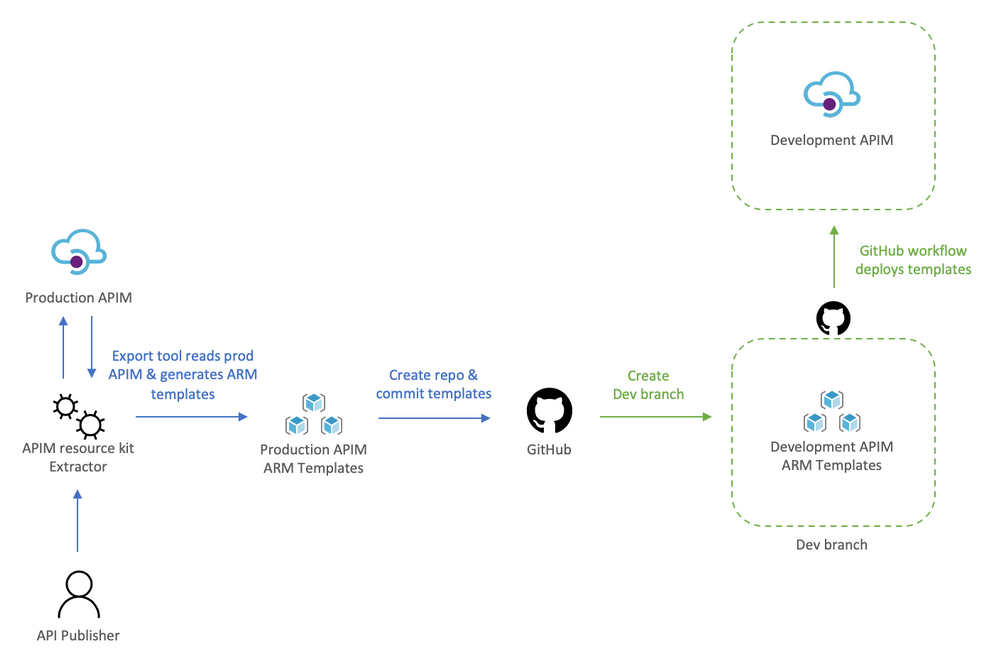
The Dev environment is created by taking a snapshot of Prod to achieve symmetric between the two environments. During this step the two instances are not synchronized, therefore, you can either abstain from making changes to Prod, or repeat the initial manual deployment of Dev.
We will:
- Use the extractor tool to capture the current Prod deployment,
- Check the Prod ARM templates into a new repository, and create a dev branch,
- Deploy dev branch to our Dev environment
To help us visualize the process let’s take a look at the following diagram:
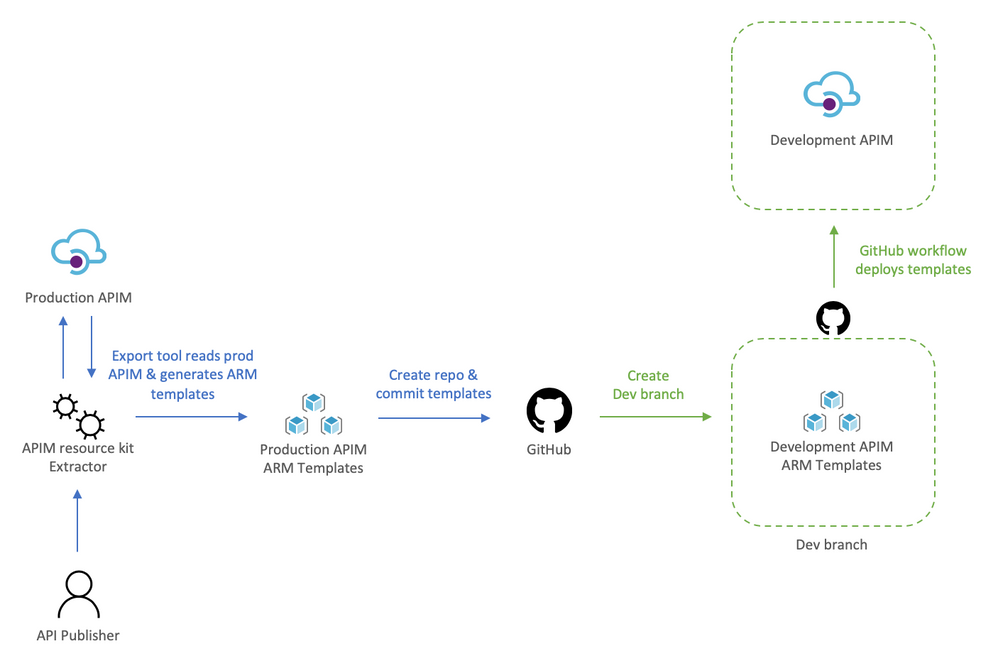
Using the extractor tool to capture Prod
Because we are in a transformation journey, we want the capture to entirely reflect Prod, thus the config used for the Extractor is set to use the production APIM as the source and the destination, this way the ARM templates generated are always production ready. Remember, we are creating development off production, we will override parameters at deployment time to target the Dev instance.
The config file defines how the Extractor will generate the templates, the following apimExtract.json will use the same instance as the source and target, split each API into its own entity, and parameterize most of the assets needed.
{
    "sourceApimName": "apim-contoso",
    "destinationApimName": "apim-contoso",
    "resourceGroup": "Prod-Serverless-App1",
    "fileFolder": "./contoso",
    "linkedTemplatesBaseUrl": "https://raw.githubusercontent.com/romerve/RvLabs/master/servless-devops/apim/contoso",
    "policyXMLBaseUrl": "https://raw.githubusercontent.com/romerve/RvLabs/master/servless-devops/apim/contoso/policies",
    "splitAPIs": "true",
    "paramServiceUrl": "true",
    "paramNamedValue": "true",
    "paramApiLoggerId": "true",
    "paramLogResourceId": "true"
}
Extract the current deployment of your environment:
apimtemplate extract --extractorConfig apimExtract.json
The initial extraction saves the ARM templates to contoso folder. This folder will only store files that have extracted and that are considered service level.
Once the extractor finishes generating the ARM templates, they need to be added to a repository. This will give us a master branch with production ready templates, which will later be automatically deployed via Pull Request ( PR ).
Checking ARM templates into the repository
Head over to Github and create a new repository. Prepare your folder hierarchy before adding, committing, and pushing the ARM templates.
At the root, we have two folders:
- contoso: which is the folder created by the extractor tool and contains the templates
- apis: this folder is not used now, but will be used later for all API development, and used by API developers
With the initial commit done, we are ready to create a the dev branch:
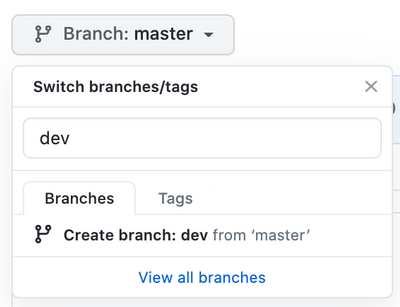
Checkpoint: by now you should have:
- ARM templates of Prod APIM instance
- A repository with Prod templates checked into master
- A new dev branch
Deploy dev branch to Dev APIM
I’ll be using GitHub Actions to automate deployments to Dev APIM and subsequently to Prod APIM.
The workflow Dev-Apim-Service.yaml has the following responsibilities:
- Set environmental variables at the job scope so they can be used across the entire workflow. Besides specifying the dev resources to target, we use a built in variable GITHUB_REF to build URLs used for dev deployments. Additionally, because service level changes and APIs can be develop at different rates, we use On.Push.Paths to specifically where service level templates are placed.
- Uses the Checkout Action and the Azure Login Action. The Azure Login action makes use of a service principal to login and run commands against your Azure subscription. To create and use a service principal, create a GitHub secret with the output of:
az ad sp create-for-rbac
--name "myApp" --role contributor
--scopes /subscriptions/{subscription-id}/resourceGroup/{resource-group}
--sdk-auth
# Replace {subscription-id}, {resource-group} with the subscription, resource group details of your APIM environments
- The las two actions: Deploy APIM Service and APIs, and Deploy APIs will use the Azure CLI to deploy the service template, and then each of the extracted APIs. Important to note that here even when we use the parameters file, we still override the service name and URLs so that the proper environment is used. The Deploy APIs step queries APIM using az rest to get a list of APIs to iterate over the APIs and deploy them.
At this point you should have a full CI/CD workflow that automatically deploys your Dev branch into your Dev APIM instance. Before continuing, this would be a good place to validate the Dev instance and ensure all is working as expected.
Adopting a DevOps process to manage, operate, and develop APIs in Azure API Management
Once the initial Dev APIM has been created it is important that the two personas: API publishers, and API developers incorporate new steps in their process. Typically, API publishers will use the Azure Portal to make changes, and API developers would be working with OpenAPI, but this could also cause configuration drift, and having the two instances running different APIs.
Therefore, API publishers and developer need to incorporate the Azure APIM Resource Kit in their process workflow. need use the Extractor tool as the last step in their process.
For API publishers
The following diagram illustrates how an API publisher would work with the Dev APIM.
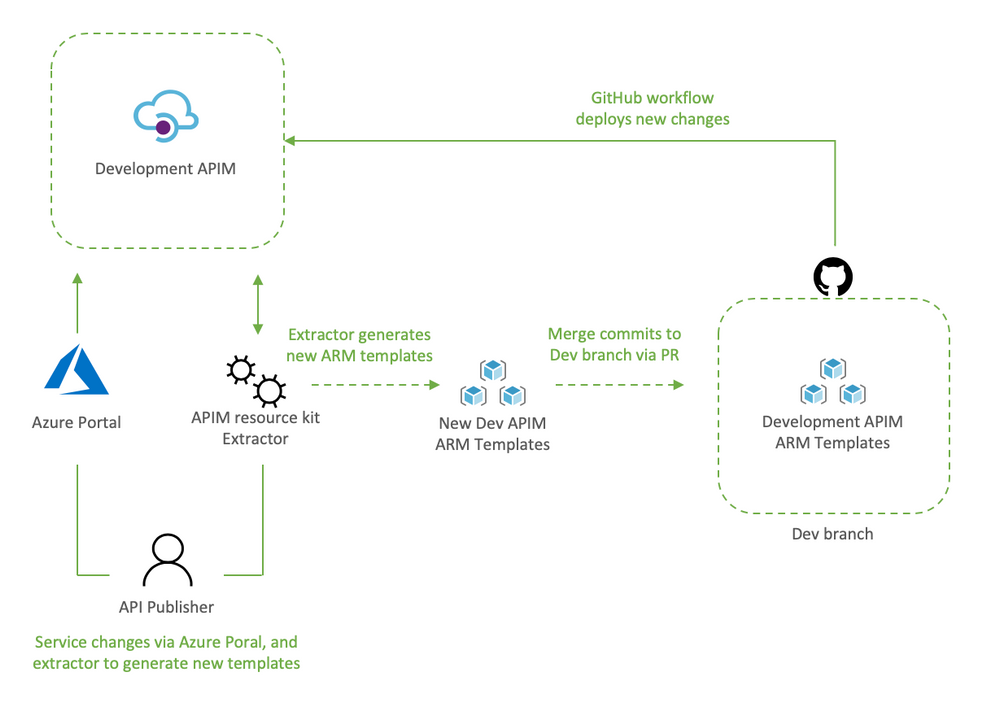
API publishers would:
- Clone the Dev branch to their local environment
- Make the desired changes to Dev APIM using the Azure Portal
- Capture the newly applied changes by running extrator tool (apimtemplate extract –extractorConfig apimExtract.json ) against the Dev APIM
- Add, and commit the new or updated templates into the locally cloned repo (git commit -a)
- Push the updated templates to automatically re-deploy the changes to Dev APIM (git push)
The reason the changes done via the portal are then re-applied to Dev APIM via Github Actions it’s validate that templated can be successfully deployed via code, and it allows for dev branch to be merged into master via PR.
Dev branch deployments is triggered by Dev-Apim-Service.yaml, which filters branch level events to only include changes done to contoso and overrides parameters to target Dev APIM.
For API developers
The diagram would show what a developer process would look like.
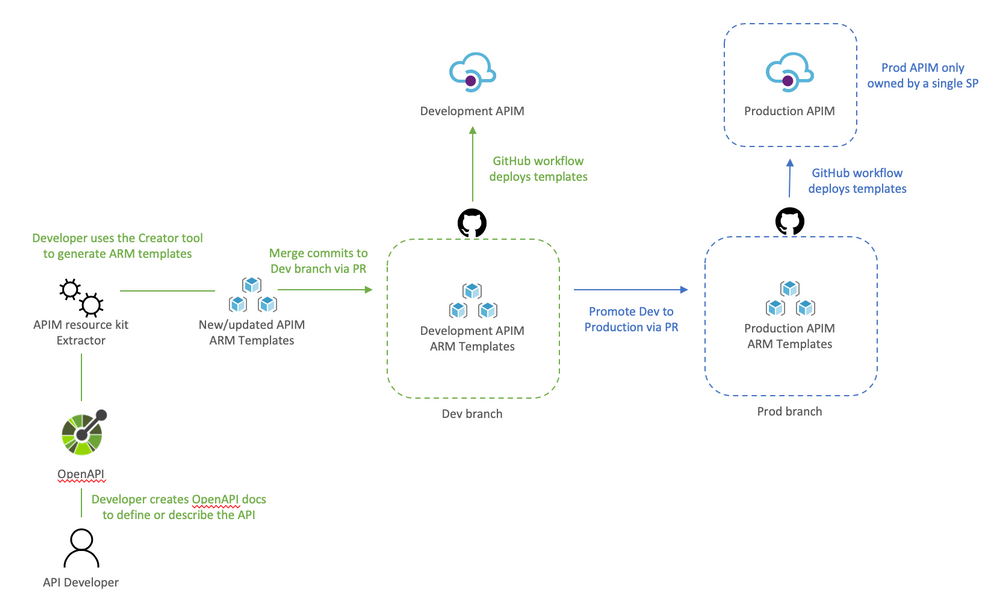
API developers would:
- Clone dev branch to their local environment
- Define or update API docs
- Use the creator tool to generate ARM templates (apimtemplate create –configFile ./apis/<API-FOLDER>/<API>.yml)
- Add, and commit new or updated templates into the locally cloned repo (git commit -a )
- Push the changes to trigger the Dev deployment (git push)
The reason the APIs are saved to apis instead of somewhere inside contoso folder it’s so that developing APIs does not trigger an APIM service deployment. And using a separate workflow Dev-Apim-Apis.yaml we can better control how the two are triggered and deployed.
Going Prod with DevOps
Once Dev APIM is validated and publishers and developers have incorporated the changes in their process, it is time to promote Dev to Prod. The promotion it’s done by creating a pull request from dev to master as illustrated below.
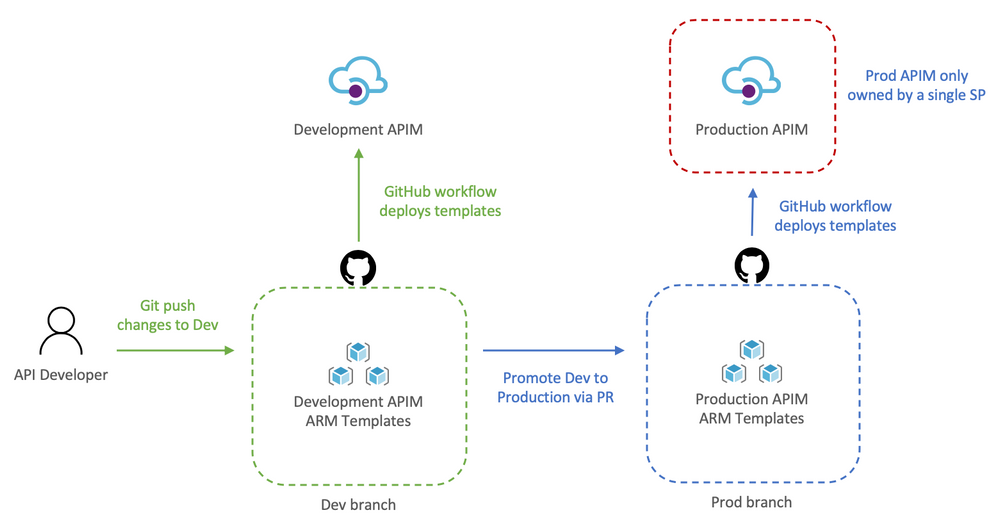
Let’s review how this works:
- API developer push changes to repo’s dev branch
- The push triggers the workflow to automatically deploy Dev APIM
- API developer creates a pull request
- The team reviews the PR and approves the PR to merge dev changes into master
- Merging into master triggers Github Actions to deploy to prod
Because the templates’ parameters files already target prod there is no need to override anything, therefore, the CD workflow simply deploys any templates it finds in contoso and apis.
Now that Dev and Prod are deploying successfully, we apply RBAC permissions to Prod just to make sure that no one can access the resource via the portal, cli, powershell, etc and make “unmannaged” changes. This can be done by:
- Launch the Azure Portal and select the Prod Resource Group
- Select Access Control (IAM)
- Remove any previously assigned roles
by Scott Muniz | Jul 13, 2020 | Azure, Microsoft, Technology, Uncategorized
This article is contributed. See the original author and article here.
Howdy folks,
Today we’re announcing the public preview of the ability to sign-in to Azure AD with email in addition to UPN (UserPrincipalName). In organizations where email and UPN are not the same, it can be confusing for users when they can’t use their familiar email address to sign-in. With this preview capability, you can enable your users to sign in with either their UPN or their email address, helping them avoid this confusion.
This feature can be enabled by setting the AlternateIdLogin attribute in the HomeRealmDiscoveryPolicy. Please use the instructions in our documentation to set this up in your organization.
Some customers are using capabilities in Azure Active Directory (Azure AD) Connect to achieve this today, but that requires them to set the email address as the UPN in Azure AD. With this preview capability, you can now use the same UPN across on-premises Active Directory and Azure AD to achieve the best compatibility across Office 365 and other workloads, while still allowing your users to sign in with either their UPN or email, further simplifying their experience.
We hope this change simplifies the sign-in experience for your end users.
As always, we’d love to hear any feedback or suggestions you may have. Please let us know what you think in the comments below or on the Azure AD feedback forum.
Stay safe and be well,
Alex Simons (@Alex_A_Simons)
Corporate VP of Program Management
Microsoft Identity Division



Recent Comments