by Scott Muniz | Jul 15, 2020 | Azure, Microsoft, Technology, Uncategorized
This article is contributed. See the original author and article here.
High-performance computing (HPC) can be expensive and complex to set up and use efficiently. Traditionally, HPC has been restricted to academia, research institutes, and enterprises with the capacity to operate large datacenters. Furthermore, it has always been a challenge to deliver optimized HPC systems with complex workflows involving different applications in a user-friendly and accessible environment. Dev Subramanian, CTO at Drizti Inc., elaborates on the challenges and describes how the Toronto startup aims to democratize HPC with Microsoft Azure:
Even enterprises that can afford to build massive datacenters can deliver HPC from only a few locations, limiting the availability of HPC for a globally distributed workforce. Additionally, applications requiring HPC generate a lot of data, and a centrally located datacenter increases the strain on networks.
These inherent complexities have limited the use of HPC across industries, slowing down cutting-edge innovation and leading organizations to investigate ways to make HPC more accessible and easier to use.
Drizti offers a cloud-based HPC platform for “personal supercomputing.” The HPCBOX platform on Microsoft Azure Marketplace delivers turnkey vertical solutions with optimized HPC for accelerating innovation in advanced manufacturing, machine learning, artificial intelligence, and finance. Drizti’s mission is to make supercomputing technology accessible on the PC of every scientist, developer, and engineer, wherever they are and whenever they need it.
With 58 global regions and availability in 140 countries, Azure is one of the few public cloud infrastructure providers focused on implementing HPC capability in the cloud.
Various Azure instance sizes are built for handling HPC workloads and are offered alongside high-speed RDMA InfiniBand networking and high-performance file systems. Furthermore, the rich set of APIs that Azure exposes enables HPC to be combined with other services, and this is what Drizti has done with its HPCBOX platform.
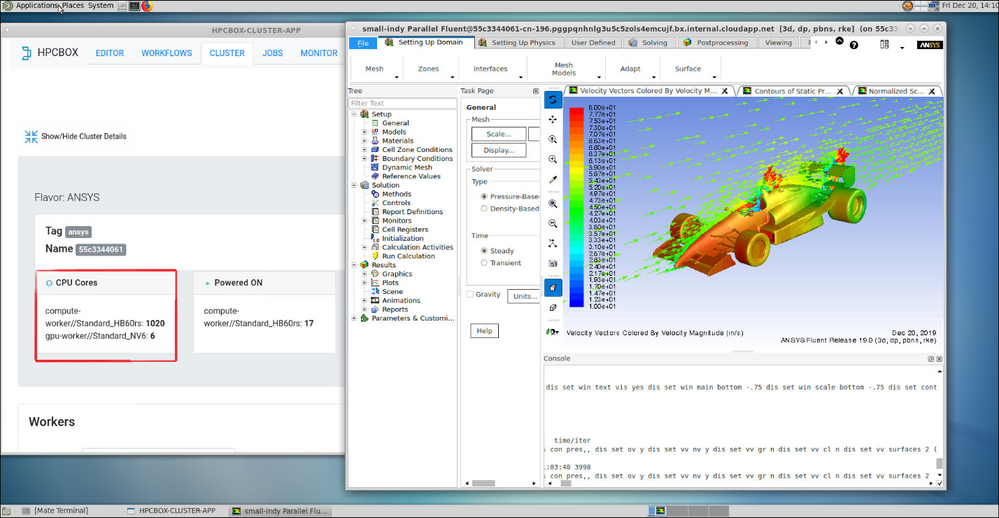 HPCBOX user interface
HPCBOX delivers a fully interactive, workflow-enabled HPC platform for automating complex application pipelines. It offers a PC-like user experience and delivers various turnkey vertical solutions optimized for applications such as ANSYS, Simcenter STAR-CCM+, Siemens Nastran, Abaqus, Horovod, SU2, OpenFOAM, and many others that can benefit from big compute on Azure. The HPCBOX platform uses big compute capabilities Azure offers, including state-of-the-art HB2, HB, HC, H, N, and NC-Series instance sizes.
Through the reach of the Azure Marketplace, HPCBOX delivers turnkey HPC solutions directly within an end user’s subscription, whether it is an EA, web-direct, or CSP subscription. This approach lets users access HPC for their applications within minutes of deploying an HPCBOX cluster while remaining compliant with all the corporate policies set by their organization. Furthermore, by delivering the HPCBOX solution directly within a user’s subscription, Drizti can make sure all the data resides within the user’s subscription and in their region of choice.
Finally, being a Microsoft co-sell certified solution makes HPCBOX fully compatible with Azure services and infrastructure, giving users confidence they can utilize HPCBOX on Azure to dramatically cut costs, get significantly faster results, and spend more time on innovation rather than system setup and configuration.
To learn more about HPCBOX on Azure, watch this video and sign up for a personal supercomputing promo.
by Scott Muniz | Jul 15, 2020 | Uncategorized
This article is contributed. See the original author and article here.
We were recently alerted to an Intune Company Portal issue whereby users would see an error in Jamf Self Service. If you run into this, there’s two options to resolve.
Symptoms
When users attempt to register a Jamf-managed Mac using Company Portal app v2.6 or later, users see the following error in Jamf SelfService:
Error: Microsoft’s Company Portal.app is not installed. {com.jamf.aad.errors code=1}
Root Cause
The Company Portal for macOS app’s bundle identifier has been updated in Company Portal v2.6. As a result, Jamf Pro 10.21.0 or earlier cannot detect the new bundle identifier.
Resolution
To resolve this issue, complete one of the two options below:
Option 1:
Update to Jamf Pro 10.22.1 or later when using Company Portal for macOS v2.6 or later. You can install the latest Company Portal for macOS here.
Option 2:
Install Company Portal app for macOS v2.5 or earlier when using Jamf Pro 10.21.0 or earlier.
JAMF has published an article with similar guidance: here.
Let us know if you have any additional questions on this by replying back to this post or tagging @IntuneSuppTeam out on Twitter.
by Scott Muniz | Jul 15, 2020 | Uncategorized
This article is contributed. See the original author and article here.
This post is an overview of our investment strategy with the web version of Excel. As I explained last quarter, one of the Excel team’s key goals from FY20 was that “Customers can use our web app for all their work and should never feel they need to fall back to the rich client”. By “rich client” I mean the Windows and Mac native desktop apps.
This post will primarily focus on the what and how but let me briefly cover the why… the web version of Excel is critical to our overall strategy as it gives us the broadest reach and helps ensure everyone has access to the latest version of the product. This not only makes a better experience for the individual customer (since they can leverage all the advances we’ve made in the product), but it also benefits anyone else working with them (because of all the collaboration investments we’ve made). Often people don’t have the ability to install/update native apps on their device, so they don’t have the latest version of Excel, and the web version is serves as a great alternative. Additionally, we’re seeing more customers who prefer to use web based apps as part of how they work. Because of this, we view the web version of Excel just as important as the native Windows and Mac desktop versions, and we’re investing heavily to make the experiences just as rich.
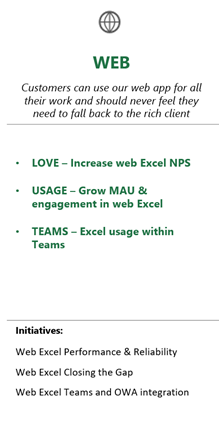
Here’s the OKR we have around Excel for the web. It includes how we measure success, as well as the investments we’re funding to help meet those targets:
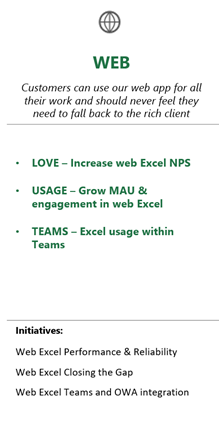
Key Measures
NPS – The key top-level metric we use for measuring our progress is Net Promoter Score (NPS). You may have seen these surveys when using the app… we ask you how likely you are to recommend the web app to other people. It’s a common tool in the industry, and we use it across all the Excel platforms. The NPS within Excel for Windows is incredibly high (higher than most other software I’ve seen). We aspire to hit similar levels with our web app, and it has become a key goal for the team. When people submit their ratings, they can also leave a comment, and we read through these verbatims to better understand the areas people love or want to see improved. The more information you can provide in those comments, the easier it is for us to take action and improve the product. We also spend a lot of time talking to customers and reading the feedback people send through channels like UserVoice and the in-product “Help Improve Office” where you can say if you like something or don’t like something.
The most impactful areas for NPS of the web app are performance, reliability, and feature differences with the native desktop apps.
MAU & Engagement – Another target we have is overall MAU (monthly active users), and engagement. There are a few ways we measure engagement, but the top-level goal is focused on “usage intensity” which we define as 5 or more days active per month. It’s measured as a percentage of overall MAU, so usage intensity of 75% would mean 75% of the MAU we see have used the app at least 5 days in that month.
Teams – Teams is a key way people work together (obviously even more so now with people working from home). It’s important to us that using Excel within Teams is a great experience, and people feel Excel spreadsheets can be a key tool to helping them work together. The primary way people experience Excel within Teams is through our web app. It’s hosted within the larger Teams experience, and we track things like usage, engagement, and NPS within that experience.
Initiatives
The initiatives are essentially sub-teams within the broader Excel team. We choose the initiatives based on our key goals, and we work with the initiative drivers to determine how many resources they’ll need to meet their goals. As you can see from the list of initiatives, there are three key areas we focus on for improving Excel for the web: Performance, Reliability, Features.
Performance – Performance is the term we use around the speed and responsiveness of the app. The native desktop versions of Excel for Windows and Mac set a very high bar for performance. With the native apps, most of the computation happens on the same machine you’re running Excel. So, if you have a fast machine, Excel is fast… if you have a slower machine, Excel may run slower. With the web, it’s a different architecture. Most of the compute happens in the cloud. This means you aren’t quite as constrained by the speed of the machine you’re on, but instead the bottleneck is usually around network latency.
We are focused on two key areas for performance… PLT (page load time); and responsiveness.
PLT (page load time) is where people get their first impression of the app. This is time it takes to load the Excel web app, and fully render the file you’ve selected. There are shortcuts apps sometimes take like showing an image of the last rendered version of the file while a full load happens in the background. That approach is something called “perceived page load time” where the user thinks it’s fully rendered, even if it’s it not yet interactive. We focus most of our energy on full page load time, as we want to make sure the app is interactive as quickly as possible.
Responsiveness is the term we use for measuring how long it takes between when you take an action, and you see the results of that action. Often times, you have to wait for the web app to send the action up to the server, it gets applied on the server, the server sends back the results, and the browser rendering is updated to show the results. In most cases, the biggest delay comes from the server roundtrip… the time to actually apply the change in Excel on the server is pretty quick. These lags can add up, and make the app feel pretty sluggish, so a key focus over the past several years has been on Client-side estimation. We have more and more intelligence running client side in the browser to show the results of an action immediately, without having to wait for the server round-trip. We will still send the update to the server to make sure the data is all in sync, but we don’t have to wait to hear back from the server to show the results and let you continue editing/formatting/etc.
Calc (the engine that executes all the formulas in the workbook) is something we’re now able to do client side in the majority of cases. We built a typescript version of Excel’s calc engine that doesn’t cover all functions, but a large percentage of them. You may have noticed over the years that more often a re-calc (re-calculated… meaning the results of all the formulas are updated after an edit) happens immediately in the web app, where in the past there was always a delay waiting for the service. The project to build a typescript version of calc was done in partnership with Microsoft Research (MSR) in Cambridge, UK, and it was recently published to the Microsoft Garage Wall of Fame!
Another big shift we made over the past year (and we’re still in the process of working on it) is moving away from using an HTML DOM of tables & cells to represent all of the grid, to instead use HTML Canvas to draw the grid. It’s much lighter weight and doesn’t put as much of a burden on the browser to render the huge complex set of HTML elements. It’s significantly improved scrolling performance, animations like the presence indicators (when other people are also editing the file), etc. You may have noticed it already, as we’re now at a point where we support the majority of the web apps features in the Canvas rendering, which means we’re able to use Canvas for a lot of the sessions. Basically, anytime we can use it, we will. If you have a spreadsheet with some of the more advanced formatting features, then it will probably still be using the old rendering stack. We should be close to having 100% coverage by the end of this calendar year.
While much of the investments to improve responsiveness are happening within the browser on the client side, we’re also making improvements on the backend server to handle larger, more complex workbooks. For some of you heavier Excel customers, you’re probably aware of MTR (multi-threaded recalc) where we leverage multiple cores on the machine to help take full advantage of the processing power on your machine to recalc faster. We’ve added MTR to the server, which helps Excel for the web handle much more complex workbooks too. We’re also making calc abortable, so that the app doesn’t become unresponsive, or sluggish when it’s trying to do a more complex recalc. For the really complex models, you can now turn off automatic recalc, which was an option in the native desktop versions, but hadn’t been available in the web.
Reliability – Similar to the native desktop versions, we track things like crashes, hangs, data loss, etc. and we have goals around each of these areas. In addition to those core reliability categories, we also track things that are unique to a web app. We track issues like where you need to refresh the page because the connection to the server has been lost, or token expirations. We’ve made a huge amount of progress here over the past couple years. I used to have to regularly refresh my page when I’d go away for an extended period of time. I find I hardly ever need to do that now. Our goal is for Excel for the web to feel just as stable and dependable as the native desktop versions for Windows and Mac.
Features – This is the area that I usually hear about the most when having direct conversations with customers. People have specific features they use on the native desktop versions that are not yet in the web app. We’ve made a huge amount of progress here over the past several years. In addition to all the feedback we receive, we also look at usage data in the Windows and Mac versions, and use that to prioritize features that we have not yet brought to the web. We are getting to the point where it’s less about specific features missing, and it’s more about the polish around how the feature operates and whether it’s a bit more limited (or just different) from how it works in the native desktop versions.
We’re rolling out so many features that we set up a dedicated site to help folks follow along with everything that’s been released: https://support.microsoft.com/en-us/office/what-s-new-in-excel-for-the-web-f8f98d6b-4752-4119-a2aa-4de22ece8d81?ui=en-us&rs=en-us&ad=us
You can see everything we’ve rolled out already this year. There is a link at the bottom to see the list from 2019. We don’t currently list the performance and reliability improvements, although I’ve talked to the team about starting to include those as well.
Here are a few examples from the past 6 months or so:
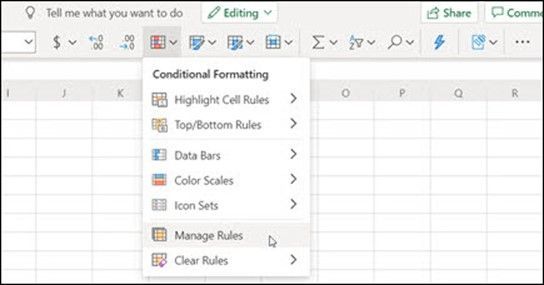
Manage conditional formatting rules
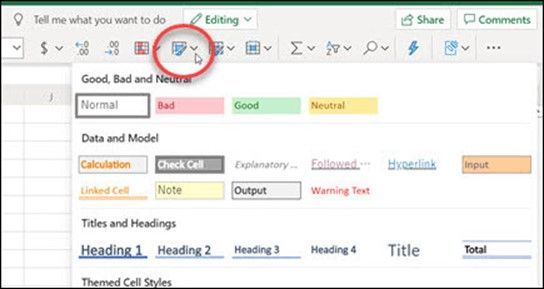
Cell Style Gallery
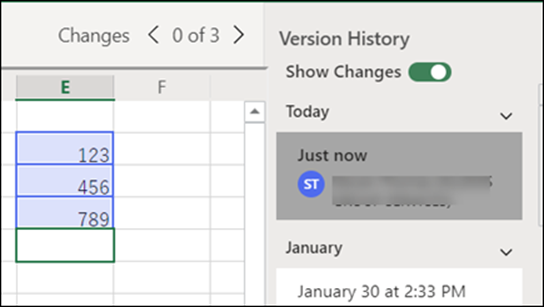
View and restore previous versions of a workbook (note that in this example, the web experience is now even richer than what we have in the native desktop versions)
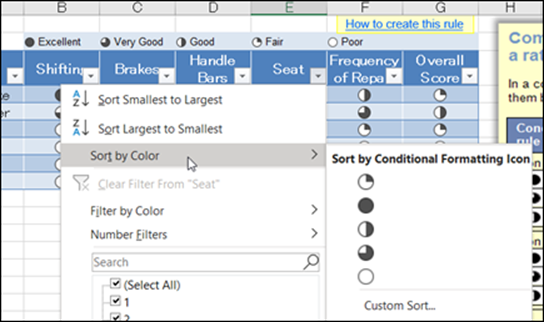
Sort by color or icon
You can count on us to continue rolling out more capabilities in the web until we get to a point where you can use the web app for all your work and should never feel the need to fall back to the native desktop apps. There are a few exceptions to that though, as there are a handful of features we do not intend to bring to the web, but that list is small. VBA and COM add-ins are really the only high usage example where we won’t bring them to the web. We have a new web extensibility model that works across platforms (Windows, Web, Mac, iPad) and we’re encouraging everyone that wants support in the web app to migrate their solutions onto that new model.
In closing… I hope this was a useful walkthrough of how we’re splitting out our investments in Excel for the web. We’re always looking for more feedback on the priorities we’ve chosen, so please send any thoughts our way either through the NPS survey, in product “send a smile/frown”, UserVoice, or just leave a comment here in the blog. Thanks!
-Brian
by Scott Muniz | Jul 15, 2020 | Uncategorized
This article is contributed. See the original author and article here.
There’s so much that you can do to help. What are you motivated to solve, now more than ever?
As members of the tech community, you’re innovators and inventors. As students, you see the world from a fresh perspective. And the projects that we saw at this year’s virtual Imagine Cup are proof that you’re connected to your communities and ready to rise to the challenge of meeting their needs.
You’ve already learned a lot. Keep going. We’re here—and there—with you.
Three ways to keep learning
Develop the skills that you’ll need, at your own pace, with free online courses. On the new Microsoft Learn for Students page, you’ll find courses and learning paths for every milestone along your journey. Here are a few places to start, depending on where you want to go.
1. Foundational learning paths
As with most things in life, starting on a solid foundation helps you build bigger and better. If you’re new to coding, then learning with Microsoft, one of the largest tech companies in the world, is a smart move. And although educators can use these foundational developer paths in the classroom, they’re designed so that students like you can work through them in your own space, at your own pace.
If AI development is in your future, you’ll need to know Python beyond the basics. Microsoft Learn has nearly 100 videos for you to explore through our Microsoft Developer YouTube channel, including the Python for Beginners and Even More Python for Beginners: Data Tools playlists. These short lessons help you learn enough Python to start building AI apps on Azure.
2. Free university classes in partnership with Microsoft
Carnegie Mellon University, the University of Oxford, and the University of California at Berkeley offer their most popular courses in data science, cloud development, and AI engineering to you for free through Microsoft Learn. If you’ve ever dreamed of learning at some of the most notable institutions in the world, take advantage of these partner courses:
3. New courses to help you make an impact
Students in our Microsoft community tend to work on solutions to problems that affect a lot of people and that generally concern the greater good. They’ve built a tool to help Parkinson’s patients save time and money on doctor appointments and technology that identifies deepfakes to protect the world from their harmful effects.
This new series of learning paths is designed to inspire and challenge students to build with social impact and responsibility in mind. For example, you can learn how to track global air quality with Azure Maps, help remote farmers protect their crops with weather alerts using Azure Functions, or analyze climate data with Azure Notebooks.
Focus on—and fight for—the future that you want
Whether you’re in a region that has opened up university campuses or you’re still taking classes from home, the thing to do is to keep learning. This is how we stay focused on the future—one made bright with your big ideas.
See everything that’s available on the Microsoft Learn for Students page.
by Scott Muniz | Jul 15, 2020 | Uncategorized
This article is contributed. See the original author and article here.
We are joined by Roberto Di Lello for this week’s Microsoft Reconnect! Hailing from Argentina, Roberto is a senior consultant in infrastructure with more than 25 years of experience.
Roberto is a nine-time MVP Program recipient and the holder of Microsoft Certified System Engineer (MCSE), Microsoft Certified System Administrator: Messaging (MCSA+M) and Microsoft Certified Technology Specialist (MCTS) certifications.
Roberto has largely worked on projects involving migration, implementation and support of Microsoft Windows Active Directory, Microsoft Exchange Server and Communications environments. More recently, he has been building teams and working on datacenter migrations in cloud and mixed environments.
The IT expert has achieved much during his long working experience with Microsoft. Roberto has previously participated as Microsoft staff at different international events such as Microsoft TechEd NorthAmerica and MS Ignite. Moreover, he holds the distinction of being a Microsoft Certified Trainer.
The South American regularly collaborates with Microsoft newsgroups in Spanish. He is one of the founders of Grupo Latinoamericano de Usuarios de Exchange with more than 400 exchange server users in Latin America. Roberto also actively participates in Grupo Latinoamericano de Usuarios de Active Directory GLAD (Active Directory UG for LATAM based in Chile) with more than 200 active directory users across the continent.
For more on Roberto, check out his blog.


Recent Comments