SAP on Azure General Update – July 2020

SAP on Azure General Update – July 2020

This article is contributed. See the original author and article here.

1. New VM Type Certified & Generally Available – Intel Based Ev4

Azure Edsv4 based on the latest generation Intel CascadeLake CPU is now certified and supported for both Hana and NetWeaver AnyDB.  Hana OLTP and OLAP are both certified.


The VM types available are:

VM Size

vCPU

RAM

SAPS

Hana Certification

NW Certification

Standard_E2ds_v4

2

16

3,142

Cameron_MSFT_SAP_PM_14-1594868960979.png


Standard_E4ds_v4

4

32

6,284

Cameron_MSFT_SAP_PM_15-1594868960980.png


Standard_E8ds_v4

8

64

12,569

Cameron_MSFT_SAP_PM_16-1594868960980.png


Standard_E16ds_v4

16

128

25,138

Cameron_MSFT_SAP_PM_17-1594868960981.png


Standard_E20ds_v4

20

160

31,422

Cameron_MSFT_SAP_PM_18-1594868960981.png


Cameron_MSFT_SAP_PM_19-1594868960981.png


Standard_E32ds_v4

32

256

50,275

Cameron_MSFT_SAP_PM_20-1594868960982.png


Cameron_MSFT_SAP_PM_21-1594868960982.png


Standard_E48ds_v4

48

384

75,413

Cameron_MSFT_SAP_PM_22-1594868960982.png


Cameron_MSFT_SAP_PM_23-1594868960983.png


Standard_E64ds_v4 

64

504

100,550

Cameron_MSFT_SAP_PM_24-1594868960986.png


Cameron_MSFT_SAP_PM_25-1594868960986.png


Hana is certified for productive use on Eds_v4 VM sizes larger than E20ds_v4 in combination with Azure Storage options with the following conditions:

  1. Premium Disk: /hana/data
  2. UltraSSD Disk: /hana/data or /hana/log
  3. ANF: /hana/data and /hana/log
  4. Any storage type may be used for /hana/shared and/or /usr/sap/SID
  5. It is not supported to use Premium or UltraSSD Disk for /hana/data and ANF for /hana/log


More information on Certification can be found in the SAP IaaS Hardware Certification Directory and more information about Hana Storage Configuration on Azure can be found here.


All Ev4 are certified and supported for NetWeaver on Azure Premium Storage and Azure UltraSSD Disk.  Azure NetApp Filer service will be available for AnyDB later.

For a complete list of Certified VM Types for SAP Applications review SAP Note 1928533 – SAP Applications on Azure: Supported Products and Azure VM types  

The check availability of these Virtual Machine types in nearby Azure Regions here


Note: As at July 2020 the Edsv4 and Ddsv4 only are supported.  The Esv4 without an internal SSD disk is not supported.   

2. Confirm VM Availability in Zones Before Deployment

The powershell script below can be used to confirm which VM types are available in an Azure region prior to deploying VMs.  It is important to run this script using the actual subscription that host the VMs.  After planning the VM Types and zones submit a quota request to begin deploying


Get-AzComputeResourceSku | where {$_.Locations.Contains(“southeastasia”)  -and $_.LocationInfo[0].Zones -ne $null -and $_.ResourceType.Equals(“virtualMachines”)}

 

Cameron_MSFT_SAP_PM_26-1594868961018.png

Cameron_MSFT_SAP_PM_27-1594868961032.png

In the above example B-series is available in all 3 zones in Singapore, but Mv2 is available in zones 1 and 3.

3. Multi-SID Clustering for RedHat & Suse & a New Fencing Agent for Suse 12.x & 15.1

Multi-SID clustering of up to 5 ASCS on the same two node cluster is now supported for both Suse and Redhat.


High availability for SAP NetWeaver on Azure VMs on SUSE Linux Enterprise Server for SAP applications multi-SID guide

High availability for SAP NetWeaver on Azure VMs on Red Hat Enterprise Linux for SAP applications multi-SID guide


It is highly recommended that prior to installing a Linux Multi-SID cluster a “test lab” installation is performed on some test VMs and great care must be taken to document IP address and port numbers. 


Suse now supports the same STONITH mechanism that is implemented for Redhat.  The Suse Pacemaker service is now able to connect to the Azure Fabric and restart a hung or fenced VM.  This functionality requires an update to the Python/Python3 libraries and the package for the Azure SDK (python-azure-mgmt-compute on SLES12 ; python3-azure-mgmt-compute on SLES15).

After implementing these packages the Python versions can be verified via the commands

python –version

python3 –version

4. Recommended Blogs for SAP on Azure Customers & Consultants  

My colleague Anjan Banerjee has developed some very useful blogs based on real customer deployments.  The topics for these blogs are based on questions from consultants.  For example “Can I run Business Objects on SQL Azure DB PaaS?”. 


Installation of SAP Netweaver ABAP 7.50 on DB2/UDB 11.1 with HADR (Highly available Database Environment) in Azure Cloud

SAP Single Sign-on : Kerberos/SPNEGO Setup for AS-JAVA

SAP On Azure : High-Availability Setup of SAP Content Server 7.53 with MaxDB in Windows Environment

SAP On Azure : HIGH AVAILIABILITY setup for SAP NETWEAVER with SAP ASE 16 DB on WINDOWS SERVER

SAP on AZURE: HIGH AVAILIABILITY setup for SAP BusinessObjects Business Intelligence 4.2 SP8 with SQL server on Windows

SAP on AZURE: SAP BusinessObjects Business Intelligence Platform Setup with Azure SQL DB (Managed PaaS database)


The full list of blogs can be found here

Another useful blog from Etienne Dittrich can be found here

5. Requirements for SAP on Windows & Linux: OS Boot Disk

Several customer escalations have been traced to inadequate performance of the OS Boot Disk.  Based on these support cases it is strongly recommended to use Premium Storage for the OS Boot Disk. The same limitations and constraints that exist for Standard storage and that are documented in SAP Note 2367194 – Use of Azure Premium SSD Storage for SAP DBMS Instance also apply to the OS Boot Disk.

The minimum recommended Premium Disk for a large high performance VM (such as E64v3 or higher) would be P15 or higher. 


In extreme cases small OS Boot Disks using Standard storage can cause a VM to appear to freeze under high IO load.

6. Azure Storage Updates

Azure Storage options and features continue to expand and improve.  Below is a brief list of features recently released and in preview:

  1. Disk Bursting is a feature that allows certain disk types to temporarily exceed their quota for a specified period of time.   Note: the disk quota increase does not change the VM level quota
  2. Update to the Hana Storage Guide for Azure.    Key changes include:
    1. LVM Stripe Size recommendations have slightly changes in response to some new performance testing results
    2. A specific recommendation to ensure /hana/data, /hana/log and /hana/shared are always placed in separate Volume Groups. 
    3. Most Linux OS the IO Scheduler changes from NOOP to NONE

https://www.suse.com/support/kb/doc/?id=7024299

https://www.suse.com/support/kb/doc/?id=7024298

  1. Azure Files Premium for Windows SMB 3.x with Active Directory Integration – this feature is now in preview
  2. Azure Files Premium for NFS 4.1 – this feature is now in private preview
  3. Azure Shared Disk – this feature is in preview and currently under evaluation for suitability for SAP solution
  4. sFTPaaS – sFTP as a Service is in planning.  This feature would eliminate the requirement for VMs to provide sFTP services

A new blog will be released when Azure Files Premium for Windows and Linux is available for SAP customers

7. SQL Server Backup to URL – How to Throttle Backup Throughput   

Modern releases of SQL Server supports direct backup to URL to multiple target blob files.  The throughput to multiple blob files approach the Network Throughput Quota for a VM type.  When the backup network traffic saturates the VM the VM may be unresponsive.  Problems such as AlwaysOn initiating a failover may occur. 

To prevent these issues the backup parameter MAXTRANSFERSIZE can be limited. 

The precise value for MAXTRANSFERSIZE depends on the number of blob files, the VM size and other factors. 

Test values MAXTRANSFERSIZE = 3145728 and monitor network throughput and stability.  If the throughput is too high reduce the MAXTRANSFERSIZE value by half and retest.    


BACKUP DATABASE <DB SID> TO

<URL PATH>

WITH COMPRESSION, BUFFERCOUNT = 4, MAXTRANSFERSIZE = 3145728, BLOCKSIZE = 65536, CHECKSUM, FORMAT, STATS = 5,

     ENCRYPTION ( ALGORITHM = AES_256, SERVER CERTIFICATE = ‘ + @P_CERT +’ );


Additional links are here and here

8. SQL Server 2019 Generally Available for NetWeaver Customers   

SQL Server 2019 is now Generally Available for NetWeaver systems. The minimum supported release for SAP applications is SQL Server 2019 CU3.  It is generally recommended to apply the latest Support Pack and Cumulative Update available

New features in SQL Server 2019 can be found here

2779625 – Setting up Microsoft SQL Server 2019

2807743 – Release planning for Microsoft SQL Server 2019

2779607 – Configuration Parameters for SQL Server 2019

2922820 – DBSL Support for SQL Server 2019

2656107 – Support for Microsoft ODBC Drivers for SQL Server in SAP NetWeaver


Business Objects Supports both Windows Server 2019 and SQL Server 2019.  In addition to SQL Server 2019 IaaS solution Azure SQL DB PaaS is fully supported for Windows platforms on SAP BO releases 4.2 SP8 and 4.3 and higher

9. Update on Support Matrix for SAP on Azure  

In recent months many new features have become available for SAP customers.  The list below is a very brief overview of recommended features and updated documentation

  1. Proximity Placement Groups (PPG) are recommended for every SAP installation
  2. SuSE 15.1 fully supported for HANA & NetWeaver on Azure
  3. SuSE 12 Support Pack 5 fully supported for HANA & NetWeaver on Azure
  4. RHEL 8.1 – in testing.  RHEL 8.0 will not be supported for Hana and will not be supported on Azure
  5. RHEL 7.7 & 7.8 are not certified for Hana yet by SAP
  6. Oracle Linux 7.7 on Mv2 now supported
  7. Recommended stack for Oracle Customers – OEL 7.7 + Oracle 19.6c + Grid + ASM.  Oracle 18 is not recommended
  8. Windows 2019 – fully supported for NetWeaver and most standalone SAP components.  Hyper-V support matrix can be found here
  9. SAP ASE documentation update  
  10. DB2 High Availability HADR on Azure – HADR is available for Linux only.  Windows support is not released

10. Update on Azure Site Recovery  

Azure Site Recovery is a very popular feature for SAP customers.  The support matrix for Azure Site Recovery A2A can be found here

Use the “Find” function to search for support – for example to find “zone” to determine zone support.

ASR Azure to Azure now supports:

  1. Zone to Zone replication
  2. Replication from one Region to a specific Zone in another Region
  3. Generation 2 Images
  4. All OS that are commonly deployed by SAP customers Windows 2019, Suse 15.1, Suse 12.5, RedHat and OEL 7.7
  5. ADE for Linux and Windows
  6. Proximity Placement Groups

Transcontinental ASR (example: Primary in USA and DR in Europe) – contact Microsoft.  Some customers have asked about “Tertiary ASR” which typically involves Zone-to-Zone ASR within a single region and then additional ASR to another Region.  This is not possible as of July 2020.


Additional information on Azure Site Recovery for SAP solutions can be found here:

https://docs.microsoft.com/en-us/azure/site-recovery/site-recovery-sap

https://aka.ms/asr_sap


11. SAP on Azure YouTube Channel

The official SAP on Azure YouTube Channel contains a lot of Azure Data Factory, OData, PowerBI, Single Sign On, IoT Integration to SAP and other topics.  Suggestions for additional topics for the YouTube channel can be posted in this blog or the YouTube channel comments section.

https://www.youtube.com/c/SAPonAzure/videos

12. SAP on Azure – Customer Success Stories   

Two interesting customer success stores are available.  A large Pharmasuetical customer Zuellig Pharma moved their entire datacenter to Azure including a VLDB Suite on Hana system.  This Suite on Hana system runs on Mv2 416 and 13 E32v3 application servers.   The project was executed by T-Systems

A recent Press Release can be found here 


Swiess Re has deployed a new S4 system on Azure.  The partner was Cognizant – the SAP on Azure Microsoft Partner of the year 2020

13. SQL Server AlwaysOn Setup & Configuration    

The setup and configuration of SQL Server AlwaysOn has been fully automated and integrated into SWPM.

The previous versions of scripts such as sap_revlogin should not be used anymore as they may cause inconsistencies and support problems.

For all new installations, migrations, upgrades and homogeneous or heterogeneous system copies SAP Note 1772688 – SQL Server AlwaysOn and SAP applications should be followed. 

Some recommended guidelines:

  1. Do not use sap_revlogin
  2. Use the latest version of SWPM available
  3. A failover from AlwaysOn Primary to Secondary is always required as certain objects can only be created in the active AlwaysOn replica
  4. After running the AlwaysOn Setup procedure in SWPM run DBA Cockpit in SAPGUI and check the “AlwaysOn Setup Check”
  5. Perform a test failover and check the ABAP or Java application server can start normally.  Check trace files (such as dev_w0) if there is any issue
  6. Check SQL Server Agent standard jobs are correctly configured on all AlwaysOn nodes
  7. Ensure Transaction Log and DB Backup jobs/procedures are configured so such that in event of a failover (planned or unplanned) the Transaction Log is backed up (to ensure recoverability and avoid Log Full situations)
  8. If the DB is protected with TDE follow the procedures for AlwaysOn + TDE

14. SAP Hana 2.0 Support Pack 5 – Released

SAP has released Hana 2.0 Support Pack 5.  New features can be found here  

2932865 – SAP HANA 2 SPS05 Revision 050.00


Hana 2.0 Revision Strategy

2378962 – SAP HANA 2.0 Revision and Maintenance Strategy  

2235581 – SAP HANA: Supported Operating Systems


Additional Links & Notes

SAP Monitor for Azure is now in Public Preview.  Highly recommended to test this feature: https://azure.microsoft.com/en-us/blog/azure-monitor-for-sap-solutions-is-now-in-preview/


Learning Journey for SAP ASE

SAP ASE Learning Journey – Administration & Monitoring

SAP ASE Learning Journey – Installation & Upgrade

A utility to check the latency between Availability Zones  

https://github.com/Azure/SAP-on-Azure-Scripts-and-Utilities/tree/master/AvZone-Latency-Test

SQL Server releases, support packs and cumulative updates  

https://techcommunity.microsoft.com/t5/sql-server/bg-p/SQLServer/label-name/SQLReleases

Azure Backup for SAP Hana – support matrix

https://docs.microsoft.com/en-us/azure/backup/sap-hana-backup-support-matrix

https://docs.microsoft.com/en-us/azure/backup/backup-azure-vm-backup-faq

Recommended blog for Hana troubleshooting.  Highly recommended to load scripts onto every Hana DB instance 1969700 – SQL Statement Collection for SAP HANA https://blogs.sap.com/2017/09/04/health-checks-of-hana-system/

Latest news about SAP Kernels  

https://wiki.scn.sap.com/wiki/display/SI/SAP+Kernel%3A+Important+News


A very useful powershell script for parsing SAP NetWeaver trace files is below.  Thanks to Ashley Zebrowski for providing this.   Powershell is available for Windows and Linux https://docs.microsoft.com/en-us/powershell/azure/install-az-ps?view=azps-4.3.0


while($true) {

    $s = Get-Content .dev_w* | sls ‘<search string goes here>‘ -context 2 | out-string -stream | sls ‘2020’

    $a = @()

    foreach ($line in $s) {

        $date = [datetime]::parseexact(($line -replace ‘  C ‘,”), ‘ddd MMM dd HH:mm:ss:fff yyyy’, $null)

        $a += $date

    }

    clear

    “Most recent connection drops:”

    $a | sort -unique -descending | select -first 20 | %{$_.tostring(‘yyyy/MM/dd HH:mm:ss.fff K’)}

}


Microsoft has released a new RDP client that is highly recommended https://docs.microsoft.com/en-us/azure/virtual-machines/workloads/sap/hana-vm-operations-storage
Intune announcing public preview for Android Enterprise corporate-owned devices with a work profile

Intune announcing public preview for Android Enterprise corporate-owned devices with a work profile

This article is contributed. See the original author and article here.

By: Shanthi Thillairajah | PM | Microsoft Endpoint Manager – Intune


NOTE: This feature is in the latest build, but the UI is rolling out. We’ll update this post when it’s fully available to use!


Microsoft Endpoint Manager – Intune support for Android Enterprise corporate-owned devices with a work profile is now in public previewYou can start enrolling devices here in the Microsoft Endpoint Manager admin centerCorporate-owned devices with a work profile is one of the corporate management scenarios in the Android Enterprise solution set. This corporate-owned, personally-enabled (COPE) scenario offers separation between work and personal profilessimilar to that offered for personallyowned work profile devices, while giving admins more device-level control. IT admins can see, control, and configure the work accounts, applications, and data in the work profile, while end users are guaranteed that admins will have no visibility into the data and applications in the personal profileThis scenario is targeted at organizations that wish to enable personal use on corporate-owned single-user devices that they have provided for work. This management scenario is available for Android 8+ (Oreo and higher) devices.


What is available in the first preview release?

This preview release is intended to demonstrate the corporate-owned work profile capabilities that we have built so far. We hope to gather feedback and iterate on the design and functionality before the end-to-end scenario becomes generally available in the Microsoft Endpoint Manager admin center. The following features are included in today’s preview:

  • EnrollmentCreate multiple enrollment profiles with unique tokens that do not expire. This includes device enrollment using NFC, token entry, QR code, Zero Touch, or Knox Mobile Enrollment.  
  • Device Configuration: A subset of the existing settings for fully managed and dedicated devices. 
  • App Management: App assignments, app configuration, and associated reporting capabilities. Support for app protection policies will be added in a subsequent preview update.  
  • Device Compliance: The compliance policies that are currently available for fully managed devices 
  • Device Action: Delete device (factory reset), reboot device, and lock device are available. 
  • Conditional AccessThe conditional access capabilities that are currently available for fully managed devices. 
  • Resource Access: Certs, Wi-Fi, and VPN. Support for PFX Create is not available in this preview. 
  • MTD SupportAdmins can push MTD apps to the work profile.


What features are in development?

We are continuing to develop several other features while we collect feedback on this preview. We anticipate adding in the features below in subsequent preview updates prior to general availability. This post will be updated when these features are available in public preview:

  • Support for app protection policies (APP, also known as MAM). 
  • Personal usage policies – these settings will configure the personal side of the device, including disabling camera and screen capture on the personal side. 
  • Work profile password configuration – these settings will create requirements for the work profile password. Device password configuration will be available in the initial preview release. 
  • Password reset device action for the work profile. 
  • Filter fully managed, dedicated, and corporate-owned work profile devices separately.


Device Enrollment

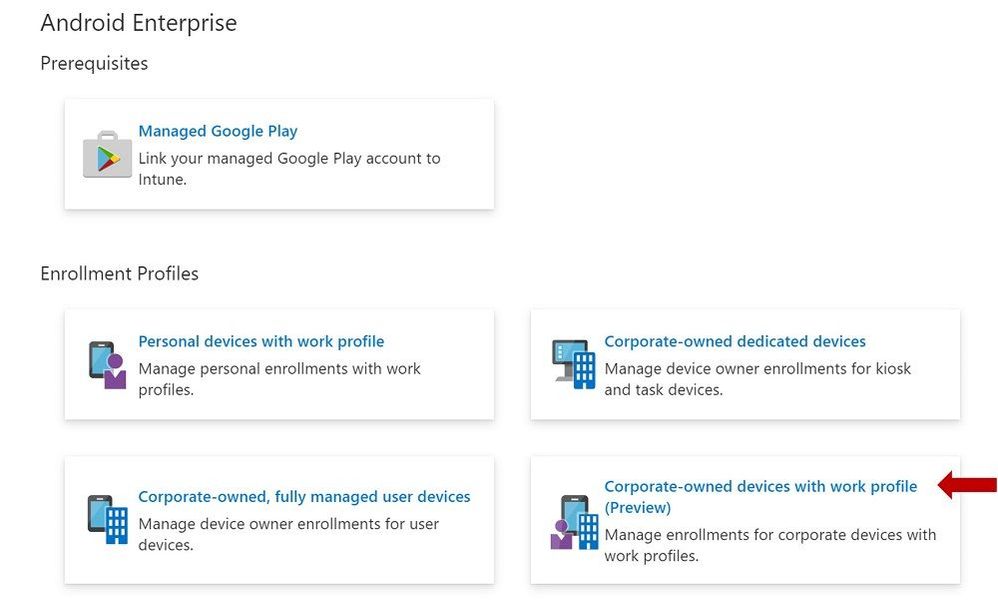
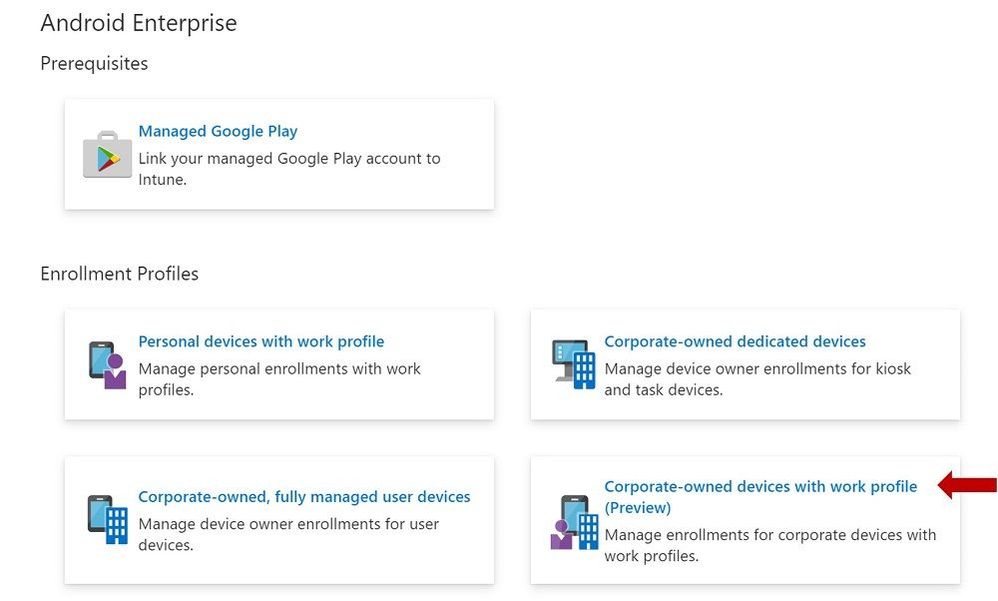
Intune admins can enable enrollment for this scenario by selecting the “corporate-owned devices with a work profile” enrollment tile (indicated with the red arrow below). Admins can create multiple enrollment profiles with unique tokens that do not expire.


Enrollment Profiles | Corporate-owned devices with work profile (Preview)Enrollment Profiles | Corporate-owned devices with work profile (Preview)


End User Enrollment

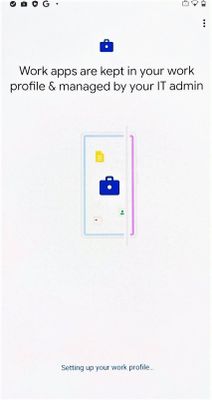
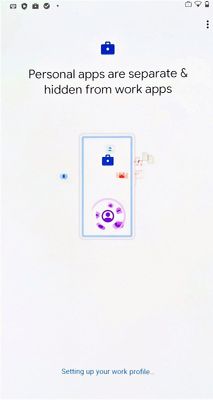
There are new screens in the end user enrollment flow that help inform the user about the functionality of the work profile and personal profile on the device. Here are some examples of the screens:


Figure 1. Setting up your work profileFigure 1. Setting up your work profile  Figure 2. Setting up your work profileFigure 2. Setting up your work profile


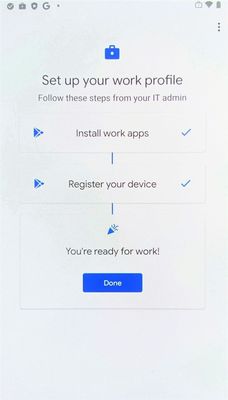
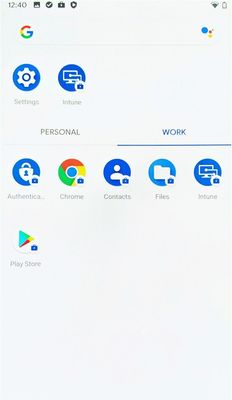
Next, there are screens that will guide your end user through setting up admin requirements like creating a device password, installing work applications, and registering the device. After a successful enrollment, the user should see two sections labeled work and personal after they swipe up to see their full application list.


Figure 3. Setting up your work profileFigure 3. Setting up your work profile  Successful enrollmentSuccessful enrollment


Device Configuration

You can create device configuration profiles to assign to corporate-owned devices with a work profile to disable device features, assign certificates, or configure VPN.


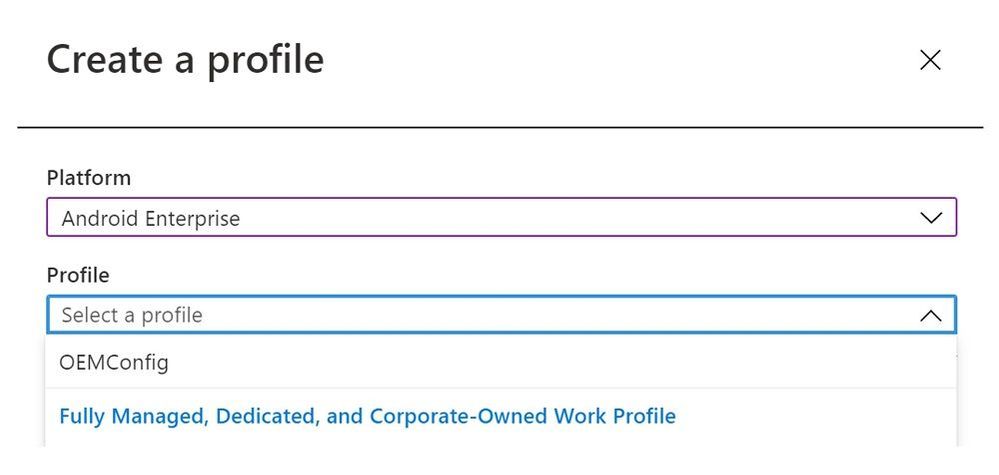
To create a device configuration profile, select a profile under the “Fully Managed, Dedicated, and Corporate-Owned Work Profile” category shown below. Device configuration profiles in this category can be applied to fully managed, dedicated, and corporate-owned work profile devices.


Create a profile - Device configuration profileCreate a profile – Device configuration profile


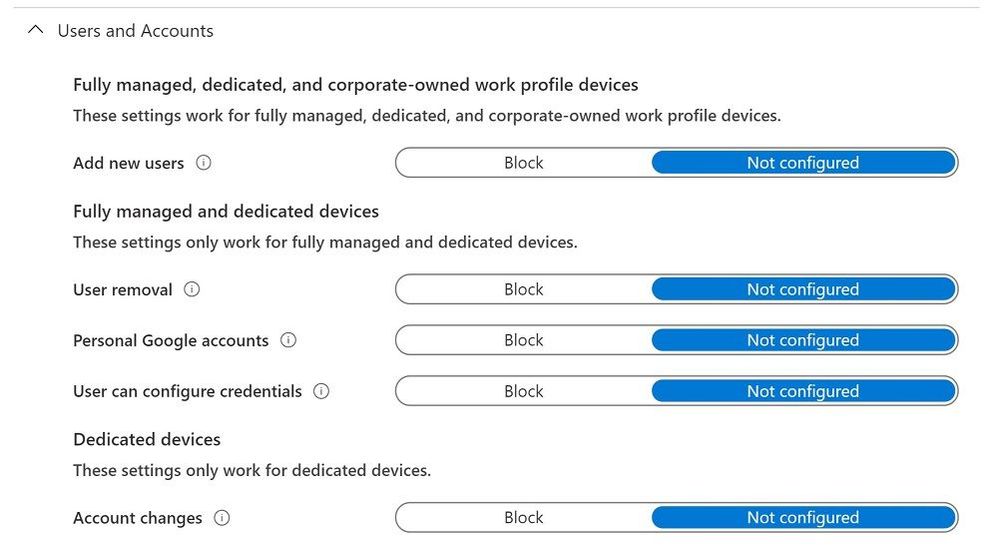
Some of the settings in the Device Restrictions profile do not apply to corporate-owned devices with a work profile; however, there are headers under each setting category that indicate which device types a particular setting can be applied to. Below is an example of these headers used in the Users and Accounts category.


Device restrictions profile - Users and AccountsDevice restrictions profile – Users and Accounts


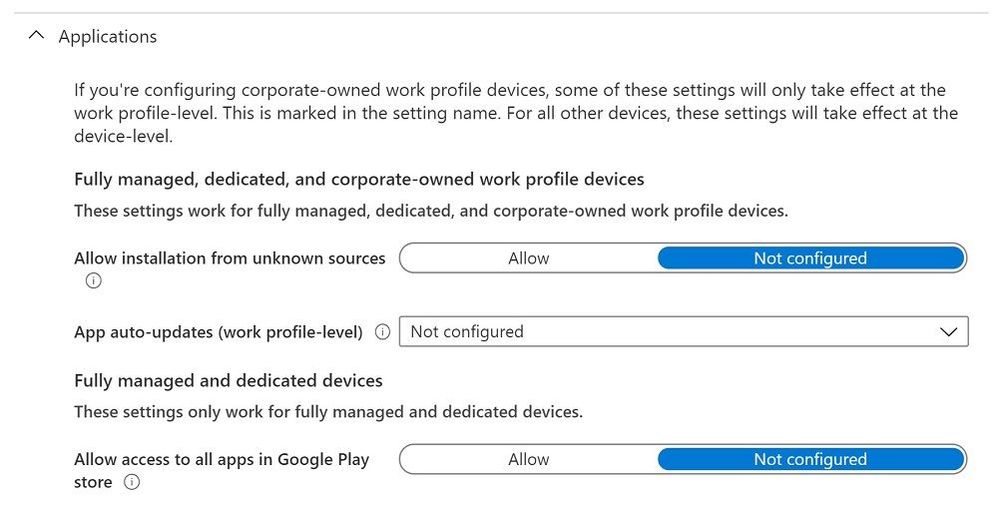
Some settings only apply at the work-profile level for corporate-owned devices with a work profile. These settings still apply device-wide for fully managed and dedicated devices. They are marked with the “work profile-level” descriptor in the setting name, as shown in the example below.


Device restrictions profile - ApplicationsDevice restrictions profile – Applications


Device Compliance

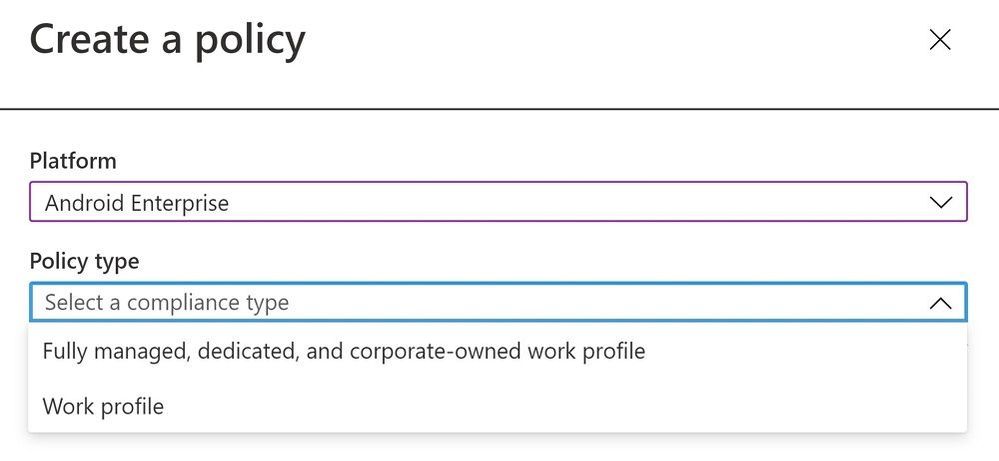
The compliance settings that are available for fully managed and dedicated devices will be applicable to corporate-owned devices with a work profile for this preview. To create a compliance policy, admins should select “Android Enterprise” as the platform and “Fully managed, dedicated, and corporate-owned work profile” as the policy type.


Create a policy - Device compliance policyCreate a policy – Device compliance policy


App Management

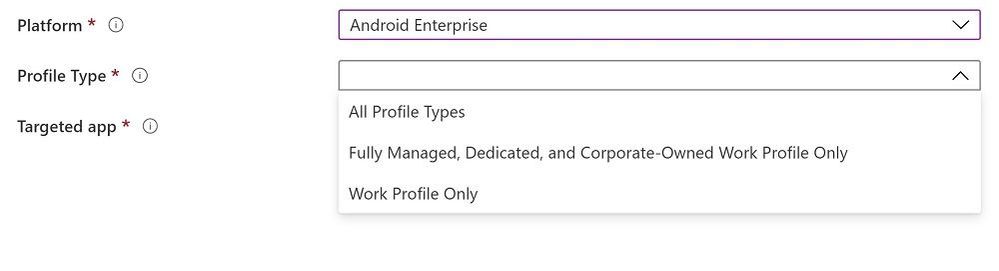
IT admins can deploy apps and utilize app configuration for corporate-owned devices with a work profile as a part of this preview release. To create an app configuration policy for managed devices, admins should select “Android Enterprise” for the platform and “Fully Managed, Dedicated, and Corporate-Owned Work Profile” for the profile type.


Create a policy - App configuration policyCreate a policy – App configuration policy

As referenced above, there is no support for app protection policies (APP, also known as MAM) in this preview release.


Customer Support for This Preview

The available preview features are fully supported through ourIntune support channels.


Known Issues

There is a known issue with being able to enforce a device-wide password. End users have the ability to get around device password requirements on corporate-owned devices with a work profile, regardless of admin policy. This happens when a user turns off the “use one lock” setting on their device which enables setting separate work profile and device passwords. This effectively allows the user to turn off device password and only use a work profile password with the requirements that the admin set for device password. We are working to address this issue in an upcoming release.


How Can You Reach Us?

As you validate and build out the Android Enterprise corporate-owned devices with a work profile preview scenarios, we would appreciate your feedback on IT admin’s device configuration and end-user’s device enrollment experiences. Keep us posted on your Android experience through comments on this blog post, through Twitter (@IntuneSuppTeam), and request any new features on UserVoice.


Android Enterprises Resources

For information about the new privacy protections on company-owned devices, refer to Google’s blog post.


Documentation

Experiencing Latency and Data Gaps issue in Azure Portal for Many Data Types – 07/17 – Resolved

This article is contributed. See the original author and article here.

Final Update: Friday, 17 July 2020 21:11 UTC

We’ve confirmed that all systems are back to normal as of 07/17, 20:30 UTC. Our logs show the incident started on 07/17, 19:20 UTC and that during the 1 hour and 10 minutes that it took to resolve the issue some customers with Application Insights resources in South Central US geographical region may have experienced intermittent metrics data gaps and incorrect alert activation. 

  • Root Cause: The failure was due to an issue in one of our dependent services.
  • Incident Timeline: 1 hour and 10 minutes – 07/17, 19:20 UTC through 07/17, 20:30 UTC

We understand that customers rely on Application Insights as a critical service and apologize for any impact this incident caused.

-Sindhu


Initial Update: Friday, 17 July 2020 20:14 UTC

We are aware of issues within Application Insights and are actively investigating. Some customers with Application Insights resources in South Central US geographical region may experience intermittent metrics data gaps and incorrect alert activation. 

  • Work Around: None
  • Next Update: Before 07/17 22:30 UTC

We are working hard to resolve this issue and apologize for any inconvenience.
-Sindhu


Experiencing Latency and Data Loss issue in Azure Portal for Many Data Types – 07/17 – Investigating

This article is contributed. See the original author and article here.

Initial Update: Friday, 17 July 2020 20:14 UTC

We are aware of issues within Application Insights and are actively investigating. Some customers with Application Insights resources in South Central US 2 geographical region may experience intermittent metrics data gaps and incorrect alert activation. 

  • Work Around: None
  • Next Update: Before 07/17 22:30 UTC

We are working hard to resolve this issue and apologize for any inconvenience.
-Sindhu


Guiding the next gen of women tech leaders in rural India

Guiding the next gen of women tech leaders in rural India

This article is contributed. See the original author and article here.

“Challenges are the biggest opportunity that will help you learn and grow,” says Alagunila Meganathan, a 4-time MVP awardee for Azure.


Alagunila hails from the remote village of Rasipuram – whose name originates from Rasi which means “constellation” in many Indian languages – about 350 kilometres from Chennai (Madras) in the southern state of Tamil Nadu in India. And from that constellation emerged a bright tech star glowing with aspirations to empower thousands of young women to follow their tech passions.


Alagunila, who is fondly known as Nila, started her career as a college professor in the Department of Master of Computer Applications. A dual postgraduate degree holder in Computer Engineering and Computer Applications, Nila understands the difficulties of overcoming remote locations more than most.


India is a melting pot of geological terrains and languages where the landscape and linguistics change every 100 kilometres. Yet, the urge for knowledge and empowerment couldn’t keep this MVP from emerging as a community leader and inspiring others to adapt to the challenges successfully.


Nila has since become an idol for the budding female tech aspirants in the community she influences. She started her journey by spreading awareness about hackathons, bootcamps, meetups and other national and international tech events. Nila, in working to spread the experience of such activities, soon connected with other like-minded MVPs to support college girls to attend events in cities like Delhi, Pune, Mumbai, Hyderabad, Cochin, Trivandrum, Bangalore and Chennai. 


IMG-20191214-WA0062.jpg


Travelling to such events would involve multiple days of transit across various modes of public transport, meaning hopefuls would need to cover their expenses as well as accommodation and food. Added to this was the cultural nuances of allowing young girls to travel alone with strangers away from their homes for the sake of imbibing knowledge and experience. Sometimes, families sometimes simply could not afford the expenses nor the risk involved.


So, Nila and team assisted some girls by sponsoring part of their expenses as well as exposing the tech aspirants to the opportunities of being a part of the industry. This, along with the mentorship given in speaking and writing, provided immense confidence for the girls entering the industry and during early employment. 


In view of the challenges, Nila with the help of fellow MVPs set up a dedicated community Microsoft DEV. Geeks (part of the Global AI Community) for students from rural locations. The sessions were delivered in the local language to help better understanding of the concepts and build familiarity and warmth within the community.


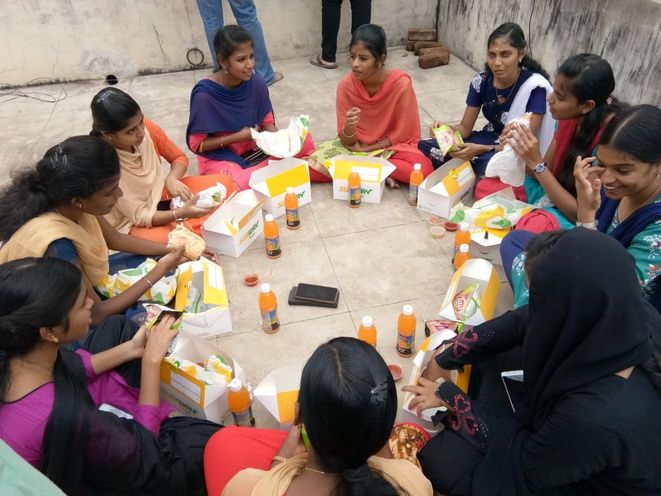
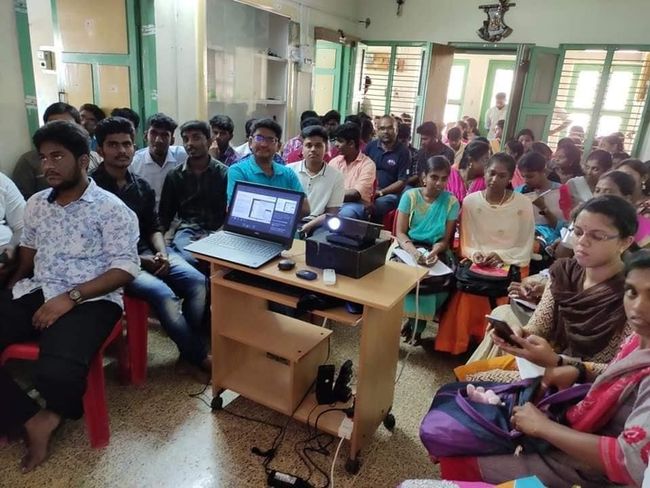
To overcome the challenge of finding a central venue for the meetups, the team collaborated with companies to provide convenient venues which were easily accessible by public transport. This initiative started with 35 participants and slowly grew to more than 100. Soon running out of available space, the young students would stand outside the venue or employ makeshift chairs to ensure they could continue their learning journey.


image4.jpg


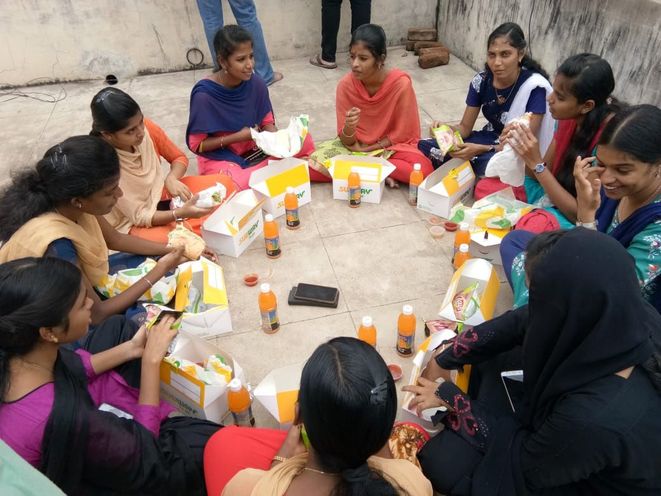
Following the sessions, the experts then joined the students for lunch on the roof. This post-session exercise became an integral part of the learning process with Lunch & Learn with Microsoft MVPs. The team continued to encourage participation with multi-language sessions, social media interaction, student feedback integration, and event invitation through the Global AI Community groups page.


Not to be deterred by the pandemic, Nila and seven other MVPs – hailing predominantly from cities like Coimbatore, Cochin, Madurai, Salem, Thiruvananthapuram, Ooty and others – started a webinar series of rural upskilling called Learn with Microsoft MVPs


Between them, the MVPs use their expertise in Azure, Developer Technologies, and Office Applications & Development to teach students not only in India but from countries like Italy and Australia.

Online and offline, Nila believes in knowledge being the true metric of success. Therefore, she continues to follow her pursuit of knowledge by sharing more and meeting new people.


Nila advises young graduates by using her own journey of challenges and successes as an example.

A true community leader, Nila mentors young aspirants to find their preferred tech platform and continue their journey as a ‘techie’ in any city of their choice. Location, as evidenced by Nila, is secondary – the most important part is finding your passion and pursuing it. 


image1.jpgnila.png