by Scott Muniz | Jul 22, 2020 | Uncategorized
This article is contributed. See the original author and article here.
IT admins around the world are gearing up for the Back to School deployment season. Here are the latest product updates from the Office 365 Education Team to help you deploy School Data Sync and adopt Microsoft Teams for Remote Learning!
- School Data Sync (SDS) is adding back Team Creation! For each class synchronized in SDS, it will once again automatically create both the M365 Group and Class Team, so Educators don’t have to. This feature will be optional when creating your Back to School sync profiles. To schedule Class Team Deployment Assistance with our EDU Customer Success Team, please complete the form at https://aka.ms/sdssignup
Target Ship Date: July 29, 2020
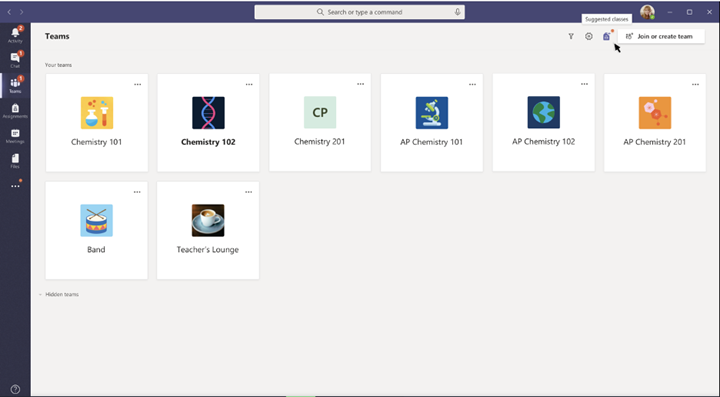
- A new Educator-Led Team Creation flow is being added to Teams. This new process allows educators to easily create the classes they need and minimize the number of extraneously created teams. Admins can use SDS to create groups for each class, and educators will be able to convert these groups into teams via the Suggested classes icon shown below.
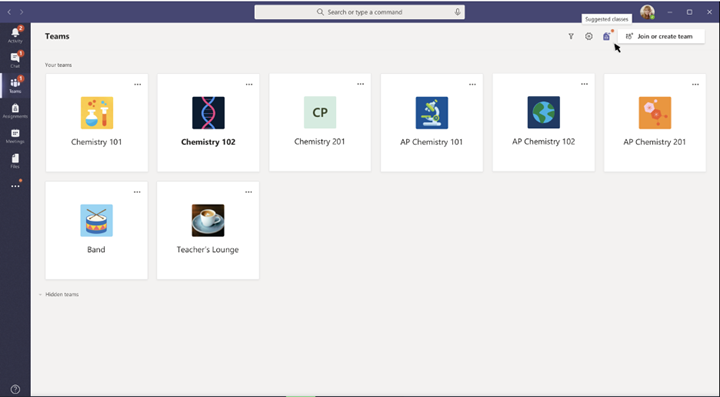
Target Ship Date: Mid-August
- Teams has published a guide on the Recommended methods for Class team creation and deployment best practices to help you prepare for this back-to-school.
- SDS is adding a new SDS v2 CSV file format, designed for both K12 and Higher Education! The new format includes a substantial data schema update and several cool new features:
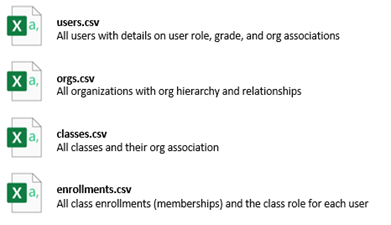
- The new format is OneRoster standards inspired and only requires 4 CSV files:
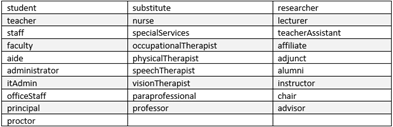
- 28 Primary User Roles for K12 and Higher Education (including Students and Teachers)
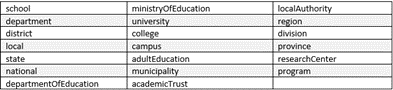
- 20 Org types for K12 and Higher Ed with support for an Organizational Hierarchy
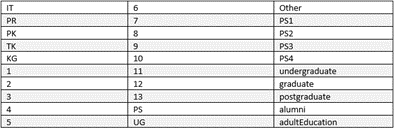
- Grade level attributes for both Educators and Students
- Class User Roles for granular control over Group and Team permissions, and for scenarios where users may be an Educator (owner) in one class and a Student (member) in another.
- Support for the full UserPrincipalName in the users.csv to enable unlimited domain association when creating and licensing users in Azure AD.
SDS will continue to support the SDS V1 format, however the SDS v2 format is ideal for Higher Education and K12 customers that require the enhanced data schema and directory modeling capabilities beyond what the SDS v1 format offers. This schema enhancement will eventually power advanced group and team provisioning scenarios and enhanced analytics.
Target Ship Date: July 29, 2020.
Available now in private preview. If interested, please contact https://aka.ms/sdssignup.
- SDS is adding a new People and Group Memberships viewer, to coincide with the SDS v2 enhanced data schema. The new synced directory viewer will provide admins the ability to search and find the objects and attributes synced by SDS. Within the existing SDS People and Groups pages, you will find the new toggle switch that allows you to work within the new experience or switch back to the legacy SDS organization viewer, as needed.
Target Ship Date: July 29, 2020
Available now in private preview. If interested, please contact https://aka.ms/sdssignup.
- A new MS Graph API for activating and unlocking Class Teams provisioned by IT. All Class Teams created by SDS require the Educators to activate the Class Team before students can see and use them. This prevents students from accessing Class Teams before Educators are ready to begin monitoring and managing the Team. The new MS Graph API will let Admins programmatically activate Class Teams ahead of the Educators, if desired.
Target Ship Date: Mid-August
- SDS is getting smarter and will generate up to 85% fewer errors when syncing using PowerSchool API and several OneRoster API sync providers, including Classlink, Eventful, and PowerSchool Unified Classroom. Previously, SDS would generate an error for each user that failed to sync, and then errors for each of the user’s enrollments. SDS will now only generate a single error for each user, dramatically reducing the volume of unnecessary errors which can lead to quarantined sync profiles.
Target Ship Date: July 29, 2020
- SDS is getting faster! Since COVID-19 deployments ramped up, SDS has seen an unprecedented volume of deployment. To accommodate the scale of large Ministries and Departments of Education, we are excited to announce several performance updates for core sync processing:
- User Sync, Licensing, Membership Sync, and Group Sync will be 2x faster
- Team Sync will process up to 75K Teams/day per sync profile
- SDS supports running 3 concurrent sync profiles, for 3x faster provisioning
Target Ship Date: July 29, 2020
- Grade Sync in SDS is adding a new generic OneRoster 1.1 API Connector. The new Grade Sync connector is intended to provide Microsoft partners who wish to test their OneRoster API endpoints with Grade Sync and confirm grade writeback from Teams works as intended. This option may also be leveraged by customers who have a SIS with the required set of API endpoints but don’t yet have a named connector in Grade Sync.
Target Ship Date: Mid-August
by Scott Muniz | Jul 21, 2020 | Alerts, Microsoft, Technology, Uncategorized
This article is contributed. See the original author and article here.
Build a Rover combining the best of Azure Sphere security with FreeRTOS
What you will learn
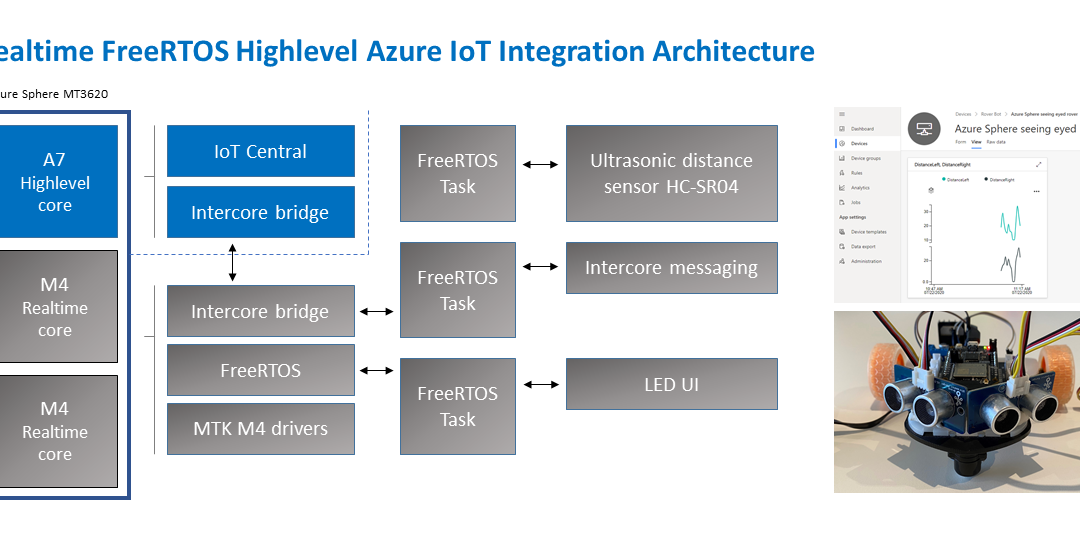
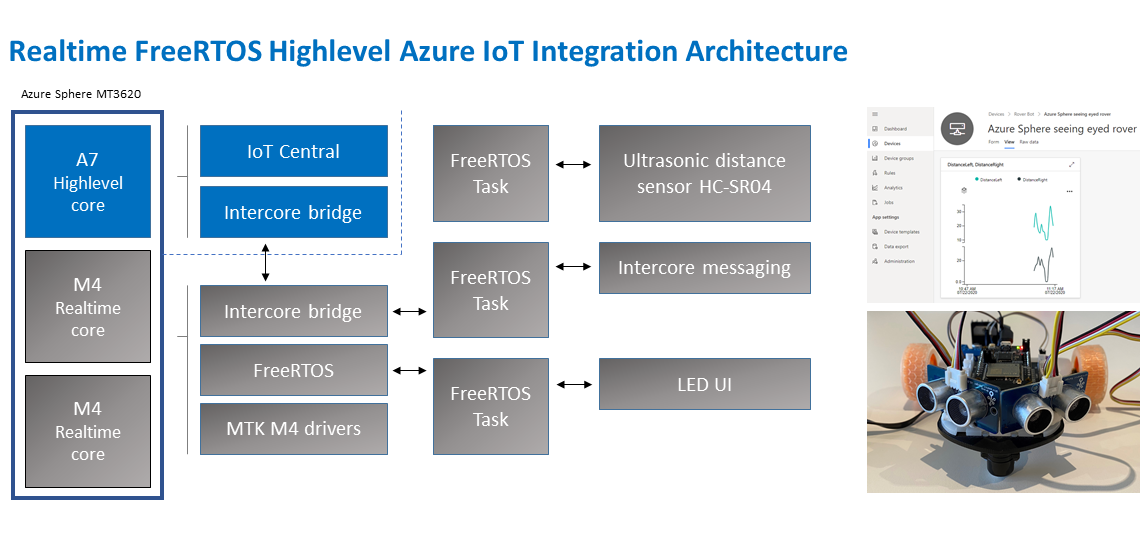
You will learn how to integrate a Real-time FreeRTOS application responsible for running a timing-sensitive ultrasonic distance sensor with the security and cloud connectivity of Azure Sphere.
#JulyOT
This is part of the #JulyOT IoT Tech Community series, a collection of blog posts, hands-on-labs, and videos designed to demonstrate and teach developers how to build projects with Azure Internet of Things (IoT) services. Please also follow #JulyOT on Twitter.
Source code and learning resources
Source code: Azure Sphere seeing eyed rover Real-time FreeRTOS sensors and Azure IoT.
Learning resources: Azure Sphere Developer Learning Path.
Learn more about Azure Sphere
Azure Sphere is a comprehensive IoT security solution – including hardware, OS, and cloud components – to actively protect your devices, your business, and your customers.
Application architecture
The application running on the Azure Sphere consists of two parts.
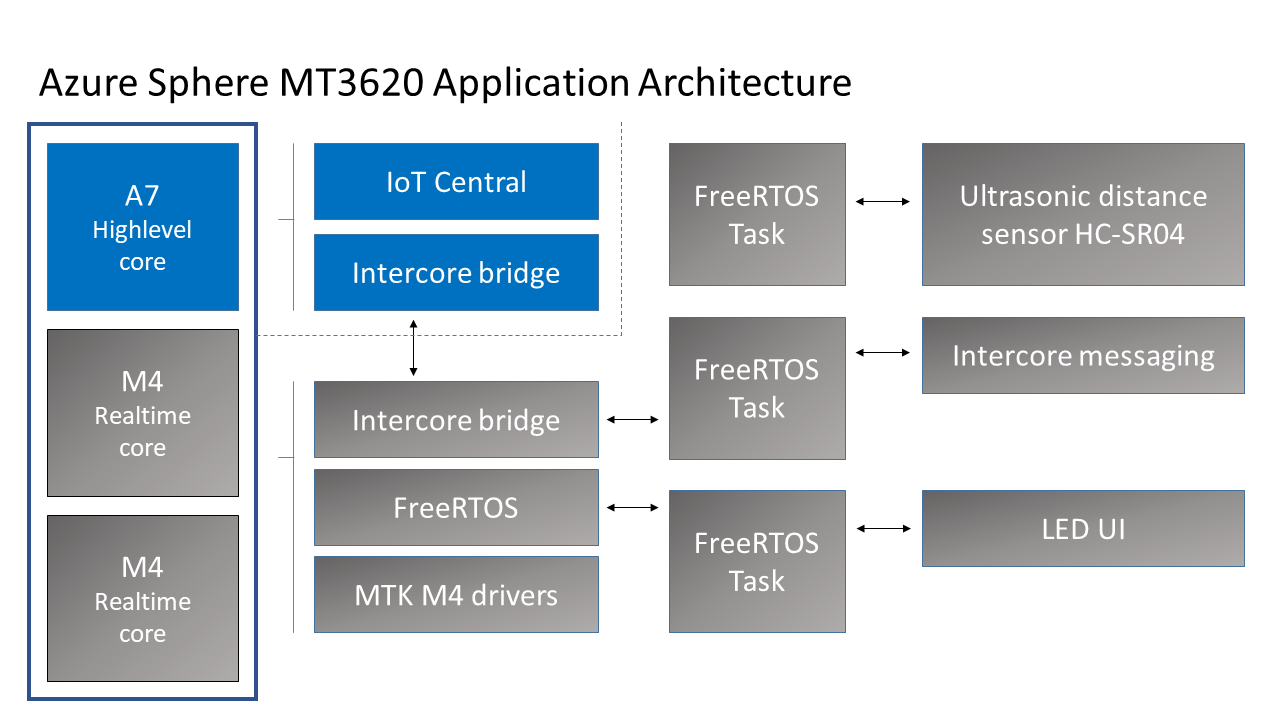
Real-time FreeRTOS Application
- The Real-time FreeRTOS application running on one of the M4 cores that is responsible for running the timing-sensitive HC-SR04 ultrasonic distance sensor.
- Distance is measured every 100 milliseconds so the rover can decide the best route.
- The sensor requires precise microsecond timing to trigger the distance measurement process, so it is a perfect candidate for running on the Real-time core as a FreeRTOS Task.
- Every 5 seconds a FreeRTOS Task sends distance telemetry to the Azure Sphere A7 High-level application.
Azure IoT High-level Application
- The application running on the Azure Sphere A7 High-level application core is responsible for less timing-sensitive tasks such as establishing WiFi/Network connectivity, negotiating security and connecting with Azure IoT Central, updating the device twin and send telemetry messages.
Extending
- I am thinking about extending this solution with a local TinyML module for smarter navigation.
Parts list

Azure IoT Central
Azure IoT Central provides an easy way to connect, monitor, and manage your Internet of Things (IoT) assets at scale.
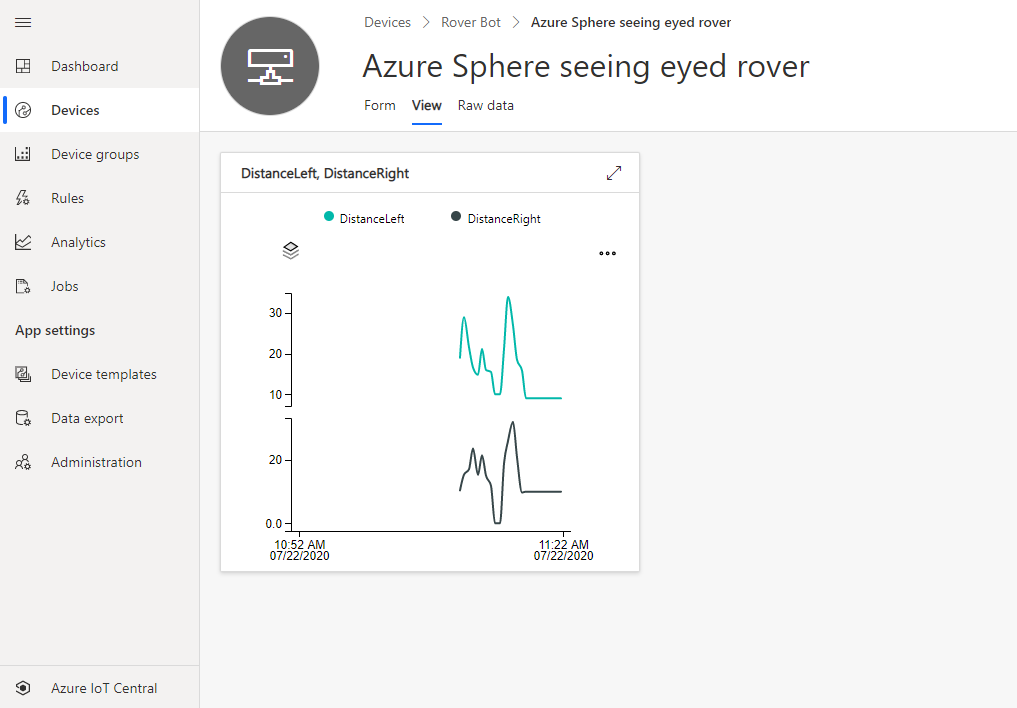
I created a free trial of Azure IoT Central and in no time I had the rover distance sensor charted and available for deeper analysis. By the way, you can continue to connect two devices for free to IoT Central after the trial period expires.
Extend and integrate Azure IoT Central applications with other cloud services
Azure IoT Central is also extensible using rules and workflows. For more information, review Use workflows to integrate your Azure IoT Central application with other cloud services
How to build the solution
- Set up your Azure Sphere development environment.
- Review Integrate FreeRTOS Real-time room sensors with Azure IoT.
- Learn how to connect and Azure Sphere to Azure IoT Central or Azure IoT Hub.
- The IoT Central Device Template Capabilities Model JSON file for this solution is included in the iot_central directory of this repo.
Have fun and stay safe and be sure to follow us on #JulyOT.
by Scott Muniz | Jul 21, 2020 | Uncategorized
This article is contributed. See the original author and article here.
One of the best ways to protect your organization from security threats is to make sure that your staff uses the appropriate level of access to perform their job, ideally following the concept of least privilege. Like other services in Microsoft 365, Intune uses a role-based access control (RBAC) model that helps you manage who has access to your organization’s resources and what they can do with those resources. By assigning roles to your Intune admins, you can limit what they can see and change.
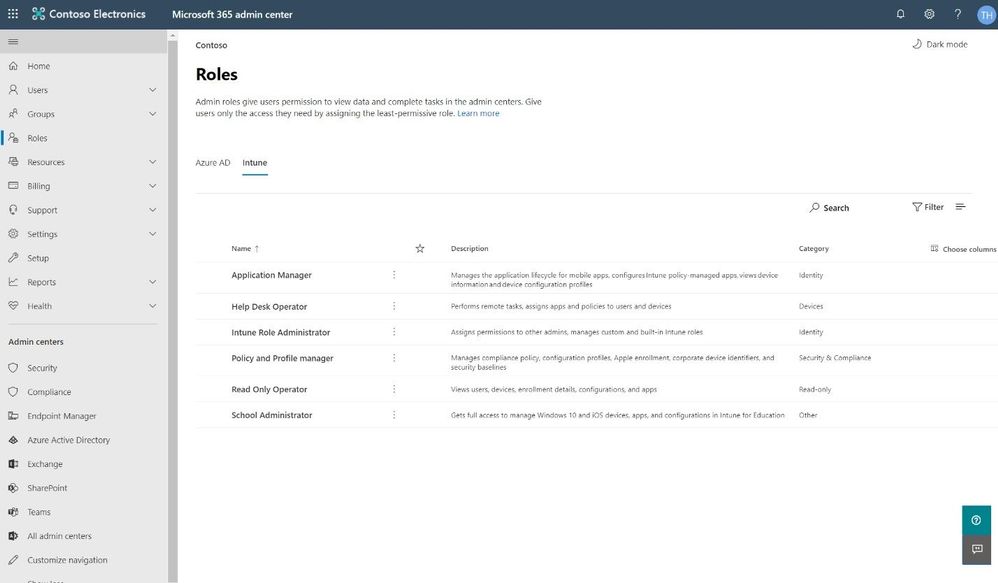
We have added Intune role management to the Microsoft 365 admin center, where you can also leverage features such as the ability to search for roles and view role permissions. This means you don’t need two separate tools to manage roles for Microsoft 365 and Intune. When you sign into the Microsoft 365 admin center, you’ll see that there are two pivots on the Roles page, one for Azure Active Directory (Azure AD) and one for Intune.
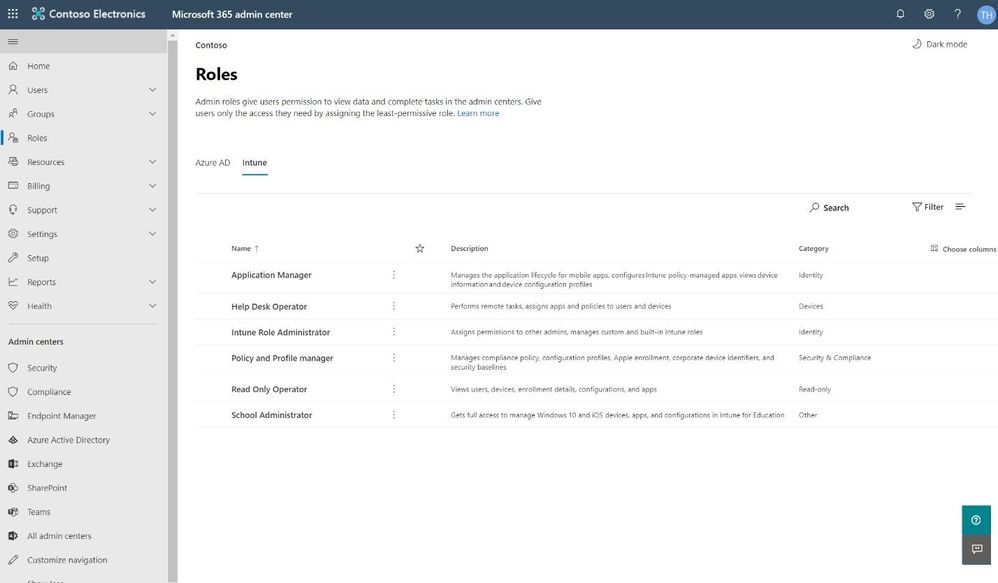 Intune pivot on the Roles page in the Microsoft 365 admin center
Search for the right role
As with the Azure AD pivot, the Intune pivot also includes Search, which allows you to use keywords to find roles bases on the role name, description, or the permissions associated with the role. This allows you to find the right role with the least amount of privileges necessary for the role tasks.
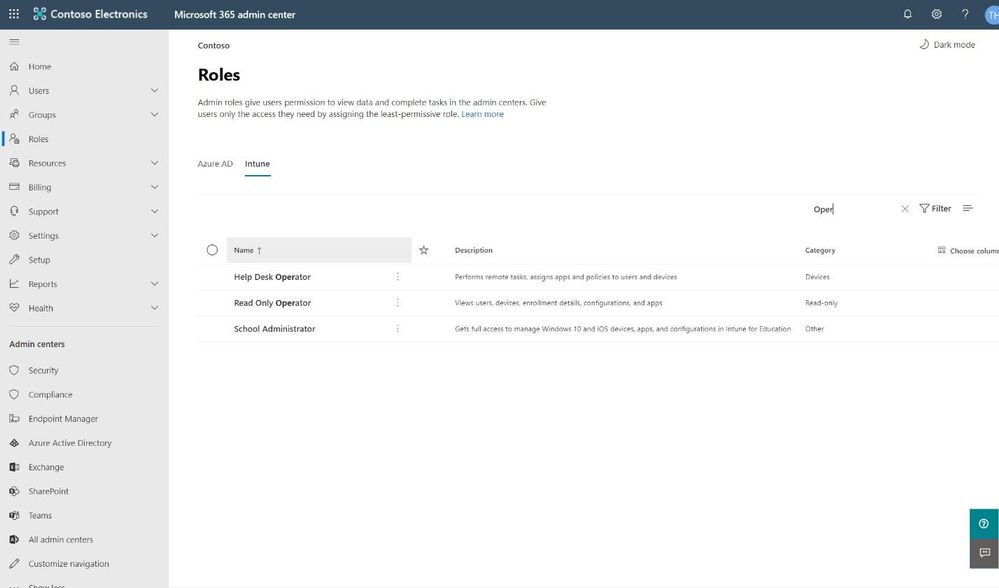 Search for the right role
Assigning a Role
Assigning a role is quick and easy. The wizard in the Microsoft 365 admin center walks you through a series of steps to identify who is being given access and what they will be able to manage.
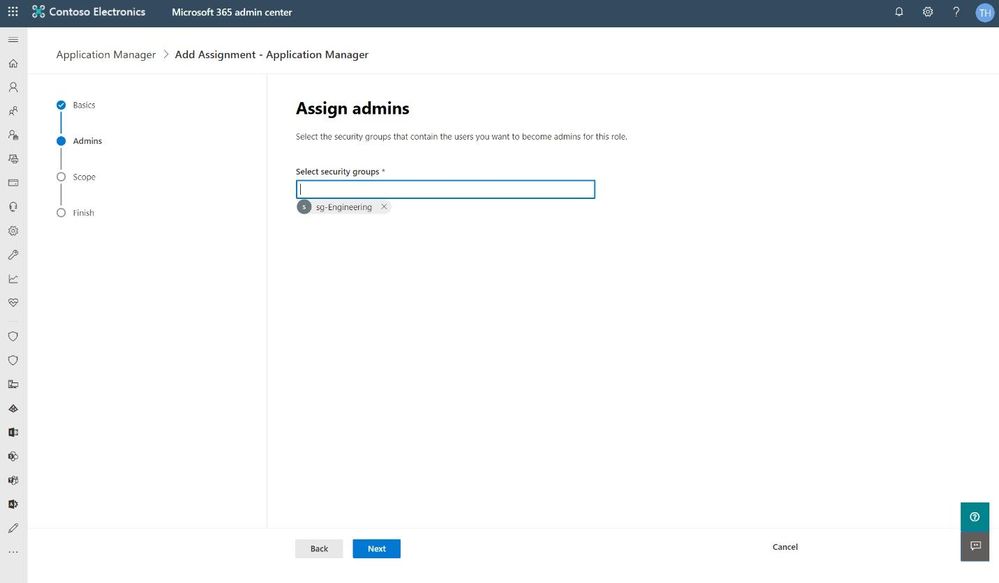 Assign an Intune role in the Microsoft 365 admin center
The wizard also supports assigning scope tags from Microsoft Endpoint Manager. Roles determine what access admins have to which resources, and scope tags determine which objects admins can see.
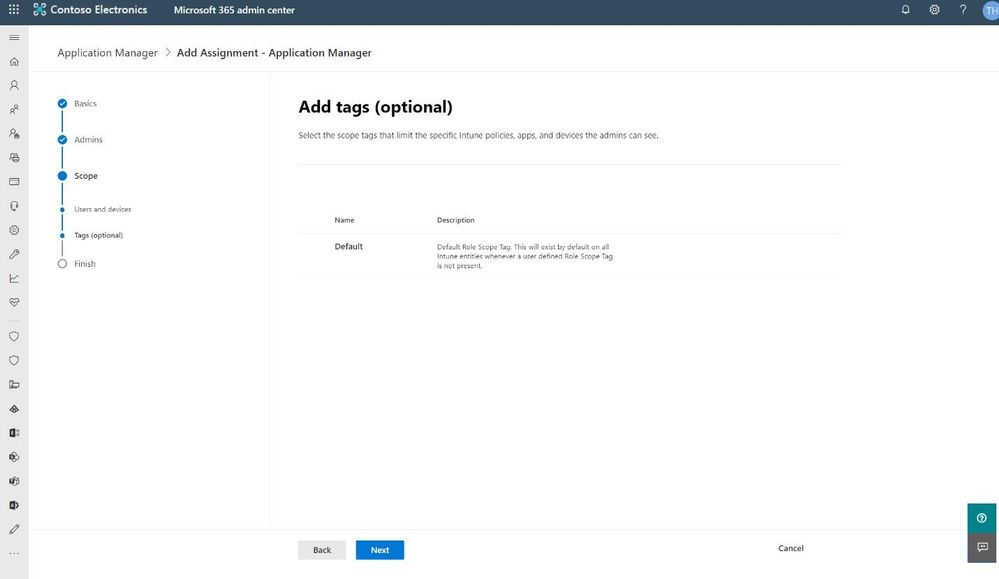 Use optional scope tags when assigning an Intune admin role
Our hope is that the wizard gives a clear path to getting the right Intune roles assigned to the right people. We’d love to get your feedback, so please try this new experience and use the in-product feedback button in the bottom right corner to let us know what you think.
We have a lot more in store for role management in the Microsoft 365 admin center, so stay tuned!
–The Microsoft 365 admin center team
by Scott Muniz | Jul 21, 2020 | Alerts, Microsoft, Technology, Uncategorized
This article is contributed. See the original author and article here.
As companies continue their cloud journey, they are more and more adopting a microservice architecture as part of their application modernization. In this blog post, we have Walter Oliver (@walterov) who is a Program Manager in the Azure Stack Hub team to explore how Azure API Management Gateway on Azure Stack Hub can help in the hybrid strategy for these services.
While some of the applications are being deployed on Azure, companies face challenges with operational consistency when it comes to those apps that must remain on premises. That is one of the scenarios where Azure Stack Hub (ASH) can provide the platform where to host their on-premises applications, while keeping operational consistency. Enterprises are increasingly using Kubernetes on Azure Stack Hub as their choice for their microservices, as they seek increased autonomy for their development teams, flexibility, and modularity. But the process of decoupling single tier monolithic applications into smaller API services brings new problems: how do you know what are these services? Do they meet the security requirements? How are they accessed and monitored?
Azure API Management (APIM) helps address these issues. APIM is part of the Microsoft hybrid strategy, it will help you in:
- Publishing a catalog of APIs available and control access to them
- Preventing DOS attacks for externally available APIs
- Implementing security policies
- Onboarding the ISV partner ecosystem
- Supporting your microservices program with a robust internal API program
Challenges to API Management on Premises
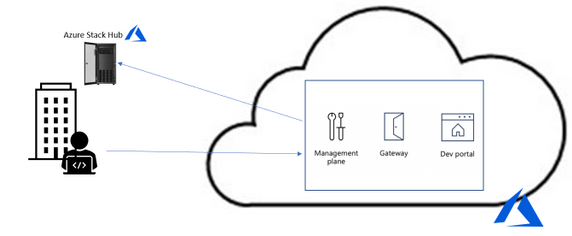
However, since the Azure API Management service is on the cloud, utilizing it implies a round trip to the cloud and then to the on-premises service to service every call. In some cases, this is acceptable, but in many it is not (figure 1).
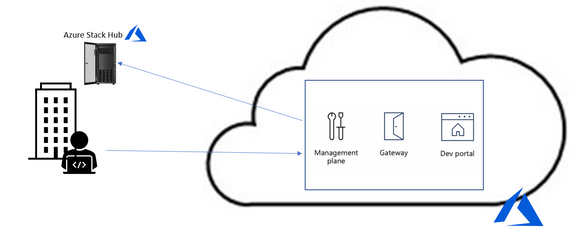
Figure 1. API Management without self-hosted gateway
To solve it the Azure APIM team created the API Management self-hosted gateway. The self-hosted gateway, as the name implied, can be hosted locally in your data center (figure 2).
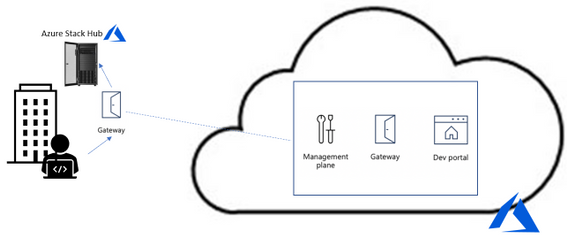
Figure 2. API Management with self-hosted gateway
Running the Self-hosted Gateway in Azure Stack
The APIM’s self-hosted gateway feature enables Azure Stack Hub customers (and customers in general) to manage their on-premises microservices APIs on a central portal in Azure. The self-hosted gateway is a containerized, functionally equivalent version of the managed gateway deployed to Azure as part of every API Management service.
Now you can deploy it inside Azure Stack Hub as a Linux -based Docker container from the Microsoft Container Registry. This means that you can hosted inside the AKS-engine-deployed Kubernetes cluster inside ASH. In cases where you have microservices APIs exposed to applications inside the Kubernetes cluster all the calls happen locally with minimal latency and no extra data transfer costs. More importantly, it also ensures that compliance is maintained since there are not round trips to Azure. Yet, all the benefits of utilizing APIM from Azure remain: single point of management, observability, and discovery of all APIs within the organization.
For complete documentation on AIPM self-hosted gateway see the overview here. To provision the gateway in APIM in Azure follow the instructions here. To deploy the gateway containers in Kubernetes follow the instructions here.
Considerations when running the gateway in Azure Stack Hub
- A common question is whether there is a need for opening ports for inbound connectivity, the answer is no. Self-hosted gateway only requires outbound TCP/IP connectivity to Azure on port 443, it follows a pull model, not a push model for communication. Connectivity is required so that information such as health reporting, updates, events, logs, and metrics can be transferred. This also implies that when there is no communication with Azure, the data does not flow, yet the gateway continues to operate as expected.
- When running the gateway container in your Kubernetes cluster with the configuration backup option, you will notice an extra managed disk being created in the cluster, this is the disk where the configuration backup is stored. This is particularly useful in case that connection to Azure can become unavailable. Notice that the gateway container is not meant to be run on an ASH stamp that will be disconnected from the internet or is planned to be disconnected most of the time. In fact, if the stamp is disconnected temporarily and for some reason the gateway container is stopped, Kubernetes will try to restart it but if the option of running with backup configuration was off, it will fail. In those cases, you need to ensure that connectivity to Azure is restored.
- Another question is whether that Gateway container automatically discovers the available APIs. The answer is that they are not, you must explicitly go to the Azure APIM portal and register the APIs you need to manage.
- In the case that you have APIs in another Kubernetes cluster (or anywhere in your data center) that you would like to manage you can publish them via the same gateway container or provision and deploy another gateway instance
- Deploying a new microservice and publishing its API or applying changes to an existing one is something that is better formalized in a CI/CD Pipeline. Getting familiarized with the available operations will be useful, see the reference here. For a guide on how to architect a CI/CD pipeline with corresponding repo see this blog.
Summary
Azure’s API Management service is very helpful for managing large microservices deployments, now the self-hosted APIM Gateway makes it very appealing for including APIs deployed on premises. The documentation provided online in Azure covers the basic concepts, provisioning, and deploying of self-hosted gateways, the summary provided above is an introduction to the subject tailored to Azure Stack Hub customers. Subsequent posts will include a sample deployment of an API and its publishing through APIM on Azure.

by Scott Muniz | Jul 21, 2020 | Alerts, Microsoft, Technology, Uncategorized
This article is contributed. See the original author and article here.
I’ve done a few posts recently around using GraphQL, especially with Azure Static Web Apps, and also on some recent streams. This has led to some questions coming my way around the best way to use GraphQL with Azure.
Let me start by saying that I’m by no means a GraphQL expert. In fact, I’ve been quite skeptical of GraphQL over the years.

This tweet here was my initial observation when I first saw it presented back in 2015 (and now I use it to poke fun at friends now) and I still this there are some metis in the comparison, even if it’s not 100% valid.
So, I am by no means a GraphQL expert, meaning that in this series I want to share what my perspective is as I come to looking at how to be do GraphQL with Azure, and in this post we’ll look at how to get started with it.
Running GraphQL on Azure
This question has come my way a few times, “how do you run GraphQL on Azure?” and like any good problem, the answer to it is a solid it depends.
When I’ve started to unpack the problem with people it comes down to wanting to find a service on Azure that does GraphQL, in the same way that you can use something like AWS Amplify to create a GraphQL endpoint for an application. Presently, Azure doesn’t have this as a service offering, and to have GraphQL as a service sounds is a tricky proposition to me because GraphQL defines how you interface as a client to your backend, but not how your backend works. This is an important thing to understand because the way you’d implement GraphQL would depend on what your underlying data store is, is it Azure SQL or CosmosDB? maybe it’s Table Storage, or a combination of several storage models.
So for me the question is really about how you run a GraphQL server and in my mind this leaves two types of projects; one is that it’s a completely new system you’re building with no relationship to any existing databases or backends that you’ve got* or two you’re looking at how to expose your existing backend in a way other than REST.
*I want to point out that I’m somewhat stretching the example here. Even in a completely new system it’s unlikely you’d have zero integrations to existing systems, I’m more point out the two different ends of the spectrum.
If you’re in the first bucket, the world is your oyster, but you have the potential of choice paralysis, there’s no single thing to choose from in Azure, meaning you have to make a lot of decisions to get up and running with GraphQL. This is where having a service that provides you a GraphQL interface over a predefined data source would work really nicely and if you’re looking for this solution I’d love to chat more to provide that feedback to our product teams (you’ll find my contact info on my About page). Whereas if you’re in the second, the flexibility of not having to conform to an existing service design means it’s easier to integrate into. What this means is that you need some way to host a GraphQL server, because when it comes down to it, that’s the core piece of infrastructure you’re going to need, the rest is just plumbing between the queries/mutations/subscriptions and where your data lives.
Hosting a GraphQL Server
There are implementations of GraphQL for lots of languages so whether you’re a .NET or JavaScript dev, Python or PHP, there’s going to be an option for you do implement a GraphQL server in whatever language you desire.
Let’s take a look at the options that we have available to us in Azure.
Azure Virtual Machines
Azure Virtual Machines are a natural first step, they give us a really flexible hosting option, you are responsible for the infrastructure so you can run whatever you need to run on it. Ultimately though, a VM has some drawbacks, you’re responsible for the infrastructure security like patching the host OS, locking down firewalls and ports, etc..
Personally, I would skip a VM as the management overhead outweighs the flexibility.
Container Solutions
The next option to look at is deploying a GraphQL server within a Docker container. Azure Kubernetes Service (AKS) would be where you’d want to look if you’re looking to include GraphQL within a larger Kubernetes solution or wanting to use Kubernetes as a management platform for your server. This might be a bit of an overkill if it’s a standalone server, but worthwhile if it’s part of a broader solution.
My preferred container option would be Azure Web Apps for Containers. This is an alternative to the standard App Service (or App Service on Linux) but useful if you’re runtime isn’t one of the supported ones (runtimes like .NET, Node, PHP, etc.). App Service is a great platform to host on, it gives you plenty of management over the environment that you’re running in, but keeps it very much in a PaaS (Platform as a Service) model, so you don’t have to worry about patching the host OS, runtime upgrades, etc., you just consume it. You have the benefit of being able to scale both up (bigger machines) and out (more machines), building on top of an backend system allows for a lot of scale in the right way.
Azure Functions
App Service isn’t the only way to run a Node.js GraphQL service, and this leads to my preference, Azure Functions with Apollo Server. The reason I like Functions for GraphQL is that I feel GraphQL fits nicely in the Serverless design model nicely (not to say it doesn’t fit others) and thus Functions is the right platform for it. If the kinds of use cases that you’re designing your API around fit with the notion of the on-demand scale that Serverless provides, but you do have a risk of performance impact due to cold start delays (which can be addressed with Always On plans).
Summary
We’re just getting started on our journey into running GraphQL on Azure. In this post we touched on the underlying services that we might want to look at when it comes to looking to host a GraphQL server, with my pick being Azure Functions if you’re doing a JavaScript implementation, App Service and App Service for Containers for everything else.
As we progress through the series we’ll look at each piece that’s important when it comes to hosting GraphQL on Azure, and if there’s something specific you want me to drill down into in more details, please let me know.
This post was originally posted on www.aaron-powell.com.


Recent Comments