
by Scott Muniz | Jun 17, 2020 | Uncategorized
This article is contributed. See the original author and article here.
It’s that time of the week once again – Microsoft Reconnect! This week we are joined by five-time MVP Business Applications recipient José Antonio Estevan.
Hailing from Alicante, Spain, José lost his MVP status when becoming a full-time employee for Microsoft as Premier Field Engineer in the Business Applications domain for the EMEA region.
“I love how customers and partners are doing amazing things with our platform and discovering how far this platform can go with a good idea and the right implementation,” he says.
An important part of the MVP program is the community, José says, so joining Reconnect feels like an excellent extension of the friendships that have been formed. “I’m especially involved in events driven by the Dynamics community, and particularly in my country. That was my push when I was an MVP and I see with pride how this community is growing and evolving. So far, my favorite event is the Dynamics Saturday and I enjoy participating on the Spanish ones and contributing always I have the chance.”
“[Reconnect] has given me the chance to keep in touch with old fellow MVPs and keep the community feeling a bit longer,” José says.
Looking back on his time as an MVP, José remembers the feeling of one event in particular. “I’m convinced the best experience you get as an MVP is your first MVP Summit,” he says.
“Personally, this experience allowed me to travel to the U.S for the first time, visit the Redmon campus, and learn from the trenches how the product I based my career on was built. That was truly inspiring and one of the biggest career motivators I’ve ever had.”
The Business Applications expert recommends new members to the program enjoy the journey instead of solely focusing on renewing the MVP award. “Just continue doing what you were doing to be awarded, what originally you decided you were having fun doing,” José says.
For now, Jose reports enjoying the process himself. “As long as I continue learning as the first time I was awarded as MVP, I hope I can enjoy the journey for a long time,” he says,
For more, visit José’s Twitter or blog.

by Scott Muniz | Jun 17, 2020 | Uncategorized
This article is contributed. See the original author and article here.
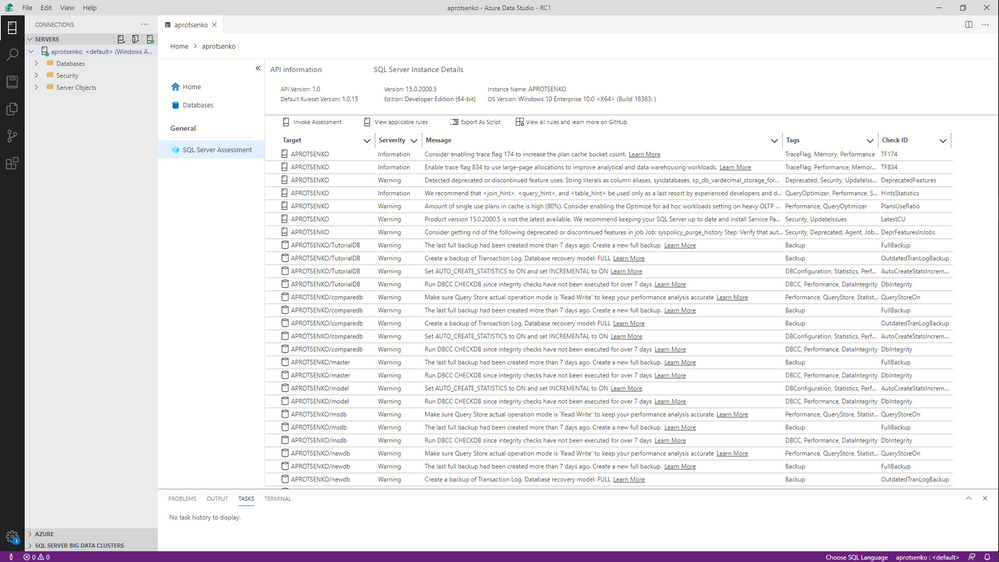
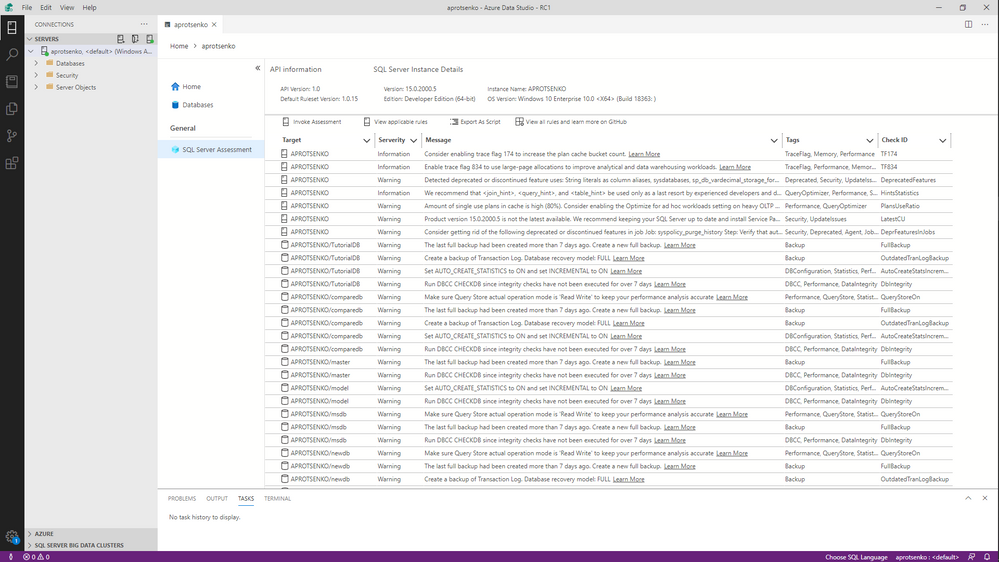
SQL Server Assessment Extension for Azure Data Studio provides a user interface for evaluating your SQL Server instances and databases for best practices. It uses SQL Assessment API to achieve this. In this preview version, you can:
– Assess a SQL Server or Azure SQL Managed Instance and its databases with built-in rules (Invoke Assessment)
– Get a list of all built-in rules applicable to an instance and its databases (View applicable rules)
– Export assessment results and list of applicable rules as script to further store it in a SQL table
We plan to introduce other highly requested features such as reporting and rule customization in later releases.
How to Install
First, you need to install Azure Data Studio version 1.19.0 or later. To acquire SQL Server Assessment extension, search for ‘sql server assessment’ in Azure Data Studio Marketplace and install it. After installation, the extension will add a new tab to the server dashboard.
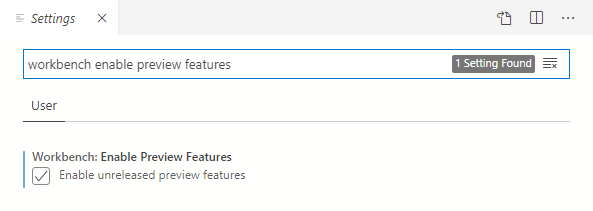
Make sure you have ‘Enable Preview Features’ checked in the ADS settings, otherwise you won’t see the SQL Assessment tab as the extension is in preview.
Currently SQL Assessment can evaluate SQL Servers and Azure SQL Managed Instances. We continue to improve our ruleset and plan to widen the product set it covers.
We would love to hear your feedback about the extension and the api. Please leave a comment here.
by admin | Jun 17, 2020 | Uncategorized
This article is contributed. See the original author and article here.
Many of you must be wondering if building near real-time analytical solution is really possible or just another buzz in the world of analytics. In traditional data analytics solutions, you have to go through the time consuming curation processes to bring data in a shape to be consumed by the end users.
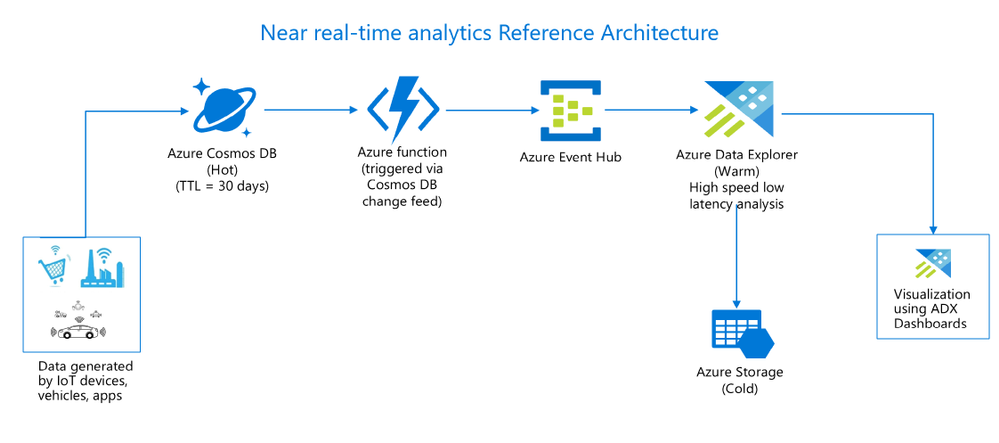
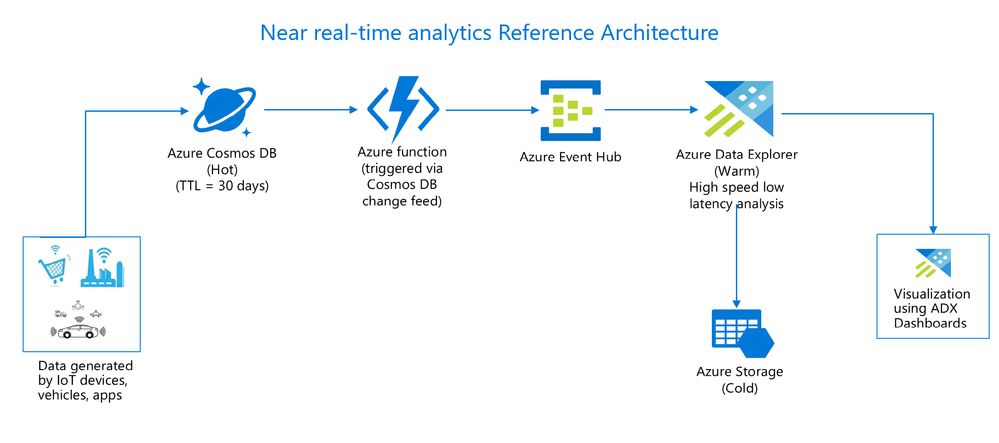
Now with the advanced systems and technologies, it is practically possible to ingest and query raw operational data in near real-time without impacting OLTP(Online transaction processing) system. Integration of Azure Cosmos DB with Azure Data Explorer makes it real with the following solution architecture –
Benefits of this architecture
- Readily available operational data for analysis as opposed to waiting for days to get the data.
- Querying data without impacting the OLTP system’s performance.
- Quick and fast interactive queries over fresh and large data sets.
- Drill down from analytic aggregates always point to the fresh data.
Use cases
There are numerous potential benefits of this architecture from business growth perspective. Just to give you an idea on its value proposition which is applicable to most organizations across diverse industries, sharing few examples of near real-time scenarios –
- In e-commerce system, contextual recommendations and promotions based on customer’s current purchase enriched with historical purchase, consumer behavior trend analysis.
- In manufacturing industry, analysis of data from IoT devices to respond to operational events, predictive maintenance, improvement in production safety.
- In energy and utilities industry, analysis of meter readings from smart meters, decisions to instantly buy and sell capacity, power generation analysis.
Similarly in health, finance and many other industries, heaps of scenarios where you could make better business decisions if you get an ability to analyse data in near real-time.
Cost optimization
The next obvious question would be around data redundancy and cost impact of this solution. You could optimize the cost of this solution by managing the data retention policies across all the services. For example, Cosmos DB is an operational hot store where data is stored only for few days, Azure Data Explorer is an analytical warm store where frequently accessed data is stored, export rest of the old data to cold storage which is Azure storage in this solution. It is very easy to configure data retention in all these services so you could easily change it depending on your requirements.
Demonstration of solution with hands on lab
To help you understand the end to end flow of near real-time analytics solution, hands on lab with step by step guidance has been put together along with working code samples so you can try and test it on your own with the simulated data. Brief on what is being covered in this lab –
- Simulate data using data generator component which will pump the data into Cosmos DB.
- Leverage Cosmos DB change feed feature to trigger Azure function to push every change in Cosmos DB.
- Use streaming capability of Azure Data explorer to ingest the streamed data via Azure Event Hub.
- Run interactive queries using KQL(Kusto query language) with the glimpses on the advanced scenarios like forecasting, anomaly detection and time series analysis.
- In last module of lab, you will have lot of fun building near real-time dashboard using ADX dashboards.
The lab is publicly available here at GitHub.
Try it out and share your feedback!
Note
Near real-time analytics solution can be built in multiple ways using different azure services, this lab describes one of the possible scenarios. Similar outcomes can be achieved using other azure services which are not covered in this lab.


Recent Comments