by Contributed | Oct 4, 2024 | Technology
This article is contributed. See the original author and article here.
Surface devices are crafted to deliver a premium and versatile experience, whether you’re working from home, in the office, or on the go. Each environment presents unique challenges for display readability, particularly due to reflections and glare from ambient light sources.
Based on feedback and extensive user testing, we set out to develop a solution to minimize unwanted reflections while maintaining the clarity and contrast of your display.
We wanted to design an experience that minimized distracting reflections and delivered on key experiences that our users expect including:
- Integrating anti-reflective (AR) technology with touch and pen experiences without compromising responsiveness and accuracy.
- Ensuring the durability of the AR technology and to protect against scratches, fingerprints and other environmental factors.
- Maintaining the color fidelity and uniformity of the display across the entire screen and calibrating it to industry standards.
- Optimizing the optical performance of the AR coating and avoid any interference with the IR and RGB cameras used for Windows Hello and other features.
In this blog post, we’ll explore these challenges in more detail and show how we addressed them with solutions in Surface Pro 10 for Business and Surface Laptop 6 for Business.
What is anti-reflective technology?
There are different types of glare suppression technology, such as anti-glare and anti-reflective (AR) solutions.
- Anti-glare technology works by creating a microscale uneven display surface, scattering light that hits the display, reducing harsh reflections and creating a matte finish.
- Anti-reflective technology reduces the amount of light bouncing off the display by applying a thin coating that minimizes reflections. By minimizing reflections, anti-reflective technology can enhance the visibility and clarity of the screen content, especially in bright or variable lighting conditions.
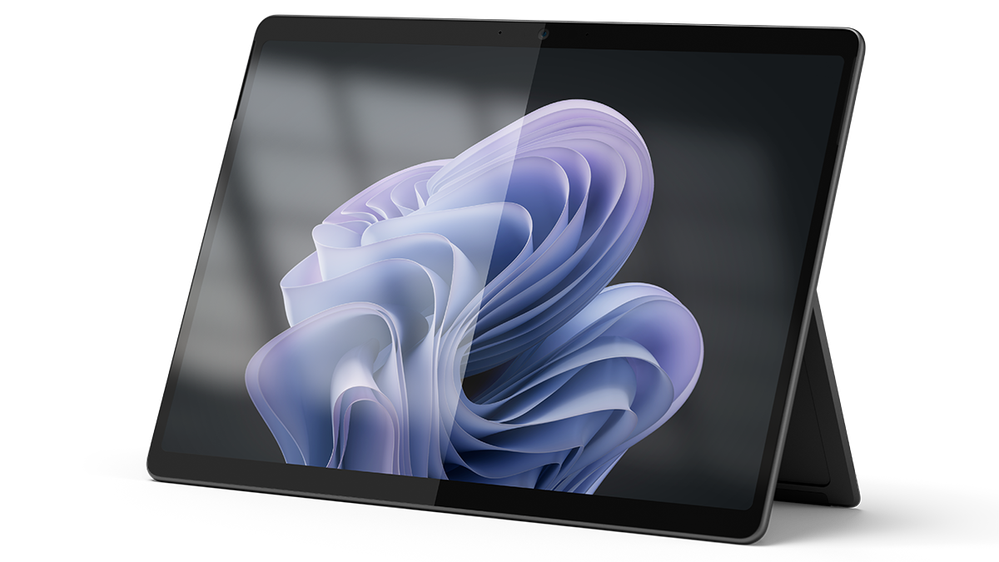
Surface Pro 10 showing the results of AR coating on the right side
Benefits of anti-reflective technology on Surface Pro 10 & Surface Laptop 6
With Surface Pro 10 and Surface Laptop 6, we sought to bring even more value to our commercial customers by adding AR technology to the displays. This new technology improved the experience in using our devices by delivering:
- Improved readability: AR technology enhances display readability by reducing reflections and glare, making it easier to see in various lighting conditions—whether it’s bright daylight, cloudy skies, office lighting, or at night in your bedroom or on an airplane. Readability largely depends on contrast, a key quality factor that we meticulously measure and optimize.
- Enhanced color perception: By reducing the reflections and glare, anti-reflective technology improves the perceived color of the display, as the ambient light can alter the hue, saturation and brightness of the screen content. Color perception is another critical quality factor that we strive to deliver.
- Compliance with regulations: Some organizations have specific regulations and standards that require the control of screen reflectivity to ensure the health and safety of the users and workers. By using anti-reflective technology, Surface devices can help meet these standards, contributing to a safer and more comfortable working environment.
Designing for innovation in anti-reflective technology
Designing the AR coating for Surface devices was not a simple task. We aimed to reduce reflections in a meaningful way without sacrificing picture quality and brightness or compromising the user experience. It involved multiple rounds of trials, tests and evaluations, with different suppliers, materials and processes. We had to consider many factors, such as the optical performance, the reliability, the process control, the yield and cost. We also had to consider the impact of the AR coating on the other components of the display, such as the black mask, IR ink, touch layers, polarizer, adhesives and the display panel itself.
We started by defining the target specifications for the AR coating, based on a benchmark analysis and user studies of multiple AR solutions. Our goal was to reduce overall reflectance by 50% and improve transmittance at the glass level. We also wanted neutral reflection for all light sources and a high transmission in the IR spectrum range for the Windows Hello feature. Balancing all aspects of the displays was essential for delivering a premium experience.
Once the target outcome was identified, we worked closely with our manufacturer to align their AR coating designs with our specifications and verify their performance at both the cover glass level and touchscreen display module (TDM) levels. We used different equipment and materials to deposit the AR coating on the glass surface. We also applied an anti-fingerprint (AF) coating over the AR coating to protect it from scratches and abrasion.
We measured and evaluated the optical and reliability performance of the AR-coated cover glass and TDM samples, using various methods. We assessed reflection color, reflection intensity and transmission as well as evaluating the impact of the AR coating on the IR ink and various cameras/sensors. Reliability tests such as abrasion, adhesion, chemical resistance, thermal shock, humidity and UV exposure ensured the AR coating met our quality standards. Finally, we conducted user studies and demos to assess the visual experience and gather feedback.
Results you can see
We’ve created an incredible experience that allows users to be more productive in almost any lighting condition.
- Reduced reflections: Our advanced anti-reflective technology reduces reflections by up to 50%, making it easier to see your screen in bright light or even outdoors. This ensures that your work is always readable, no matter where you are.
- Individually calibrated displays: Each Surface Pro 10 and Surface Laptop 6 display is individually calibrated to minimize unwanted reflections while preserving exceptional picture quality. This attention to detail ensures touch and pen interactions remain precise and responsive, providing a seamless user experience.
- Enhanced brightness and contrast: Surface Pro 10 features our latest PixelSense display, which is 33% brighter and boasts a 15% higher contrast ratio than its predecessor, the Surface Pro 9. With support for brightness levels ranging from 2 to 600 NITS, users can enjoy vibrant visuals in any lighting condition.
- Certified excellence: Our displays have been certified by TÜV SÜD, a globally recognized testing and certification organization, to meet the stringent requirements of ISO 9241-307, which ensures high-quality display performance and user safety.1
- Eye comfort and longevity: To improve eye comfort, we’ve engineered the displays on Surface Pro 10 and Surface Laptop 6 to reduce blue light exposure. This not only improves eye comfort but also allows users to work longer without experiencing eye strain. Our displays are certified by TÜV SÜD for their low blue light ratio, ensuring a healthier viewing experience.1
- Flicker-free experience: Additionally, our displays have been rigorously tested to be flicker-free, further enhancing eye comfort and reducing eye strain. This certification by TÜV SÜD underscores our dedication to user well-being.1

At Surface, we are committed to creating premium hardware and experiences that enable our customers to work more efficiently and comfortably. The displays on Surface Pro 10 for Business and Surface Laptop 6 for Business are not only stunning and responsive, but also designed to reduce eye strain, glare and reflections in any lighting condition. We achieve this by applying advanced anti-reflective technologies and by individually calibrating each display to ensure optimal picture quality. Our displays have been certified by TÜV SÜD for their flicker-free, low blue light and high-quality performance, demonstrating our adherence to rigorous industry standards.
With our displays, you can focus on what matters most, without being distracted or fatigued by your screen. For more information, head to the links below:
Make sure to subscribe to the Surface IT Pro Blog and come back to discover more about our innovative designs that boost productivity and elevate user experience.
References
1. Testing and certification has been performed by TÜV SÜD and only applies to Surface Pro 10 for Business and Surface Laptop 6 for Business.
by Contributed | Oct 3, 2024 | Technology
This article is contributed. See the original author and article here.
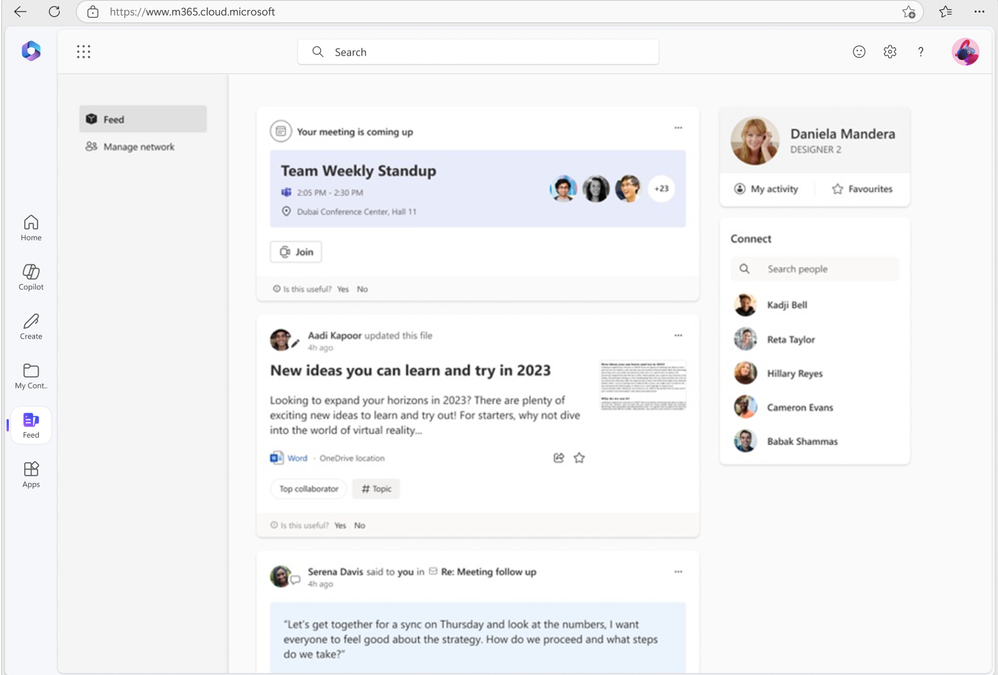
As part of our ongoing efforts to streamline and enhance user experiences, we will be retiring the Feed feature (shown in figure 1 below) on the Microsoft 365 app. This change will affect web endpoints (www.microsoft365.com, www.office.com) and the Windows app (“Microsoft 365 (Office)”).
We are committed to ensuring that your existing workflows remain unaffected. Launched in 2022, Feed was designed to help users explore the latest content and team activities. Over time, we have integrated all the essential features of Feed into a more accessible surface within the Microsoft 365 app: the “Recommended” files on the Home tab (shown in figure 2 below).
Deprecation timeline: Feed will no longer be accessible from the Microsoft 365 app starting November 1, 2024.
 Figure 1: Feed as seen on Microsoft 365
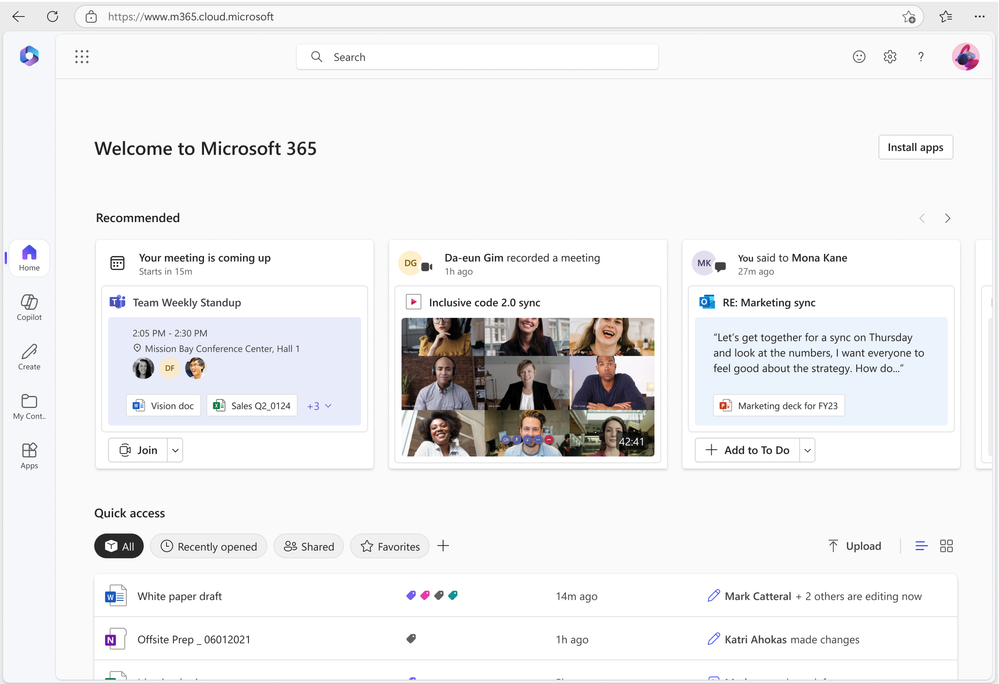 Figure 2: Recommended files on Microsoft 365
by Contributed | Oct 2, 2024 | Technology
This article is contributed. See the original author and article here.
Join us in Reston, VA, on October 15th, 16th, or 17th for our Microsoft 365 Copilot GCC Readiness Days!
This exclusive in-person event is your chance to learn how AI and Microsoft 365 Copilot GCC can address the unique challenges of public sector missions. Tailored for IT professionals, administrators, and decision-makers in government agencies, these readiness days offer practical, actionable insights to help you drive secure productivity, efficiency, and innovation in your organization.
Reserve Your Spot Today!
Spaces are limited for these in-person readiness days to ensure personalized, in-depth discussions. Register now to secure your spot and be among the first to explore how Microsoft 365 Copilot GCC can empower your teams to work more effectively.
Why You Should Attend
Microsoft 365 Copilot GCC is set to revolutionize government workspaces, bringing AI-powered productivity into secure, compliant environments. At this event, you will uncover how Copilot can automate routine tasks, enhance collaboration, and help your team focus on higher-priority activities—all while meeting the stringent regulations of government operations.
What You’ll Gain from the Event:
- In-Depth, Actionable Learning: Sessions will provide detailed, step-by-step guides on how to implement Copilot GCC within your agency’s existing workflows.
- Transparency and Trust: Gain insights from candid discussions about the strengths and limitations of AI in government settings, addressing your concerns around compliance, security, and data privacy.
- Real-World Solutions: Learn directly from AI thought leaders and engineers on how to navigate integration challenges and leverage responsible AI practices.
What to Expect:
- Prepare to Become an AI-Powered Public Sector Organization: Learn how to ready your workforce for a seamless transition to Microsoft 365 Copilot GCC, with practical tips tailored to government environments.
- Responsible AI: Discover how Microsoft partners with government agencies to implement AI responsibly, ensuring compliance, security, and ethical considerations.
- Gov AI Integration Challenges and Opportunities: Engage in transparent discussions with product experts and engineers to explore best practices for deploying Copilot GCC in your agency’s environment.
Event Agenda:
- 09:00 AM – 09:15 AM: Keynote
- 09:15 AM – 10:00 AM: Roadmap
- 10:00 AM – 10:50 AM: How Copilot Works
- 11:00 AM – 11:50 AM: How to Get Ready: Technology
- 12:00 PM – 01:00 PM: Lunch
- 01:00 PM – 01:50 PM: Microsoft 365 Business Chat Conversation
- 02:00 PM – 02:50 PM: How to Get Ready: People
- 03:00 PM – 03:50 PM: Art of the Possible Demos
Note: The agenda is identical for each day, so select the date that best fits your schedule.
Is Lunch Provided?
Yes! Lunch is provided each day, thanks to our spectacular sponsoring partners:
Be sure to learn more about our sponsoring partners’ Copilot offerings during the Partner Lunch & Learn session!
Venue Details:
- Where: The Microsoft Garage, Reston – DC, 11955 Freedom Drive, Reston, VA 20190
Engage and Share!
Have questions or want to share your thoughts on Microsoft 365 Copilot in GCC? Join the conversation in the comments below and connect with your peers!
by Contributed | Oct 1, 2024 | Technology
This article is contributed. See the original author and article here.
1. File Actions
If you use the SharePoint File Actions dataset in Microsoft Graph Data Connect, you might want to join it with the SharePoint Files dataset to get the details for each file. This post is about how you can do it, including the most common issues.
2. What is in File Actions
The SharePoint File Actions dataset includes details about every time a file was accessed, deleted, downloaded, modified, moved, renamed, or uploaded. The information about each action includes the type of action, when it happened, what file was acted upon, what application was used, and the user who performed the action (the actor).
For more information about the dataset, see the full schema documentation at data-connect-dataset-sharepointfileactions.md.
3. Joining with other datasets
A common use of this dataset is to join with the SharePoint Sites or the SharePoint Files to understand how much activity is going on for a specific Site or File. You could use this to see which Site or File was the most accessed on a given day. If you accumulate the actions for a longer period, you could find which sites had no activities in the last 90 days.
To find the details for site associated with a specific action, group File Actions by site ID then join with Sites. Here’s a SQL example to get a list of most popular sites during the period covered by File Actions:
WITH ActionsBySite AS (
    SELECT
        SiteId,
        MIN(ActionDate) AS EarliestAction,
        MAX(ActionDate) AS LatestAction,
        COUNT(*) AS ActionCount
    FROM FileActions
    GROUP BY SiteId
)
SELECT
    S.Id AS SiteId,
    S.[RootWeb.Title] AS SiteName,
    S.CreatedTime AS SiteCreated,
    S.[RootWeb.LastItemModifiedDate] AS SiteLastModified,
    S.[RootWeb.TemplateId] AS SiteTemplateId,
    A.EarliestAction,
    A.LatestAction,
    A.ActionCount
FROM ActionsBySite AS A
JOIN Sites S
ON A.SiteId = S.Id
ORDER BY ActionCount DESC
LIMIT 10;
To find details of the file associated with a specific action, group File Actions by File then join with Files. Here’s a similar example to get a list of most popular files during the period covered by File Actions:
WITH ActionsByFile AS (
    SELECT
        SiteId,
        WebId,
        ListId,
        ListItemId,
        MIN(ActionDate) AS EarliestAction,
        MAX(ActionDate) AS LatestAction,
        COUNT(*) AS ActionCount
    FROM FileActions
    GROUP BY SiteId, WebId, ListId, ListItemId
)
SELECT
    F.DirName,
    F.FileName,
    F.AuthorEmail,
    F.TimeCreated AS FileCreated,
    F.TimeLastModified AS FileLastModified,
    A.EarliestAction,
    A.LatestAction,
    A.ActionCount
FROM ActionsByFile AS A
JOIN Files F
ON A.SiteId = F.SiteId
AND A.WebId = F.WebId
AND A.ListId = F.ListId
AND A.ListItemId = F.ItemId
ORDER BY ActionCount DESC
LIMIT 10;
NOTE: Please check with your compliance team if they approve of keeping the File Actions data for longer periods of time. There might be restrictions on how long you should keep private information.
4. Potential issues
With huge datasets like Files and File Actions, there are scenarios where the JOIN is not a perfect match. Here are a few possible issues when joining File Actions with Sites or Files.
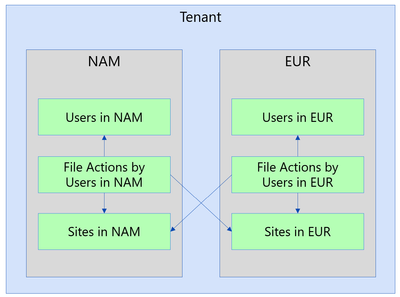
4a. Different regions
IMPORTANT: This section applies only to tenants that use the Microsoft 365 Multi-Geo capabilities, as described at Microsoft 365 Multi-Geo and Multi-Geo Capabilities in OneDrive and SharePoint.
The JOIN operation will exclude a specific action if the File Action is in a different region than the File. When a tenant has multiple regions, the actions are recorded in the region of the actor. An actor in that region might be accessing files in other regions, which you might not have in that environment. To overcome that, you must run collection for SharePoint Files from all the regions and combine (union) them into a single dataset.
NOTE: These datasets are partitioned by region for compliance reasons, so please make sure to run this scenario by your compliance team before combining data from multiple regions.
4b. Matching dates
There are certain situations where the Files will be missing when you try the join because your File Action snapshot is more recent than your File snapshot date. For instance, if you have a File Actions snapshot for July 15th joined with a Files snapshot for July 1st. Essentially, the JOIN will exclude the File Action because the File data did not make it yet.
Also, the SharePoint Files dataset might take about a week to fully update. You might exclude an action for a file that was recently created and did not make its way into the Files dataset yet. So even if both the File Actions snapshot and the Files snapshot are from July 1st, there is the possibility that some of the recent files have not been captured yet.
There is also the chance of some File Actions arriving late (typically less than 0.01%). For instance, a small percentage of actions for July 1st might show in the snapshot for July 2nd.
So, in general, if you want to get the most complete dataset, it’s a good idea to wait until July 8th to process and report on actions for July 1st. This will guarantee that you are using a fresher Files dataset and allowing for late-arriving File Actions data.
4c. Not a Document Library
Another reason for not finding a match between the File Actions dataset and the Files dataset is when the file action is for a file not in a document library. The SharePoint Files dataset only includes files in a document library, ignoring other types of lists. This is by design to keep the Files dataset to a more reasonable size.
A common scenario here are actions related to SharePoint pages (files with the “aspx” extension), typically in Communication Sites. While you will not see these “aspx” pages in the Files dataset, you could still count actions per site.
Covering this gap would require adding specific datasets for SharePoint Pages and/or SharePoint Lists, providing additional details. This is something the team is considering for the future, but there is no estimated date for this.
4d. List Item Id missing
The File Actions dataset shows the telemetry as reported by applications. For some of these applications, it is possible that the ListItemId is not reported or is reported as “null”. In that case, the join will exclude those actions.
Again, you could summarize these actions at a site level even if the ListItemId is missing. You can also look at a summary by User Agent to identify specific applications that are not providing data.
5. Conclusion
I hope you learned more about the SharePoint File Actions dataset in Microsoft Graph Data Connect. You can read more about the Microsoft Graph Data Connect for SharePoint at https://aka.ms/SharePointData. There you will find many details, including a list of datasets available and frequently asked questions.

by Contributed | Sep 30, 2024 | Technology
This article is contributed. See the original author and article here.
I was having a conversation with a small business owner, and they mentioned wanting to have an emphasis on improving customer service and ratings, but the process of reading feedback and survey responses was taking up a lot of time. I often spend time analyzing questions and comments from customers, and it’s always a painstaking task dissecting verbatims and identifying themes and insights, let alone develop an action plan to resolve them. With the recent slate of enhancements announced, including Copilot in Excel being generally available, I thought it’d be appropriate to explore some ways Copilot could help make this a much simpler task.
Tip 1: Use Copilot in Excel to summarize unstructured text in a table
Easily one of the best tips that could save you time when trying to dig into and get insights from feedback verbatims is to ask Copilot to do it for you! Whether it’s customer feedback, survey results, or focus group studies, you can simply ask Copilot to summarize the text data.
In this example, I open my spreadsheet with customer ratings and feedback. I then open Copilot in Excel on the top right and ask it to “Please summarize the feedback in this sheet.”
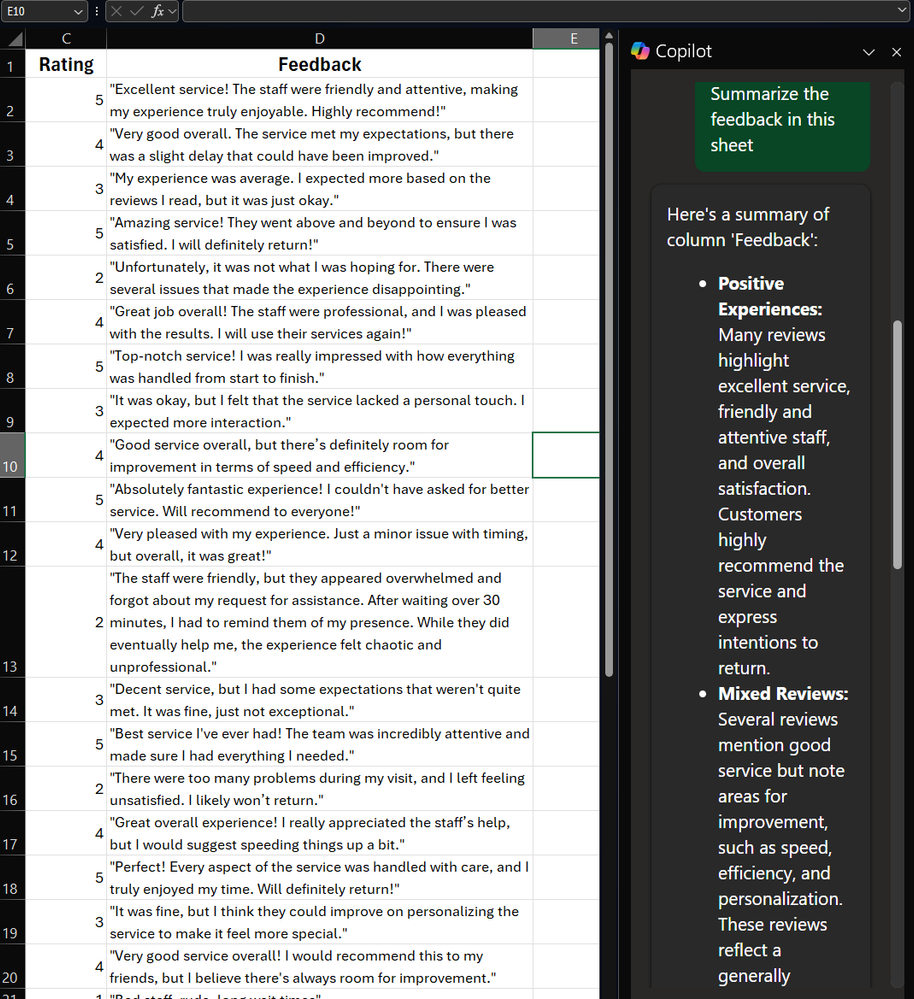 A screenshot of Copilot in Excel summarizing rows of feedback verbatims
Copilot provides a high-level summary of the feedback, group it into different themes. Very quickly, with little effort, we already have some insights that we could start working with!
Tip 2: Add specifics to your prompt to get more precise insights
As we’ve covered in previous editions, how you craft your prompt matters. Let’s say you want to drill down further and get more insights focused on more negative reviews and areas of improvement.
Using the same example data here, you could then write a prompt like, “Hone in on Feedback with Ratings of less than 3, can you summarize this feedback and provide key themes and areas of improvement.”
Copilot first explains what it’s doing:
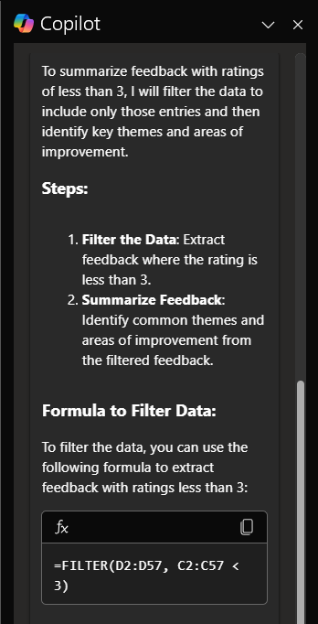 A screenshot of Copilot outlining how it’s going to summarize feedback from responses with a rating of less than 3
Then, based on the focused information, gives me back more detailed and specific information so that I can focus on specific aspects of customer service that I want to address, including tips on how to take action.
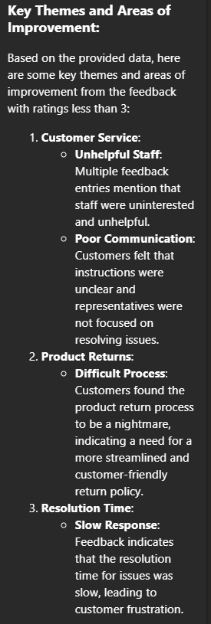 A screenshot of more detailed insights focused on neutral to negative feedback analyzed
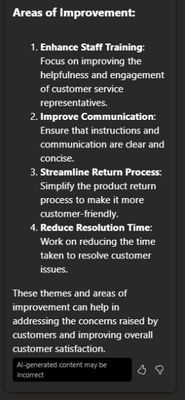 A screenshot of recommendations by Copilot on how to improve customer service based on the feedback analysis
Just like that, we were able to find insights from raw feedback that would’ve otherwise taken time to parse through manually, and I can instead focus on building an action plan to help address my issues!
Let me know in the comments below how else you’ve been using Microsoft 365 Copilot, or if there are tips you’d like to see!


Recent Comments