by Contributed | Nov 16, 2023 | Technology
This article is contributed. See the original author and article here.
While there are multiple methods for obtaining explicit outbound connectivity to the internet from your virtual machines on Azure, there is also one method for implicit outbound connectivity – default outbound access. When virtual machines (VMs) are created in a virtual network without any explicit outbound connectivity, they are assigned a default outbound public IP address. These IP addresses may seem convenient, but they have a number of issues and therefore are only used as a “last resort”:
- These implicit IPs are subject to change which can result in issues later on if any dependency is taken on them.
- Their dynamic nature also makes them challenging to use for logs or filtering with network security groups (NSGs).
- Because these IPs are not associated with your subscription, they are very difficult to troubleshoot.
- This type of open egress does not adhere to Microsoft’s “secure-by-default” model which ensures customers have a strong security policy without having to take additional steps.
Because of these factors, we recently announced the retirement of this type of implicit connectivity, which will be removed for all VMs in subnets created after September 2025.
Private subnet
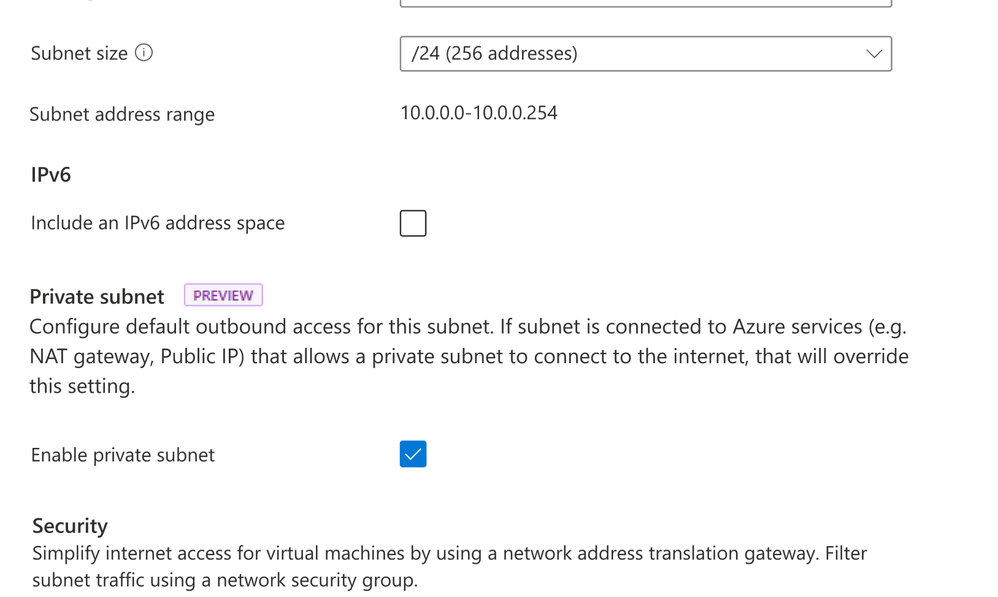
At Ignite, a new feature—private subnet—was released in preview. This feature will let you prevent this type of insecure implicit connectivity for all subnets with the “default outbound access” parameter set to false. Any virtual machines created on this subnet will be prevented from connecting to the Internet without an explicit outbound method specified. To enable this feature, simply ensure the option is selected when a new subnet is created as shown below.
View of Azure portal with Private subnet selection
Note that currently:
- A subnet must be created as private; this parameter cannot be changed following creation.
- Certain services will not function on a virtual machine in a private subnet without an explicit method of egress (examples are Windows Activation and Windows Updates).
- Both CLI and ARM templates can also be used; PowerShell is in development.
Azure’s recommended explicit outbound connectivity methods
The good news is that there are much better, more scalable, and secure methods for having your VMs access the Internet. The three recommended options—in order of preference—are a NAT gateway, using outbound rules with a public load balancer, or placing a public IP directly on the VM network interface card (NIC).
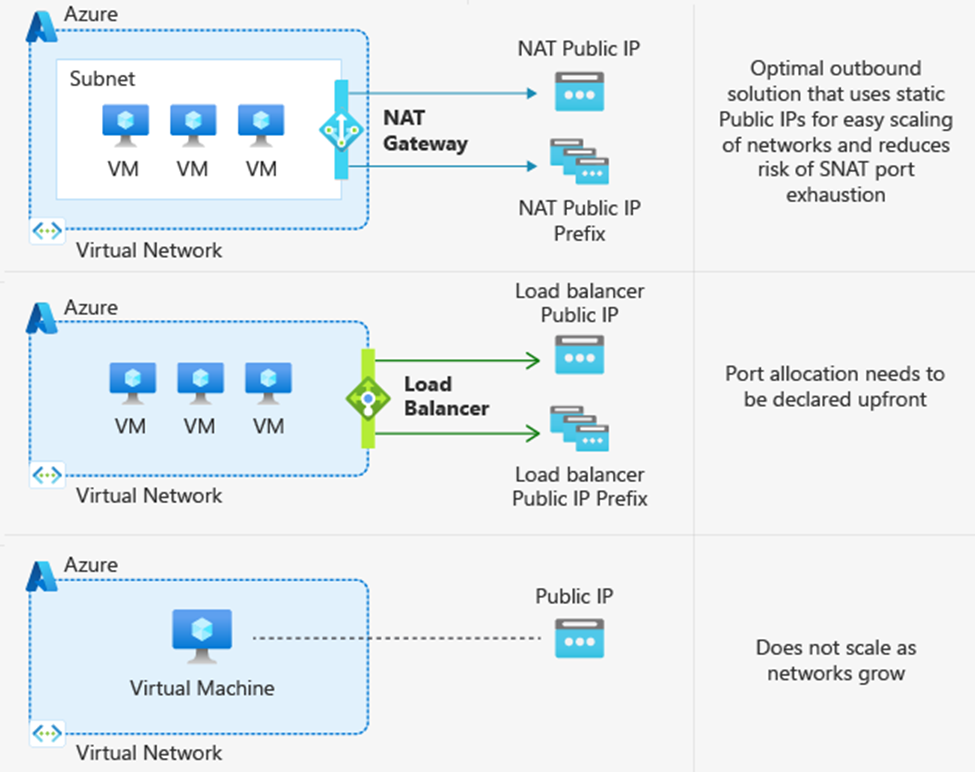 Diagram of multiple explicit outbound methods
Azure NAT Gateway
NAT Gateway is the best option for connecting outbound to the internet as it is specifically designed to provide highly secure and scalable outbound connectivity. NAT Gateway enables all instances within private subnets of Azure virtual networks to remain fully private and source network address translate (SNAT) to a static public IP address. No connections sourced directly from the internet are permitted through a NAT gateway. NAT Gateway also provides on-demand SNAT port allocation to all virtual machines in its associated subnets. Since ports are not in fixed amounts to each VM, this means you don’t need to worry about knowing the exact traffic patterns of each VM. To learn more, take a look at our documentation on SNATing with NAT Gateway or our blog that explores a specific outbound connectivity failure scenario where NAT Gateway came to the rescue.
Azure Load Balancer with outbound rules
Another method for explicit outbound connectivity is using public Azure load balancers with outbound rules. To provide outbound connectivity with Azure Load Balancer, you assign a dedicated public IP address or addresses as the frontend IP of the outbound rule. Private instances in the backend pool of the Load balancer then use the frontend IP of the outbound rule to connect outbound in a secure manner, similar to NAT Gateway. However, unlike NAT Gateway, SNAT ports are not allocated dynamically with outbound rules. Rather, using a load balancer requires manual allocation of SNAT ports in fixed amounts to each instance of your backend pool prior to deployment. This manual SNAT port allocation gives you full declarative control over outbound connectivity since you decide the exact amount of ports each VM is allowed. However, this manual allocation creates more overhead management in ensuring that you have assigned the correct amount of SNAT ports needed by your backend instances for connecting outbound. While you can scale your Load balancer by adding more frontend IPs to your outbound rule, this scaling requires you to then re-allocate assigned SNAT ports per backend instance to ensure that you are utilizing the full inventory of SNAT ports available.
Public IP address assignment to virtual machine NICs
Another option for providing explicit outbound connectivity from an Azure virtual network is the assignment of a public IP address directly to the NIC of a virtual machine. Customers that want to have control over which public IP address their VMs use for connecting to specific destination endpoints may benefit from assigning public IPs directly to the VM NIC. However, customers with more complex and dynamic workloads that need a many to one SNATing relationship that scales with their traffic volume should look to NAT Gateway or Load Balancer.
To learn more about each of these explicit outbound connectivity methods, see our public documentation on using source network address translation for outbound connections.
What outbound method am I currently using?
As mentioned earlier, default outbound access is enabled only when no other explicit outbound connectivity method exists. Note that there is an order of priority among the explicit methods, shown in the flowchart below. In other words, if your VM has multiple forms of outbound connectivity defined, then the higher order one will be used (e.g. NAT Gateway takes precedence above a public IP address attached to the VM NIC).
To check the form of outbound your deployments are using, you can refer to the flowchart below which lists them in the order of precedence.
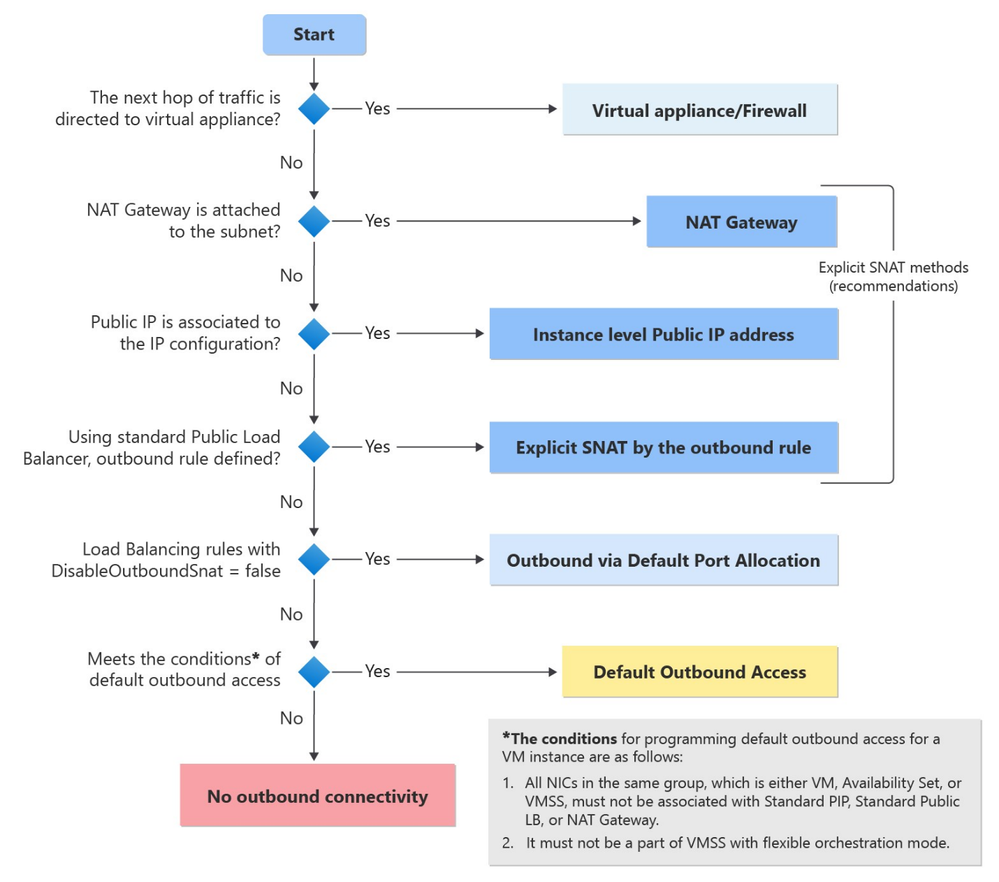 Flowchart showing priority order for diffrent outbound methods
To read more about default outbound access and private subnets, please refer to Default outbound access in Azure – Azure Virtual Network | Microsoft Learn.
To learn more about how to deploy a NAT Gateway, please use Quickstart: Create a NAT Gateway – Azure portal | Microsoft Learn.
by Contributed | Nov 15, 2023 | Technology
This article is contributed. See the original author and article here.
By Quentin Miller
We are excited to announce the public preview of Liveness Detection, an addition to the existing Azure AI Face API service. Facial recognition technology has been a longstanding method for verifying a user’s identity in device and online account login for its convenience and efficiency. However, the system encounters escalating challenges as malicious actors persist in their attempts to manipulate and deceive the system through various spoofing techniques. This issue is expected to intensify with the emergence of generative AIs such as DALL-E and ChatGPT. Many online services e.g., LinkedIn and Microsoft Entra, now support “Verified Identities” that attest to there being a real human behind the identity.
Face Liveness Detection
Liveness detection aims to verify that the system engages with a physically present, living individual during the verification process. This is achieved by differentiating between a real (live) and fake (spoof) representation which may include photographs, videos, masks, or other means to mimic a real person.
Face Liveness Detection has been an integrated part of Windows Hello Face for nearly a decade. “Every day, people around the world get access to their device in a convenient, personal and secure way using Windows Hello face recognition”, said Katharine Holdsworth, Principal Group Program Manager, Windows Security. The new Face API liveness detection is a combination of mobile SDK and Azure AI service. It is conformant to ISO/IEC 30107-3 PAD (Presentation Attack Detection) standards as validated by iBeta level 1 and level 2 conformance testing. It successfully defends against a plethora of spoof types ranging from paper printouts, 2D/3D masks, and spoof presentations on phones and laptops. Liveness detection is an active area of research, with continuous improvements being made to counteract increasingly sophisticated spoofing attacks over time, and continuous improvement will be rolled out to the client and the service components as the overall solution gets hardened against new types of attacks over time.
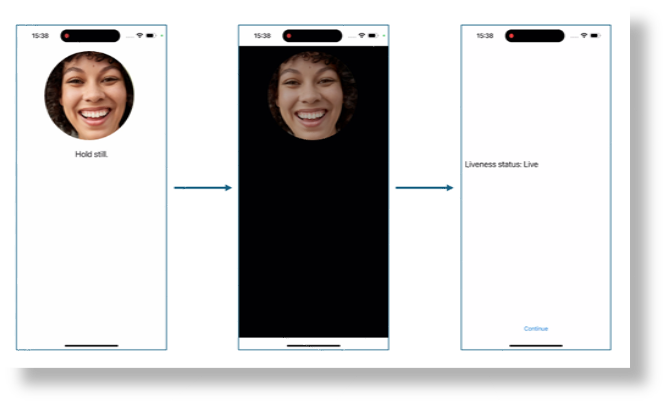
A simple illustration of the user experience from the SDK sample is shown below, where the screen background goes from white to black before the final liveness detection result is shown on the last page.
The following video demonstrates how the product works under different spoof conditions.
While blocking spoof attacks is the primary focus of the liveness solution, paramount importance is also given to allowing real users to successfully pass the liveness check with low friction. Additionally, the liveness solution complies with the comprehensive responsible AI and data privacy standards to ensure fair usage across demographics around the world through extensive fairness testing.
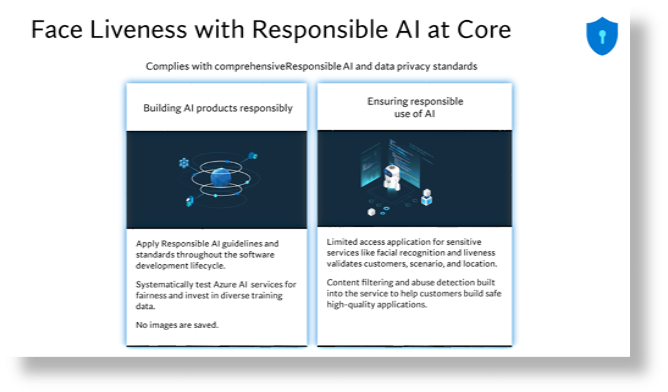
For more information, please visit: Empowering responsible AI practices | Microsoft AI.
Implementation
The overall liveness solution integration involves 2 different components: a mobile application and an app server/orchestrator.
Prepare mobile application to perform liveness detection
The newly released Azure AI Vision Face SDK for mobile (iOS and Android) allows for ease-of-integration of the liveness solution on front-end applications. To get started you would need to apply for the Face API Limited Access Features to get access to the SDK. For more information, see the Face Limited Access page.
Once you have access to the SDK, follow the instructions and samples included in the github-azure-ai-vision-sdk to integrate the UI and the code needed into your native mobile application. The SDK supports both Java/Kotlin for Android and Swift for iOS mobile applications.
Upon integration into your application, the SDK will handle starting the camera, guide the end-user to adjust their position, compose the liveness payload and then call the Face API to process the liveness payload.
Orchestrating the liveness solution
The high-level steps involved in the orchestration are illustrated below:
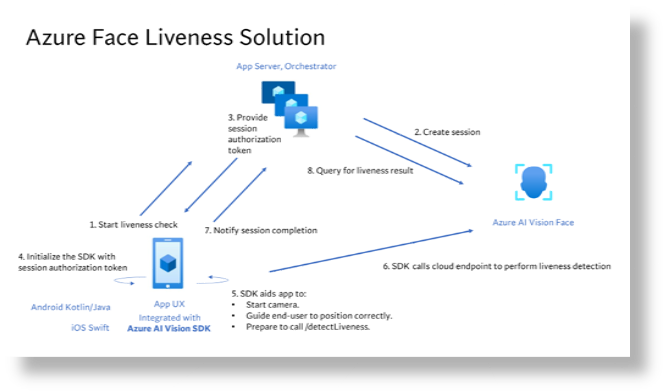
For more details, refer to the tutorial.
Face Liveness Detection with Face Verification
Integrating face verification with liveness detection enables biometric verification of a specific person of interest while ensuring an additional layer of assurance that the individual is physically present.
For more details, refer to the tutorial.
by Contributed | Nov 14, 2023 | Technology
This article is contributed. See the original author and article here.
I am excited to announce a comprehensive refresh of the Well-Architected Framework for designing and running optimized workloads on Azure. Customers will not only get great, consistent guidance for making architectural trade-offs for their workloads, but they’ll also have much more precise instructions on how to implement this guidance within the context of their organization.
Background
Cloud services have become an essential part of the success of most companies today. The scale and flexibility of the cloud offer organizations the ability to optimize and innovate in ways not previously possible. As organizations continue to expand cloud services as part of their IT strategies, it is important to establish standards that create a culture of excellence that enables teams to fully realize the benefits of the modern technologies available in the cloud.
At Microsoft, we put huge importance on helping customers be successful and publish guidance that teaches every step of the journey and how to establish those standards. For Azure, that collection of adoption and architecture guidance is referred to as Azure Patterns and Practices.
The Patterns and Practices guidance has three main elements:
Each element focuses on different parts of the overall adoption of Azure and speaks to specific audiences, such as WAF and workload teams.
What is a workload?
The term workload in the context of the Well-Architected Framework refers to a collection of application resources, data, and supporting infrastructure that function together towards a defined business goal.
Well-architected is a state that is achieved and maintained through design and continuous improvement. You optimize through a design process that results in an architecture that delivers what the business needs while minimizing risk and expense.
For us, the workload standard of excellence is defined in the Well-architected Framework – a set of principles, considerations, and trade-offs that cover the core elements of workload architecture. As with all of the Well-architected Framework content, this guidance is based on proven experience from Microsoft’s customer-facing technical experts. The Well-architected Framework continues to receive updates from working with customers, partners, and our technical teams.
Today we have published updates across each of the core pillars of WAF which represent a huge amount of experience and learning from across Microsoft.
The refreshed and expanded Well-Architected Framework brings together guidance to help workload teams design, build, and optimize great workloads in the cloud. It is intended to shape discussions and decisions within workload teams and help create standards that should be applied continuously to all workloads.
Details of the refreshed Well-Architected Framework
Over the past six months, Microsoft’s cloud solution architects refreshed the Well-Architected Framework by compiling the learnings and experience of over 10,000 engagements that had leveraged the WAF and its assessment.
All five pillars of the Well-Architected Framework now follow a common structure that consists exclusively of design principles, design review checklists, trade-offs, recommendation guides, and cloud design patterns.
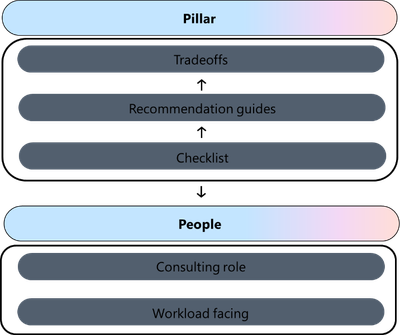
Design principles. Presents goal-oriented principles that build a foundation for the workload. Each principle includes a set of recommended approaches and the benefits of taking those approaches. The principles for each pillar have changed in terms of content and coverage.
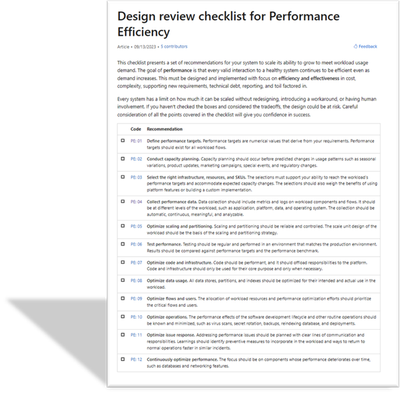
Design review checklists. Lists roughly codified recommendations that drive action. Use the checklists during the design phase of your new workload and to evaluate brownfield workloads.
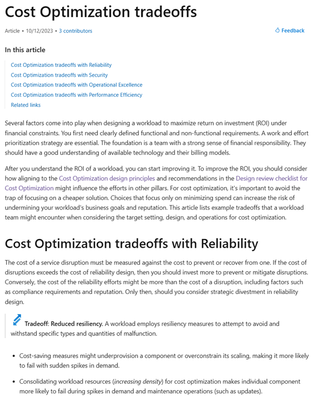
Trade-offs. Describes tradeoffs with other pillars. Many design decisions force a tradeoff. It’s vital to understand how achieving the goals of one pillar might make achieving the goals of another pillar more challenging.
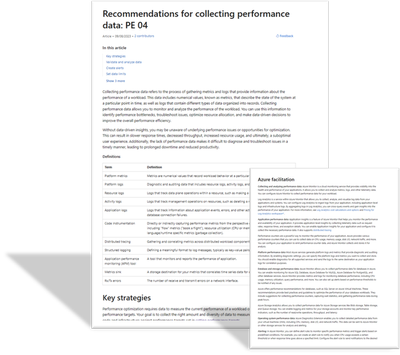
Recommendation guides. Every design review checklist recommendation is associated with one or more guides. They explain the key strategies to fulfill that recommendation. They also include how Azure can facilitate workload design to help achieve that recommendation. Some of these guides are new, and others are refreshed versions of guides that cover a similar concept.
The recommendation guides include trade-offs along with risks.
- This icon indicates a trade-off:

- This icon indicates a risk:

Cloud design patterns. Build your design on proven, common architecture patterns. The Azure Architecture Center maintains the Cloud Design Patterns catalog. Each pillar includes descriptions of the cloud design patterns that are relevant to the goals of the pillar and how they support the pillar.
The Well-Architected Review assessment has also been refreshed. Specifically, the “Core Well-Architected Review” option now aligns to the new content structure in the Well-Architected Framework. Every question in every pillar maps to the design review checklist for that pillar. All choices for the questions correlate to the recommendation guides for the related checklist item.
Using the guidance
The Well-architected Framework is intended to help workload teams throughout the process of designing and running workloads in the cloud.
Here are three key ways in which the guidance can help your team be successful:
- Use the Well-architected Framework as the basis for your organization’s approach to designing and improving cloud workloads.
- Establish the concept of achieving and maintaining a state of well-architected as a best practice for all workload teams
- Regularly review each workload to find opportunities to optimize further – use learnings from operations and new technology capabilities to refine elements such as running costs, or attributes aligned to performance, reliability, or security
To learn more, see the new hub page for the Well-Architected Framework: aka.ms/waf
Dom Allen has also created a great, 6-minute video on the Azure Enablement Series.

by Contributed | Nov 11, 2023 | Technology
This article is contributed. See the original author and article here.
Hi everyone! Brandon Wilson here once again with this month’s “Check This Out!” (CTO!) guide.
These posts are only intended to be your guide, to lead you to some content of interest, and are just a way we are trying to help our readers a bit more, whether that is learning, troubleshooting, or just finding new content sources! We will give you a bit of a taste of the blog content itself, provide you a way to get to the source content directly, and help to introduce you to some other blogs you may not be aware of that you might find helpful.
From all of us on the Core Infrastructure and Security Tech Community blog team, thanks for your continued reading and support!
Title: Click Through Demo for Windows Server 2012 Extended Security Updates Enabled by Azure Arc
Source: Azure Arc
Author: Dan Richardson
Publication Date: 10/9/2023
Content excerpt:
As many of you know, Windows Server 2012 is reaching end-of-support (EoS) on October 10, 2023. Extended Security enabled by Azure Arc is the best way for customers to get trusted security updates and benefit from cloud capabilities including discovery, management, and patching, all in one offering.

Title: Azure Provides Enhanced Security Awareness with Ubuntu Pro
Source: Azure Compute
Author: Maulik Shah
Publication Date: 10/12/2023
Content excerpt:
Bad actors can expose a new security vulnerability to initiate a DDoS attack on a customer’s infrastructure. This attack is leveraged against servers implementing the HTTP/2 protocol. Windows, .NET Kestrel, and HTTP .Sys (IIS) web servers are also impacted by the attack. Azure Guest Patching Service keeps customers secure by ensuring the latest security and critical updates are applied using Safe Deployment Practices on their VM and VM Scale Sets.

Title: Azure Monitor Baseline Alerts (AMBA) for Azure landing zone (ALZ) is Generally Available (GA)!
Source: Azure Governance and Management
Author: Paul Grimley
Publication Date: 10/6/2023
Content excerpt:
Some of you may recall back in June we posted a blog introducing AMBA and since then we’ve received a huge amount of interest and adoption in its use as well as hearing from you on what you needed to be able to use AMBA in your environment.
We’ve made significant investment and progress in addressing feedback and fixes and I’m pleased to announce the AMBA pattern for ALZ is now GA! As part of GA we’re also integrating the recommended alerts into the ALZ Azure Portal reference implementation for new deployments (please visit https://aka.ms/alz/portal) with Bicep and Terraform support planned in the near future.

Title: Optimize your Cloud investment with new Azure Advisor Workbooks
Source: Azure Governance and Management
Author: Antonio Ortoll
Publication Date: 10/10/2023
Content excerpt:
Everyone is under pressure to cut costs these days. But in times of economic flux, it’s not just about cutting costs. A successful approach lies in the ability to continuously optimize and prioritize what matters most to drive innovation, productivity, and agility and to realize an ongoing cycle of growth and innovation. Reinvestment opens the opportunity to maintain momentum when everyone else is seeking to downsize – that’s the competitive advantage optimization offers your business.

Title: Announcing AuthorizationResources in Azure Resource Graph
Source: Azure Governance and Management
Author: Snaheth Thumathy
Publication Date: 10/16/2023
Content excerpt:
We are excited to announce support for Azure RBAC resources in Azure Resource Graph (ARG) via the AuthorizationResources table! You can query your Role Assignments, Role Definitions, and Classic Admins resources. With this table, you’ll be able to quickly answer questions such as “how many users are using a role definition?” or “how many role assignments are used?” or “how many role definitions are used?”. Then, you can act on the results to clean up unused role definitions, remove redundant role assignments, or optimize your existing role assignments using AAD Groups.

Title: Built-in Azure Monitor alerts for Azure Site Recovery is now in public preview
Source: Azure Governance and Management
Author: Aditya Balaji
Publication Date: 10/29/2023
Content excerpt:
We are happy to share that built-in Azure Monitor alerts for Azure Site Recovery is now in public preview.
With this integration, Azure Site Recovery users will now have:
- A way to route notifications for alerts to any of the destinations supported by Azure Monitor – which includes email, ITSM, Webhook, Functions etc.
- An alerting experience for Azure Site Recovery which is consistent with the alerting experience currently available for many other Azure resource types.
- Enhanced flexibility in terms of choosing which scenarios to get notified for, ability to suppress notifications during planned maintenance windows, and so on.

Title: Announcing General Availability: Azure Change Tracking & Inventory using Azure Monitor agent (AMA)
Source: Azure Governance and Management
Author: Swati Devgan
Publication Date: 10/31/2023
Content excerpt:
We are excited to announce the general availability to configure Azure Change Tracking & Inventory using the Azure Monitor agent (AMA)
The Change Tracking and Inventory service tracks changes to Files, Registry, Software, Services and Daemons and uses the MMA (Microsoft Monitoring Agent)/OMS (Operations Management Suite) agent.

Title: Step-by-Step Guide: Setting up Custom Domain for Azure Storage Account with HTTPS Only Enabled
Source: Azure PaaS
Author: Zoey Lan
Publication Date: 10/3/2023
Content excerpt:
If you are using Azure Storage to host your website, you might want to enable HTTPS Only to ensure secure communication between the client and the server. However, setting up a custom domain with HTTPS Only enabled can be a bit tricky. In this blog, we will guide you through the step-by-step process of setting up a custom domain for your Azure Storage account with HTTPS Only enabled.

Title: How to Restrict User Visibility of File Share, Queue, and Table Storage Service
Source: Azure PaaS
Author: Sourabh Jain
Publication Date: 10/13/2023
Content excerpt:
Suppose you have a specific requirement wherein the user should not have access to view the File Share, Queue, and Table Storage Services Data. The user should only be able to access and view the containers within the storage account. In this blog, we will delve into the methods and techniques to fulfil this requirement.

Title: Unlocking Azure Secrets: Using Identities for Key Vault Access
Source: Core Infrastructure and Security
Author: Joji Varghese
Publication Date: 10/2/2023
Content excerpt:
Azure Key Vault is essential for securely managing keys, secrets, and certificates. Managed Identities (MI) allow Azure resources to authenticate to any service that supports Azure AD authentication without any credentials in your code. For those looking to swiftly test Managed Identities for Azure Key Vault access from a Virtual Machine, this blog provides step-by-step implementation details. We will delve into both User Assigned Managed Identity (UAMI) and System Assigned Managed Identity (SAMI), helping you determine the best approach for your needs.

Title: Mobile Application Management on Windows 11
Source: Core Infrastructure and Security
Author: Atil Gurcan
Publication Date: 10/4/2023
Content excerpt:
Intune is very well known for its ability to manage both devices (aka. MDM) and applications (aka.MAM). The core difference between these two options lies back to the level of management that companies require, or employees accept.
While MDM is seen an appropriate way to manage company-owned devices or a full zero trust environment; MAM is useful when a company wants to make sure employees can use their personal devices to run applications that access to company data, and limit what can be done with that data. From that perspective, it can improve zero trust posture of a company as well; making sure that applications used to access certain data such as the company data complies with certain criteria, that is defined in the application protection policy.

Title: Quick-Start Guide to Azure Private Endpoints with AKS & Storage
Source: Core Infrastructure and Security
Author: Joji Varghese
Publication Date: 10/9/2023
Content excerpt:
Azure Private Endpoints (PE) offer a robust and secure method for establishing connections via a private link. This blog focuses on utilizing PEs to link a Private Azure Kubernetes Service (AKS) cluster with a Storage account, aiming to assist in quick Proof-of-Concept setups. Although we spotlight the Storage service, the insights can be seamlessly applied to other Azure services.

Title: Defender Definition Updates with ConfigMgr – Part 2 – How to set it up
Source: Core Infrastructure and Security
Author: Stefan Röll
Publication Date: 10/16/2023
Content excerpt:
Here is Part 2 of my Blog Defender Definition Updates with ConfigMgr – Part 1 – Learnings from the Field
Currently Defender Definition Updates are called Security Intelligence Update for Windows Defender Antivirus. To keep it consistent with Part 1 of my Blog, I will keep calling them Definition Updates – The updates that are released multiple times per day.

Title: Service Endpoints vs Private Endpoints
Source: Core Infrastructure and Security
Author: Khushbu Gandhi
Publication Date: 10/24/2023
Content excerpt:
For a long time, if you were using the multi-tenant, PaaS version on many Azure services, then you had to access them over the internet with no way to restrict access just to your resources. This restriction was primarily down to the complexity of doing this sort of restrictions with a multi-tenant service. At that time, the only way to get this sort of restriction was to look at using single-tenant solutions like App Service Environment or running service yourself in a VM instead of using PaaS.

Title: Calling Azure Resource APIs from Power Automate Using Graph Explorer
Source: Core Infrastructure and Security
Author: Werner Rall
Publication Date: 10/31/2023
Content excerpt:
In today’s fast-paced technological landscape, cloud integration and automation have ascended as twin pillars of modern business efficiency. Microsoft’s Azure and Power Automate are two titans in this arena, each offering a unique set of capabilities. But what if we could marry the vast cloud resources of Azure with the intuitive workflow automation of Power Automate? In this article, we’ll embark on a digital journey to explore how you can seamlessly call Azure Resource APIs from Power Automate, unlocking new vistas of potential for your business processes. Whether you’re an Azure aficionado, a Power Automate pro, or someone just stepping into the cloud, strap in and let’s dive deep into this integration!

Title: Wired for Hybrid What’s New in Azure Networking September 2023 Edition
Source: ITOps Talk
Author: Pierre Roman
Publication Date: 10/16/2023
Content excerpt:
Azure Networking is the foundation of your infrastructure in Azure. Each month we bring you an update on What’s new in Azure Networking.
In this blog post, we’ll cover what’s new with Azure Networking in September 2023. In this blog post, we will cover the following announcements and how they can help you.
- Gateway Load Balancer IPv6 Support
- Sensitive Data Protection for Application Gateway Web Application Firewall
- Domain fronting update on Azure Front Door and Azure CDN
- New Monitoring and Logging Updates in Azure Firewall

Title: What’s new in Microsoft Entra
Source: Microsoft Entra (Azure AD)
Author: Shobhit Sahay
Publication Date: 10/2/2023
Content excerpt:
Microsoft has recently introduced a range of new security tools and features for the Microsoft Entra product family, aimed at helping organizations improve their security posture. With the ever-increasing sophistication of cyber-attacks and the increasing use of cloud-based services and the proliferation of mobile devices, it is essential that organizations have effective tools in place to manage their security scope.
Today, we’re sharing the new feature releases for the last quarter (July – September 2023) and the change announcements (September 2023 change management train). We also communicate these changes on release notes and via email. We’re continuing to make it easier for our customers to manage lifecycle changes (deprecations, retirements, service breaking changes) within the new Entra admin center as well.

Title: Just-in-time access to groups and Conditional Access integration in Privileged Identity Management
Source: Microsoft Entra (Azure AD)
Author: Joseph Dadzie
Publication Date: 10/2/2023
Content excerpt:
As part of our mission to enable customers to manage access with least privilege, we’re excited to announce the general availability of two additions to Microsoft Entra Privileged Identity Management (PIM): PIM for Groups and PIM integration with Conditional Access.

Title: Step-by-Step Guide to Identify Inactive Users by using Microsoft Entra ID Governance Access Reviews
Source: Microsoft Entra (Azure AD)
Author: Dishan Francis
Publication Date: 10/10/2023
Content excerpt:
Within an organization, inactive user accounts can persist for various reasons, including former employees, service providers, and service accounts associated with products or services. These accounts may remain inactive temporarily or for extended periods. If an account remains inactive for 90 days or more, it is more likely to remain inactive. It’s crucial to periodically review these inactive accounts and eliminate any that are unnecessary. Microsoft Entra ID Governance Access Reviews now offers the capability to detect inactive accounts effectively.

Title: Microsoft Graph Activity Log is Now Available in Public Preview
Source: Microsoft Entra (Azure AD)
Author: Kristopher Bash
Publication Date: 10/13/2023
Content excerpt:
Today we’re excited to announce the public preview of Microsoft Graph Activity Logs. Have you wondered what applications are doing with the access you’ve granted them? Have you discovered a compromised user and hoped to find out what operations they have performed? If so, you can now gain full visibility into all HTTP requests accessing your tenant’s resources through the Microsoft Graph API.

Title: Entra ID now enables you to receive emails in your preferred language
Source: Microsoft Entra (Azure AD)
Author: Jairo Cadena
Publication Date: 10/17/2023
Content excerpt:
We have received feedback from you—our customers—about the need to have user level language localization. We understand that users would like to receive notifications that have their text adapted to their local language, customs, and standards.
We have added logic to check multiple places for language information to make the best possible choice for what language we should send an email in, and these changes are now generally available for Privileged Identity Management, Access Reviews and Entitlement Management.

Title: Windows Local Administrator Password Solution with Microsoft Entra ID now Generally Available!
Source: Microsoft Entra (Azure AD)
Author: Sandeep Deo
Publication Date: 10/23/2023
Content excerpt:
Today we’re excited to announce the general availability of Windows Local Administrator Password Solution (LAPS) with Microsoft Entra ID and Microsoft Intune. This capability is available for both Microsoft Entra joined and Microsoft Entra hybrid joined devices. It empowers every organization to protect and secure their local administrator account on Windows and mitigate any Pass-the-Hash (PtH) and lateral traversal type of attacks.
Since our public preview announcement in April 2023, we’ve continued to see significant growth in deployment and usage of Windows LAPS across thousands of customers and millions of devices. Thank you!

Title: Delegate Azure role assignment management using conditions
Source: Microsoft Entra (Azure AD)
Author: Stuart Kwan
Publication Date: 10/25/2023
Content excerpt:
We’re excited to share the public preview of delegating Azure role assignment management using conditions. This preview gives you the ability to enable others to assign Azure roles but add restrictions on the roles they can assign and who they can assign roles to.

Title: New security capabilities of Event Tracing for Windows
Source: Windows IT Pro
Author: Jose Sua
Publication Date: 10/11/2023
Content excerpt:
Elevate your security with improved Event Tracing for Windows (ETW) logs. Now you can know who initiated the actions for each device to aid in threat detection and analysis. Whether you’re in cybersecurity, IT, performance, or software development, diagnosing cybersecurity threats has never been easier. In this article, get ready to:
- Learn about Windows event tracing.
- Find new security-related information on a Windows device.
- Interpret security-related events.

Title: The evolution of Windows authentication
Source: Windows IT Pro
Author: Matthew Palko
Publication Date: 10/11/2023
Content excerpt:
As Windows evolves to meet the needs of our ever-changing world, the way we protect users must also evolve to address modern security challenges. A foundational pillar of Windows security is user authentication. We are working on strengthening user authentication by expanding the reliability and flexibility of Kerberos and reducing dependencies on NT LAN Manager (NTLM).
Kerberos has been the default Windows authentication protocol since 2000, but there are still scenarios where it can’t be used and where Windows falls back to NTLM. Our team is building new features for Windows 11, Initial and Pass Through Authentication Using Kerberos (IAKerb) and a local Key Distribution Center (KDC) for Kerberos, to address these cases. We are also introducing improved NTLM auditing and management functionality to give your organization more insight into your NTLM usage and better control for removing it.

Title: Windows passwordless experience expands
Source: Windows IT Pro
Author: Sayali Kale
Publication Date: 10/23/2023
Content excerpt:
The future is passwordless. Microsoft has an ongoing commitment with other industry leaders to enable a world without passwords. Today, we are excited to announce an improved Windows passwordless experience to organizations starting with the September 2023 update for Windows 11, version 22H2.

Title: What’s new for IT pros in Windows 11, version 23H2
Source: Windows IT Pro
Author: Harjit Dhaliwal
Publication Date: 10/31/2023
Content excerpt:
When you update devices running Windows 11, version 22H2 to version 23H2, you’ll get the capabilities we have delivered as part of continuous innovation, including those announced in September, enabled by default. These include:…

Previous CTO! Guides:
Additional resources:



Recent Comments