by Contributed | Jun 10, 2021 | Technology
This article is contributed. See the original author and article here.
We are proudly announcing the official launch of our Microsoft 365 Compliance Scenario Based Demos (SBD) video series. Through the series, we will demonstrate how Microsoft Information Protection (MIP) and Microsoft Information Governance (MIG) components can be implemented in a scripted walk-through to provide end-to-end Information protection and governance solution to enforce privacy and ensure compliance with regulatory requirements.
This is a technical demo series – except for the first 2 sessions – that will aim to raise awareness of the MIP and MIG capabilities, and provide another channel to get us more connected with the public audience, providing the opportunity for YOU to share feedback, suggest features and influence our products.
So what are you waiting for? Head to https://aka.ms/MIPC/SBD-Episode1, and start watching. Don’t forget to hit the subscribe button and leave some feedback!
Also, don’t forget to check our One Stop Shop for ALL our resources: https://aka.ms/mipc/OSS
by Contributed | Jun 10, 2021 | Technology
This article is contributed. See the original author and article here.
Introduction
In the first part of this blog, we covered how to determine your Program Goals and what Resources and Dependencies you would need for a successful program. In this part, we’ll be covering the other critical questions you’ll need to answer to fully land your program for maximum success.
If you are interested in going deep to get strategies and insights about how to develop a successful security awareness training program, please join the discussion in this upcoming Security Awareness Virtual Summit on June 22nd, 2021, hosted by Terranova Security and sponsored by Microsoft. You can sign up to attend by clicking here.
Targeting
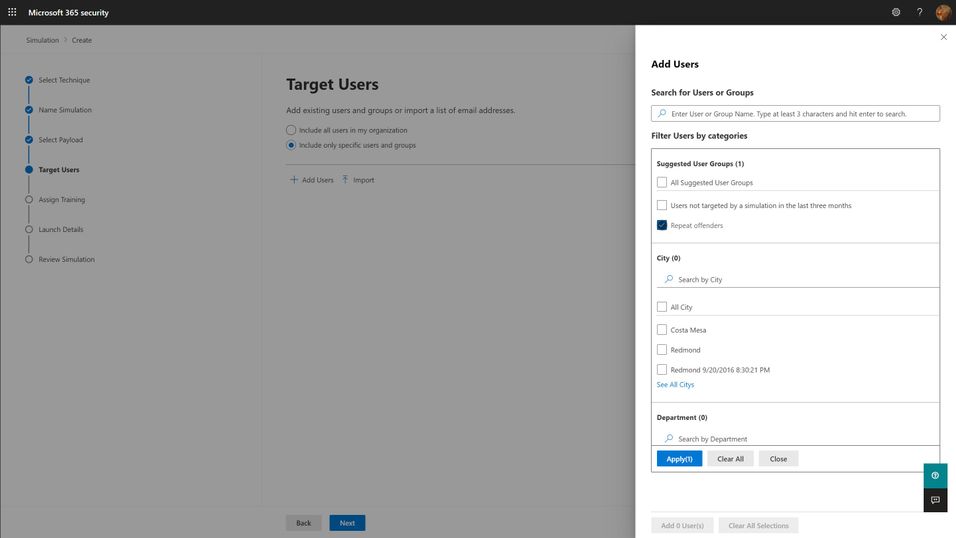
The first question you must answer for your simulation program is “Who should I target?”. The answer to this question can be complicated, but the short answer boils down to “everyone who needs it”. Spoiler alert: everyone in your organization needs it. This includes your executives, your frontline workers, everyone that might interact with email and that might have access to organizational resources. Microsoft has seen an enormous variation on how different organizations have approached the audience question, but we think the best ones start with the assumption that every member of the organization should be exposed regularly, and that higher risk and higher impact members should be targeted with special cycles (more on this below with the frequency question). You should think through partner and vendor relationships and consider requiring training of any users that have access to your organization’s resources. The best tools are ones that will integrate with your existing organizational directories, so figuring out how to segment and target these audiences should be as easy as searching for groups or users in your directory and adding them to the target list.
Frequency
The second, significantly more complicated question is “How often should I do phish simulations?”. The answer to this question is something along the lines of “As often as you need to minimize bad behavior (clicking phishing links), maximize good behavior (reporting phish) of your users, and not significantly negatively impact their productivity.” Like with targeting philosophies, Microsoft has seen enormous variation with different organizations. We understand that your organizational risk culture, risk tolerance, and resourcing will define the best answer to this question for your organization, and so you should take the below recommendations with a grain of salt. Most organizations try to balance how much time and energy goes into actually creating and sending out a phish simulation against the potential productivity impact to users. Doing more frequent simulations can be a lot of work for the program owner, although more data can be very helpful in maximizing the impact of the training on end user behavior.
- Every user in your organization should be exposed to a phishing simulation at least quarterly. Only do this if your training experiences are differentiated and short. Longer training, of the exact same content, required quarterly, will not produce better results and will irritate your users. If you can confidently differentiate your training per user, and constrain the educational experience to a few minutes, quarterly is a healthy cadence to remind your users of the risks of phishing.
- High-risk or high-impact users should be targeted more frequently, at least until they can consistently demonstrate an ability to correctly identify and report phishing messages. Daily or weekly simulations don’t seem to produce significantly better results, so we recommend a monthly cadence for these groups.
One consideration we think you should make when determining your simulation frequency is that the work of actually selecting payloads, target audiences, and training experiences for users is significant, but that automation can ease this burden. So long as your phish simulations positively impact behavior, and don’t negatively impact productivity, you should strive to engage users in this very common, and very impactful malicious attack technique as often as you can. More on this in the section about Operationalization.
Payloads
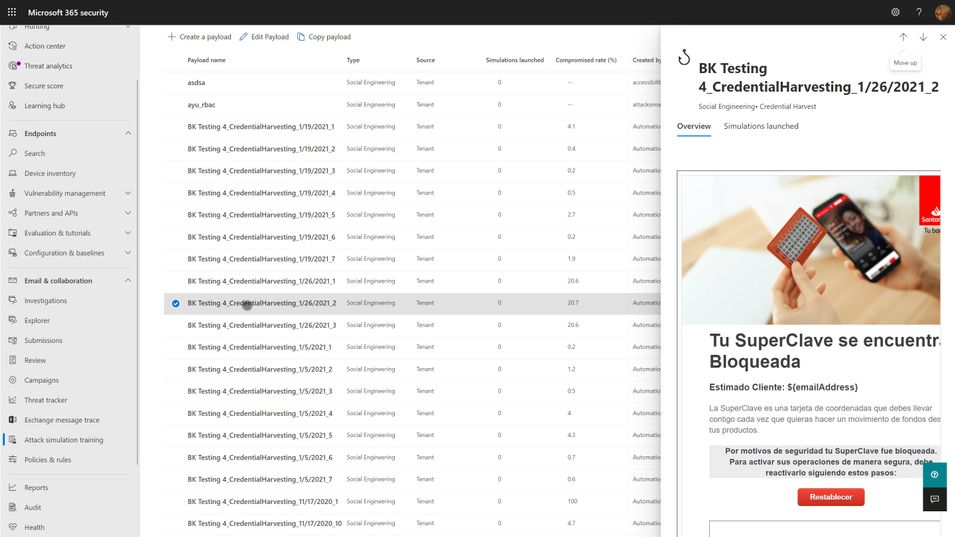
Payloads are the actual email that gets sent to end users that contains the malicious link or attachment. As mentioned in the goal setting portion above, click-through rates for your simulation are, in large part, a function of the payload you select. The conceit of any given payload will hook different users very differently, depending on their personal motivations and psychology. Every quality tool will include a large library of payloads from which you can select. We think the following criteria are important considerations when selecting your payloads:
- Research shows that trickier payloads are better at engaging end users and changing their behavior. If you pick payloads that are really obviously phishing, you may end up with a great, low click-through rate, but your end users aren’t really learning anything. Resist the urge to pick low complexity, or ‘easy’ payloads for your users because you want them to successfully avoid getting phished. Instead, rely on mechanisms like the Microsoft 365 Attack Simulation Training tool’s Predicted Compromise Rate to baseline and measure actual behavioral impact. More on this below.
- Use authentic payloads. This means that you should always seek to use payloads that are created by the exact same bad guys that are attacking your organization. There are many different levels of phishing (phishing, spearphishing, whaling, etc.) and effective attackers will tune and adjust their payloads for maximum impact against your users. If you try to make up silly phishing payload themes (bedbugs in the office!), you might be able to highlight that users will fall for anything, but you won’t be teaching them what real attackers do. The caveat to this is that the payloads you use should not, under any circumstances, contain actual malicious links or code. Real world payloads should be thoroughly de-weaponized before use in simulations.
- Don’t be shy about leveraging real world brands. Attackers will use anything and everything at their disposal. Credit card brands, banks, social media, legal institutions, and companies like Microsoft are very common. Figure out what attackers are using against your users and leverage it in your phish sim payloads.
- Thematic payloads are powerful teaching tools. Attackers are opportunistic and will leverage real world events such as COVID-19 in their campaigns. Pay attention to world events and business-impacting themes and leverage them in your payloads.
- Try not to use the same payloads for every user. This recommendation is tricky, especially if you are using static click-through rates to measure your click susceptibility. You want to be able to compare the click-through rates of user A vs. user B and that usually requires a common payload lure. However, using the same payload for all users can lead to something called the Gopher Effect, where your users will start popping up their heads and letting the people around them know that there is a company-wide phishing exercise going on. Varying payload delivery and content helps tamp this down.
- Don’t be precious about payloads selection. It is something that every user in your org will see, and so you want to make sure it doesn’t have any obvious errors or offensive content. Over-investing time and energy into something that attackers spend mere moments on can dramatically increase the cost of your simulation program. Instead, we recommend you curate a large library of payloads that you want to use, and leverage automation to select randomly from your library.
Training
Every phish simulation includes several components that are educational in nature. These include the payload, the cred harvesting page and URL, the landing page at the end of the click-through, and then any follow-on interactive training that might get assigned. The training experiences you select for your users will be crucial in turning a potentially negative event (I’ve been tricked!) into a positive learning experience. As such, we recommend the following guidelines:
- The landing page at the end of the click-through is your best opportunity to teach about the actual payload indicators. M365 Attack Simulation Training includes a landing page per simulation that renders the email message the user just received annotated with ‘coach marks’ describing all the things in the payload that the user could or should have noticed to indicate it was phishing. These pages are usually customizable, and you should make efforts to tailor the language to be non-threatening and engaging for the user.
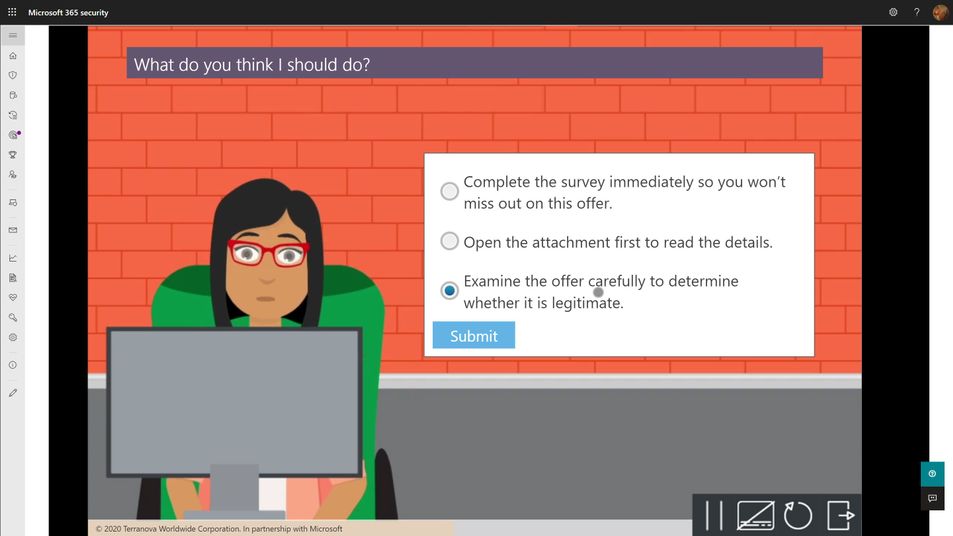
- Every user should complete a formal training course that describes general phishing techniques and appropriate responses at least annually. The M365 Attack Simulation Training tool provides a robust library of content from Terranova Security that covers these topics in a variety of durations from 20 minutes to as little as 15 seconds. Once they have completed one course, we recommend you target different courses based on their actions taken during subsequent simulations. Don’t make the user take the same course more than once per year, regardless of their actions.
- The training course assignment should be interactive, engaging, inclusive, and accessible on multiple platforms, including mobile.
- Many organizations opt to not assign training at the end of any given simulation because the phish guidance is included in other required employee training. Every organization will have a different calculus for training impacts on productivity and so we leave it to you to determine whether this makes sense for you or not. If you find that repeated simulations aren’t changing your user behaviors with phishing, consider incorporating more training.
Operationalization
For any given phish simulation, you’ll find that you will have a fairly complex process to navigate to successfully operate your program. Those steps fall into approximately five major phases:
- Analyze. What are my regulatory requirements? How much do my users understand about phishing? What kind of training will help them? Which parts of the organization are high risk or high impact for phishing? How susceptible am I to phishing?
- Plan. Who needs to review and sign off on my simulation? Who am I going to target with which payloads, how often, and with what training experiences? What do I expect my click-through and report rates will be? What do I want them to be? Which payloads should I use?
- Execute. Who will actually send the simulations? Have I notified the security ops team and leadership? What is the plan if something goes wrong?
- Measure. What specific measures am I tracking? How will I aggregate and analyze the data to draw the best insights and learnings from the data? Which training experiences are affecting overall susceptibility?
- Optimize. What is working and what should change? Which users need more help? What impacts are the simulations and training having on overall productivity? How will I communicate the status of the program to stakeholders?
With the right tool, huge portions of this process can be automated, and we strongly suggest that you leverage those capabilities to lower your program costs and maximize your impact. Two pieces of automation are available in the M365 Attack Simulation Training tool today:
- Payload Harvesting automation. This will allow you to harvest payloads from your organization’s threat protection feed, de-weaponize it, and publish it to your organization’s payload library. This is the best, most authentic source of payloads for use in simulations. It is literally what real world attackers are sending to your users. Let the bad guys help inoculate your users against their tactics.
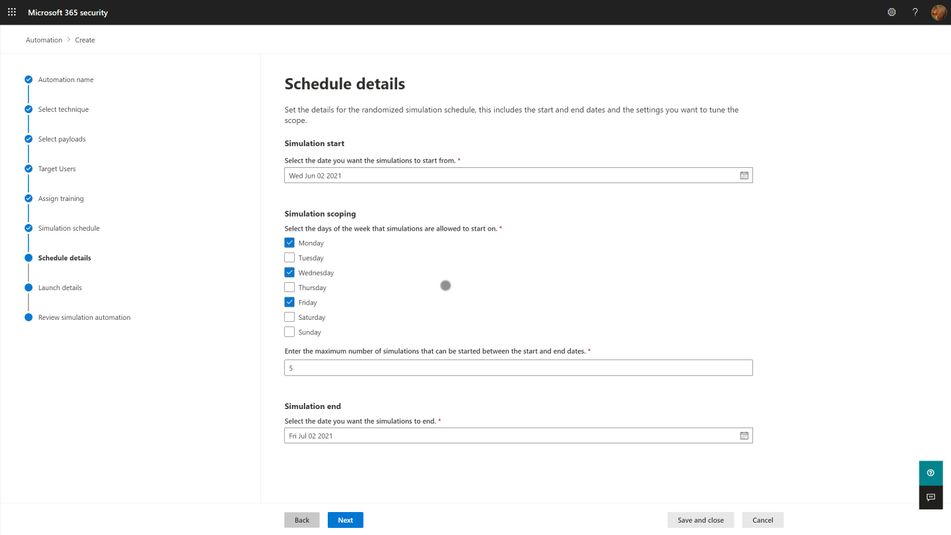
- Simulation automation. This capability will allow you to create workflows that will execute a simulation over some specified period of time and randomize the delivery, payloads, and targeted user audience in a way that offsets the groundhog effect and lowers the risk of a single, huge simulation going awry.
Measuring Success
As mentioned in the goals section above, your program is essentially measuring how susceptible your organization is to phishing attacks, and the extent to which your training program is impacting that susceptibility. The key here is which specific metric do you use to express that susceptibility? Static click-through rates are problematic because they are driven by payload complexity and conceit. It is a reasonable place to start your program health measurements, alongside report rates, but it quickly becomes problematic when you need to compare two different simulations against each other and track progress over time.
Our suggestion is to leverage metadata like Microsoft 365 Attack Simulation Training’s Predicted Compromise Rate to normalize cross-simulation comparisons. Instead of measuring absolutely click-through rates, you measure the difference between the predicted compromise rate and your actual compromise rate, grounded along two dimensions: Percentage Delta and Total Users Impacted. We believe this metric is a much better, authentic representation of how training is changing end user behavior and gives you a clearer path to changing your approach.
by Contributed | Jun 10, 2021 | Technology
This article is contributed. See the original author and article here.
Today and every Wednesday Data Exposed goes live at 9AM PT on LearnTV. Every 4 weeks, we’ll do a News Update. This month is an exception, as we’re actually streaming on a Thursday. We’ll include product updates, videos, blogs, etc. as well as upcoming events and things to look out for. We’ve included an iCal file, so you can add a reminder to tune in live to your calendar. If you missed the episode, you can find them all at https://aks.ms/AzureSQLYT.
You can read this blog to get all the updates and references mentioned in the show. Here’s the June 2021 update:
Product updates
We had a ton of guests on this episode, which made it a fast-paced, deeply entertaining and informative show (yes, I am biased). Let’s start with who came on and what was announced.
At Microsoft Build, Rohan Kumar announced the public preview of Azure SQL Database ledger capabilities. Jason Anderson, from the Azure SQL team, did a demo which you can view here. Jason also came on the show to tell us more about the new capabilities. For more information, you can review the documentation, announcement blog, whitepaper (must read!), and you can join us again on Data Exposed Live on June 16th for the next Azure SQL Security deep dive live. Also, a great place to learn and read about deep dive topics or updates like this one is in the SQLServerGeeks magazine run by the community. You can subscribe here. Next month, Jason is contributing a fascinating article on Ledger!
We had a special guest on the show, Kaza Sriram, from the Azure Resource Mover team which was recently released. Azure Resource Mover is built to provide customers with the flexibility to move their resources from one region to another and operate in the location that best suits their needs. With Azure Resource Mover, you can now take advantage of Azure’s growth in new markets and regions with Availability Zones and move resources including Azure SQL. You can learn more with resources including tutorials, and videos on Azure Unplugged, Azure Friday, and a whiteboarding video.
Mara-Florina Steiu, PM on the Azure SQL team, also came on the show to talk about the recent public preview release of Change Data Capture (CDC) in Azure SQL Database. Here are some references to go as deep as you desire:
Next, Pedro Lopes, PM on the SQL Server team, came on the talk about some of the latest announcements related to Intelligent Query Processing (IQP). This included the recent public preview of Query Store Hints (announcement blog here and Data Exposed episode here) and some references to demos.
Finally, related to announcements we had Alexandra Ciortea on the show again to talk more about Oracle migrations and related tooling. This included the release of SSMA 8.20 including automatic partition conversion (there is also a Data Exposed episode on this topic!), DAMT 0.3.0 including support for DB2 source databases, and DMA 5.4 with new SKU recommendations.
Other announcements include enhancements for Azure SQL Managed Instance backups, increased storage limit in Azure SQL Managed Instance (now 16 TB limit in General Purpose), Azure Active Directory only authentication for Azure SQL DB and MI, and using Azure Resource Health to troubleshoot connectivity to Azure SQL Managed Instance.
Videos
We continued to release new and exciting Azure SQL episodes this month. Here is the list, or you can just see the playlist we created with all the episodes!
- Venkata Raj Pochiraju: Migrating to SQL: Cloud Migration Strategies and Phases in Migration Journey (Ep. 1)
- Venkata Raj Pochiraju: Migrating to SQL: Discover and Assess SQL Server Data Estate Migrating to Azure SQL (Ep. 2)
- Alexandra Ciortea: Migrating to SQL: Introduction to SSMA (Ep. 3)
- Alexandra Ciortea and Xiao Yu: Migrating to SQL: Validate Migrated Objects using SSMS (Ep. 4)
- Alexandra Ciortea and Xiao Yu: Migrating to SQL: Enabling Automatic Conversions for Partitioned Tables (Ep. 5)
- [MVP Edition] with John Morehouse: Disaster Recovery for Azure SQL Databases (special Star Wars episode!)
- Joe Sack: Query Store Hints in Azure SQL Database
We’ve also had some great Data Exposed Live sessions. Subscribe to our YouTube channel to see them all and get notified when we stream. Here are some of the recent live streams.
- Deep Dive: How to set up Azure Monitor for SQL Insights
- Azure SQL Virtual Machines Reimagined: Storage (Ep. 2)
- Something Old, Something New: That’s really Deep
Blogs
As always, our team is busy writing blogs to share with you all. Blogs contain announcements, tips and tricks, deep dives, and more. Here’s the list I have of SQL-related topics you might want to check out.
- Azure Blog, data-related
- SQL Server Tech Community
- Azure SQL Tech Community
- Azure SQL Devs’ Corner
- Microsoft SQL Server Blog
- Azure Database Support (SQL-related posts)
Special Segment: SQL in a Minute with Cheryl Adams
Cheryl and Mike Ray came on to do a segment on documentation focused on how to look for information using the Table of Contents. You can access the docs at https://aka.ms/sqldocs and the contributors guide at https://aka.ms/editsqldocs.
Upcoming events
As always, there are a lot of events coming up this month. Here are a few to put on your calendar and register for from the Azure Data team:
June 6 – 11: Microsoft SQL Server and Azure SQL Conference
June 8: DevDays Europe 2021
June 25: Women Data Summit
June 29: Azure Hybrid and Multicloud Digital Event
In addition to these upcoming events, here’s the schedule for Data Exposed Live:
June 16: Azure SQL Security Series
June 23: Something Old, Something New with Buck Woody
June 30: Deep Dive: Azure Cloud Experience for Data Workloads Anywhere
Plus find new, on-demand Data Exposed episodes released every Thursday, 9AM PT at aka.ms/DataExposedyt
Featured Microsoft Learn Module
Learn with us! This month I highlighted the module: Putting it all together with Azure SQL. Check it out!
By the way, did you miss Learn Live: Azure SQL Fundamentals? On March 15th, Bob Ward and I started delivering one module per week from the Azure SQL Fundamentals learning path (https://aka.ms/azuresqlfundamentals ). Head over to our YouTube channel https://aka.ms/azuresqlyt to watch the on-demand episodes!
Anna’s Pick of the Month
This month I am highlighting the new learning path Build serverless, full stack applications with Azure. Learn how to create, build, and deploy modern full stack applications in Azure by using the language of your choice (Python, Node.js, or .NET) and with a Vue.js frontend. Topics covered include modern database capabilities, CI/CD and DevOps, backend API development, REST, and more. Using a real-world scenario of trying to catch the bus, you will learn how to build a solution that uses Azure SQL Database, Azure Functions, Azure Static Web Apps, Logic Apps, Visual Studio Code, and GitHub Actions. Davide Mauri and I streamed this live at Microsoft Build, so you can access the recording here!
Until next time…
That’s it for now! Be sure to check back next month for the latest updates, and tune into Data Exposed Live every Wednesday at 9AM PST on LearnTV. We also release new episodes on Thursdays at 9AM PST and new #MVPTuesday episodes on the last Tuesday of every month at 9AM PST at aka.ms/DataExposedyt.
Having trouble keeping up? Be sure to follow us on twitter to get the latest updates on everything, @AzureSQL. You can also download the iCal link with a recurring invite!
We hope to see you next time, on Data Exposed :)
–Anna and Marisa
by Contributed | Jun 10, 2021 | Technology
This article is contributed. See the original author and article here.
Howdy folks!
With the growing trend of more applications and services moving to the cloud, there’s an increasing need to improve the governance of identities used by these workloads. Today, we’re announcing the public preview of access reviews for service principals in Azure AD. Many of you are already using Azure AD access reviews for governing the access of your user accounts and have expressed the desire for extending this capability to your service principals and applications.
With this public preview, you can require a review of service principals and applications that are assigned to privileged directory roles in Azure AD. In addition, you can also create reviews of roles in your Azure subscriptions to which a service principal is assigned. This ensures a periodic check to make sure that service principals are only assigned to roles they need and helps you improve the security posture of your environment.
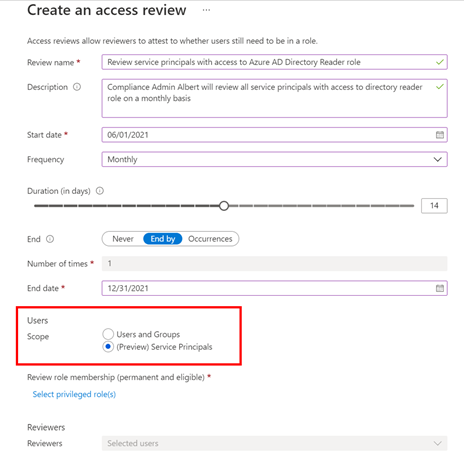
Setting up an access review for service principals in your tenant or Azure subscriptions is easy -select “service principals” during the access review creation experience, and the rest is the same as any other access review!
To set up this new Azure AD capability in the Azure portal:
- Navigate to Identity Governance.
- Choose Azure AD roles or Azure resources followed by the resource name.
- Locate the Access Reviews blade to create a new access review.
- Set the Scope to Service Principals.
The selected reviewers will receive an email directing them to review access from the Azure portal.
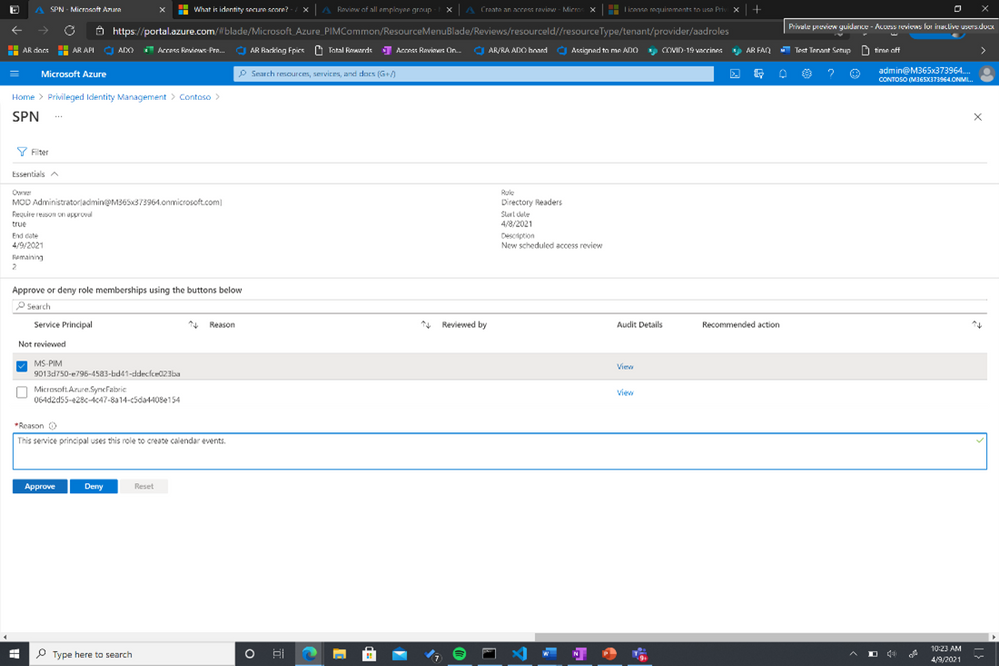
You can also use MS Graph APIs and ARM (Azure Resource Manager) APIs to create this access review for Azure AD roles and Azure AD resource roles, respectively. To learn more about this feature, visit our documentation on reviewing Azure AD roles and assigning Azure resource roles.
As we work on the expanding the set of identity capabilities for workloads, we will use this preview to collect customer feedback for identifying the optimal way of making these capabilities commercially available.
Learn more about Microsoft identity:
by Contributed | Jun 10, 2021 | Technology
This article is contributed. See the original author and article here.
In this episode of Data Exposed, Joe Sack, Principal Group Program Manager of SQL Server engine and SQL Hybrid, and Anna Hoffman, Data & Applied Scientist, talk about a new way in Azure SQL Database to optimize the performance of queries when you are unable to directly change the original query text. They will cover the new public preview feature Query Store Hints, which leverages queries already captured in Query Store to apply hints that would have originally required modifications to the original query text through the OPTION clause.
Watch on Data Exposed
Feedback? Email QSHintsFeedback@microsoft.com


Recent Comments