![[Guest Blog] My Path from Computer Vision to Mixed Reality](https://www.drware.com/wp-content/uploads/2021/06/fb_image.bmp)
by Contributed | Jun 17, 2021 | Technology
This article is contributed. See the original author and article here.
This article is written by Harpreet S Sawhney, a Principal Computer Vision Architect at Microsoft Mixed Reality + HoloLens at Microsoft, who shares his journey from computer vision to mixed reality as a part of our Humans of Mixed Reality series.
How I discovered Hololens and am Loving It!
At the start of my graduate student stint, I took my first course in Computer Vision at UMass, Amherst. Computer vision is a field that uses computing, algorithms and software to understand the physical world of entities and humans via cameras, imaging and related sensors. Computer vision has transitioned from a boutique and esoteric research field worked on by a few university and industry labs in the 90s to a mainstream field that has transformed the world via deployed products and emerging technologies.
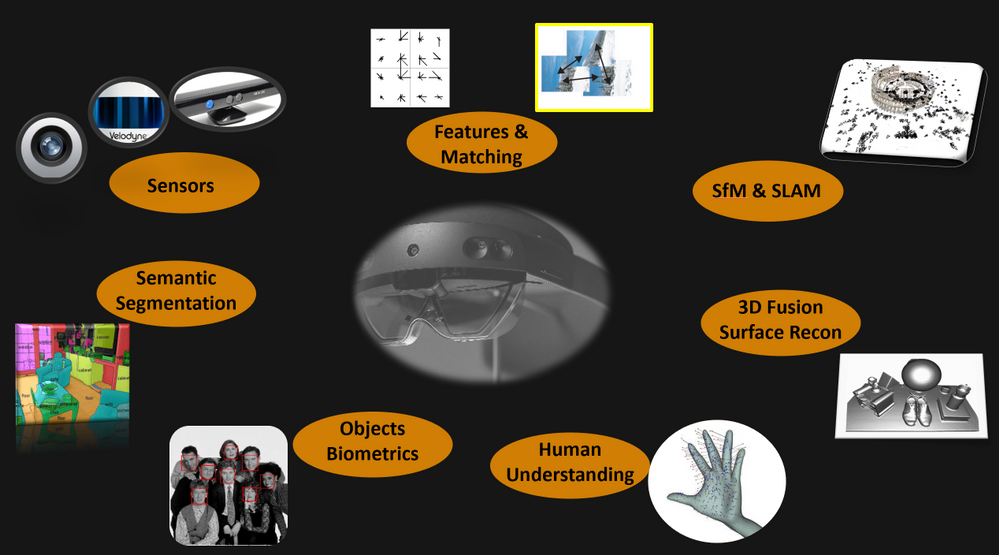
After working on almost all aspects of computer vision including Structure from Motion (SfM), object detection and tracking, 3D object recognition and video understanding at industry labs, I had the opportunity to experience a HoloLens demo at the Computer Vision and Pattern Recognition (CVPR) Conference in 2016. It’s safe to say that I have been hooked ever since.
It hit me that the next revolution in computing and peoples’ lives would be working with the physical world through a digital medium. The promise of Mixed Reality and HoloLens is tremendous. One of the biggest challenges in real-time, real world computer vision is building integrated multi-camera and multi-sensor systems on mobile platforms with synchronized data streams and on-board processing that will stand the test of dynamics of the platform, changing environments and environmental conditions.
When I first wore the HoloLens, I truly realized how beautiful the device worn on my head was. Capabilities such as integrated cameras, time-of-flight, inertial sensors, displays and processing created an integrated sensor-processor in a head-mounted compact format. If we ever get to a world in which the physical world is seamlessly augmented by an extension of our own visual and cognitive intelligence, then HoloLens is a significant first step in making that a reality.
When I joined the Analog Science team in HoloLens at Microsoft in 2017, I began to explore gaps and challenges needed to make HoloLens in enterprise applications a reality. I quickly found that one of the most sought after capabilities in enterprises was locking holograms to objects for collaborative design and marketing as this video demonstrates:
Microsoft HoloLens: Partner Spotlight with Ford ( https://www.youtube.com/watch?v=3QyA7HhIYkg )
This problem is technically challenging, but, if solved, would open up object-locked holograms to the world of mixed reality. Imagine this: a time in the future when all user manuals, maintenance manuals, and training manuals are in mixed reality. For example, I can simply walk up to my car and ask my HoloLens to show me how to check the oil in my car and it takes me through the steps in 3D, directly aligned to the relevant parts of my car right there in my garage! Even better, every car owner, technician and user has the same experience. Another exciting component: the manual only has to be created just once in the factory, and then used millions of times wherever that car or the object is in the world, independent of its surroundings and environmental conditions. This is called object-locking as contrasted with world-locking in which holograms attach to locations in the world that HoloLens provided out-of-the-box via head-tracking. Thus Object Understanding (OU) in the the Analog Science HoloLens team was born!
Believe it or not, I did the first data capture for algorithm development and experimentation with HoloLens in my own garage with my own car! The well-integrated and synchronized sensor suite not only enables real-time applications on the device, but also affords synchronized data captures for important offline development and performance evaluation. The key technology we developed for OU is automated detection and alignment of a Digital Twin (3D Model) of an object to its physical counterpart as shown for a car here.

|
Automatically detecting and aligning a Digital Twin (3D model) to its physical counterpart.
|
We also “discovered” a first-party product team, Dynamics 365 Guides, that makes on-the-job learning a magical experience for users, with automated and unobtrusive object detection using Azure Object Anchors and QR markers. Guides is a “killer app” for Mixed Reality and HoloLens, enabling 3D, in-situ workflows for training, task guidance and operations. A great example is demonstrated here.
Dynamics 365 Guides with HoloLens 2
We honed the HoloLens “Object Understanding” features by working closely with the Guides team as well as external partners such as Toyota. Object Understanding on HoloLens 2 was released as Public Preview in March 2021 under the banner of Azure Object Anchors (AOA) to achieve marker-less anchoring and the new experience will be available as Public Preview on August 1, 2021. A video of the integrated Guides + Object Anchors demo is here.
Object Anchors: Object Detection within Guides.
Examples of usage of Object Anchors by Toyota and others are here.
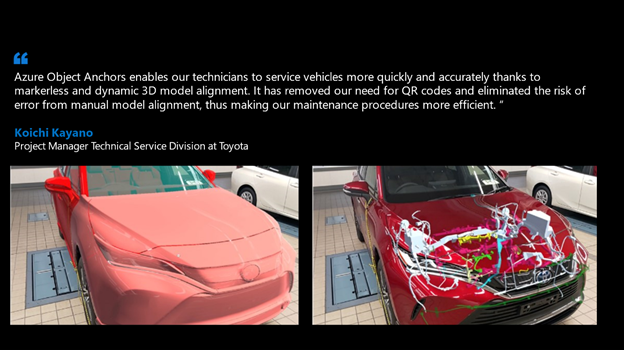
Azure Object Anchors – Object understanding with HoloLens
Object Anchors and its companion technology Azure Spatial Anchors are just the beginning in persistent location-locked and object-locked holographic content authoring and interaction. Imagine a world in the near future when people connect and collaborate with others as if they are together even when not physically present through Microsoft Mesh with spatial, object, and human augmentation that blurs the distinction between the digital and the physical!
That is the promise that drives me every day and helped blaze the path for my Computer Vision journey to HoloLens, Mixed Reality and Microsoft. I am thrilled to be creating the future of how humans work, play and live within the physical and human World in Mixed Reality!
#MixedReality #CareerJourneys
by Contributed | Jun 17, 2021 | Technology
This article is contributed. See the original author and article here.
Talking about your insecurities is an important way to stay mentally healthy, especially during a pandemic.
Making sure people have such an emotional outlet is the ethos behind Aus Ouvidos — a PowerApp that connects people to mental health experts during difficult times in Brazil.
Hosted on Azure and created with the Power Platform, Aus Ouvidos counts a multidisciplinary team that supplies qualified listening to better establish bonds, strengthen ties and generally help people through this delicate moment.
The platform was launched by MTAC Association Brazil, a not-for-profit organization led by MVP Heber Lopes. Heber says it is humbling to create a fully operational tool that provides psychological consultations free to the community.
“For us as technology professionals, it’s very gratifying to see our work helping people. To know that the dedicated effort is making a difference in the lives of those who need it most is incredible,” he says.
“The team’s motivation is to work with newly launched technologies, together with renowned professionals, and with the main objective of helping others.”
Heber says the team was inspired to create Aus Ouvidos to assist health professionals on the virus front line in the Latin American nation. This inspiration was then helped by Microsoft donations of Power Platform and Azure credits.
The consultations take place on Microsoft Teams, with psychologists also leveraging Microsoft Power Automate and Microsoft Graph to organize their schedules. Meanwhile, Power BI is used to analyze aggregated session volume data and manage demand.
Going forward, Heber hopes the team can create a chatbot to help answer patient questions and expand the service to other countries around the world.
“If you are interested in deploying Aus Ouvidos Services in your region, we are ready to scale to other support groups around the world,” Heber says.
For technology professionals who want to support the project, contact Heber via email.
by Contributed | Jun 17, 2021 | Technology
This article is contributed. See the original author and article here.
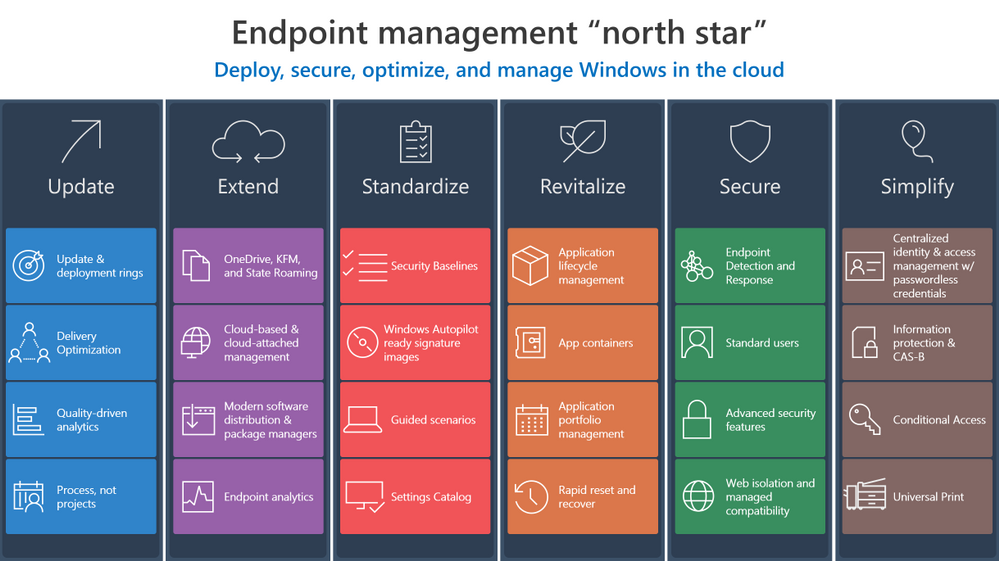
Investments in Azure and Microsoft 365 can streamline your transition to the cloud and make it easier to manage endpoints across your organization. Now let’s explore ways to develop and implement effective strategy to make that transition and help you create the “how” and “why” to leverage these solutions in your own environment.
Update
Updating means staying ahead of adversaries and competition with technology innovations to drive security and business results through:
- Better managing the risk of change in a fast-moving technology world with deployment rings keeping Windows up to date with the latest quality updates, feature updates, and security features managed by solutions like expedited updates and Windows Update for Business.
- Optimizing and de-duplicating bandwidth without sacrificing control to quickly deploy critical changes to improve security and productivity using Delivery Optimization.
- Reshaping processes to avoid determinism, embrace statistics, and becoming quality driven via Update Compliance or Desktop Analytics.
- Redefining how your organization manages technology to invest in on-going servicing capabilities not products, and driving the use of processes and not projects.
Extend
Extending means driving real cloud value while still benefiting from your existing investments using Microsoft 365 to:
- Stop migrating user data and state, or losing user data trapped on an endpoint, and instead use the endpoints as a local cache for OneDrive, Known Folder Redirection with OneDrive, and State Roaming technologies. Even when using your personal managed devices to access data, OneDrive allows for changes to follow you to your primary Windows device.
- Increase management reach while reducing infrastructure architecture, deployment, and operations cost in with cloud-based and cloud-attached management tools such Microsoft Endpoint Manager, or Microsoft Endpoint Configuration Manager with Tenant Attach and the Cloud Management Gateway.
- Deploy trusted, signed apps and minimize complex infrastructure using Modern Software Distribution & Package Manager technologies such as MSIX and the Windows Package Manager (Winget.)
- Manage and monitor your application portfolio, software, and endpoint health in a perimeter-free world using modern insights such as Endpoint Analytics.
Standardize
Standardization involves increasing security and manageability while reducing operational costs by sticking with well-known and proven solutions:
Revitalize
To revitalize means building long-term user satisfaction by standardizing on reliable applications and a dependable, more focused operating system. This involves:
- Deploying a cloud config to users that only need one or two apps in addition to their productivity apps.
- Eliminating constant repackaging with vendor-provided packages and durable customization packages for a better application lifecycle management strategy.
- Separating applications from the operating system and from each other as a security or reliability boundary using App and Guard Containers such as Windows Defender Application Control (WDAC) and MSIX.
- Managing application catalogs like a portal, with tools such as Endpoint Manager’s Software Center & Company Portal to manage security and user experience while directly integrating with distribution platforms with application portfolio management.
- Quickly recovering from reliability or security issues by building capability to rapidly reset and recover with technologies such as device reset.
Secure
Securing endpoints from the cloud involves providing the right balance of security and convenience, reducing attack surfaces, and increasing monitorability by:
Simplify
Ironically, implementing a zero-trust approach simplifies user interactions in a world where identity is the new perimeter by using a single powerful Windows identity across apps and endpoints. We recommend:
Wrapping up
As you can see, the “north star” for endpoint management transformation involves a holistic end-to-end solution set that simplifies operations, optimizes user experiences, and increases security using the best of suite culminating in a modern, cloud-managed Windows endpoint. Microsoft 365 provides this holistic solution across the entire framework. We hope these principles help you develop the proper framework for your organization.
Have feedback or a best practice to share? Drop a comment below!
by Contributed | Jun 17, 2021 | Technology
This article is contributed. See the original author and article here.
Go further with Microsoft Lists. You know you want to. And now you can – on-demand.
We recently delivered five live workshops across multiple time zones – and we learned a lot. We’ve refined the content based on feedback and tightened up a few additional things – mindful of your time and ease of consumption.
The result: We’ve got a great two-part, on-demand workshop – two videos wrapped in a single page with additional resources. Dig in and learn how you and your team can best utilize Microsoft Lists. We teach you how to use and create views, configure conditional formatting, adjust forms, use rules, and more. Plus, we highlight no-code and low-code solutions leveraging integrated tools from the Power Platform. You’ll also find materials to deliver the Lists workshop to your organization (PowerPoint, speaker notes, demo materials).
Jump into the Microsoft Lists on-demand workshop now! [for ease of copy/pasting and sharing with others: https://aka.ms/MSLists/workshop]
What you’ll find on the Lists workshop page…
Watch the two-part Microsoft Lists workshop on-demand (https://aka.ms/MSLists/workshop).
Microsoft Lists workshop, part 1: “Creating and collaborating”
We’ll start with the basics – clarity on what Lists is and what it isn’t – including addressing numerous frequently asked questions (FAQs). We’ll then focus on a variety of ways to create lists from the new Lists home page and from within Microsoft Teams – inclusive of using new ready-made templates. Lots of demos – lots of insight.
Microsoft Lists workshop, part 2: “Make Lists work for you”
Continuing from part 1, we turn to making lists work for you using filters, views, rules, and formatting. We end with a look at how Lists integrates with the Power Platform to take lists even further with custom forms, flows and reporting. We wrap up with the roadmap to share what’s coming next for Microsoft Lists.
BONUS | Host a Microsoft Lists workshop within your organization
Interested in conducting a Microsoft Lists training within your organization – to kick off a pilot or help ramp up your future list pros? We’ve provided a few helpful, downloadable resources to assist your internal Lists evangelism (commonly delivered in 3-4 hours) – PowerPoint with speaker notes and demo suggestions + content for demo’ing creating a list from Excel.
Jump into the Microsoft Lists on-demand workshop now! (if you haven’t yet already)
We, too, have updated our Lists resource and adoption centers – our core public destinations to learn and consume all things Microsfot Lists (blogs, videos, demos, podcasts, deployment resources, and more). Let us know what you think.
Happy workshopping!
Thank you, Mark Kashman – senior product manager (Microsoft Lists)
P.S. did you jump into the Microsoft Lists on-demand workshop yet? Just checking ;)
by Contributed | Jun 17, 2021 | Technology
This article is contributed. See the original author and article here.
Today, we are announcing the public preview of the ability to use custom Docker containers in Azure Machine Learning online endpoints. In combination with our new 2.0 CLI, this feature enables you to deploy a custom Docker container while getting Azure Machine Learning online endpoints’ built-in monitoring, scaling, and alerting capabilities.
Below, we walk you through how to use this feature to deploy TensorFlow Serving with Azure Machine Learning. The full code is available in our samples repository.
Sample deployment with TensorFlow Serving
To deploy a TensorFlow model with TensorFlow Serving, first create a YAML file:
name: tfserving-endpoint
type: online
auth_mode: aml_token
traffic:
  tfserving: 100

deployments:
  - name: tfserving
    model:
      name: tfserving-mounted
      version: 1
      local_path: ./half_plus_two
    environment_variables:
      MODEL_BASE_PATH: /var/azureml-app/azureml-models/tfserving-mounted/1
      MODEL_NAME: half_plus_two
    environment:
      name: tfserving
      version: 1
      docker:
        image: docker.io/tensorflow/serving:latest
      inference_config:
        liveness_route:
          port: 8501
          path: /v1/models/half_plus_two
        readiness_route:
          port: 8501
          path: /v1/models/half_plus_two
        scoring_route:
          port: 8501
          path: /v1/models/half_plus_two:predict
    instance_type: Standard_F2s_v2
    scale_settings:
      scale_type: manual
      instance_count: 1
      min_instances: 1
      max_instances: 2
Then create your endpoint:
az ml endpoint create -f endpoint.yml
And that’s it! You now have a scalable TensorFlow Serving endpoint running on Azure ML-managed compute.
Next steps



Recent Comments