
by Contributed | Jun 29, 2021 | Technology
This article is contributed. See the original author and article here.
The Azure Arc partner ecosystem offers customers validated, enterprise grade solutions to run Azure on-premises and at the edge. Launched at Microsoft Ignite 2021 with support from industry-leading OEMs, hardware providers, platform providers, and ISVs, we are happy to announce the expansion of the Azure Arc network of trusted partners and validated platforms to data services.
Azure Arc validation program
The Azure Arc validation program ensures customers can adopt from a wide range of partner solutions to fit their needs with the confidence that they have been designed, engineered, configured, and tested to run Azure data services and Kubernetes distributions.
With these validated solutions, customers receive the benefits of enterprise performance and scale to deploy and operate their data services across their entire estate, as well as the assurance of enterprise grade support.
Technology partners & platforms
Our partnership with industry leading OEMs and storage providers delivers HCI and hardware-as-a-service (HaaS) solutions that combine hardware and software platforms that are optimized to run hybrid data workloads.
Partner |
Solution |
Description |
Link |

Azure Kubernetes Service (AKS)
|
Azure Kubernetes Service |
Deploy and manage containerized applications more easily with a fully managed Kubernetes service. |
azure.microsoft.com/en-ca/services/kubernetes-service/ |
 |
Charmed Kubernetes |
The Azure Arc dashboard combined with Charmed Kubernetes’ full lifecycle automation tooling to drastically simplify multi-cloud deployments and operations traceability with GitOps. |
ubuntu.com/blog/gitops-with-azure-arc-and-charmed-kubernetes |
 |
Storage Solutions |
Get the scalability, intelligence, and cloud integration you need to unlock the value of your data.
- Dell EMC PowerFlex
- Dell EMC PowerStore
- Dell EMC PowerMax
|
delltechnologies.com/storage |
|
Hyperconverged Solutions |
Benefit from an HCI portfolio that allows for choice based on infrastructure, operational models and desired IT outcomes.
- Dell EMC PowerFlex
- Dell EMC Integrated System for Microsoft Azure Stack HCI
|
delltechnologies.com/hci
|
|
as-a-Service Solutions |
Experience the ease and agility of as-a-Service combined with the power and control of leading technology infrastructure.
- Dell Technologies APEX Data Storage Services
|
delltechnologies.com/apex |

|
Hybrid cloud Kubernetes with Nutanix HCI + Karbon and Azure Arc
|
Fast-track your cloud native journey! Make hybrid cloud Kubernetes a reality by extending Microsoft Azure and Azure Arc Data Services to Karbon Kubernetes clusters on Nutanix’s industry-leading Hyperconverged Infrastructure (HCI).
|
nutanix.com/solutions/cloud-native/hybrid-cloud-kubernetes |

|
FlashArray and PX-Backup |
Pure Storage and PX-Backup delivers an enterprise-grade point-and-click , container-native, backup and disaster recovery solution with fine grained protection, security, and audit capabilities.
|
purestorage.com/azure-arc |
 |
Rancher |
Together, Azure Arc and SUSE Rancher (SUSE’s GitOps-enabled Kubernetes management platform) provides a complete, open, and interoperable software stack for DevOps to deploy, secure, and manage their Kubernetes clusters.
|
suse.com/solutions/cloud-native-transformation/
|
 |
Azure Red Hat OpenShift
|
Azure Red Hat OpenShift provides highly available, fully managed Red Hat OpenShift clusters on-demand, monitored and operated jointly by Microsoft and Red Hat with an integrated support experience.
|
azure.microsoft.com/en-us/services/openshift/ |
 |
Red Hat OpenShift |
Red Hat OpenShift is for innovation without limitation — bringing big ideas to life through intelligent applications with the security-focused hybrid cloud platform open to any team or infrastructure.
|
openshift.com
|
 |
SUSE Linux Enterprise Server
SUSE Manager |
Supported by Microsoft Azure Arc for servers, SUSE Linux Enterprise Server simplifies an enterprise’s journey to a hybrid cloud infrastructure. In concert with Azure Arc, SUSE Manager orchestrates the deployment and lifecycle of the systems, while Azure Arc manages policy compliance.
|
suse.com/c/suse-accelerates-transformation-in-the-cloud-with-solutions-for-microsoft-azure/ |
 |
VMware Tanzu Kubernetes Grid |
Run your containerized applications and Azure Arc-enabled data services anywhere, at enterprise-scale with VMware Tanzu Kubernetes Grid.
|
tanzu.vmware.com/kubernetes-grid |
Featured service partners
Whether you are just getting started with migration and modernization efforts or in the middle of a multi-year smart factory rollout, our consulting services partners can help you choose the validated infrastructures and applications that are specifically configured and tested to work with Azure Arc.
Partner |
Solution |
Description |
Link |
 |
Azure Governance Solution |
AHEAD created the Azure Governance Framework to allow enterprises to develop and maintain a fully optimized, and secure environment.
|
AHEAD Azure Governance Solution
|
 |
Cloud and Application Services |
Avanade provides a turnkey, managed Azure Stack solution.
Through a single provider, you get a Microsoft certified
hardware platform, Azure Stack software setup and
configuration, a hybrid cloud foundations workshop, and then
we run and manage it for you. |
Accelerating Cloud Migrations And Extending Cloud Services | Avanade Insights Blog |
 |
AzCOP |
The power of automation on a unified platform providing benefits of self-services cloud. Consolidates all aspects of sourcing, managing and delivering cloud services across matrix teams while managing cloud risk and compliance |
AzCOP – Cloud Orchestration & Provisioning | BrainScale Inc
|
 |
Azure Arc
|
Learn how Microsoft and ClearDATA together can provide a comprehensive view into both your on-premises and cloud PHI data security and compliance by using Azure Arc. |
Healthcare Compliance
|

|
Cognizant Cloud Operate |
Accelerated, factory-based, agile framework for migrating and transforming enterprise data center workloads to cloud using best of breed tools, custom blueprints, governance and optimization. |
Cloud Managed Services—Cloud Operate | Cognizant
|
|
Azure Cloud Economics Assessment and Migration |
Undergoing the Cloud Economics Assessment will allow for effective forecasting of Azure Infrastructure usage, ensuring a well defined migration plan and transition to the cloud. |
Azure Accelerate – Core BTS
|
 |
Azure Arc Datacenter Management Assessment |
**Cloud-first hybrid management** Simplify the management of complex and distributed environments across private & public clouds, datacenters, and edge.
|
Azure Arc Datacenter Management Assessment: 5-day – Microsoft Azure Marketplace |
 |
Do it hybrid |
Azure Arc enables Everis to help organizations design and achieve business goals extending the Azure’s capabilities and having unified operations. Do it hybrid streamlines the management of distributed environments anywhere.
|
everis cloud adoption journey > cloud implementation > cloud hybrid
|
 |
Azure Validation & Optimization |
An Azure validation and optimization project is for customers seeking a professional review of cloud usage, services consumed, architecture, subscriptions and workloads to validate and identify areas of optimization.
|
App Modernization “Smart Start”: 2-Hr Briefing – Microsoft Azure Marketplace
|
 |
Azure Arc Fast Start |
Azure Arc Fast Start helps organizations adopt Azure Arc to drastically simplify management and operation with a clients hybrid cloud. Microsoft® Azure Arc was designed with hybrid solutions at the core to simplify workload management and operational burden across resources, no matter where they live. |
Hybrid Container Management With Azure Arc Strategy Workshop | Insight
|
 |
Managed Cloud Services for Azure |
KoçSistem MCS for Azure is a portal to manage cloud licenses and monitors usage/consumption for Microsoft Cloud Customers.
|
KoçSistem Teknolojiyi Türkiye’nin Lider Markaları ile Buluşturuyor! (kocsistem.com.tr)
|
 |
Cloud Next |
Cloud Next is a multi and hybrid cloud platform built by KPMG Ignition Tokyo (KIT). The goals of Cloud Next are to provide a secure, low-cost, and 24×7 supported environment where clients and KPMG member firms can host their digital solutions. |
KPMG Ignition Tokyo
|
 |
Database Modernization |
Azure DB and Cosmos DB Migration Accelerator Pack helps organizations understand and plan on-prem data estate migration and modernization to Azure. |
Nous Azure Arc based Hybrid Solution
|
 |
Azure Governance Services for a Fully Governed Cloud Environment |
SNP’s Azure Adoption Framework is designed to help customers create and implement the business and technology |
Hybrid Cloud Solutions- 4 Week Implementation – Microsoft Azure Marketplace |
 |
Azure Migration & Managed Service |
We help enterprises distribute workloads based on criticality & functionality between private & public clouds. |
TCS’ Services for Cloud Migration to Azure for Digital Transformation
|
 |
Azure Arc Hybrid Cloud |
A new management tool for hybrid cloud application infrastructures. It’s designed to manage resources in a cloudlike manner wherever they are, treating Azure’s resource tooling as your control plane. |
Managed Services | UniSystems
|
Getting started resources
by Contributed | Jun 29, 2021 | Technology
This article is contributed. See the original author and article here.
In May we announced the support for Linux across our threat and vulnerability management capabilities in Microsoft Defender for Endpoint. Today, we are excited to announce that threat and vulnerability management for Linux is now generally available across Red Hat, Ubuntu, CentOS, SUSE, and Oracle, with support for Debian coming soon. In addition to Linux, the threat and vulnerability management capabilities already support macOS and Windows, with support for Android and iOS coming later this summer to further expand our support of third party platforms.
Vulnerability Management plays a crucial role in monitoring an organization’s overall security posture. That’s why we continue to expand our cross-platform support to equip security teams with real-time insights into risk with continuous vulnerability discovery, intelligent prioritization, and the ability to seamlessly remediate vulnerabilities for all their platforms. With the general availability of support for Linux, organizations can now review vulnerabilities within installed apps across the Linux OS and issue remediation tasks for affected .
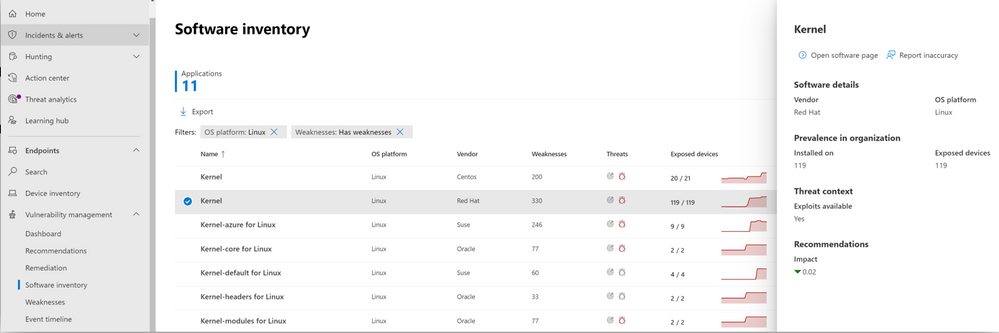
Image 1: Software inventory page in the vulnerability management console, showing various Linux platforms
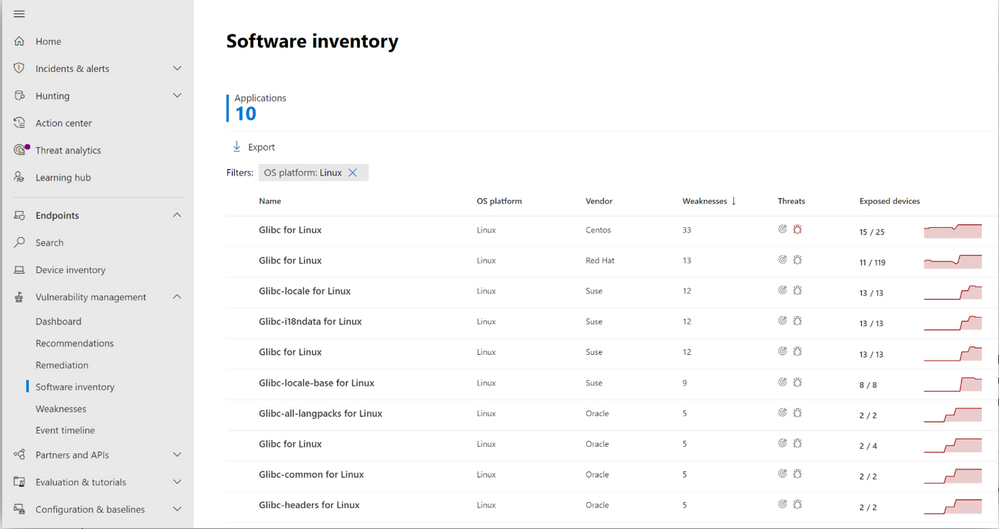 Image 2: Software inventory page in the vulnerability management portal, showing glibc across various Linux systems
Support for the various Linux platforms in threat and vulnerability management closely follows what is available across our Endpoint Detection and Response (EDR) capabilities. This alignment ensures a consistent experience for Microsoft Defender for Endpoint customers, as we continue to expand our cross-platform support.
More information and feedback
The threat and vulnerability management capabilities are part of Microsoft Defender for Endpoint and enable organizations to effectively identify, assess, and remediate endpoint weaknesses to reduce organizational risk.
Check out our documentation for a complete overview of supported operating systems and platforms.
We want to hear from you! If you have any suggestions, questions, or comments, please visit us on our Tech Community page.
by Contributed | Jun 29, 2021 | Technology
This article is contributed. See the original author and article here.
Credit and thanks to Alexandru Jercaianu and Vladimir Cernov for implementation work
Over the last year, we have been improving the DNS over HTTPS (DoH) functionality in the Windows DNS client. Now we are pleased to introduce you to the different features now available through the Windows Insider program.
To start with, we want to note that the registry key controls documented in our original DoH testing blog post are no longer applicable. As stated there, those instructions were time limited to the initial DoH test rollout. If you did ever set that key, please delete it then reboot your machine before proceeding with the rest of this blog post.
Next, we will be reviewing the new configuration behavior, how Windows will know if a DNS server supports DoH, and what our next steps are in advancing encrypted DNS discovery.
UI
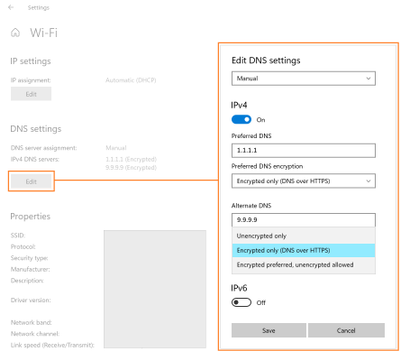
The first control you should try out is the new UI fields in the Settings app, originally announced on the Insider blog. When Windows knows a given DNS server’s IP address has a corresponding DoH server, it will unlock a dropdown that lets you decide whether to require encryption always be used, use encryption but fall back to plain-text DNS when encryption fails, or not to use encryption (the default value).
GPO
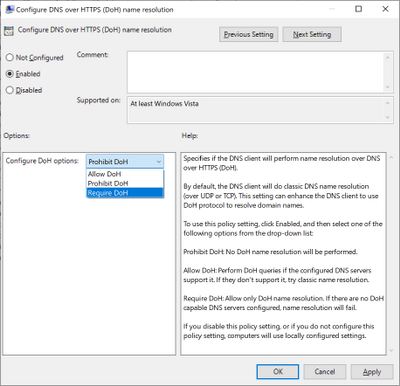
For enterprise administrators, we have provided a new GPO for controlling DoH behavior. This will allow the use of DoH to be allowed, required, or prohibited system-wide.
- Allowed will defer the use of DoH to local settings available in the UI per network adapter.
- Required will prevent the use of configured DNS servers if they do not support DoH and will disable fallback to plain-text DNS.
- Prohibited will prevent any local DoH settings from taking effect, ensuring Windows functions as it did before the DoH client using plain-text DNS only.
NRPT
The Name Resolution Policy Table (NRPT) allows administrators to specify rules for name resolution by namespace. For example, you can create an NRPT rule that specifies all queries for “*.microsoft.com” must be sent to a specific DNS server.
If Windows knows that a DNS server provided in an NRPT rule supports DoH (see the next section for how this works), then the traffic affected by the NRPT rule will inherit the benefits of using DoH. This allows admins who want to use DoH for some namespaces and not others to configure that behavior.
Knowing a server supports DoH
All these mechanisms rely on Windows already knowing a given DNS server IP address supports DoH. We ship a few definitions of known DoH servers in Windows:
Server Owner
|
Server IP addresses
|
Cloudflare
|
1.1.1.1
1.0.0.1
2606:4700:4700::1111
2606:4700:4700::1001
|
Google
|
8.8.8.8
8.8.4.4
2001:4860:4860::8888
2001:4860:4860::8844
|
Quad9
|
9.9.9.9
149.112.112.112
2620:fe::fe
2620:fe::fe:9
|
Other definitions need to be added using the netsh command. To start with, you can check to see what DoH server definitions we already know by retrieving them:
Using netsh
netsh dns show encryption
Using PowerShell
Get-DnsClientDohServerAddress
Then you can add another server definition to the list and ensure it never falls back to plain-text DNS:
Using netsh
netsh dns add encryption server=<resolver-IP-address> dohtemplate=<resolver-DoH-template> autoupgrade=yes udpfallback=no
Using PowerShell
Add-DnsClientDohServerAddress -ServerAddress ‘<resolver-IP-address>’ -DohTemplate ‘<resolver-DoH-template>’ -AllowFallbackToUdp $False -AutoUpgrade $True
If you prefer to allow fallback so that when encryption fails you can still make DNS queries, you can run the same commands with the fallback flag toggled to add a new server:
Using netsh
netsh dns add encryption server=<resolver-IP-address> dohtemplate=<resolver-DoH-template> autoupgrade=yes udpfallback=yes
Using PowerShell
Add-DnsClientDohServerAddress -ServerAddress ‘<resolver-IP-address>’ -DohTemplate ‘<resolver-DoH-template>’ -AllowFallbackToUdp $True -AutoUpgrade $True
The `-AutoUpgrade` and `-AllowFallbackToUdp` flags together represent the values present in the Setting app per-server dropdown. If for some reason you want to add these DoH server definitions but leave them to use unencrypted DNS for now, you can set the `-AutoUpgrade` flag to false instead of true as in the examples above.
If you want to edit an existing list entry rather than adding a new one, you can use the `Set-DnsClientDohServerAddress` cmdlet in place of the `Add-DnsClientDohServerAddress` cmdlet.
It would be easier for users and administrators if we allowed a DoH server to have its IP address determined by resolving its domain name. However, we have chosen not to allow that. Supporting this would mean that before a DoH connection could we established, we would have to first send a plain-text DNS query to bootstrap it. This means a node on the network path could maliciously modify or block the DoH server name query. Right now, the only way we can avoid this is to have Windows know in advance the mapping between IP addresses and DoH templates.
Coming up next
Going forward, we want to be able to directly discover DoH server configuration from the DNS server. This would mean DoH servers could be used without having to include it in Windows or manually configure the IP address to DoH template mapping. We are currently contributing to two proposals in the IETF ADD WG to enable this: Discovery of Designated Resolvers (DDR) and Discovery of Network-designated Resolvers (DNR). We look forward to updating you with our first tests in supporting DoH discovery!
by Scott Muniz | Jun 29, 2021 | Security, Technology
This article is contributed. See the original author and article here.
In a blog post by Executive Assistant Director (EAD) Eric Goldstein, CISA announced the creation of a catalog to document bad cybersecurity practices that are exceptionally risky for any organization and especially dangerous for those supporting designated Critical Infrastructure or National Critical Functions.
While extensive guidance on cybersecurity “best practices” exists, additional perspective is needed. Ending the most egregious risks requires organizations to make a concerted effort to stop bad practices.
CISA encourages cybersecurity leaders and professionals to review EAD Goldstein’s blog post and the new Bad Practices webpage and to monitor the webpage for updates. CISA also encourages all organizations to engage in the necessary actions and critical conversations to address bad practices.
by Contributed | Jun 29, 2021 | Technology
This article is contributed. See the original author and article here.
Updates to SQL Server, Reporting Services, and Analysis Services Management Packs are available (7.0.32.0). We also released an update to SQL Server Dashboards MP. You can download the MPs from the links below. Majority of the changes are based on your direct feedback. Thank you.
Microsoft System Center Management Pack for SQL Server
Microsoft System Center Management Pack for SQL Server Reporting Services
Microsoft System Center Management Pack for SQL Server Analysis Services
Microsoft System Center Management Pack for SQL Server Dashboards
Another change we’ve done recently is to move operations guides for all SQL Server family of management packs from download center to docs.microsoft.com. This unifies the content viewing experience for the user as the rest of the SCOM and SQL Server documentation is already there. Further more, it allows us to present you with the most up to date and accurate content online. The link to the operation guide for each MP can be found on the MP download page. Here are the links that show what’s new in these MPs:
Features and Enhancements in Management Pack for SQL Server
Features and Enhancements in Management Pack for SQL Server Analysis Services
Features and Enhancements in Management Pack for SQL Server Reporting Services


Recent Comments