by Contributed | Jul 6, 2021 | Technology
This article is contributed. See the original author and article here.
Previously, when you migrated content from Google Workspace (formerly G Suite) to Microsoft 365, a user could bring over their Mail, Calendar, and Contact information. While this did help reduce friction for users getting used to the new platform, it did not avoid the burden of re-creating all their email organization rules in Outlook. To address this, we have now added the capability to migrate Gmail filters to Outlook rules as a part of the standard migration offering!
With this feature you can now migrate Mail, Rules, Calendar and Contact data for all users and everyone is opted in by default.
Here are some of the conversions we support:
Gmail filter criteria
Gmail filter Criteria
|
Criteria Syntax
|
Outlook Rule Condition
|
From:
|
user@domain.com
|
From people or public group
|
|
!user@domian.com
|
Except it from people or public group
|
|
-user@domain.com
|
Except it from people or public group
|
To:
|
me
|
Where my name is in the To box
|
|
user@domain.com
|
Send to people or public group
|
|
!user@domain.com
|
Except it send to people or public group
|
|
-user@domain.com
|
Except it from people or public group
|
Has the words:
|
cc:me
|
Where my name is in the CC box
|
|
word1 or word2
|
With word1 or word2 in the subject or body
|
Doesn’t have:
|
Word1 or word2
|
Except if the subject or body contains word1 or word2
|
|
cc:me
|
Except where my email address is in the cc box
|
Subject:
|
Word1 or word2
|
With word1 or word2 in the subject
|
|
!word1 AND !word2
|
Except if the subject contains word1 or word2
|
|
word1 AND !word2
|
(With word1 in the subject) AND (Except if the word2 contains B)
|
|
!word2 AND word1
|
(Except if the subject contains word2) AND (With word1 in the subject)
|
Size:
|
Greater than number unit
|
With a size in a specific range
|
Has attachment:
|
|
Which has an attachment
|
Gmail filter action
Gmail filter Action
|
Outlook Rule Action
|
Skip Inbox (Archive it)
|
Move it to the Archive folder
|
Mark as read
|
Mark it as read
|
Apply the label
|
Move a copy to the specific folder
|
Forward it
|
Forward it to people or public group
|
Delete it
|
Delete it (Move to Deleted Items folder)
|
Always mark it as important
|
Mark it as important
Importance: High
|
Never mark it as important
|
Mark it as important
Importance: Medium
|
Conversions that are not supported
We do not currently support migrations of Categories from Google Workspace to Microsoft 365.
Additionally, if there are certain filters we are unable to process and convert, we mark these as bad items. And bad items from filters to rules migration do not negatively impact the DCS score of a job since that mechanism is more relevant for identifying data loss for the underlying data set (like Mail, Calendar and Contacts).
How to configure the feature
By default, the feature is enabled when you use New-MigrationBatch for Google Workspace migrations. If, however, you wish to disable the rule migration capability, you can do so by specifying the –SkipRules parameter via PowerShell.
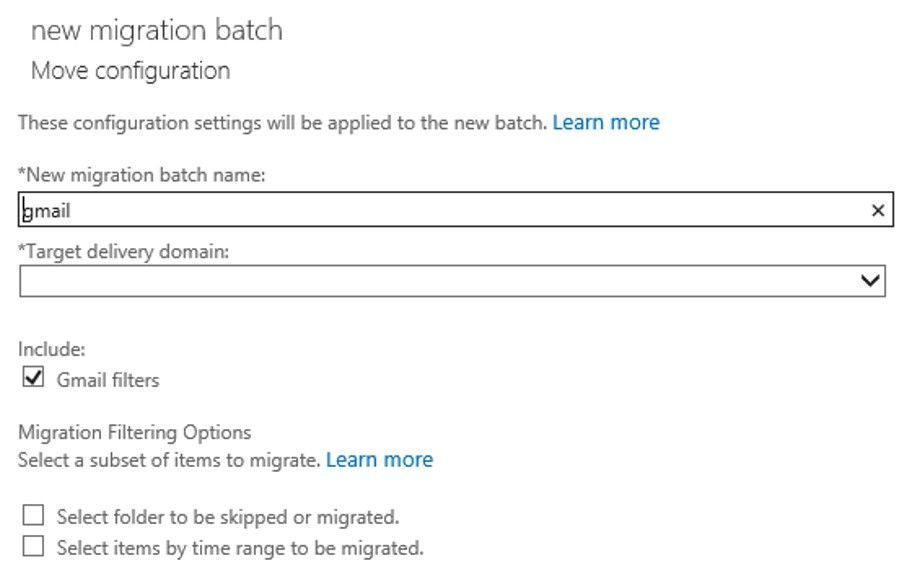
In the screenshot below, you can see that there are now checkboxes for migrating Gmail Filters (to Outlook Rules) – which is checked by default. Simply un-checking the checkbox for Rules will skip migrating those items. Currently you need to do this via the Classic Exchange Admin Center; this change will be incorporated into the Modern Exchange Admin Center in the future.
Note: We do not have a way to reset rules once migrated, as is the case for any other data like Mail, Calendar or Contacts.
Try the feature out and give us feedback in the comments if the conversion was to your liking and what improvements we can make in the future!
The Exchange Migration team
by Contributed | Jul 6, 2021 | Technology
This article is contributed. See the original author and article here.
Senaj Lelic is the managing direct at oneAssist, a Microsoft-certified partner. oneAssist brings fun and joy to the way other companies work. They are experts in process documentation and data visualization and build custom Microsoft cloud solutions for products like Microsoft Visio, Microsoft Teams, and Microsoft SharePoint that enhance customers’ work through helpful work environments.
COVID-19 has made many organizations aware that they lack proper business process documentation (BPM). But even those with the right documentation felt unprepared for the dramatic upheaval the pandemic caused.
But why? For years, the general perception was that if you had your processes adequately documented and “knew” how the organization was supposed to work, you were prepared for any situation. But the pandemic taught us this is not necessarily true. For more than three decades, our team at oneAssist has helped educate and counsel companies to prepare for various disruptions, and now we want to share our expertise to assist you in today’s environment.
What we learned was that those business processes lived “on paper” in idyllic flowcharts, connected data, and files. They assumed the best-case scenario and that all the people, systems, and non-human components in the organization operated as they should. But in reality, and especially in the face of a pandemic, those processes break down in the face of unexpected challenges.
So, what is the answer? How can you build business processes that account for the unprecedented?
The answer is, you can’t with BPM. You need a business continuity plan (BCP).
What is the difference between BPM and BCP? Basically, a BPM describes the desired way the organization works and performs with all its contributing components. It’s the foundation of your processes. We’ve long used and recommended Microsoft Visio to document and visualize business processes. Any process documentation is a “visualization code or language”; hence, we suggest using the BPMN or ISO standard within the cross-functional flowchart template in Visio, which comes out of the box with all Visio plans. But this is only a suggestion. The most important thing is that the process is easily understood in your organization, so choose the flowchart template that will resonate best with your team. Visio offers more than 325 templates, of which over 40 are flowcharts. Whichever template you choose, remember it will be the visual standard for all documentation types, be it BPM or BCP. Designing your BPM is the first step in building a robust BCP. Without the former, you can’t have the latter.
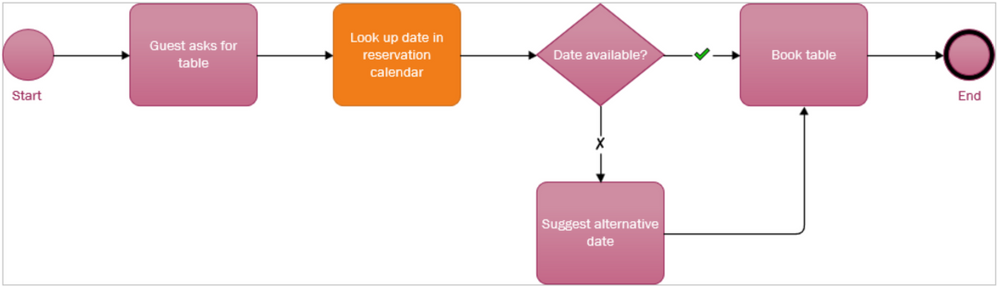
A simple BPM for restaurant employees to make table reservations.
Once the BPM is in place, you need to get from that to a BCP. Doing this is straightforward.
- Evaluate the documented business processes
- Assume that one or more vital components fail or experience some turbulence/interruption
- Remodel the process so that the desired outcome is possible again
- Repeat this for all critical processes and process categories
The easiest way to start a BCP is to open the process you’ve already documented in Visio. You’ll then need to identify the critical steps and components—you can do this with any number of built-in Visio tools, like changing the shape color or adding an icon—estimate which of those could fail, and determine the possible causes of failure. After that, create a copy of the Visio file and add the failing component to the file name. For example, if your original BPM file name is, “production.vsdx” and you’ve identified parts delivery as the reason certain production parts are missing, rename the file to, “production-faileddelivery.vsdx.”
Working in the new file, you can now remodel the process so the failed component is replaced in a way that makes the process work again.
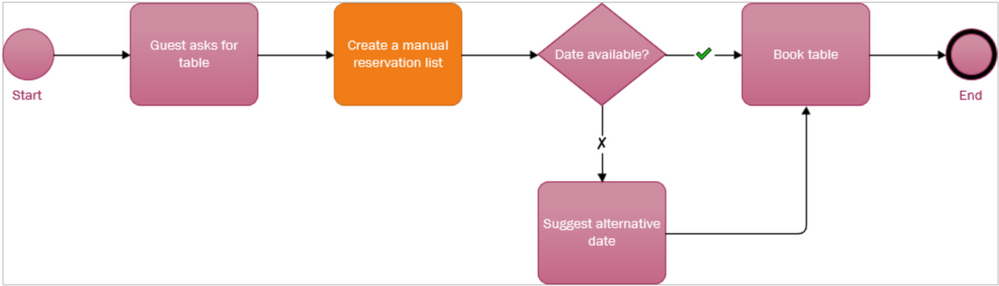 The remodeled table reservation process. This BCP assumes the reservation calendar has failed and replaces that component with a manual alternative. You might name this file, “tablereservation-nocalendaraccess.”
Store your processes in a place where others can securely access it, like Microsoft Teams or Microsoft SharePoint. You could even export the new file to Microsoft Word, which pastes each diagram component and its associated metadata separately so you can add additional written context next to it.
It may sound like every process needs a bunch of “shadow” variations that document the what-if scenarios. But in reality, you only need to do this for the core processes that are not inherently resilient. For example, IT systems, especially now with the cloud, are backed-up by design, so you can likely skip IT entirely.
But what about the rest? One simple approach could suffice.
Look over the processes that are not related to an IT system and check how often they failed in the last 12 months. If a process fails:
- less than once a month on average, this can be considered as an irregularity and therefore ignored.
- once a month, a continuity plan is needed for this component and process.
- more often than once a month, consider remodeling the process itself and/or generate a new process since this process seems error-prone.
Now that the BPM and BCP processes are both in Visio, the next step is adding insights to critical process components. To do this, add a metadata element to the necessary component shapes, configure a data graphic element with a critical indicator (e.g., a flag), and turn it on for shapes/components so you immediately see what’s critical. The metadata you add can come from another underlying data source, like an org chart or cost sheet, and when that source changes the critical indicator you added will change too.
The second step for the BCP assessment should be the business impact. If the failure of this process only has minor consequences, a BCP is not needed. The larger the business impact of the process, the more likely it requires a BCP. Various components can have a significant business impact and can be located within and outside of your company. Some examples of business interruptions include delayed delivery of product parts, team member illness, or the breakdown of a machine, each of which can cause a process to fail and result in lost clients, missed revenue, and general disruptions to the company’s success.
Feel free to reach out to us if your company needs assistance building a BPM or BCP or would like more in-depth advice. We believe in times like these, every company should use its knowledge, skills, and expertise to help others prepare for and, more importantly, overcome challenges. We will be happy to assist you!
This is the first of two articles from our team about business continuity. Next week, we’ll consider whether the COVID-19 pandemic and all its challenges should part of or outside of traditional business process thinking and planning.
by Contributed | Jul 6, 2021 | Technology
This article is contributed. See the original author and article here.
In this article, I am providing the step-by-step instructions on provisioning a Logic App Standard resources and deploying a simple workflow to it through GitHub actions.
1. Generate deployment credentials and store it under GitHub Secrets:
To create a Service Principal for GitHub to deploy resources to Azure, In the below command, replace myApp with a unique name for your service principal and provide the resource ID of the Resource Group to which you are deploying the Logic App.
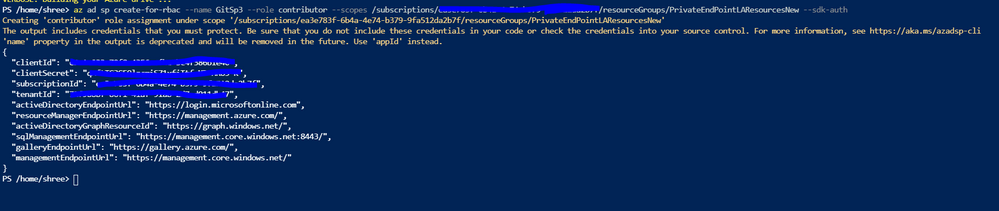
az ad sp create-for-rbac –name {myApp} –role contributor –scopes /subscriptions/{subscription-id}/resourceGroups/{MyResourceGroup} –sdk-auth
Run this command in Azure CLI and copy the complete output which looks like below.
{
“clientId”: “<GUID>”,
“clientSecret”: “<GUID>”,
“subscriptionId”: “<GUID>”,
“tenantId”: “<GUID>”,
(…)
}
In the GitHub repository, go to Settings > Secrets > New secret.
Name the secret as AZURE_CREDENTIALS and paste the output of the above CLI command.

Deploy Resource Manager templates by using GitHub Actions – Azure Resource Manager | Microsoft Docs
2. Provisioning Logic App with all the dependent resources.
1. Create ARM templates to deploy the Logic app and all the dependent resources:
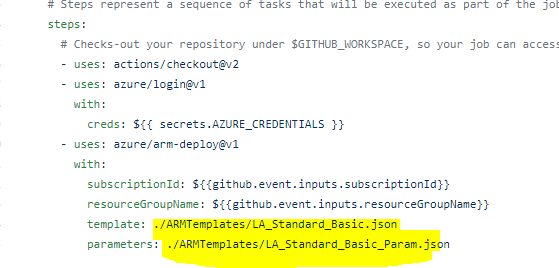
Please find below the sample template and param file. This template would help to create a Storage Account, App service plan, App insight and a Logic App under the specified resource group. Please modify the parameter value as per your requirement and place these files in the GitHub repository.
https://github.com/ShreeDivyaMV/LogicAppGithub/blob/7e968a3676725ad43d5ddb2fed34f3a624919679/ARMTemplates/LA_Standard_Basic.json
https://github.com/ShreeDivyaMV/LogicAppGithub/blob/7e968a3676725ad43d5ddb2fed34f3a624919679/ARMTemplates/LA_Standard_Basic_Param.json
This example doesn’t have any API connections. If any API connections, add those to the ARM template as well. Please refer the link in the reference section for more examples.
2. Create GitHub action to deploy the Logic App:
Go to Actions tab in the repository, click on ‘new workflow’
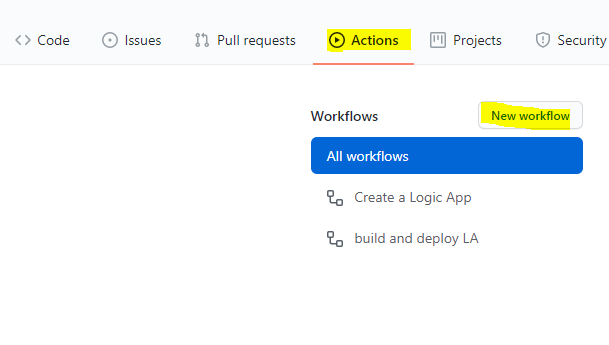
You can refer the below YAML file for the template. You might have to modify the path and name of your ARM templates. Save this file and go back to Actions tab.
https://github.com/ShreeDivyaMV/LogicAppGithub/blob/7e968a3676725ad43d5ddb2fed34f3a624919679/.github/workflows/DeployLogicApp.yml
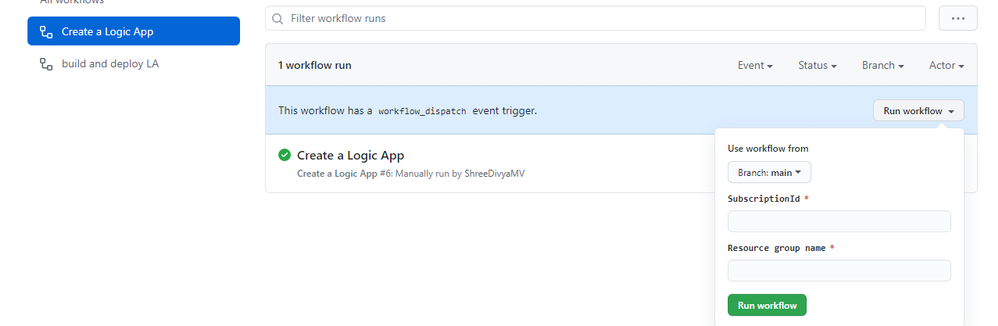
3. Run the GitHub action:
Select the action “create a Logic App” and provide the Subscription ID and Resource group Name and run the action.
This would create the Logic app based on the ARM template provided.
3. Deploy the workflows to the Logic App:
Copy your Logic App project folder to GitHub repository.
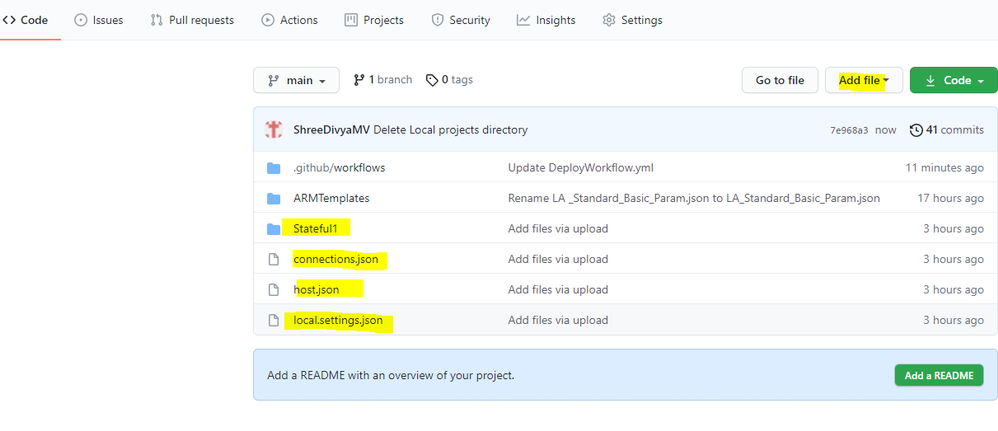
Go to Actions tab and create another action to deploy the workflow to the earlier provisioned Logic App.
You can refer the below YAML file for the sample.
https://github.com/ShreeDivyaMV/LgoicAppGithub/blob/44ac6e908b4818bacccab484a33075e76949e20f/.github/workflows/DeployWorkflow.yml
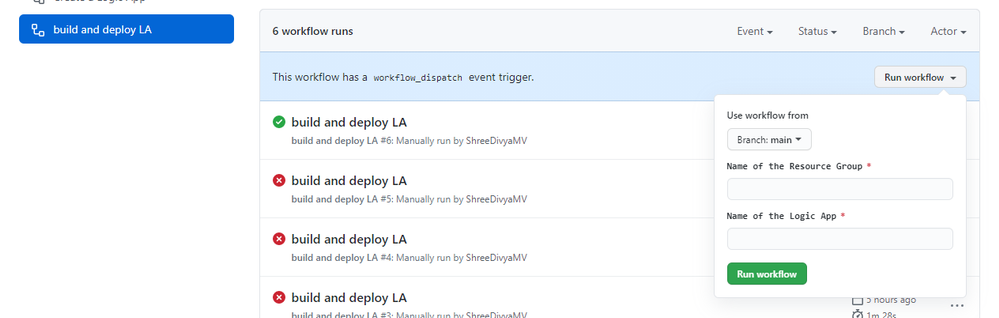
You can run this workflow by providing the Resource Group name and Logic App Name
References:
GitHub Repository of the above example- ShreeDivyaMV/LogicAppGithub
GitHub Repository for more examples on Logic App Standard- Azure/logicapps: Azure Logic Apps labs, samples, and tools (github.com)
More info on Logic App Standard: Overview – Single-tenant Azure Logic Apps – Azure Logic Apps | Microsoft Docs
by Scott Muniz | Jul 6, 2021 | Security, Technology
This article is contributed. See the original author and article here.
CISA has released an Industrial Controls Systems (ICS) Medical Advisory detailing multiple vulnerabilities in multiple Philips Clinical Collaboration Platform Portal (officially registered as Vue PACS) products. An attacker could exploit some of these vulnerabilities to take control of an affected system.
CISA encourages users and administrators to review the ICS medical advisory ICSMA-21-187-01 Philips Vue PACS and to apply the necessary updates or workarounds.


Recent Comments