by Contributed | Jul 29, 2021 | Technology
This article is contributed. See the original author and article here.
In addition to being a Security Information and Event Management (SIEM) tool, Azure Sentinel is a Security Orchestration, Automation, and Response (SOAR) platform. Automation takes a few different forms in Azure Sentinel, from automation rules that centrally manage the automation of incident handling and response, to playbooks that run predetermined sequences of actions to provide powerful and flexible advanced automation to your threat response tasks.
In this blog we will be focusing on playbooks and understanding application programming interface (API) permissions, connections, and connectors in Azure Sentinel playbooks.
A playbook is a collection of response/remediation actions and logic that can be run from Azure Sentinel as a routine. It is based on workflows built in Azure Logic Apps which is a cloud service that helps you schedule, automate, and orchestrate tasks and workflows across systems throughout the enterprise. They are very powerful as they interact with Azure Sentinel features (they can update your incidents, update watchlists, etc.), and also with other Azure or Microsoft services and even third-party services. Whether you use out-of-the-box playbook connectors or the more generic HTTP connector, ultimately you will be interacting with various APIs.
When creating playbooks, solutions that we want to use to automate tasks need to have their own connector in Logic Apps (like Office 365 Outlook, Azure Sentinel, Microsoft Teams, Azure Monitor Logs…) or to have possibility to interact via API so that we can use the generic HTTP connector. As each connector needs to create an API connection to the solution and authorize it, if you are getting started with playbooks you may find it challenging to figure out what permissions are required. For example, our playbook templates on GitHub may come with multiple connections. When you first deploy a template, you may notice the playbook fails when you run it for the first time due to lack of permissions. In this blog post we will cover some of the main connectors you may encounter when you use Azure Sentinel playbooks, different methods to authenticate, as well as permissions you may require.
Before we move into specifics about identities and connectors, let’s quickly revisit the permissions needed to create and run a playbook in Logic Apps:
- Permissions required to create a Logic App:
- Logic App Contributor in the Resource Group (RG) where the Logic App has been created
- Permissions required to run a Logic App:
- Azure Sentinel Responder in the RG where your Azure Sentinel workspace resides
- Permissions required for an Azure Sentinel automation rule to run a playbook:
- Azure Sentinel Automation Contributor in the RG where the playbook to be triggered by the automation rule resides (these are explicit permissions for a special Azure Sentinel service account specifically authorized to trigger playbooks from automation rules. It is not meant for user accounts.)
Authorizing Connections
The first topic that we will cover are the type of identities you can use in a playbook to authorize a connection between Logic Apps and the solution of your choice. There are three types of identities:
- Managed identity
- Service principal
- User identity
Managed Identity
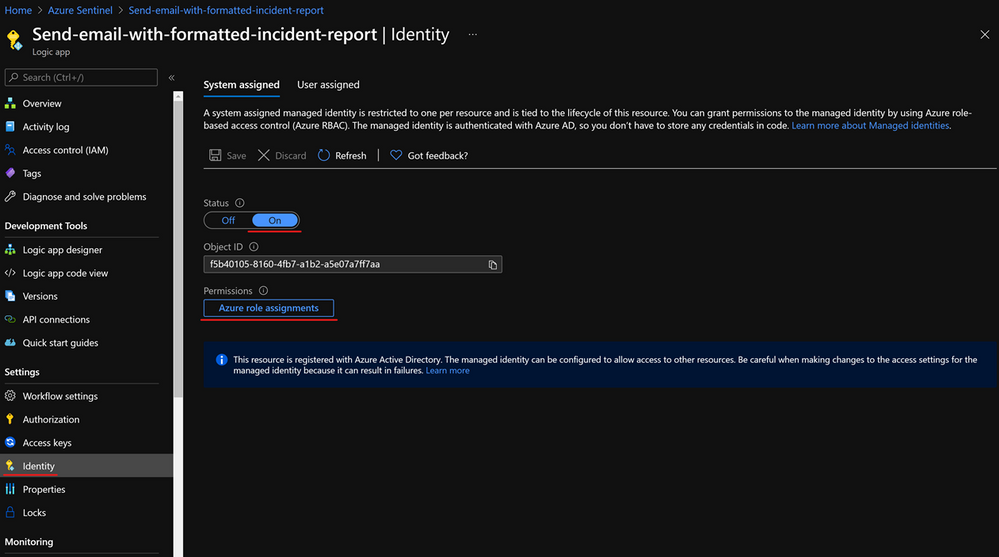
A common challenge for developers is the management of secrets and credentials used to secure communication between different components making up a solution. Managed identities eliminate the need for developers to manage credentials. To enable managed identity on your Logic App, you need to go under Identity, and choose from:
- A System assigned managed identity that turns your Logic App into an identity/service account to which you can provide permissions.
- A User-assigned managed identity which creates a separate Azure resource to which you can assign roles and permissions, and you can reuse on other Logic Apps.
After enabling a managed identity we have to assign appropriate permissions to it. If we use it with the Azure Sentinel connector, based on actions that connector will perform, we need to assign Azure Sentinel Reader, Azure Sentinel Responder, or Azure Sentinel Contributor role.
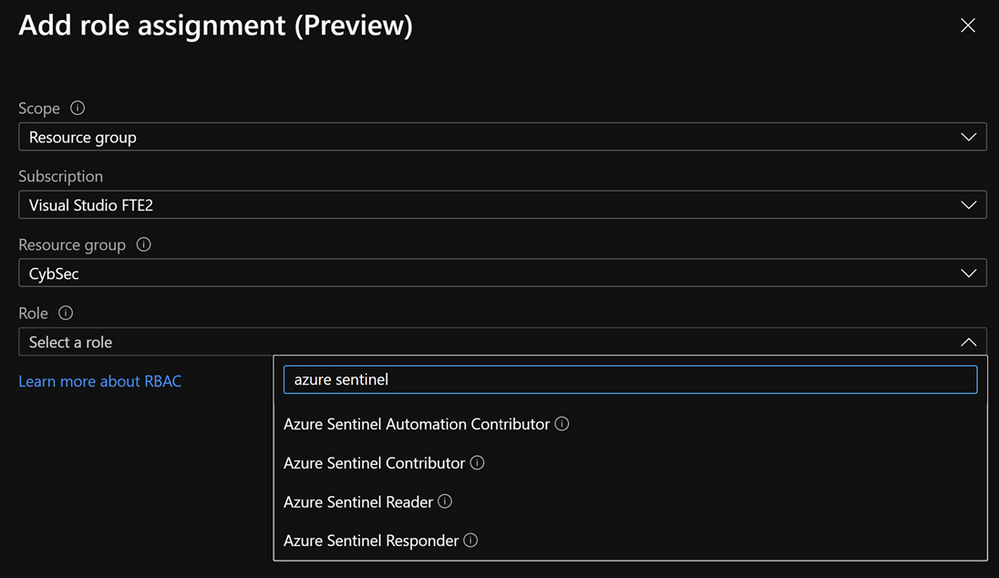
It is important to note that managed identity is in preview and is available only to the subset of connectors.
Note that there is hard limit of 2000 role assignments per subscription.
Managed identity is the recommended approach to authorize connections for playbooks. For more info about interaction between managed identity and playbooks, check this blog – What’s new: Managed Identity for Azure Sentinel Logic Apps connector – Microsoft Tech Community.
Service principal
A service principal is an identity assigned when you register an application in the Azure AD. Click here to see instructions on how to create an app registration as well as how to get an Application ID, Tenant ID, and to generate a secret that you will need to authorize a Logic App connection with a service principal.
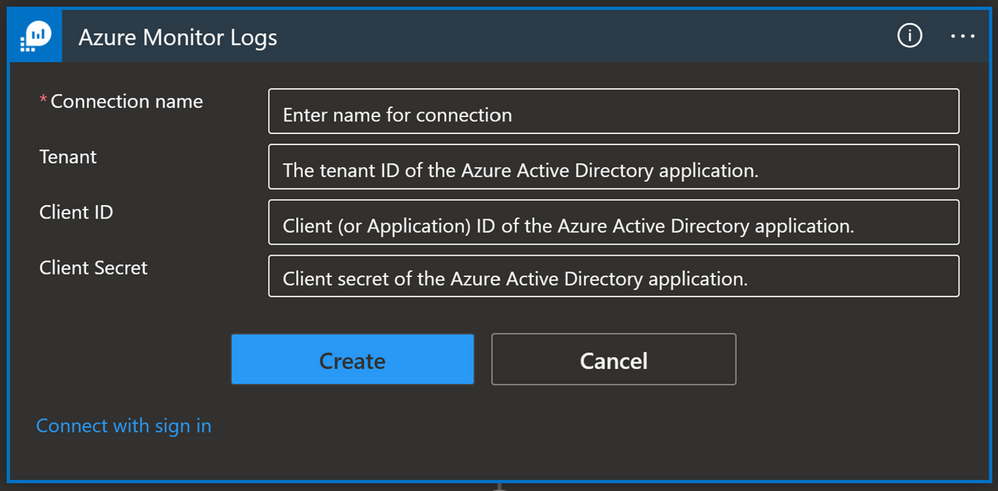
A service principal needs to have appropriate permissions to be able to perform a task. In the case of Azure Monitor Logs for example, we need to have Log Analytics Reader role-based access control (RBAC) assigned to the service principal.
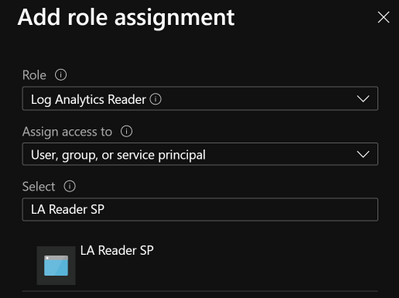
Once you create a service principal you can use it on multiple playbooks: in our example, we used a service principal for Azure Monitor Logs and we can reuse that connection for each playbook where we have an Azure Monitor Logs connector.
Note: You must manage your service principal’s secret and store it to a secure place (e.g.. Key Vault). This adds additional admin work since you will need to keep track of your service principal secrets as well as their expiration date. If the service principal’s secret expires, connections made with that service principal will stop working, which could have an adverse effect on your security operations.
User account
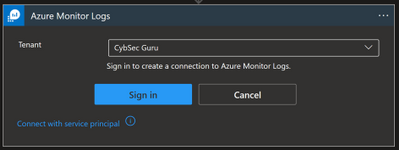
This is the most straightforward option in terms of identities, because you need to sign in with your user account or user account that has the required privileges. To use this, go to the Logic App and select API connections then select the API connection they want to authorize, select Edit API connection and select Authorize and Save.
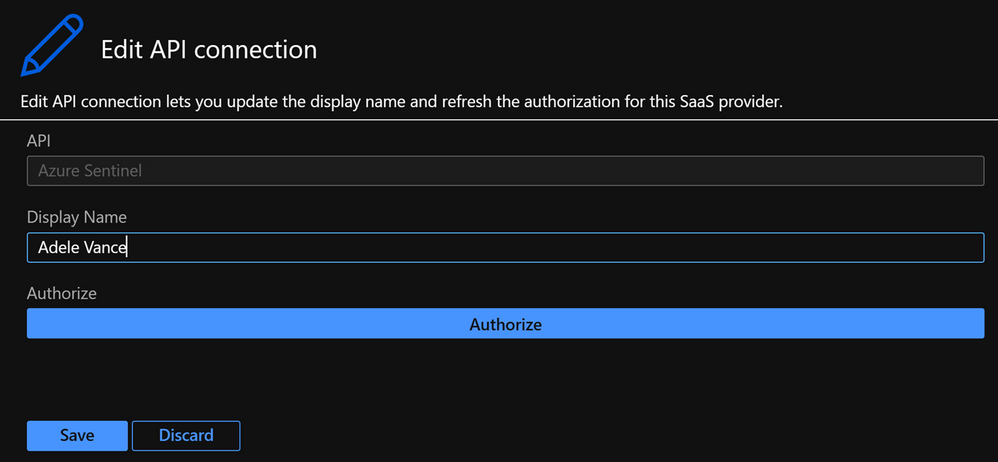
Or you can sign in from the Logic App designer view, as seen in the below screenshot:
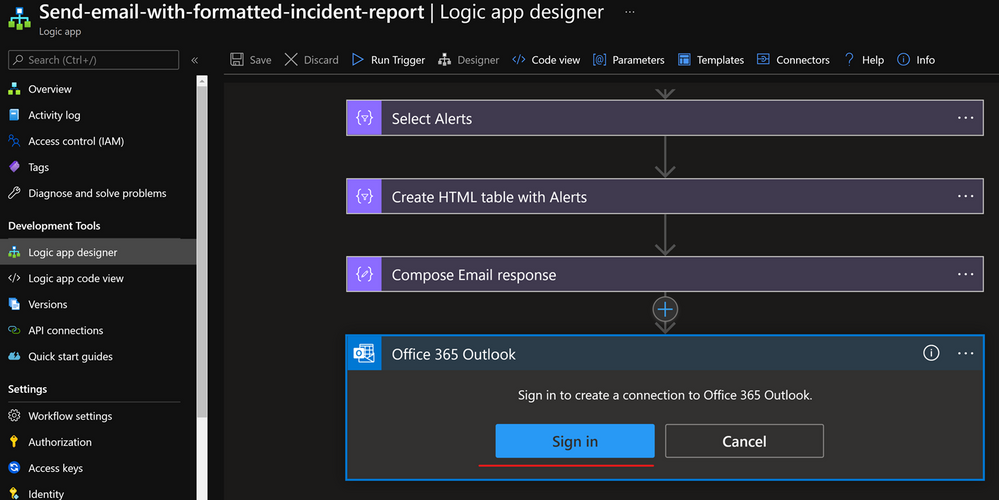
To successfully authorize a connection with a user identity, the user needs to have the appropriate license/permissions assigned to them. If we look at the Office 365 Outlook connector, the user needs to have an Exchange Online license assigned. If we want to use a user identity with Azure Monitor Logs connector then the user must have the Log Analytics Reader permission assigned to them.
Whilst this option is often the most convenient for users, there are downsides to using a user identity:
- It is harder to audit what actions were taken by a user and what actions were taken by the playbook.
- If a user leaves the organization you need to update all the connections that use that identity to another user account.
- If a user’s permissions or license changes (e.g. they don’t use Exchange Online anymore or don’t have the Log Analytics Reader permissions anymore) you will need to update these connections to a user identity with the correct licensing/permissions.
Connectors
Now, let’s have a look at some of the main playbook connectors you will use for Azure Sentinel.
Azure Sentinel
The Azure Sentinel connector can be used to trigger a playbook when an incident is created or with a manual trigger on the alert. The Azure Sentinel connector relies on the Azure Sentinel REST API and allows you to get incidents, update incidents, update watchlists, etc.
Connection options:
- Managed identity (Recommended)
- Service Principal
- User identity
Other prerequisites:
- Azure Sentinel Reader role (if you only want to get information from an incident e.g., Get Entities)
- Azure Sentinel Operator role (if you want to update an incident); or
- Azure Sentinel Contributor role (if you want to make changes on your workspace e.g., update a watchlist).
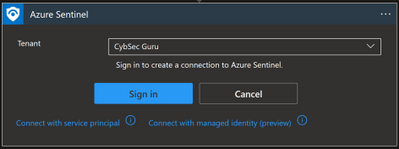
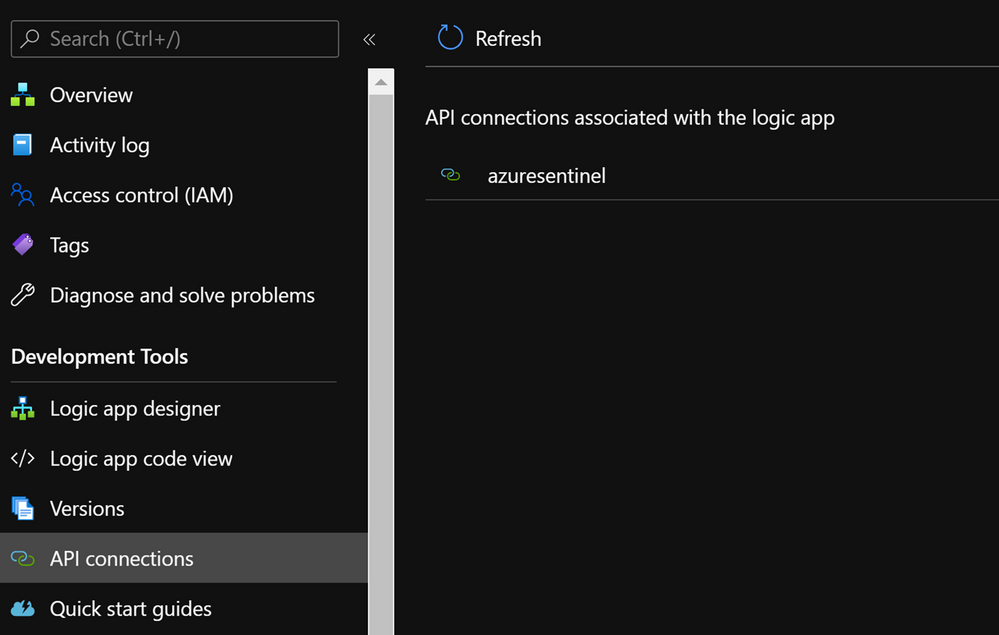
Once you have set up the connection you will notice that a new API connection has been created in the Logic App under API connections:
Microsoft Graph Security
Sometimes you might need to connect to the Graph Security API. For example, you can use the Microsoft Graph Security API to import Threat Intelligence (TI) indicators into Azure Sentinel. If you want to add TI indicators to your Threatintelligence table, there is a connector that calls the Graph Security API to do this:
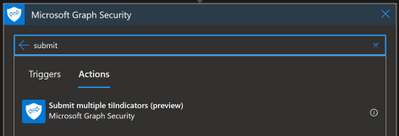
To find out which permissions you need, you should refer to the Graph API documentation, and for this specific example refer to tiIndicator: submitTiIndicators – Microsoft Graph beta | Microsoft Docs. On the Permissions section, you will see it requires ThreatIndicators.ReadWrite.OwnedBy.
Again, here you can connect with your user or with a managed identity:
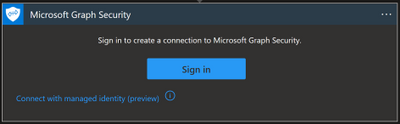
- Managed identity: this option is in preview and for now it is not possible to assign the required Graph API permission through the portal. If you want to choose this type of connection, you can assign the permission with PowerShell. If you want to explore this workaround, you can have a look at the personal blog “Rahul Nath” for instructions.
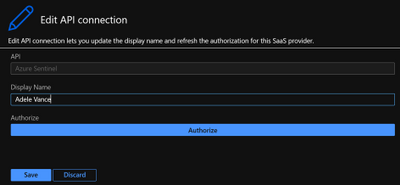
- Signing in with a user: this is the most straightforward option, but there are some downsides as explained earlier in the blog. Unless your user is allowed to establish a connection, you will need a Security Administrator or Global Administrator to authorize it. This can be done in Logic Apps under API Connections, and then Edit API connection
HTTP connector
This connector allows you to make a GET, PUT, POST, PATCH or DELETE API call to solutions that are supporting API connections. If you need to get specific information from the solution, and the connector is not available or the connector natively doesn’t support that action, while solutions support API calls, we can use an HTTP connector to get that data.
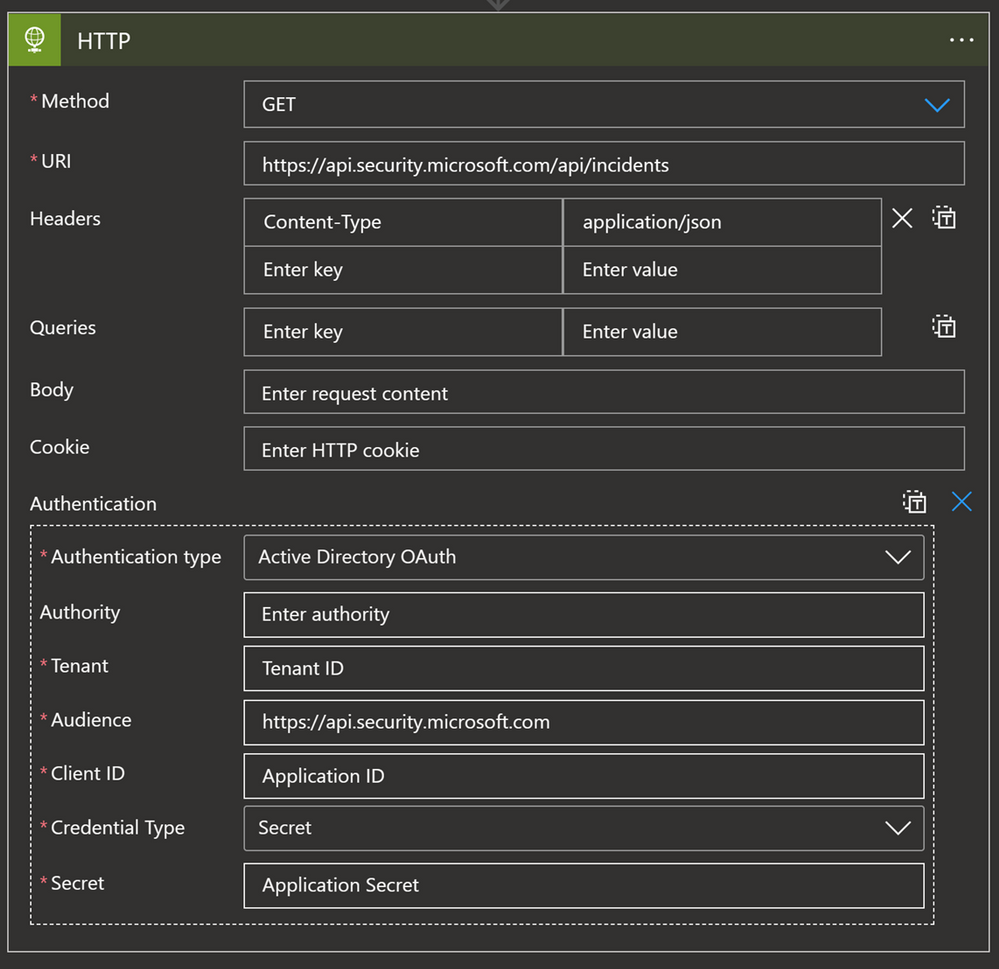
For example, since the Microsoft 365 Defender (M365D) connector does not synchronize comments, we can use an API GET call to ingest comments from M365D and update the Sentinel comment section with those values. In terms of permissions, what is required depends on the solution:
Key Vault
If you are using a service principal and want to save the secret in a secure place, the best practice is to store them in Key Vault. But what if we want to use this secret in our playbook for the HTTP connector explained above? In this scenario we have the Key Vault connector.
Options for connecting:
- Managed identity (Recommended)
- Service Principal
- User identity
Other prerequisites:
- Managed identity/service principal/user identity authorizing the connection must have assigned permissions to read the secret (Key Vault Secrets User to read; Key Vault Secrets Officer to manage). Instructions to assign these permissions can be found by clicking on this link.
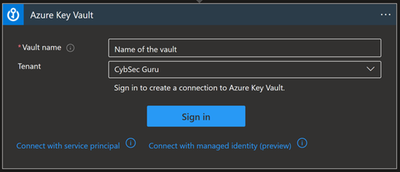
You can use a Key Vault action to get a secret and use that secret inside of the playbook.
One more option with the Key Vault connector also is to turn on Secure Inputs and Secure Outputs features.
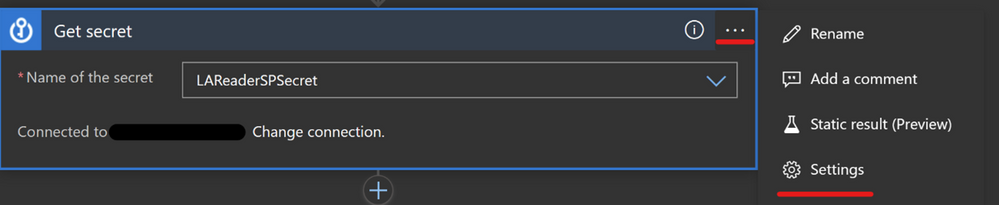
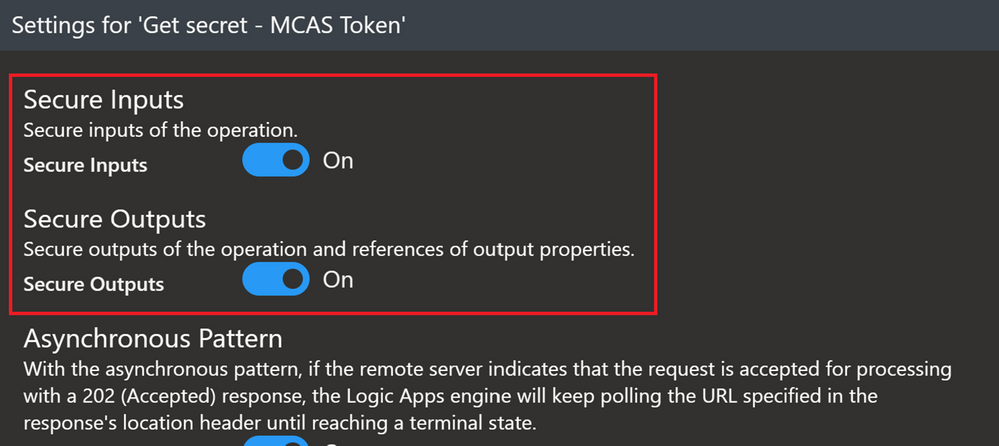
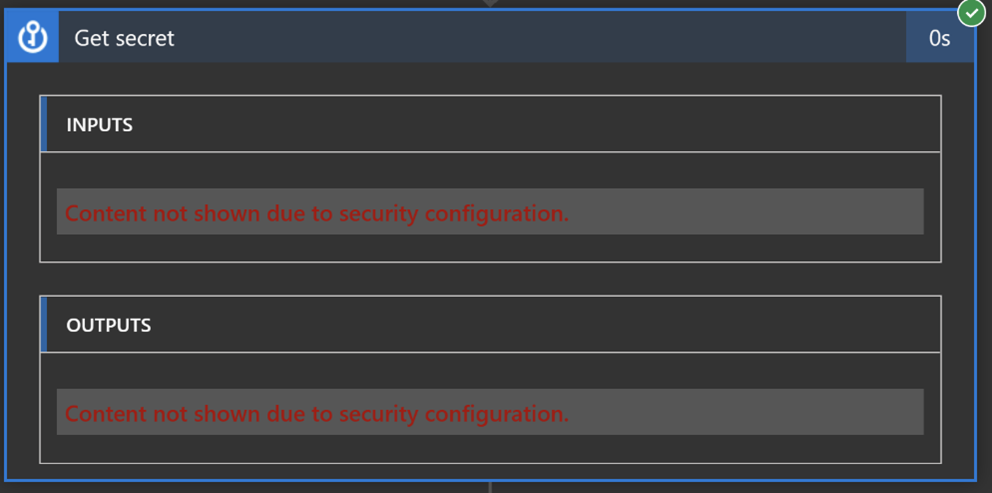
With this feature on, when the playbook runs a Key Vault action, the input and output content will be hidden by default.
Azure Monitor Logs
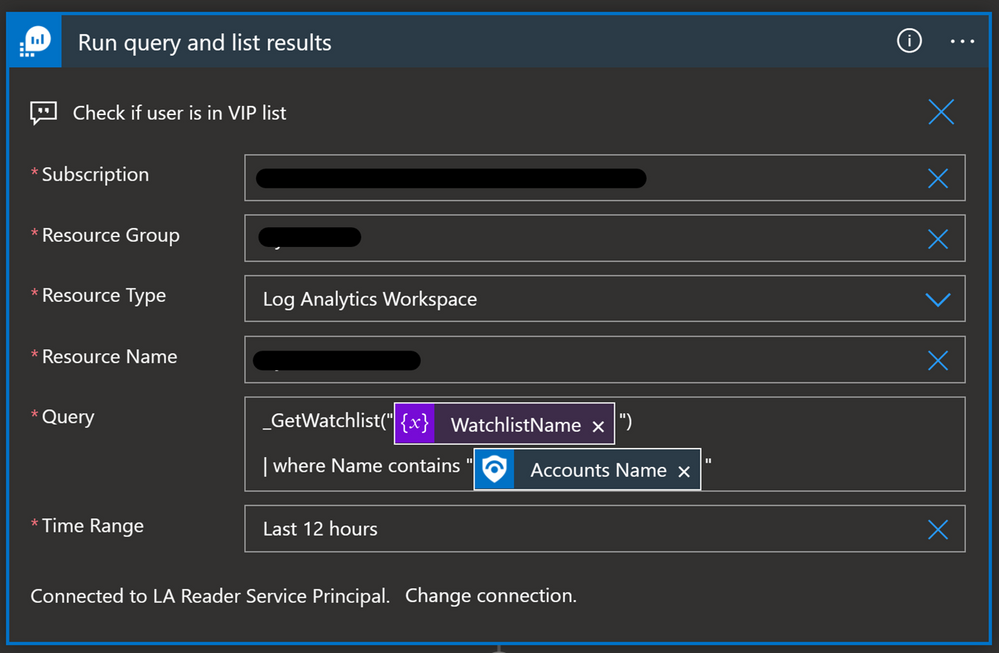
You will need to use the Azure Monitor Logs connector when you want to run a query against the data in your Azure Sentinel workspace from a Logic App. This can be used when we want to get more data about incident/alert entities before we decide what kind of action we will take. For example, we have a Watchlist with VIP users, and we want to cross-reference it with Accounts in the incident/alert. If the Account in the incident/alert is also in the Watchlist, then we will change the severity of the incident to High.
Options for connecting:
- Service principal (recommended)
- User identity
Other prerequisites:
- Service principal/user identity authorizing connection must have the Log Analytics Reader role assigned
Here is the query in the Azure Monitor Logs Logic App connector:
Office 365 Outlook
Whenever you want to send an email notification, send an email approval, flag an email, forward an email etc., you can use the Office 365 Outlook connector.
Options for connecting:
Other prerequisites:
- User authorizing connection must have an Exchange Online license assigned
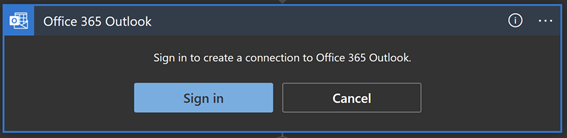
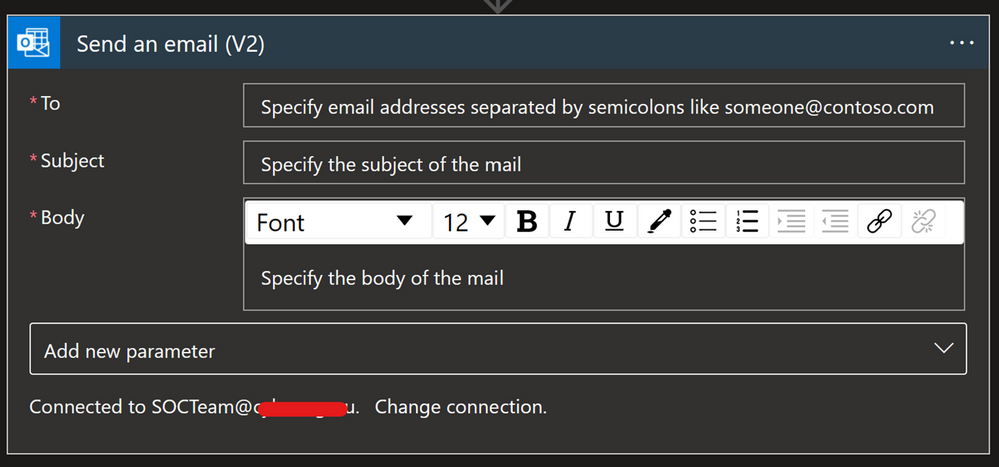
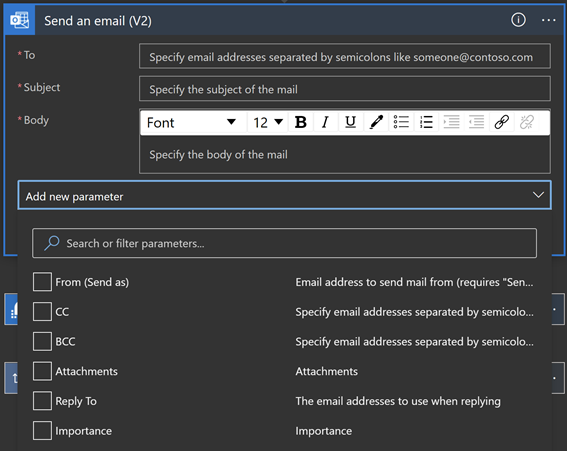
There are different options to configure when using this connector e.g. add people to CC or BCC, add Attachment, configure the email address to use when replying, or change the importance of the email.
An important part of this connector to understand is the “From (Send As)” parameter. This is important because when you authorize a connection with the user identity, all emails will be sent from that account.
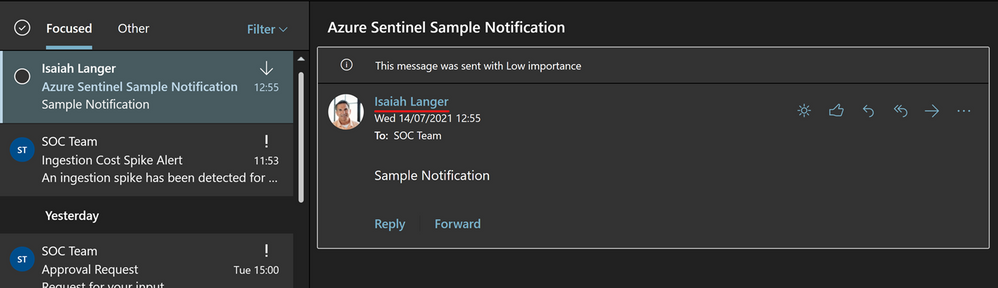
The “From (Send As)” parameter gives us the option to change from whom that email will be sent from to an Microsoft 365 Group, shared mailbox or some other user. Note that a valid Send As configuration must be applied to the mailbox so that it can send emails successfully.
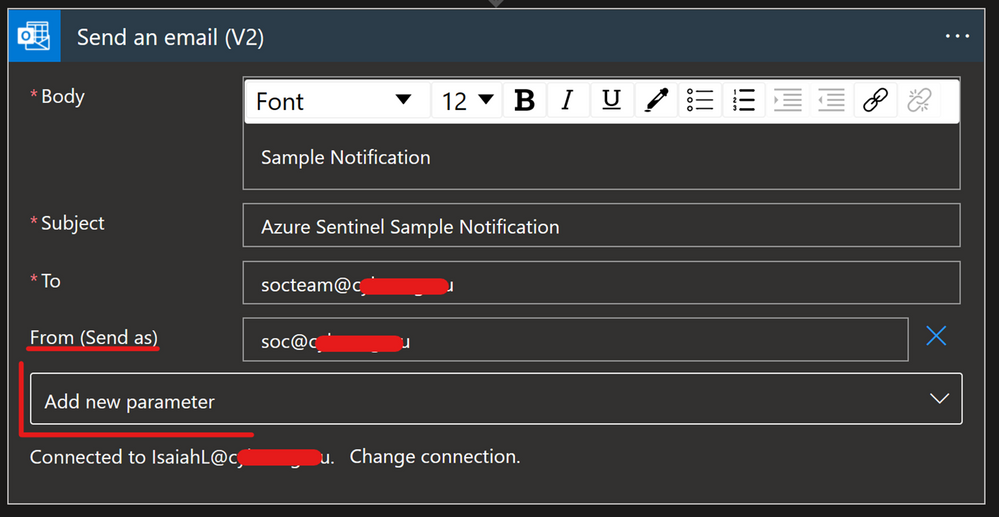
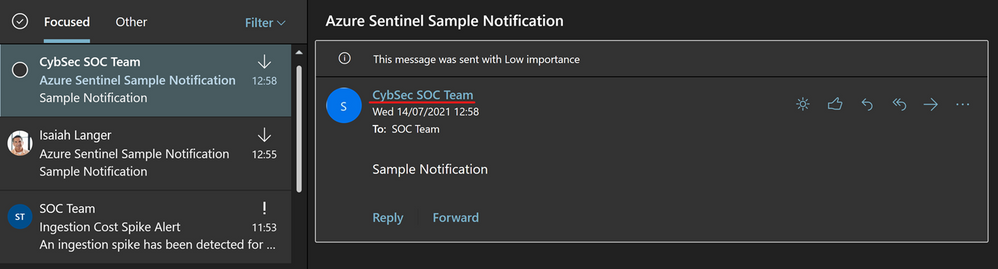
Another option is to have one specific user account, like soc@xyz.com, which you will use to authorize Office 365 Outlook connection and all emails will appear as if they are sent from soc@xyz.com. Please note that the account used for this must be a user account (no Microsoft 365 Group or shared mailbox), and it must have a valid Exchange Online license/mailbox
Microsoft Teams
Microsoft Teams is another popular connector that can be used for sending notifications. As Microsoft Teams plays a big role in organizing teams and providing a place to centralize collections of information and has become even more critical since the pandemic, it’s a useful tool to integrate into your SOC operations and automation.
Options for connecting:
Other prerequisites:
- User authorizing connection must have a Microsoft Teams license assigned, and
- Specific permissions (to post a message to a channel, the user must be a member of that team; to add a member – must be owner; to create a new team group – must have permission to create a Microsoft 365 Group…)
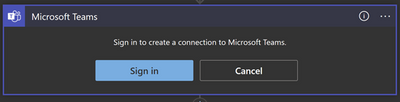
Note that when a user authorizes a connection, all actions will appear as they are performed by that specific user. (Unlike with Office 365 Outlook where we have the “From (Send As)” parameter, that is not an option in Microsoft Teams.)
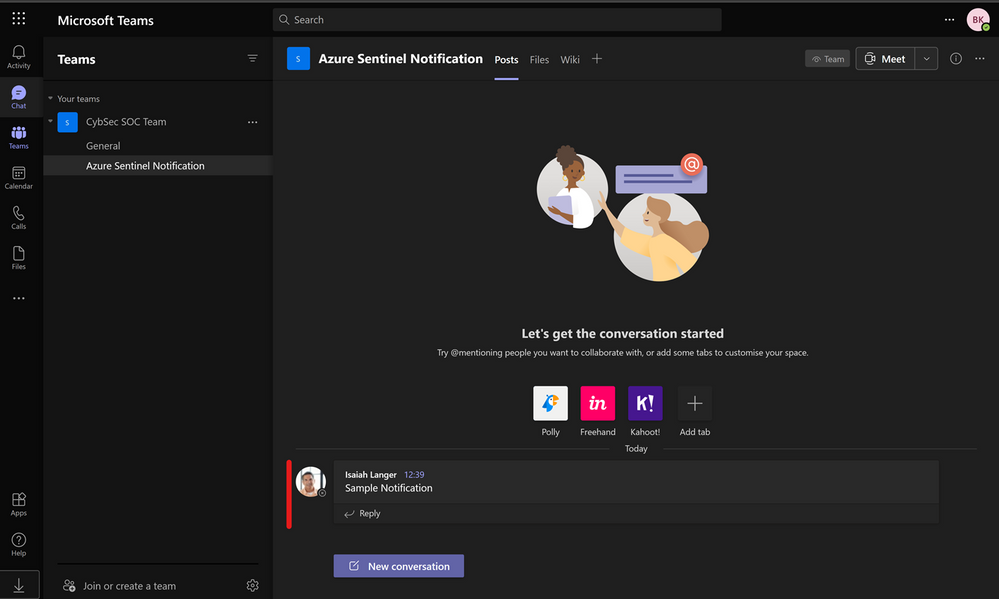
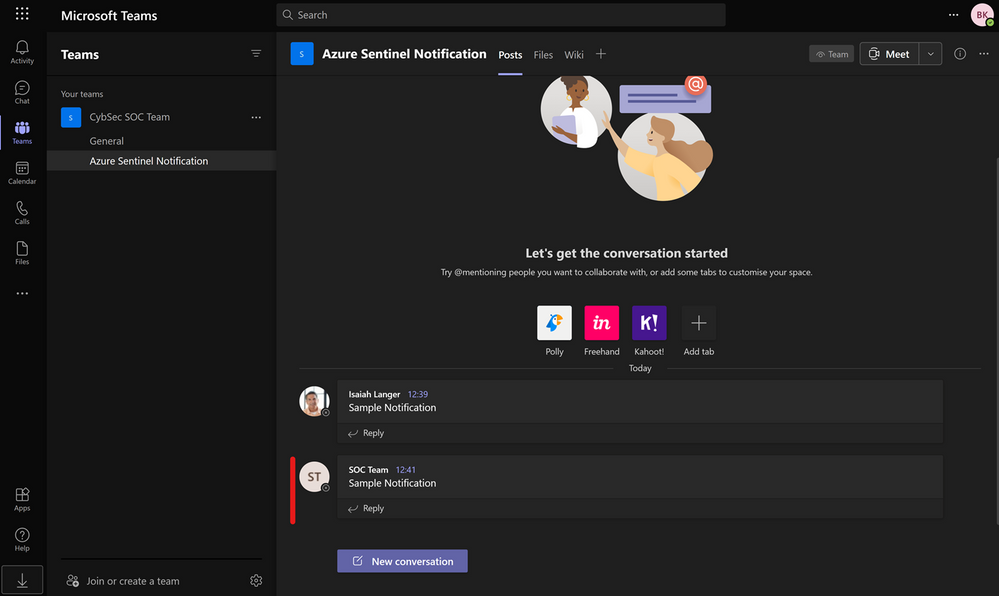
As mentioned with Office 365 Outlook connection, we can have one specific user account, like soc@xyz.com, which you will use to authorize Microsoft Teams connection and all actions will appear as if they have been initiated by soc@xyz.com.
Thanks to our reviewers @Jeremy Tan , @Innocent Wafula and @Javier Soriano .
We hope you found this article useful, please leave us your feedback and questions in the comments section.
by Contributed | Jul 28, 2021 | Technology
This article is contributed. See the original author and article here.
Check out the most recent update to Microsoft Dynamics 365 Guides! With the July release of Guides, authors can now create guides to anchor faster and with more accuracy through markerless technology enabled by integration of Azure Object Anchors. Based on customer feedback, we have introduced an easier and more seamless way for you to anchor holograms to objects in the physical world using object anchoring.

Using Object Anchors, operators can easily move from one workstream to the next as HoloLens’ spatial insight detects anchors and seamlessly launches overlaid digital content. Learn more about how this new feature improves on-the-job guidance with Dynamics 365 Guides.
Why use Object Anchors instead of QR codes?
Object anchors enable users to automatically align digital content with physical objects, eliminating the need for QR-code markers while improving alignment accuracy.
- QR codes require physical artifacts of specific sizes to be printed out.
- Object Anchors are markerless.
- Sticking QR codes on objects might cause damage.
- Object Anchors are fully digital and have no risk of getting scratched or damaging physical products.
- Finding and scanning QR codes involves another step to the operator workflow.
- Once your object has been converted to the right format by the author, operators can easily walk up and look at the object to be detected. This reduces the time it takes to locate the physical marker and more seamlessly launch into a workflow.
- Using a single QR code can affect accuracy as it can be influenced by marker size, camera scanning angle, and distance from the marker. Manual processes that require QR code alignment can also impact alignment accuracy.
- Object Anchors minimize manual processes and increases the accuracy of detecting an object.
How does Azure Object Anchors work?
Object Anchors is an Azure service which enables the detection of specific objects in the real-world environment. It uses sensing and processing on a HoloLens to detect and align a digital model to a physical object. To detect the object, it requires a converted 3D model of the real-world object through AOA’s conversion service.
Once the 3D model has been converted, Azure Object Anchors primarily uses the depth sensor on the device to match the geometry of the real-world object and the converted model. When it finds the object, it overlays it with a mesh to indicate the object and visualizes the required and pre-authored Guides.
Considerations while using Object Anchors
When considering potential use cases, keep in mind the following:
- Object Anchors currently works best for stationary objects that don’t move.
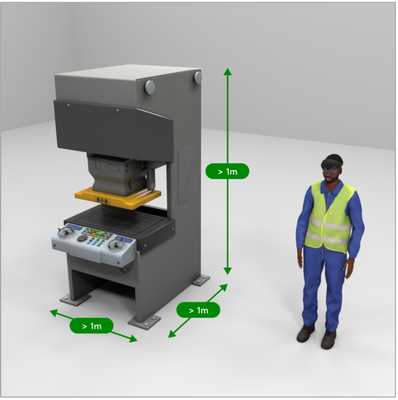
- Objects should be 1-10 meters for each dimension for optimal alignment accuracy.
- An accurate 3D model of the object is required to convert to an Object Anchor. The currently supported file types are: .obj, .fbx, .glb, .gltf, .ply
- Highly reflective and dark material objects are difficult for the HoloLens to detect and may impact alignment and detection.
Recommended dimensions for objects
Workflow
Step 1 – Convert your 3D model to a detectable format:
- Use a 3D model of the object with which you want to align.
- Run this 3D model through the AOA conversion services cloud-based training and conversion pipeline (using Guides, authors will be able to perform that pre-conversion and assign detectable object to a guide as part of their workflow).
- Receive an object model output to use on your HoloLens 2 device .
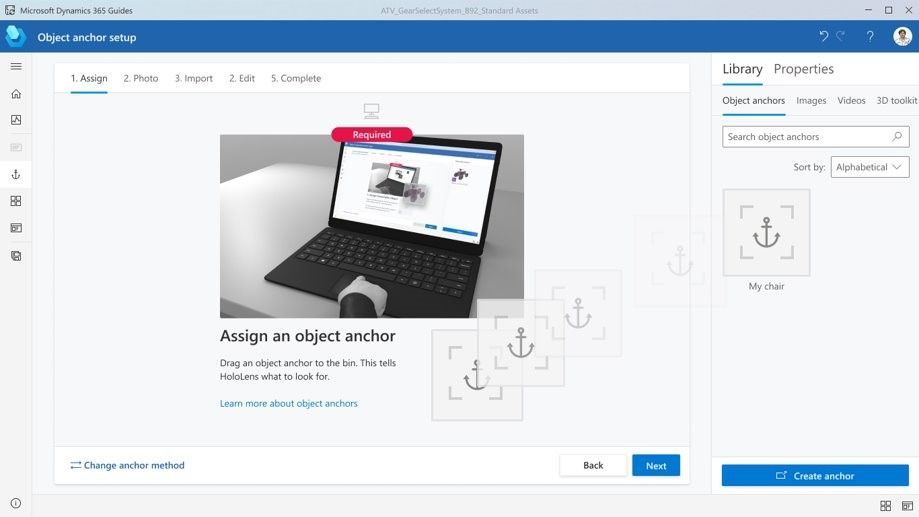
Step 2 – Assign an anchor: Leverage the object model generated in the first workflow to assign it to a guide as its Object Anchor. Use the PowerPoint-style authoring experience to simply drag and assign the object as an anchor.
Step 3 – Author/ operate:
- Guides uses the Azure Object Anchors detection SDK to scan and detect the Object Anchor based on a real-world scan .
- Step by step holographic instructions are then overlaid accurately over the physical object, based on the Guides that you set up.
Try it out! Download the latest release of Guides here.
Instructions on how to upgrade your Guides solution are here.
Have a suggestion? Post it here in our categories or use this forum.
Don’t forget to tell us what you think and let us know about the different Mixed Reality solutions you build!
by Scott Muniz | Jul 28, 2021 | Security, Technology
This article is contributed. See the original author and article here.
This Joint Cybersecurity Advisory was coauthored by the U.S. Cybersecurity and Infrastructure Security Agency (CISA), the Australian Cyber Security Centre (ACSC), the United Kingdom’s National Cyber Security Centre (NCSC), and the U.S. Federal Bureau of Investigation (FBI).
This advisory provides details on the top 30 vulnerabilities—primarily Common Vulnerabilities and Exposures (CVEs)—routinely exploited by malicious cyber actors in 2020 and those being widely exploited thus far in 2021.
Cyber actors continue to exploit publicly known—and often dated—software vulnerabilities against broad target sets, including public and private sector organizations worldwide. However, entities worldwide can mitigate the vulnerabilities listed in this report by applying the available patches to their systems and implementing a centralized patch management system.
Click here for a PDF version of this report.
Key Findings
In 2020, cyber actors readily exploited recently disclosed vulnerabilities to compromise unpatched systems. Based on available data to the U.S. Government, a majority of the top vulnerabilities targeted in 2020 were disclosed during the past two years. Cyber actor exploitation of more recently disclosed software flaws in 2020 probably stems, in part, from the expansion of remote work options amid the COVID-19 pandemic. The rapid shift and increased use of remote work options, such as virtual private networks (VPNs) and cloud-based environments, likely placed additional burden on cyber defenders struggling to maintain and keep pace with routine software patching.
Four of the most targeted vulnerabilities in 2020 affected remote work, VPNs, or cloud-based technologies. Many VPN gateway devices remained unpatched during 2020, with the growth of remote work options challenging the ability of organization to conduct rigorous patch management.
CISA, ACSC, the NCSC, and FBI consider the vulnerabilities listed in table 1 to be the topmost regularly exploited CVEs by cyber actors during 2020.
Table 1:Top Routinely Exploited CVEs in 2020
|
Vendor
|
CVE
|
Type
|
|
Citrix
|
CVE-2019-19781
|
arbitrary code execution
|
|
Pulse
|
CVE 2019-11510
|
arbitrary file reading
|
|
Fortinet
|
CVE 2018-13379
|
path traversal
|
|
F5- Big IP
|
CVE 2020-5902
|
remote code execution (RCE)
|
|
MobileIron
|
CVE 2020-15505
|
RCE
|
|
Microsoft
|
CVE-2017-11882
|
RCE
|
|
Atlassian
|
CVE-2019-11580
|
RCE
|
|
Drupal
|
CVE-2018-7600
|
RCE
|
|
Telerik
|
CVE 2019-18935
|
RCE
|
|
Microsoft
|
CVE-2019-0604
|
RCE
|
|
Microsoft
|
CVE-2020-0787
|
elevation of privilege
|
|
Netlogon
|
CVE-2020-1472
|
elevation of privilege
|
In 2021, malicious cyber actors continued to target vulnerabilities in perimeter-type devices. Among those highly exploited in 2021 are vulnerabilities in Microsoft, Pulse, Accellion, VMware, and Fortinet.
CISA, ACSC, the NCSC, and FBI assess that public and private organizations worldwide remain vulnerable to compromise from the exploitation of these CVEs. Malicious cyber actors will most likely continue to use older known vulnerabilities, such as CVE-2017-11882 affecting Microsoft Office, as long as they remain effective and systems remain unpatched. Adversaries’ use of known vulnerabilities complicates attribution, reduces costs, and minimizes risk because they are not investing in developing a zero-day exploit for their exclusive use, which they risk losing if it becomes known.
Organizations are encouraged to remediate or mitigate vulnerabilities as quickly as possible to reduce the risk of exploitation. Most can be remediated by patching and updating systems. Organizations that have not remediated these vulnerabilities should investigate for the presence of IOCs and, if compromised, initiate incident response and recovery plans. See the Contact Information section below for how to reach CISA to report an incident or request technical assistance.
2020 CVEs
CISA, ACSC, the NCSC, and FBI have identified the following as the topmost exploited vulnerabilities by malicious cyber actors from 2020: CVE-2019-19781, CVE-2019-11510, CVE-2018-13379, CVE-2020-5902, CVE-2020-15505, CVE-2020-0688, CVE-2019-3396, CVE-2017-11882, CVE-2019-11580, CVE-2018-7600, CVE 2019-18935, CVE-2019-0604, CVE-2020-0787, CVE-2020-1472.[1][2][3] Among these vulnerabilities, CVE-2019-19781 was the most exploited flaw in 2020, according to U.S. Government technical analysis.CVE-2019-19781 is a recently disclosed critical vulnerability in Citrix’s Application Delivery Controller (ADC)—a load balancing application for web, application, and database servers widely use throughout the United States.[4][5] Nation-state and criminal cyber actors most likely favor using this vulnerability because it is easy to exploit, Citrix servers are widespread, and exploitation enables the actors to perform unauthorized RCE on a target system.[6]
Identified as emerging targets in early 2020,[7] unremediated instances of CVE-2019-19781 and CVE-2019-11510 continued to be exploited throughout the year by nation-state advanced persistent threat actors (APTs) who leveraged these and other vulnerabilities, such as CVE-2018-13379[8][9], in VPN services[10][11] to compromise an array of organizations, including those involved in COVID-19 vaccine development.[12][13]
The CVE-2019-11510 vulnerability in Pulse Connect Secure VPN was also frequently targeted by nation-state APTs. Actors can exploit the vulnerability to steal the unencrypted credentials for all users on a compromised Pulse VPN server and retain unauthorized credentials for all users on a compromised Pulse VPN server and can retain unauthorize access after the system is patched unless all compromised credentials are changed. Nation-state APTs also commonly exploited CVE-2020-15505 and CVE-2020-5902.[14][15][16][17]
2021 CVEs
In 2021, cyber actors continued to target vulnerabilities in perimeter-type devices. In addition to the 2020 CVEs listed above, organizations should prioritize patching for the following CVEs known to be exploited.
- Microsoft Exchange: CVE-2021-26855, CVE-2021-26857, CVE-2021-26858, and CVE-2021-27065
- See CISA’s Alert: Mitigate Microsoft Exchange Server Vulnerabilities for more information on identifying and mitigating malicious activity concerning these vulnerabilities.
- Pulse Secure: CVE-2021-22893, CVE-2021-22894, CVE-2021-22899, and CVE-2021-22900
- See CISA’s Alert: Exploitation of Pulse Connect Secure Vulnerabilities for more information on how to investigate and mitigate this malicious activity.
- Accellion: CVE-2021-27101, CVE-2021-27102, CVE-2021-27103, CVE-2021-27104
- See the Australia-New Zealand-Singapore-UK-U.S. Joint Cybersecurity Advisory: Exploitation of Accellion File Transfer Appliance for technical details and mitigations.
- VMware: CVE-2021-21985
- See CISA’s Current Activity: Unpatched VMware vCenter Software for more information and guidance.
- Fortinet: CVE-2018-13379, CVE-2020-12812, and CVE-2019-5591
- See the CISA-FBI Joint Cybersecurity Advisory: APT Actors Exploit Vulnerabilities to Gain Initial Access for Future Attacks for more details and mitigations.
Mitigations and Indicators of Compromise
One of the most effective best practices to mitigate many vulnerabilities is to update software versions once patches are available and as soon as is practicable. If this is not possible, consider applying temporary workarounds or other mitigations, if provided by the vendor. If an organization is unable to update all software shortly after a patch is released, prioritize implementing patches for CVEs that are already known to be exploited or that would be accessible to the largest number of potential attackers (such as internet-facing systems). This advisory highlights vulnerabilities that should be considered as part of the prioritization process. To further assist remediation, automatic software updates should be enabled whenever possible.
Focusing scarce cyber defense resources on patching those vulnerabilities that cyber actors most often use offers the potential of bolstering network security while impeding our adversaries’ operations. For example, nation-state APTs in 2020 extensively relied on a single RCE vulnerability discovered in the Atlassian Crow, a centralized identity management and application (CVE-2019-11580) in its reported operations. A concerted focus on patching this vulnerability could have a relative broad impact by forcing the actors to find alternatives, which may not have the same broad applicability to their target set.
Additionally, attackers commonly exploit weak authentication processes, particularly in external-facing devices. Organizations should require multi-factor authentication to remotely access networks from external sources, especially for administrator or privileged accounts.
Tables 2–14 provide more details about, and specific mitigations for, each of the top exploited CVEs in 2020.
Note: The lists of associated malware corresponding to each CVE below are not meant to be exhaustive but intended to identify a malware family commonly associated with exploiting the CVE.
Table 2: CVE-2019-19781 Vulnerability Details
|
Citrix Netscaler Directory Traversal (CVE-2019-19781)
|
|
Vulnerability Description
Citrix Netscaler Application Delivery Control (ADC) is vulnerable to RCE and full system compromise due to poor access controls, thus allowing directory traversal.
|
CVSS 3.02
Critical
|
|
Vulnerability Discussion, IOCs, and Malware Campaigns
The lack of adequate access controls allows an attacker to enumerate system directories for vulnerable code (directory traversal). In this instance, Citrix ADC maintains a vulnerable Perl script (newbm.pl) that, when accessed via HTTP POST request (POST https://$TARGET/vpn/../vpn/portal/scripts/newbm.pl), allows local operating system (OS) commands to execute. Attackers can use this functionality to upload/execute command and control (C2) software (webshell or reverse-shell executable) using embedded commands (e.g., curl, wget, Invoke-WebRequest) and gain unauthorized access to the OS.
Multiple malware campaigns, including NOTROBIN, have taken advantage of this vulnerability.
|
Fix
Patch Available
|
|
Recommended Mitigations
- Implement the appropriate refresh build according to the vulnerability details outlined by the vendor: Citrix: Mitigation Steps for CVE-2019-19781
- If possible, only allow the VPN to communicate with known Internet Protocol (IP) addresses (allow-list).
|
|
Detection Methods
|
|
Vulnerable Technologies and Versions
Citrix ADC and Gateway 10.5, 11.1, 12.0, 12.1, and 13.0
|
|
References and Additional Guidance
|
Table 3: CVE 2019-11510 Vulnerability Details
Table 4: CVE 2018-13379 Vulnerability Details
Table 5: CVE-2020-5902 Vulnerability Details
| F5 Big IP Traffic Management User Interface (CVE-2020-5902) |
|
Vulnerability Description
The Traffic Management User Interface (TMUI), also referred to as the Configuration Utility, has an RCE vulnerability in undisclosed pages.
|
CVSS 3.0
Critical
|
|
Vulnerability Discussion, IOCs, and Malware Campaigns
This vulnerability allows for unauthenticated attackers, or authenticated users, with network access to the Configuration Utility (through the BIG-IP management port and/or self IPs) to execute arbitrary system commands, create or delete files, disable services, and execute arbitrary Java code. This vulnerability may result in complete system compromise. The BIG-IP system in Appliance mode is also vulnerable. This issue is not exposed on the data plane; only the control plane is affected.
|
Fix
Upgrade to Secure Versions Available
|
|
Recommended Mitigations
Download and install a fixed software version of the software from a vendor approved resource. If it is not possible to update quickly, restrict access via the following actions.
- Address unauthenticated and authenticated attackers on self IPs by blocking all access.
- Address unauthenticated attackers on management interface by restricting access.
|
| Detection Methods
|
|
Vulnerable Technologies and Versions
BIG-IP (LTM, AAM, Advanced WAF, AFM, Analytics, APM, ASM, DDHD, DNS, FPS, GTM, Link Controller, PEM, SSLO, CGNAT) 15.1.0, 15.0.0-15.0.1, 14.1.0-14.1.2, 13.1.0-13.1.3, 12.1.0-12.1.5, and 11.6.1-11.6.5 are vulnerable.
|
| References
|
Table 6: CVE-2020-15505 Vulnerability Details
| MobileIron Core & Connector (CVE-2020-15505) |
|
Vulnerability Description
MobileIron Core & Connector, Sentry, and Monitoring and Reporting Database (RDB) software are vulnerable to RCE via unspecified vectors.
|
CVSS 3.0
Critical
|
|
Vulnerability Discussion, IOCs, and Malware Campaigns
CVE-2020-15505 is an RCE vulnerability in MobileIron Core & Connector versions 10.3 and earlier. This vulnerability allows an external attacker, with no privileges, to execute code of their choice on the vulnerable system. As mobile device management (MDM) systems are critical to configuration management for external devices, they are usually highly permissioned and make a valuable target for threat actors.
Multiple APTs have been observed exploiting this vulnerability to gain unauthorized access.
|
Fix
Patch Available
|
|
Recommended Mitigations
- Download and install a fixed software version of the software from a vendor approved resource.
|
|
Detection Methods
- None. Manually check your software version to see if it is susceptible to this vulnerability.
|
|
Vulnerable Technologies and Versions
MobileIron Core & Connector versions 10.3.0.3 and earlier, 10.4.0.0, 10.4.0.1, 10.4.0.2, 10.4.0.3, 10.5.1.0, 10.5.2.0, and 10.6.0.0; Sentry versions 9.7.2 and earlier and 9.8.0; and Monitor and Reporting Database (RDB) version 2.0.0.1 and earlier are vulnerable.
|
|
References
|
Table 7: CVE-2020-0688 Vulnerability Details
Table 8: CVE-2019-3396 Vulnerability Details
Table 9: CVE 2017-11882 Vulnerability Details
| Microsoft Office Memory Corruption (CVE 2017-11882) |
|
Vulnerability Description
Microsoft Office is prone to a memory corruption vulnerability allowing an attacker to run arbitrary code, in the context of the current user, by failing to properly handle objects in memory. It is also known as the “Microsoft Office Memory Corruption Vulnerability.”
Cyber actors continued to exploit this four-year-old vulnerability in Microsoft Office that the U.S. Government publicly assessed last year was the most frequently targeted. Cyber actors most likely continue to exploit this vulnerability because Microsoft Office use is ubiquitous worldwide, the vulnerability is ideal for phasing campaigns, and it enables RCE on vulnerable systems.
|
CVSS 3.0
High
|
|
Vulnerability Discussion, IOCs, and Malware Campaigns
Microsoft Equation Editor, a component of Microsoft Office, contains a stack buffer overflow vulnerability that enables RCE on a vulnerable system. The component was compiled on November 9, 2000. Without any further recompilation, it was used in all currently supported versions of Microsoft Office. Microsoft Equation Editor is an out-of-process COM server that is hosted by eqnedt32.exe, meaning it runs as its own process and can accept commands from other processes.
Data execution prevention (DEP) and address space layout randomization (ASLR) should protect against such attacks. However, because of the manner in which eqnedt32.exe was linked, it will not use these features, subsequently allowing code execution. Being an out-of-process COM server, protections specific to Microsoft Office such as EMET and Windows Defender Exploit Guard are not applicable to eqnedt32.exe, unless applied system-wide. This provides the attacker with an avenue to lure targets into opening specially crafted documents, resulting in the ability to execute an embedded attacker commands.
Multiple cyber espionage campaigns have taken advantage of this vulnerability. CISA has noted CVE-2017-11882 being exploited to deliver LokiBot malware.
|
Fix
Patch Available
|
|
Recommended Mitigations
|
|
Detection Methods
- Microsoft Defender Antivirus, Windows Defender, Microsoft Security Essentials, and the Microsoft Safety Scanner will all detect and patch this vulnerability.
|
|
Vulnerable Technologies and Versions
- Microsoft Office 2007 Service Pack 3, Microsoft Office 2010 Service Pack 2, Microsoft Office 2013 Service Pack 1, and Microsoft Office 2016 are vulnerable.
|
|
References
|
Table 10: CVE 2019-11580 Vulnerability Details
| Atlassian Crowd and Crowd Data Center Remote Code Execution (CVE 2019-11580) |
|
Vulnerability Description
Atlassian Crowd and Crowd Data Center had the pdkinstall development plugin incorrectly enabled in release builds.
|
CVSS 3.0
Critical
|
|
Vulnerability Discussion, IOCs, and Malware Campaigns
Attackers who can send unauthenticated or authenticated requests to a Crowd or Crowd Data Center instance can exploit this vulnerability to install arbitrary plugins, which permits RCE on systems running a vulnerable version of Crowd or Crowd Data Center.
|
Fix
Patch Available
|
|
Recommended Mitigations
- Atlassian recommends customers running a version of Crowd below version 3.3.0 to upgrade to version 3.2.8. For customers running a version above or equal to 3.3.0, Atlassian recommends upgrading to the latest version.
- Released Crowd and Crowd Data Center version 3.4.4 contains a fix for this issue and is available at https://www.atlassian.com/software/crowd/download.
- Released Crowd and Crowd Data Center versions 3.0.5, 3.1.6, 3.2.8, and 3.3.5 contain a fix for this issue and are available at https://www.atlassian.com/software/crowd/download-archive.
|
|
Detection Methods
|
|
Vulnerable Technologies and Versions
All versions of Crowd from version 2.1.0 before 3.0.5 (the fixed version for 3.0.x), from version 3.1.0 before 3.1.6 (the fixed version for 3.1.x), from version 3.2.0 before 3.2.8 (the fixed version for 3.2.x), from version 3.3.0 before 3.3.5 (the fixed version for 3.3.x), and from version 3.4.0 before 3.4.4 (the fixed version for 3.4.x) are affected by this vulnerability.
|
|
References
|
Table 11: CVE 2018-7600 Vulnerability Details
| Drupal Core Multiple Remote Code Execution (CVE 2018-7600) |
|
Vulnerability Description
Drupal versions before 7.58, 8.x before 8.3.9, 8.4.x before 8.4.6, and 8.5.x before 8.5.1 allow remote attackers to execute arbitrary code because of an issue affecting multiple subsystems with default or common module configurations.
|
CVSS 3.0
Critical
|
|
Vulnerability Discussion, IOCs, and Malware Campaigns
An RCE vulnerability exists within multiple subsystems of Drupal 7.x and 8.x. This potentially allows attackers to exploit multiple attack vectors on a Drupal site, which could result in the site being completely compromised. Failed exploit attempts may result in a denial-of-service condition. A remote user can send specially crafted data to trigger a flaw in the processing of renderable arrays in the Form Application Programming Interface, or API, and cause the target system to render the user-supplied data and execute arbitrary code on the target system.
Malware campaigns include the Muhstik botnet and XMRig Monero Cryptocurrency mining.
|
Fix
Patch Available
|
|
Recommended Mitigations
- Upgrade to the most recent version of Drupal 7 or 8 core. If running 7.x, upgrade to Drupal 7.58. If running 8.5.x, upgrade to Drupal 8.5.1.
|
|
Detection Methods
|
|
Vulnerable Technologies and Versions
- Drupal versions before 7.58, 8.x before 8.3.9, 8.4.x before 8.4.6, and 8.5.x before 8.5.1 are affected.
|
|
References
|
Table 12: CVE 2019-18935 Vulnerability Details
| Telerik UI for ASP.NET AJAX Insecure Deserialization (CVE 2019-18935) |
|
Vulnerability Description
Telerik User Interface (UI) for ASP.NET does not properly filter serialized input for malicious content. Versions prior to R1 2020 (2020.1.114) are susceptible to remote code execution attacks on affected web servers due to a deserialization vulnerability.
|
CVS 3.0
Critical
|
|
Vulnerability Discussion, IOCs, and Malware Campaigns
The Telerik UI does not properly sanitize serialized data inputs from the user. This vulnerability leads to the application being vulnerable to RCE attacks that may lead to a full system compromise. A vulnerable HTTP POST parameter rauPostData makes use of a vulnerable function/object AsyncUploadHandler. The object/function uses the JavaScriptSerializer.Deserialize() method, which not not properly sanitize the serialized data during the deserialization process. This issue is attacked by:
- Determining the vulnerable function is available/registered:
http://<HOST>/Telerik.Web.UI.WebResource.axd?type=rau,
- Determining if the version running is vulnerable by querying the UI, and
- Creating an object (e.g., malicious mixed-mode DLL with native OS commands or Reverse Shell) and uploading the object via rauPostData parameter along with the proper encryption key.
There were two malware campaigns associated with this vulnerability:
- Netwalker Ransomware and
- Blue Mockbird Monero Cryptocurrency-mining.
|
Fix
Patch Available
|
|
Recommended Mitigations
- Update to the most recent version of Telerik UI for ASP.NET AJAX (at least 2020.1.114 or later).
|
|
Detection Methods
- ACSC has an example PowerShell script that can be used to identify vulnerable Telerik UI DLLs on Windows web server hosts.
- Vulnerable hosts should be reviewed for evidence of exploitation. Indicators of exploitation can be found in IIS HTTP request logs and within the Application Windows event log. Details of the above PowerShell script and exploitation detection recommendations are available in ACSC Advisory 2020-004.
- Exploitation of this and previous Telerik UI vulnerabilities commonly resulted in the installation of web shell malware. NSA provides guidance on detecting and preventing web shell malware.
|
|
Vulnerable Technologies and Versions
Telerik UI for ASP.NET AJAX versions prior to R1 2020 (2020.1.114) are affected.
|
|
References
|
Table 13: CVE-2019-0604 Vulnerability Details
| Microsoft SharePoint Remote Code Execution (CVE-2019-0604) |
|
Vulnerability Description
A vulnerability in an XML deserialization component within Microsoft SharePoint allowed remote attackers to execute arbitrary code on vulnerable Microsoft SharePoint servers.
|
CVSS 3.0
Critical
|
|
Vulnerability Discussion, IOCs, and Malware Campaigns
This vulnerability was typically exploited to install webshell malware to vulnerable hosts. A webshell could be placed in any location served by the associated Internet Information Services (IIS) web server and did not require authentication. These web shells would commonly be installed in the Layouts folder within the Microsoft SharePoint installation directory, for example:
C:Program FilesCommon FilesMicrosoft SharedWeb Server Extensions<version_number>TemplateLayouts
The xmlSerializer.Deserialize() method does not adequately sanitize user input that is received from the PickerEnitity/ValidateEnity (picker.aspx) functions in the serialized XML payloads. Once the serialized XML payload is deserialized, the XML code is evaulated for relevant XML commands and stings. A user can attack .Net based XML parsers with XMLNS payloads using the <system:string> tag and embedding malicious operating system commands.
The exploit was used in malware phishing and the WickrMe/Hello Ransomware campaigns.
|
Fix
Patch Available
|
|
Recommended Mitigations
- Upgrade on-premise installations of Microsoft Sharepoint to the latest available version (Microsoft SharePoint 2019) and patch level.
- On-premise Microsoft SharePoint installations with a requirement to be accessed by internet-based remote staff should be moved behind an appropriate authentication mechanism such as a VPN, if possible.
|
|
Detection Methods
- The patch level of on-premise Microsoft SharePoint installations should be reviewed for the presence of relevant security updates as outlined in the Microsoft SharePoint security advisory.
- Vulnerable SharePoint servers should be reviewed for evidence of attempted exploitation. ACSC Advisory 2019-125 contains advice on reviewing IIS HTTP request logs for evidence of potential exploitation.
- NSA provides guidance on detecting and preventing web shell malware.
|
|
Vulnerable Technologies and Versions
At the time of the vulnerability release, the following Microsoft SharePoint versions were affected: Microsoft Sharepoint 2019, Microsoft SharePoint 2016, Microsoft SharePoint 2013 SP1, and Microsoft SharePoint 2010 SP2.
|
|
References
|
Table 14: CVE-2020-0787 Vulnerability Details
| Windows Background Intelligent Transfer Service Elevation of Privilege (CVE-2020-0787) |
|
Vulnerability Description
The Windows Background Intelligent Transfer Service (BITS) is vulnerable to a privilege elevation vulnerability if it improperly handles symbolic links. An actor can exploit this vulnerability to execute arbitrary code with system-level privileges.
|
CVSS 3.0
High
|
|
Vulnerability Discussion, IOCs, and Malware Campaigns
To exploit this vulnerability, an actor would first need to have the ability to execute arbitrary code on a vulnerable Windows host.
Actors exploiting this vulnerability commonly used the proof of concept code released by the security researcher who discovered the vulnerability. If an actor left the proof of concept exploit’s working directories unchanged, then the presence of the following folders could be used as an indicator of exploitation:
C:Users<username>AppDataLocalTempworkspace
C:Users<username>AppDataLocalTempworkspacemountpoint
C:Users<username>AppDataLocalTempworkspacebait
The exploit was used in Maze and Egregor ransomware campaigns.
|
Fix
Patch Available
|
|
Recommended Mitigations
- Apply the security updates as recommended in the Microsoft Netlogon security advisory.
|
|
Detection Methods
- The patch level of all Microsoft Windows installations should be reviewed for the presence of relevant security updates as outlined in the Microsoft BITS security advisory.
|
|
Vulnerable Technologies and Versions
Windows 7 for 32-bit and x64-based Systems Service Pack 1, 8.1 for 32-bit and x64-based systems, RT 8.1, 10 for 32-bit and x64-based Systems, 10 1607 for 32-bit and x64-based Systems, 10 1709 for 32-bit and x64-based and ARM64-based Systems, 10 1803 for 32-bit and ARM64-based and x64-based Systems, 10 1809 for 32-bit and ARM64-based and x64-based Systems, 10 1903 for 32-bit and ARM64-based and x64-based Systems, 10 1909 for 32-bit, and ARM64-based and x64-based Systems are vulnerable.
Windows Server 2008 R2 for x64-based Systems Service Pack 1, 2008 R2 for x64-based Systems Service Pack 1 (Server Core Installation), 2008 for 32-bit Systems Service Pack 2, 2008 for 32-bit Systems Service Pack 2 (Server Core Installation), 2012, 2012 (Server Core Installation), 2012 R2, 2012 R2 (Server Core Installation), 2016, 2016 (Server Core Installation), 2019, 2019 (Server Core Installation), 1803 (Server Core Installation), 1903 (Server Core Installation), and 1909 (Server Core Installation) are also vulnerable.
|
|
References
|
Table 15: CVE-2020-1472 Vulnerability Details
| Netlogon Elevation of Privilege (CVE-2020-1472) |
|
Vulnerability Description
The Microsoft Windows Netlogon Remote Protocol (MS-NRPC) reuses a known, static, zero-value initialization vector (VI) in AES-CFB8 mode, which could allow an unauthenticated attacker to impersonate a domain-joined computer including a domain controller, and potentially obtain domain administrator privileges.
|
CVSS 3.0
Critical
|
|
Vulnerability Discussion, IOCs, and Malware Campaigns
To exploit this vulnerability, an actor would first need to have an existing presence on an internal network with network connectivity to a vulnerable Domain Controller, assuming that Domain Controllers are not exposed to the internet.
The immediate effect of successful exploitation results in the ability to authentication to the vulnerable Domain Controller with Domain Administrator level credentials. In compromises exploiting this vulnerability, exploitation was typically followed immediately by dumping all hashes for Domain accounts.
Threat actors were seen combining the MobileIron CVE-2020-15505 vulnerability for initial access, then using the Netlogon vulnerability to facilitate lateral movement and further compromise of target networks.
A nation-state APT group has been observed exploiting this vulnerability.[18]
|
Fix
Patch Available
|
|
Recommended Mitigations
- Apply the security updates as recommended in the Microsoft Netlogon security advisory.
|
|
Detection Methods
- The patch level of Domain Controllers should be reviewed for the presence of relevant security updates as outlined in the Microsoft Netlogon security advisory.
- Reviewing and monitoring Windows Event Logs can identify potential exploitation attempts. However, further investigation would still be required to eliminate legitimate activity. Further information on these event logs is available in the ACSC 2020-016 Advisory.
|
|
Vulnerable Technologies and Versions
At the time of the vulnerability release, the following Microsoft Windows Server versions were vulnerable: all versions of Windows Server 2019; all versions of Windows Server 2016; Windows Server 2012 R2; Windows Server 2012; Windows Server 2008 R2 SP1; and Windows Server versions 1909/1903/1809.
|
|
References
|
For additional general best practices for mitigating cyber threats, see the joint advisory from Australia, Canada, New Zealand, the United Kingdom, and the United States on Technical Approaches to Uncovering and Remediating Malicious Activity and ACSC’s Essential Eight mitigation strategies.
Additional Resources
Free Cybersecurity Services
CISA offers several free cyber hygiene vulnerability scanning and web application services to help U.S. federal agencies, state and local governments, critical infrastructure, and private organizations reduce their exposure to threats by taking a proactive approach to mitigating attack vectors. For more information about CISA’s free services, or to sign up, email vulnerability_info@cisa.dhs.gov.
Cyber Essentials
CISA’s Cyber Essentials is a guide for leaders of small businesses as well as leaders of small and local government agencies to develop an actionable understanding of where to start implementing organizational cybersecurity practices.
Cyber.gov.au
ACSC’s website provides advice and information about how to protect individuals and families, small- and medium-sized businesses, large organizations and infrastructure, and government organizations from cyber threats.
ACSC Partnership Program
The ACSC Partnership Program enables Australian organizations and individuals to engage with ACSC and fellow partners, drawing on collective understanding, experience, skills, and capability to lift cyber resilience across the Australian economy.
Australian organizations, including government and those in the private sector as well individuals, are welcome to sign up at Become an ACSC partner to join.
NCSC 10 Steps
The NCSC offers 10 Steps to Cyber Security, providing detailed guidance on how medium and large organizations can manage their security.
On vulnerabilities specifically, the NCSC has guidance to organizations on establishing an effective vulnerability management process, focusing on the management of widely available software and hardware.


Recent Comments