
by Contributed | Dec 4, 2021 | Technology
This article is contributed. See the original author and article here.
Before implementing data extraction from SAP systems please always verify your licensing agreement. |
I hope you all enjoyed the summer with OData-based extraction and Synapse Pipelines. Time flies quickly, and we’re now in the fourth episode of this mini-blog series. You’ve learnt quite a lot! Initially, we built a simple pipeline with a single activity to copy data from the SAP system to data lake storage. But that solution evolved quickly, and now it supports storing metadata in an external store that decouples the management of OData services and pipelines. To extract data from a new service, you can just enter its name to the Azure Table Storage. You don’t have to make any changes in Synapse!
Today we continue our journey, and we’ll focus on optimizing the extraction performance of large datasets. When I first started working with OData-based extraction, it caused me a lot of challenges – have you ever tried to generate an OData payload for more than a million records? I can’t assure you – most of the time, it doesn’t end well!
But even if we forget about string size limitations, working with huge HTTP payloads causes problems in data transmission and processing. How should we then approach the data extraction from large OData sources?
CLIENT-SIDE PAGING
The solution to the above problem is pretty straightforward. If working with a large amount of data is causing us an issue, let’s split the dataset into a couple of smaller chunks. Then extract and process each part separately. You can even run each thread in parallel, improving the overall performance of the job.
There is a couple of ways how you can split the dataset. Firstly, the most obvious is to use business logic to provide rules. Using the Sales Orders as an example, we could chunk it into smaller pieces using the following keys:
- SalesOrganization
- SalesOrderType
- SoldToPary
Those are not the only business-related keys you can use to create partitions in your data. It’s a reliable approach, but it requires a lot of preparation and data discovery work. Fortunately, there is another solution.
When working with OData services, you can manipulate the amount of data to fetch within a single request using the $top query parameter. When you pass $top=25 you will only receive only 25 records in the response. But that’s not the end! We can also use the $skip parameter that indicates the first record to fetch. So, to process 15 records, you can send a single request, or we can chunk it into smaller pieces using the combination of $skip and $top parameters.

As sending a single request asking for large amounts of data is not the best approach, a similar danger comes from flooding the SAP system with a large number of tiny calls. Finding the right balance is the key!
The above approach is called Client-Side Paging. We will use the logic inside Synapse Pipeline to split the dataset into manageable pieces and then extract each of them. To implement it in the pipeline, we need three numbers:
- The number of records in the OData service
- Amount of data to fetch in a single request (batch size)
- Number of requests
Getting the number of records in the OData service is simple. You can use the $count option passed at the end of the URL. By dividing it by the batch size, which we define for each OData service and store in the metadata table, we can calculate the number of requests required to fetch the complete dataset.
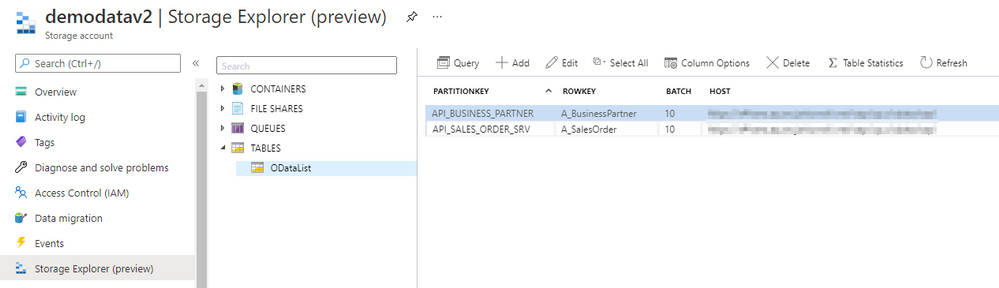
Open the Storage Explorer to alter the metadata table and add a new Batch property:
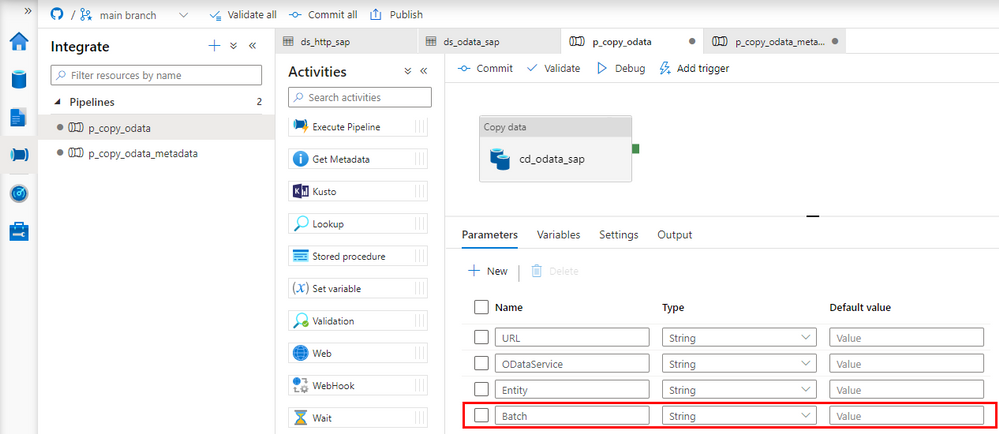
Now go to Synapse Studio and open the child pipeline. Add a new parameter to store the Batch size:
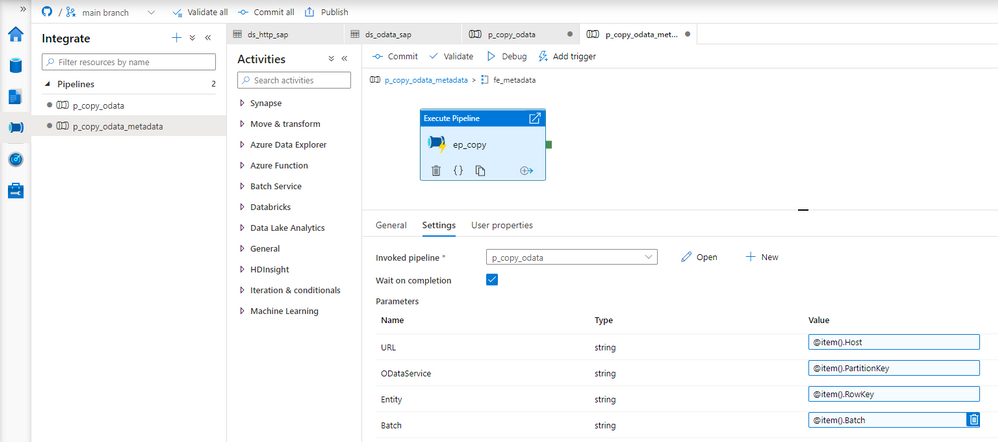
In the metadata pipeline, open the Execute Pipeline activity. The following expression will pass the batch size value from the metadata table. You don’t have to make any changes to the Lookup.
@item().Batch
There is a couple of ways to read the record count. Initially, I wanted to use the Lookup activity against the dataset that we already have. But, as the result of a $count is just a number without any data structure, the OData connector fails to interpret the value. Instead, we have to create another Linked Service and a dataset of type HTTP. It should point to the same OData Service as the Copy Data activity.
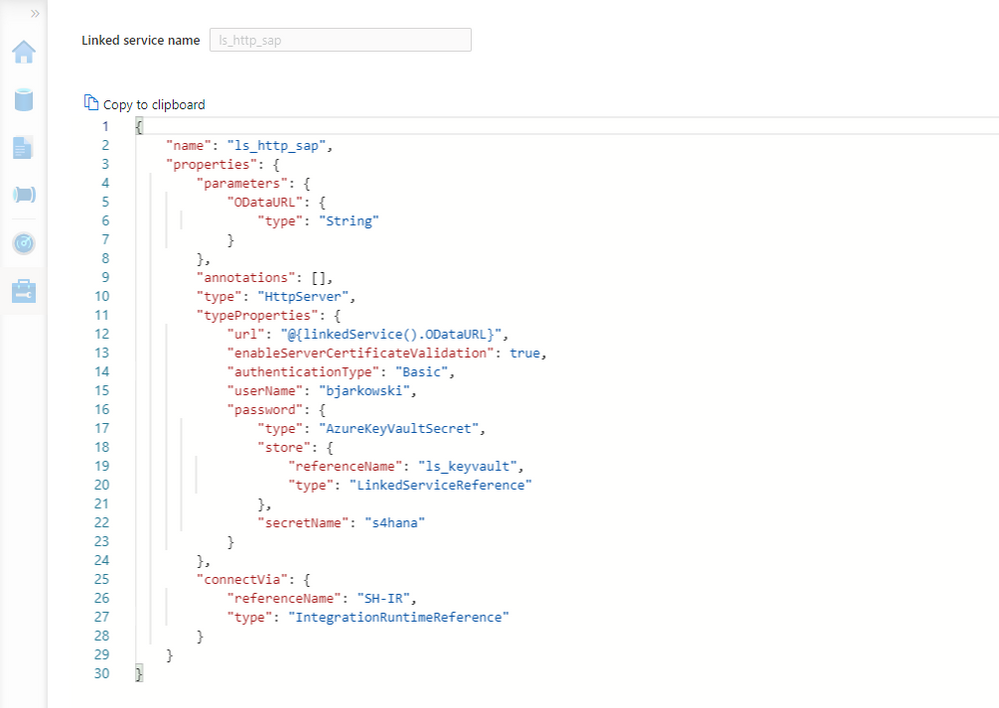
Create the new Linked Service of type HTTP. It should accept the same parameters as the OData one. Refer to the second episode of the blog series if you’d like to refresh your memory on how to add parameters to linked services.
{
    "name": "ls_http_sap",
    "properties": {
        "parameters": {
            "ODataURL": {
                "type": "String"
            }
        },
        "annotations": [],
        "type": "HttpServer",
        "typeProperties": {
            "url": "@{linkedService().ODataURL}",
            "enableServerCertificateValidation": true,
            "authenticationType": "Basic",
            "userName": "bjarkowski",
            "password": {
                "type": "AzureKeyVaultSecret",
                "store": {
                    "referenceName": "ls_keyvault",
                    "type": "LinkedServiceReference"
                },
                "secretName": "s4hana"
            }
        },
        "connectVia": {
            "referenceName": "SH-IR",
            "type": "IntegrationRuntimeReference"
        }
    }
}
Now, let’s create the dataset. Choose HTTP as the type and DelimitedText as the file format. Add ODataURL and Entity parameters as we did for the OData dataset. On the Settings tab, you’ll find the field Relative URL, which is the equivalent of the Path from the OData-based dataset. To get the number of records, we have to concatenate the entity name with the $count. The expression should look as follows:
@concat(dataset().Entity, '/$count')
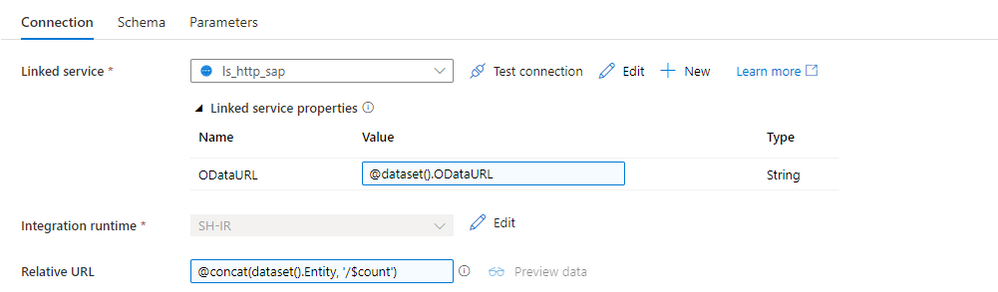
Perfect! We can now update the child pipeline that processes each OData service. Add the Lookup activity, but don’t create any connection. Both parameters on the Settings tab should have the same expression as the Copy Data activity. There is one difference. It seems there is a small bug and the URL in the Lookup activity has to end with a slash ‘/’ sign. Otherwise, the last part of the address may be removed, and the request may fail.
ODataURL: @concat(pipeline().parameters.URL, pipeline().parameters.ODataService, '/')
Entity: @pipeline().parameters.Entity
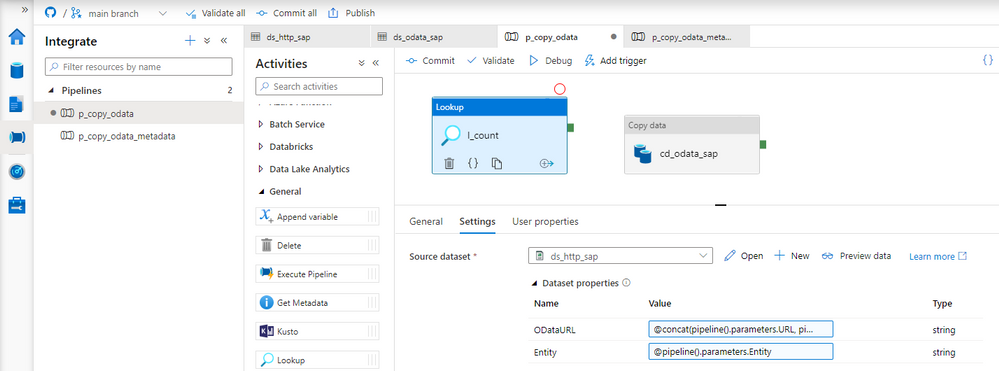
Difficult moment ahead of us! I’ll try to explain all the details the best I can. When the Lookup activity checks the number of records in the OData service, the response contains just a single value. We will use the $skip and $top query parameters to chunk the request into smaller pieces. The tricky part is how to model it in the pipeline. As always, there is no single solution. The easiest approach is to use the Until loop, which could check the number of processed rows at every iteration. But it only allows sequential processing, and I want to show you a more robust way of extracting data.
The ForEach loop offers parallel execution, but it only accepts an array as the input. We have to find a way on how to create one. The @range() expression can build an array of consecutive numbers. It accepts two parameters – the starting position and the length, which in our case will translate to the number of requests. Knowing the number of records and the batch size, we can easily calculate the array length. Assuming the OData service contains 15 elements and the batch size equals 5, we could pass the following parameters to the @range() function:
@range(0,3)
As the outcome we receive:
[0,1,2]
Each value in the array represents the request number. Using it, we can easily calculate the $skip parameter.
But there is one extra challenge. What if the number of records cannot be divided by the batch size without a remainder? As there is no rounding function, the decimal part of the result will be omitted, which means we’re losing the last chunk of data. To avoid that, I implemented a simple workaround – I always add 1 to the number of requests. Of course, you could think about a fancy solution using the modulo function, but I’m a big fan of simplicity. And asking for more data won’t hurt.
Add the ForEach loop as the successor of the Lookup activity. In the Items field, provide the following expression to create an array of requests. I’m using the int() function to cast the string value to the integer that I can then use in the div().
@range(0, add(div(int(activity('l_count').output.firstRow.Prop_0), int(pipeline().parameters.Batch)),1))
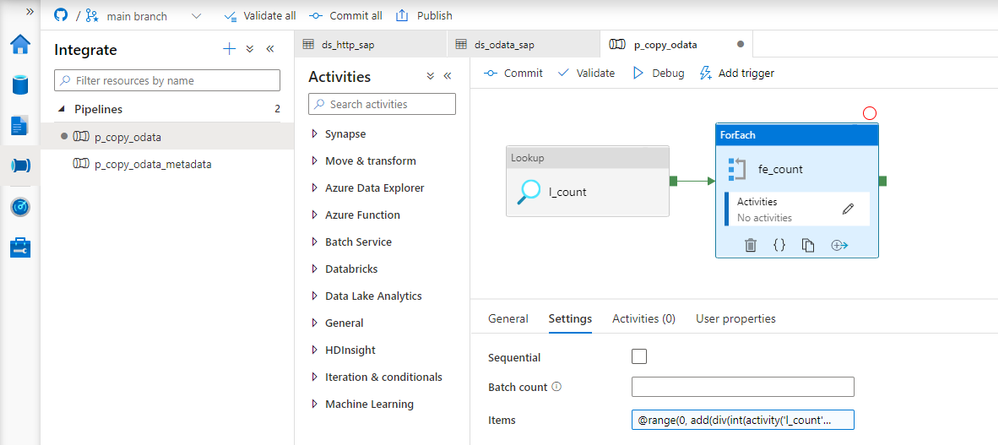
To send multiple requests to the data source, move the Copy Data activity to the ForEach loop. Every iteration will trigger a copy job – but we have to correctly maintain query parameters to receive just one chunk of data. To achieve it, we will use the $top and $skip parameters, as I mentioned earlier in the post.
The $top parameter is static and always equals the batch size. To calculate the $skip parameter, we will use the request number from the array passed to the loop multiplied by the batch size.
Open the Copy Data activity and go to the Settings tab. Change the field Use Query to Query and provide the following expression:
@concat('$top=',pipeline().parameters.Batch, '&$skip=',string(mul(int(item().value), int(pipeline().parameters.Batch))))
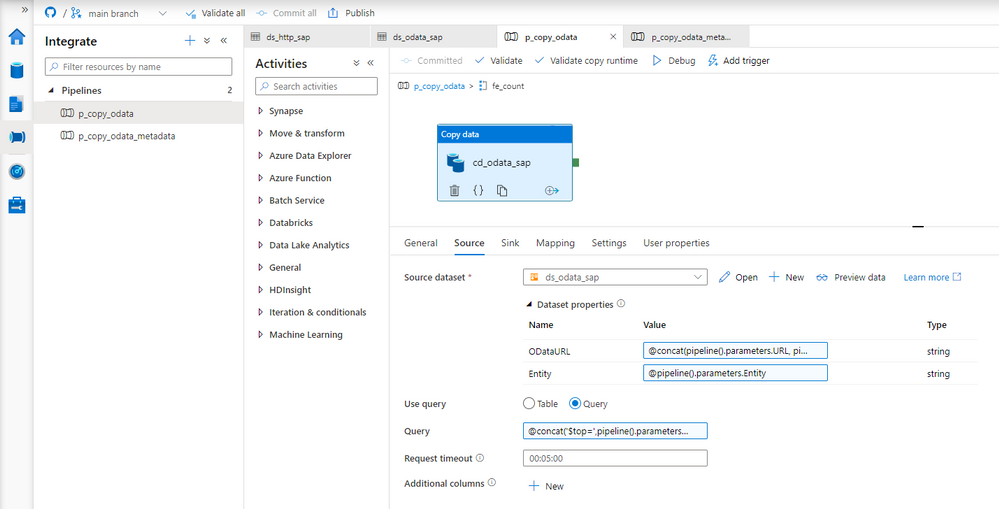
That was the last change to make. Let’s start the pipeline!
EXECUTION AND MONITORING
Once the pipeline processing finishes we can see successfully completed jobs in the monitoring view. Let’s drill down to see the details.
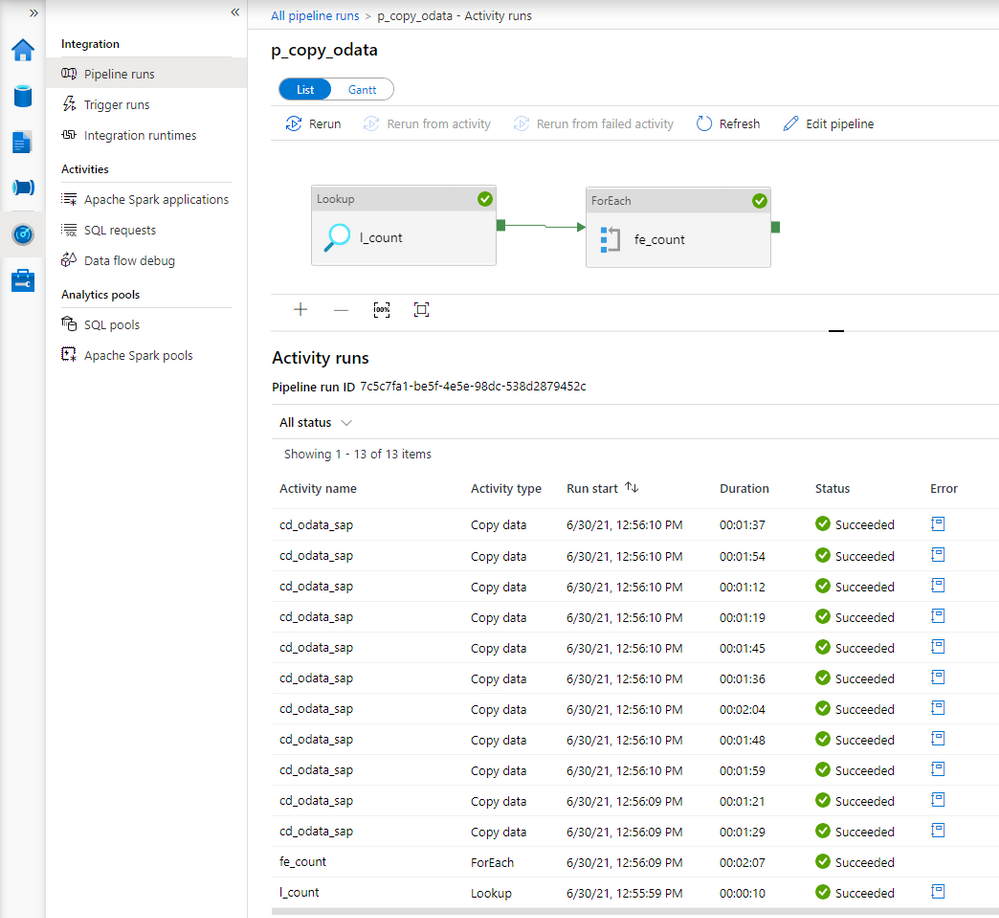
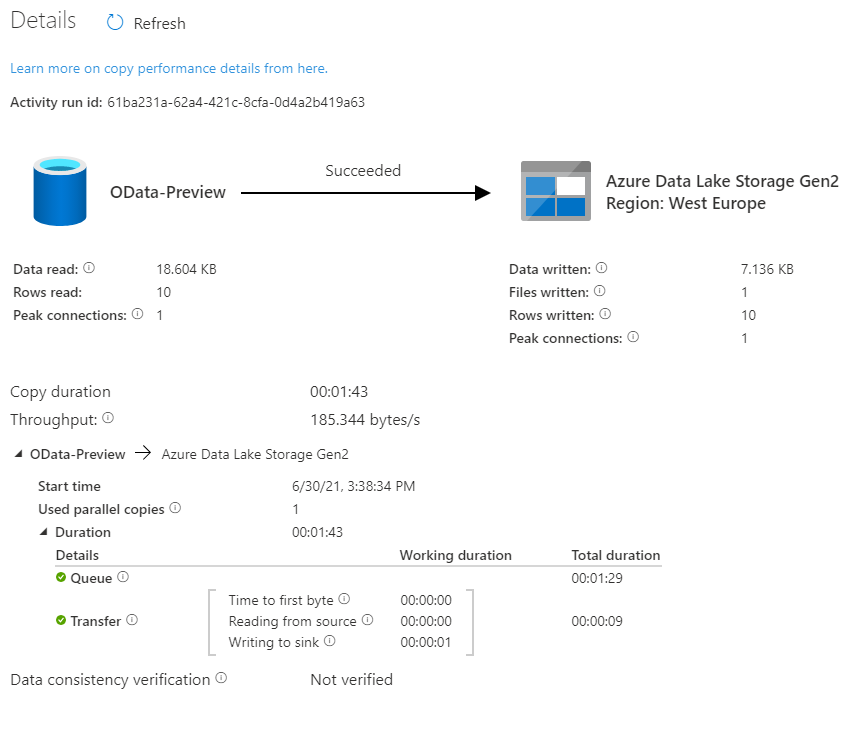
Comparing to the previous extraction, you can see the difference. Instead of just one, there are now multiple entries for the Copy Data activity. You may be slightly disappointed with the duration of each copy job. It takes much longer to extract every chunk of data – in the previous episode, it took only 36 seconds to extract all sales orders. This time every activity took at least a minute.
There is a couple of reasons why it happens. Let’s take a closer a closer look at the components of the extraction job to understand why the duration increased heavily.
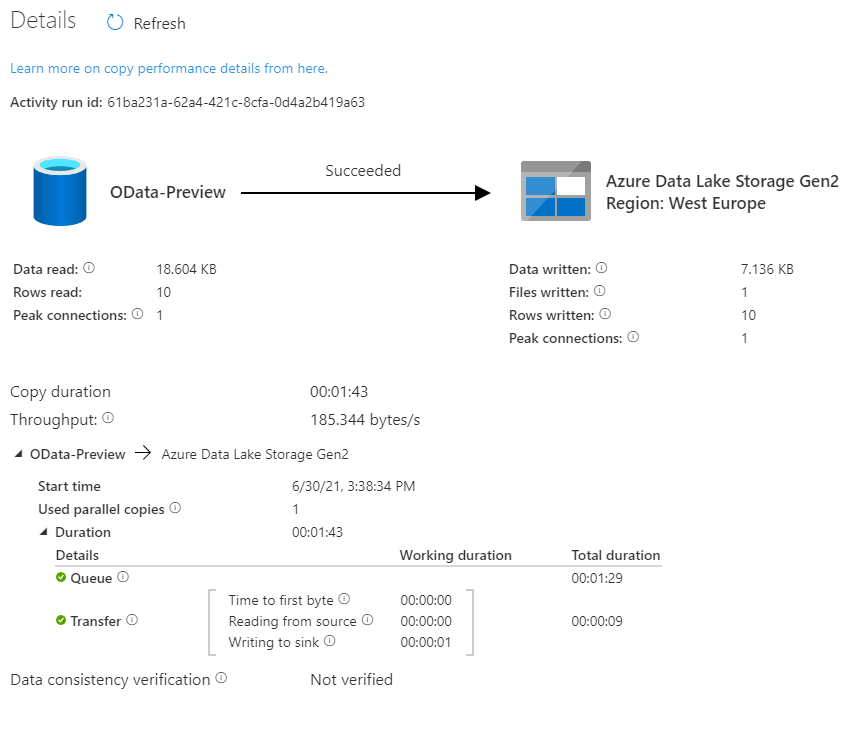
Look at the time analysis. Before the request was processed, it was in the Queue for 1 minute and 29 seconds. Extracting data took only 9 seconds. Why there is such a long wait time?
In the first episode of the blog series, I briefly explained the role of the integration runtime. It provides the computing resources for pipeline execution. To save cost, I host my integration runtime on a very tiny B2ms virtual machine. It provides enough power to process two or three activities at the same time, which means that extracting many chunks is rather sequential than parallel. To fix that, I’ve upgraded my virtual machine to a bigger one. The total duration to extract data decreased significantly as I could process more chunks at the same time.
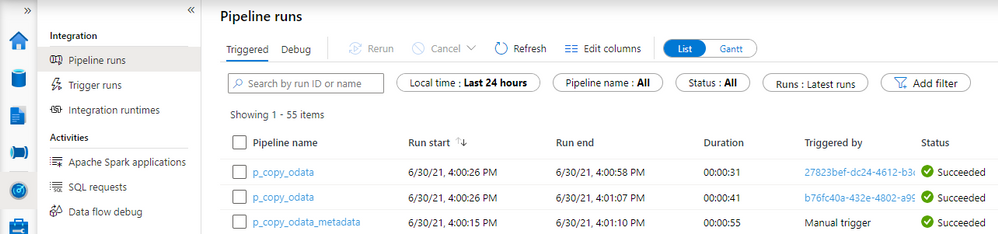
Here is the duration of each Copy Data activity.
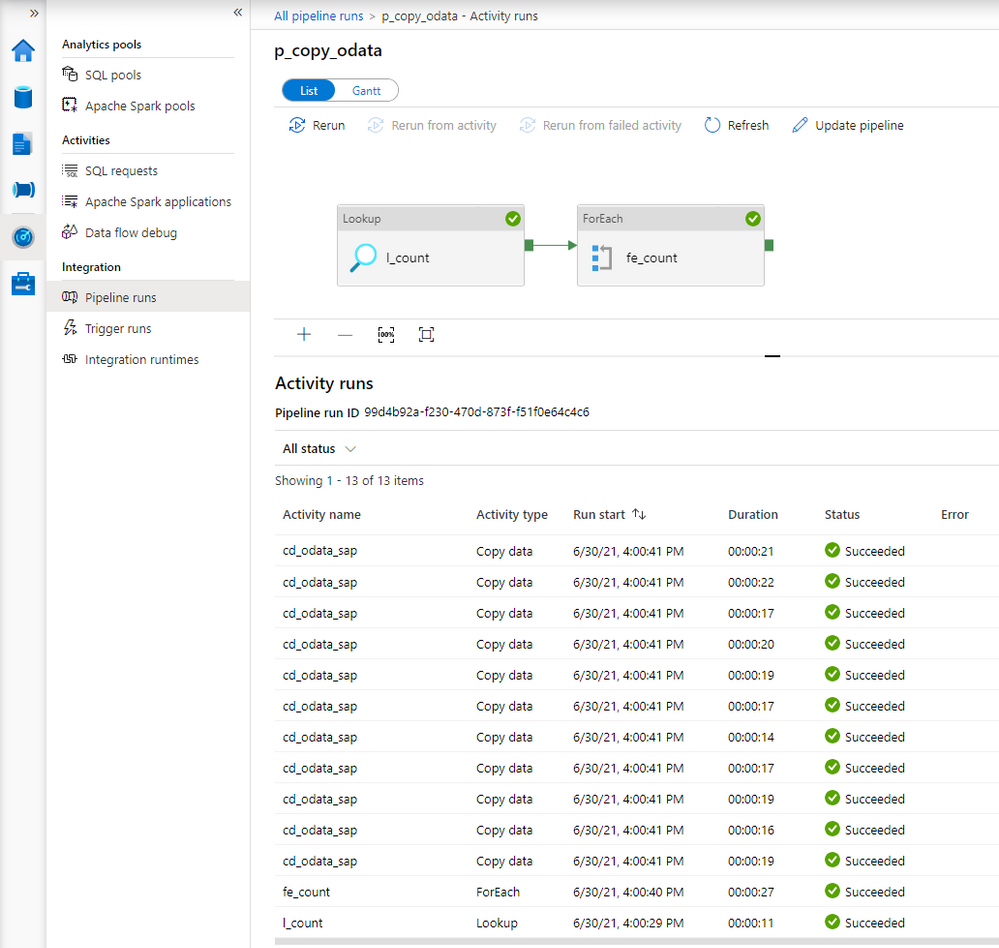
The request is in the queue only for a couple of seconds instead of over a minute.
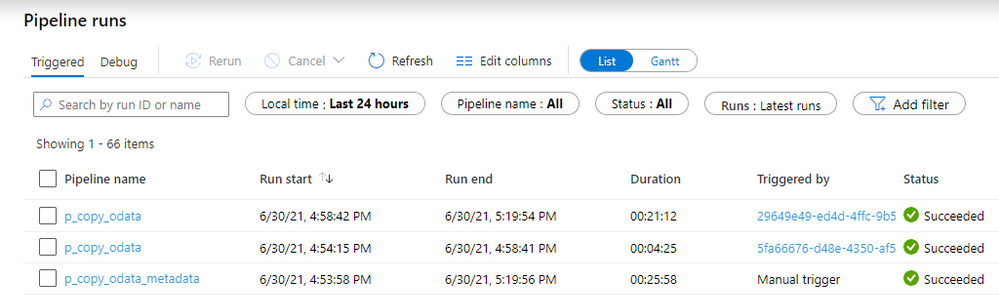
Before we finish, I want to show you some results of processing a large dataset. In another system, I have over 1 million sales orders with more than 5 million line items. It wasn’t possible to extract it all in a single request as every attempt resulted in a short dump at the SAP side. I’ve adjusted the batch size to 100 000 which should be alright to process at a time. To further optimize the extraction, I changed the processing of OData services to Sequential, which means the job firstly extracts Sales Order headers before moving to line items. You can do it in the ForEach Loop in the metadata pipeline. To limit the impact of extraction to the SAP system, I also set a concurrency limit for the Copy Data activity (ForEach loop in the child pipeline).
It took 25 minutes to extract in total over 6 million records. Not bad.
The extraction generated quite a lot of files on the data lake. Let’s count all records inside them and compare the number with what I have in my SAP system:
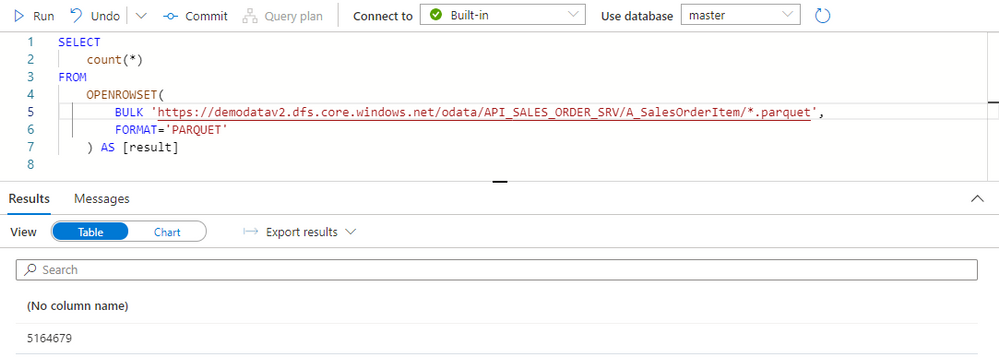
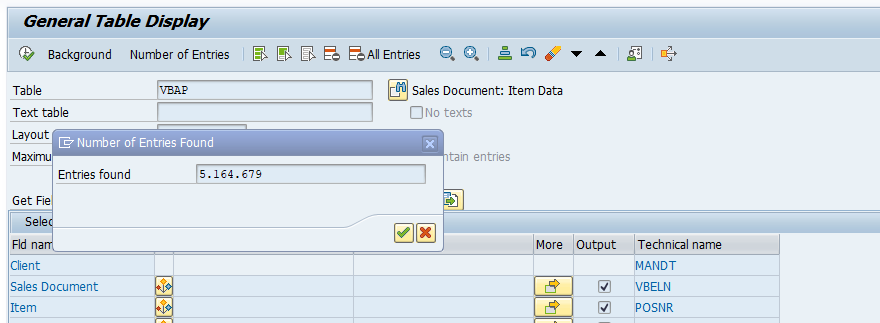
Both numbers match, which means we have the full dataset in the data lake. We could probably further optimize the extraction duration by finding the right number of parallel processes and identifying the best batch size.
Finally, before you even start the extraction, I recommend checking if you need all data. Trimming the dataset by setting filters on columns or extracting only a subset of columns can heavily improve the extraction duration. That’s something we’ll cover in the next episode!
by Contributed | Dec 3, 2021 | Technology
This article is contributed. See the original author and article here.
Overview
Many FHIR include complex nesting. For example the Item component of Questionnaire can either be a single item or an array of more items, which can themselves also be arrays of more items, with even more arrays below. Arrays all the way down! A previous post (FHIR + Blazor + Recursion = Rendering a Questionnaire ) showed a method to render objects with complex nesting: using Dynamic Fragments. This article shows an alternative method: using self-referential components.
Why use components?
Components will allow easier reuse than Dynamic Fragment rendered pages. Imagine a case where we want to both create new and allow updates of complex nested children. If we use components, we can easily adapt a component for both EDIT and CREATE. More reuse means less code!
How it’ll work
We’ll create a parent component. The parent component will render the child component.
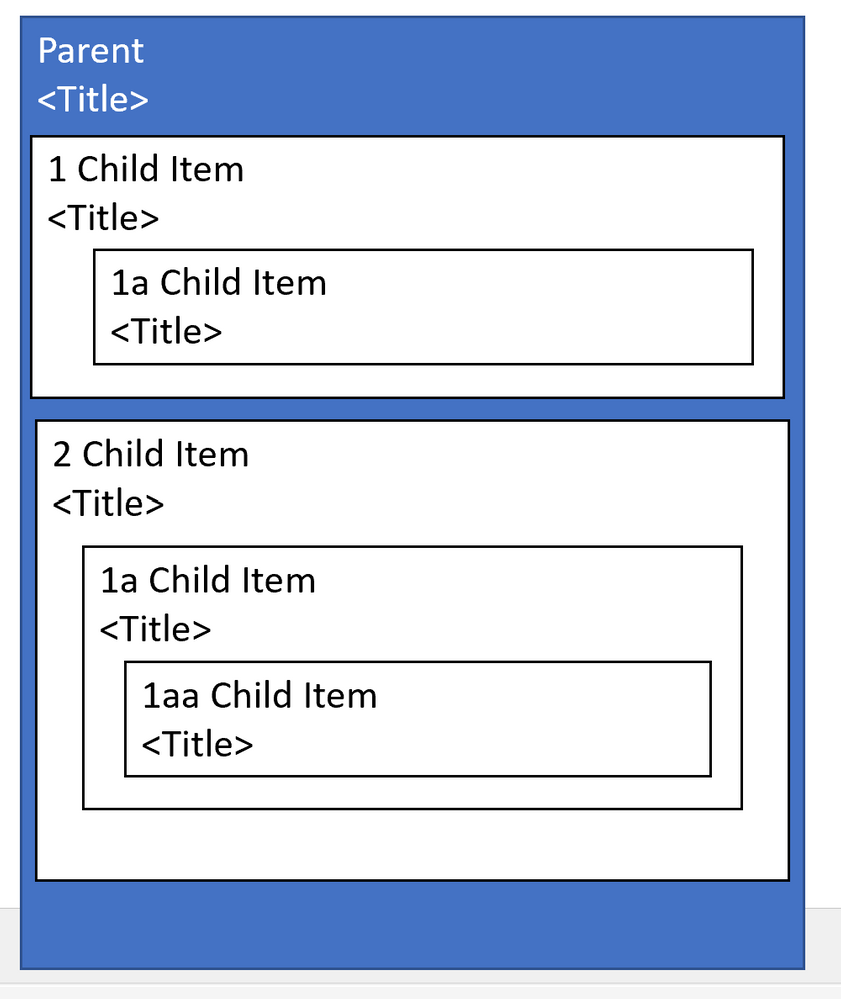
Parent Component;
<span>@Parent.Title</span>
<p>@Parent.Description</p>

@{
   int childNum=1;
}

@foreach(var child in Parent.children){
    Child #@childNum
    ChildComponent child=child />
    childNum++;
}
AND HERE’s THE MAGIC:
Child Component:
<span>@Child.Title</span>

@foreach(var child in Child.children){
    <ChildComponent child=child />
}
The child component will render additional child components.
FHIR Specific Example
Check out the code below from (FHIRBlaze)
Parent Component (QuestionnaireComponent)
<EditForm Model=Questionnaire OnValidSubmit=Submit>
    <label class="col-sm-2 form-label">Title:</label>
    <InputText @bind-Value=Questionnaire.Title />

    @foreach(var item in Questionnaire.Item)
    {
        <div class="border border-primary rounded-left  rounded-right p-2">
            <div class="row">
                <div class="col-sm-12">@GetHeader(item)</div>
            </div>
            <div class="row">
                <div class="col-sm-11">
                    <ItemDisplay ItemComponent=item/>
                </div>
                <div class="col-sm-1">
                    <button type="button" class="btn btn-primary" @onclick="()=>RemoveItem(item)">
                        <span class="oi oi-trash" />
                    </button>
                </div>
            </div>
        </div>
    }

    <div>
        <ItemTypeComponent ItemSelected="AddItem" />
    </div>
    <br/>
    <button type="submit">Submit</button>
</EditForm>
Note the ItemDisplay component.
Child Component ( ItemDisplay )
<div class="card-body">
        <label class="sr-only" >@GetTitleText(ItemComponent)</label>
        <input type='text' required class='form-control' id='question' placeholder=@GetTitleText(ItemComponent) @bind-value='ItemComponent.Text' >
        <label  class="sr-only">LinkId:</label>
        <input type='text' required class='form-control' placeholder='linkId' @bind-value='ItemComponent.LinkId'>

        @switch (ItemComponent.Type)
        {
            case Questionnaire.QuestionnaireItemType.Group:
                foreach(var groupitem in ItemComponent.Item)
                {
                     <div class="border border-primary rounded-left  rounded-right p-2">
                        <div class="row">
                            <div class="col-sm">@GetHeader(groupitem)</div>
                        </div>
                        <div class="row">
                            <div class="col-sm-11">
                                <ItemDisplay ItemComponent=groupitem/>
                            </div>
                            <div class="col-sm">
                                <button type="button" class="btn btn-primary"  @onclick="()=>ItemComponent.Item.Remove(groupitem)">
                                    <span class="oi oi-trash" />
                                </button>
                            </div>
                        </div>
                    </div>
                 }
                 break;
             case Questionnaire.QuestionnaireItemType.Choice:
                 int ansnum= 1;
                 @foreach (var opt in ItemComponent.AnswerOption)
                 {
                    <div class="row">
                        <form class="form-inline">
                        <div class="col-sm-1">#@ansnum</div>
                        <div class="col-sm-10"><AnswerCoding Coding=(Coding)opt.Value /></div>
                        <div class="col-sm-1"><button type="button" class="btn btn-primary" @onclick="()=>ItemComponent.AnswerOption.Remove(opt)"><span class="oi oi-trash" /></button></div>
                        </form>
                   </div>
                   ansnum++;
                 }
                 <button type="button" @onclick=AddAnswer >Add Choice</button>
                 break;
             default:
                 break;
        }

        @if (ItemComponent.Type.Equals(Questionnaire.QuestionnaireItemType.Group))
        {
            <div>
                <ItemTypeComponent ItemSelected="AddItem" />
            </div>
        }
</div>
Line 58 is the key line. This component renders itself!
Caveats
With this you should be able to quickly render nested Item after nested Item. But there are some caveats you should know.
#1: Memory Consumption
As you render each nesting- all those objects are loaded into memory. If a FHIR has an unknown number of children- each of which could have its own children, you could potentially consume large amounts of memory. This is a particular problem because you could be rendering on a phone.
Suggested Mitigation: Consider rendering to a max depth and a max number of children. Render “see more” type links to allow the user to see remaining children
#2: Display Clipping
The standard approach is to indent children. But if you have 5 levels of nesting and the app is rendered on mobile than your 5th level children may show up in a single character column. If you render 100 levels of nested children, your final level may not render at all.
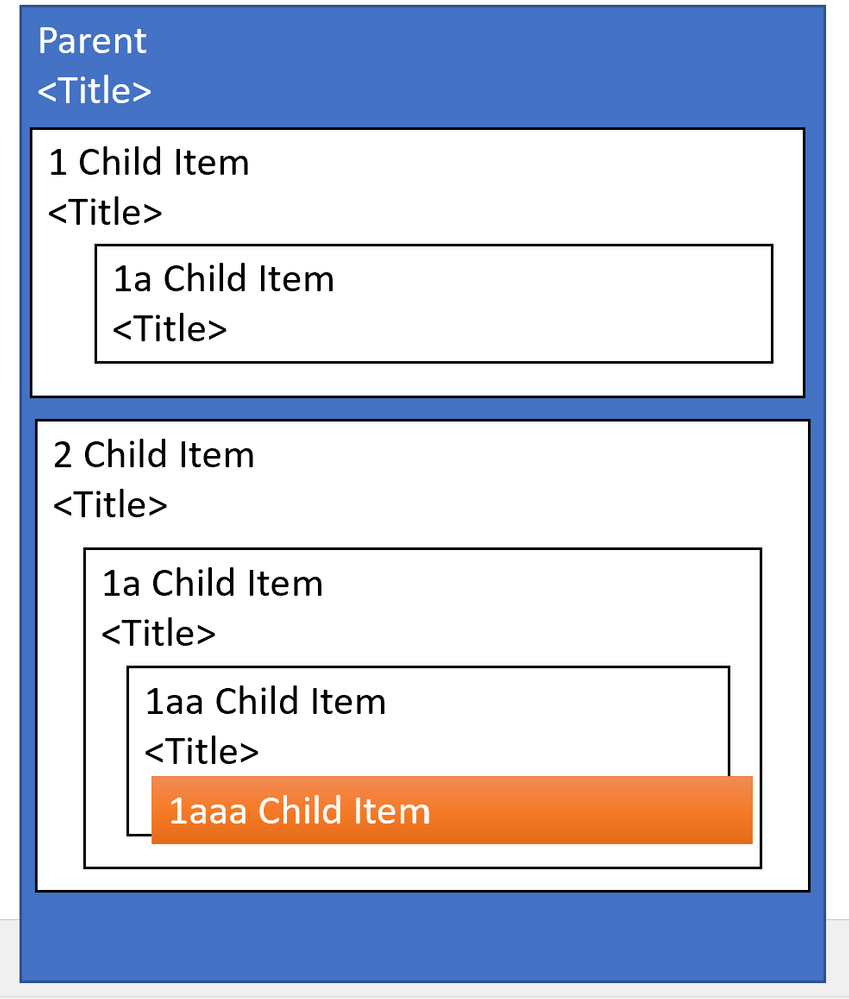
Suggested Mitigation: Consider an alternative to displaying all children. For example- consider using collapsible sections to show children.
#3: Labeling Problems
If you’re allowing Edit of a component with complex nesting it may be difficult for a user to remember which level of children, they are in. For example, imagine the following are rendered as cards: Parent 1: Child 1: Child 2: Child 3: Child 4: Child 5.
Suggested Mitigation: Consider using borders and labeling to help users determine which child is currently selected
by Scott Muniz | Dec 2, 2021 | Security, Technology
This article is contributed. See the original author and article here.
Summary
This joint Cybersecurity Advisory uses the MITRE Adversarial Tactics, Techniques, and Common Knowledge (ATT&CK®) framework, Version 9. See the ATT&CK for Enterprise framework for referenced threat actor techniques and for mitigations.
This joint advisory is the result of analytic efforts between the Federal Bureau of Investigation (FBI) and the Cybersecurity and Infrastructure Security Agency (CISA) to highlight the cyber threat associated with active exploitation of a newly identified vulnerability (CVE-2021-44077) in Zoho ManageEngine ServiceDesk Plus—IT help desk software with asset management.
CVE-2021-44077, which Zoho rated critical, is an unauthenticated remote code execution (RCE) vulnerability affecting all ServiceDesk Plus versions up to, and including, version 11305. This vulnerability was addressed by the update released by Zoho on September 16, 2021 for ServiceDesk Plus versions 11306 and above. The FBI and CISA assess that advanced persistent threat (APT) cyber actors are among those exploiting the vulnerability. Successful exploitation of the vulnerability allows an attacker to upload executable files and place webshells, which enable the adversary to conduct post-exploitation activities, such as compromising administrator credentials, conducting lateral movement, and exfiltrating registry hives and Active Directory files.
The Zoho update that patched this vulnerability was released on September 16, 2021, along with a security advisory. Additionally, an email advisory was sent to all ServiceDesk Plus customers with additional information. Zoho released a subsequent security advisory on November 22, 2021, and advised customers to patch immediately.
The FBI and CISA are aware of reports of malicious cyber actors likely using exploits against CVE-2021-44077 to gain access [T1190] to ManageEngine ServiceDesk Plus, as early as late October 2021. The actors have been observed using various tactics, techniques and procedures (TTPs), including:
- Writing webshells [T1505.003] to disk for initial persistence
- Obfuscating and Deobfuscating/Decoding Files or Information [T1027 and T1140]
- Conducting further operations to dump user credentials [T1003]
- Living off the land by only using signed Windows binaries for follow-on actions [T1218]
- Adding/deleting user accounts as needed [T1136]
- Stealing copies of the Active Directory database (
NTDS.dit) [T1003.003] or registry hives
- Using Windows Management Instrumentation (WMI) for remote execution [T1047]
- Deleting files to remove indicators from the host [T1070.004]
- Discovering domain accounts with the net Windows command [T1087.002]
- Using Windows utilities to collect and archive files for exfiltration [T1560.001]
- Using custom symmetric encryption for command and control (C2) [T1573.001]
The FBI and CISA are proactively investigating this malicious cyber activity:
- The FBI leverages specially trained cyber squads in each of its 56 field offices and CyWatch, the FBI’s 24/7 operations center and watch floor, which provides around-the-clock support to track incidents and communicate with field offices across the country and partner agencies.
- CISA offers a range of no-cost cyber hygiene services to help organizations assess, identify, and reduce their exposure to threats. By requesting these services, organizations of any size could find ways to reduce their risk and mitigate attack vectors.
Sharing technical and/or qualitative information with the FBI and CISA helps empower and amplify our capabilities as federal partners to collect and share intelligence and engage with victims, while working to unmask and hold accountable those conducting malicious cyber activities.
A STIX file will be provided when available.
For a downloadable pdf of this CSA, click here.
Technical Details
Compromise of the affected systems involves exploitation of CVE-2021-44077 in ServiceDesk Plus, allowing the attacker to:
- Achieve an unrestricted file upload through a POST request to the ServiceDesk REST API URL and upload an executable file,
C:ManageEngineServicedeskbinmsiexec.exe, with a SHA256 hash of ecd8c9967b0127a12d6db61964a82970ee5d38f82618d5db4d8eddbb3b5726b7. This executable file serves as a dropper and contains an embedded, encoded Godzilla JAR file.
- Gain execution for the dropper through a second POST request to a different REST API URL, which will then decode the embedded Godzilla JAR file and drop it to the filepath
C:ManageEngineServiceDesklibtomcattomcat-postgres.jar with a SHA256 hash of 67ee552d7c1d46885b91628c603f24b66a9755858e098748f7e7862a71baa015.
Confirming a successful compromise of ManageEngine ServiceDesk Plus may be difficult—the attackers are known to run clean-up scripts designed to remove traces of the initial point of compromise and hide any relationship between exploitation of the vulnerability and the webshell.
Targeted Industries
APT cyber actors have targeted Critical Infrastructure Sector industries, including the healthcare, financial services, electronics and IT consulting industries.
Indicators of Compromise
Hashes
Webshell:
67ee552d7c1d46885b91628c603f24b66a9755858e098748f7e7862a71baa015
068D1B3813489E41116867729504C40019FF2B1FE32AAB4716D429780E666324
759bd8bd7a71a903a26ac8d5914e5b0093b96de61bf5085592be6cc96880e088
262cf67af22d37b5af2dc71d07a00ef02dc74f71380c72875ae1b29a3a5aa23d
a44a5e8e65266611d5845d88b43c9e4a9d84fe074fd18f48b50fb837fa6e429d
ce310ab611895db1767877bd1f635ee3c4350d6e17ea28f8d100313f62b87382
75574959bbdad4b4ac7b16906cd8f1fd855d2a7df8e63905ab18540e2d6f1600
5475aec3b9837b514367c89d8362a9d524bfa02e75b85b401025588839a40bcb
Dropper:
ecd8c9967b0127a12d6db61964a82970ee5d38f82618d5db4d8eddbb3b5726b7
Implant:
009d23d85c1933715c3edcccb46438690a66eebbcccb690a7b27c9483ad9d0ac
083bdabbb87f01477f9cf61e78d19123b8099d04c93ef7ad4beb19f4a228589a
342e85a97212bb833803e06621170c67f6620f08cc220cf2d8d44dff7f4b1fa3
NGLite Backdoor:
805b92787ca7833eef5e61e2df1310e4b6544955e812e60b5f834f904623fd9f
3da8d1bfb8192f43cf5d9247035aa4445381d2d26bed981662e3db34824c71fd
5b8c307c424e777972c0fa1322844d4d04e9eb200fe9532644888c4b6386d755
3f868ac52916ebb6f6186ac20b20903f63bc8e9c460e2418f2b032a207d8f21d
342a6d21984559accbc54077db2abf61fd9c3939a4b09705f736231cbc7836ae
7e4038e18b5104683d2a33650d8c02a6a89badf30ca9174576bf0aff08c03e72
KDC Sponge:
3c90df0e02cc9b1cf1a86f9d7e6f777366c5748bd3cf4070b49460b48b4d4090
b4162f039172dcb85ca4b85c99dd77beb70743ffd2e6f9e0ba78531945577665
e391c2d3e8e4860e061f69b894cf2b1ba578a3e91de610410e7e9fa87c07304c
Malicious IIS Module:
bec067a0601a978229d291c82c35a41cd48c6fca1a3c650056521b01d15a72da
Renamed WinRAR:
d0c3d7003b7f5b4a3bd74a41709cfecfabea1f94b47e1162142de76aa7a063c7
Renamed csvde:
7d2780cd9acc516b6817e9a51b8e2889f2dec455295ac6e6d65a6191abadebff
Network Indicators
POST requests sent to the following URLs:
/RestAPI/ImportTechnicians?step=1
Domains:
seed.nkn[.]org
Note: the domain seed.nkn[.]org is a New Kind of Network (NKN) domain that provides legitimate peer to peer networking services utilizing blockchain technology for decentralization. It is possible to have false positive hits in a corporate network environment and it should be considered suspicious to see any software-initiated contacts to this domain or any subdomain.
Log File Analysis
- Check serverOut*.txt log files under C:ManageEngineServiceDesklogs for suspicious log entries matching the following format:
[<time>]|[<date>]|[com.adventnet.servicedesk.setup.action.ImportTechniciansAction]|[INFO]|[62]: fileName is : msiexec.exe]
Filepaths
C:ManageEngineServiceDeskbinmsiexec.exe
C:ManageEngineServiceDesklibtomcattomcat-postgres.jar
C:WindowsTempScriptModule.dll
C:ManageEngineServiceDeskbinScriptModule.dll
C:Windowssystem32ME_ADAudit.exe
c:Users[username]AppDataRoamingADManagerME_ADManager.exe
%ALLUSERPROFILE%MicrosoftWindowsCachessystem.dat
C:ProgramDataMicrosoftCryptoRSAkey.dat
c:windowstempccc.exe
Tactics, Techniques, and Procedures
- Using WMI for lateral movement and remote code execution (in particular,
wmic.exe)
- Using plaintext credentials for lateral movement
- Using
pg_dump.exe to dump ManageEngine databases
- Dumping
NTDS.dit and SECURITY/SYSTEM/NTUSER registry hives
- Active credential harvesting through
LSASS (KDC Sponge)
- Exfiltrating through webshells
- Conducting exploitation activity often through other compromised U.S. infrastructure
- Dropping multiple webshells and/or implants to maintain persistence
- Using renamed versions of
WinRAR, csvde, and other legitimate third-party tools for reconnaissance and exfiltration
Yara Rules
rule ReportGenerate_jsp {
strings:
$s1 = “decrypt(fpath)”
$s2 = “decrypt(fcontext)”
$s3 = “decrypt(commandEnc)”
$s4 = “upload failed!”
$s5 = “sevck”
$s6 = “newid”
condition:
filesize < 15KB and 4 of them
}
rule EncryptJSP {
strings:
$s1 = “AEScrypt”
$s2 = “AES/CBC/PKCS5Padding”
$s3 = “SecretKeySpec”
$s4 = “FileOutputStream”
$s5 = “getParameter”
$s6 = “new ProcessBuilder”
$s7 = “new BufferedReader”
$s8 = “readLine()”
condition:
filesize < 15KB and 6 of them
}
rule ZimbraImplant {
strings:
$u1 = “User-Agent: Mozilla/5.0 (Windows NT 10.0; Win64; x64) AppleWebKit/537.36 (KHTML, like Gecko) Chrome/87.0.4280.88 Safari/537.36”
$u2 = “Content-Type: application/soap+xml; charset=UTF-8”
$u3 = “/service/soap”
$u4 = “Good Luck :::)”
$s1 = “zimBR”
$s2 = “log10”
$s3 = “mymain”
$s4 = “urn:zimbraAccount”
$s5 = “/service/upload?fmt=extended,raw”
$s6 = “<query>(in:”inbox” or in:”junk”) is:unread</query>”
condition:
(uint16(0) == 0x5A4D and uint32(uint32(0x3C)) == 0x00004550) and filesize < 2MB and 1 of ($u*) and 3 of ($s*)
}
rule GodzillaDropper {
strings:
$s1 = “UEsDBAoAAAAAAI8UXFM” // base64 encoded PK/ZIP header
$s2 = “../lib/tomcat/tomcat-postgres.jar”
$s3 = “RunAsManager.exe”
$s4 = “ServiceDesk”
$s5 = “C:Userspwndocumentsvisual studio 2015Projectspayloaddll”
$s6 = “CreateMutexA”
$s7 = “cplusplus_me”
condition:
(uint16(0) == 0x5A4D and uint32(uint32(0x3C)) == 0x00004550) and filesize < 350KB and 4 of them
}
rule GodzillaJAR {
strings:
$s1 = “org/apache/tomcat/SSLFilter.class”
$s2 = “META-INF/services/javax.servlet.ServletContainerInitializer”
$s3 = “org/apache/tomcat/MainFilterInitializer.class”
condition:
uint32(0) == 0x04034B50 and filesize < 50KB and all of them
}
rule APT_NGLite {
strings:
$s1 = “/mnt/hgfs/CrossC2-2.2”
$s2 = “WHATswrongwithU”
$s3 = “//seed.nkn.org:”
$s4 = “Preylistener”
$s5 = “preyid”
$s6 = “Www-Authenticate”
condition:
(uint16(0) == 0x5A4D and uint32(uint32(0x3C)) == 0x00004550) and filesize < 15MB and 4 of them
}
rule KDCSponge {
strings:
$k1 = “kdcsvc.dll”
$k2 = “kdccli.dll”
$k3 = “kdcsvs.dll”
$f1 = “KerbHashPasswordEx3”
$f2 = “KerbFreeKey”
$f3 = “KdcVerifyEncryptedTimeStamp”
$s1 = “download//symbols//%S//%S//%S” wide
$s2 = “KDC Service”
$s3 = “system.dat”
condition:
(uint16(0) == 0x5A4D and uint32(uint32(0x3C)) == 0x00004550) and filesize < 1MB and 1 of ($k*) and 1 of ($f*) and 1 of ($s*)
Mitigations
Compromise Mitigations
Organizations that identify any activity related to ManageEngine ServiceDesk Plus indicators of compromise within their networks should take action immediately.
Zoho ManageEngine ServiceDesk Plus build 11306, or higher, fixes CVE-2021-44077. ManageEngine initially released a patch for this vulnerability on September 16, 2021. A subsequent security advisory was released on November 22, 2021, and advised customers to patch immediately. Additional information can be found in the Zoho security advisory released on November 22, 2021.
In addition, Zoho has set up a security response plan center that provides additional details, a downloadable tool that can be run on potentially affected systems, and a remediation guide.
FBI and CISA also strongly recommend domain-wide password resets and double Kerberos TGT password resets if any indication is found that the NTDS.dit file was compromised.
Note: Implementing these password resets should not be taken as a comprehensive mitigation in response to this threat; additional steps may be necessary to regain administrative control of your network. Refer to your specific products mitigation guidance for details.
Actions for Affected Organizations
Immediately report as an incident to CISA or the FBI (refer to Contact information section below) the existence of any of the following:
- Identification of indicators of compromise as outlined above.
- Presence of webshell code on compromised ServiceDesk Plus servers.
- Unauthorized access to or use of accounts.
- Evidence of lateral movement by malicious actors with access to compromised systems.
- Other indicators of unauthorized access or compromise.
Contact Information
Recipients of this report are encouraged to contribute any additional information that they may have related to this threat.
For any questions related to this report or to report an intrusion and request resources for incident response or technical assistance, please contact:
Revisions
December 2, 2021: Initial version
This product is provided subject to this Notification and this Privacy & Use policy.


Recent Comments