by Scott Muniz | Dec 17, 2021 | Security, Technology
This article is contributed. See the original author and article here.
VMware has released a security advisory to address a vulnerability in Workspace ONE UEM console. An attacker could exploit this vulnerability to obtain sensitive information.
CISA encourages users and administrators to review VMware Security Advisory VMSA-2021-0029 and apply the necessary mitigation.
by Scott Muniz | Dec 16, 2021 | Security, Technology
This article is contributed. See the original author and article here.
CISA has announced the joint National Security Agency (NSA) and CISA publication of the final of a four-part series, Security Guidance for 5G Cloud Infrastructures. Part IV: Ensure Integrity of Cloud Infrastructure focuses on platform integrity, microservices infrastructure integrity, launch time integrity, and build time security to ensure that 5G cloud resources are not modified without authorization. This series was published under the Enduring Security Framework (ESF), a public-private cross-sector working group led by NSA and CISA.
CISA encourages 5G providers, integrators, and network operators to review the guidance and consider the recommendations. See CISA’s 5G Security and Resilience webpage for more information.
by Contributed | Dec 16, 2021 | Technology
This article is contributed. See the original author and article here.
Attack Simulation Training is an intelligent phish risk reduction tool that measures behavior change and automates the deployment of an integrated security awareness training program across an organization. It is available with Microsoft 365 E5 or Microsoft Defender for Office 365 P2 plan. In a phishing simulation, admins can use end user email notifications to inform targeted users about their participation in the campaign or to appreciate a successful phishing report.
We’re pleased to announce that these can now be localized, customized, and targeted based on the user’s locale. Security admin will be able to customize 2 different types of notifications:
- Positive Reinforcement Notification
- Simulation Notification
Positive Reinforcement Notification
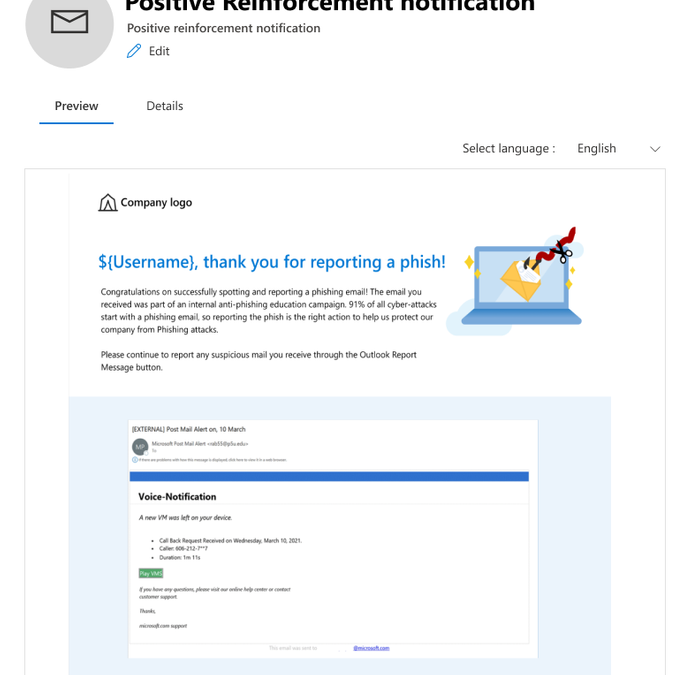
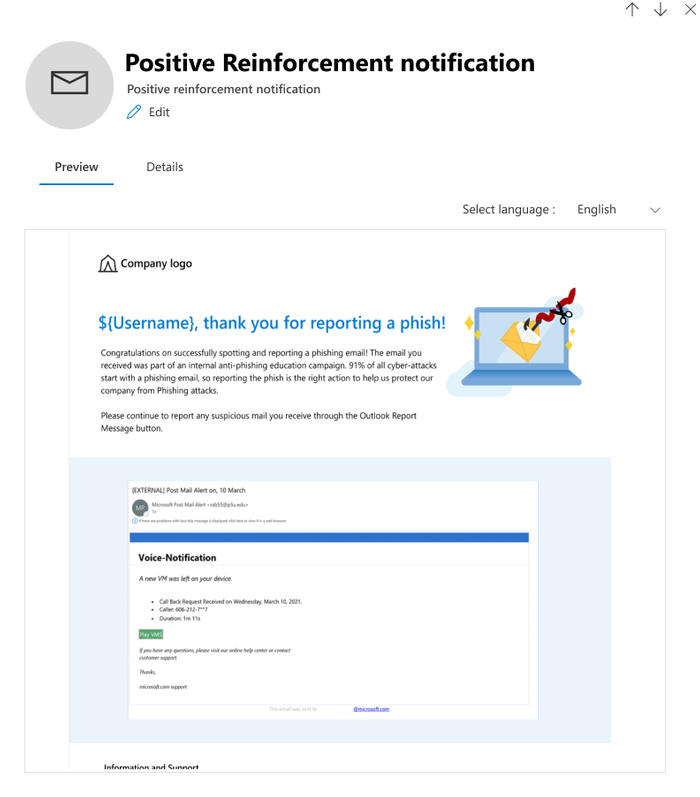
Positive Reinforcement Notification allows you to send an appreciation mail to the users who report a phish to reinforce positive behavior. You can choose to send these notifications during the campaign as well as after it completes.
Simulation Notification
Simulation Notification allows you to send a notification to the users to inform them about their participation in the phishing campaign when no trainings are assigned to them. You can assign this notification to all users, users who clicked, or to the users who were compromised, and a notification will be sent to those users after the campaign ends.
How to create or access these notifications?
A new library of notifications is provided under a new tab called ‘End user notifications’ which will be used to create, edit, copy and delete notifications. Notifications are either Microsoft curated or customized by a customer.
1. Microsoft curated notifications (Global)
Enables you to choose from Microsoft curated notifications in 12 languages for a ‘click and go’ experience.
2. Custom notification created by a tenant (Tenant)
Enables you to tailor the notification to your requirements in 12 languages. For example, include your own branding, messaging, code, and more.
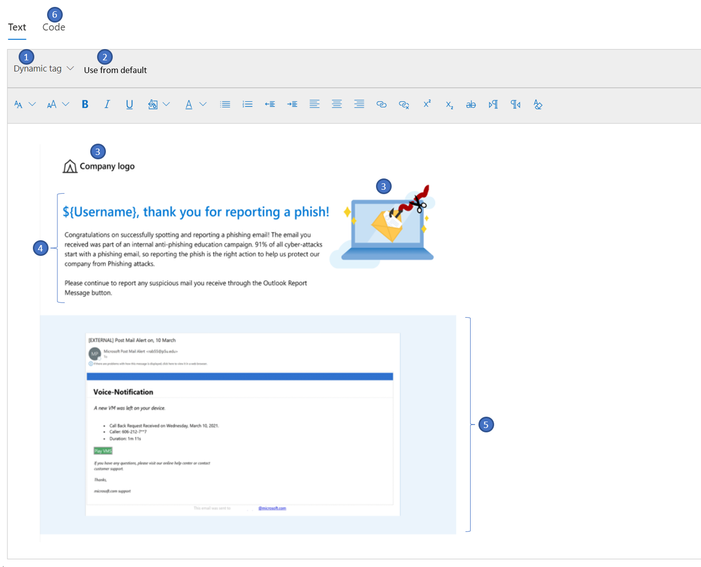
Creating a custom notification is a great option for enterprises who want to create a notification from scratch using Rich Text Editor. The notification can be created either by using the text tab (RTE) where the content can be created within the editor, copied from external sources, or by using the code tab to input the HTML code.
- Dynamic tag: Allows you to choose the user’s first name, last name, UPN, email address, and payload dynamically.
- Use from Default: Allows you to choose Microsoft defaults landing page with predefined formatting and make additional modifications as necessary.
- Company Logo/images: Allows you to paste the image/logos of your choice and insert videos of up to 4MB.
- Body: Allows you to create content/text of your choice.
- Shows the content of the payload chosen
- The “code” tab that comes along with the rich text editor can be leveraged for additional sophisticated design requirements using HTML code. The code can be saved and reused for new simulations.
How to use notifications in simulations?
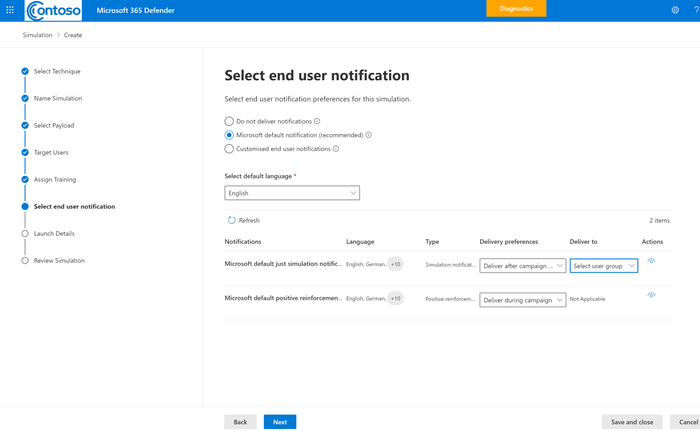
A new node called ‘Select end user notification’ is added to the launch simulation and simulation automation workflow where you can choose to not deliver any notification, choose from Microsoft defaults or customized end user notifications. Positive reinforcement notification can be delivered during the campaign or after the campaign whereas Simulation Notification would be delivered after the campaign ends as per the users’ actions-all users, clicked, and compromised.
We hope you enjoy using custom end user notifications in a simulation. Looking forward to your experience and feedback!
Want to learn more about Attack Simulation Training?
Get started with the available documentation today and check out the blogs for Setting up a New Phish Simulation Program-Part One and Part Two. In addition to these, you can read more details about new features in Attack Simulation Training.
by Scott Muniz | Dec 15, 2021 | Security, Technology
This article is contributed. See the original author and article here.
CISA has added two new vulnerabilities to its Known Exploited Vulnerabilities Catalog, based on evidence that threat actors are actively exploiting the vulnerabilities listed in the table below. These types of vulnerabilities are a frequent attack vector for malicious cyber actors of all types and pose significant risk to the federal enterprise.
| CVE Number |
CVE Title |
Remediation Due Date |
| CVE-2021-43890 |
Microsoft Windows AppX Installer Spoofing Vulnerability |
12/29/2021 |
| CVE-2021-4102 |
Google Chromium V8 Engine Use-After-Free Vulnerability |
12/29/2021 |
Binding Operational Directive (BOD) 22-01: Reducing the Significant Risk of Known Exploited Vulnerabilities established the Known Exploited Vulnerabilities Catalog as a living list of known CVEs that carry significant risk to the federal enterprise. BOD 22-01 requires FCEB agencies to remediate identified vulnerabilities by the due date to protect FCEB networks against active threats. See the BOD 22-01 Fact Sheet for more information.
Although BOD 22-01 only applies to FCEB agencies, CISA strongly urges all organizations to reduce their exposure to cyberattacks by prioritizing timely remediation of Catalog vulnerabilities as part of their vulnerability management practice. CISA will continue to add vulnerabilities to the Catalog that meet the meet the specified criteria.
by Contributed | Dec 15, 2021 | Technology
This article is contributed. See the original author and article here.
At-scale data processing systems typically store a single table in storage as multiple files. In the Azure Purview data catalog, this concept is represented by using resource sets; a resource set is a single object in the catalog that represents many assets in storage.
For example, suppose your Spark cluster has persisted a DataFrame into an Azure Data Lake Storage (ADLS) Gen2 data source. In Spark, the table looks like a single logical resource, but on the disk there are likely thousands of Parquet files, each of which represents a partition of the total DataFrame’s contents.
IoT data and web log data have the same challenge. Imagine you have a sensor that outputs log files several times per second. It won’t take long until you have hundreds of thousands of log files from that single sensor. In Azure Purview, resource sets allow for these partitions to be handled as a single data asset, allowing for easy consumption and preventing oversaturation of the data catalog.
How Azure Purview detects resource sets
Azure Purview supports resource sets in Azure Blob Storage, ADLS Gen1, ADLS Gen2, Azure Files, and Amazon S3.
Azure Purview automatically detects resource sets when scanning. This feature looks at all the data that’s ingested via scanning and compares it to a set of defined patterns.
For example, suppose you scan a data source whose URL is https://myaccount.blob.core.windows.net/mycontainer/machinesets/23/foo.parquet. Azure Purview looks at the path segments and determines if they match any built-in patterns. It has built-in patterns for GUIDs, numbers, date formats, localization codes (for example, en-us), and so on. In this case, the number pattern matches 23. Azure Purview assumes this file is part of a resource set named https://myaccount.blob.core.windows.net/mycontainer/machinesets/{N}/foo.parquet.
Or, for a URL such as https://myaccount.blob.core.windows.net/mycontainer/weblogs/en_au/23.json, Azure Purview matches both the localization pattern and the number pattern, producing a resource set named https://myaccount.blob.core.windows.net/mycontainer/weblogs/{LOC}/{N}.json.
Using this strategy, Azure Purview would map the following resources to the same resource set, https://myaccount.blob.core.windows.net/mycontainer/weblogs/{LOC}/{N}.json:
Note: Azure Purview intentionally doesn’t try to classify document file types such as Microsoft Word, Microsoft Excel, and PDFs as resource sets.
Advanced resource sets
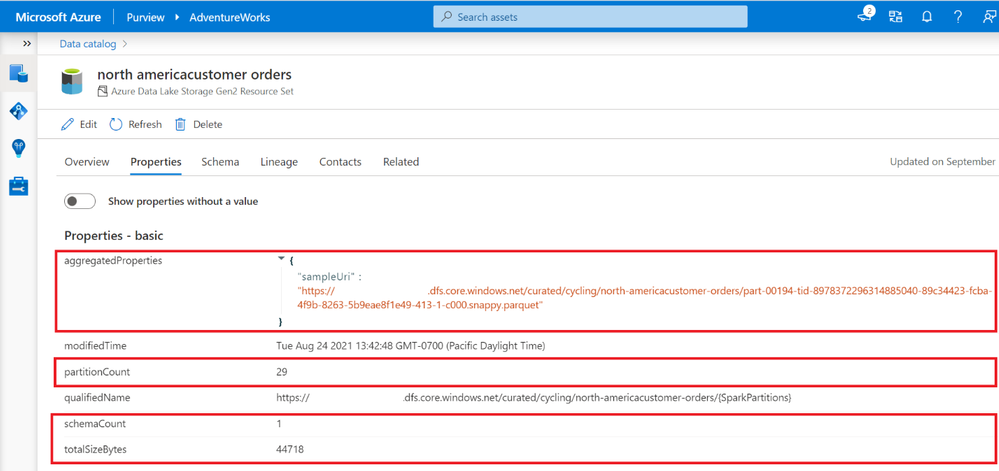
Azure Purview can customize and further enrich your resource set assets through the Advanced Resource Sets capability. When advanced resource sets are enabled, Azure Purview runs extra aggregations to compute the following information about resource set assets:
- Up-to-date schema and classifications to accurately reflect schema drift from changing metadata.
- Sample file paths of assets that comprise the resource set.
- A partition count that shows how many files make up the resource set.
- A schema count that shows how many unique schemas were found. This value is either a number between 1 and 5, or for values greater than 5, 5+.
- A list of partition types when more than a single partition type is included in the resource set. For example, an IoT sensor might output both XML and JSON files, although both are logically part of the same resource set.
- The total size of all files that comprise the resource set.
These properties can be found on the asset details page of the resource set.
Enabling advanced resource sets also allows for the creation of resource set pattern rules that customize how Azure Purview groups resource sets during scanning.
Enabling advanced resource sets
The advanced resource sets feature is off by default in all new Azure Purview instances. Advanced resource sets can be enabled from Account information in the management hub.
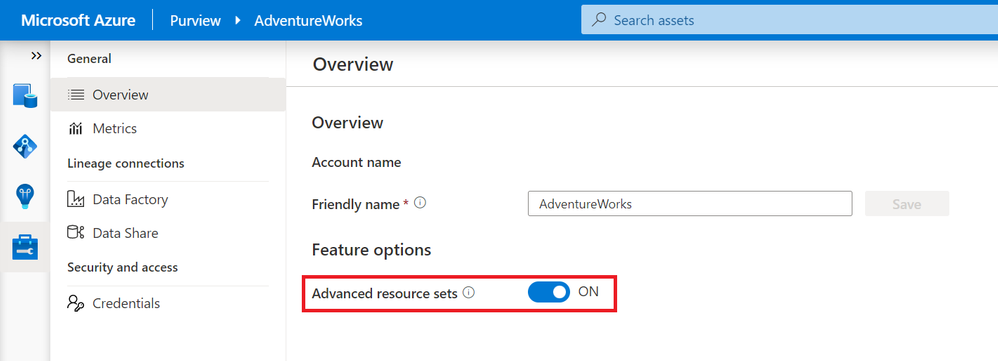
After enabling advanced resource sets, the additional enrichments will occur on all newly ingested assets. The Azure Purview team recommends waiting an hour before scanning in new data lake data after toggling on the feature.
Customizing resource set grouping using pattern rules
When scanning a storage account, Azure Purview uses a set of defined patterns to determine if a group of assets is a resource set. In some cases, Azure Purview’s resource set grouping might not accurately reflect your data estate. These issues can include:
- Incorrectly marking an asset as a resource set
- Putting an asset into the wrong resource set
- Incorrectly marking an asset as not being a resource set
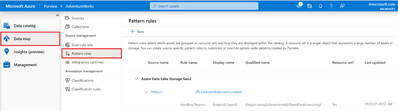
To customize or override how Azure Purview detects which assets are grouped as resource sets and how they are displayed within the catalog, you can define pattern rules in the management center. Pattern rules are only available when the advanced resource sets feature is enabled. For step-by-step instructions and syntax, please see resource set pattern rules.
Get started today!


Recent Comments