by Scott Muniz | Jan 20, 2022 | Security, Technology
This article is contributed. See the original author and article here.
Drupal has released security updates to address vulnerabilities affecting Drupal 7, 9.2, and 9.3. An attacker could exploit these vulnerabilities to take control of an affected system.
CISA encourages users and administrators to review the following Drupal security advisories and apply the necessary updates.
by Scott Muniz | Jan 20, 2022 | Security, Technology
This article is contributed. See the original author and article here.
Google has released Chrome version 97.0.4692.99 for Windows, Mac, and Linux. This version addresses vulnerabilities that an attacker could exploit to take control of an affected system.
CISA encourages users and administrators to review the Chrome Release Note and apply the necessary update as soon as possible.
by Contributed | Jan 19, 2022 | Technology
This article is contributed. See the original author and article here.
Azure Firewall is a managed stateful network security service that recently became generally available for premium features across most Azure regions, providing capabilities such as TLS inspection, URL filtering and more
Across the different virtual networks and subscriptions, rules are created for network segmentation and access control. Managing the network traffic may require you to audit rules for utilization, flow hit count or require a previous working configuration.
This runbook will help create instantaneous back-up copies of Azure Firewall with the Firewall Policy and when scheduled with an automation account, you can take daily/weekly snapshots and store them in a specified path.
For this runbook, Azure blob storage will be used to store Azure Firewall configuration for both network infrastructure and firewall policy at the time of the dump. You can edit the template to specify another storage method. We also discuss how to redeploy a firewall to a known configuration using one of the backed-up templates. For more information on other network resources that you may like to adapt to this runbook, please see the Export-AzResourceGroup module.
Requirements
- Automation account
- Storage Account
- Runbook
Set up Automation account
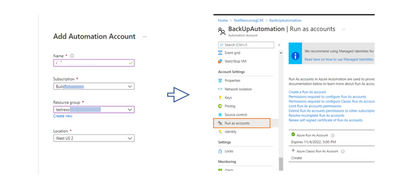
Go to the Search bar and type Automation account. Create a New Automation account. When done, go to the Automation account and in the Settings blade, under Account settings, create a “Run As” account. This provide the service principal access that will be used to auto-login into our script later.
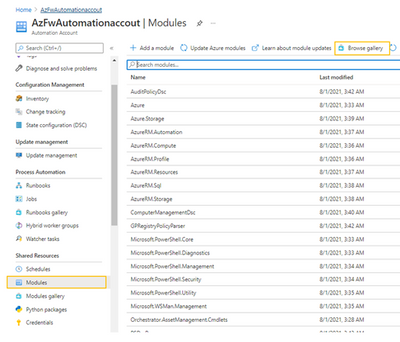
This runbook is a PowerShell module and we need to confirm that we have access to network and resources modules. On the Automation account blade which you have just created, go to Modules and then search the Gallery to import the following three requisites:
– Az.Account
– Az.Network
– Az.Resources
Create Storage account
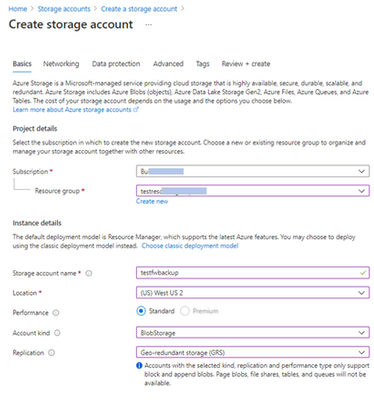
Next, we create a storage account to store each back-up created in Azure Blob storage. Go to the search bar for resources and search for Storage Account. Create a Storage account. Select Cool storage mode
Next, we create the Runbook.
On the Automation account blade, click on Runbooks and create one. Here below, I have created AzFwBackUp.
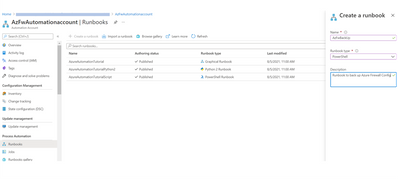
After creating the runbook, copy the code from our Azure Network Security Github repository and paste it in line one. This code has three functions: 1. Create storage, 2. Export the firewall configuration, and save in the storage, and 3. Purge the older backups. It uses the Get-AzFirewall and Get-AzFirewallPolicy cmdlet to create snapshot instances.
Click Save and then click on Test Plane.
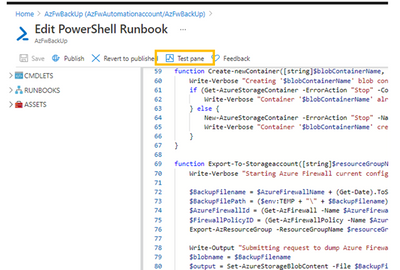
On the next page, you will be prompted for a few parameters which you have set up earlier:
- Provide the resource group name, Azure Firewall name and Firewall Policy name, obtainable in your Resource group
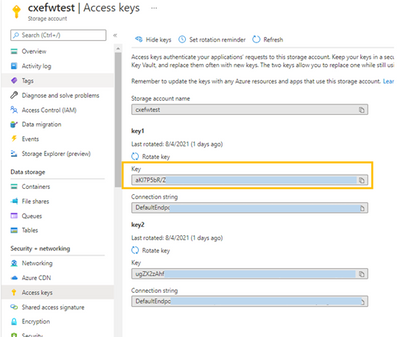
- Provide storage account name that was created in the step earlier above and the storage key. The storage key can be obtained under “Access Keys” in the Storage Account blade (see image below).
- Give it a Blob container name and specify a retention date. Back-ups older than this date will be deleted at next run.
Test the script
Click Start to begin the dry run to confirm you can store a copy of the current configuration. Once done, you can then proceed to create a schedule to make this run periodically.
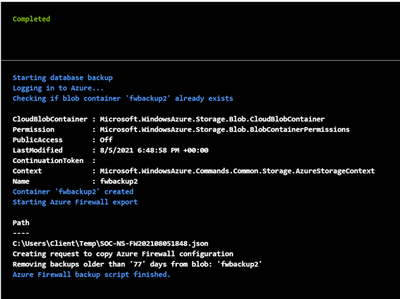
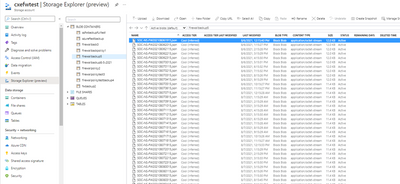
The back-up should be available in your Storage -> Container in .json format.
Create a schedule
To create a schedule, go to the Runbook that was created, at the Runbook blade, select Schedules -> Add a Schedule. Give it a name and select “Recurring” Configure for every week or month.
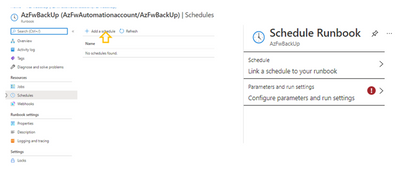
Click to “Link the schedule to the runbook.” Select the runbook you have created and then click “Configure parameters and run settings,” Fill this form as done earlier.
The Runbook should now be all set to create back-ups in. json template that may be used to restore the firewall to an earlier configuration. The storage account should now store your back-ups as specified.
Restore Azure Firewall
To restore an Azure firewall (firewall infrastructure and firewall policy) to an earlier configuration, run the following syntax in your Cloud shell:
New-AzResourceGroupDeployment -name $azurefirewallname -ResourceGroupName $resourcegroupname -TemplateFile $filepath
Note that Rule Collection Groups or RCGs are treated as dependency objects and these objects cannot be deployed in parallel. Collection groups all reference the policy as dependant (dependsOn in the arm template).
This means it will first update policy and then try to update all rule collection groups in parallel. This may fail due to the policy dependency issue. (This is currently by ARM (Azure Resource Manager) design and a roadmap item).
Hence, rule collection groups must be deployed one after the other using the “depends on” tag in your firewall backup file.
As an example, the Rule Collection Group would have to be edited using the rule processing order.
The format is to first specify the Firewall Policy name, then Policy RCG object.
      "type": "Microsoft.Network/firewallPolicies/ruleCollectionGroups",

      "apiVersion": "2020-11-01",

      "name": "SOC-NS-FWPolicy_premium/DefaultNetworkRuleCollectionGroup",

      "location": "westus2",

      "dependsOn": [

        "[resourceId('Microsoft.Network/firewallPolicies', 'SOC-NS-FWPolicy_premium')]",

   "[resourceId('Microsoft.Network/firewallPolicies/ruleCollectionGroups', 'SOC-NS-FWPolicy_premium','DefaultDnatRuleCollectionGroup')]"

      ]
(Also, confirm that the KeyVault information is not missing after the redeployment is complete)
In summary, you may need to export firewall settings when creating child policies, restoring from a wrong configuration, auditing rules etc. By setting up frequent back up schedule, you can create a historical record of your configuration.
For more information about Azure firewall use cases and governance information, see the Azure Network Security TechCommunity blog
by Scott Muniz | Jan 18, 2022 | Security, Technology
This article is contributed. See the original author and article here.
CISA has added 13 new vulnerabilities to its Known Exploited Vulnerabilities Catalog, based on evidence that threat actors are actively exploiting the vulnerabilities listed in the table below. These types of vulnerabilities are a frequent attack vector for malicious cyber actors of all types and pose significant risk to the federal enterprise.
| CVE Number |
CVE Title |
Required Action Due Date |
| CVE-2021-32648 |
October CMS Improper Authentication |
2/1/2022 |
| CVE-2021-21315 |
System Information Library for node.js Command Injection Vulnerability |
2/1/2022 |
| CVE-2021-21975 |
Server Side Request Forgery in vRealize Operations Manager API Vulnerability |
2/1/2022 |
| CVE-2021-22991 |
BIG-IP Traffic Microkernel Buffer Overflow Vulnerability |
2/1/2022 |
| CVE-2021-25296 |
Nagios XI OS Command Injection Vulnerability |
2/1/2022 |
| CVE-2021-25297 |
Nagios XI OS Command Injection Vulnerability |
2/1/2022 |
| CVE-2021-25298 |
Nagios XI OS Command Injection Vulnerability |
2/1/2022 |
| CVE-2021-33766 |
Microsoft Exchange Server Information Disclosure Vulnerability |
2/1/2022 |
| CVE-2021-40870 |
Aviatrix Controller Unrestricted Upload of File Vulnerability |
2/1/2022 |
| CVE-2020-11978 |
Apache Airflow Command Injection Vulnerability |
7/18/2022 |
| CVE-2020-13671 |
Drupal Core Unrestricted Upload of File Vulnerability |
7/18/2022 |
| CVE-2020-13927 |
Apache Airflow Experimental API Authentication Bypass Vulnerability |
7/18/2022 |
| CVE-2020-14864 |
Oracle Corporate Business Intelligence Enterprise Edition Path Traversal Vulnerability |
7/18/2022 |
Binding Operational Directive (BOD) 22-01: Reducing the Significant Risk of Known Exploited Vulnerabilities established the Known Exploited Vulnerabilities Catalog as a living list of known CVEs that carry significant risk to the federal enterprise. BOD 22-01 requires FCEB agencies to remediate identified vulnerabilities by the due date to protect FCEB networks against active threats. See the BOD 22-01 Fact Sheet for more information.
Although BOD 22-01 only applies to FCEB agencies, CISA strongly urges all organizations to reduce their exposure to cyberattacks by prioritizing timely remediation of Catalog vulnerabilities as part of their vulnerability management practice. CISA will continue to add vulnerabilities to the Catalog that meet the meet the specified criteria.



 ) or https:// means you’ve safely connected to the .gov website. Share sensitive information only on official, secure websites.
Recent Comments