by Contributed | Feb 3, 2022 | Technology
This article is contributed. See the original author and article here.
Overview
Charting in Excel has long been an important tool our customers use to explore, analyze, and tell stories about their data. Until a few years ago however, Excel for the Web primarily served as consumption-based companion app to our desktop versions – this meant that users were limited in their ability to create and edit charts on the web. As part of the broader effort to evolve Excel for the Web, the team has been working hard to elevate the charting experience and is excited to share several major improvements we have made over the last couple years that are available to all free and paid customers. In this blog post, we’ll cover some of the most significant upgrades we’ve made, which provide users with a more robust chart editing experience.
The Format Pane and On-Chart Interactions
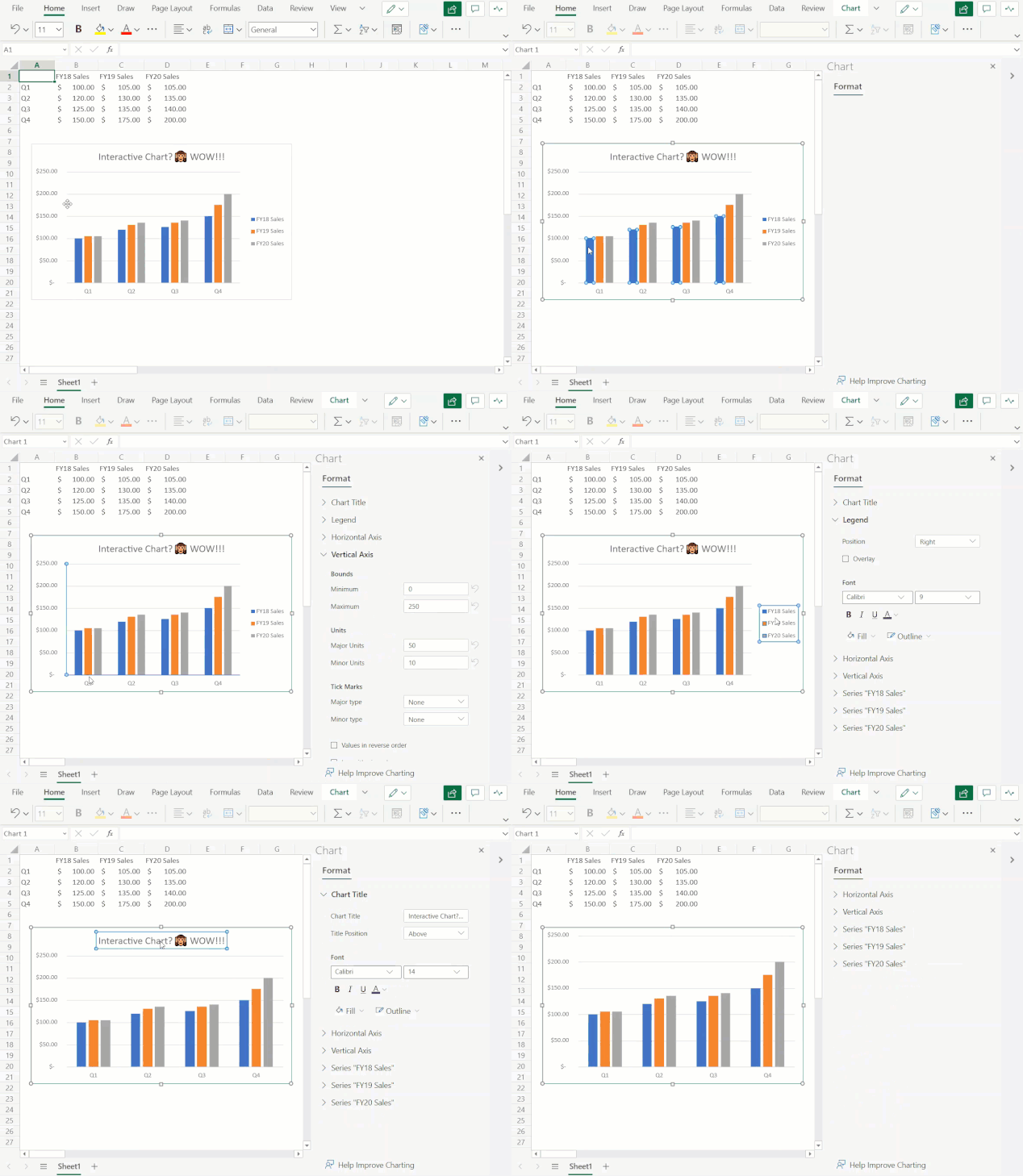
You can now leverage the format task pane and on-chart interactions to format charts on the web. The format pane provides formatting support for critical chart properties (axes, legend, data series, etc.) and makes it easy to view and navigate to each editable chart element. You are now able to make property edits to elements of a chart such as the fill/outline color, number format, axis bounds, and more.
You can now also directly select the individual elements within a chart to launch and navigate to their respective formatting options in the format pane. Previously, users could only select the entire chart but not any contents within the chart.
To explore these new capabilities, launch the task pane by double-clicking anywhere on the chart or by right-clicking and selecting “Format”. From there, you can view each chart element’s formatting options by either selecting an element within the chart or expanding the options in the format pane.
Launch and navigate the Chart Format Pane by directly interacting with chart elements
Support for Adding & Removing Chart Elements
You can now also add and remove chart elements without having to leave the format pane. Users can leverage the new on/off toggles in the pane to choose whether to include a chart element in the chart. Alternatively, you can use the delete/backspace keys to remove a chart element that is selected. We have also added support for adding/removing trendlines and error bars.
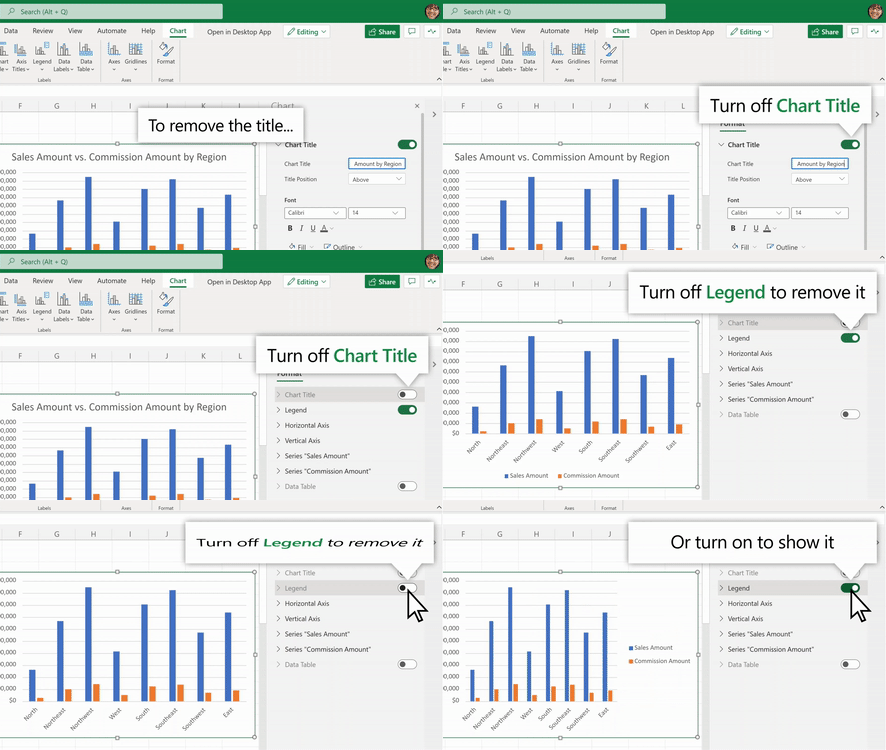 Use the Chart Format Pane’s toggles to add/remove chart elements from your chart
Other Improvements
- You can now select data from non-adjacent rows to create a chart. Previously, users were limited to creating charts from a continuous range of cells.
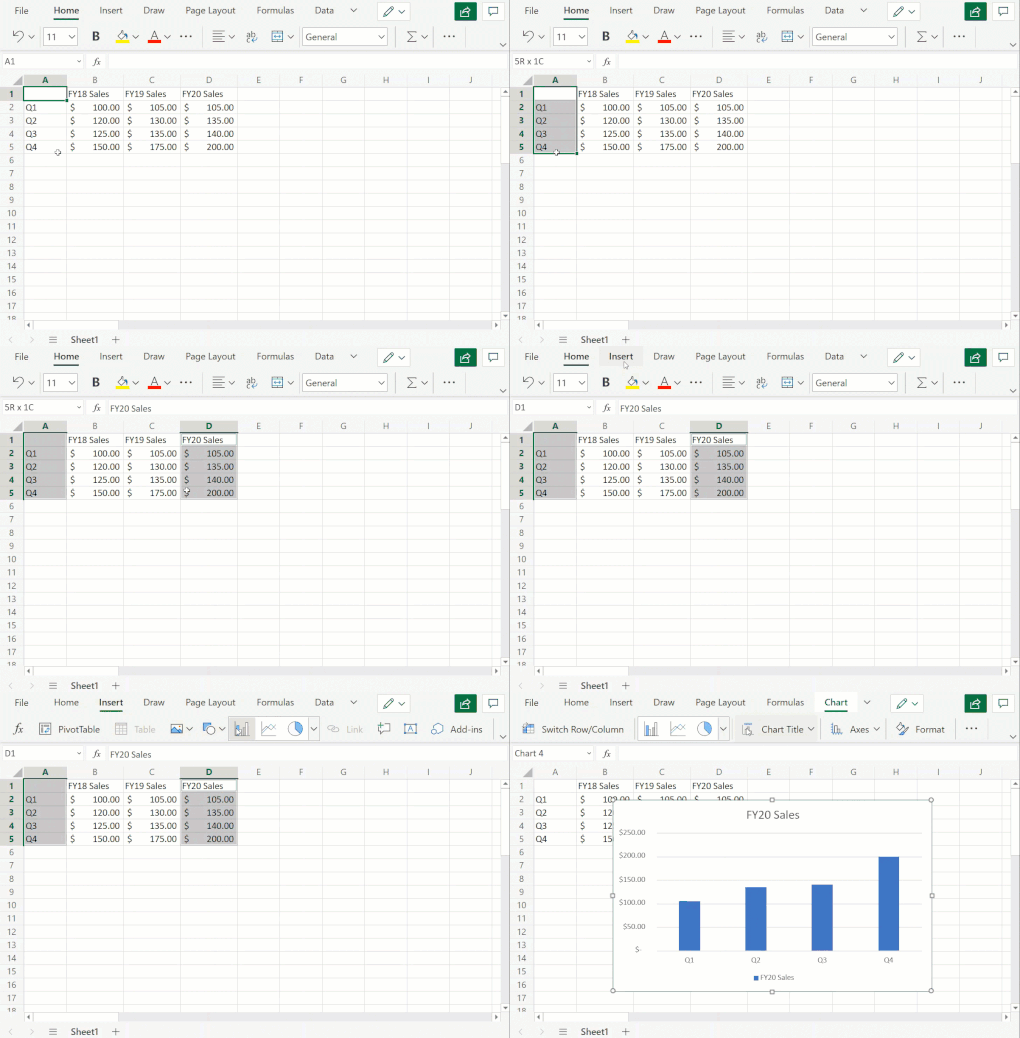
- You can now freely change between all different chart types. Previously, some chart type changes were not supported.
- We have also added undo/redo support for all chart commands and enabled sheet duplication for worksheets containing any chart type.
Stay tuned as we continue to improve Excel’s web charting experience – we’ll be sharing more updates as new features become available!
Your feedback is important for us! Tell us what you think about these improvements to the charting experience in Excel for the web by writing a comment on this blog post or Send us a smile or frown. You can also submit new ideas or vote for other ideas via Microsoft Feedback.
Want to know more about Excel for the web? See What’s new in Excel for the web and subscribe to our Excel Blog to get the latest updates. Stay connected with us and other Excel fans around the world – join our Excel Community and follow us on Twitter.
by Contributed | Feb 2, 2022 | Technology
This article is contributed. See the original author and article here.
The SMTP protocol isn’t secure and wasn’t designed to be. Email sent in the early days of the Internet were the digital equivalent of sending a postcard through the postal system. Eventually, Transport Layer Security (TLS) encryption was added to protect SMTP communications. But to maintain backward compatibility, it was never made compulsory and even today it’s used only opportunistically by senders.
TLS uses certificates for encryption, but they aren’t used for verifying the identity of the destination server. This exposes SMTP connections to DNS tampering that can redirect connections to an attacker’s server. Senders have no way to confirm that destination server is the intended email server. Even worse, after intercepting traffic, a savvy attacker can relay it to the intended destination, and neither the sender nor the recipient would be aware that a man-in-the-middle attack ever took place.
The SMTP MTA Strict Transport Security (MTA-STS) standard was developed to ensure that TLS is always used, and to provide a way to for sending servers to refuse to deliver messages to servers that don’t support TLS and have a trusted certificate. The MTA-STS standard was developed by several email industry companies brought together by the Messaging, Malware and Mobile Anti-Abuse Working Group (M3AAWG). We have been validating our implementation and are now pleased to announce support for MTA-STS for all outgoing messages from Exchange Online.
Outbound Protection
All outbound Exchange Online email traffic is covered by this new security feature, and there’s nothing admins need to do to leverage it. Our outbound implementation respects the wishes of the recipient domain owners via their MTA-STS policy. MTA-STS now forms part of the security infrastructure of Exchange Online, and it’s always on (like other core SMTP features).
Inbound Protection
Nothing new is needed from Exchange Online to leverage MTA-STS protection for your own domains. Exchange Online supports TLS1.2 and offers the TLS certificates that are required by the standard. As domain owners ourselves, we secured several of our own domains, including primary domains such as outlook.com, hotmail.com, and live.com. Therefore, we’re now assured that connections from senders who support MTA-STS are much better protected against man-in-the-middle attacks. If a sender does not perform MTA-STS validations, email will still be delivered as normal, and TLS will be used if the sender chooses to use it.
NOTE: Messages will be delivered when only one party supports MTA-STS. For example, when an MTA-STS-protected domain receives a message from a sender domain that doesn’t support MTA-STS, the message is delivered. The message is also delivered when the recipient domain doesn’t support MTA-STS, but the sender domain does. The only scenario where messages aren’t delivered is when both sides are using MTA-STS and MTA-STS validation fails.
How To Adopt MTA-STS
MTA-STS allows a domain to declare support for TLS and communicate the MX record and destination certificate to expect. It also indicates what a sending server should do if there’s a problem. This is done through a combination of a DNS TXT record and a policy file that’s published as an HTTPS web page. The HTTPS-protected policy introduces another security protection that attackers must overcome.
A domain’s MTA-STS TXT record indicates MTA-STS support to a sender, after which the domain’s HTTPS-based MTA-STS policy is retrieved by the sender. The following TXT record is an example that declares support for MTA-STS:
_mta-sts.contoso.com. 3600 IN TXT v=STSv1; id=20211201000000Z;
A domain’s MTA-STS policy is located at a predefined URL that’s hosted by the domain’s web infrastructure. The URL syntax is https://mta-sts.<domain name>/.well-known/mta-sts.txt. For example, Microsoft.com’s policy is found at: https://mta-sts.microsoft.com/.well-known/mta-sts.txt
version: STSv1
mode: enforce
mx: *.mail.protection.outlook.com
max_age: 604800
Any customers whose MX records point directly to Exchange Online can use this same policy. The unique, required information in the policy is the MX record that points to Exchange Online, and the same certificate is shared by Exchange Online customers.
To be protected by MTA-STS, a domain owner needs to create the DNS TXT domain record and host the policy file at the required HTTPS URL with a valid certificate that contains their domain. Details about MTA-STS are available in RFC 8461.
Staying Informed Through TLS-RPT Reports
Accompanying MTA-STS is an extremely useful industry specification that outlines a standard mechanism to allow email services to report sending issues that occur when sending to a specific domain. This is the first time a channel is available for domain owners to get direct reports of actual issues that senders encounter when sending email to the domain. This reporting mechanism can avoid the need for senders to report issues related to sending email to your domain.
The TLS-RPT standard provides reporting for MTA-STS (and DANE for SMTP) with a single daily report from each email service that supports it. To receive TLS-RPT reports, a domain owner can create a DNS TXT entry to indicate where they would like to receive reports. For most admins, it means sending the reports to an email address, as shown in the following example:
TXT Record example: _smtp._tls.example.com. 3600 IN TXT TLSRPTv1;rua=mailto:reports@example.com
Email services that send email to your domain and that support both MTA-STS and TLS-RPT send daily reports to the provided email address. Details about TLS-RPT are available in this RFC 8460. Microsoft has started sending TLS-RPT reports to domains that have requested them.
MTA-STS Failures
If an MTA-STS check fails and the domain’s policy is set to enforce, an NDR will be generated and the message will not be sent. The following list describes the errors that might occur due to MTA-STS failures:
- Destination server does not support TLS
551 5.7.4 STARTTLS is required by recipient domain’s MTA-STS policy
- Destination server does not support TLS 1.2 or above
551 5.7.6 MTA-STS requires TLS 1.2 or higher. TLS Version: <Observed TLS version>
- Domain’s MX record failed MTA-STS validation
551 5.4.8 MX hosts of ‘<Domain>’ failed MTA-STS validation.
- The destination’s certificate must contain the hostname in the MX record
551 5.7.5 Remote certificate MUST have a subject alternative name matching the hostname (MTA-STS)
- The destination’s certificate failed validation
551 5.7.5 Remote certificate failed MTA-STS validation. Reason: <Reason>
Implementation
We try to respect RFCs to the best of our abilities. The goal is to achieve the best interoperability possible. In a small number of scenarios, there may be unexpected behavior, and we’ll do our best to document that behavior.
For example, one difference in behavior involves CNAME records and MX records. Having a CNAME record for an MX record doesn’t comply with the SMTP RFC, but in the interest of successfully sending the email of our customers, we currently resolve CNAMEs to the servers that they point to for message deliveries. For MTA-STS, we’ve taken a stricter approach to supporting the RFC. We do not support CNAMEs when MTA-STS is used. If a domain uses a CNAME and follows the MTA-STS RFC, that domain will fail our MTA-STS checks, and will not receive emails from us. However, it’s possible for a domain to include the final server in their MTA-STS policy and pass our MTA-STS checks, even though that would not strictly follow the MTA-STS RFC.
MTA-STS Vs SMTP DANE
MTA-STS came about because of the slow roll out of DNSSEC to protect the DNS records that are associated with SMTP. MTA-STS can be seen as a lighter-weight mechanism to secure your mail flow. Although MTA-STS offers a much-needed upgrade to current SMTP protections, DANE for SMTP (with the support of DNSSEC) is the gold standard for securing SMTP connections. However, many customers might find MTA-STS good enough for their security needs.
We’ve been working on support for both MTA-STS and DANE for SMTP. At the very least, we encourage customers to secure their domains with MTA-STS. You can use both standards on the same domain at the same time, so customers are free to use both when Exchange Online offers inbound protection using DANE for SMTP by the end of 2022. By supporting both standards, you can account for senders who may support only one method.
Both MTA-STS and DANE require adoption from domain owners on the receiving side and services/servers that send email. We strongly encourage everyone to adopt these standards to improve the overall security of SMTP connections. Currently, we successfully validate connections to over 35K MTA-STS-protected domains, and this number is growing every month.
Future Work
We’re actively working on features that are related to the MTA-STS and DANE for SMTP standards with the goal of making it easier for our customers to make the most of them. We’ll announce these features as they become available.
Exchange Online Transport Team


Recent Comments