by Scott Muniz | Mar 3, 2022 | Security, Technology
This article is contributed. See the original author and article here.
CISA has added 95 new vulnerabilities to its Known Exploited Vulnerabilities Catalog, based on evidence of active exploitation. These types of vulnerabilities are a frequent attack vector for malicious cyber actors and pose significant risk to the federal enterprise. Note: to view the newly added vulnerabilities in the catalog, click on the arrow on the of the “Date Added to Catalog” column, which will sort by descending dates.
Binding Operational Directive (BOD) 22-01: Reducing the Significant Risk of Known Exploited Vulnerabilities established the Known Exploited Vulnerabilities Catalog as a living list of known CVEs that carry significant risk to the federal enterprise. BOD 22-01 requires FCEB agencies to remediate identified vulnerabilities by the due date to protect FCEB networks against active threats. See the BOD 22-01 Fact Sheet for more information.
Although BOD 22-01 only applies to FCEB agencies, CISA strongly urges all organizations to reduce their exposure to cyberattacks by prioritizing timely remediation of Catalog vulnerabilities as part of their vulnerability management practice. CISA will continue to add vulnerabilities to the Catalog that meet the specified criteria.
Note: prioritizing software updates that address known exploited vulnerabilities is one of the actions CISA encourages as part of the recent Shields Up recommendations to all stakeholders. CISA appreciates the contributions of Joint Cyber Defense Collaborative (JCDC) partners to this recent addition to the catalog.

by Scott Muniz | Mar 3, 2022 | Security, Technology
This article is contributed. See the original author and article here.
Official websites use .gov
A .gov website belongs to an official government organization in the United States.

Secure .gov websites use HTTPS
A
lock ( )
) or
https:// means you’ve safely connected to the .gov website. Share sensitive information only on official, secure websites.
by Contributed | Mar 2, 2022 | Technology
This article is contributed. See the original author and article here.
Watchlists are a critical component to enhance security operations and provide data correlation. Up till now, watchlist files have been limited to 3.8 MB per upload. We are excited to announce that Watchlists now support up to 500 MB file size per upload!
There are many scenarios where you will need to reference and look up a larger dataset in your detection rules or investigation. Here are some sample use cases you can use the large watchlists for.
- Map database of IPv4 address networks with their respective geographical location from known sources such as MaxMind or IP2Location.
- Leverage the CVE vulnerability database to help enrich incidents and alerts that may be related to a known exploit.
- Enrich alerts and incidents with custom datasets that are larger than 3.8MB in size.
How to create a large watchlist
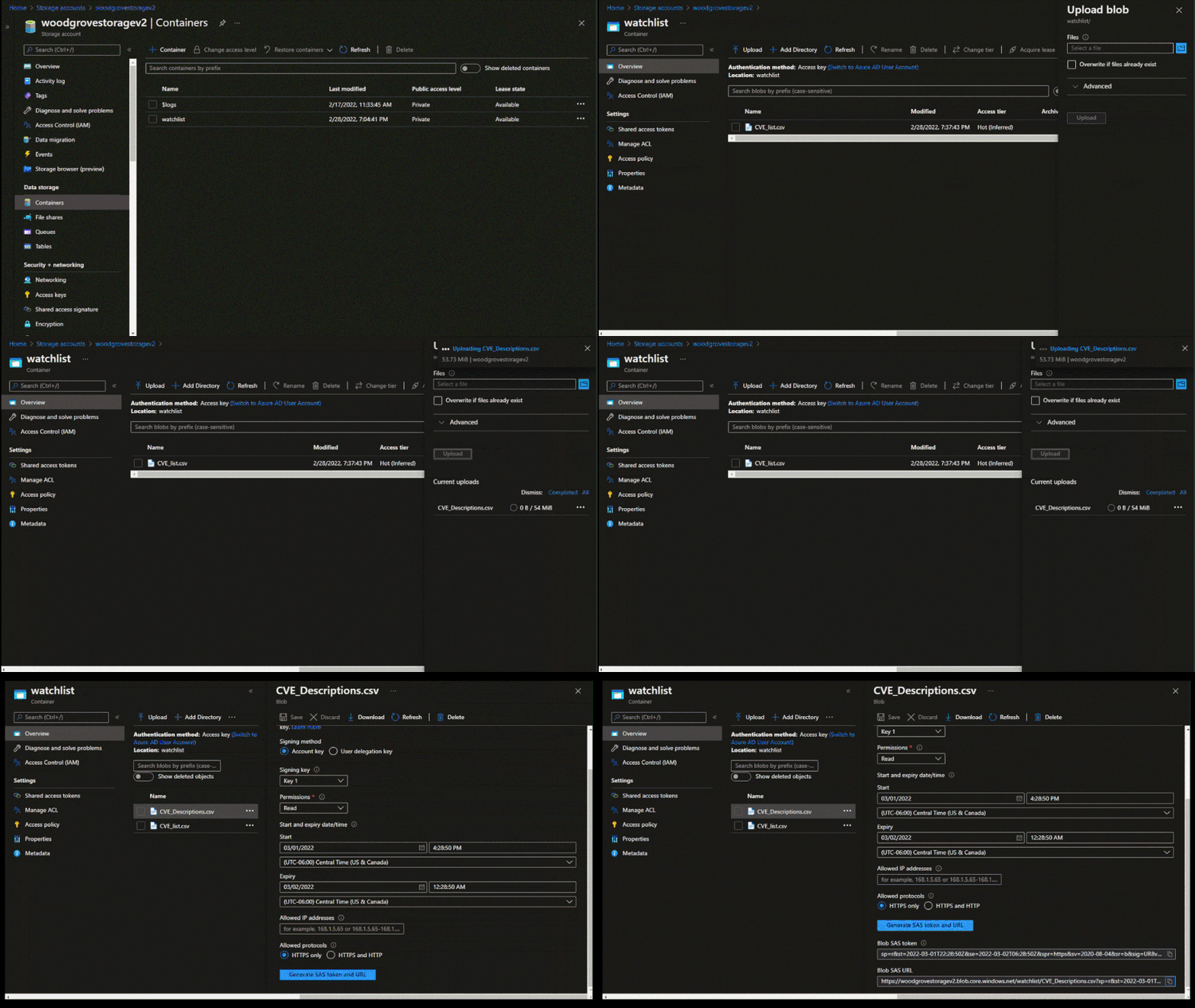
To create a large watchlist, you will need to upload a watchlist file in an Azure Storage account. Then create a shared access signature (SAS) URL for Microsoft Sentinel to securely retrieve the watchlist data. Finally upload the watchlist to your workspace in Microsoft Sentinel.
Check out our step-by-step instructions to create a large watchlist.
Upload the watchlist file in an Azure Storage account and generate a secure SAS URL
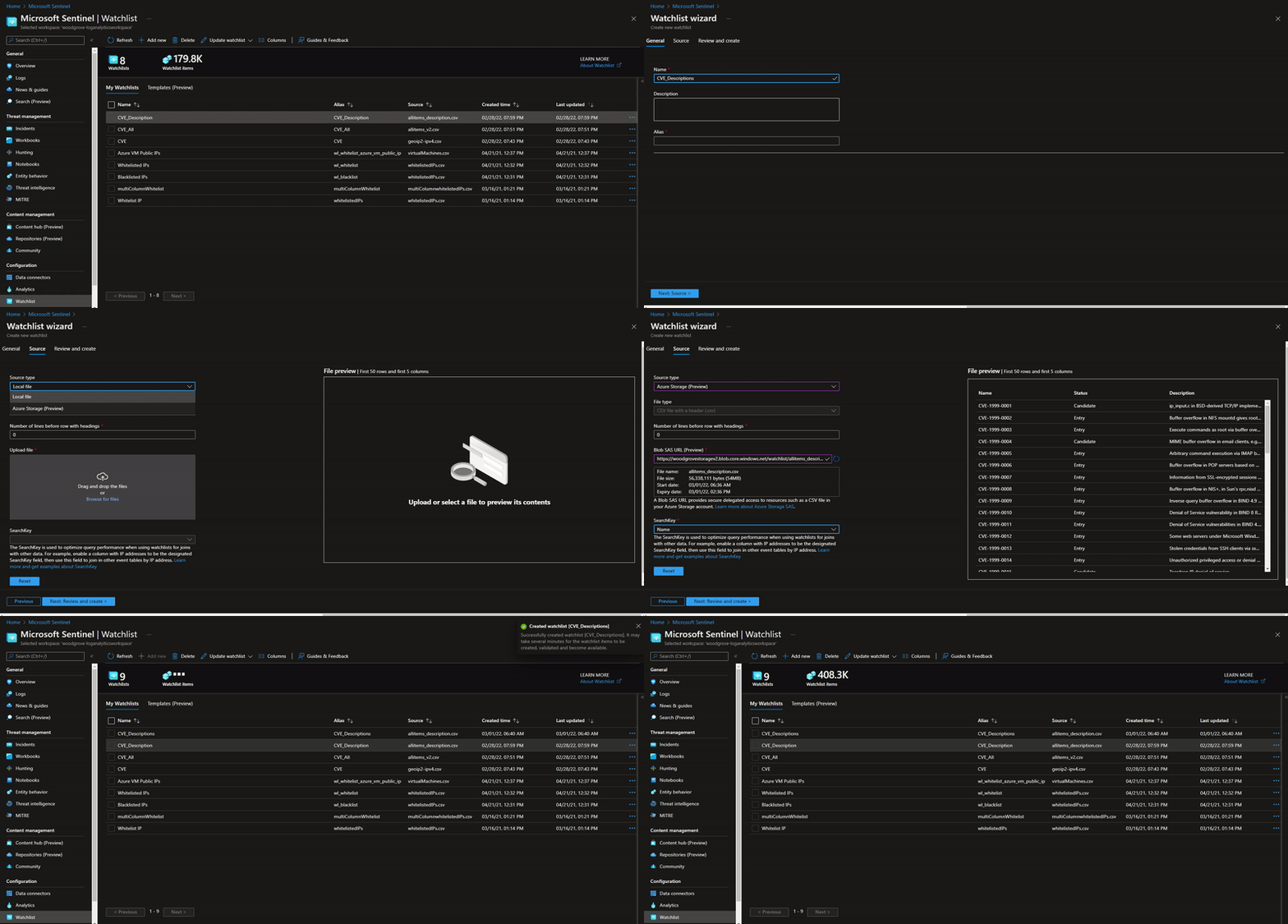 Upload a large watchlist in Microsoft Sentinel portal
Considerations:
- Creating a watchlist from a local file is still limited to 3.8 MB per upload. The increased limit applies only to watchlist files stored in Azure Storage.
- Microsoft Sentinel will require an Azure Storage Blob SAS URL to access and download the file for processing and ingestion into the watchlist table. The SAS URL must have at least 6 hours away from its expiry time.
- An entry in the CSV file must not exceed 10,240 characters per line.
Further reading resources:
Try out this new watchlist capability and let us know your feedback!
by Scott Muniz | Mar 2, 2022 | Security, Technology
This article is contributed. See the original author and article here.
Google has released Chrome version 99.0.4844.51 for Windows, Mac, and Linux. This version addresses vulnerabilities that an attacker could exploit to take control of an affected system.
CISA encourages users and administrators to review the Chrome Release Note and apply the necessary updates.
by Contributed | Feb 28, 2022 | Technology
This article is contributed. See the original author and article here.
We are happy to announce self-service trials for Microsoft Visio. As of today, you can sign up for free 30-day trials of Visio Plan 1 or Visio Plan 2 on existing Microsoft 365 tenants managed by your organization using your business login. Then, test out the full functionality of the Visio web and desktop apps before directly purchasing subscriptions.
With self-service trials, you can sign up for trial licenses for up to five users and then, with a limited admin role, assign the trial licenses to your colleagues in the Microsoft 365 admin center. If you run in to any issues signing up for your trial licenses, please contact your IT department.
These new self-service trial capabilities are available worldwide except for India. They are not available for Education or Government customers.
Please note: You will be asked to provide credit card details at signup. At the end of your 30-day trial, you will be charged the applicable subscription fee to continue using Visio. Cancel at any time to stop future charges.
Determine which Visio trial is right for you
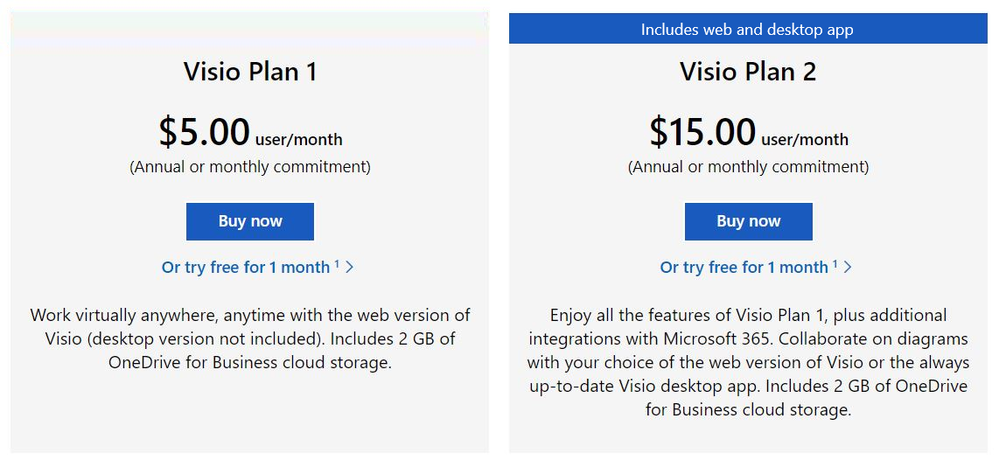
With the Visio Plan 1 trial, you and your team members will have full access to the Visio web app—including dozens of diagram templates and hundreds of shapes—and 2 GB of OneDrive for Business cloud storage. The Visio Plan 2 trial includes all the features in the Visio Plan 1 trial, plus additional templates, shapes, and advanced features in the Visio desktop app. During both trials, you’ll be able to create, edit, share, and collaborate on diagrams and flowcharts using Visio or Microsoft Teams (requires a Microsoft 365 subscription to use Teams).
How to sign up
The 30-day trials of Visio Plan 1 and Visio Plan 2 are available for self-service signup by individuals and departments from the Visio plans and pricing comparison page. Select the corresponding trial link below the Buy Now button and complete the necessary steps.
Screenshot of Visio Plan 1 and Visio Plan 2: Click on “Or try free for 1 month” to complete the steps to start your trial
Manage trial licenses as a Global or Billing admin
The self-service trial capabilities do not compromise IT oversight or control. If you are an admin, you can use the same self-service purchase controls to disable self-service trials while making use of subscription management capabilities to oversee and manage trial licenses on the licensing page in the Microsoft 365 admin center.
If you’ve disabled the self-service purchase functionality for Visio in the past, self-service trials signup for individuals or departments will automatically allow users to request licenses directly from you. Learn more about managing self-service licenses acquired by individuals or departments in your organization.
Give us feedback about your trial experience! Please tell us what you think in the comments below or send feedback via the Visio Feedback portal.
Continue the conversation by joining us in the Microsoft 365 Tech Community! Whether you have product questions or just want to stay informed with the latest updates on new releases, tools, and blogs, Microsoft 365 Tech Community is your go-to resource to stay connected!


Recent Comments