
by Contributed | Apr 12, 2021 | Technology
This article is contributed. See the original author and article here.
Microsoft partners and customers have been building metrics monitoring solutions for AIOps and predictive maintenance, by leveraging the easy-to-use time-series anomaly detection Cognitive Service: Anomaly Detector. Because of its ability to analyze time-series individually, Anomaly Detector is benefiting the industry with its simplicity and scalability.
What’s new
We are pleased to announce the new multi-variate capability of Anomaly Detector. The new multivariate anomaly detection APIs in Anomaly Detector further enable developers to easily integrate advanced AI of detecting anomalies from groups of metrics into their applications without the need for machine learning knowledge or labeled data. Dependencies and inter-correlations between different signals are now counted as key factors. The new feature protects your mission-critical systems and physical assets, such as software applications, servers, factory machines, spacecraft, or even your business, from failures with a holistic view.
Imagine 20 sensors from an auto engine generating 20 different signals, e.g., vibration, temperature, etc. The readings of those signals individually may not tell you much on system-level issues, but together, could represent the health of the engine. When the synergy of those signals turns odd, the multivariate anomaly detection feature can sense the anomaly like a seasoned floor expert. Moreover, the AI models are trained and customized for your data such that it understands your business. With the new APIs in Anomaly Detector, developers can now easily integrate the multivariate time-series anomaly detection capabilities as well as the interpretability of the anomalies into predictive maintenance solutions, or AIOps monitoring solutions for complex enterprise software, or business intelligence tools.
Customer love
“Medical device production demands unprecedented precision. For this reason, the Siemens Healthineers team uses Multivariate Anomaly Detector (MVAD) in medical device stress tests during the final inspection in the production. We found MVAD easy to use and work almost out of the box with promising performance. With the ready-to-use model, we don’t need to develop a custom AD model, which ensures a short time to market. We plan to expand this technology also to other use cases. It is made easy due to good integration into our ML platform and processes.” – Dr. Jens Fürst, Head Digitalization and Automation at Siemens Healthineers

To better understand the health and condition of the aircraft and foresee and fix potential problems before they occur, Airbus deployed Anomaly Detector, part of Cognitive Services, to gather and analyze the telemetry data. It began as a proof of concept of the aircraft-monitoring application by loading telemetry data from multiple flights for analysis and model training. “Early tests have shown that for many cases, the out-of-the-box solution works beautifully, which helps us deploy our solutions faster. I would say that we save up to three months on development for our smaller use cases with Anomaly Detector.”
Marcel Rummens: Product Owner of Internal AI Platform, Airbus
AI horsepower
Time-series anomaly detection is an important research topic in data mining and has a wide range of applications in the industry. Efficient and accurate anomaly detection helps companies to monitor their key metrics continuously and alert for potential incidents on time. In many real-world applications like predictive maintenance and SpaceOps, multiple time-series metrics are collected to reflect the health status of a system. Univariate time-series anomaly detection algorithms can find anomalies for a single metric. However, it could be problematic in deciding whether the whole system is running normally. For example, sudden changes of a certain metric do not necessarily mean failures of the system. As shown in Figure 1, there are obvious boosts in the volume of TIMESERIES RECEIVED and DATA RECEIVED ON FLINK in the green segment, but the system is still in a healthy state as these two features share a consistent tendency. However, in the red segment, GC shows an inconsistent pattern with other metrics, indicating a problem in garbage collection. Consequently, it is essential to take the correlations between different time series into consideration in a multivariate time-series anomaly detection system.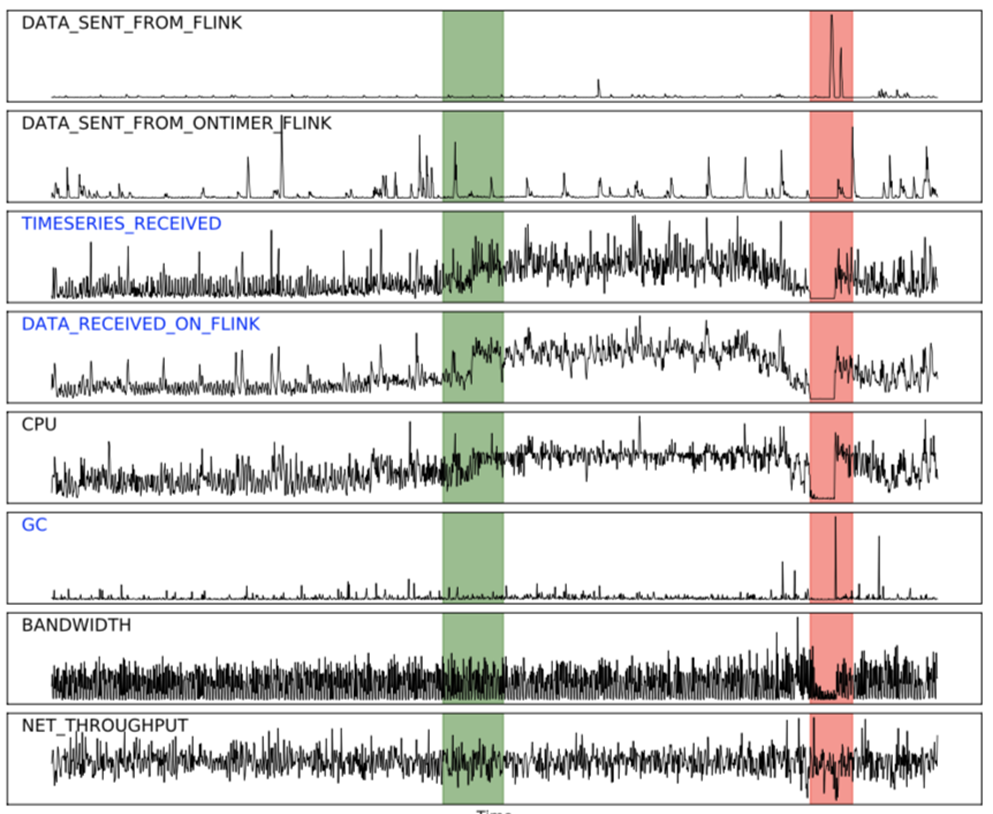 Fig.1
Fig.1
In this newly introduced feature, we productized a novel framework — MTAD-GAT (Multivariate Time-series Anomaly Detection via Graph Attention Network), to tackle the limitations of previous solutions. Our method considers each univariate time-series as an individual feature and tries to model the correlations between different features explicitly, while the temporal dependencies within each time-series are modeled at the same time. The key ingredients in our model are two graph attention layers, namely the feature-oriented graph attention layer and the time-oriented graph attention layer. The feature-oriented graph attention layer captures the causal relationships between multiple features, and the time-oriented graph attention layer underlines the dependencies along the temporal dimension. In addition, we jointly train a forecasting-based model and a reconstruction-based model for better representations of time-series data. The two models can be optimized simultaneously by a joint objective function.
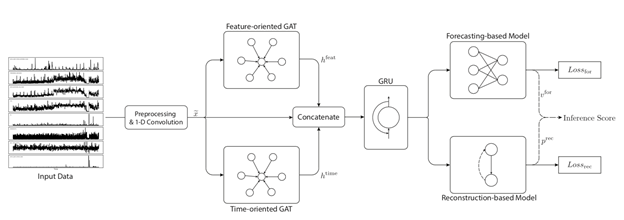
The magic behind the scenes can be summarized as follows:
- A novel framework to solve the multivariate time-series anomaly detection problem in a self-supervised manner. Our model shows superior performances on two public datasets and establishes state-of-the-art scores in the literature.
- For the first time, we leverage two parallel graph attention (GAT) layers to learn the relationships between different time-series and timestamps dynamically. Especially, our model captures the correlations between different time-series successfully without any prior knowledge.
- We integrate the advantages of both forecasting-based and reconstruction-based models by introducing a joint optimization target. The forecasting-based model focuses on single-timestamp prediction, while the reconstruction-based model learns a latent representation of the entire time-series.
- Our network has good interpretability. We analyze the attention scores of multiple time-series learned by the graph attention layers, and the results correspond reasonably well to human intuition. We also show its capability of anomaly diagnosis.
Multivariate anomaly detection API overview
This new feature has a different workflow compared with the existing univariate feature. There are two phases to obtain the detection results, the training phase, and the inference phase. In the training phase, you need to provide some historical data to let the model learn past patterns. Then in the inference phase, you can call the inference API to acquire detection results of multivariate time-series in a given range.
APIs
|
Functionality
|
/multivariate/models
|
Create and train model using training data
|
/multivariate/models/{modelid}
|
Get model info including training status and parameters used in the model
|
multivariate/models[?$skip][&$top]
|
List models of a subscription
|
/multivariate/models/{modelid}/detect
|
Submit inference task with user’s data, this is async
|
/multivariate/results/{resultid}
|
Get anomalies + root causes (the contribution scores of each variate for each incident)
|
multivariate/models/{modelId}
|
Delete an existing multivariate model according to the modelId
|
multivariate/models/{modelId}/export
|
Export Multivariate Anomaly Detection Model as Zip file
|
Get started!
by Contributed | Apr 12, 2021 | Technology
This article is contributed. See the original author and article here.
Introduction
This article is written to explain OAuth 2.0 and OpenID Connect bearer tokens (JWT) and concepts relating to Microsoft Azure AD and related technologies, but can most likely be applied elsewhere too.
Tokens are everywhere on the Internet. Even if you don’t realise it, you may have just used one on the way to read this article! You may ask “What is a token and what do I need it for?” and my answer would be “Which token?”. You see, there are different types of tokens all with their use cases.
This article is here to break down the different types, how and when they are used and what a token is comprised of. Hopefully this article will help you better understand tokens and apply this to getting started with other technologies such as Microsoft Graph.
What is a token?
A token is a list claims of something. A real world analogy could be a receipt from a purchase of goods you made. Let’s say you needed to prove that you bought to goods to return something. The receipt would most likely contain the date of purchase, the price you paid and most importantly, the goods purchased. Essentially, you are making a claim of ownership using the receipt. A token works in a similar way – it is a way to claim “I am me” or “I am allowed to do this”.
Token types
As explained in the introduction, there are many different types of tokens. This article will concentrate on the 3 most commonly used tokens in Azure AD:
ID tokens
ID tokens are used by a client to provide a user’s identity. This is referred to as authentication. One example is a user entering their credentials in to a client and being given an ID token on sign-in success. By then having an ID token, the client then can access resources as the signed-in user without prompting the user.
Important Note: ID tokens should only be used for identity purposes and NOT be used to grant access to additional resources. This will be covered next
Access tokens
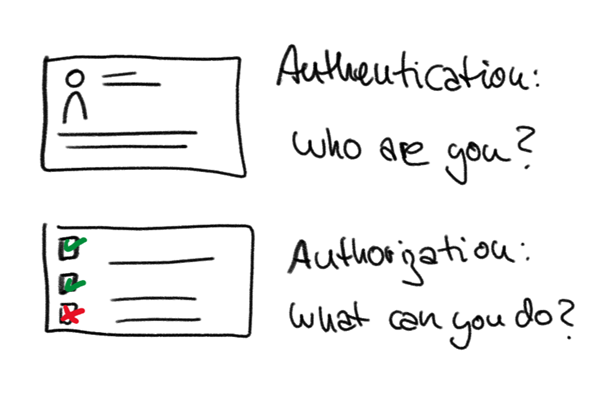
Access tokens are used by a client to obtain access to additional resources e.g. a protected API such as Microsoft Graph. This is referred to as authorization. With an access token, you can have a list of permissions (scopes) granted to you against a resource. You can then use these permissions in the access token to access protected resources that you would not be able to access with an ID token.
If you are still confused of the difference between authentication and authorization, @LuiseFreese sums it up perfectly:

The term “auth token” is widely used can become misleading as it could be interpreted as an authentication (ID) or authorization (access) token. It is important to distinguish the difference between the two and try to avoid using the term “auth token”.
Refresh tokens
Refresh tokens can be issued with ID and access tokens. Tokens have a fixed lifetime and expire, but with a refresh token a client can obtain a token without prompting the user for input. A basic example could be you are signed in to a client and it is using an access token with Microsoft Graph. On expiry of the access token, instead of interrupting the user, a new access token is silently obtained before the old access token expires using the refresh token from the original access token.
What makes up a token?
Let’s look at a sample token:
eyJ0eXAiOiJKV1QiLCJhbGciOiJSUzI1NiIsImtpZCI6IjFMVE16YWtpaGlSbGFfOHoyQkVKVlhlV01xbyJ9.eyJ2ZXIiOiIyLjAiLCJpc3MiOiJodHRwczovL2xvZ2luLm1pY3Jvc29mdG9ubGluZS5jb20vOTEyMjA0MGQtNmM2Ny00YzViLWIxMTItMzZhMzA0YjY2ZGFkL3YyLjAiLCJzdWIiOiJBQUFBQUFBQUFBQUFBQUFBQUFBQUFJa3pxRlZyU2FTYUZIeTc4MmJidGFRIiwiYXVkIjoiNmNiMDQwMTgtYTNmNS00NmE3LWI5OTUtOTQwYzc4ZjVhZWYzIiwiZXhwIjoxNTM2MzYxNDExLCJpYXQiOjE1MzYyNzQ3MTEsIm5iZiI6MTUzNjI3NDcxMSwibmFtZSI6IkFiZSBMaW5jb2xuIiwicHJlZmVycmVkX3VzZXJuYW1lIjoiQWJlTGlAbWljcm9zb2Z0LmNvbSIsIm9pZCI6IjAwMDAwMDAwLTAwMDAtMDAwMC02NmYzLTMzMzJlY2E3ZWE4MSIsInRpZCI6IjkxMjIwNDBkLTZjNjctNGM1Yi1iMTEyLTM2YTMwNGI2NmRhZCIsIm5vbmNlIjoiMTIzNTIzIiwiYWlvIjoiRGYyVVZYTDFpeCFsTUNXTVNPSkJjRmF0emNHZnZGR2hqS3Y4cTVnMHg3MzJkUjVNQjVCaXN2R1FPN1lXQnlqZDhpUURMcSFlR2JJRGFreXA1bW5PcmNkcUhlWVNubHRlcFFtUnA2QUlaOGpZIn0.1AFWW-Ck5nROwSlltm7GzZvDwUkqvhSQpm55TQsmVo9Y59cLhRXpvB8n-55HCr9Z6G_31_UbeUkoz612I2j_Sm9FFShSDDjoaLQr54CreGIJvjtmS3EkK9a7SJBbcpL1MpUtlfygow39tFjY7EVNW9plWUvRrTgVk7lYLprvfzw-CIqw3gHC-T7IK_m_xkr08INERBtaecwhTeN4chPC4W3jdmw_lIxzC48YoQ0dB1L9-ImX98Egypfrlbm0IBL5spFzL6JDZIRRJOu8vecJvj1mq-IUhGt0MacxX8jdxYLP-KUu2d9MbNKpCKJuZ7p8gwTL5B7NlUdh_dmSviPWrw
Makes sense, right? Of course not. All Azure AD tokens are also referred to as “JWTs” or JSON Web Tokens. This means that the token is formatted as a JSON object and then “base64Url” encoded and signed and with a bit of extra security (we’ll cover this soon), the end result is what we have above.
For an introduction in to JSON, I highly recommend Bob German’s article here.
Decoding a token
Taking the sample above and putting in in to jwt.ms, it is possible to decode from “base64url” back to human-readable JSON.


You will now see a JWT is made up of 3 parts:
- Header (red text)
- Payload (blue text)
- Signature (green text)
In the next two sections, we’ll cover off each part.
Payload
A payload or body is the content of the token where the claims are stored. Most tokens contain standard claims such as:
- “iss” – Identity of the service that issued the token e.g.
https://login.microsoftonline.com/9122040d-6c67-4c5b-b112-36a304b66dad/v2.0
- “sub” – The subject of the token e.g. the user
- “aud” – The audience of the token, who the token is intended for. This is usually the client and not the user
- “exp” – Expiry date of token in seconds since the Unix epoch
- “iat” – Time token was issued (Unix epoch seconds)
- “nbf” – Time token is valid from (Unix epoch seconds)
In addition to standard claims, there are custom claims in Azure AD tokens such as:
- “name” – Name of the subject
- “oid” – Azure AD object ID of the subject
- “tid” – Azure AD tenant ID of the subject
One great feature of jwt.ms is that you can view detailed descriptions of standard and Azure AD claims.
Validating a token
You may be thinking: I just decoded a token on a webpage – how is that secure? JWTs are typically “signed” (not encrypted) with an algorithm and private key by the issuer of the token. This doesn’t stop any of the payload or header from being decoded as the aim of a token isn’t to hide information, but provide validity to it.
Never store secret information in a payload of a token as it can be easily decoded.
It is up to the recipient e.g. your client to validate the token to ensure it can be trusted.
There is a bit more nuance to the process than outlined here, but here is the summary on how to validate a token. Within the header part of the JWT, it contains the information on how the JWT was “signed” (what algorithm and private/public key pair was used). With this information it is possible for the client (if it has access to the public key) to validate the signature part of the JWT.
In addition to the signature, validation should also be taken place on the payload such as expiry time, audience and issuer.
Token usage
Now we are familiar with tokens. Let’s cover how they could be used in a couple of scenarios:
OpenID Connect
OpenID Connect is a way to sign a user in to an application. It is used for authentication only and not authorization. In this example, the end-user (user-agent) requests access to an application. The application requires authentication, so the end-user is redirected to authenticate at the authorization sever (I know, confusing). If successful, an ID token is returned and then validated by the application. If it passes validation, access is granted to the application.
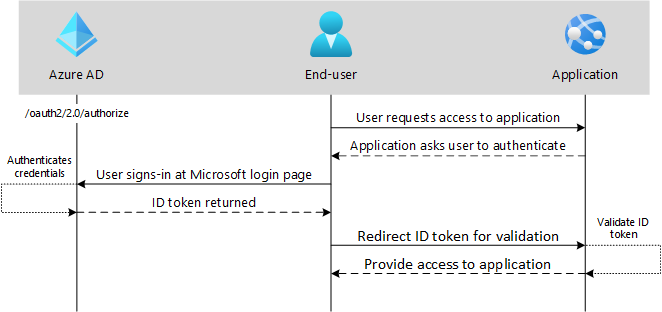
OAuth 2.0 auth code grant
Auth code grant flow is where a user is asked to sign-in at the authorization server (Azure AD). This time, however, instead of an ID token being returned, an authorization code is returned. A second request is then made to the authorization server with the authorization code, but this time an access token is returned. With the access token, a protected API can then be accessed.

Wrap up
I hope you found this useful and understand more around what tokens are, the different types of tokens and how they are used.

by Contributed | Apr 12, 2021 | Business, Microsoft 365, Microsoft Teams, Technology
This article is contributed. See the original author and article here.
We have learned over the past year that no business is impervious to everything. We also learned—or were reminded—how critical manufacturing ecosystems are to our daily lives.
The post How Microsoft Teams is powering hybrid work and the frontline in manufacturing appeared first on Microsoft 365 Blog.
Brought to you by Dr. Ware, Microsoft Office 365 Silver Partner, Charleston SC.

by Contributed | Apr 12, 2021 | Technology
This article is contributed. See the original author and article here.
We are temporarily pausing MidDay Cafe until our re-launch on May 10th.
Due to scheduling conflicts with increased interest in new offerings, as well re-structuring MidDay Cafe for a shorter format with different content and a new emphasis on podcast readiness, we are temporarily pausing MidDay Cafe. Look for an upcoming announcement with meeting invite and more.
Michael Gannotti
Michael Gannotti
by Contributed | Apr 12, 2021 | Technology
This article is contributed. See the original author and article here.
When I first started in IT, my large organization had an entirely separate “Data Security” team who were responsible for user management – adds/moves/deletes and password resets. They were a small but busy team, handling both calls from users via the helpdesk and requests generated by HR. Apart from using some Active Directory automation scripting with VBScript instead of the GUI, each request was handled individually.
Fast forward to 2021 and as well as replacing those scripts with PowerShell, we can use dynamic groups to maintain the group members based on the attributes of those members.
Why would you use Dynamic Groups?
Using a query-based membership, when you update the attributes of a user or device they will be added to or removed from the dynamic groups that are now relevant to them, without you having to do any other steps. You might have a dynamic group for people who have the same department name or location specified in their user account. You can combine more than one attribute so, for example, the group members have to both be in the Finance department and be located in Brisbane, Australia. You can even create a “direct reports” dynamic group for people who report to the same manager.
Devices can also be group members but you can’t mix both users and devices in the same group. You could create dynamic groups of devices with the same operating system version, Intune device property label or enrolment profile name, for example.
For a full list of supported attribute queries and syntax, visit Dynamic membership rules for groups in Azure Active Directory.
Licensing
Dynamic membership is supported in security groups and Microsoft 365 groups. It requires an Azure AD P1 license for each unique user who is a member of one of or more dynamic groups. This is an overall count though – the P1 license doesn’t have to be assigned to the people you want to be included in dynamic groups, but the total member count of people in dynamic groups must match or be exceeded by the total number of P1 licenses owned by your organization. Some Microsoft 365 license plans include this Azure AD premium functionality – E3, E5, MF1 and MF3. No licenses are required for devices that are members of dynamic groups.
Dynamic Groups in Azure Active Directory
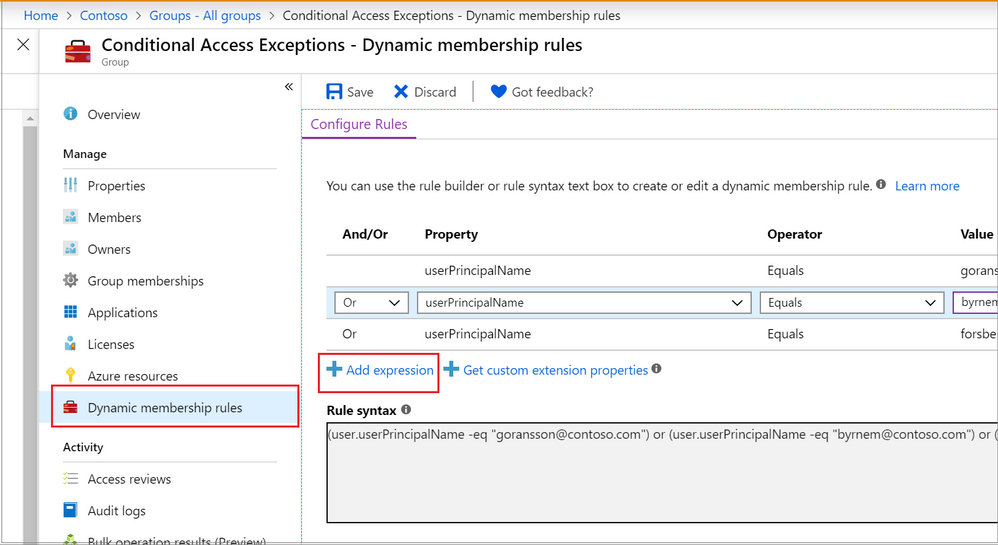
The Azure portal provides a graphical-based rule builder for dynamic membership, which supports adding up to five expressions, and the ability to enter your query string directly into the text editor. You also need to use the text editor for the “direct reports” scenario I mentioned above, setting operator precedence, and for writing more complex rules.
Adding a dynamic membership rule to a group in the Azure Portal
Operator precedence is where we want a part of the query to be evaluated before another part. For example, we can use parenthesis to build a list of matching department names (finance or HR) and add that to the Brisbane location:
user.city -eq "Brisbane"-and (user.department -eq "Finance" -or user.department -eq "HR")
To build more complex queries, you can use the following operators:
-eq -ne -startsWith -notStartsWith -contains -notContains -match –notMatch -in -notIn
-not
-and
-or
-any -all
Example: Direct Reports
This rule maintains members who have their Manager property set to the same Manager ID. The Manager ID is the unique object identifier found in the manager’s profile. It does not support subgroups and can’t be combined with any other membership rules.
Direct Reports for "{objectID_of_manager}" for example Direct Reports for "62e19b97-8b3d-4d4a-a106-4ce66896a863"
Example: On-premises domain membership
If you’re synchronizing identities from Active Directory to Azure Active Directory, you can build dynamic groups based on which Active Directory Domain the user belongs to. This is based on the user’s Security Identifier (SID). You can use PowerShell to query the users with a domain filter to get the start of the SID that you need:
Get-ADUser -Filter * -SearchBase "dc=domain,dc=local" | select Name,SID
Then use the rule syntax that queries Azure AD for the user.onPremisesSecurityIdentifier attribute:
(user.onPremisesSecurityIdentifier -startsWith "S-1-5-21-12345678-1234567891-123456789")
Verifying members of your dynamic group
When an identity attribute of a user or a device changes, Azure AD evaluates all dynamic membership rules that exist in that directory, triggering any relevant membership additions or removals. You can also see the list of current group members via the Azure portal, or use the following PowerShell command for a simple list:
(Get-AzADGroup -DisplayName "<DisplayNameofGroup>" | Get-AzADGroupMember).DisplayName
Note: This requires the Azure Active Directory PowerShell module that you can download here.
In preview, is the ability to validate your rules against up to 20 users or devices. The Validate Rules tab will run your query against your selected target users or devices and confirm if they would meet the requirements to be a group member or not. For more information, visit Validate a dynamic group membership rule (preview) in Azure Active Directory.
Microsoft 365 groups and Microsoft Teams dynamic membership
Microsoft 365 groups (as a group type) provision access across a selection of Microsoft 365 services for a group of people who will be working together. They are designed to prove quick and easy access, removing the administration overhead of an IT Pro needing to set permission on several different Microsoft 365 services, including Teams, a SharePoint Online site, a Planner Plan, a Power BI workspace and a shared mailbox. This group type also supports dynamic membership, created via the Azure Portal the same as you would an Azure AD security group.
By using this group type and dynamic membership, you can add and remove members to a Microsoft Team automatically, without the team owner needing to do any administration tasks.
To achieve this, you can either:
Create your Microsoft 365 group in Azure Active Directory, adding your dynamic membership rule.
Then either create a new team from this group (after giving Azure AD time to update).
Or apply dynamic membership to an existing team by changing its group membership from static to dynamic.
For more details, visit Overview of dynamic membership for Teams.
What about dynamic distribution groups?
Yes, Exchange Online supports dynamic membership for email distribution groups! Unlike security groups, the group membership is calculated each time a message is sent to the group. To set up and manage dynamic distribution groups, you need to use the Exchange Admin Center or Exchange Online PowerShell.
This example creates a dynamic group of Full Time Employees by querying a custom attribute:
New-DynamicDistributionGroup -Name "Full Time Employees" -RecipientFilter "(RecipientTypeDetails -eq 'UserMailbox') -and (CustomAttribute10 -eq 'FullTimeEmployee')"
For details, visit Manage dynamic distribution groups.
You also need to use Exchange Online PowerShell to query the list of group members at this point in time, as they can’t be viewed in the Exchange Admin Center or the Azure Portal:
$FTE = Get-DynamicDistributionGroup "Full Time Employees"
Get-Recipient -ResultSize Unlimited -RecipientPreviewFilter $FTE.RecipientFilter -OrganizationalUnit $FTE.RecipientContainer | Format-Table Name,Primary*
Check out View members of a dynamic distribution group for more details.
Conclusion
Dynamic group membership is a powerful feature, but like any technology capability it requires planning and alignment with your organization’s needs and its business processes. What scenarios do you have where dynamic groups would be useful? Need help writing more complex queries? Let us know in the comments!




Recent Comments