by Contributed | Apr 13, 2021 | Technology
This article is contributed. See the original author and article here.
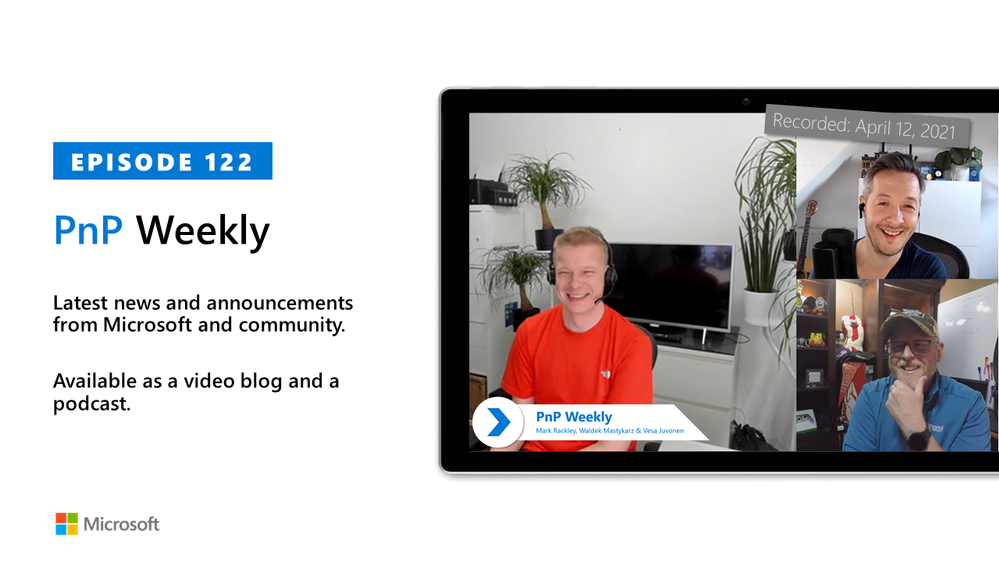
In this installment of the weekly discussion revolving around the latest news and topics on Microsoft 365, hosts – Vesa Juvonen (Microsoft) | @vesajuvonen, Waldek Mastykarz (Microsoft) | @waldekm are joined by a Partner at the US-based consultancy PAIT Group and Microsoft 365 MVP Mark Rackley | @mrackley.
Topics discussed in this session include: Hillbilly tabs, North American Collaboration Summit, how the transition from on-Prem to Cloud along with a talented PnP community has impacted the need to customize applications. Hiring based on who’s available, managing the pace of change and customer expectations, deployment planning, and the business unit customer’s interest in Microsoft Viva experience.
Covering also 20 articles from Microsoft and the Community.
This episode was recorded on Monday, April 12, 2021.
These videos and podcasts are published each week and are intended to be roughly 45 – 60 minutes in length. Please do give us feedback on this video and podcast series and also do let us know if you have done something cool/useful so that we can cover that in the next weekly summary! The easiest way to let us know is to share your work on Twitter and add the hashtag #PnPWeekly. We are always on the lookout for refreshingly new content. “Sharing is caring!”
Here are all the links and people mentioned in this recording. Thanks, everyone for your contributions to the community!
Events:
Microsoft articles:
Community articles:
Additional resources:
If you’d like to hear from a specific community member in an upcoming recording and/or have specific questions for Microsoft 365 engineering or visitors – please let us know. We will do our best to address your requests or questions.
“Sharing is caring!”
by Contributed | Apr 13, 2021 | Technology
This article is contributed. See the original author and article here.
All Around Azure is the amazing show you may already know to learn everything about Azure services and how they can be utilized with different technologies, operating systems, and devices. Now, the show is expanding! We’re excited to bring you All Around Azure: DevOps with GitHub.
When Developers and IT operations teams work together, organizations win. Learn the patterns, practices, and tooling that bring out the DevOps capabilities in your organization
Agenda
World Wide Event
07:30 – 10:00 IST
12:00 – 14:30 AEST
03:00 – 05:30 GMT
19:00 – 21:30 PDT
|
11:00 – 13:30 GMT
15:30 – 18:00 IST
20:00 – 22:30 AEST
03:00 – 05:30 PDT
|
12:00 – 14:30 PDT
20:00 – 22:30 GMT
12:30 – 03:00 IST
05:00 – 07:30 AEST
|
Register Now
https://aaa-devopsgitub.splashthat.com/
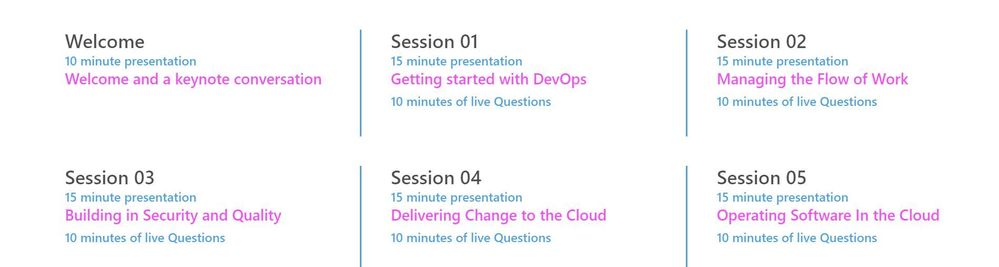
The DevOps Learning Path is designed for those who develop and operate software and need to increase collaboration, performance, and reliability. The content is comprised of 5 modules that approach topics ranging from getting started with DevOps, to delivering change, to operating software in the cloud.
Each session includes a curated selection of associated modules from Microsoft Learn that can provide an interactive learning experience for the topics covered and may also contribute toward preparedness for the official AZ-400 Designing and Implementing Microsoft DevOps Solutions Certification.
by Contributed | Apr 13, 2021 | Technology
This article is contributed. See the original author and article here.
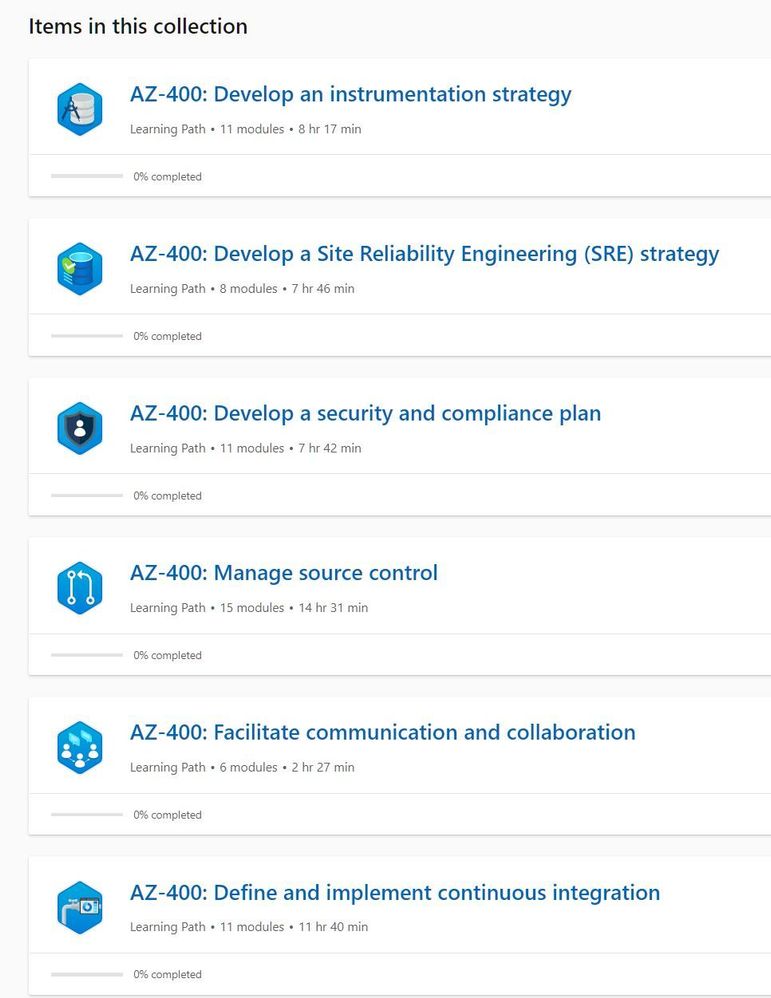
In this latest episode of Azure Unblogged, I am chatting to Vijay Nagarajan from the Azure Update Management team.
I’ve long been a fan and user of Azure Update Management both in my own environments and encouraging customers to adopt it, chatting to Vijay I ask about where Azure Update Management fits in on a customer’s cloud adoption journey and how it can be leveraged.
Patching servers and applications is a bit part of an IT department’s “business as usual (BAU)” activities and there are well established method’s for patching Windows and Linux servers but I raise the question about third party product patching and where Microsoft’s WSUS or Azure Update Management solutions can help in this area.
Vijay and I delve into the cost of implementing Azure Update Management (spoiler alert, Azure Update Management is a free solution) and explain how to look at that in a wider context when pricing up your Azure environment.
And lastly Vijay shares some information about the roadmap features he and the team are working on and the current private preview.
So grab a comfy seat and your favourite drink and join Vijay & I here or on Channel 9.
Resources:
– Azure Update Management Overview
– MS Learn: Manage Azure Updates
– WSUS Package Publisher
by Contributed | Apr 12, 2021 | Technology
This article is contributed. See the original author and article here.
Several customers have approached me on how to configure Splunk antivirus exclusions for processes, folders, and files within Microsoft Defender for Endpoint on RedHat Enterprise Linux. This quick reference article has been created to address this common question.
Note: This blog is in support of Microsoft Defender for Endpoint on Red Hat Enterprise Linux 7.9.
Disclaimer: This may not work on all versions of Linux. Linux is a third-party entity with its own potential licensing restrictions. This content is provided to assist our customers to better navigate integration with a 3rd party component or operating system, and as such, no guarantees are implied. Process and folder exclusions could potentially be harmful because such exclusions increase your organizational exposure to security risks.
- First let’s check if any file or folder exclusions are already configured on your RedHat Enterprise Linux clients by running the following command
mdatp exclusion list
- In the following example, we see that we do not have any exclusions configured for the device
[azureuser@redhat /]$ mdatp exclusion list
=====================================
No exclusions
=====================================
[azureuser@redhat /]$
- To review Microsoft Defender for Endpoint on Linux exclusions information, visit our public documentation.
- Splunk exclusions list is noted in their respective documentation.
- Here is a simplified list of the recommended exclusion from the link above:
version:
|
Directories to exclude:
|
Processes to exclude:
|
Splunk Enterprise (*nix)
|
/opt/splunk ($SPLUNK_HOME) and all sub-directories
/opt/splunk/var/lib/splunk ($SPLUNK_DB) and all sub-directories
|
· bloom
· btool
· btprobe
· bzip2
· cherryd
· classify
· exporttool
· locktest
· locktool
· node
· python*
· splunk
· splunkd
· splunkmon
· tsidxprobe
· tsidxprobe_plo
· walklex
|
Splunk universal forwarder (*nix)
|
/opt/splunkforwarder ($SPLUNK_HOME) and all subdirectories
|
· Same as Splunk Enterprise (*nix)
|
- To add an exclusion manually for a process running on RHEL 7.9, you need to run the following command:
mdatp exclusion process add –name [nameofprocess]
- Since we have 17 processes to exclude, we will have to run the command 17 times, one for each process.
sudo mdatp exclusion process add –name bloom
sudo mdatp exclusion process add –name btool
sudo mdatp exclusion process add –name btprobe
sudo mdatp exclusion process add –name bzip2
sudo mdatp exclusion process add –name cherryd
sudo mdatp exclusion process add –name classify
sudo mdatp exclusion process add –name exporttool
sudo mdatp exclusion process add –name locktest
sudo mdatp exclusion process add –name locktool
sudo mdatp exclusion process add –name node
sudo mdatp exclusion process add –name python*
sudo mdatp exclusion process add –name splunk
sudo mdatp exclusion process add –name splunkd
sudo mdatp exclusion process add –name splunkmon
sudo mdatp exclusion process add –name tsidxprobe
sudo mdatp exclusion process add –name tsidxprobe_plo
sudo mdatp exclusion process add –name walklex
[azureuser@redhat /]$ sudo mdatp exclusion process add –name bloom
Process exclusion added successfully
- Once we run through the 17 processes, we can check the exclusions list again.
[azureuser@redhat /]$ mdatp exclusion list
=====================================
Excluded process
Process name: bloom
—
Excluded process
Process name: btool
—
Excluded process
Process name: btprobe
—
Excluded process
Process name: bzip2
—
Excluded process
Process name: cherryd
—
Excluded process
Process name: classify
—
Excluded process
Process name: exporttool
—
Excluded process
Process name: locktest
—
Excluded process
Process name: locktool
—
Excluded process
Process name: node
—
Excluded process
Process name: python*
—
Excluded process
Process name: splunk
—
Excluded process
Process name: splunkd
—
Excluded process
Process name: splunkmon
—
Excluded process
Process name: tsidxprobe
—
Excluded process
Process name: tsidxprobe_plo
—
Excluded process
Process name: walklex
=====================================
[azureuser@redhat /]$
Note: Now that we have all 17 processes excluded. We can move on to the folder exclusions.
- To add folder exclusions manually for RedHat Enterprise Linux 7.9, you need to run the following commands:
sudo mdatp exclusion folder add –path “/opt/splunk/”
Note: This will exclude all paths and all sub directories under /opt/splunk.
[azureuser@redhat /]$ sudo mdatp exclusion folder add –path “/opt/splunk/”
Folder exclusion configured successfully
- We can check the folder exclusions list again and verify the folders are excluded.
[azureuser@redhat /]$ mdatp exclusion list
=====================================
[azureuser@redhat /]$ mdatp exclusion list
=====================================
Excluded folder
Path: “/opt/splunk/”
—
- Now that we have added the folder exclusions for the application and verified it with mdatp exclusion list we are good to go.
Hopefully this article provides you with added clarity around the common task of adding Splunk exclusions on Linux clients protected by Microsoft Defender for Endpoint on Linux.
Disclaimer
The sample scripts are not supported under any Microsoft standard support program or service. The sample scripts are provided AS IS without warranty of any kind. Microsoft further disclaims all implied warranties including, without limitation, any implied warranties of merchantability or of fitness for a particular purpose. The entire risk arising out of the use or performance of the sample scripts and documentation remains with you. In no event shall Microsoft, its authors, or anyone else involved in the creation, production, or delivery of the scripts be liable for any damages whatsoever (including, without limitation, damages for loss of business profits, business interruption, loss of business information, or other pecuniary loss) arising out of the use of or inability to use the sample scripts or documentation, even if Microsoft has been advised of the possibility of such damages.
by Contributed | Apr 12, 2021 | Technology
This article is contributed. See the original author and article here.
In the last blog we discussed how to deploy AKS fully integrated with AAD. Also we discussed deploying add-on for Azure Pod Identity and Azure CSI driver. In the article we will discuss how to create an application that using Pod Identity to access Azure Resources.
What is Pod Identity?
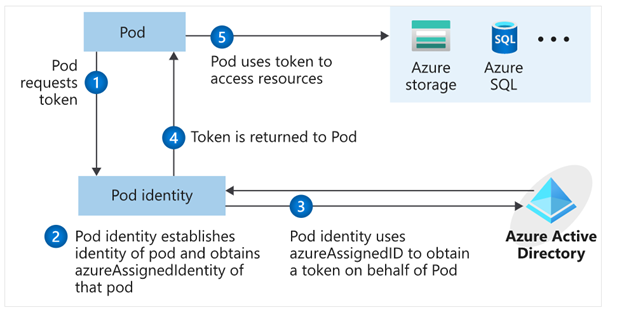
Pod Identity is a feature allows applications deployed to communicate with AAD, request a token then use the token to access Azure resources. The simplified workflow for pod managed identity is shown in the following diagram:
You can review Microsoft docs about pod identity best practice here
How to Create an application using Pod Identity?
In order to use pod identity in our code we will need AKS cluster to be configured with Azure AAD and Pod Identity deployed as we discussed in our pervious post.
Depending on the application, we will need to use an authentication MSI library to request a token from AAD. You can review example here
In our pervious post we show after deploying Pod Identity addon, terraform script deployed a managed Identity to namespace “demo” and updated the Key Vault access policy to include this managed identity.
In our demo today, we will show how to build application access Azure Key Vault to retrieve secrets using Pod Identity. Sample code exists here. The repo contains sample codes using C#, Java and Python.
Before staring we need to double check out environment to make sure all necessary deployment are deployed
- AAD Azure Identity Pods under Kube-System namespace:
kubectl get pods -n kube-system| grep aad”
- Azure Identity resource under target namespace
kubectl get azureIdentity -n demo
- Azure Identity Binding resource under target namespace
kubectl get azureIdentity -n demo
Once we confirm the resources then we are ready to start coding.
Java Demo
Source Code Review
The Java demo is a sample java spring boot RestAPI application. Here are few points about the code
Helm Chart Review
The helm chart will be the same chart for all demos (java/C#/Python) we will override the values.yaml during the pipeline run to fit every demo needs. The chart will deploy the following:
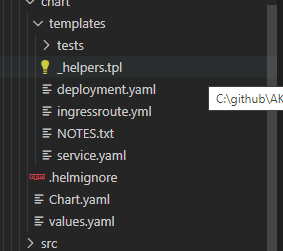
- Applications pods deployment: we can control how many replica from values.yaml
- Service deployment:
- Ingress deployment: map incoming request to app services
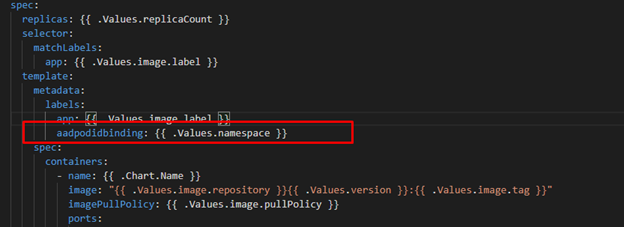
The main area we point here will be the metadata label aadpodbinding. The pod deployment file MUST have this label. In our environment we deployed the AzureIdentity and AzureIdentityBinding with same name like environment namespace hence we passing the namespace as value for aadpodbinding
Pipeline Review
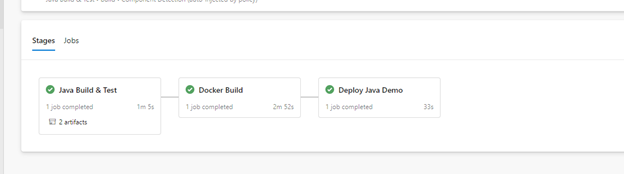
The pipeline “azure-pipelines-java-kv.yml” has 3 stages as shows in the following figure
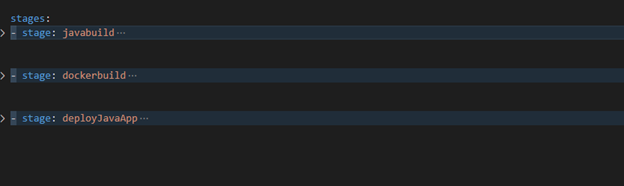
- Java Build: using Maven will package the app and publish it with chart
- Docker Build: using docker will build an image and publish it to ACR
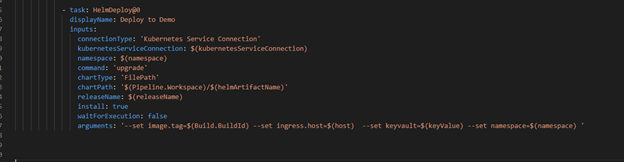
- Helm Deployment: using helm will connect to AKS then install helm chart under namespace “demo”. Please notice how we passing new chart values as argument
Once it runs, we should see the following:
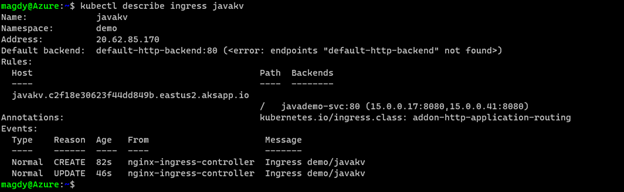
Check our work:



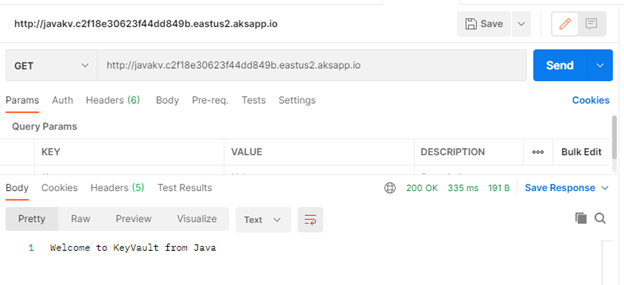
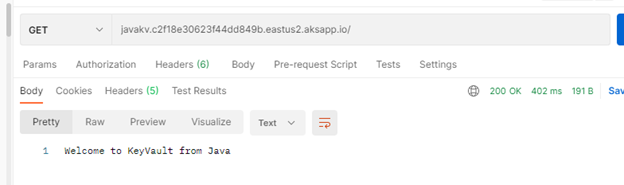
Finally Use Postman and query the Java app.
C# Demo
Source Code Review
Demo is identical to Java code. Rest API service that shows secret from KV. The API class is under controller folder and it expect KV URL to pass as environment variable exactly like Java example.
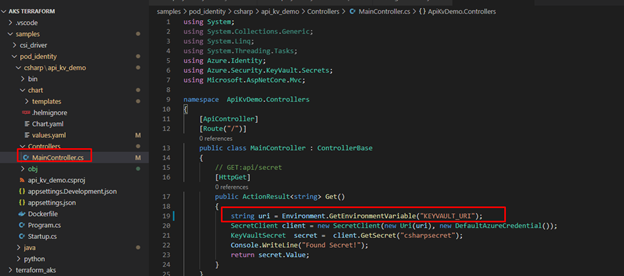
The pipeline for “azure-pipelines-csharp-kv.yml” is follow same structure of 3 stages
- CSharp Build: using dotnet will package the app and publish it with chart
- Docker Build: using docker will build an image and publish it to ACR
- Helm Deployment: using helm will connect to AKS then install helm chart under namespace “demo”. Please notice how we are passing new chart values as arguments
Python Demo
Source Code Review
Python code is a FlaskRest API example.
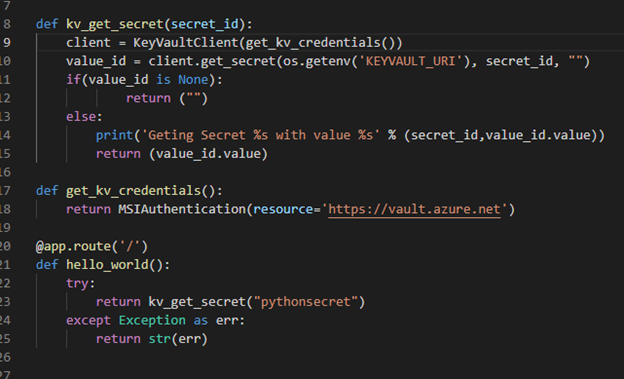
The pipeline for “azure-pipelines-python-kv.yml” is follow same structure of 2 stages.
- Docker Build: using docker will build an image and publish it to ACR
- Helm Deployment: using helm will connect to AKS then install helm chart under namespace “demo”. Please notice how we are passing new chart values as arguments.
Check our work:
Once we get pipelines deployed for all application, we can review the deployed resources.
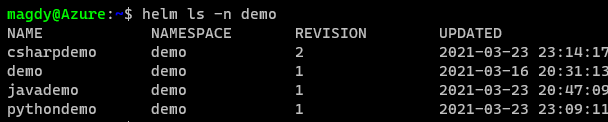
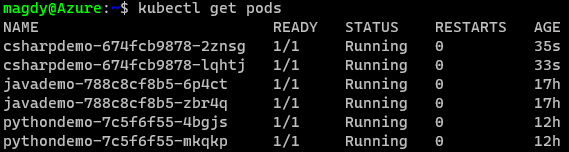
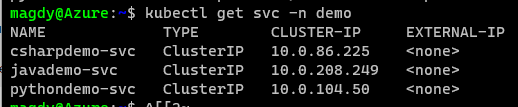

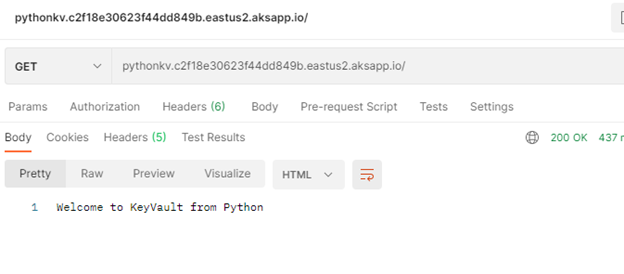
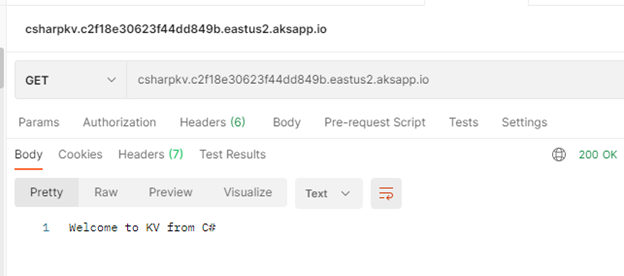
Use Postman to call apps using ingress host.
Java Demo
Python Demo
C# Demo
Summary
We discussed in detail how to setup and configure your application to use Pod Identity. It is great feature to utilize Azure Managed Identity to access Azure resources. In our next blog will discuss Azure secret store provider for csi driver




Recent Comments