by Contributed | Apr 30, 2021 | Technology
This article is contributed. See the original author and article here.
Claire Bonaci
You’re watching the Microsoft us health and life sciences, confessions of health geeks podcast, a show that offers Industry Insight from the health geeks and data freaks of the US health and life sciences industry team. I’m your host Claire Bonaci. On this final episode for patient experience week, Antoinette Thomas talks with Dr. Zafar Chaudry, Senior Vice President and CIO at Seattle Children’s Hospital on how they are working to expand access to health care, and improve health equity in the greater Seattle area.
Antoinette Thomas
This is the third and final podcast in a three part series, exploring patient experience. And today we have a special guest joining us from Seattle, Washington Dr. Zafar Chaudry, and he’s joining us from Seattle Children’s Hospital. So welcome, Dr. Chaudry. And can you start off by sharing a little bit with our guests about your journey in health care and how your journey to Seattle?
Zafar Chaudry
Thank you. And thank you for inviting me to speak with you for for a few minutes here. So yeah, I started my career in medicine. Internal Medicine is my specialty. I started off as a physician, but very quickly moved into the tech industry. This was a time when we had to learn multiple keys on a keyboard and lots of green screens, dos based solutions. And I volunteered to take some training in that space because they wanted clinical people to work in technology. And then from there I evolved into dot com before it went dot bomb. And then from there, back into health IT have been CIO for 20 plus years worked in probably 20 different healthcare systems around the world have also been on the vendor side work for Gartner. And yeah, I’ve been here at Seattle Children’s as senior vice president CIO for just over three and a half years.
Antoinette Thomas
So we recently had a very engaging conversation a couple weeks ago. And I was so impressed by some of the work that you’re doing there, specifically around health and digital equity. So I would really love for you to share with our audience, your experience, what you’re seeing there in Seattle, and I apologize, I actually live a mile equidistance from two major health systems in Cleveland. So how appropriate that we have sirens. Yeah, so share a little bit about that conversation and about what you’re doing, and what your vision is in addressing digital and health inequities.
Zafar Chaudry
So at Seattle children’s, our mission is to provide hope, care and cures for children. And the way in which I interpret that is not only treating a child when a child is sick, but how do we help the child through through their entire journey of growing up. And so from a technology point of view, we’ve been looking at this in multiple in multiple ways. So just before the pandemic, we actually built a coffee shop in our downtown Seattle facility. And the coffee shop was designed to take homeless children and train them to be baristas. And half of the coffee shop was a tech bar, where we were going to take children and train them to be a plus certified. And get them on the career path, especially for those children that lived in underprivileged areas in this route in and around the Seattle City. And as we’ve been thinking through this, but then the pandemic hit, and so that’s sort of been currently close. But as the as the pandemic hit. And we’ve been thinking through this, one of the things that came to mind was, how do I build a pipeline of new talent because Seattle is very competitive place specially in tech, companies like yourselves, can take up most of the talent, so we still have to compete in that market. So we’ve been looking to build a training program for high school graduates who may not have access to or be able to pay for a full degree. So we’re working with the Seattle City Colleges of Seattle to build an associate’s program in health information technology. I’m very pleased to say that after about a year’s worth of work, that’s, that’s all ready to go. We’re waiting for state approval, but we will start hiring the first cohort of students into the program this fall. And as part of that commitment that we have with the City College’s Seattle Children’s, my department will sponsor 10 students for their fees and expenses for the two year program, build a pipeline into my team. In terms of patients, so, pandemic has taught us that you have to pivot very quickly to a different way of working. So on site off site and for patients, the experience has changed. So prior to the pandemic, we weren’t really doing many telehealth visits per week. We’re currently doing about 15,000 telehealth visits per week. And what we’ve learned from this journey of the last 12 to 14 months is there are still many people that we serve, that don’t have access to decent internet connectivity, don’t have access to the right hardware. So if you imagine a household that may have five children, two adults all trying to work, it’s very unlikely that a household of seven or five will have seven laptops available so that they can do their telehealth visit whilst doing their work whilst doing their schoolwork. So we’ve learned this during this journey, we’ve also set up programs to lend devices, to those people that need connectivity slash a piece of hardware, we’ve piloted that that’s been successful. At the same time, we have 46 sites across four states as the health system. And for the pandemic, we did set up our clinics to be walk-in telehealth center. So you could walk in, use our equipment, be safely distanced in a room by yourself that’s been sanitized, and access your virtual visit without connections, and that’s also had relatively good uptake.
Antoinette Thomas
Those are some really unique and innovative ways to address inequities, and specifically, your approach to the device lending and you know, the big elephant in the room, which is the explosion of virtual health and, you know, not enough access to internet or broadband, as we can continue to think about this. And, you know, I guess my last question for you sitting here, you know, working for one of the large technology companies here in the United States is what, what can those of us on the technology side, the company, the vendor side, what can we do to partner with you, or help you help other health systems in solving for this very, very big problem?
Zafar Chaudry
So I think there’s multiple programs we could think about. So one would be a reduced cost program where people could buy decent hardware. And the other would be since you’re such a big vendor is maybe build a purpose built device that does telehealth visits, right? Because it could be built on a cheaper platform. It has it serves a purpose it has built in connectivity. So maybe we can take advantage of the advanced 4g and now 5g networks, an offer a tablet type device that people can buy, consume, or even rent, you know, at low cost, because we’re there’s a lot of leasing going on with equipment now versus do I spend 900 on a on a device? Or can I make the first payment for 40 bucks and then consume that device, and then hand it back after 24 months? Something to that extent, I think that’s where we should think to partner, and then have subsidized programs for those folks that still don’t have the right access? Because without access, how do we develop our communities, certainly our pedes community, right. And not everybody has. I mean, people tend to have smartphones. That’s what the data shows, but people who don’t have a strong income tend to have Android based smartphones. Now, there isn’t a Windows based smartphone anymore. And the apple ecosystem seems to be prohibitive for families that are really living on that sort of poverty line. The pandemic has certainly pushed more families into not having insurance for their kids, and then putting their kids on Medicaid programs. 53% of our patients currently are funded by Medicaid programs. And Medicaid is a federal program. It doesn’t really pay that well. And so that has an impact as well in terms of what services we can provide. So I think it really has to come from a vendor perspective, can we build the device, use a device that is inefficient? Which is efficient, but less expensive to actually consume and use and must have a level of connectivity.
Antoinette Thomas
Well, that’s ending our time today. But I what I want to do is I want to thank you for joining us. And I also would love to stay connected and perhaps have a follow up conversation in six months to 12 months because I would really like to reengage you to share with our audience the results of the program, the scholarship program, and then also just really kind of keep the finger on the pulse of you know, how we are how you are working to solve these equity issues, specifically in the range of market share of the Seattle Children’s Hospital. So, I thank you again and we appreciate your time.
Claire Bonaci
Thank you all for watching. Please feel free to leave us questions or comments below and check back soon for more content from the HLS industry team.

by Contributed | Apr 30, 2021 | Technology
This article is contributed. See the original author and article here.
Let’s Blast This Summer With Visual Studio 2022
Syed Shanu is a Microsoft MVP, a two-time C# MVP and two-time Code project MVP. Syed is also an author, blogger and speaker. He’s from Madurai, India, and works as Technical Lead in South Korea. With more than 10 Years of experience with Microsoft technologies, Syed is an active person in the community and always happy to share his knowledge on topics related to ASP.NET , MVC, ASP.NET Core, Web API, SQL Server, UWP, Azure, among others. You can see his contributions to MSDN and TechNet Wiki here. Follow him on Twitter @syedshanu3.
How to change Azure Public IP SKU upgrade Basic to Standard
Robert Smit is a EMEA Cloud Solution Architect at Insight.de and is a current Microsoft MVP Cloud and Datacenter as of 2009. Robert has over 20 years experience in IT with experience in the educational, health-care and finance industries. Robert’s past IT experience in the trenches of IT gives him the knowledge and insight that allows him to communicate effectively with IT professionals. Follow him on Twitter at @clusterMVP

Creating a team and channel aware Power Apps
Vesku Nopanen is a Principal Consultant in Office 365 and Modern Work and passionate about Microsoft Teams. He helps and coaches customers to find benefits and value when adopting new tools, methods, ways or working and practices into daily work-life equation. He focuses especially on Microsoft Teams and how it can change organizations’ work. He lives in Turku, Finland. Follow him on Twitter: @Vesanopanen

Teams Real Simple with Pictures: Retention Policies on Private Channels
Chris Hoard is a Microsoft Certified Trainer Regional Lead (MCT RL), Educator (MCEd) and Teams MVP. With over 10 years of cloud computing experience, he is currently building an education practice for Vuzion (Tier 2 UK CSP). His focus areas are Microsoft Teams, Microsoft 365 and entry-level Azure. Follow Chris on Twitter at @Microsoft365Pro and check out his blog here.

Making Windows Terminal look awesome with oh-my-posh
Tobias Zimmergren is a Microsoft Azure MVP from Sweden. As the Head of Technical Operations at Rencore, Tobias designs and builds distributed cloud solutions. He is the co-founder and co-host of the Ctrl+Alt+Azure Podcast since 2019, and co-founder and organizer of Sweden SharePoint User Group from 2007 to 2017. For more, check out his blog, newsletter, and Twitter @zimmergren
by Contributed | Apr 30, 2021 | Technology
This article is contributed. See the original author and article here.
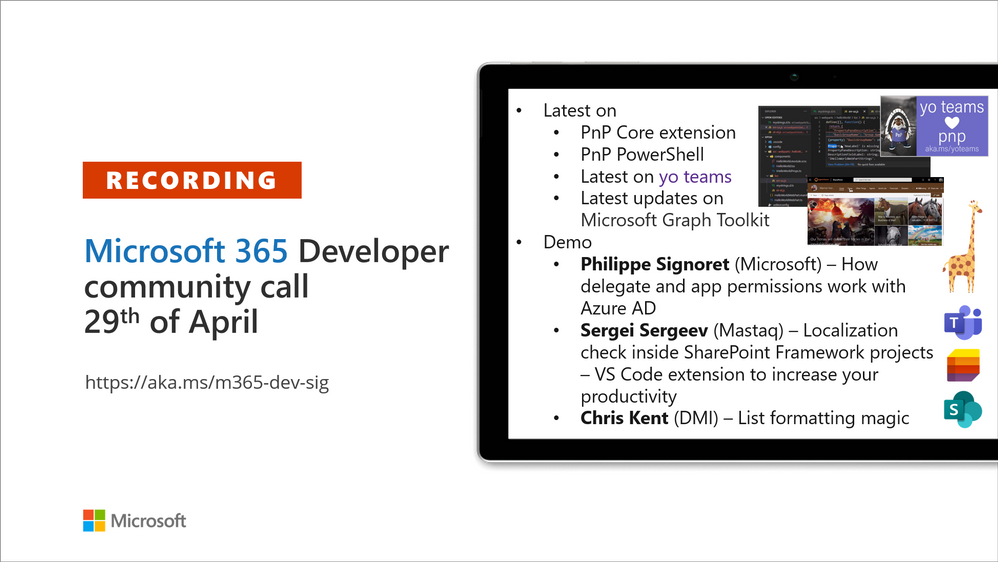
Recording of the Microsoft 365 – General M365 development Special Interest Group (SIG) community call from April 29, 2021.
Call Summary
Latest news from Microsoft 365 engineering and updates on open-source projects: PnP .NET libraries, PnP PowerShell, modernization tooling, on yo Teams, on Microsoft Graph Toolkit, and on Microsoft Teams Samples.
Announcing the release of SharePoint Framework v1.12.1, check out the new Microsoft 365 Extensibility look book gallery, visit the Microsoft Teams samples gallery to get started with Microsoft Teams development, please complete the Microsoft 365 developer community survey, and register now for May trainings on Sharing-is-caring. Open-source project activity is focused on prepping for May releases.
Open-source project status:
Project |
Current Version |
Release/Status |
PnP .NET Libraries – PnP Framework |
v1.4.0 |
Bug fixes, Prepping for v1.5.0 (May) |
PnP .NET Libraries – PnP Core SDK |
v1.1.0 |
Bug fixes, Prepping for v1.2.0 (May) |
PnP PowerShell |
v1.5.0 |
Prepping for v1.6.0 (May) |
Yo teams – generator-teams |
v3.0.3 GA, v3.1.0 Preview |
Preview with Viva Connections support |
Yo teams – yoteams-build-core |
v1.1.0 |
|
Yo teams – msteams-react-base-component |
v3.1.0 |
|
Microsoft Graph Toolkit (MGT) |
v2.1.0 GA, v2.2.0 Preview |
Bug fixes and v2.2.0 preview updates |
Additionally, one new Teams sample delivered. The host of this call was Vesa Juvonen (Microsoft) | @vesajuvonen. Q&A takes place in chat throughout the call.
Actions:
- Last week to complete the Microsoft 365 Developer Community Survey – https://aka.ms/m365pnp/survey
- Try the public beta of SPFx v1.12.1.
- Reserve date – SharePoint Monthly community call – 11th of May 8 AM PDT | https://aka.ms/sp-call
- Register for Sharing is Caring Events:
- First Time Contributor Session – May 24th (EMEA, APAC & US friendly times available)
- Community Docs Session – April
- PnP – SPFx Developer Workstation Setup – May 13th
- PnP SPFx Samples – Solving SPFx version differences using Node Version Manager – May 20th
- AMA (Ask Me Anything) – Power Platform Samples – May 5th
- AMA (Ask Me Anything) – Tech Community – May 11th
- First Time Presenter – May 25th
- More than Code with VS Code – May 27th
- Maturity Model Practitioners – May 18th
- PnP Office Hours – 1:1 session – Register
- Download the recurrent invite for this call – http://aka.ms/m365-dev-sig
- Call attention to your great work by using the #PnPWeekly on Twitter.
Microsoft Teams Development Samples: (https://aka.ms/TeamsSampleBrowser)
- Document manager sample app using messaging – Sathya Raveendran, Varaprasa…
Thank you for being part of the community and for helping others to succeed. You are awesome!
Demos delivered in this session
Delegated and application permissions in the Microsoft Identity Platform – demystifies the identity model with a clearly delivered 100 level overview of app permissions – operation and terminology, i.e., delegation, requests, grants, consent, tokens, etc. How app/services permission delegation works, how tokens are aligned to a machine or to a person. Is the app or person authorized to access resources? How and when machines dynamically/statically request permissions and more.
Localization check inside SharePoint Framework projects – VS Code extension to increase your productivity – a VS Code and Node.js extension that keeps resources in sync by making sure all localization labels inside SharePoint Framework project files across organization are consistent. The extension is automatically activated for your SPFx solutions and checks, whether localization resource files (en-us.js, nl-nl.js, etc.) follow the pattern, defined in the corresponding strings.d.ts. Prevents accidental or refactoring errors in SPFx solutions.
Using field lookups with list formatting – Field Type = “Lookup.” Lookups get values from a list and have limited formatting options. Of horse, this limitation does not deter Chris from showing crazy, crazier, craziest formatting options for lookups. Approach = format the lookup column into which content from the list will flow. Use advanced forEach property. In this demo, Chris shows formatting capabilities available in a referenced sample.
Thank you for your work. Samples are often showcased in Demos.
Topics covered in this call
- PnP .NET library updates – Bert Jansen (Microsoft) | @O365bert – 6:59
- PnP PowerShell updates – Bert Jansen (Microsoft) | @O365bert – 8:43
- yo Teams updates – Wictor Wilén (Avanade) | @wictor – 9:53
- Microsoft Graph Toolkit updates – Beth Pan (Microsoft) | @beth_panx – 11:10
- Microsoft Teams Samples – Vesa Juvonen (Microsoft) | @vesajuvonen – 12:33
Demo: Delegated and application permissions in the Microsoft Identity Platform – Philippe Signoret (Microsoft) | @psignoret – 14:48
Demo: Localization check inside SharePoint Framework projects – VS Code extension to increase your productivity – Sergei Sergeev (Mastaq) | @sergeev_srg – 30:22
Demo: Using field lookups with list formatting – Chris Kent (DMI) | @theChrisKent – 42:48
Resources:
Additional resources around the covered topics and links from the slides.
General resources:
Upcoming Calls | Recurrent Invites:
General Microsoft 365 Dev Special Interest Group bi-weekly calls are targeted at anyone who’s interested in the general Microsoft 365 development topics. This includes Microsoft Teams, Bots, Microsoft Graph, CSOM, REST, site provisioning, PnP PowerShell, PnP Sites Core, Site Designs, Microsoft Flow, PowerApps, Column Formatting, list formatting, etc. topics. More details on the Microsoft 365 community from http://aka.ms/m365pnp. We also welcome community demos, if you are interested in doing a live demo in these calls!
You can download recurrent invite from http://aka.ms/m365-dev-sig. Welcome and join in the discussion. If you have any questions, comments, or feedback, feel free to provide your input as comments to this post as well. More details on the Microsoft 365 community and options to get involved are available from http://aka.ms/m365pnp.
“Sharing is caring”
Microsoft 365 PnP team, Microsoft – 30th of April 2021
by Contributed | Apr 30, 2021 | Technology
This article is contributed. See the original author and article here.
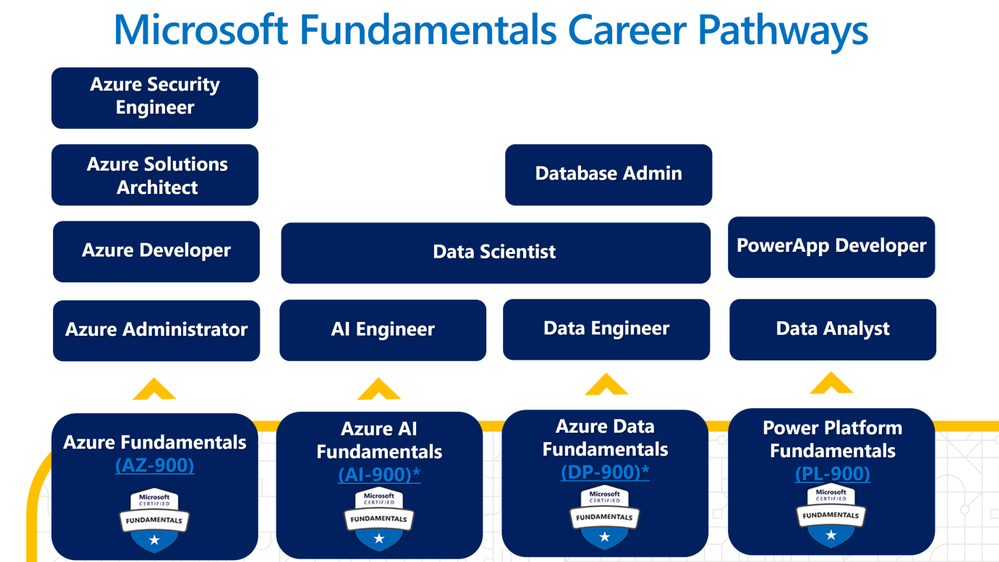
Millions of users are looking to you, the developers, to build engaging and unique application experiences by leveraging the wealth of data and intelligence made accessible through Microsoft technologies. If you’re a educator, student, business user, or beginning technical professional, this certification can accelerate your progress and give your career a boost, as you use your Microsoft skills to improve your team’s productivity.
No experience is necessary to train for any of the fundamentals, basic familiarity with computer technology, data analytics, cloud computing, and the internet. Think of a fundamentals certification as the first step in growing your skill set and advancing to other certifications.
Azure Course in a Box Resources
Curriculum resources
• MSLearn for Educators Program
•Microsoft Learn Self-Study
LMS Integration
•MSLearn Catalog API
•MSLearn LTI Application
Hands on Learning
•Microsoft Learn
•Azure for Students
•Microsoft Students Ambassadors
•Azure Devtools for Teaching
•Azure Lab Services (PAID)
•Github for EDU (PAID)
•LinkedInLearning (PAID)
Power Platform Fundamentals
Learn the business value and product capabilities of Power Platform. Create simple Power Apps, connect data with Microsoft Dataverse, build a Power BI Dashboard, automate a process with Power Automate, and build a chatbot with Power Virtual Agents.
The Microsoft Power Platform Fundamentals certification could be a great fit for you, if you’d like to:
- Build solutions with Microsoft Power Platform.
- Automate basic business processes with Power Automate.
- Perform data analysis with Power BI.
- Create simple Power Apps experiences.
- Build practical chatbots with Power Virtual Agents.
This certification has no prerequisites. However, if you’d like to gain some more experience, you could:
- Shadow a person on your team who works with Microsoft Power Platform.
- Explore available learning paths on Microsoft Learn.
- Sign up for an instructor-led training course.
Power Platform Fundamentals PL-900
Power Platform Fundamentals Learning Pathway Microsoft Learn
Ready for more advanced development
If you feel your ready to take on the next challenge I would suggest you watch the session on demand Learn Together: Building Apps with Microsoft Graph | Channel 9 (msdn.com)
The Session covers:
- Why you should consider building apps with Microsoft Graph
- How to get started building apps using the Microsoft Graph Toolkit
- What the top 5 features are to make your application stand out
Quickly get started learning how to build these apps and stick around to connect with your developer community!
- Graph Learn Challenge: aka.ms/challenge-graph
- Enter the challenge for a chance to win prizes!
- Complete learn modules and test your knowledge about Microsoft Graph
- Microsoft Graph docs: aka.ms/docs-graph
- Overview documentation for Microsoft Graph with tutorials, reference docs, and more information to get started building apps with Graph
- Microsoft Graph Fundamentals learning path: aka.ms/learn-graph
- New to Graph? Start your dev journey with an introductory Learning Path.
- Microsoft Graph Toolkit module: aka.ms/learn-mgt
- Love how east the toolkit makes things? Learn more on Learn!
Additional Resources



Recent Comments