by Contributed | May 13, 2021 | Technology
This article is contributed. See the original author and article here.
Engaged communities are stronger communities. This is the ethos behind Code for South Florida, a Miami nonprofit that facilitates community feedback between governments and citizens with tech.
The group brings the area’s tech enthusiasts together to create solutions that support the youth and improve quality of life, in partnership with government departments, nonprofit organizations and colleges.
Regarded as the largest public interest technology non-profit in the state, the group leverages public code and data to build prototypes and support data collaborations that make life better for the inhabitants of South Florida.
Ultimately, Code for South Florida seeks to elevate the voices of all who call the region home.
AI MVP and Miami native Noelle Silver says there is new momentum in South Florida that is embracing technology and its potential for social good.
“There are so many people hungry to learn and get into tech but few programs available and affordable to them,” Noelle says. “The Code for South Florida community was created to help more people by combining technology and the government.”
“I was raised in Miami and was not afforded the opportunity to learn about tech or coding. I had to leave and attend a university to get that exposure. I am now back, after travelling the country and working for Amazon, Microsoft, and IBM over the years.”
“South Florida is home to many underrepresented groups and this community serves them all. It allows for people to learn to code in their native language, to find like-minded, career-focused peers and create a social and professional network that will serve them for years.”
Connection and communication are vital to open-source communities like Code for South Florida. Noelle points to recent initiatives like Tech Hub Tech Talk – an educational series that inspires people to get involved in the Miami and South Florida tech scene – and the creation of Open Government and Haitians in Tech – smaller groups that help developers find a support network to call their own – in successfully uniting the many communities of Code for South Florida.
“What I love most about this community is its focus on connecting people together who can further inspire, contribute, and build a local culture of public service and technology,” Noelle says.
“I want to use the Code for South Florida initiative to help bring the idea of technical careers to junior and senior highs across the region. I am using Microsoft Learn as a platform for helping anyone who wants to learn to get the skills they need.”
The biggest challenge, Noelle says, is “trying to be heard above the noise and get this message to more people. This is where the MVP community can help!”
If you have a project you need help with or want to create a new initiative with the tech talent in South Florida, the community has a network of volunteers and staff ready to support. To join the group or for more information visit the Code for South Florida website.
by Contributed | May 13, 2021 | Technology
This article is contributed. See the original author and article here.
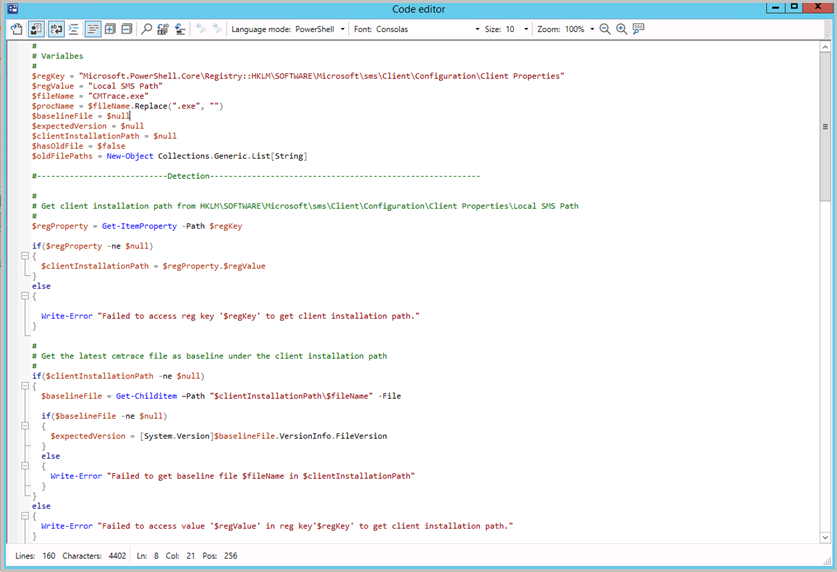
Update 2105 for the Technical Preview Branch of Microsoft Endpoint Configuration Manager has been released. Building on improvements in Configuration Manager 2010 for syntax highlighting and code folding, you now have the ability to edit scripts in an enhanced editor. The new editor supports syntax highlighting, code folding, word wrap, line numbers, and find and replace. The new editor is available in the console wherever scripts and queries can be viewed or edited.
Enhanced code editor in ConfigMgr console
For more information, see Enhanced Code Editor.
This preview release also includes:
Select VM size for CMG – When you deploy a cloud management gateway (CMG) with a virtual machine scale set, you can now choose the virtual machine (VM) size. The following three options are available:
- Lab: B2s
- Standard: A2_v2. This option continues to be the default setting.
- Large: D2_v3
This control gives you greater flexibility with your CMG deployment. You can adjust the size for test labs or if you support large environments.
Support Center dark and light themes – The Support Center tools now offer dark and light modes. Choose to use the system default color scheme, or override the system default by selecting either the dark or light theme.
Updated client deployment prerequisite – The Configuration Manager client requires the Microsoft Visual C++ Redistributable component (vcredist_x*.exe). When you install the client, it automatically installs this component if it doesn’t already exist. Starting in this release, it now uses the Microsoft Visual C++ 2015-2019 Redistributable version 14.28.29914.0. This version improves stability in Configuration Manager client operations.
Change to internet access requirements – To simplify the internet access requirements for Configuration Manager updates and servicing, this technical preview branch release downloads from configmgrbits.azureedge.net. This endpoint is already required, so should already be allowed through internet filters. With this change, the existing internet endpoint for technical preview releases is no longer required: cmupdatepackppe.blob.core.windows.net.
PowerShell release notes preview – These release notes summarize changes to the Configuration Manager PowerShell cmdlets in technical preview version 2105.
For more details and to view the full list of new features in this update, check out our Features in Configuration Manager technical preview version 2105 documentation.
Update 2105 for Technical Preview Branch is available in the Microsoft Endpoint Configuration Manager Technical Preview console. For new installations, the 2103 baseline version of Microsoft Endpoint Configuration Manager Technical Preview Branch is available on the Microsoft Evaluation Center. Technical Preview Branch releases give you an opportunity to try out new Configuration Manager features in a test environment before they are made generally available.
We would love to hear your thoughts about the latest Technical Preview! Send us feedback about product issues directly from the console and continue to share and vote on ideas about new features in Configuration Manager.
Thanks,
The Configuration Manager team
Configuration Manager Resources:
Documentation for Configuration Manager Technical Previews
Try the Configuration Manager Technical Preview Branch
Documentation for Configuration Manager
Configuration Manager Forums
Configuration Manager Support
by Contributed | May 13, 2021 | Technology
This article is contributed. See the original author and article here.
As part of our continued efforts to help customers be successful with Exchange Online, Microsoft has detected that some customers are using an unsupported journaling configuration by pointing their journaling alternate mailbox to an Exchange Online mailbox. With the enforcement of mailbox receiving limits as announced in our February blog post, this may result in loss of journaling non-delivery reports, as cloud-hosted mailboxes will be throttled when they exceed the limit of 3600 messages received per rolling hour. We urge all customers to validate their journaling configuration and ensure they will not be affected.
Using an Exchange Online mailbox as a journaling alternate mailbox
Journaling in Exchange Online allows administrators to set an alternate journaling mailbox. This mailbox will accept non-delivery reports (also known as NDRs or bounce messages) if the primary journaling mailbox is unavailable, to catch undelivered journal reports and allow for re-sending when the journaling mailbox becomes available.
As the documentation states, the alternate journaling mailbox cannot be an Exchange Online mailbox. Cloud mailboxes are subject to our Exchange Online service limits and unsuitable for journaling.
How can I tell if I am affected?
Tenant administrators can check their configuration via the classic Exchange admin center. Navigate to the Journal Rules section and find the email address configured for non-delivery reports. If no address is configured or if the address is not an Exchange Online mailbox, administrators do not need to take action. If the address for journaling NDRs is set to an Exchange Online mailbox, administrators need to change this setting in order to avoid impact.
What do I do if I am affected?
Microsoft’s recommendation is to leverage our Microsoft 365 compliance solutions rather than journaling messages to another location. This suite of solutions provides data protection, data loss prevention, and data governance capabilities to meet customers’ diverse regulatory and compliance requirements.
If journaling is still needed, administrators should double check their settings and switch the alternate journaling address to a non-Exchange Online mailbox. Customers are urged to validate their configuration and take action by May 31st to avoid potential disruption.
Thank you for your attention to this!
The Exchange Transport team and the Microsoft 365 Information Governance team

by Contributed | May 13, 2021 | Technology
This article is contributed. See the original author and article here.
Microsoft Build is just around the corner and we’re excited to announce our Humans of IT sessions lineup! We’ll be bringing a compilation of stories where humanity and technology intersect all in one track so that you can discover how to empower your community, build meaningful careers, be more productive and achieve more!
We know this is the post you’ve been waiting for.
The Humans of IT community will be speaking at Microsoft Build 2021! Join us during our 5 Humans of IT sessions at Build 2021! Register today!
5 Sessions You Don’t Want to Miss at Microsoft Build 2021
Tuesday, May 25th 9:30-10:00am PDT: Microsoft Teams bot technology: Enables easier access to information and helps solve communication gaps between HR and employees
Speakers: Thao Le, Brian Costea, Nirupa Kalathur, Kamila Rawat, Angela Donohue
Join this session to hear more about how Microsoft is providing a technology platform and IT solutions that are human-centered. Learn about advancements in Microsoft Teams that impact lives on a personal level by developing tools that help improve mental well-being, and on the professional level by bridging communication gaps and enabling easier access to information. We will be demoing the BabyBot to give you even further insight into this new tool and its benefits.
Tuesday, May 25th, 2:30-3:00pm PDT: Code for good with GiveCamp
Speakers: Jay Harris, Chris Koeing
Have you ever wanted to use your coding skills to help others? GiveCamp gives people the opportunity to do just that and give back through coding! In this session, we’ll discuss how this idea for GiveCamp came to life, how they use tech to help non-profits, and how you can get involved.
Wednesday, May 26th 6:30-7:00am PDT: Stuck no more: Removing the anguish from languishing
Speakers: Christopher Gill
May is Mental Health Awareness Month, but it can still be easy to feel overwhelmed, anxious, or like you are generally not functioning at full capacity. Let’s learn together about a term called “languishing” and some ways you can utilize tech to rediscover yourself and your enthusiasm! In this session, Chris will discuss how to achieve risk reduction and share tips on how to avoid toxic positivity while creating small and measurable bite-sized goals.
Wednesday, May 26th 11:00-11:30am PDT: Planting the seeds for community: How Microsoft Developers Community began in Haiti
Speakers: Leomaris Reyes, Leslie Gordian
Join this session to learn how MVPs from Dominican Republic went to Haiti to create the first Microsoft Developers Community in Haiti. Hear about their story, what inspired them, and how they made it happen.
Thursday, May 27th 3:00-3:30am PDT: Mentoring grassroot technologist and transforming unreached communities
Speakers: Kolaru Adeola, Clement Dike, Ayodeji Folarin, Bettirose Ngugi, David Okeyode, O Oluwawumiju, Samuel Omodadepo
Join us in this session on embracing the passion of grassroot communities, and hear how people from completely different backgrounds are all working towards the same goal of transforming the future of tech in Africa. Learn from the stories of empowered youths, non-IT professionals, and technologists and how they change their perceptions to embrace the digital change.
See you at Microsoft Build 2021, #HumansofIT- Register online to secure your virtual seat today!
#HumansofIT
#MSBuild
#CommunityRocks
#ConnectionZone
by Contributed | May 13, 2021 | Technology
This article is contributed. See the original author and article here.
Be inspired at ESPC21 Online.
You’ll find expert-led tutorials (workshops), visionary keynotes, and informative breakout sessions, delivered by the world’s best independent Microsoft 365 experts including many Microsoft leaders and employees from the product teams.
Be Inspired at ESPC21 Online. ESPC is a chance to escape your daily routine and take the time to focus on you and your professional development.
Take time to learn, ask questions and engage with fellow delegates via 1:1 chats or group networking to discover top tricks and helpful insights. Hear directly from the individuals behind your favourite products, discover the latest innovations and engage in live session Q&A’s with each speaker to get your urgent questions answered. Session schedule lists times in CEST; recordings will be available to watch post conference for All-Access ticket holders.
Book now
Jeff Teper (CVP), Karuana Gatimu (Principal PM manager), and Charles Lamanna (CVP) will be giving keynotes that spans the globe and topics, plus Microsoft speakers delivering breakout sessions among thought leaders and members of the community from around the world. Review all Microsoft keynotes and sessions below and start your world journey today.
ESPC21 Online offers you affordable, world-class Microsoft 365 learning at your fingertips, from wherever you are. Tune in live or catch up on-demand across 100+ sessions covering SharePoint, Microsoft Viva, Microsoft Teams, Microsoft 365 adoption, Microsoft Search, AI, Governance, SharePoint Syntex, Teams admin, Cloud operations, Intranets, Power Platform, and more.
Microsoft keynotes, breakout sessions, and tutorials (workshops)
 Hear from the best of the best – Microsoft Product Team members, RDs, MVPs, MCMs and independent experts.
Microsoft keynotes
Microsoft tutorial (workshops) (pre-event workshop)
Microsoft breakout sessions
Shout out to community members Sarah McNamara, Kevin Monaham and the #ESPC21 team for putting together the event, corralling all speakers and content, and for supporting and promoting the knowledge and expertise to promote the world-class Microsoft 365 tech community around the world.
Cheers,
Mark “Euro” Kashman


Recent Comments