by Contributed | May 14, 2021 | Technology
This article is contributed. See the original author and article here.
Introduction
Let’s move our database to the cloud! This is one of the common scenarios for solution modernization and database migrations. There are many ways of migrating SQL Server database to Microsoft Azure and there are lots of materials covering this topic. This blog is about the ability to go back from Azure SQL Managed Instance to physical/virtual SQL Server environment. At this stage, there are at least two questions that could come up. First, what’s the challenge of going back, as it’s a matter of backup and restore, isn’t it? Well, it isn’t, because backup-restore strategy does not work today in this case, and you will find more about this below. Second, why should anyone go back from the Azure, or cloud in general to any other place? Our customer and partner cases shed some light on this. One of the reasons for example is a policy or general requirement of having a “cloud exit” plan.
Why backup-restore is not a way to go?
To better understand this problem, first of all, let’s see what is Managed Instance? It’s a database product in a form of a platform as a service (PaaS), meaning that Microsoft as a service provider covers for you various platform aspects such as:
- Providing resources (compute, memory, networking) and setting up the system.
- Built in high availability and disaster recovery capabilities.
- Regular OS and SQL upgrades.
- Automatic backups, monitoring, etc.
As SQL bits are being upgraded regularly (every few months), Managed Instance is running on “evergreen” SQL bits. This means that current Managed Instance version is most of the time actually newer than the latest SQL Server version. As SQL Server backups are not backwards compatible, a backup from Managed Instance cannot be restored to e.g., SQL Server 2019. It’s for the same reason as why backup from SQL Server 2019 cannot be restored to SQL Server 2017. Specifically, internal database version mismatch is one of the main technical reasons why a database from Managed Instance cannot be backed up and then restored to e.g., SQL Server 2019. Upgrading is of course working but downgrading internal database version has never been supported in SQL Server. So by design, backups from lower versions of the SQL Server can be restored to higher version, but vice versa is not supported.
Note: You can use this query to check internal database version of the server instances you’re using:
select name as database_name, version as internal_database_version from sys.sysdatabases
Lack of backup-restore functionality from higher to lower version is what makes moving a database from Managed Instance to SQL Server a non-trivial effort, and that’s why migration to the Managed Instance is often considered a one-way journey. Making Managed Instance backup portable to on-premises SQL is one of the popular Managed Instance feature requests on Azure Feedback. The team is investigating ways to provide the solution for this request and make the two-way migration, both to and from Managed Instance easy and simple. Until a solution arrives, we’ll talk more about currently available options for migration of user databases from Managed Instance to SQL Server: Export/Import and Transactional Replication.
Why moving away from Managed Instance?
While we’re striving to build Azure SQL Managed Instance to be the best PaaS database solution, with full compatibility with SQL Server and want you to like it and use it for your databases, sometimes having an option to easily migrate from Managed Instance to another database system is a necessity. Motivation can come from compliance or legal reasons. Sometimes our customers have contract obligation to provide database backups to their clients, who might not want to use our cloud solutions. In other cases, development practices require using schemas and data from production back in development environment that are often purely on-premises. Finally, you might find out that you require more flexibility than what PaaS can offer, so you need to go back to IaaS (e.g. managed VMs) or on-premises solutions.
Available options
There are two main SQL technologies that can be used today for moving data from Managed Instance to SQL Server. Those are:
- Export/Import, also known as BACPAC.
- Transactional replication.
Both technologies have different options and some limitations, and these will be discussed later, or in subsequent blog posts.
Here is a brief comparison of the two technologies and their pros and cons.
Export/Import
Using export/import is very simple, either through SSMS or SqlPackage. It’s best to be used for offline migration of small and medium databases.
This technology has some limitations:
- It does not handle databases that reference external objects (schemas with three or four-part names).
- Its performance degrades when working with large databases or databases with large number of objects (hundreds of GBs or tens of thousands of objects in a database).
- Produced BACPAC is not transactionally consistent.
If you’d like to read more about this option, see how to migrate database from Managed Instance to SQL Server with export/import.
Transactional replication
This is a more robust way to migrate databases from Managed Instance to SQL Server. It’s best to be used for online or offline migration of large and complex databases.
Some outstanding limitations that apply to transactional replication are:
- Tables must have primary keys.
- Setup is not simple.
To find out more about this, see how to migrate database from Managed Instance to SQL Server with transactional replication.
by Contributed | May 14, 2021 | Technology
This article is contributed. See the original author and article here.
Hello! I’m Sue Bohn, Partner Director of Program Management for Identity and Access Management. In this Voice of the Partner blog post, we’ve invited Prakash Narayanamoorthy, Principal Microsoft Security Architect for Wipro, and Terence Oliver Jayabalan, Practice Partner and Global Solutions Lead for IAM at Wipro, to share how their company envisioned, engineered, and brought to market a one-of-a-kind solution for automatically migrating third-party apps to Azure Active Directory—shrinking the migration process from months to hours.
Seamlessly and automatically migrate SSO applications to Azure AD
By Terence Oliver Jayabalan, Practice Partner, Global Solutions Lead for Identity and Access Management
Wipro Limited is a leading global information technology, consulting, and business process services company. We harness the power of cognitive computing, hyper-automation, robotics, cloud, analytics, and emerging technologies to help our clients succeed in the digital world. With over 180,000 employees serving clients across six continents, we’ve been recognized for our comprehensive portfolio of services, commitment to sustainability, and good corporate citizenship. With a staff of more than 8,000 security professionals, Wipro has been helping customers in the Identity and Access Management (IAM) domain for more than two decades through our consulting, advisory, and implementation solutions.
Moving a mountain—app migrations and IAM
Our customers come to us from across industry verticals, but a common pain point for most of them involves user provisioning and access management for single sign-on (SSO) software-as-a-service (SaaS) apps. With Zero Trust now the gold standard for enterprise security, identity has become the new perimeter. Many of our customers are looking to modernize their identity and access management (IAM) landscape by bringing advanced platforms like Azure Active Directory (Azure AD) into their environment; so they can connect and secure all their apps with a single identity solution. With Azure AD, Conditional Access, multifactor authentication, single-sign on (SSO), and automatic user provisioning make IAM easier and more secure across the enterprise. Azure AD also saves money by reducing admin overhead for on-premises user provisioning and authentication—Forrester estimates the value of IT efficiency gains at USD 3.0 million over three years.
However, moving to a new IAM solution often requires the time-consuming task of manually migrating hundreds of SaaS applications from their existing IAM solution. This typically involves the admin getting the connection parameters from the existing tool and manually bringing it into Azure AD, usually by typing information or with some form of export-import function. Then, the admin has to validate those settings and do the application site configurations before the end-to-end integration/migration is finally completed. For a typical business, this process can require several hours just for one app.
Wipro sought to change that. We set out to build a solution that could automate migrating applications from one IAM platform to another while addressing the biggest IAM app-migration challenges:
- Large number of applications needing to be migrated.
- Need for a specialized skillset to carry out the migration.
- Extensive manual effort needed to migrate applications to a new platform.
- No centralized view of the vast IAM landscape.
- Lack of centralized monitoring, reporting, and management for IAM.
- No centralized repository for documents, best practices, templates, or delivery kits.
- Lack of IAM tasks and process automations.
- No simplified view of IAM operations (user details, who has access to what).
Wipro’s solution—Identity Management Center (IMC)
To solve this pain point for our customers, Wipro worked closely with the Microsoft Identity engineering team to enable a seamless solution for onboarding SSO apps to Azure AD. Our new accelerator solution, Identity Management Center (IMC), automates and accelerates the app migration/onboarding process from end to end. IMC supports migrating OIDC and SAML applications, as well as multiple IAM systems both as a source and a target—including a new functionality to speed up migration of SSO apps from Okta to Azure AD.
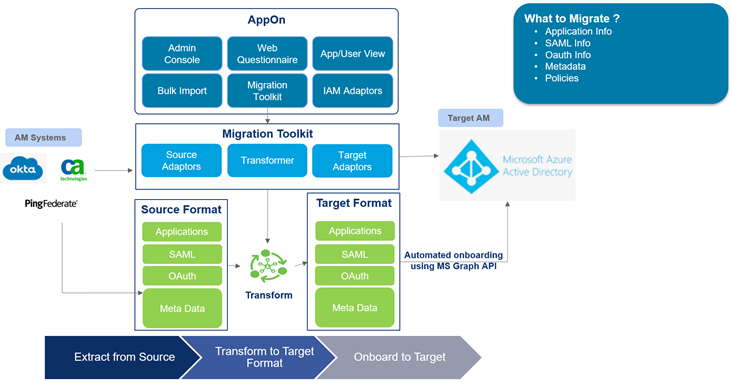
We make use of customer Okta instance APIs to pull information about the application into IMC, i.e., SAML and related metadata, any URLs, and policy information. As all that is pulled in, we transform it into a format which Microsoft Azure AD understands. Once it’s present in that format within IMC, we make use of the Microsoft Graph API to push that information into Azure AD.
Figure 1: IMC for Azure AD: Reference architecture
Once the application configuration is loaded into the IMC platform, migrating from one environment to another (Dev to QA, QA to Prod, etc.) requires just the click of a button. It begins with the discovery process in the Okta platform, followed by bringing the required configuration into IMC. The intuitive IMC interface helps users gather the applications’ onboarding details effortlessly via web-form questionnaires. Once the app configurations are onboarded, IMC automatically provisions the apps to Azure AD. Our IMC solution also integrates with IT service management (ITSM) tools like SNOW, helping to incorporate change-management processes for automated onboarding to Azure AD as well.

Figure 2: IMC accelerated process for SaaS app migration
Wipro’s IMC solution is a web-tiered architecture that can be quickly setup on customers’ on-premises or cloud infrastructure. And because IMC is not a multi-tenant solution, data residency and control remains completely within the customer’s hands. IMC provides a single pane of glass for monitoring IAM solutions across your enterprise—a single, holistic service-management platform which provides compliance visibility and includes accelerators and automation tool-kits.
IMC contains eight modules covering enterprise IAM:
- Data VX: Data validation and transformation
- AppOn: Application onboarding
- Unified dashboards: Singular view of IAM ecosystem
- Delivery toolkits: Industry best practices and tool kits
- IAM monitoring: Live monitoring via APIs and agents
- TestAX: Test automation and execution
- UAmatic: Unified access management
- Bot management: Bot execution monitoring
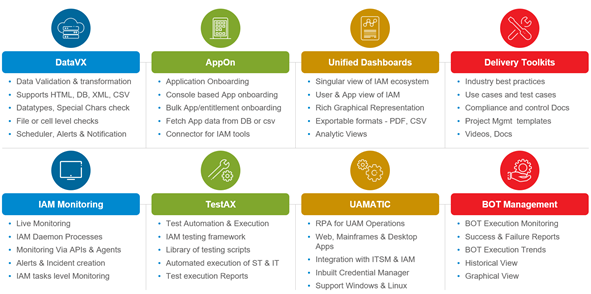
Figure 3: IMC modules
For questions like, how many orphan accounts do you have? Or how many concurrent logins are happening in your access-management system? Those are the types of things you can configure in the dashboard. For example, if you have 100 applications integrated to your Azure AD; validating those normally is going to be a huge manual effort. Instead, TestAX will run scripts for you at the click of a button—all the use cases can run in a series and provide you with a PDF report.
Results—fast, easy app migration
If a typical manual migration of 500 applications takes around 10 months, our IMC solution can reduce app migration efforts by 60 to 70 percent—dropping migration timelines from months to hours. Working closely with the Azure AD engineering team on the Microsoft Graph APIs and IMC integration, we’ve been able to automate the entire SSO app migration to deliver one-click onboarding from Okta to Azure AD, including:
- Live auto discovery of Okta apps
- No Okta or Azure AD admins required for SSO application onboarding activities
- Automatic transformation of Okta configuration into Azure AD
- One-click migration of configurations
- Automated ticketing with integrated ITSM
- Easily assign applications to users in Azure AD
- Provides Azure AD certificate
Teamwork brings IMC to market
We have a deep connection with the Microsoft Identity engineering team, and they’re really excited about our IMC solution because it’s the only tool of its kind that provides a seamless migration from Okta to Azure AD. We’ve presented IMC to multiple customers, and they’re excited too. This is the only tool that solves their specific pain points around application migration and IAM. Our team at Wipro believes that IMC has the potential for migrating thousands of applications, including deeper integrations with other ecosystems. The results have been so promising, we’re now building migration capabilities for more IAM solutions, such as Ping Identity and Oracle Access Management. We’re expecting IMC’s Okta-to-Azure AD migration feature to enter general availability in Q2, 2021
For additional information about Wipro and their IMC SaaS app-migration solution, please contact cybersecurity.services@wipro.com
Learn more about Microsoft identity:

by Contributed | May 14, 2021 | Technology
This article is contributed. See the original author and article here.
Blazor is here – and Chinese Developer Technologies MVP Guangpo Zhang is determined to make sure the technology reaches the heights that it deserves.
The free and open-source web framework that enables developers to create web apps using C# and HTML launched in 2018, with Guangpo inspired to support online learners with a resource created during the pandemic.
The result is Blazor.Zone, an educational hub that in one year has grown into China’s top Blazor destination with more than 100,000 monthly page views.
“Creating Blazer.Zone is a meaningful thing,” Guangpo says. “When I went to Beijing on a business trip, I was quarantined in a hotel for a month. I took advantage of this month to conceive and complete more than 40 Blazor components and create the open-source website.”
“Since Blazor technology was newly launched by Microsoft, the entire ecosystem was blank without any easily used UI component library. I wanted to contribute something for the .NET community, so I made this open-source UI component library.”
Blazor lets users build interactive web UIs using C# instead of JavaScript, with Blazor apps composed of reusable web UI components implemented using C#, HTML, and CSS. Both client and server code is written in C#, allowing users to share code and libraries.
In addition to the website, Guangpo is active in helping people learn the framework with Microsoft Docs. After one year of using and fine-tuning the content, Guangpo regards Docs as “a knowledge base camp”.
“We have witnessed the continued improvement and update of the [Docs] website … I always recommend this technology treasure to community members, no matter what level they are, as there are always learning paths and modules for them.”
Today, Blazer.Zone is both a place to develop projects with other coders and a platform to learn and communicate technology. Every Thursday, for example, Guangpo simultaneously updates his open-source projects and MS Learn and Docs content so that users will see the learning materials as they read the project update news.
Moreover, Guangpo also organizes several WeChat groups for Blazor developers and enables administrators to send out MS Learn materials in these groups. Members report that these learning materials are valuable, with screenshots of module completion and problems encountered shared in the WeChat learning group.
For more information on Guangpo’s story, check out his blog.

by Contributed | May 14, 2021 | Technology
This article is contributed. See the original author and article here.
Microsoft partners like Aviatrix Systems, Tartabit, and Zammo deliver transact-capable offers, which allow you to purchase directly from Azure Marketplace. Learn about these offers below:
|
Aviatrix Controller Meter License – PAYG: The Aviatrix cloud network platform delivers advanced networking, security, operational visibility, and control while maintaining the simplicity and automation of the cloud. Easily deploy a high-availability, multi-cloud network data plane with end-to-end encryption, multi-cloud security domains, and the operational data your enterprise IT teams need.
|
 |
Tartabit IoT Bridge: Tartabit IoT Bridge provides rapid integration between low-power wide area network (LPWAN) devices and the Microsoft Azure ecosystem. Designed for Azure IoT-centric solutions, Tartabit IoT Bridge features a low/no-code environment that enables fast deployment of production-grade IoT solutions without needing to host custom developed servers and self-managed infrastructure.
|
 |
Zammo AI SaaS: Zammo is a Microsoft Azure-based SaaS platform enabling organizations across all industries to extend their content to interactive voice response and telephone-based voice bots and chatbots across many popular channels. Create a branded multi-channel conversational AI presence to quickly provide the public, consumers, and employees with current, accurate information.
|
|

by Contributed | May 14, 2021 | Technology
This article is contributed. See the original author and article here.
Azure Percept is a platform of hardware and services that simplifies use of Azure AI technologies on the edge. The development kit comes with an intelligent camera, Azure Percept Vision, and it can also be extended with Azure Percept Audio, a linear microphone array. Azure Percept works out of the box with Azure services such as Cognitive Services, Machine Learning, Live Video Analytics, and others to deliver vision and audio insights in real time. Scenarios like object detection, spatial analytics, anomaly detection, keyword spotting, and others can easily be solved with use of pre-built Azure AI models for edge.
I build “Perceptmobile”, an Azure Percept-powered obstacle avoidance LEGO Boost car, as a weekend project and in this post I will walk you through all steps how it was built.
In the standard LEGO Boost package you can find instructions on how to build 4 different models and one of them is M.T.R. 4 model, which I modified a bit to fit the needs of this project. Model was used as a base on top of which I placed Azure Percept with Azure Percept Vision camera. LEGO Boost package also comes with 3 cones that I took pictures of and trained the Custom Vision model. Custom vision models can easily be deployed to the Azure Percept via Azure Percept Studio, and you can easily test it with camera stream.
With NodeJS I made a small backend that is based on quickstart “Send telemetry from a device to an IoT hub and read it with a back-end application” and with use of Express I served results on the localhost. For the frontend application I used “Lego Boost Browser Application” which is a great React application for controlling LEGO Boost from the browser via Web Bluetooth API. With it you can easily connect to your LEGO Boost, and the application gives you a nice interface where you are not only able to control motors and other sensors, but you are also able to write different commands and programming logic.
In following video you can see full walkthrough how to build this project:
Quickstart: Send telemetry from a device to an IoT hub and read it with a back-end application (Node.js) can be found here.
Azure CLI commands used:
az iot hub show --query properties.eventHubEndpoints.events.endpoint --name {YourIoTHubName}

az iot hub show --query properties.eventHubEndpoints.events.path --name {YourIoTHubName}

az iot hub policy show --name service --query primaryKey --hub-name {YourIoTHubName}
Pictures used for model training and relevant code is available in GitHub repository.


Recent Comments